
A 2.5GbE dock can give your laptop a faster wired connection while bringing displays, storage, and peripherals onto one cable. The right choice depends on more than its Ethernet port: host compatibility, monitor support, charging, and USB bandwidth all matter.
These nine options range from pocket-size hubs to full Thunderbolt desktop docks. Here’s how to narrow them down without paying for ports your setup cannot use.
Best 9 USB C Docks with 2 5gbe Ethernet Picks for 2026
Dell Workspace Pick
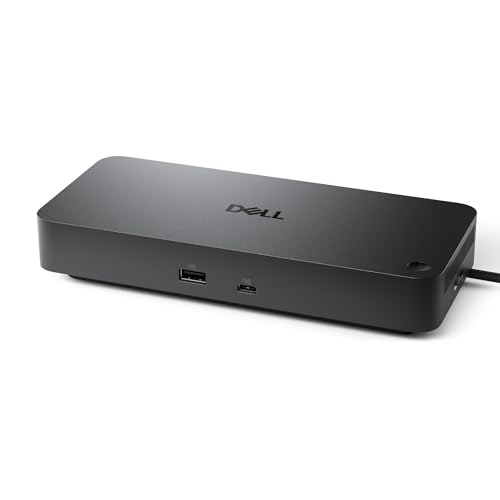
- 2.5GbE and six USB 3.2 Gen 2 ports
- Up to four WQHD displays
- Up to 100W charging for Dell systems
Best For: Dell multi-monitor workstations
High-Power Thunderbolt Pick
StarTech Thunderbolt 5 USB4 Dock

- 2.5GbE with SD 4.0 and microSD 4.0
- Up to 140W laptop charging
- Multi-display support varies by host
Best For: High-power Thunderbolt or USB4 workstations
Compact Hub Pick

- 2.5GbE and three 10Gbps USB data ports
- Up to 4K/120Hz HDMI with compatible host
- Up to 85W pass-through laptop charging
Best For: Compact single-display laptop setups
Best for IT Rollouts

- Driverless on Windows and ChromeOS
- Dual 4K 120Hz HDMI output
- 2.5GbE with PXE Boot and Wake-on-LAN
Best For: Managed Windows and ChromeOS desks
Best for Port Variety
UGREEN 13-in-1 Thunderbolt 4 Dock

- 13 ports, including 2.5GbE and card readers
- Dual 4K 60Hz on supported hosts
- Up to 90W laptop charging
Best For: Multi-peripheral Windows or compatible Mac desks
Best for Travel

- Compact 3.7-ounce aluminum hub
- 2.5GbE and HDMI 2.1
- Up to 85W power delivery
Best For: Portable single-display setups
Best Full-Size Dock
CalDigit TS4 Thunderbolt 4 Dock

- 18 ports for a desktop setup
- 2.5GbE and up to 98W charging
- Display support varies by host
Best For: Thunderbolt workstations needing extensive connectivity
Most Ports for Mac Workflows
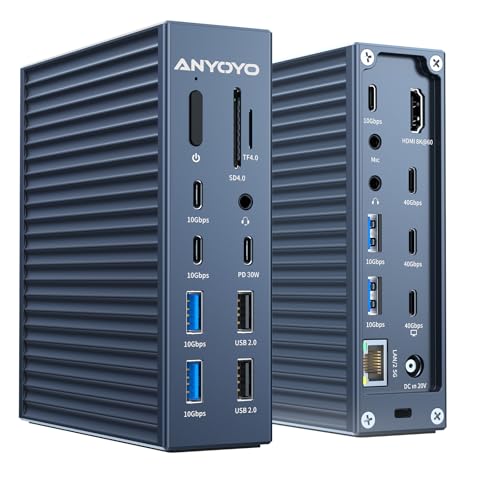
- 21-port desktop layout
- 2.5GbE and up to 90W charging
- Single 8K or dual 4K display support
Best For: Mac-oriented desks with many USB-C peripherals
Best Portable Hub
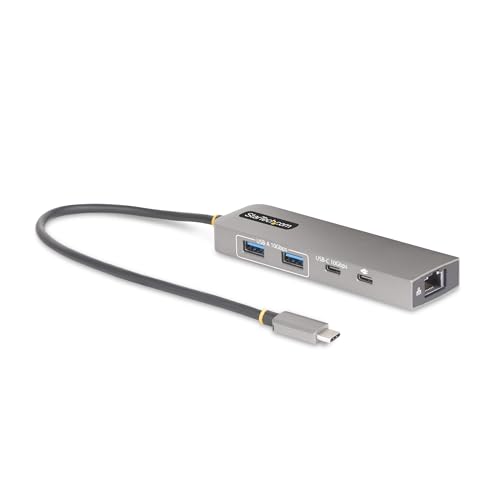
- 2.5GbE plus three 10Gb/s USB ports
- Up to 85W laptop charging
- No listed video outputs
Best For: Portable wired networking and basic USB expansion
Dell Workspace Pick – Dell Pro Dock WD25
Among USB-C docks with 2.5GbE Ethernet, the Dell Pro Dock WD25 is a practical choice for a Dell-centered desk that needs multiple displays, wired networking, and laptop charging through one connection.
Best For: Dell laptop users building a multi-monitor office workstation.
Pros:
- Supports up to four WQHD displays through its available video connections.
- Offers six USB 3.2 Gen 2 ports and a 2.5GbE RJ45 port.
- Provides up to 100W charging for Dell systems and 96W for other devices.
Cons:
- Charging capacity varies between Dell and non-Dell devices.
- Check your laptop’s display capabilities before planning a four-screen setup.
The WD25 stands out for its port selection and Dell-oriented management features, including pass-through MAC and PXE boot. Its reversible cable routing also helps with desk placement.
High-Power Thunderbolt Pick – StarTech Thunderbolt 5 USB4 Dock
For shoppers comparing USB-C docks with 2.5GbE Ethernet, this StarTech Thunderbolt 5 dock pairs faster wired networking with ambitious display support and enough power delivery for demanding laptops.
Best For: Thunderbolt 5 or USB4 laptop users who need high-resolution monitors, strong charging, and card readers.
Pros:
- Provides a 2.5GbE connection plus SD 4.0 and microSD 4.0 slots.
- Delivers up to 140W laptop charging and includes a 30W USB-C charging port.
- Supports multiple high-resolution displays, with configurations varying by Mac or Windows host.
Cons:
- Display counts and refresh rates depend on the connected computer.
- Its Thunderbolt 5 capabilities are most relevant to compatible hosts.
This is the feature-rich option when charging capacity, displays, and removable-media access matter alongside Ethernet. Confirm your computer’s supported display configuration before choosing a monitor setup.
Compact Hub Pick – WAVLINK 6-in-1 USB-C Hub
If you want a compact alternative to larger USB-C docks with 2.5GbE Ethernet, this WAVLINK hub combines a 2.5Gbps RJ45 port, three 10Gbps USB data ports, and HDMI in a six-in-one design.
Best For: Laptop users who need one external display and faster wired networking in a compact hub.
Pros:
- Includes 2.5GbE, two 10Gbps USB-A ports, and one 10Gbps USB-C data port.
- HDMI supports up to 4K at 120Hz with a compatible DP 1.4 and DSC 1.2 host.
- Accepts up to 100W USB-C PD input and supplies up to 85W pass-through charging.
Cons:
- Charger and charging cable are not included.
- The USB-C data port does not output video.
- Full Ethernet speed requires compatible networking equipment and host connectivity.
Choose this hub when its single HDMI output and smaller port selection cover your needs. Check host video support and power compatibility if 4K/120Hz and pass-through charging are priorities.
Best for IT Rollouts – StarTech Driverless USB4 Dock
For teams shopping for usb c docks with 2 5gbe ethernet, this StarTech USB4 dock pairs a 2.5GbE connection with driverless operation on Windows and ChromeOS. Its two HDMI outputs support dual 4K at 120Hz or a single 8K at 60Hz with a compatible host.
Best For: Windows and ChromeOS workspaces that need fast wired networking, high-refresh dual displays, and straightforward deployment.
Pros:
- Plug-and-play setup requires no drivers on Windows or ChromeOS.
- Supports dual 4K 120Hz or single 8K 60Hz output.
- Includes 2.5GbE, PXE Boot, and Wake-on-LAN for managed environments.
Cons:
- Not compatible with macOS.
- Surface and VESA mounting accessories are sold separately.
Choose this dock when deployment simplicity and display performance matter more than Mac compatibility. Check that your laptop has the required USB4 or Thunderbolt 4 connection for the stated display modes.
Best for Port Variety – UGREEN 13-in-1 Thunderbolt 4 Dock
Among usb c docks with 2 5gbe ethernet, the UGREEN 13-in-1 is a desk-focused option for connecting storage, peripherals, and displays through a Thunderbolt 4 setup. Alongside its 2.5GbE port, it provides Thunderbolt 4, DisplayPort, USB, audio, and SD/TF connections.
Best For: Windows or compatible Mac users who want a powered, multiport workstation dock with wired networking.
Pros:
- Thirteen-port selection includes 2.5GbE and SD/TF card readers.
- Supports dual 4K 60Hz displays on Windows and select Macs.
- Included 180W adapter enables up to 90W laptop charging.
Cons:
- Base M1/M2/M3 Macs and full-function USB-C hosts are limited to one display.
- HDMI monitors connected through DisplayPort require an active DP-to-HDMI adapter or cable.
- The dock must be connected to its power adapter to function.
This is a strong fit if port selection is the priority, but confirm your laptop’s display support before planning a dual-monitor layout. The DisplayPort adapter requirement is worth factoring in if your monitors only accept HDMI.
Best for Travel – SABRENT USB4 Travel Hub
If your search for usb c docks with 2 5gbe ethernet is really about taking fast wired networking on the road, the SABRENT USB4 Travel Hub keeps the essentials compact. It combines 2.5GbE, HDMI 2.1, USB data ports, and power-delivery input in an aluminum hub with an integrated USB-C cable.
Best For: Travelers who need a portable single-display hub with 2.5GbE and USB-C charging passthrough.
Pros:
- Compact 3.7-ounce aluminum design with an integrated cable.
- HDMI supports up to 4K 144Hz or 8K 60Hz with DSC.
- Includes two USB-C data ports, one USB-A data port, and up to 85W power delivery.
Cons:
- Provides one HDMI display output rather than a dual-monitor setup.
- Its smaller port selection may not replace a full-size desktop dock.
Pick this hub for a lighter bag and a fast Ethernet connection away from your desk. If you need several displays or a larger assortment of desktop ports, a full-size dock is the more suitable choice.
Best Full-Size Dock – CalDigit TS4 Thunderbolt 4 Dock
For shoppers comparing USB-C docks with 2.5GbE Ethernet, the CalDigit TS4 offers a full desktop setup: 18 ports, a 2.5GbE connection, and up to 98W laptop charging through one cable.
Best For: Thunderbolt laptop users who need extensive desktop connectivity, fast wired networking, and multiple display options.
Pros:
- 18 ports include three Thunderbolt 4 ports, eight 10Gb/s USB ports, and SD and microSD UHS-II readers.
- Supports up to 98W host charging and includes a certified 0.8m cable.
- 2.5GbE is backward-compatible with 1GbE networks.
Cons:
- Full 2.5GbE performance requires a Thunderbolt host and compatible network equipment.
- Display support depends on the host; non-Pro M1–M3 Macs are limited to one external display.
The TS4 is the most expansive option here, but check your laptop’s port and display capabilities before buying it for a multi-monitor workstation.
Most Ports for Mac Workflows – ANYOYO 21-in-1 Dock
Among USB-C docks with 2.5GbE Ethernet, the ANYOYO 21-in-1 dock stands out for its broad port selection, including 40Gb/s connections, HDMI, multiple 10Gb/s USB-C ports, and SD/TF card slots.
Best For: Users who want a Mac-oriented desk dock with plenty of USB-C connections, card readers, and wired networking.
Pros:
- 21-port layout includes a 2.5GbE jack and seven listed 10Gb/s USB-C ports.
- Advertises up to 90W laptop charging over the host connection.
- Supports a single 8K display or dual 4K displays, subject to host capability.
Cons:
- Its many port types warrant checking that the layout matches your peripherals.
- 2.5GbE speeds require compatible networking equipment.
This is a connectivity-heavy alternative for a fixed desk; confirm your computer’s display-output support before planning a dual-monitor setup.
Best Portable Hub – StarTech 3-Port USB-C Hub
If you are looking at USB-C docks with 2.5GbE Ethernet but only need a few extra ports, this compact StarTech hub provides a simpler option: three 10Gb/s USB ports, wired networking, and USB-C power pass-through.
Best For: Laptop users who need portable 2.5GbE networking and a small number of fast USB ports rather than a full desktop dock.
Pros:
- Adds two 10Gb/s USB-A ports, one 10Gb/s USB-C port, and a 2.5GbE RJ45 jack.
- Accepts up to 100W USB-C power input, reserving 15W for the hub and delivering up to 85W to the laptop.
- Attached 30cm cable offers extra reach and helps reduce strain on the host port.
Cons:
- No video outputs or card readers are listed.
- Full 100W pass-through is not available to the laptop because the hub reserves 15W.
Choose this over a larger dock when Ethernet and USB expansion matter more than monitor connections or an extensive port selection.
How We Picked the Best USB C Docks with 2 5gbe Ethernet
We focused on USB-C, USB4, and Thunderbolt docks or hubs that list a 2.5GbE Ethernet port, then compared their stated host connection, display outputs, charging, and peripheral ports. The nine selections cover both compact adapters and desk-focused docks. Listed capabilities are not a guarantee that every laptop can use every feature at once; check the manufacturer’s compatibility details for your exact computer.
Quick Comparison: Which Type Fits?
For a permanent workstation, the Dell Pro Dock WD25, CalDigit TS4, UGREEN Thunderbolt 4 dock, and StarTech Thunderbolt 5 dock offer broader connectivity. The StarTech driverless USB4 dock is worth considering if high-refresh external displays are a priority. For a bag-friendly setup, look at the SABRENT USB4 Travel Hub, WAVLINK USB-C hub, or StarTech 3-port USB-C hub. The 40Gbps MacBook docking station is aimed at MacBook users, but confirm its display support against your specific model before buying.
Key Buying Factors for USB-C Docks with 2.5GbE Ethernet
Check the Host Port First
A USB-C connector does not automatically provide Thunderbolt or USB4 speeds. Match the dock’s requirements to your laptop’s port specifications, especially if you want multiple high-resolution monitors, fast storage, and Ethernet running together. A Thunderbolt 5 dock may connect to an older host, but it cannot create bandwidth the host lacks.
Verify Display Support on Your Laptop
Monitor claims depend on the host, operating system, cable, resolution, and refresh rate. Check whether the dock offers the video connectors you need and whether your laptop supports the stated number of external displays. This is particularly important for MacBooks, whose external-display limits vary by chip and model.
Size Up Power, Ethernet, and Ports
Compare the dock’s stated charging output with your laptop’s power needs; a compact hub with power pass-through may still require you to supply a separate USB-C charger. For 2.5GbE speeds, the dock also needs a compatible switch or router port, suitable cabling, and a network that can exceed 1Gbps. Finally, count the USB, card-reader, and audio connections you will actually use rather than choosing by total port count alone.
Who Should Buy Which USB C Docks with 2 5gbe Ethernet?
Choose a full-size desktop dock if you regularly connect monitors and several peripherals and want a single-cable desk setup. Choose a USB4 or Thunderbolt model when your compatible laptop and displays can benefit from its higher-bandwidth connection. Choose a compact 2.5GbE hub if wired networking and a few essential ports matter more than maximum expansion. If you mainly need Ethernet, avoid paying extra for ambitious display specifications you will not use.
