
If you own a Mac Mini, you know how essential it is to maximize its potential with the right accessories. A USB-C dock can greatly expand your connectivity options, allowing you to connect multiple devices seamlessly. With so many choices available, finding the best dock can feel overwhelming. Let’s explore the top picks that can elevate your setup and enhance your Mac Mini experience. You might be surprised by what you find.
StarTech.com USB C Dock – Triple 4K Monitor Docking Station

If you’re looking to elevate your Mac Mini setup with the ability to connect multiple high-resolution displays, the StarTech.com USB C Dock – Triple 4K Monitor Docking Station is an excellent choice. This docking station supports dual 4K at 60Hz or triple 4K at 30Hz, giving you flexibility in your display options. With six USB ports and a Gigabit Ethernet connection, you can connect various devices seamlessly. It even offers 100W power delivery, ensuring your laptop stays charged. Weighing just 10.6 ounces, it’s portable and easy to set up, making it perfect for both home and office use.
Best For: Professionals and creatives who require multiple high-resolution displays for enhanced productivity and seamless connectivity.
Pros:
- Supports dual 4K at 60Hz or triple 4K at 30Hz, providing flexibility for multi-monitor setups.
- 100W power delivery ensures devices stay charged, eliminating the need for separate chargers.
- Portable design at just 10.6 ounces makes it easy to set up and move between home and office.
Cons:
- Some users reported compatibility issues with specific devices, such as Framework laptops and Asus Rog Ally.
- Price point may be higher compared to simpler docking solutions.
- Limited support for older operating systems, as it’s primarily designed for Windows and Chrome OS.
Lention USB C Hub with 100W Charging and 4K HDMI
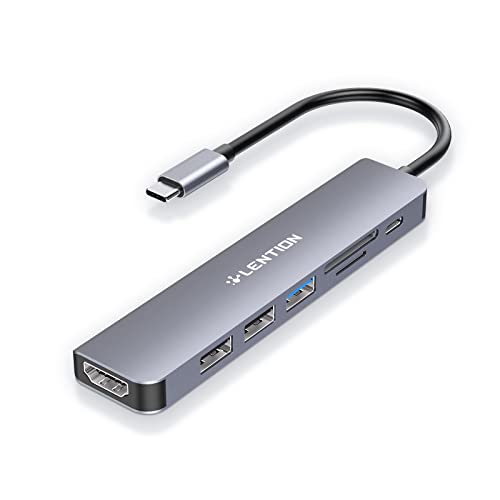
The Lention USB C Hub is an excellent choice for Mac Mini users seeking versatility and power. This 7-in-1 hub features a 100W Type C charging port, 4K HDMI output, USB 3.0, dual USB 2.0 ports, and SD/Micro SD card readers. With dimensions of 9.92 x 1.57 x 0.47 inches and weighing just 1.44 ounces, it’s highly portable. The hub supports up to 3840×2160 resolution at 30Hz, ensuring stunning visuals. Users appreciate its reliability and multiple connection options, though some HDMI issues have been noted. Overall, this hub enhances your Mac Mini experience, making it a top contender.
Best For: Mac Mini users looking for a versatile, high-performance USB-C hub with multiple connectivity options.
Pros:
- 7-in-1 Expansion: Offers a variety of ports including USB 3.0, dual USB 2.0, and card readers for enhanced functionality.
- High Power Delivery: Supports up to 100W pass-through charging, ensuring your devices stay powered while connected.
- Compact and Portable: Lightweight design and small dimensions make it easy to carry and use on the go.
Cons:
- HDMI Reliability Issues: Some users have reported problems with HDMI connections after extended use.
- Limited Compatibility with Superdrive: The hub does not support Apple’s Superdrive for external DVD usage.
- Potential Overheating: Although it has a stable driver certification, some users may still experience heating issues during heavy use.
UGREEN Mac mini M4 Dock & Stand with NVMe SSD Enclosure
Designed specifically for Mac mini M4 and M4 Pro users, the UGREEN Mac mini M4 Dock & Stand with NVMe SSD Enclosure greatly enhances connectivity and storage capabilities. This 11-in-1 hub offers multiple USB-A and USB-C ports, ensuring you can connect all your devices effortlessly. You can support up to 8TB of NVMe SSDs for fast 10Gbps transfer speeds, perfect for large files and 4K editing. Its sleek design matches your Mac mini, minimizing desk clutter. With strong user ratings, this dock is a cost-effective solution for boosting your Mac mini’s functionality and storage potential.
Best For: The UGREEN Mac mini M4 Dock & Stand is best for Mac mini M4 and M4 Pro users seeking enhanced connectivity and storage solutions.
Pros:
- 11-in-1 hub providing multiple connectivity options with high-speed transfer rates.
- Compact and sleek design that complements the Mac mini aesthetics while minimizing desk space.
- Supports up to 8TB NVMe SSDs, offering significant storage expansion potential at a lower cost than Apple upgrades.
Cons:
- SSD not included, requiring additional purchase for full functionality.
- External power adapter recommended for multiple device setups, which may add to clutter.
- Limited user feedback on long-term durability and performance over extended usage periods.
Mac mini M4 Dock with HDMI Hub and SSD Enclosure

Looking to expand your Mac mini M4’s capabilities? The Mac mini M4 Dock with HDMI Hub and SSD Enclosure is your answer. This elegant 10-in-1 hub not only supports 4K@60Hz HDMI but also features an M.2 NVMe/SATA SSD enclosure, accommodating up to 8TB. With lightning-fast 10Gbps USB-A and USB-C ports, plus two additional 5G USB A ports, you’ll enjoy seamless data transfer. The brushed aluminum design complements your Mac mini, while the plug-and-play setup enhances airflow. Just remember to connect the USB-C charging port for ideal power when using hard drives. It’s a perfect addition to your workspace!
Best For: Users looking to enhance their Mac mini M4 capabilities with additional connectivity options and storage solutions.
Pros:
- 10-in-1 functionality includes HDMI, USB ports, and SSD enclosure for comprehensive connectivity.
- Elegant design in brushed aluminum matches the aesthetic of Mac mini devices while improving airflow.
- Fast data transfer speeds with 10Gbps USB ports ensure efficient performance for peripherals.
Cons:
- Some users report issues with SSD ejection when multiple devices are connected.
- Power requirement for USB-C charging may be inconvenient for those using hard drives.
- Occasional speed limitations when multiple devices are in use, affecting overall performance.
Satechi USB C Hub – Type-C Aluminum Stand & Hub
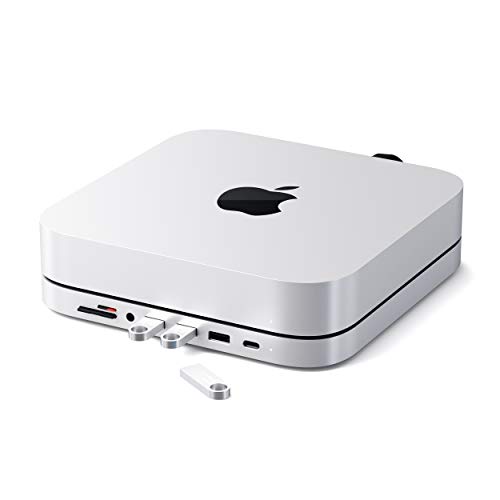
For Mac Mini users seeking an elegant solution to expand their connectivity, the Satechi USB C Hub – Type-C Aluminum Stand & Hub stands out as an exceptional choice. This sleek hub features a refined brushed finish in space grey aluminum, perfectly matching your Mac Mini. With a 6-in-1 configuration, you’ll enjoy a USB C data port, three USB 3.0 ports, and Micro/SD card readers, all while benefiting from its built-in cooling system. Easy installation is supported with a user manual, and it comes with a 2-year limited warranty. Elevate your workspace with this stylish and functional accessory.
Best For: Users of Mac Studio and Mac mini M2/M1 looking for a stylish and efficient way to expand connectivity options.
Pros:
- Elegant design that complements the Mac Mini aesthetics with a refined brushed finish.
- Versatile connectivity with 6-in-1 configuration, including USB C, USB 3.0 ports, and card readers.
- Built-in cooling system ensures optimal temperature regulation during operation.
Cons:
- Not compatible with Mac mini M4 or 2024 models, limiting its usability for newer devices.
- Aluminum material may be prone to scratches and fingerprints over time.
- Limited warranty of 2 years may not be sufficient for some users seeking longer protection.
RayCue MiniPack Expansion Dock for Mac mini M4

The RayCue MiniPack Expansion Dock for Mac mini M4 stands out with its dual 10Gbps USB-C ports, making it the perfect choice for creators and professionals who demand high-speed data transfer. This 6-port hub features two USB-C and two USB-A ports, along with an SD/microSD card reader. You’ll enjoy ultra-fast data transfer, enabling large files to move in seconds. Its compact design guarantees it won’t block adjacent ports, while the plug-and-play functionality makes setup a breeze. Users appreciate the front-facing ports for easy access, although some have noted potential WiFi speed dips when connected. Overall, it’s a solid addition to your setup.
Best For: Creators, gamers, and professionals seeking high-speed data transfer and multi-device connectivity.
Pros:
- Ultra-fast 10Gbps data transfer enables quick handling of large files.
- Compact design prevents blockage of adjacent ports for seamless integration.
- Plug-and-play functionality ensures easy setup without the need for drivers.
Cons:
- Some users reported WiFi speed decreases when the dock is connected.
- There are potential concerns about connection stability for certain units.
- A few users may find the limited number of ports insufficient for extensive setups.
Kensington SD4760P 11-in-1 USB-C Docking Station

If you’re searching for a versatile docking solution for your Mac Mini, the Kensington SD4760P 11-in-1 USB-C Docking Station stands out with its impressive triple monitor support. You can connect one 4K display at 30Hz and two 1080p displays at 60Hz, thanks to DisplayLink technology. This dock offers universal compatibility with various laptops and provides up to 100W power delivery for charging. With three HDMI ports, six USB-A 3.2 Gen1 ports, and a Gigabit Ethernet port, it enhances your connectivity. Plus, the DockWorks software optimizes your experience, making it a solid choice for your setup.
Best For: The Kensington SD4760P 11-in-1 USB-C Docking Station is best for users seeking a powerful and flexible docking solution to enhance their multitasking capabilities with multiple displays.
Pros:
- Supports triple monitor setup, including one 4K display and two 1080p displays.
- Offers up to 100W power delivery for laptop charging and powering connected accessories.
- Universal compatibility with a wide range of laptops, including MacBook M1, M2, M3, and M4.
Cons:
- DisplayLink technology may require additional software installation and updates.
- Limited to Windows for the DockWorks software, which may not benefit macOS or Chrome OS users.
- The zero-footprint mounting option requires a separate bracket purchase for installation.
Minisopuru iExpandMate MINI218B MAX Dock & Stand for Mac mini M4

Designed specifically for Mac mini M4 and M4 Pro users, the Minisopuru iExpandMate MINI218B MAX Dock & Stand stands out with its innovative vertical design that not only saves desktop space but also enhances accessibility. It supports up to 4TB capacity with M.2 PCIe NVMe SSDs and features an HDMI port that outputs up to 4K@60Hz, perfect for extending displays. With a built-in SD/TF card slot offering quick data access and efficient file transfers, it meets your connectivity needs. Plus, its non-slip, scratch-resistant pad guarantees stability while maintaining the sleek aesthetics of your Mac mini.
Best For: Mac mini M4 and M4 Pro users looking for a space-saving, efficient docking solution with enhanced functionality.
Pros:
- Supports high-capacity storage of up to 4TB with M.2 PCIe NVMe SSDs for extensive data management.
- Outputs 4K@60Hz via HDMI, ideal for high-quality visual experiences on external displays.
- Built-in SD/TF card slot facilitates quick data transfers, enhancing productivity and convenience.
Cons:
- Only one HDMI port available, limiting the connection to a single external monitor.
- SSD card not included, requiring an additional purchase for full functionality.
- Vertical design may not suit all users who prefer a traditional horizontal dock setup.
Satechi Mac mini Hub & Stand with SSD Enclosure

For those looking to expand their Mac mini or Mac Studio’s capabilities, the Satechi Mac mini Hub & Stand with SSD Enclosure stands out as an excellent choice. This 7-in-1 docking station supports M.2 SSDs, delivering speeds up to 10Gbps for rapid data access. You’ll appreciate the variety of ports, including USB-C, USB-A, and Micro/SD card readers. Designed for ideal cooling, its sleek aluminum finish not only looks great but also keeps your device organized. Plus, with included accessories and a 2-year warranty, you can feel confident in your purchase. Just remember, it’s not compatible with the 2024 Mac Mini M4.
Best For: Users seeking to enhance their Mac mini or Mac Studio with expanded storage and connectivity options.
Pros:
- Supports M.2 SSDs with speeds up to 10Gbps for fast data access.
- Offers a variety of ports including USB-C, USB-A, and Micro/SD card readers for versatile connectivity.
- Sleek aluminum design with built-in cooling features helps maintain an organized workspace.
Cons:
- Not compatible with the 2024 Mac Mini M4.
- SSD is not included, requiring an additional purchase for full functionality.
- Limited to specific SSD sizes (2242, 2260, 2280), which may restrict options for some users.
Satechi Mac mini M4 Hub & Stand with NVMe SSD Enclosure

The Satechi Mac mini M4 Hub & Stand with NVMe SSD Enclosure is a game-changer for Mac mini users seeking enhanced connectivity and storage solutions. Designed specifically for the Mac mini M4 and M4 Pro, this sleek aluminum hub offers two USB A 3.2 ports and an SD card reader, while supporting M.2 NVMe SSDs for up to 4TB of storage. Its ergonomic design elevates your setup, ensuring your Mac mini stays cool with integrated vents. Users appreciate its easy installation and stylish look, making it a must-have for anyone needing extra ports and efficient performance.
Best For: Users of the Mac mini M4 and M4 Pro looking for enhanced connectivity and storage options.
Pros:
- Sleek design: Matches the Mac mini aesthetic and saves space with a compact build.
- Easy installation: Comes with all necessary tools and user support for hassle-free setup.
- Enhanced storage: Supports M.2 NVMe SSDs up to 4TB, providing fast and ample storage.
Cons:
- Limited USB ports: Some users desire additional USB ports for more connectivity options.
- Snug fitment: The hub may fit tightly with the Mac mini, which could be an issue for some users.
- No support for CD readers: USB-A ports do not support CD readers or Apple SuperDrive, limiting certain functionalities.
Factors to Consider When Choosing USB C Docks for Mac Mini
When you’re choosing a USB-C dock for your Mac Mini, you’ll want to take into account several key factors. Think about the variety and availability of ports, power delivery capabilities, and the video output resolution that meets your needs. Also, don’t overlook the design and aesthetics, as well as compatibility with your other devices.
Port Variety and Availability
Choosing the right USB-C dock for your Mac Mini hinges on port variety and availability. You’ll want to take into account the number of ports and types, like USB-A, USB-C, HDMI, and card readers, to match your connectivity needs. High data transfer rates are essential, so look for docks with USB-C ports offering speeds up to 10Gbps for quick file transfers. Video output availability is another key factor; docks supporting multiple 4K displays can greatly boost your productivity with expansive multi-monitor setups. Additionally, specialized ports such as SD and microSD card readers make it easier to transfer files directly from cameras and other devices without needing extra adapters. Choose wisely to enhance your workflow!
Power Delivery Capabilities
Understanding power delivery capabilities is vital for maximizing the performance of your USB-C dock with a Mac Mini. The power delivery can vary considerably, with some docks supporting up to 100W, which is essential for efficiently charging your laptop and peripherals. Make sure the dock’s power delivery meets or exceeds the power requirements of your devices to avoid slow charging or disconnections. Look for docks with “always-on” ports that allow charging even when your Mac Mini is disconnected, enhancing versatility. A higher power delivery rating enables faster charging speeds, especially beneficial if you rely on your laptop for intensive tasks. Some docks also incorporate BC 1.2 fast charge specifications for quicker power replenishment of compatible devices.
Video Output Resolution
To maximize your experience with a Mac Mini, it’s crucial to evaluate the video output resolution of any USB-C dock you’re eyeing. Look for docks that support dual 4K at 60Hz or triple 4K at 30Hz, especially if you’re using high-resolution displays. The type of video output—like HDMI or DisplayPort—can greatly affect compatibility and achievable resolutions. For smoother visuals, prioritize docks that offer 4K at 60Hz, ideal for tasks like video editing or gaming. Be aware that some docks might allow one 4K display at 30Hz alongside two lower resolution monitors. Always confirm the dock’s specifications match your monitor’s capabilities to avoid performance issues and fully leverage your setup’s potential.
Design and Aesthetics
When setting up your Mac Mini, the design and aesthetics of a USB-C dock can greatly enhance your workspace. Look for docks featuring a sleek, brushed aluminum finish that matches your Mac Mini, promoting a cohesive look. Compact designs are ideal since they minimize desk space and keep your area clutter-free. Docks with built-in cooling systems and non-slip pads not only enhance functionality but also maintain a visually appealing profile. Some models are shaped to elevate the Mac Mini, improving airflow while creating a more ergonomic setup. Color matching to your Mac Mini’s original finish can make the dock feel like an integral part of your system, seamlessly blending into your workspace.
Compatibility With Devices
Choosing the right USB-C dock for your Mac Mini means ensuring compatibility with your specific model and needs. Make sure the dock is designed for your Mac Mini version, especially if you have the latest M4 or M4 Pro models. It’s essential to verify that the dock provides adequate power delivery to charge your Mac Mini while supporting any connected peripherals. Check the number and types of ports available, like HDMI or DisplayPort outputs, to connect multiple monitors. If you plan to expand storage, look for docks compatible with various M.2 NVMe SSD sizes, as not all docks support the same dimensions. By considering these factors, you’ll enhance your Mac Mini setup effectively.
Data Transfer Speeds
Data transfer speeds are an essential factor to take into account for your USB-C dock, especially if you’re working with large files. Depending on the dock’s specifications, you can typically expect speeds ranging from 5Gbps to 10Gbps. If you’re a video editor or graphic designer, high-speed capabilities can greatly reduce your transfer times. Consider docks featuring USB 3.2 or Thunderbolt 3/4 technology, which can achieve speeds up to 40Gbps under ideal conditions. Additionally, if you frequently use memory cards, look for devices with UHS-II SD/TF card readers that offer access speeds up to 312MB/s. Just remember to check compatibility with various USB standards, as multiple devices may limit the highest transfer rates.
Cooling and Heat Management
Effective cooling and heat management play a crucial role in the performance of USB-C docks for your Mac Mini, especially during intense tasks. When you connect multiple devices, overheating can lead to performance degradation or disconnections. Many docks feature built-in air vents or cooling systems that enhance airflow, keeping temperatures ideal during heavy usage. Some designs even elevate your Mac Mini, allowing better airflow around the device and reducing the risk of thermal throttling. Look for docks made from materials like aluminum, which effectively dissipate heat. Additionally, confirm the dock has adequate power supply capabilities; insufficient power can cause overheating when multiple power-hungry devices are connected simultaneously, negatively impacting your overall setup.
Warranty and Support Options
When evaluating USB-C docks for your Mac Mini, it’s essential to take into account the warranty and support options offered by manufacturers. Typically, warranty options range from one to three years, giving you peace of mind regarding defects and performance issues. Look for products with notable customer support channels, including phone, email, and live chat, ensuring help is readily available when you need it. Reviews often emphasize the value of extended warranty coverage, as higher-rated docks usually provide better support. Some docks also include user manuals and installation guides, enhancing your setup experience. Be sure to check the specific warranty terms and claim procedures, as these can vary considerably between brands and models.
