
In today’s fast-paced work environment, maximizing productivity is essential, and the right USB-C docking station can make all the difference. With dual display capabilities, these devices offer seamless multitasking and connectivity. You’ll find options that support 4K resolution, ample USB ports, and robust power delivery. Curious about which models stand out in 2025? Let’s explore the top contenders that can transform your workspace.
Selore USB C Docking Station Dual Monitor (14 in 1)

If you’re looking to enhance your productivity with a versatile docking solution, the Selore USB C Docking Station Dual Monitor (14 in 1) is an excellent choice for professionals who need multiple display options. With dual HDMI and VGA outputs, you can easily connect three displays, maximizing your workspace. This docking station supports various devices, including Windows laptops and MacBooks with M1/M2 chips. Plus, its array of ports—two 4K HDMI, USB A/C, and SD card readers—ensures you’ve got all the connectivity you need. Enjoy high-speed data transfer and fast charging, making it an essential tool for your tech setup.
Best For: Professionals and tech enthusiasts who need a versatile docking solution for multiple displays and high-speed connectivity.
Pros:
- Dual HDMI and VGA outputs allow for triple display functionality, enhancing productivity and workspace organization.
- High-speed data transfer capabilities with USB A/C ports up to 10Gbps, ensuring efficient data management.
- Universal compatibility with a wide range of devices, including Windows laptops and MacBooks with M1/M2 chips.
Cons:
- May require confirmation that devices support Thunderbolt or DisplayPort Alternate Mode for video output functionality.
- Limited to certain compatibility based on DP1.4 laptops and monitors, which may restrict use with older devices.
- Power delivery output is capped at 87W, which might not be sufficient for all power-hungry devices.
StarTech.com Dual-Monitor USB-C Docking Station

The StarTech.com Dual-Monitor USB-C Docking Station is an ideal choice for professionals who need to enhance their productivity with multiple displays. It supports DisplayPort, HDMI, and VGA, enabling dual-monitor setups up to 4K at 60Hz. With a 7-port USB hub, you’ll have ample connectivity options, including front-facing USB 3.2 ports for quick access. Its driverless installation makes setup a breeze. Plus, with 85W Power Delivery, it powers your laptop and peripherals effortlessly. Security features like a locking USB-C host cable and mounting options provide peace of mind. Overall, it’s a powerful tool for maximizing your workspace efficiency.
Best For: Professionals seeking to enhance productivity with multiple displays and ample connectivity options.
Pros:
- Supports dual-monitor setups with resolutions up to 4K at 60Hz, providing high-quality visuals.
- Includes a 7-port USB hub for versatile connectivity, allowing for easy access to multiple devices.
- Driverless installation simplifies setup, making it user-friendly for a variety of users.
Cons:
- Limited compatibility with older systems that may not support USB-C or the required display standards.
- May require additional adapters for certain video output configurations, depending on the user’s setup.
- Locking features might be cumbersome for users who prefer a more portable solution without securing the device.
USB C Hub Dual Monitor Docking Station (13 in 1)

Designed for professionals who rely on multiple displays for enhanced productivity, the USB C Hub Dual Monitor Docking Station (13 in 1) offers impressive triple display support. With two HDMI ports and a DisplayPort, you can connect up to three monitors, achieving stunning 4K resolution at 60Hz. This docking station features a variety of ports, including USB-C, USB 3.1, and Gigabit Ethernet, guaranteeing fast data transfer and reliable internet connectivity. Its robust metal construction guarantees durability, while the 100W power delivery keeps your laptop charged. Enjoy seamless multitasking and enhanced performance with this versatile hub tailored for your needs.
Best For: Professionals who require multiple displays and fast data transfer for enhanced productivity.
Pros:
- Excellent build quality with durable metal construction.
- Supports triple display with stunning 4K resolution at 60Hz.
- Multiple ports including USB-C, USB 3.1, and Gigabit Ethernet for versatile connectivity.
Cons:
- Some users report HDMI port malfunctions.
- Charging function effectiveness varies based on power source.
- Power light remains on even when laptop is shut down, which may be inconvenient.
Anker Laptop Docking Station Dual Monitor (8-in-1 USB C Hub)

For professionals juggling multiple tasks, the Anker Laptop Docking Station Dual Monitor (8-in-1 USB C Hub) is a game-changer. It features dual HDMI displays supporting 4K@60Hz for a single device or 4K@30Hz on two screens, enhancing your multitasking capabilities. With 85W high-speed pass-through charging and various ports, including USB-A and Ethernet, it’s designed for efficiency. While customer ratings sit at an impressive 4.3 stars, be aware of potential compatibility issues and occasional heat generation during heavy use. Anker’s responsive customer support and 18-month warranty guarantee a reliable investment for your productivity needs.
Best For: Professionals and multitaskers seeking a reliable docking station for enhanced productivity with dual monitor support.
Pros:
- Compact and lightweight design makes it portable and easy to carry.
- Supports dual HDMI displays with high resolution, improving multitasking capabilities.
- Responsive customer support with an 18-month warranty ensures peace of mind.
Cons:
- Compatibility issues reported with certain devices, such as MacBook Air M3.
- 85W power delivery may be insufficient for high-power laptops.
- Can generate heat during intensive use with multiple connections.
USB C Docking Station, 20-in-1 Universal Displaylink Dock
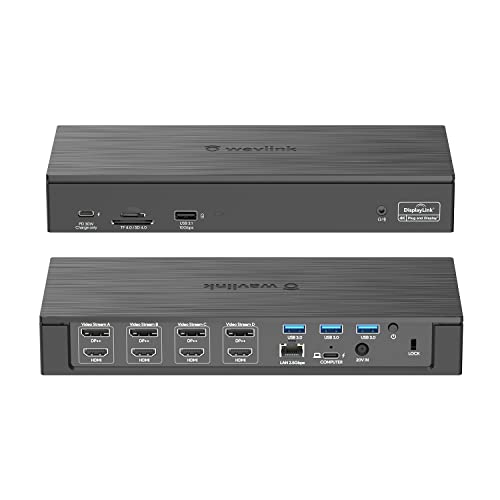
If you’re a designer or part of a large enterprise, the USB C Docking Station, 20-in-1 Universal Displaylink Dock is a game changer for your productivity. With support for quad 4K and dual 5K displays, it seamlessly enhances your workspace. Featuring 20 versatile ports, including multiple HDMI and DisplayPort options, you can connect various devices effortlessly. The 180W power adapter delivers up to 100W charging for your PC, while 2.5Gbps Ethernet guarantees a stable connection. Plus, its compatibility with multiple operating systems and efficient cooling design make it a reliable choice for any demanding environment.
Best For: Professionals in design and large enterprises seeking enhanced productivity through multiple display capabilities and versatile connectivity options.
Pros:
- Supports quad 4K and dual 5K displays for superior visual performance.
- Offers a total of 20 ports, including various HDMI and DisplayPort options, making it easy to connect multiple devices.
- Equipped with a powerful 180W adapter that provides up to 100W charging for laptops, ensuring devices stay powered during use.
Cons:
- The USB-C PD charging and DC out cannot be used simultaneously, which may limit charging options for some users.
- Only one type of video port (DP or HDMI) can be active per video stream, which may restrict display configurations.
- The integrated lock slot for security does not include a lock, requiring an additional purchase for full security.
Plugable USB C Triple Display Docking Station with Laptop Charging

The Plugable USB C Triple Display Docking Station is an excellent choice for professionals who need to maximize their workspace with multiple monitors. With support for three HDMI outputs, you can connect one 4K display and two 1080p monitors, enhancing your productivity greatly. It’s compatible with Thunderbolt, USB4, and USB-C systems, allowing seamless integration with various laptops. Plus, it provides up to 100W charging, so you won’t have to worry about your laptop running out of power. With 12-in-1 connectivity options, including Gigabit Ethernet and multiple USB ports, this docking station truly elevates your workstation.
Best For: Professionals and creatives who require multiple displays for enhanced productivity and efficient multitasking.
Pros:
- Supports triple display capabilities with 1x 4K and 2x 1080p outputs, perfect for multitasking.
- Provides up to 100W charging to keep your laptop powered while connected.
- Compatible with a variety of systems including Thunderbolt, USB4, and USB-C, ensuring versatility.
Cons:
- Not compatible with Linux, limiting options for some users.
- HDCP not supported, which may affect content playback for certain media.
- Requires driver installation for macOS, which could be a hassle for some users.
UGREEN Revodok Pro 7 in 1 Docking Station Dual Monitor

Designed for professionals who demand versatility, the UGREEN Revodok Pro 7 in 1 Docking Station excels in dual monitor setups, making it ideal for anyone looking to enhance their productivity. With dual 4K@60Hz HDMI ports, you’ll enjoy crisp, high-definition displays. It features two USB A and C ports for fast data transfers up to 10Gbps, though these aren’t for charging or video. The 100W PD charging port guarantees your devices stay powered, but remember to use a compatible charging cable. Compatible with various devices, it effortlessly supports Windows systems while Mac users face mirrored display limitations.
Best For: Professionals who require high-definition dual monitor setups for enhanced productivity and efficient multitasking.
Pros:
- Supports dual 4K@60Hz HDMI outputs for high-resolution displays.
- Fast data transfer speeds of up to 10Gbps through USB A and C ports.
- 100W PD charging capability ensures devices remain powered during use.
Cons:
- macOS users may only utilize mirrored display mode for external monitors.
- USB ports do not support charging, video, or audio transfer functionalities.
- Requires compatible charging cable and power adapter for optimal performance.
MOKiN USB C Laptop Docking Station (13 in 1, Dual Monitor, 4K)

For professionals juggling multiple tasks, the MOKiN USB C Laptop Docking Station stands out with its impressive 13-in-1 design. You’ll love the dual monitor support with two 4K HDMI and one DP port, perfect for multitasking. With up to 10Gbps data transfer speeds, transferring large files becomes a breeze. Plus, the 100W PD charging guarantees your devices stay powered while you work. Connect seamlessly to various laptops, including MacBook Pro and Dell models. Rated 4.4 stars from nearly 1,200 users, it’s a reliable choice for enhancing productivity in any workspace. Experience smoother workflows with this versatile docking station.
Best For: Professionals and remote workers seeking a versatile docking station that enhances productivity with dual monitor support and fast data transfer.
Pros:
- Supports dual and triple monitor setups with high-resolution output.
- Fast data transfer speeds of up to 10Gbps for efficient file handling.
- Provides 100W power delivery, ensuring devices remain charged during use.
Cons:
- Limited support for macOS users to extend only one display.
- May require additional adapters for certain older laptops.
- Some users may find the size less portable for travel.
Plugable USB-C Docking Station with Dual 4K HDMI

Looking to boost your productivity with seamless dual 4K display support? The Plugable USB-C Docking Station (Model: UD-MSTH2) is your go-to solution. With dual 4K 60Hz HDMI outputs, you can easily connect two monitors for an expansive workspace. Enjoy 65W charging and fast data transfer through multiple USB ports, all while maintaining a stable Gigabit Ethernet connection. Its driverless setup guarantees hassle-free use with USB-C Windows 10+, USB4, and Chromebooks. While it’s not recommended for macOS, Plugable offers lifetime support, making it a reliable choice for enhancing your productivity experience.
Best For: Professionals and remote workers seeking to enhance their productivity with dual 4K displays and robust connectivity options.
Pros:
- Dual 4K 60Hz HDMI outputs for an expansive workspace and improved multitasking.
- 65W charging capability allows you to power your laptop while connecting multiple devices.
- Driverless setup ensures quick and easy installation without the need for additional software.
Cons:
- Not recommended for macOS users due to MST support limitations, which may affect functionality.
- Some users have reported initial setup issues that required assistance from customer support.
- Specific device compatibility concerns, such as issues with Logitech wireless mouse connectivity.
Laptop Docking Station Dual Monitor 11-in-1 USB C Docking Station

When you’re juggling multiple tasks across different applications, the Laptop Docking Station Dual Monitor 11-in-1 USB C Docking Station stands out as an ideal solution for professionals using Dell, HP, Lenovo, or Surface devices. It offers dual 4K HDMI outputs, enabling enhanced productivity with dual monitors. With 11 ports, including USB-A, USB-C, and Gigabit Ethernet, it supports high-speed data transfer up to 5Gbps. The 100W power delivery guarantees your devices charge quickly, while its compact size and lightweight design make it portable. Rated 4.3 stars by users, it’s a reliable companion for your multitasking needs.
Best For: Professionals using Dell, HP, Lenovo, or Surface devices who need to enhance productivity with dual monitor support.
Pros:
- Dual Monitor Support: Achieves dual 4K video output, enhancing multitasking efficiency.
- High-Speed Data Transfer: Offers USB ports with 5Gbps transfer rates, making data transfers quick and efficient.
- Portable Design: Compact and lightweight, ideal for on-the-go professionals.
Cons:
- MacBook Limitations: MacBook users experience mirror mode instead of extended display mode.
- Power Output Limitation: Provides up to 87W for the host laptop due to power consumption by the dock.
- Warranty Information: Warranty details are only available upon request, which may not be convenient for users.
Factors to Consider When Choosing USB C Docking Stations With Dual Display
When choosing a USB-C docking station with dual display, you need to evaluate several key factors. Display resolution support and the number of ports can greatly impact your productivity. Additionally, make sure the dock offers adequate power delivery capabilities and fast data transfer speeds while being compatible with your devices.
Display Resolution Support
Choosing the right USB-C docking station for dual displays hinges on understanding display resolution support. Verify the maximum resolution capabilities; options can range from 1080p to dual 4K at 60Hz, depending on your device’s specifications. If you want dual 4K outputs, make sure the docking station meets DisplayPort 1.4 or HDMI 2.0 standards for peak performance. Consider whether you need mirror mode, which duplicates displays, or extended mode for independent configurations. Also, check the power delivery capabilities to support multiple displays, as higher resolutions demand more bandwidth and power. Finally, verify compatibility with your operating system, since some devices might limit resolution or display modes based on hardware and software constraints.
Number of Ports
Understanding display resolution support is just one part of the equation; the number of ports on a USB-C docking station greatly impacts your overall productivity. When choosing a docking station with dual display capabilities, consider how many ports it offers. Aim for at least 10 ports to guarantee you can connect multiple devices simultaneously. Look for a mix of video outputs like HDMI, DisplayPort, or VGA to accommodate various monitor setups. High-speed USB ports, such as USB 3.1 or 3.2, are essential for quick data transfers, reaching up to 10Gbps. Additionally, having extra ports for specific needs, like SD card readers or Ethernet connections, can further enhance your setup and streamline your workflow.
Power Delivery Capabilities
Power Delivery (PD) capabilities are essential for guaranteeing your devices stay charged while you work. When choosing a USB-C docking station, look for models that offer between 85W to 100W of power. A docking station with a higher PD output, like 100W, enables faster charging of your laptop and peripherals simultaneously, keeping everything powered during demanding tasks. Be sure to check that the power adapter matches the PD specifications to maximize charging efficiency and prevent device damage. Remember, many docking stations reserve a portion of the PD output for their own needs, typically around 13W, which can reduce the power available for your laptop. Also, verify your devices support the PD protocol for effective charging.
Compatibility With Devices
When looking for a USB-C docking station that supports dual displays, compatibility with your devices is key. First, check if the docking station works with your laptop’s USB-C port, guaranteeing it supports Thunderbolt 3, DisplayPort Alternate Mode, or USB-C Alt Mode for video output. Next, confirm that it’s compatible with your device’s operating system; some models may only support Windows, ChromeOS, or specific macOS versions. Pay attention to multi-monitor support, as some setups may only allow mirroring instead of extending displays. Additionally, verify the power delivery capabilities to guarantee it can adequately charge your laptop—many need at least 100W. Finally, assess the variety and number of ports to guarantee compatibility with your peripherals.
Data Transfer Speeds
Data transfer speeds play a crucial role in the efficiency of your USB-C docking station, especially when you’re managing dual displays. Look for docking stations that support USB 3.1 or USB 3.2 standards, which allow transfer rates of up to 10Gbps. This guarantees quick access to external drives, enhancing your productivity. While some ports may offer USB 2.0 speeds of up to 480Mbps for less demanding peripherals, prioritize high-speed options for larger file transfers. Many stations also include SD and microSD card readers, capable of transferring data at around 200Mbps, perfect for managing files from cameras. With the right docking station, you can transfer a 20GB file in about 25 seconds, saving you valuable time.
Video Output Options
Choosing the right USB-C docking station for dual displays can greatly enhance your productivity, especially if you prioritize compatibility with your monitors. Start by checking the supported video output resolutions. Aim for options like 4K at 60Hz or dual 1080p at 60Hz to guarantee peak performance. Look for various video ports such as HDMI, DisplayPort, and VGA, as they can impact maximum resolution and refresh rates. Verify if the station supports Multi-Stream Transport (MST) for driving multiple displays from a single DisplayPort. Compatibility with your operating system matters too; some stations limit Mac devices to mirror mode. Finally, make sure it delivers enough power, ideally with a power delivery rating of 85-100W, to charge your laptop and support dual displays simultaneously.
Build Quality and Design
While selecting a USB-C docking station, you shouldn’t overlook build quality and design, as they directly impact your user experience and device longevity. Look for durable materials like metal or high-grade plastic that can withstand daily use. A compact and lightweight design makes it easy to carry without adding bulk to your laptop bag. Effective heat dissipation features, such as heat sinks or cooling channels, help maintain stable performance during demanding tasks. User-friendly designs with plug-and-play functionality save you from complex installations, enhancing convenience. Finally, consider aesthetics; a sleek, minimalist look can complement your modern laptop and create an organized workspace. Prioritizing these factors guarantees you get a reliable and visually appealing docking station.
Ease of Setup
When it comes to boosting your productivity with a USB-C docking station that supports dual displays, ease of setup plays a pivotal role. Look for models with plug-and-play functionality; this means you won’t need to fuss with driver installations or complex configurations. Verify the docking station has clear compatibility specifications, so it seamlessly connects with your device’s USB-C or Thunderbolt ports. A user-friendly interface and clearly labeled ports simplify connecting multiple peripherals and displays, saving you time. Opt for products that provide thorough setup guides or solid customer support to help tackle any issues. Finally, check customer reviews focused on ease of setup; they can reveal valuable insights about installation experiences and potential challenges others faced.
