
If you’re a creative professional looking to streamline your workspace, investing in a reliable USB-C docking station could be a game changer. These devices not only expand connectivity options but also enhance your multitasking capabilities with support for multiple monitors. With so many options available, finding the right one to suit your needs can be intimidating. Let’s explore ten of the best USB-C docking stations that could transform your creative environment.
StarTech.com 7-in-1 USB-C DisplayLink Docking Station

If you’re a creative professional using a MacBook Air or Pro with the M1, M2, M3, or M4 chip, the StarTech.com 7-in-1 USB-C DisplayLink Docking Station is a game changer. This portable dock lets you connect dual 4K 60Hz monitors, expanding your workspace immensely. With a 10Gbps USB-A and USB-C hub, you can transfer data quickly while charging your laptop with 100W Power Delivery. Plus, the built-in SD card reader and Gigabit Ethernet streamline your workflow. Compatible with various operating systems, this dock guarantees reliable performance and is backed by a 3-year warranty, making it a smart investment for any creative setup.
Best For: Creative professionals using MacBook Air or Pro with M1, M2, M3, or M4 chips who need to expand their workspace with dual monitors.
Pros:
- Supports dual 4K 60Hz monitors, enhancing productivity and multitasking capabilities.
- Offers fast data transfer speeds with a 10Gbps USB hub and includes a built-in SD card reader for convenience.
- Provides 100W Power Delivery for charging laptops while using multiple peripherals.
Cons:
- May require an external power adapter for optimal performance and to avoid video flickering.
- Limited compatibility with non-USB-C devices, which may restrict usability for some users.
- The reliance on DisplayLink software may lead to additional setup or troubleshooting for some users.
Selore USB C Docking Station (14 in 1)

The Selore USB C Docking Station (14 in 1) is an ideal choice for creative professionals who need versatile connectivity options for their work. With dual HDMI and VGA outputs, it supports triple display functionality, perfect for multitasking. It’s equipped with two 4K HDMI ports, USB 3.1 ports for speedy data transfer, and SD/Micro SD card readers. Plus, the 1000M Ethernet port guarantees stable internet connectivity. You’ll enjoy fast charging with 100W power delivery, compatible with a range of devices including MacBooks and Windows laptops. Just plug it in, and you’re ready to enhance your workspace effortlessly.
Best For: Creative professionals and multitaskers seeking versatile connectivity options for their devices.
Pros:
- Supports triple display functionality with dual HDMI and VGA outputs.
- High-speed data transfer capabilities with USB 3.1 ports and SD/Micro SD card readers.
- 100W power delivery for fast charging, compatible with various devices.
Cons:
- Compatibility relies on DP1.4 laptops and monitors for optimal performance.
- USB ports are limited to data transfer and charging, without video output support.
- Requires confirmation of Thunderbolt or DisplayPort Alternate Mode for video output functionality on USB C ports.
j5create USB Type C Docking Station with 100W PD Charger
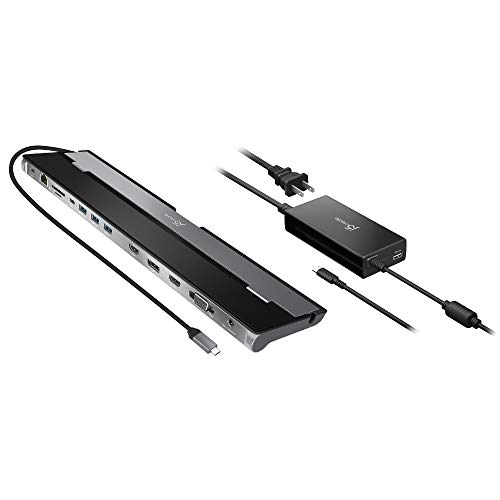
Creative professionals seeking a versatile and powerful docking solution will find the j5create USB Type C Docking Station (Model: JCD543P) particularly appealing. With support for three displays via HDMI, DisplayPort, and VGA, it enhances your workspace considerably. The 100W Power Delivery charger efficiently powers your laptop while connecting multiple devices through its extensive ports, including USB-A, USB-C, and Gigabit Ethernet. Although users appreciate its compact design and easy setup, some report connectivity issues, especially with monitors. Overall, this docking station balances performance with functionality, making it a worthy addition to your creative toolkit.
Best For: Creative professionals looking for a versatile docking solution that supports multiple displays and extensive connectivity options.
Pros:
- Easy setup with multiple peripherals and monitors.
- Efficient 100W Power Delivery for powering laptops while connecting devices.
- Compact design that saves desk space.
Cons:
- Frequent connectivity issues with monitors after waking laptops.
- Problems reported with video calls on applications like Microsoft Teams.
- Some users experienced defective units and intermittent performance.
USB C Hub Docking Station for Laptop and MacBook
Designed for professionals who rely on high-resolution displays, the USB-C Hub Docking Station offers dual HDMI ports that support 4K@60Hz. This 7-in-1 hub features three USB 3.0 ports and a USB-C data port, enabling seamless connectivity for all your devices. With 100W Power Delivery, you can charge your laptop while using multiple peripherals, eliminating battery anxiety. It’s perfect for extending or mirroring displays on both Windows and Mac, making it ideal for work or creative projects. Plus, its plug-and-play compatibility with various laptops guarantees you’re set up in no time. Enhance your workspace effortlessly!
Best For: Professionals and creatives who require high-resolution displays and seamless connectivity for their laptops and MacBooks.
Pros:
- Supports dual HDMI outputs with 4K@60Hz for enhanced visual clarity.
- Provides 100W Power Delivery charging, allowing for device power without interruptions.
- Plug-and-play compatibility with a variety of USB-C laptops ensures quick and easy setup.
Cons:
- Charger not included, which may necessitate an additional purchase.
- Limited to USB-C laptops that support DP Alt Mode, restricting compatibility with older devices.
- May generate heat during extended use, which could be a concern for some users.
Selore USB C Docking Station with Triple 4K Display

For professionals who demand high-quality visuals and extensive connectivity, the Selore USB C Docking Station stands out with its ability to support three 4K displays simultaneously. With two HDMI ports and a DisplayPort, it allows you to extend your workspace efficiently. While Windows users can enjoy enhanced productivity, macOS users will find it limited to mirror mode. The docking station also features a Gigabit Ethernet port for reliable internet access and multiple USB ports for high-speed data transfer. Plus, it supports up to 100W Power Delivery for fast charging. Selore backs this product with an 18-month warranty, ensuring your investment is protected.
Best For: Professionals who require high-quality visuals and extensive connectivity for multitasking with multiple monitors.
Pros:
- Supports triple 4K displays, enhancing productivity for Windows users.
- Includes a Gigabit Ethernet port for stable internet access and multiple high-speed USB ports for efficient data transfer.
- Provides up to 100W Power Delivery for fast charging of laptops and MacBooks.
Cons:
- macOS users are limited to mirror mode for external displays, reducing functionality.
- Power output is capped at 85W for safety, which may not fully charge some devices.
- Compatibility is restricted to devices with Thunderbolt 3/4/5 or full-featured USB-C ports.
StarTech.com Dual-Monitor USB-C Docking Station

If you’re a professional needing to connect multiple displays, the StarTech.com Dual-Monitor USB-C Docking Station is an excellent choice. It supports DisplayPort, HDMI, and VGA outputs, allowing for dual configurations and stunning 4K resolution at 60Hz. With a 7-port USB hub, it provides ample connectivity options, including two USB 3.2 Type-A ports and a USB 3.2 Type-C port. The docking station features 85W Power Delivery, ensuring your laptop and peripherals stay charged. Plus, its security features, like a locking USB-C host cable, give you peace of mind while you work. Upgrade your workspace effortlessly with this versatile dock.
Best For: Professionals who need to connect multiple displays and require a reliable docking solution for enhanced productivity.
Pros:
- Supports dual-monitor configurations with high-resolution output options up to 4K 60Hz.
- Includes a 7-port USB hub for extensive connectivity with various USB ports.
- Offers 85W Power Delivery, keeping your laptop and peripherals charged while in use.
Cons:
- Limited compatibility with non-USB-C devices may require additional adapters.
- Potentially higher cost compared to simpler docking stations without dual-monitor capabilities.
- May require specific hardware (Intel 11th Gen or higher) to achieve full 4K output.
j5create USB C Dual 4K60 Display Docking Station (12-in-1)

The j5create USB C Dual 4K60 Display Docking Station (12-in-1) is an excellent choice for creative professionals who need to connect multiple high-resolution displays. You can connect up to two 4K 60Hz displays via HDMI and DisplayPort, enhancing your multitasking capability. With three 10 Gbps USB ports and one 5 Gbps USB Type-A port, high-speed connectivity is at your fingertips. The built-in M.2 NVMe/SATA PCIe SSD slot allows for storage expansion. Plus, you’ll enjoy a stable internet connection through the Gigabit Ethernet port. Its aluminum finish guarantees durability while it runs cool during extended use, making it a reliable addition to your workspace.
Best For: Creative professionals and programmers who require seamless multitasking with dual high-resolution displays.
Pros:
- Supports up to two 4K 60Hz displays for enhanced productivity.
- High-speed connectivity with multiple USB ports and Gigabit Ethernet.
- Durable aluminum construction that remains cool during extended use.
Cons:
- Lacks a USB-C data port, which may limit connectivity options.
- Mixed customer support experiences, with some reporting language barriers.
- Compatibility concerns with non-Surface devices may deter some users.
Anker 14 in 1 USB C Laptop Docking Station

Creative professionals seeking a powerful and versatile solution will appreciate the Anker 14 in 1 USB-C Laptop Docking Station. This hub features two 4K HDMI ports, a 1080p VGA port, and five USB-A ports, allowing for seamless connectivity across multiple devices. With triple display support and 5 Gbps data transfer speeds, you can enhance your workspace efficiently. The 80W pass-through charging keeps your devices powered up. While most users report excellent performance, some have faced issues with monitor detection and USB-A functionality. Overall, Anker’s reputation for quality makes this docking station a solid choice for your creative needs.
Best For: Creative professionals seeking a versatile solution for seamless connectivity across multiple devices and displays.
Pros:
- Supports triple display with two 4K HDMI ports and one VGA port for an enhanced workspace.
- Fast 5 Gbps data transfer speeds for efficient multimedia and file handling.
- 80W pass-through charging ensures your devices remain powered during use.
Cons:
- Some users experience issues with external monitor detection and USB-A port functionality.
- Potential power delivery concerns, with reports of insufficient wattage for certain laptops.
- Compatibility with Linux environments is not officially supported, leading to mixed user experiences.
Anker 7-in-1 USB-C Hub and Docking Station

For professionals juggling multiple tasks, the Anker 7-in-1 USB-C Hub and Docking Station stands out with its dual HDMI display feature, allowing you to effortlessly extend your workspace across two screens. You’ll enjoy sharp 1080p@60Hz resolution, enhancing your productivity. With blazing-fast 10Gbps data transfer speeds, transferring files becomes a breeze. This hub supports USB-C, USB4, and Thunderbolt connections, making it versatile for various devices. Plus, its 85W output guarantees your high-demand devices stay charged. The package includes an 18-month warranty and customer support, giving you peace of mind. Upgrade your workspace with this efficient docking solution today!
Best For: Professionals seeking to enhance productivity through dual-screen multitasking and fast data transfer.
Pros:
- Dual HDMI display allows extending workspace across two screens for increased efficiency.
- Blazing-fast 10Gbps data transfer significantly reduces file transfer times.
- 85W output ensures high-demand devices stay charged while in use.
Cons:
- Wall charger not included, which may require an additional purchase for optimal use.
- Not compatible with Linux, limiting its usability for users on that operating system.
- Limited to certain operating systems (macOS 12 and newer, Windows 10 and 11, ChromeOS), which may not suit all users.
USB C Hub Docking Station (13 in 1, Dual Monitor)

Looking for a versatile docking station that enhances your workflow? The USB C Hub Docking Station is a 13-in-1 multiport adapter designed for your MacBook, Dell, HP, Lenovo ThinkPad, or Surface. With dual monitor support and triple display capabilities, you can easily connect up to three screens. Enjoy fast data transfer speeds of 10Gbps through USB-C 3.1 and keep your devices charged with 100W power delivery. Its sturdy metal construction guarantees durability, while the Gigabit Ethernet port provides lag-free internet. With an 18-month warranty, this docking station is a smart choice for any creative professional.
Best For: Creative professionals and multitaskers who need efficient connectivity and multiple display options for their devices.
Pros:
- Excellent build quality with durable metal construction.
- Multiple ports including dual HDMI and Gigabit Ethernet for versatile connectivity.
- Fast data transfer speeds of 10Gbps and 100W power delivery for charging devices.
Cons:
- Some users report HDMI port malfunctions.
- Charging function effectiveness can vary based on the power source.
- Power light remains on even when the laptop is shut down, which may be inconvenient.
Factors to Consider When Choosing Usb C Docking Stations for Creative Professionals
When choosing a USB-C docking station, you’ll want to contemplate several key factors that can impact your workflow. Look for options that support multiple monitors, offer a variety of ports with fast speeds, and provide adequate power delivery. Additionally, make sure the docking station is compatible with your devices and built to last, so it can keep up with your creative demands.
Multi-Monitor Support Options
Considering the demands of creative professionals, multi-monitor support options play a critical role in enhancing productivity and workflow. Look for docking stations that enable dual 4K 60Hz output if you need high-resolution displays. Some models even support triple display setups, giving you ample screen real estate for multitasking. Keep in mind that compatibility with your operating system matters—macOS might limit you to mirroring displays instead of extending them on certain devices. Check for multiple video output ports like HDMI, DisplayPort, and VGA, as these provide flexibility in connecting various monitors. Finally, verify the docking station supports DisplayPort Alt Mode, which is essential for achieving the best video output across multiple monitors.
Port Variety and Speed
To maximize your productivity as a creative professional, choosing a USB-C docking station with a diverse array of ports is vital. Look for models that include multiple USB-A, USB-C, HDMI, and Ethernet connections to accommodate all your peripherals. High-speed data transfer is essential, so prioritize docks with USB 3.1 or 3.2, which offer speeds up to 10Gbps for efficient file transfers. Confirm the docking station supports multiple display outputs for dual or triple monitor setups, ideally at 4K@60Hz, enhancing your visual workspace. Compatibility is key, so check if it supports protocols like DisplayPort Alt Mode for seamless integration with your devices. This way, you’ll create a more efficient and connected workspace tailored to your creative needs.
Power Delivery Capacity
Power delivery capacity plays a critical role in your workflow as a creative professional. It determines how quickly and efficiently your devices charge while you’re working. Look for docking stations that offer at least 85W to 100W, allowing you to charge your laptop and power multiple peripherals simultaneously. This feature reduces downtime during intensive tasks, keeping your creative flow uninterrupted. Verify the docking station supports the power delivery protocol, as compatibility is key to utilizing its full potential. Some models reserve power for stability—this guarantees that video output remains consistent while charging. Finally, consider your specific device requirements, as different laptops have varying power needs to perform effectively with a docking station.
Compatibility With Devices
When choosing a USB-C docking station, it’s vital to guarantee compatibility with your devices to avoid frustrating connectivity issues. First, check if the docking station works with your device’s USB-C, Thunderbolt 3, or USB4 ports, as these protocols are critical for video output and data transfer. Next, consider your display needs; some docks support dual or triple monitor setups, while others only allow one external display. Verify the docking station’s compatibility with your operating system—some may only support Windows or macOS. Look for universal compatibility features to confirm it works with various brands and models. Finally, assess the power delivery specifications to ensure it can adequately charge your device while in use.
Build Quality and Design
Ensuring compatibility with your devices is just the first step in selecting the right USB-C docking station. You’ll want a well-constructed model featuring an aluminum finish or similar materials for durability and a professional look—vital for creative professionals like you. A compact, lightweight design makes it easy to transport, perfect for on-the-go work. Effective heat management is important, too; look for advanced cooling designs to prevent overheating during long sessions. Additionally, double-sided cable storage compartments can keep your workspace tidy and organized, helping you stay focused. Finally, a slim profile allows for easy placement on your desk or in your travel bag, enhancing usability and efficiency wherever you work.
