
Finding a usb audio interface under 200 doesn’t mean settling for noisy recordings or limited inputs. Today’s budget models can deliver clean preamps, solid driver support, and enough flexibility for vocals, guitar, podcasting, and streaming.
This roundup focuses on practical picks that balance sound quality, features, and ease of use so you can match the right interface to your setup without overspending.
Best 10 USB Audio Interface Under 200 Picks for 2026
Studio-Ready Solo Starter
Focusrite Scarlett Solo 3rd Gen

- 24-bit/192kHz recording and playback
- 1 XLR mic preamp plus 1 Hi-Z input
- Air mode and balanced outputs
Best For: Solo recording, vocals, and guitar
Versatile Two-Input Pick

- Two combo XLR/line/instrument inputs
- 48kHz recording with direct monitoring
- Crystal preamps and software bundle
Best For: Podcasting, streaming, and simple two-source recording
Ultra-Compact Budget Basic

- 2x2 interface with USB power
- XENYX mic preamp and direct monitoring
- 48kHz recording and broad DAW support
Best For: Entry-level recording on a tight budget
Creator-Friendly Routing Choice

- 24-bit/192kHz with 106dB dynamic range
- Loopback and ProStudio routing software
- Low-noise preamp with instrument input
Best For: Streaming, podcasting, and flexible home recording
Portable 2x2 Creator Interface
Synido USB C Audio Interface for Recording Music

- 24-bit/48kHz recording with low-latency support
- Three monitoring modes for tracking, mix, or USB playback
- 48V phantom power plus XLR and 6.35mm compatibility
Best For: Creators who want a portable interface with flexible monitoring
High-Resolution 2-Channel Pick

- 24-bit/192kHz recording for high-detail capture
- Two combo XLR/TRS inputs with 48V phantom power
- USB-C bus power and zero-latency direct monitoring
Best For: Home studio and mobile users who want higher-resolution recording
Budget-Friendly Starter Interface
M-AUDIO M-Track Solo USB Audio Interface

- 48kHz recording for podcasts, streaming, and music
- Combo XLR/Line input plus separate instrument input
- USB/Direct switch and Crystal Preamp for easy monitoring
Best For: Beginners who want an easy, affordable entry into recording
Best Portable Studio Pick
Rockville ROCK-U MINI 2x2 USB Computer Recording Interface
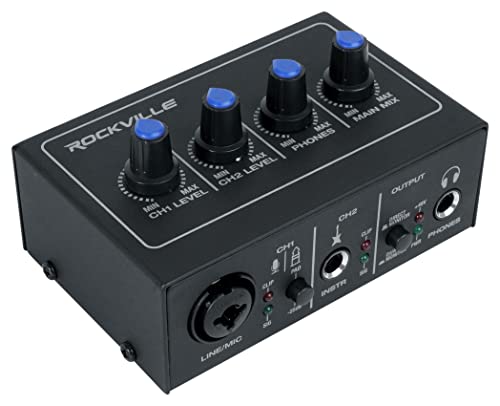
- 24-bit/192kHz conversion with low-noise preamps
- Combo input plus dedicated Hi-Z instrument input
- Bus-powered metal design with direct monitoring
Best For: Home studios and mobile recording
Budget Solo Recording Pick
Wrugste USB Audio Interface Solo

- Combo XLR/1/4" inputs for mics, guitars, and line sources
- 48V phantom power for condenser microphones
- Plug-and-play design with included adapters
Best For: Beginners recording vocals, guitar, or podcasts
Portable 2-In/2-Out Pick
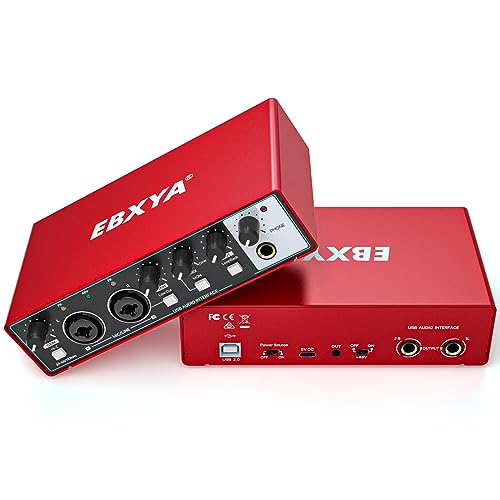
- 24-bit/192kHz audio with ultra-low latency monitoring
- Two combo inputs with up to 60dB gain
- 48V phantom power, HI-Z switch, and included adapters
Best For: Podcasts, guitar recording, and compact home studios
Studio-Ready Solo Starter – Focusrite Scarlett Solo 3rd Gen
If you want a usb audio interface under 200 that feels polished from the start, the Scarlett Solo 3rd Gen is a strong pick for single-mic and guitar setups. It offers 24-bit/192kHz recording, a high-performing mic preamp, and a Hi-Z instrument input for clean capture with minimal fuss.
Best For: Solo musicians, vocalists, and podcasters who want a simple, high-quality interface.
Pros:
- 24-bit/192kHz converters for detailed recording and playback
- 1 XLR mic preamp plus 1 Hi-Z instrument input for vocals and guitar
- Air mode adds extra clarity for acoustic instruments
- Balanced outputs and headphone monitoring for flexible listening
Cons:
- Only one mic preamp, so it is not built for multi-mic recording
- Best suited to simple solo workflows rather than larger sessions
The Scarlett Solo stands out as a dependable entry point if you want cleaner recordings and an easy setup without overbuying features you may not use.
Versatile Two-Input Pick – M-AUDIO M-Track Duo
For buyers comparing a usb audio interface under 200 for recording, streaming, or podcasting, the M-AUDIO M-Track Duo is built to cover several use cases at once. Its two combo XLR/line/instrument inputs, 48kHz resolution, and direct monitoring make it a practical all-rounder for small home setups.
Best For: Creators who need a compact interface for podcasts, streaming, and basic music recording.
Pros:
- Two combo XLR/line/instrument inputs with phantom power
- 48kHz audio resolution for clean everyday recording
- USB/direct monitoring switch helps avoid latency
- Crystal preamps and included MPC Beats software add value
Cons:
- 48kHz max sample rate is lower than some competing interfaces
- Software bundle is useful, but still entry-level in scope
The M-Track Duo makes sense if you want flexible input options and simple monitoring in a budget-friendly interface without paying for advanced studio extras.
Ultra-Compact Budget Basic – Behringer U-PHORIA UM2
If you need a usb audio interface under 200 and want the simplest path into recording, the Behringer U-PHORIA UM2 keeps things basic and affordable. It offers a 2×2 layout, a XENYX mic preamp, direct monitoring, and 48kHz resolution for straightforward home use.
Best For: Beginners and solo musicians looking for a compact, no-frills interface.
Pros:
- Ultra-compact 2×2 interface that is easy to move and set up
- XENYX mic preamp with strong dynamic range and clear capture
- Direct monitor select and phones output for practical monitoring
- USB-powered and compatible with popular recording software
Cons:
- 48kHz max sample rate is modest compared with higher-end options
- Feature set is intentionally minimal
The UM2 is best viewed as a straightforward entry-level recording tool: it focuses on the essentials and leaves out extras, which can be a benefit if you just want to start capturing audio quickly.
Creator-Friendly Routing Choice – MAONO PS22 Lite
The MAONO PS22 Lite is a strong option if you want a usb audio interface under 200 for recording, streaming, and content creation in one compact box. It combines 24-bit/192kHz audio, a low-noise preamp, loopback support, and routing software, making it well suited to modern creator workflows.
Best For: Streamers, podcasters, and home-studio users who want flexible routing and high-resolution audio.
Pros:
- 24-bit/192kHz recording with 106dB dynamic range
- Low-noise preamp with 48V phantom power for condenser and dynamic mics
- Loopback and ProStudio routing software for streaming setups
- Dedicated instrument input and direct monitoring for music recording
Cons:
- Software-driven features may be more than casual users need
- Best value comes from using the routing and loopback tools
The PS22 Lite is especially appealing if you switch between music, voice, and live-streaming tasks, because its feature set is designed to make those transitions easy.
Portable 2×2 Creator Interface – Synido USB C Audio Interface for Recording Music
If you want a usb audio interface under 200 for recording, streaming, or podcasting, this Synido 2×2 model focuses on practical features rather than extras. It offers 24-bit/48kHz recording, dual-channel input support, and multiple monitoring modes, making it a flexible pick for creators who switch between tracking, mixing, and playback.
Best For: Singers, podcasters, and mobile creators who want simple setup with flexible monitoring
Pros:
- 24-bit/48kHz recording with an independent audio chip for clearer capture and lower latency
- Three monitoring modes: Stereo, Mix, and USB for different recording and editing workflows
- 48V phantom power and XLR/6.35mm support for microphones and line or instrument sources
- Compact 300g design with included USB-C to USB-A cable and phone adapter for portability
Cons:
- Maximum sample rate is limited to 48kHz, so it is not aimed at higher-resolution workflows
- Best performance may require downloading a third-party universal ASIO driver
Overall, this is a straightforward choice if you want a compact interface that handles the basics well and gives you flexible monitoring without complicating the setup. It is especially appealing for creators who value portability and easy switching between recording modes.
High-Resolution 2-Channel Pick – 2X2 24-bit/192kHz Interface
This usb audio interface under 200 is built for buyers who want a higher sample-rate ceiling and an easy plug-and-play setup. The PIYONE Q28 offers 24-bit/192kHz recording, two combo inputs, zero-latency direct monitoring, and bus-powered USB-C operation for a clean, portable desktop or laptop rig.
Best For: Home studio users and mobile recordists who want high-resolution capture with simple setup
Pros:
- 24-bit/192kHz fidelity for high-resolution recording with wide dynamic range
- Two combo XLR/TRS inputs with 48V phantom power for microphones or guitar
- Direct monitor feature supports zero-latency tracking
- USB-C bus power and no-driver setup keep the workflow simple on Mac and PC
Cons:
- Details list Windows compatibility, so Mac users may want to verify their exact setup
- It only provides two channels, which may be limiting for larger sessions
If higher-resolution specs matter more than extra input count, this model is a strong candidate. It pairs clean recording features with a portable one-cable design, which makes it easy to use for both studio work and travel setups.
Budget-Friendly Starter Interface – M-AUDIO M-Track Solo USB Audio Interface
The M-AUDIO M-Track Solo is a practical usb audio interface under 200 for beginners who need a simple way to record vocals, instruments, or streams. It keeps things basic with 48kHz resolution, a combo XLR/Line input, a separate instrument input, and direct monitoring for a low-friction setup.
Best For: Beginners and budget-conscious creators who want a dependable entry-level interface
Pros:
- 48kHz recording for straightforward podcasting, streaming, and music capture
- One combo XLR/Line input plus one line/instrument input for flexible source handling
- USB/Direct monitoring switch helps achieve zero-latency monitoring
- Crystal Preamp and included MPC Beats software add value for first-time users
Cons:
- Maximum sample rate is limited to 48kHz
- Only one mic-capable combo input, so multi-mic setups are not its strength
For buyers who want a no-nonsense starter interface, this model covers the essentials without adding complexity. Its input layout, included software, and compact size make it an easy way to get recording quickly.
Best Portable Studio Pick – Rockville ROCK-U MINI 2×2 USB Computer Recording Interface
If you want a usb audio interface under 200 that feels ready for home recording or mobile sessions, the Rockville ROCK-U MINI is built around practical, no-frills features. It offers 24-bit/192kHz conversion, combo and instrument inputs, and bus-powered operation, so you can plug in and start tracking vocals, guitar, or line sources without a lot of setup.
Best For: Home studio users and mobile recordists who want a compact, bus-powered interface with direct monitoring.
Pros:
- 24-bit/192kHz converters and low-noise preamps for clean recording
- XLR/1/4″ combo input, Hi-Z instrument input, and 48V phantom power
- Direct zero-latency monitoring plus USB playback mode
- Metal housing and bus-powered design make it easy to travel with
Cons:
- Only two input channels, so it is not built for larger multi-mic sessions
- Best suited to simple recording setups rather than advanced routing needs
Overall, the Rockville stands out as a compact and practical choice if your priority is clean sound, straightforward control, and portability. It covers the essentials well for solo recording, podcasting, or small home studio work.
Budget Solo Recording Pick – Wrugste USB Audio Interface Solo
The Wrugste Solo is a straightforward usb audio interface under 200 for basic recording, podcasting, and streaming. It keeps the feature set focused with combo inputs, 48V phantom power, and plug-and-play use, which makes it a sensible pick if you want to connect a mic or guitar without adding extra complexity.
Best For: Beginners and budget-minded creators who need a simple interface for vocals, guitar, or streaming.
Pros:
- Combo XLR/1/4″ inputs handle microphones, guitars, and line signals
- 48V phantom power supports condenser microphones
- Simple plug-and-play setup with no included software required
- Includes USB-A to C cable, USB-C adapter, and 2-year warranty
Cons:
- Headphone output is 1/4″, so some users may need an adapter
- No software or driver package is included in the box
- More basic feature set than higher-end 2-in/2-out interfaces
As a budget-friendly option, the Wrugste does the essentials well and keeps the setup process simple. It is a good match if you want to get audio into your computer quickly for voice, music, or content creation.
Portable 2-In/2-Out Pick – EBXYA 2×2 Audio Interface
If you are shopping for a usb audio interface under 200 with flexible inputs and easy portability, the EBXYA 2×2 is a strong all-around option. It supports 24-bit/192kHz recording, includes dual combo inputs, and adds 48V phantom power plus a high-impedance switch, making it useful for both microphones and guitar setups.
Best For: Podcasters, home recordists, and guitar players who want a compact 2-in/2-out interface.
Pros:
- 24-bit/192kHz recording with ultra-low latency monitoring
- Two XLR/line combo inputs with up to 60dB gain
- 48V phantom power and HI-Z support for different source types
- Includes multiple adapters and a 2-year warranty
Cons:
- Requires an external 5V USB power adapter to operate
- Not a bus-powered interface, so it is less convenient for some mobile setups
The EBXYA is a good fit if you want a small interface that still covers the most common recording needs. Its mix of phantom power, gain, and portable hardware makes it practical for home studios and on-the-go sessions.
How We Picked the Best USB Audio Interface Under 200
We looked for dependable USB Audio Interface Under 200 options with strong value for the money: clean microphone preamps, 48V phantom power where useful, sensible input/output layouts, and compatibility with common recording workflows on PC and Mac. We also favored models that are straightforward for beginners but still capable enough for growing home studios.
Quick Comparison
If you only need one mic and one instrument, a compact solo interface is usually the easiest choice. If you plan to record two sources at once, stream with loopback, or leave room for future expansion, a 2×2 interface is often the better fit. For podcasting, streaming, and voice work, features like direct monitoring, low-noise preamps, and stable software support matter more than marketing claims.
Key Buying Factors for a USB Audio Interface Under 200
Inputs and Channel Count
Choose based on what you record today, not just what looks impressive. Solo units work well for single-mic creators and singer-songwriters, while 2-input interfaces are better for duet recordings, interviews, or guitar plus vocal sessions.
Preamp Quality and Gain
A clean preamp with enough gain can make a bigger difference than extra features. Dynamic microphones, in particular, benefit from interfaces that stay quiet at higher gain settings.
Monitoring and Latency
Direct monitoring helps you hear yourself without delay. If you stream or track vocals, this is one of the most useful features to look for in a USB Audio Interface Under 200.
Connectivity and Software Support
Check whether the interface uses USB-C or standard USB, and confirm driver support for your operating system. Some models include routing tools, loopback, or bundled software that can simplify setup for recording and broadcasting.
Power and Compatibility
Bus-powered designs are convenient for portable rigs, but make sure they can supply phantom power reliably if you use condenser microphones. Also confirm iOS support only if you plan to record on mobile devices.
Who Should Buy Which USB Audio Interface Under 200?
Solo creators, vocalists, and guitarists should lean toward simple one- or two-input interfaces with reliable gain and monitoring. Podcasters and streamers may benefit most from loopback, flexible routing, and easy USB connectivity. Beginners should prioritize straightforward setup and stable performance over advanced extras, while multi-use home studio users will usually be happier with a 2×2 interface that leaves room to grow.
In short, the best choice is the one that matches your recording setup, your microphone type, and how much flexibility you need now and in the future.
