
When you’re using a Mac, finding the right USB A to USB C adapter can greatly enhance your connectivity experience. Whether you’re transferring files or connecting peripherals, the options available can vary in speed and versatility. From reliable brands to budget-friendly choices, there’s something for everyone. Let’s explore the top picks that can meet your needs and elevate your Mac experience.
Syntech USB C to USB Adapter (Pack of 2)

If you’re a Mac user looking for a reliable way to connect your USB-A devices, the Syntech USB C to USB Adapter (Pack of 2) is your best choice. This compact adapter supports USB 3.0 for fast data transfer and charging, making it perfect for connecting peripherals like mice and external drives. Its durable zinc alloy housing guarantees it can withstand over 10,000 plug and unplug cycles. Plus, the plug-and-play functionality means you won’t need any drivers. With a high customer rating of 4.7 stars, it’s clear that users appreciate its performance and build quality.
Best For: Users who need a reliable and compact solution for connecting USB-A devices to USB-C ports, particularly Mac and other Type C device owners.
Pros:
- Durable Design: Made with anti-interference zinc alloy, designed to withstand over 10,000 plug and unplug cycles.
- Fast Data Transfer: Supports USB 3.0 for quick data transfer and charging.
- User-Friendly: Plug-and-play functionality eliminates the need for drivers, making it easy to use.
Cons:
- Bulky Cables Issue: May not fit adjacent USB-C ports if the connected cables are bulky.
- Potentially Slower Transfer Speeds: Some users report slower data transfer compared to other adapters.
- Limited Warranty Information: Warranty details are only available upon request, which may be inconvenient for some users.
Anker USB C Adapter (2 Pack) for High-Speed Data Transfer

The Anker USB C Adapter (2 Pack) is an excellent choice for Mac users who need seamless connectivity between USB-A devices and USB-C ports. Compatible with devices like the MacBook Pro 2020 and iPad Pro 2020, these adapters guarantee high-speed data transfer, connecting everything from external hard drives to printers. Their sleek Space Gray design and premium aluminum construction make them durable and stylish. Plus, with an average rating of 4.7 stars from over 20,000 users, you can count on their reliability. Just make sure a firm connection for peak performance, and enjoy hassle-free connectivity in your everyday tasks.
Best For: Mac users seeking a reliable solution to connect USB-A devices to USB-C ports for efficient data transfer.
Pros:
- High-Speed Data Transfer: Ensures fast and efficient connectivity for various devices, enhancing productivity.
- Durable Design: Made from premium scratch-resistant aluminum, built to withstand daily wear and tear.
- Compact and Convenient: Ultra-slim form factor allows for side-by-side use in MacBook Pro’s USB-C ports.
Cons:
- Firm Connection Required: Some users may need to ensure a secure fit for optimal performance.
- Limited to USB-A Devices: Only compatible with USB-A devices; may not suit users needing direct USB-C connections.
- No Additional Features: Lacks extra functionalities that some other adapters may offer, such as power delivery.
Apple USB-C to USB Adapter

For anyone looking to seamlessly connect their older USB devices to a Mac or iPad, the Apple USB-C to USB Adapter stands out as the perfect solution. This compact adapter plugs easily into your USB-C or Thunderbolt 3 port, allowing you to connect flash drives, cameras, and other standard USB accessories. You can even use it to sync and charge your iPhone or iPad with a Lightning to USB cable. Users rave about its quality and reliability, often preferring it over cheaper alternatives. With its sleek design and ease of use, it’s an essential tool for any Apple user.
Best For: Users needing to connect older USB devices to modern Apple products like Mac, iPad, or iPhone.
Pros:
- High-quality construction and reliable performance compared to cheaper alternatives.
- Compact and sleek design, making it easy to carry and use.
- Versatile functionality for syncing and charging multiple devices.
Cons:
- Limited to USB-C and Thunderbolt 3 ports, which may not suit all devices.
- Higher price point compared to less reliable third-party options.
- Some users report issues with high-frequency noise in specific audio setups.
Hiearcool USB C Multi-Port Hub Adapter for MacBook Pro

Designed specifically for MacBook Pro users, the Hiearcool USB C Multi-Port Hub Adapter offers an impressive array of features that enhance connectivity and functionality. This 7-in-1 hub expands a single USB-C port into an HDMI output, two USB-A 3.0 ports, and SD/microSD card slots, all while supporting up to 100W power delivery. Its compact design makes it travel-friendly, weighing only 1.8 ounces. With plug-and-play functionality, you’ll enjoy seamless connections and high-speed data transfers at 5Gbps. Users rave about its versatility, fast charging, and stylish look, making it a reliable choice for all your connectivity needs.
Best For: Users of MacBook Pro and other USB-C devices who need versatile connectivity options for multiple peripherals and fast charging.
Pros:
- Versatile Connectivity: Expands a single USB-C port into multiple ports, including HDMI and USB-A, accommodating various devices and accessories.
- High-Speed Data Transfer: USB 3.0 ports offer fast data transfer rates of up to 5Gbps, enhancing productivity.
- Compact and Portable Design: Lightweight and slim, making it easy to carry in bags for travel without adding bulk.
Cons:
- Limited to USB-C Devices: Only compatible with devices that support DisplayPort Alt Mode, which may exclude some older models.
- Power Consumption Consideration: Power delivery is shared with the hub’s consumption, potentially limiting charging speed for the laptop.
- Heat Generation: While designed for heat dissipation, some users may experience warmth during extended use.
Amazon Basics USB-C to USB-A Adapter Cable
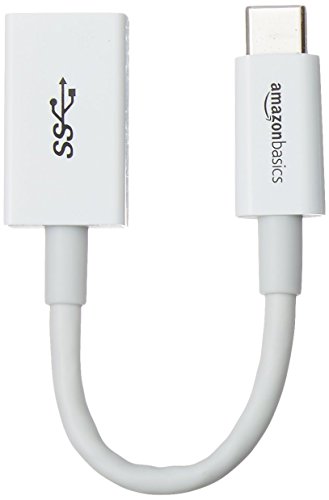
With its high-speed data transfer capability of up to 5 Gbps, the Amazon Basics USB-C to USB-A Adapter Cable is perfect for tech-savvy individuals who need reliable connectivity between their modern USB-C devices and older USB-A peripherals. This compact adapter not only connects your devices seamlessly but also supports fast charging up to 15W. Weighing just 0.128 ounces and measuring 5.51 x 0.64 x 0.34 inches, it’s easy to carry. Rated 4.7 out of 5 stars by over 56,000 users, it’s praised for its speed and build quality, backed by a one-year warranty for peace of mind.
Best For: Tech-savvy individuals looking for a reliable and compact solution to connect their USB-C devices with older USB-A peripherals.
Pros:
- High-speed data transfer of up to 5 Gbps for efficient file transfers.
- Supports fast charging capability up to 15W, making it ideal for smartphones and power banks.
- Compact and lightweight design, easy to carry for on-the-go use.
Cons:
- Limited to USB-C to USB-A connectivity, may not support other types of connections.
- Not suitable for devices requiring higher power transfer than 15W.
- May require additional adapters for certain specific use cases or devices.
3 Pack USB C to USB Adapter for High-speed Data Transfer

If you’re looking to seamlessly connect your USB-A devices to modern USB-C technology, the 3 Pack USB C to USB Adapter is your best bet. With high-speed data transfer capabilities of up to 5GB in seconds, it’s perfect for various devices, including your iPhone 16, Mac, and Samsung Galaxy S24. Its compact design makes it easy to carry, and the plug-and-play functionality means you won’t need any drivers. Plus, the durable aluminum build guarantees long-lasting use. Users love its reliability and affordability, making it a smart choice for efficiently using your existing USB-A cables with USB-C devices.
Best For: Users looking for an efficient and budget-friendly solution to connect USB-A devices to USB-C devices.
Pros:
- High-speed data transfer capabilities of up to 5GB in seconds.
- Plug-and-play design ensures easy connectivity without the need for drivers.
- Durable aluminum build withstands up to 10,000 plug-and-unplug cycles.
Cons:
- Some users report data transfer speeds around 30MB/s, which may indicate USB 2.0 performance rather than USB 3.0.
- A few complaints about a tight fit on connectors may lead to difficulty when plugging and unplugging.
- Limited warranty information provided may leave users uncertain about long-term support.
USB C to USB 3.0 Adapter (2 Pack)
![USB C to USB 3.0 Adapter [2 Pack], USB C Male to USB Female OTG Cable Thunderbolt3 to USB Adapter Compatible with MacBook Pro/Air, iPhone 17 Pro Max/17 Plus/17/16/15, Galaxy S24/S23/S22/S21](https://m.media-amazon.com/images/I/41uG+IulSOL._SL500_.jpg)
The USB C to USB 3.0 Adapter (2 Pack) is perfect for anyone looking to enhance their connectivity options, especially Mac users. With its USB C male to USB female design, you can effortlessly connect flash drives, keyboards, and external hard drives. Enjoy lightning-fast data transfer rates up to 5Gbps, making file transfers and HD video streaming a breeze. This adapter is compatible with a range of devices, including the latest iPhones and Galaxy models. Lightweight and durable, it’s ideal for travel. Plus, each pack comes with an 18-month warranty and 24/7 customer support for added peace of mind.
Best For: Anyone seeking to expand their device connectivity and transfer data quickly, especially MacBook and smartphone users.
Pros:
- Super-fast data transfer rates of up to 5Gbps, making it ideal for large file transfers and HD video streaming.
- Wide compatibility with various devices, including the latest iPhones, Galaxy models, and MacBooks.
- Lightweight and durable design that makes it easy to carry for travel and everyday use.
Cons:
- Limited to USB C and USB 3.0 connections, which may not suit older devices without USB C ports.
- May not support some devices that require specific power outputs or functionalities beyond standard USB connections.
- Potential compatibility issues with certain USB-C accessories or peripherals, depending on manufacturer specifications.
Basesailor USB C to USB Adapter 3 Pack

For those seeking a reliable solution to connect older USB-A devices to modern USB-C ports on Mac computers, the Basesailor USB C to USB Adapter 3 Pack stands out. This pack features three adapters that convert USB-C male to USB-A female, supporting USB 3.0 OTG for speedy data transfers. Its slim design enables side-by-side usage in adjacent ports, while the durable aluminum construction adds a touch of style. With a 4.7-star rating from over 12,000 reviews, you can trust its performance. Plus, a 12-month warranty guarantees peace of mind. It’s an affordable and effective choice for your connectivity needs.
Best For: Those who need to connect older USB-A devices to newer USB-C ports on their Mac computers or other compatible devices.
Pros:
- Affordable pack of three adapters, providing great value compared to competitors.
- Durable aluminum construction with a stylish design that complements modern laptops.
- High customer satisfaction with a 4.7-star rating from over 12,000 reviews.
Cons:
- Limited to USB-C to USB-A conversion; cannot be used for USB-C to USB-C connections.
- May not support certain devices with specific data transfer requirements.
- Compact size might be easy to misplace if not stored properly.
USB C to USB Adapter (2 Pack)
![USB C to USB Adapter [2 Pack],Type-C OTG Cable Type C Male to USB A Female Usb to Usbc-c Adapter Compatible with Macbook Pro/Air iPad Pro 2022 2021 2020, Galaxy S23 S22 Ultra Note 10 S9 S8 (Black)](https://m.media-amazon.com/images/I/31xINmpcvYL._SL500_.jpg)
Looking to expand the connectivity options for your Mac? The USB C to USB Adapter (2 Pack) is perfect for you. With a robust design, these adapters are made from high-quality materials, ensuring durability and heat dissipation during use. Enjoy ultra high-speed data transfer up to 480MB/s, making it easy to move files, HD movies, and music seamlessly. They’re compatible with a wide range of USB-C devices, including the latest MacBook Pro and various Samsung Galaxy models. Plus, reliable customer support is available if you encounter any issues. Upgrade your connectivity today!
Best For: Anyone looking to enhance connectivity options for USB-C devices, especially MacBook users and Samsung Galaxy smartphone owners.
Pros:
- High-speed data transfer of up to 480MB/s for quick file movement.
- Durable design made from quality materials for long-lasting use and heat dissipation.
- Wide compatibility with numerous USB-C devices, including popular models from Apple and Samsung.
Cons:
- Limited to USB 2.0 speeds, which may not satisfy users needing faster transfer rates.
- Not universally compatible with all USB devices, as it requires a USB-C port.
- May require additional adapters for certain devices or setups not covered by this product.
uni USB C to USB Hub Multiport Adapter

Designed specifically for Mac users, the uni USB C to USB Hub Multiport Adapter is an excellent choice if you need a reliable solution for data syncing. With four USB 3.1 Gen 1 ports, you can transfer data at speeds up to 5Gbps—ten times faster than USB 2.0. Its compact aluminum design makes it lightweight and perfect for travel, while the braided nylon cable guarantees durability. Plus, it’s plug-and-play, so there’s no need for drivers. Enjoy peace of mind with a smart chip that protects against overcurrent and short circuits, backed by an 18-month warranty and 24/7 support.
Best For: Users looking for a portable and efficient USB hub that supports data syncing for their MacBook Pro/Air, iPad Pro, or other compatible devices.
Pros:
- Fast Data Transfer: Supports speeds up to 5Gbps, making it 10x faster than USB 2.0.
- Durable Design: Constructed with an aluminum shell and braided nylon cable for enhanced durability.
- User-Friendly: Plug-and-play functionality with no drivers or software needed.
Cons:
- No Charging Support: Designed solely for data transfer; does not support charging devices.
- Limited Current: Maximum total current limit of 900 mA may not be sufficient for high-power devices.
- Compatibility Restrictions: Primarily designed for specific devices like MacBook and iPad Pro, which may limit use with other products.
Factors to Consider When Choosing USB A to USB C Adapters for Mac
When you’re choosing a USB A to USB C adapter for your Mac, there are a few key factors to keep in mind. You’ll want to contemplate compatibility with your devices, data transfer speed, and the quality of materials used in the build. Additionally, think about the design, portability, and whether it offers plug-and-play functionality for a seamless experience.
Compatibility With Devices
Choosing the right USB A to USB C adapter for your Mac involves several key compatibility factors. First, make certain the adapter is compatible with your specific Mac model, particularly if you own a newer MacBook Pro (2016+) or MacBook Air (2018+). Next, check that it supports USB 3.0 or higher to guarantee you get the best performance. It’s also essential that the adapter can handle various devices like external hard drives, flash drives, and peripherals such as keyboards and mice. Additionally, verify if it supports OTG (On-The-Go) functionality, allowing direct connections from USB devices to your Mac. Finally, opt for a compact and portable design, making it convenient for travel and use with different USB-C devices.
Data Transfer Speed
How fast do you want your data transfers to be? If you’re looking for quick file transfers, USB 3.0 adapters are your best bet, offering speeds up to 5 Gbps—ten times faster than USB 2.0. However, keep in mind that the actual speed depends on the compatibility of your devices; USB 2.0 devices will only reach up to 480 Mbps. Some adapters support advanced technology like USB 3.1 or Thunderbolt, which can push transfer rates even higher. When choosing an adapter, consider how many USB-C ports you’ll use simultaneously. Look for designs that allow side-by-side connections to avoid any physical obstruction that could compromise your data transfer speed. Speed matters, so choose wisely!
Build Quality Materials
While data transfer speed is important, the build quality of your USB A to USB C adapter plays a significant role in its overall performance and durability. Look for adapters made from durable materials like premium scratch-resistant aluminum or zinc alloy housing to guarantee they last. You’ll want connectors engineered to withstand at least 10,000 plug and unplug cycles for reliable daily use. Consider the weight and compactness; lighter, slimmer designs are easier to carry while traveling. Evaluate the heat dissipation capabilities of the materials used, as effective heat management can prevent overheating during charging and data transfer. Finally, a minimalist, anti-slippery design enhances usability, making it easier to handle and connect in various situations.
Design and Portability
When it comes to USB A to USB C adapters for your Mac, design and portability are key factors that can enhance your overall experience. Opt for a compact form factor that fits easily in your bag or pocket, especially if you’re often on the go. Look for lightweight options, ideally under 1 ounce, to guarantee they won’t weigh you down during travel. A slim profile is essential, allowing side-by-side usage in adjacent USB-C ports without blocking access. Choose adapters made from high-quality materials like aluminum or anti-interference zinc alloy for durability and style. Finally, a minimalist design with anti-slippery embossments can improve grip, reducing the chance of accidental disconnections while you work.
Plug-and-Play Functionality
A key consideration in selecting USB A to USB C adapters for your Mac is plug-and-play functionality. This feature allows you to connect USB-A devices without needing to install additional drivers or software. Many adapters automatically recognize devices, ensuring a seamless connection right when you plug them in. This convenience is perfect for quick file transfers or connecting peripherals without setup delays. Opting for adapters with plug-and-play capabilities means you can expect compatibility across various device types, including smartphones, laptops, and tablets. Users appreciate this reliability, as it guarantees consistent performance without the hassle of software conflicts or installation errors. So, make sure to prioritize this functionality when choosing your adapter.
Warranty and Support
Selecting the right USB A to USB C adapter for your Mac involves more than just evaluating its technical features; warranty and support play critical roles, too. A solid warranty offers peace of mind against defects and product failures, with most adapters providing coverage from 12 to 18 months. Some brands even extend support options for replacements or refunds. It’s also important to reflect on customer service availability; responsive support can help you tackle any issues that arise. Additionally, look for satisfaction guarantees that allow returns if the product doesn’t meet your expectations. Don’t forget to review user feedback on warranty claims and customer service experiences to gauge the reliability of the manufacturer you’re reflecting upon.
Price and Value
Understanding the price and value of USB A to USB C adapters is essential for making an informed purchase for your Mac. When evaluating options, consider the price per unit; packs with multiple adapters can offer better overall value. Look for high-performance adapters that support fast data transfer rates of up to 5 Gbps without breaking the bank. Pay attention to warranty options, as longer warranties often indicate better durability and customer satisfaction. Customer ratings are also important; products with ratings of 4.6 stars and above typically reflect good value. Finally, assess build quality relative to price—investing in premium materials may cost more upfront, but it can save you money in the long run by ensuring longevity and reliability.
