
A vertical GPU mount can show off your graphics card and give a build a cleaner look—but the wrong kit can block airflow or simply fail to fit your case.
These eight options cover PCIe 4.0 and 5.0 risers, different bracket designs, and black, white, and ARGB finishes. Start with case compatibility, then match the riser and clearance to your GPU.
Best 8 Universal Vertical GPU Mount Picks for 2026
Best for Flexible Case Fit
Cooler Master Vertical GPU Holder V3

- PCIe 4.0 riser included
- Fits most seven-slot ATX cases
- Tool-free, two-direction adjustment
Best For: Adjustable ATX or Micro-ATX builds
Best PCIe 5.0 All-Rounder
Cooler Master Gen5 Vertical GPU Holder

- 165mm PCIe 5.0 x16 riser
- Tool-less, two-direction adjustment
- Supports GPUs up to three slots wide
Best For: Compatible builds needing PCIe 5.0 and flexible placement
Best Angled Showcase

- Adjustable 0–45° tilt
- 200mm PCIe 5.0 riser
- Magnetic or fan-base mounting
Best For: Roomy ATX builds focused on GPU presentation
Best for Four-Slot GPUs
LIAN LI VG4v4 Vertical GPU Kit

- Supports four-slot GPUs
- PCIe 5.0 riser included
- Support arm rated up to 10kg
Best For: Heavy four-slot cards in verified compatible cases
Gen4 All-in-One Kit
Vertical GPU Mount with 200mm Riser
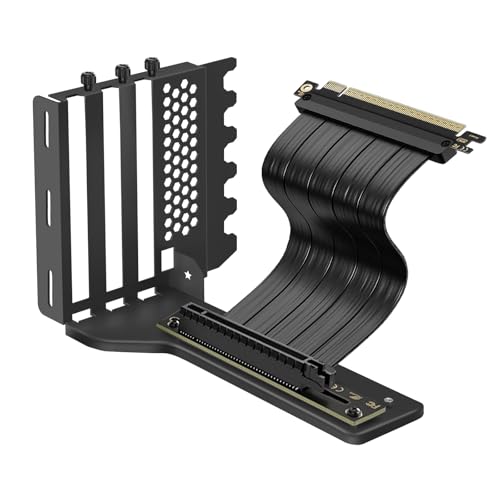
- 200mm PCIe 4.0 x16 riser included
- Listed for full-break ATX, micro-ATX, and EATX cases
- Supports 2-slot and 3-slot GPU configurations
Best For: A compatible build needing both bracket and Gen4 riser
Gen5 Cable Option
GIGA-MEGA Right-Angle Riser and Steel Bracket

- 16cm PCIe Gen5 right-angle riser included
- L-shaped steel bracket for large GPUs
- Needs at least six expansion-slot spaces
Best For: Gen5 builds with verified slot and cooler clearance
Bracket-Only Pick
JEYI Three-Slot Aluminum GPU Mount
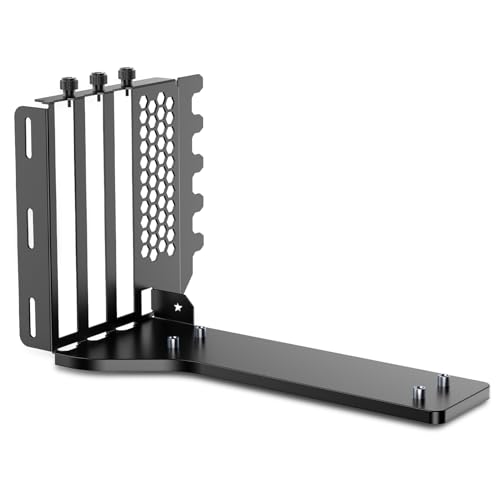
- Bracket only; riser cable not included
- Fits many 2-slot and 3-slot GPUs
- Requires at least seven PCIe slots and an open structure
Best For: Builders who already have a compatible x16 riser
NZXT H7 Fit
NZXT Steel Mount with 175mm Gen4 Riser

- Specified for NZXT H7-series cases
- 175mm PCIe 4.0 x16 riser included
- Thick steel anti-sag bracket
Best For: NZXT H7-series builds
Best for Flexible Case Fit – Cooler Master Vertical GPU Holder V3
If you want a universal vertical gpu mount for a standard ATX build or a compatible Micro-ATX case, the Cooler Master V3 offers practical positioning flexibility. Its included 165mm PCIe 4.0 riser works with PCIe 4.0 and 5.0 motherboards and GPUs.
Best For: Builders who want tool-free GPU positioning across compatible ATX and Micro-ATX cases.
Pros:
- Fits most traditional seven-slot ATX cases and supports modern three-slot GPUs.
- Removable bracket allows installation in most traditional four-slot Micro-ATX cases.
- Adjusts up to 65mm horizontally and 30mm toward the side panel without tools.
Cons:
- May block the rear fan in some cases.
- The included riser is PCIe 4.0, not PCIe 5.0.
The removable bracket makes this a useful option when case size varies between builds, but check rear-fan clearance before buying.
Best PCIe 5.0 All-Rounder – Cooler Master Gen5 Vertical GPU Holder
For buyers seeking a universal vertical gpu mount with a PCIe 5.0 connection, this Cooler Master Gen5 kit includes a 165mm PCIe 5.0 x16 riser. It is designed for E-ATX, ATX, and Micro-ATX cases with at least four PCI slots available.
Best For: Builders with a compatible case who want a PCIe 5.0 riser and adjustable placement for a heavy GPU.
Pros:
- Included PCIe 5.0 x16 riser is backward compatible with older PCIe standards.
- Supports GPUs of any length up to three slots wide.
- Tool-less adjustment moves the GPU up to 65mm toward the front and 30mm toward the side panel.
- Reinforced SGCC steel helps support large cards and reduce sag.
Cons:
- Requires at least four PCI slots for installation.
- Does not support GPUs wider than three slots.
This is a strong choice when riser generation and straightforward positioning matter more than support for extra-thick four-slot cards.
Best Angled Showcase – EZDIY-FAB AH18 ARGB GPU Mount
The EZDIY-FAB AH18 takes a different approach to a universal vertical gpu mount: it lets you tilt the card from 0 to 45 degrees and adds ARGB lighting. It is intended for most full- and mid-tower ATX cases with at least seven available expansion slots.
Best For: ATX showcase builds with enough internal clearance for a tilted, illuminated GPU.
Pros:
- Adjustable 0–45° GPU viewing angle.
- Includes a 200mm PCIe 5.0 x16 riser that is backward compatible with earlier PCIe generations.
- Offers magnetic attachment to metal surfaces or fan-mount bases.
- Steel construction supports large GPUs and helps reduce sag.
Cons:
- Requires at least seven available expansion slots.
- Needs GPU width plus 35mm of clearance below the CPU cooler; 190mm or more between the motherboard tray and side panel is recommended.
The tilt and lighting make this the visual standout, but its clearance requirements deserve careful measurement before purchase.
Best for Four-Slot GPUs – LIAN LI VG4v4 Vertical GPU Kit
For an extra-thick graphics card, this universal vertical gpu mount candidate supports GPUs up to four slots wide and includes a 200mm PCIe 5.0 x16 riser. The LIAN LI VG4v4 also offers three height settings and multiple tilt positions, though it is not guaranteed to fit every ATX case.
Best For: Builders with a verified compatible case and a heavy, four-slot GPU.
Pros:
- Supports graphics cards up to four slots thick.
- Adjustable support arm is rated for GPUs weighing up to 10kg.
- Three height levels and forward, neutral, or backward tilt provide positioning options.
- Includes a PCIe 5.0 riser compatible with PCIe 2.0–4.0.
Cons:
- Needs six accessible expansion slots for vertical mounting or seven for angled mounting.
- Shifts the GPU forward by 31mm; nearby coolers, fans, radiators, or motherboard accessories may interfere.
- GPU OC buttons and some triple full-size DisplayPort layouts may cause fit issues.
Its four-slot capacity and support arm address demanding GPUs, but check the rear opening and surrounding component clearances rather than assuming a universal fit.
Gen4 All-in-One Kit – Vertical GPU Mount with 200mm Riser
If you’re shopping for a universal vertical gpu mount, this kit pairs an aluminum bracket with a 200mm PCIe 4.0 x16 riser cable. It is listed for ATX, micro-ATX, and EATX cases with full-break PCIe expansion slots, but you should still check clearance around your GPU and side panel.
Best For: Builders who want a bracket and Gen4 riser together for a compatible case.
Pros:
- Includes a 200mm PCIe 4.0 riser with a right-angle connector.
- Supports 2-slot and 3-slot GPU configurations.
- Aluminum bracket is rated by the seller to support GPUs up to 5 kg.
Cons:
- Requires full-break expansion slots; case fit is not guaranteed by the ATX label alone.
- The included riser is PCIe 4.0, not PCIe 5.0.
This is a convenient single-purchase option if its bracket layout and 200mm cable suit your build. Treat the seller’s cooling-improvement figures as a claim, not a guaranteed result.
Gen5 Cable Option – GIGA-MEGA Right-Angle Riser and Steel Bracket
This take on a universal vertical gpu mount combines a 16cm PCIe Gen5 right-angle riser with a low-profile, L-shaped steel bracket. Its faster-generation cable is appealing for a newer build, but the specified case-space requirements make measuring essential.
Best For: Builders seeking a Gen5 riser kit who can verify case clearance before ordering.
Pros:
- Included riser is specified for PCIe Gen5, Gen4, Gen3, and earlier generations.
- Shielded Twinax ribbon cable is designed to be flexible.
- L-shaped steel bracket is intended to support large, heavy GPUs.
Cons:
- Requires at least six expansion-slot spaces.
- Case ribs between rear PCIe slots may obstruct DisplayPort or HDMI plugs.
- A vertically mounted GPU may conflict with a large air-cooled CPU radiator.
Choose this kit for its included Gen5 cable only after checking slot layout, video-output access, and cooler clearance. The seller notes that some cases with rear-slot ribs may need modification.
Bracket-Only Pick – JEYI Three-Slot Aluminum GPU Mount
For buyers who already have a riser cable, this bracket-only choice offers a route to a universal vertical gpu mount without paying for another cable. JEYI lists compatibility with many 2-slot and 3-slot GPUs in suitable ATX and EATX cases.
Best For: Builders who already own a compatible PCIe x16 riser cable.
Pros:
- Aluminum bracket accommodates many 2-slot and 3-slot GPUs.
- Designed for use with many PCIe 5.0, 4.0, and 3.0 x16 riser cables.
- Includes mounting tools and three foam pads of different thicknesses.
Cons:
- No riser cable is included.
- Requires a case with at least seven PCIe slots and an open slot structure; middle baffles may need cutting otherwise.
This is the practical pick if you can match an existing riser to the bracket. Confirm the bracket dimensions and your case’s rear-slot design before purchasing.
NZXT H7 Fit – NZXT Steel Mount with 175mm Gen4 Riser
Not every universal vertical gpu mount is the best choice for a specific case. If you own an NZXT H7-series case, this purpose-matched kit combines a thick steel bracket with a 175mm PCIe 4.0 x16 riser cable.
Best For: NZXT H7-series owners who want the stated case-specific fit.
Pros:
- Bracket and riser are specified to fit NZXT H7-series cases.
- Thick steel bracket is designed to hold heavy GPUs and resist sag.
- Includes a 175mm PCIe 4.0 x16 riser cable.
Cons:
- Supplied compatibility information identifies NZXT H7-series cases, not general case fit.
- PCIe 4.0 riser is not specified for Gen5 operation.
For an H7 build, the documented fit is the main advantage over a more universal-looking kit. Owners of other cases should confirm compatibility rather than assume this bracket will fit.
How We Picked the Best Universal Vertical GPU Mount
We focused on eight kits that offer a range of bracket styles, riser generations, finishes, and mounting approaches. We prioritized the details that determine whether a kit is useful in a real build: expansion-slot requirements, GPU thickness clearance, riser specifications, cable length, and the space left between the GPU fans and the side panel. A product labeled “universal” is not guaranteed to fit every case or graphics card, so check the manufacturer’s installation diagram before buying.
Quick Comparison: Which Kit Fits Your Build?
For a current PCIe 5.0 build, start with the Cooler Master Gen5, EZDIY-FAB AH18, LIAN LI VG4v4, JEYI, or the listed Gen5 right-angle riser-and-bracket kit, then confirm your case fit. The Cooler Master V3 is another flexible holder option; verify the riser specification of the exact package you select. If PCIe 4.0 meets your needs, the NZXT kit and the listed 200 mm riser kit offer straightforward alternatives. The EZDIY-FAB AH18 stands out if you want ARGB and angle adjustment; the white Cooler Master and LIAN LI kits suit a matching light-colored build.
Key Buying Factors for a Universal Vertical GPU Mount
Case Slots and Bracket Compatibility
Count the rear expansion slots your case makes available and check whether the mount replaces slot covers or needs a dedicated vertical opening. Some brackets require modifications or extra space behind the case’s slot frame. The LIAN LI VG4v4, for example, is listed as a four-slot kit; that does not mean it fits every case with four open slots. Check the case and kit compatibility lists together.
GPU Thickness, Panel Clearance, and Cooling
Measure your card’s height, length, and thickness, including its cooler and power connector. A thick GPU positioned close to a glass panel can struggle to draw in air. Leave adequate room for the fans, and check where the power cable will bend—especially on large, high-power cards. If clearance is tight, a conventional horizontal installation may be the better choice.
Riser Generation and Cable Routing
Choose a riser rated for the PCIe generation you intend to use, and confirm its connector orientation and length suit your motherboard and mounting position. PCIe 4.0 risers can be appropriate for many builds, but do not assume a PCIe 5.0 link will operate at full Gen5 speed through a Gen4-rated cable. Route the riser without sharp bends or pressure against fans and side panels. If you encounter detection or stability issues, verify that the riser is seated properly and check your motherboard’s PCIe link settings.
Who Should Buy Which Universal Vertical GPU Mount?
Choose a Gen5-rated kit if you want that riser specification for a compatible platform; pick a Gen4 kit if it fits your build and offers better value. Choose EZDIY-FAB for an ARGB-focused display build, or a white Cooler Master or LIAN LI option for a coordinated finish. Consider NZXT if you want a steel bracket and a listed 175 mm Gen4 riser. Above all, buy the Universal Vertical GPU Mount whose documented case fit and GPU clearance match your hardware—not the one with the broadest compatibility claim.
