
A universal laptop charger can be a practical replacement when your original adapter fails or goes missing—but a long list of supported brands does not guarantee a match for your laptop.
These 10 options include mostly 90W multi-tip adapters, a 65W adjustable-voltage model, and a USB-C-capable choice. Start with your laptop’s power requirements and connector before comparing extras.
Best 10 Universal Lapchargers Picks for 2026
Broad Voltage Pick
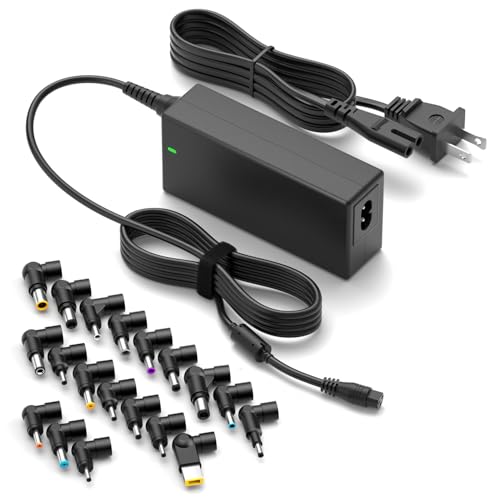
- 19 supplied DC tips
- 15V–20V listed outputs
- 90W maximum
Best For: Compatible barrel-connector laptops with varied voltage needs
USB-C Option
Belker 90W Charger with 20 Tips

- USB-C plug included
- 20 additional connectors
- Up to 90W output
Best For: Compatible USB-C devices and laptops using supplied tips
Barrel-Tip Alternative
ELECBRAiN 90W Charger with 16 Tips

- 16 DC connector tips
- 15V–20V listed outputs
- No USB-C tip
Best For: Compatible barrel-connector laptops rated at 90W or less
Best for Charging a Phone Too
Belker 90W Charger with USB Port

- 19 laptop tips included
- 5V/2.4A USB charging port
- 18.5V–20V outputs; 90W maximum
Best For: Laptop and phone charging from one adapter
Best Straightforward Replacement
Belker 90W Adapter with 15 Tips

- 15 interchangeable tips
- 100–240V AC input
- Not for USB-C or over-90W laptops
Best For: Replacing a compatible non-USB-C laptop adapter
Everyday 90W Pick
FJEZCHN Universal Laptop Charger with 16 Tips

- 90W maximum output
- 16 interchangeable barrel tips
- 100–240V AC input
Best For: Compatible 45W–90W laptops needing a replacement charger
Tip-Spec Pick
LHYSFIY 90W Charger with 16 Listed Connectors

- 90W rated power
- 16 tips with listed sizes and voltages
- Not for USB-C ports
Best For: Buyers matching a laptop port to published tip specifications
Multi-Voltage Pick
Powseed 65W Adapter for Laptops and DC Devices

- 5V–20V listed DC outputs
- 16 center-positive tips
- 9-foot total cord length
Best For: Compatible laptops and DC devices rated 65W or less
Lenovo-Friendly Pick – ROLADA 90W Charger with 15 Tips
Among universal lapchargers, this ROLADA adapter is worth a look if you need a replacement for a listed Lenovo, HP, Dell, Acer, or Toshiba laptop. Its 15 interchangeable tips cover multiple connector styles, but you should confirm your laptop’s plug, voltage, and wattage before ordering.
Best For: Owners of a listed barrel-connector laptop who want a 90W adapter with several tip options.
Pros:
- Includes 15 interchangeable connector tips.
- Supports listed 18.5V, 19V, 19.5V, and 20V outputs, up to 90W.
- Accepts 100–240V AC input.
Cons:
- No USB-C tip or M1 connector is included.
- Fit and electrical requirements must be checked for your exact model.
This is a practical option for compatible older-style laptop ports, not a substitute for a USB-C charger. Match the connector and power requirements first.
Broad Voltage Pick – ZOZO 90W Charger with 19 Tips
If you’re comparing universal lapchargers for laptops with different power requirements, the ZOZO 90W adapter offers automatic voltage adjustment and 19 supplied tips. Its listed DC outputs run from 15V to 20V; check your model’s connector and power rating before relying on it.
Best For: Households with compatible barrel-connector laptops that require one of its listed 15V–20V outputs.
Pros:
- Includes 19 DC tips and an AC power cord.
- Automatically adjusts among its supported output voltages.
- Accepts 100–240V AC input.
Cons:
- Not intended for laptops requiring more than 90W.
- A listed brand alone does not guarantee the right tip for your model.
The wider listed voltage range makes this a flexible barrel-connector choice. Confirm the exact tip and required voltage rather than choosing by brand alone.
USB-C Option – Belker 90W Charger with 20 Tips
The Belker stands apart from the other universal lapchargers here by including a USB-C plug as well as 20 other connectors. Its listed outputs span 5V to 20V with a 90W maximum, making it a candidate for compatible USB-C devices and laptops that use one of the supplied tips.
Best For: Someone who needs a USB-C plug alongside connector options for compatible laptops.
Pros:
- Includes a USB-C plug and 20 additional connectors.
- Lists outputs from 5V through 20V, up to 90W.
- Accepts 100–240V AC input.
Cons:
- Its 90W maximum will not meet higher-wattage requirements.
- Connector fit and USB-C charging requirements still need model-specific verification.
Choose this one when USB-C is part of your charging needs, but check your device’s required wattage and the relevant plug before buying.
Barrel-Tip Alternative – ELECBRAiN 90W Charger with 16 Tips
For shoppers considering universal lapchargers for a listed HP, Dell, Acer, or Toshiba model, the ELECBRAiN adapter supplies 16 DC connector tips and automatically adjusts among its supported 15V–20V outputs. It is intended for compatible laptops rated at 90W or less.
Best For: Owners of a compatible barrel-connector laptop who can verify the included tip and a power requirement no greater than 90W.
Pros:
- Comes with 16 DC tips, a US power cord, and a user manual.
- Lists 15V, 16V, 18.5V, 19V, 19.5V, and 20V outputs.
- Accepts 100–240V AC input.
Cons:
- No USB-C or 2.5 × 0.7 mm connector is included.
- Not compatible with every laptop model or laptops requiring more than 90W.
This is another useful barrel-tip option if its connector chart matches your laptop. Check the exact tip, voltage, and wattage rather than assuming a brand match is enough.
Best for Charging a Phone Too – Belker 90W Charger with USB Port
Among universal lapchargers, this Belker adapter stands out for its 5V/2.4A USB port, which lets you charge a phone or another 5V device alongside a laptop. It includes 19 tips and supports 18.5V, 19V, 19.5V, and 20V laptops drawing up to 90W.
Best For: A laptop user who also wants a separate USB charging port at the desk.
Pros:
- Includes 19 interchangeable laptop tips.
- USB port supplies up to 5V/2.4A for compatible devices.
- Works with compatible 40W, 45W, and 65W laptops as well as models requiring up to 90W.
Cons:
- Not suitable for laptops requiring more than 90W.
- You still need to match your laptop’s connector and power requirements to the supplied tips and outputs.
The extra USB port is the reason to choose this version; check tip fit and voltage before buying.
Best Straightforward Replacement – Belker 90W Adapter with 15 Tips
If you’re comparing universal lapchargers to replace a missing barrel-style adapter, this Belker model provides 15 tips and 18.5V, 19V, 19.5V, and 20V outputs. Its 100–240V input also accommodates different mains voltages, provided you have the appropriate wall-plug arrangement.
Best For: Someone replacing a compatible 45W, 65W, or 90W non-USB-C laptop adapter.
Pros:
- Includes 15 interchangeable tips for a range of listed laptop models.
- Supports 100–240V, 50–60Hz AC input.
- Comes with a power cord, tips kit, and user guide.
Cons:
- Does not support USB-C laptops.
- Cannot power devices requiring more than 90W.
This is a practical replacement if one of its tips fits and your laptop’s voltage and wattage requirements match; the brand list alone is not a fit guarantee.
Best for 16V Laptop Support – WENYAA 90W Charger with 16 Tips
This WENYAA model is worth a look among universal lapchargers if your laptop needs 16V: its selectable outputs cover 16V, 18.5V, 19V, 19.5V, and 20V. It includes 16 interchangeable tips and supports compatible laptops requiring no more than 90W.
Best For: A non-USB-C laptop owner who needs one of its listed voltages, particularly 16V, and can verify tip fit.
Pros:
- Offers a 16V setting alongside four other output voltages.
- Includes 16 interchangeable tips.
- Supports 100–240V AC input and compatible 45W and 65W devices.
Cons:
- No USB-C tip or Samsung Chromebook port compatibility.
- Not for laptops requiring more than 90W.
Check the laptop model and connector diagram as the seller advises, then confirm its required voltage and wattage before selecting a tip.
Everyday 90W Pick – FJEZCHN Universal Laptop Charger with 16 Tips
If you’re comparing universal lapchargers for a spare at home, school, or work, this FJEZCHN adapter covers many barrel-connector laptops with 16 interchangeable tips. Its listed outputs span 15V to 20V, with a 90W maximum.
Best For: Replacing a compatible 45W, 65W, or 90W laptop charger when you need several tip options.
Pros:
- Includes 16 connector tips for select HP, Dell, Lenovo, Acer, ASUS, and other laptops.
- Accepts 100–240V AC input for use with appropriate local plug arrangements.
- Lists over-voltage, over-current, overheating, and short-circuit protection.
Cons:
- Not suitable for laptops requiring more than 90W.
- Voltage and connector fit must be checked against your laptop before purchase.
This is a practical general-purpose replacement if its output and one of its tips match your device; the broad brand list alone does not guarantee a fit.
Tip-Spec Pick – LHYSFIY 90W Charger with 16 Listed Connectors
Among universal lapchargers, this LHYSFIY 90W adapter stands out for listing the voltage and dimensions of each of its 16 tips. That detail helps you compare the included connectors with an existing charger rather than relying only on a laptop brand name.
Best For: Buyers who can verify their laptop’s charging voltage and barrel-port dimensions against the listed tips.
Pros:
- Provides 16 connector options with individual voltage and size specifications.
- Lists compatibility with select HP, Dell, Lenovo, ASUS, Toshiba, Sony, and Fujitsu models.
- Offers up to 90W for laptops that match an included connector and output.
Cons:
- Not compatible with USB-C charging ports.
- The listing excludes Samsung Chromebooks with a 2.5 × 0.7 mm port.
The detailed tip list is useful, but check your exact laptop model, required voltage, and port before choosing it—especially if your device charges through USB-C.
Multi-Voltage Pick – Powseed 65W Adapter for Laptops and DC Devices
If your search for universal lapchargers extends to lower-voltage DC equipment, the Powseed 65W adapter is the most flexible of these three on listed output range. It offers multiple DC voltages from 5V to 20V, 16 center-positive tips, and a 9-foot total cord length.
Best For: Powering compatible laptops and other center-positive DC devices that draw no more than 65W.
Pros:
- Multiple output-voltage options cover a wider range than laptop-only adapters.
- Includes 16 tips, including connectors designated for select HP and Dell laptops.
- Lists over-voltage, over-current, short-circuit, and overheat protection.
Cons:
- 65W maximum rules out devices needing higher wattage.
- Requires a match for voltage, connector size, and center-positive polarity.
Choose this for its range of compatible uses, not simply its long device list: confirm your device’s electrical requirements and plug fit before connecting it.
How We Picked the Best Universal Lapchargers
We focused on the specifications that determine whether a replacement adapter is usable: stated wattage, voltage support, included connector tips, and USB-C capability. The selection covers mostly 90W multi-tip chargers, plus a 65W adjustable-voltage option. Product names and brand-compatibility claims are starting points, not proof that a charger fits a particular laptop model.
Quick Comparison
Most options here are 90W adapters intended for laptops with compatible barrel-style charging ports. The Belker 90W model with 20 tips also lists USB-C charging, while the Belker 90W model with 19 tips adds a USB port; confirm what that port is designed to power before treating it as laptop charging support. The Powseed 65W model lists several selectable voltages and may suit a lower-power device if its connector and current requirements match. Tip counts vary, but the right tip matters more than the total number.
Key Buying Factors for Universal Lapchargers
Match Voltage and Wattage First
Read the output label on your original adapter or your laptop’s specifications. A replacement should provide the required voltage and enough wattage; a higher wattage rating is generally fine when voltage and connector requirements match, because the laptop draws the power it needs. Do not use an adapter with the wrong voltage. For adjustable-voltage models, verify the setting before plugging in.
Check the Exact Connector
Match the plug’s outside and inside dimensions, shape, and polarity—not just the laptop brand. Some laptops use a center pin or identification signal that a physically fitting third-party tip may not provide. Check the seller’s tip chart against your laptop model, and confirm that any required tip is included rather than sold separately.
Distinguish USB-C Charging from a USB Port
A USB-C charging claim is different from having a USB port for another device. If your laptop charges over USB-C, verify that the charger supports USB-C Power Delivery at a wattage and voltage profile your laptop accepts. A barrel-plug adapter without a USB-C tip will not become a USB-C laptop charger through a separate USB port.
Look at Everyday Practicalities
Check cord length, plug orientation, portability, and whether replacement tips are available. Review the listing for safety certifications and the return policy, particularly when fit information is unclear. Stop using an adapter if the connector is loose, power cuts in and out, or the charger becomes unusually hot.
Who Should Buy Which Universal Lapchargers?
Choose a 90W multi-tip model if your laptop uses a conventional charging jack and you can confirm its voltage and exact tip. Consider the USB-C-capable Belker option only after verifying your laptop’s USB-C Power Delivery requirements. The Powseed 65W model is worth checking for a compatible lower-power laptop or monitor, but not for a laptop that requires more than 65W. If you cannot verify the voltage, connector, and required charging protocol, buy a model-specific replacement instead of guessing among Universal Lapchargers.
