
Creating a peaceful workspace can markedly boost your productivity, and choosing the right ultra-quiet desk workstation is essential. With advanced noise-canceling technologies and sound-dampening materials, these workstations can provide a serene environment. You’ll find options like the Dell ECT1250 and Quiet Rackmount Computer commendable for their performance. But what features truly set them apart? Let’s explore the top models and what you should consider before making your choice.
Dell Tower Desktop ECT1250 – Intel Core Ultra 7-265 Processor

If you’re looking for a powerful workstation that won’t disrupt your work environment, the Dell Tower Desktop ECT1250 is an excellent choice. With its Intel Core Ultra 7-265 processor running at 2.4 GHz and 32GB DDR5 memory, it handles multitasking and streaming effortlessly. The 1TB M.2 SSD guarantees fast boot times and program loading. Plus, its sleek design, made from recycled materials, means you can work sustainably. Enjoy the quiet operation while connecting up to four FHD monitors or two 4K displays. Security features like the hardware TPM chip keep your data safe, making it a smart investment for any user.
Best For: Professionals and creatives seeking a high-performance desktop that balances power, efficiency, and eco-friendliness in a compact design.
Pros:
- Powerful Performance: Equipped with an Intel Core Ultra 7-265 processor and 32GB DDR5 memory for seamless multitasking.
- Sustainable Design: Crafted from recycled materials, promoting environmentally friendly usage.
- Versatile Connectivity: Supports multiple monitor setups for enhanced productivity, accommodating both FHD and 4K displays.
Cons:
- Limited Upgrade Options: Some users report restrictions on SSD upgrades and power supply compatibility.
- External Storage Recommendation: For media files, external storage solutions are suggested due to internal limitations.
- Mixed Online Purchase Experience: Customer feedback indicates inconsistencies with Dell’s website compared to other purchasing platforms like Amazon.
Dell ECT1250 Business Desktop (Intel Ultra 7-265K, 32GB DDR5, 2TB PCIe SSD)
For professionals seeking a powerful yet discreet computing solution, the Dell ECT1250 Business Desktop stands out with its ultra-quiet design and impressive Intel Ultra 7-265K processor. With 20 cores and clock speeds reaching 5.5 GHz, multitasking becomes seamless. You’ll appreciate the 32GB DDR5 memory and 2TB PCIe SSD, ensuring ample storage and speed. Connect dual 4K monitors effortlessly while enjoying Wi-Fi 6 and Bluetooth for reliable wireless access. Plus, Windows 11 offers a user-friendly interface. Security features like a hardware TPM chip and built-in lock slot provide peace of mind. The included wireless keyboard and mouse complete this stylish workstation.
Best For: Professionals and businesses seeking a powerful, quiet, and reliable desktop for multitasking and productivity.
Pros:
- Ultra-quiet design ensures minimal noise disruption in office environments.
- Dual 4K monitor support enhances productivity with expanded screen real estate.
- Robust security features including hardware TPM chip and lock slot for data protection.
Cons:
- Limited upgrade options for memory and storage compared to some competitors.
- Higher price point may not be suitable for budget-conscious users.
- Weight and size may be cumbersome for users needing a portable solution.
Dell Slim Desktop ECS1250 (Intel Core Ultra 5-225, 16GB DDR5, 512GB SSD)

The Dell Slim Desktop ECS1250 stands out as an ideal choice for professionals seeking a powerful yet ultra-quiet workstation. With its Intel Core Ultra 5-225 processor and 16GB DDR5 memory, you’ll experience seamless multitasking and enhanced productivity through built-in AI. The 512GB M.2 SSD offers ample storage, while connectivity options let you connect up to four FHD monitors or two 4K displays. Its sleek design fits perfectly in small spaces, crafted from recycled materials for sustainability. Plus, tool-less access allows for easy upgrades, and security features like a TPM chip guarantee your data stays protected when you’re away.
Best For: Professionals seeking a powerful, compact workstation for multitasking and enhanced productivity.
Pros:
- Seamless multitasking capabilities with Intel Core Ultra 5-225 processor and 16GB DDR5 memory.
- Sustainable design utilizing recycled materials and a sleek, modern aesthetic suitable for small workspaces.
- Flexible connectivity options allowing connection of multiple monitors, enhancing productivity for visual tasks.
Cons:
- Limited built-in graphics with Intel UHD Graphics, which may not support high-end gaming or graphic-intensive applications.
- Storage size of 512GB may require external solutions for large file storage or extensive multimedia libraries.
- Potential noise from components during heavy usage, despite being designed as an ultra-quiet workstation.
Acer Aspire Desktop (2025 Model)
Engineered specifically for professionals who need a serene workspace, the Acer Aspire Desktop (2025 Model) stands out with its ultra-quiet design, making it an ideal choice for those who value a distraction-free environment. With an Intel Celeron N4505 processor and 32GB RAM (upgradable to 64GB), it handles multitasking smoothly. The 1TB PCIe SSD provides ample storage, while integrated Intel UHD Graphics delivers stunning visuals. You’ll appreciate its compact size, fitting seamlessly into your office setup. Plus, its extensive connectivity options, including Wi-Fi 6, make staying connected effortless. Experience reliability and performance without the noise, enhancing your productivity.
Best For: Professionals seeking a quiet and efficient desktop for multitasking and daily computing tasks.
Pros:
- Ultra-quiet design enhances focus in serene work environments.
- Ample storage with 1TB PCIe SSD, expandable up to 4TB for extensive data needs.
- Comprehensive connectivity options including Wi-Fi 6 and multiple USB ports for seamless integration with peripherals.
Cons:
- Limited graphics capability due to integrated Intel UHD Graphics, which may not suffice for heavy gaming or graphic design.
- Weight of 12 lb may be cumbersome for those needing a highly portable solution.
- Upgradability may require technical knowledge, as some components are customizable but may not be straightforward to access.
Quiet Rackmount Computer (2U Rack Mount Server or Workstation)

Looking for a powerful yet ultra-quiet workstation? The Quiet Rackmount Computer features an Intel Core Ultra 7 265 processor with 20 cores and 20 threads, offering speeds up to 5.5 GHz. With 96GB DDR5 RAM and a 2TB PCIe NVMe SSD, you’ll experience seamless multitasking and lightning-fast data transfers. Its integrated Intel UHD graphics and mATX motherboard provide room for expansion. Assembled in the USA and rigorously tested, this workstation comes with lifetime support and a 3-year limited hardware warranty. Elevate your gaming and content creation while maintaining a tranquil workspace with this exceptional machine.
Best For: This powerful and ultra-quiet workstation is best for gamers and content creators looking for high performance without noise distractions.
Pros:
- Exceptional Performance: Equipped with a powerful Intel Core Ultra 7 265 processor and 96GB DDR5 RAM for seamless multitasking.
- Fast Storage: The 2TB PCIe NVMe SSD ensures hyper-fast bootup and data transfer speeds, significantly outperforming traditional hard drives.
- Comprehensive Support: Comes with lifetime technical support and a 3-year limited hardware warranty for peace of mind.
Cons:
- Price Point: High-performance components may come with a premium price, making it less accessible for budget-conscious users.
- Integrated Graphics Limitations: While suitable for basic tasks, integrated Intel UHD graphics may not meet the demands of high-end gaming or intensive graphic work.
- Size Constraints: As a 2U rackmount, it may require specific rack space and may not be suitable for all environments or setups.
Dell Ect1250 Tower Desktop PC

If you’re seeking a powerful yet quiet workstation for demanding tasks, the Dell Ect1250 Tower Desktop PC stands out with its Intel Core Ultra 5-225 processor, which boasts a 10-core design and a turbo boost capability of up to 4.90GHz. With 32GB of DDR5 RAM and a 1TB NVMe SSD, it guarantees smooth multitasking and ample storage for your projects. The Intel UHD Graphics provides clear visuals, while its Wi-Fi 6 and Bluetooth 5.4 connectivity keep you linked effortlessly. Compact and weighing just 12.02 lbs, it fits perfectly into any workspace, making it an ideal choice for your professional needs.
Best For: Professionals and creatives seeking a powerful, compact workstation for demanding tasks and multitasking capabilities.
Pros:
- High-performance with a 10-core Intel Core Ultra processor and turbo boost up to 4.90GHz for demanding applications.
- Ample memory of 32GB DDR5 RAM ensures smooth multitasking and efficient workflow.
- Robust connectivity options including Wi-Fi 6 and Bluetooth 5.4 for seamless networking and device connections.
Cons:
- Limited graphics performance with Intel UHD Graphics, which may not suit high-end gaming or graphic-intensive applications.
- Weight of 12.02 lbs may be heavier than some users prefer for portability.
- No dedicated graphics card, which could limit performance for specific professional tasks such as video editing or 3D rendering.
Dell 2025 ECT1250 Business Desktop
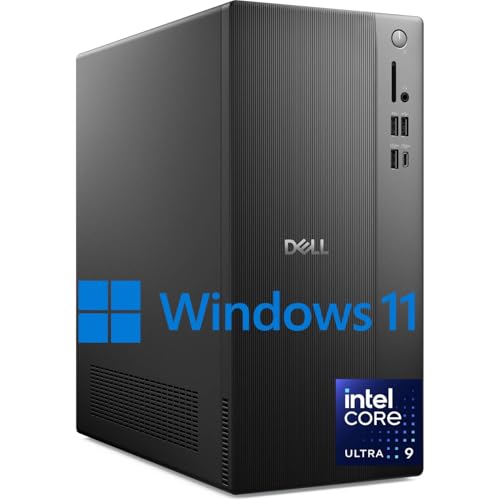
For professionals seeking a powerhouse of productivity, the Dell 2025 ECT1250 Business Desktop stands out with its Intel Ultra 9-285K processor. With 24 cores and clock speeds up to 5.7 GHz, you’ll experience seamless multitasking. You can configure it with up to 64GB of DDR5 memory and enjoy lightning-fast boot times with a 4TB PCIe M.2 SSD. The desktop offers versatile connectivity options, including USB-C and HDMI ports, along with Wi-Fi 6 and Bluetooth. Plus, built-in security features keep your data safe. Running on Windows 11, it comes with a stylish wireless keyboard and mouse, perfect for your workspace.
Best For: Professionals and businesses seeking a high-performance desktop for multitasking and productivity.
Pros:
- Powerful Performance: Equipped with an Intel Ultra 9-285K processor with 24 cores, enabling seamless multitasking.
- Ample Storage: Configurable with up to 4TB PCIe M.2 SSD for fast boot times and handling large files.
- Comprehensive Connectivity: Offers a wide range of ports including USB-C and HDMI, along with Wi-Fi 6 and Bluetooth for reliable connectivity.
Cons:
- Price Point: Higher-end configuration may be costly for small businesses or budget-conscious users.
- Size and Weight: As a desktop, it may require dedicated space, not suitable for users needing portability.
- Limited Graphics Capability: May not meet the demands of graphic-intensive applications compared to dedicated gaming or workstation PCs.
Dell 2025 ECT1250 Business Desktop
The Dell 2025 ECT1250 Business Desktop stands out as an ideal choice for professionals seeking an ultra-quiet workstation that doesn’t compromise on power. With its Intel Ultra 7-265K processor boasting 20 cores and clock speeds up to 5.5 GHz, you’ll experience seamless multitasking and productivity. Configurable with up to 64GB DDR5 memory and a 4TB PCIe M.2 SSD, it handles large files effortlessly. Multiple connectivity options guarantee you stay connected, while the hardware TPM security chip keeps your data safe. Running Windows 11, it delivers a user-friendly experience, complete with a stylish wireless keyboard and mouse.
Best For: Professionals seeking a powerful, ultra-quiet workstation for seamless multitasking and productivity.
Pros:
- Powerful Performance: Equipped with an Intel Ultra 7-265K processor offering 20 cores and clock speeds up to 5.5 GHz for enhanced productivity.
- Ample Memory and Storage: Configurable with up to 64GB DDR5 memory and a 4TB PCIe M.2 SSD, allowing for efficient handling of large files.
- Comprehensive Connectivity: Features a versatile selection of ports and Wi-Fi 6, ensuring reliable and fast connections.
Cons:
- Potential Overkill for Casual Users: The high performance and features may be excessive for users with basic computing needs.
- Price Point: May be more expensive compared to entry-level desktops, which could be a barrier for budget-conscious buyers.
- Limited Upgradeability: Some components might be difficult to upgrade or replace in the future, depending on the design.
GMKtec AI Mini PC Ultra 9 285H

Designed with professionals and gamers in mind, the GMKtec AI Mini PC Ultra 9 285H stands out for its impressive turbo clock speed of 5.4 GHz and efficient cooling system. With 16 cores and 96GB of DDR5 RAM, it handles multitasking effortlessly. The 2TB PCIe SSD guarantees quick access to your files, while the Intel Arc 140T GPU delivers stunning graphics for gaming and video editing. Enjoy seamless connectivity with 2.5GbE Ethernet and WiFi 6. Plus, its quiet operation keeps your workspace peaceful, making it an ideal choice for both work and play.
Best For: Professionals and gamers seeking a high-performance mini PC for multitasking, gaming, and video editing.
Pros:
- High turbo clock speed of 5.4 GHz for excellent performance in demanding applications.
- Large capacity of 96GB DDR5 RAM allows for seamless multitasking and efficient handling of heavy workloads.
- Quiet operation and efficient cooling system ensure a peaceful workspace during intensive tasks.
Cons:
- Limited to 2TB internal storage without additional expansion, which may not suffice for all users.
- Weight of 4.93 pounds may be heavier compared to other mini PCs, affecting portability.
- Price point may be higher than entry-level mini PCs, potentially deterring budget-conscious buyers.
GMKtec Mini PC Workstation with Intel Core i9 13900HK

If you’re seeking a powerhouse that excels in both performance and quiet operation, the GMKtec Mini PC Workstation with the Intel Core i9-13900HK stands out as an exceptional choice. With its 14-core processor reaching a max frequency of 5.4 GHz, 64GB of DDR5 RAM, and a 1TB NVMe SSD, it handles demanding tasks effortlessly. You’ll appreciate the quad-screen support for ultra HD displays, making it ideal for multitasking. The extensive connectivity options guarantee seamless integration into your workspace. Plus, with a solid 4.6-star rating, users praise its reliability and speed, perfect for your peaceful workspace experience.
Best For: Professionals and power users who require high performance for demanding applications like 3D design, video editing, and virtualization.
Pros:
- Exceptional multitasking capabilities with a powerful 14-core Intel Core i9 processor and 64GB DDR5 RAM.
- Extensive connectivity options, including dual HDMI and DisplayPort for quad-screen support and high-speed networking with WiFi6 and 2.5G LAN.
- Highly rated by users for reliability and speed, making it a great choice for a quiet and efficient workspace.
Cons:
- The power supply size may be considered bulky for some users.
- Integrated Intel Iris Xe Graphics may not meet gaming performance expectations for graphics-intensive titles.
- Limited to a 1-year warranty, which may not be sufficient for long-term use.
Factors to Consider When Choosing Ultra Quiet Desk Workstations
When choosing an ultra quiet desk workstation, you’ll want to take into account several key factors. Noise reduction technologies, thermal management systems, and processor performance levels play an essential role in maintaining a peaceful environment. Additionally, look into memory and storage options, as well as the types of ports and connectivity available to make certain your setup meets your needs.
Noise Reduction Technologies
Creating a peaceful workspace is essential for productivity, and noise reduction technologies play a crucial role in achieving that serenity. When selecting an ultra-quiet desk workstation, look for features like sound-dampening materials and advanced cooling systems that minimize operational noise. Opt for components designed for low noise output, such as fanless designs or optimized fans, which can keep decibel levels as low as 20 dB. Solid-state drives (SSDs) are another excellent choice, as they operate silently without moving parts. Additionally, vibration-reducing mounts and enclosures help absorb sound, preventing noise transmission. Finally, consider workstations that implement noise-canceling technologies, which actively reduce environmental noise and create an even quieter workspace.
Thermal Management Systems
Effective thermal management systems are essential for ensuring that your ultra-quiet desk workstation operates efficiently and maintains peak performance. In high-performance environments, advanced cooling technologies like heat sinks, liquid cooling, and optimized airflow designs help prevent overheating while minimizing noise. Look for systems that implement thermal sensors and dynamic fan control, as these adjust fan speeds based on real-time temperatures, reducing noise during low-load scenarios. The design of workstation enclosures matters too; sound-absorbing materials and strategically placed vents can enhance heat dissipation without increasing noise. Finally, maintaining a clean airflow path is vital; dust accumulation can hinder cooling and lead to louder fan operations, so regular cleaning is key to keeping your workstation quiet and efficient.
Processor Performance Levels
Choosing the right processor performance levels is essential for getting the most out of your ultra-quiet desk workstation, especially if you rely on multitasking and demanding applications. Look for processors with a higher number of cores and threads, as these enhance multitasking capabilities. For instance, a processor boasting 20 cores and 20 threads can handle multiple tasks seamlessly. Additionally, clock speed matters—modern processors can reach up to 5.5 GHz, allowing quick execution of instructions. Don’t overlook cache memory; larger sizes, like 36MB, can reduce latency and boost efficiency. If you need advanced performance, consider processors with built-in AI capabilities to optimize your workflow. Finally, verify your processor can support multiple high-resolution displays for an expansive workspace.
Memory and Storage Options
When it comes to memory and storage options for your ultra-quiet desk workstation, consider a setup with at least 32GB of DDR5 RAM. This amount strikes a great balance between performance and multitasking capabilities for most users. For storage, aim for configurations with 1TB to 2TB PCIe SSDs. These drives provide fast boot times and quick access to files while minimizing noise from traditional mechanical drives. Confirm your workstation supports expandable memory, allowing upgrades to 64GB or more as software demands grow. Additionally, look for multiple M.2 slots for SSDs, enabling extra storage without sacrificing performance or introducing noise. This combination will keep your workspace peaceful and efficient.
Port and Connectivity Types
A well-equipped ultra-quiet desk workstation should feature a variety of ports and connectivity options to enhance your productivity. Prioritize USB 3.2, HDMI, and DisplayPort for versatile connections to multiple displays and peripherals. Ascertain the workstation includes Wi-Fi 6 and Bluetooth for fast wireless connectivity, alongside traditional Ethernet for a stable internet connection. Look for USB-C ports for modern devices and SD card readers to simplify file transfers from cameras. Multiple USB ports, such as USB 3.2 Gen 2 and Gen 3, are essential for connecting various devices without needing extra hubs. Finally, don’t forget about audio jacks and microphone ports, which allow seamless integration with headsets or speakers, improving your overall workstation experience.
Build Quality and Materials
Build quality and materials play an integral role in determining the effectiveness of an ultra-quiet desk workstation. The choice of materials can greatly impact sound-dampening capabilities, with recycled materials often providing denser compositions that enhance acoustic performance. A well-constructed workstation minimizes vibrations, so look for designs featuring tool-less entry and removable panels for easy upgrades without sacrificing sound insulation. Compact designs are ideal for noise reduction, as they limit the space for sound to resonate. Additionally, a sleek, modern aesthetic often correlates with quieter operation, as these workstations prioritize optimized airflow and thermal management, reducing reliance on noisy cooling fans. Integrating low-noise fans and efficient thermal solutions is vital for maintaining an unobtrusive workspace.
Size and Form Factor
Choosing the right size and form factor for your ultra-quiet desk workstation is essential for creating an efficient and comfortable workspace. Confirm your workstation fits comfortably without overcrowding, typically requiring a surface area of at least 24 inches deep and 48 inches wide. If space is tight, consider compact designs like mini or slim desktops that still pack a punch. Tower desktops offer more upgrade options but occupy more vertical space, while all-in-one systems save desk space by integrating components into the monitor. Also, pay attention to height; aim for 28 to 30 inches for ideal ergonomic use. Remember, larger cases often provide better airflow and quieter operation, so choose wisely for a peaceful environment.
Energy Efficiency Ratings
When setting up your ultra-quiet desk workstation, energy efficiency ratings play an essential role in maintaining both performance and cost-effectiveness. Look for Energy Star certifications, which indicate that your workstation meets strict energy efficiency guidelines set by the EPA. Higher efficiency ratings can reduce electricity consumption, lowering your utility bills and carbon footprint. Opt for workstations with components like 80 PLUS certified power supplies to guarantee at least 80% of consumed energy is used effectively. Consider solid-state drives (SSDs) instead of traditional hard drives, as they consume less power and generate less heat. Additionally, choose models with advanced power management features, like sleep modes, to further enhance energy efficiency during idle times.
