
UGREEN’s NAS lineup covers everyone from first-time home users to demanding creators who need faster shared storage, remote access, and room to grow.
This roundup highlights 10 UGREEN NAS enclosures so you can quickly match the right bay count, networking, and performance to your workflow and budget.
Best 10 Ugreen Nas Enclosures Picks for 2026
Best for Creators
UGREEN DXP2800 2-Bay Desktop NAS

- Intel N100, 8GB DDR5, and 2.5GbE for responsive everyday performance
- Dual M.2 NVMe slots and 4K HDMI add useful flexibility
- AI photo tools and broad device support simplify media management
Best For: Content creators and enthusiasts who want a capable, easy-to-use local storage hub.
Best for Big Local Photo Libraries
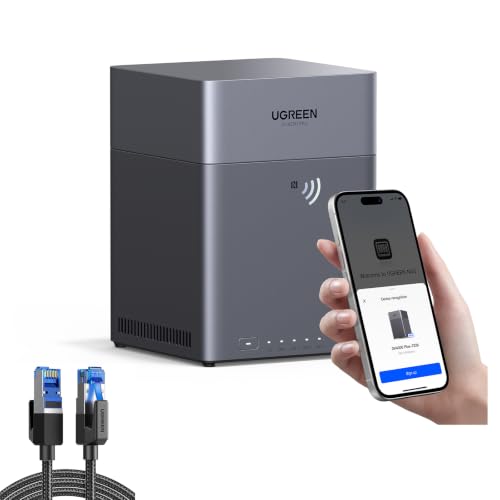
- 4-bay diskless NAS with room to scale storage
- AI photo search, albums, and duplicate cleanup
- Cross-platform access with private local backups
Best For: Home users who want a private, high-capacity NAS for photos, backups, and shared family storage.
Best for Power Users

- Intel Core i3-1315U and DDR5 RAM for strong multitasking
- 10GbE + 2.5GbE networking for fast transfers
- Docker, VMs, and two M.2 NVMe slots add flexibility
Best For: Editors, developers, and advanced home users who need a high-performance diskless NAS.
Best for Beginners
UGREEN NAS DH2300 2-Bay Desktop NAS

- Simple first NAS for private storage and backups
- Up to 64TB capacity for media and files
- AI photo tagging helps organize memories fast
Best For: Beginners who want a straightforward personal NAS for backups and media storage.
Best for Easy Setup

- 10GbE and Ryzen-powered performance
- UGOS Pro with Docker, VMs, and media apps
- Built-in local surveillance and RAID 1 support
Best For: Creators, freelancers, and smart home users who need a fast, expandable NAS.
Best for Large Libraries
UGREEN DH4300 Plus 4-Bay Desktop NAS

- Up to 128TB of local storage capacity
- AI photo tools for search, sorting, and deduping
- Cross-platform access with remote sharing
Best For: Home users who want a high-capacity, private NAS enclosure for backups and media libraries.
Best for Comfort

- Simple setup for first-time NAS users
- Up to 64TB of private storage
- AI photo tools and basic home-media support
Best For: First-time NAS buyers who want easy private storage for photos, videos, and backups.
Best for Performance and 10GbE

- Dual 10GbE for fast transfers and smoother multi-user access
- Ryzen Embedded CPU with expandable RAM for heavier workloads
- HDMI, SD, and USB 10Gbps ports suit creator and smart-home use
Best For: Creators, smart home users, and small teams needing fast local storage with expansion room.
Best Heavy-Duty Pick

- 4-bay design supports up to 128TB
- Beginner-friendly app, NFC, and guided setup
- 2.5GbE, 8GB RAM, and 4K HDMI
Best For: Home users and first-time NAS buyers who want simple private storage with room to expand.
Best for High-Performance Teams
UGREEN NAS DXP8800 Plus 8-Bay NAS

- Dual 10GbE for fast, aggregated networking
- 8-bay design with 2 M.2 NVMe slots
- Intel i5, DDR5, and VM/Docker support
Best For: Teams and advanced users who need fast file transfers and massive expandable storage.
Best for Creators – UGREEN DXP2800 2-Bay Desktop NAS
If you want one of the more capable ugreen nas enclosures for a home office, creator setup, or small team, the DXP2800 is an easy fit. It combines a quad-core Intel N100, 8GB of DDR5 RAM, 2.5GbE networking, dual M.2 NVMe slots, and 4K HDMI in a compact 2-bay design.
Best For: Content creators, enthusiasts, and small teams that want fast local storage, simple sharing, and room to grow without paying cloud fees.
Pros:
- Strong hardware mix for the price, including Intel N100, 8GB DDR5, and 2.5GbE
- Dual M.2 NVMe slots add flexibility for caching or extra fast storage
- Easy access across Windows, macOS, mobile, web, and smart TV apps
- AI photo organization and duplicate removal help streamline media libraries
Cons:
- Diskless model means you still need to buy drives separately
- 2-bay capacity is good for many users, but not ideal for large-scale expansion
- Advanced features may be more than casual backup users need
Overall, the DXP2800 stands out among ugreen nas enclosures for buyers who want a practical, creator-friendly NAS with modern connectivity and useful media features. It feels like a smart step up from external drives or cloud storage without getting overly complex.
Best for Big Local Photo Libraries – UGREEN DH4300 Plus 4-Bay NAS
If you want one of the more practical ugreen nas enclosures for large personal libraries, the DH4300 Plus is built around massive local storage, easy multi-device access, and simple remote file sharing. It’s a diskless 4-bay desktop NAS, so you’ll need to add your own drives, but it gives you a flexible foundation for backups, media, and family photo organization.
Best For: Home users who want a private, high-capacity NAS for photos, backups, and cross-platform file access without paying for cloud storage.
Pros:
- 4-bay design supports very large capacity when paired with your own drives
- Photo tools include AI album recognition, duplicate removal, and semantic search
- Works across Windows, macOS, Android, iOS, web browsers, and smart TVs
- Local storage and automatic backups help keep data private and under your control
Cons:
- Drives are not included, so total cost is higher after setup
- Most buyers will need some time to learn NAS basics and app features
- Best suited to users who want a home server, not a plug-and-play external drive
This is a strong fit if you’re comparing ugreen nas enclosures and want a balance of capacity, privacy, and easy file management. The bundled Cat 8 cable is a small bonus, but the real value is the storage platform itself.
Best for Power Users – UGREEN DXP4800 Pro 4-Bay NAS
If you’re comparing ugreen nas enclosures for a fast home lab or small office, the DXP4800 Pro stands out for its Intel Core i3-1315U processor, 10GbE networking, and support for Docker and virtual machines. It’s aimed at users who want more than basic file storage and need a capable private server for media, backups, and productivity workflows.
Best For: Editors, developers, and advanced home users who need a high-performance diskless NAS with room to grow.
Pros:
- Intel Core i3-1315U and DDR5 memory deliver strong multitasking performance.
- 10GbE plus 2.5GbE ports make large transfers and shared access much faster.
- Two M.2 NVMe slots add cache or storage flexibility.
- Docker, VMs, and local AI photo tools expand what the NAS can do.
Cons:
- Diskless design means you’ll need to buy drives separately.
- Overkill for users who only need simple backup storage.
- Higher-spec hardware typically comes at a higher price than basic enclosures.
For buyers who want a serious, future-ready option among ugreen nas enclosures, this model is one of the most capable choices in the lineup. It makes the most sense when performance, expandability, and advanced app support matter as much as storage capacity.
Best for Beginners – UGREEN NAS DH2300 2-Bay Desktop NAS
If you want one of the easiest ways to get started with ugreen nas enclosures, the DH2300 is built for simple private storage, automatic backups, and photo organization without the complexity of advanced server features. It’s a practical entry-level 2-bay pick for people moving off cloud subscriptions or external drives.
Best For: Beginners who want a straightforward personal NAS for backups, media storage, and photo management.
Pros:
- Easy entry into personal NAS storage with a beginner-friendly setup
- Supports up to 64TB for photos, videos, and file backups
- Includes AI photo tagging and duplicate/similar image cleanup
- Cross-platform backup support for Windows, macOS, iOS, and Android
Cons:
- Does not support Docker or virtual machines
- 1GbE networking is fine for basics, but not ideal for power users
- Drives are not included
For shoppers comparing ugreen nas enclosures, the DH2300 stands out as a simple, low-friction option focused on everyday storage rather than advanced homelab features. If you mainly want private backups, media access, and organized photo libraries, it offers a clean starting point.
Best for Easy Setup – UGREEN DXP2800 GT 2-Bay NAS
If you want one of the fastest ugreen nas enclosures for a home cloud, the UGREEN DXP2800 GT stands out with 10GbE networking, an AMD Ryzen Embedded CPU, and expandability that goes well beyond basic file storage. It is a strong fit for people who move large media files, run self-hosted apps, or want a flexible NAS that can grow with their workflow.
Best For: Creators, freelancers, and smart home users who want a fast, expandable NAS with local storage and app support.
Pros:
- 10GbE and Ryzen Embedded performance help with backups, streaming, and multi-device access
- UGOS Pro supports Docker, virtual machines, Plex, Jellyfin, and Home Assistant
- Built-in surveillance support for ONVIF/RTSP cameras and local recording
- Flexible storage expansion with SATA, M.2 NVMe, and RAID 1 support
Cons:
- Diskless model, so you must buy drives separately
- May be more NAS than casual users need for simple backups
Overall, this is one of the more capable ugreen nas enclosures for buyers who care about speed, local privacy, and app flexibility. If your priority is a compact but serious home server, the DXP2800 GT delivers a lot of headroom for the money.
Best for Large Libraries – UGREEN DH4300 Plus 4-Bay Desktop NAS
UGREEN’s DH4300 Plus is a practical pick for shoppers comparing ugreen nas enclosures and wanting a straightforward 4-bay desktop unit with lots of room to grow. It emphasizes high-capacity local storage, easy cross-platform access, and automatic backups, while the included HDMI cable is a small convenience for certain setups.
Best For: Home users, photographers, and small teams who want a roomy diskless NAS enclosure for centralized backups and private file access.
Pros:
- Supports up to 128TB, making it well suited to large photo, video, and backup libraries
- Cross-platform access with app, web, and smart TV support plus remote file sharing
- AI album features help with photo classification, duplicate cleanup, and semantic search
- One-time hardware purchase can be more predictable than paying for recurring cloud storage
Cons:
- Drives are not included, so total cost depends on the HDDs you add
- Diskless bundle may be less appealing if you want an out-of-the-box storage solution
- Advanced NAS features can still take some learning for first-time users
For buyers comparing ugreen nas enclosures, this model stands out for its capacity, privacy-first local storage, and friendlier app experience. It makes the most sense if you want a scalable home NAS rather than a basic external drive replacement.
Best for Comfort – UGREEN DH2300 2-Bay NASync
If you want one of the easier ugreen nas enclosures to start with, the DH2300 keeps the experience simple while still giving you a private 2-bay storage hub for photos, videos, and backups. It skips advanced extras like Docker and virtual machines, which helps keep setup and day-to-day use approachable for first-time NAS buyers.
Best For: Beginners, families, and personal users who want straightforward private storage without cloud subscriptions.
Pros:
- Beginner-friendly interface and simple setup
- Up to 64TB capacity for growing photo and media libraries
- AI photo tools help tag, find, and clean up duplicates
- 1GbE, 4GB RAM, and 4K HDMI support everyday home use
Cons:
- No Docker or virtual machine support
- Wi-Fi requires an external USB adapter
- Drives are not included
Overall, the DH2300 is a practical entry point into ugreen nas enclosures if you value private storage, automatic backups, and photo organization over advanced server features. It is a solid fit when you want a simple NAS that can replace scattered external drives and reduce reliance on cloud storage.
Best for Performance and 10GbE – UGREEN NAS DXP4800 GT 4-Bay
If you want one of the faster ugreen nas enclosures for a home lab, creator workflow, or small office setup, the UGREEN NAS DXP4800 GT stands out with an AMD Ryzen Embedded CPU, 8GB of RAM, and dual 10GbE networking. It is built for heavy multitasking, fast transfers, and expansion, while still keeping the management experience approachable through UGOS Pro.
Best For: Creators, smart home users, and small teams that need fast, local storage with room to grow.
Pros:
- Dual 10GbE ports and NVMe expansion support fast transfers and responsive editing workflows.
- AMD Ryzen Embedded processor and expandable memory make it suitable for Docker, VMs, and backups.
- Built-in HDMI, SD card slot, and USB 10Gbps ports are handy for media and creator use.
- Local storage, RAID support, and security tools help keep data private and organized.
Cons:
- Diskless design means you still need to buy your own drives and SSDs.
- Advanced features and higher-capacity expansion may be more than casual users need.
For buyers comparing ugreen nas enclosures, this model is a strong fit when speed, app flexibility, and future expansion matter more than keeping costs as low as possible.
Best Heavy-Duty Pick – UGREEN DH4300 Plus 4-Bay NAS
If you want one of the more approachable ugreen nas enclosures for building a private cloud at home, the DH4300 Plus is aimed squarely at beginners who still want solid everyday performance. It gives you four bays, remote access, AI photo tools, and simple app-based setup without the complexity of a higher-end workstation NAS.
Best For: Home users and first-time NAS buyers who want easy setup, private storage, and room to grow.
Pros:
- 4-bay design supports up to 128TB of diskless expansion
- Beginner-friendly setup with NFC, app control, and clear instructions
- 2.5GbE, 8GB RAM, and 4K HDMI offer strong everyday performance
- AI album features help organize photos and remove duplicates
Cons:
- Drives are not included, so total cost rises quickly
- Supports Docker but not virtual machines
- Best suited to home and light prosumer use, not heavy enterprise workloads
This is a smart pick if you want ugreen nas enclosures that prioritize privacy, easy remote access, and simple media/photo management over advanced admin features. It balances convenience and capacity well for families or solo users moving away from cloud storage.
Best for High-Performance Teams – UGREEN NAS DXP8800 Plus 8-Bay NAS
If you’re comparing ugreen nas enclosures for a busy office, creator studio, or power-user home lab, the DXP8800 Plus stands out for speed and expansion. It combines an Intel Core i5 processor, dual 10GbE networking, and support for both HDDs and M.2 NVMe drives, giving it the kind of headroom that smaller NAS units simply can’t match.
Best For: Teams and advanced users who need fast file transfers, large multi-drive storage, and flexible RAID options in one desktop NAS.
Pros:
- Dual 10GbE ports can be aggregated for very high transfer throughput
- Eight drive bays plus two M.2 NVMe slots support massive expansion
- Intel i5 CPU and 8GB DDR5 help with multitasking, Docker, and VM use
- Built-in 8K HDMI and Thunderbolt 4 add versatile connectivity
Cons:
- Drives are not included, so total cost rises quickly
- Overkill for simple backup or light home media use
- Full speed benefits depend on a fast network and compatible hardware
For buyers who want one of the most capable ugreen nas enclosures in the lineup, this model is all about performance, storage density, and future-proof networking. It’s a strong fit when you need a serious local data hub rather than a basic file box.
How We Picked the Best Ugreen Nas Enclosures
We focused on the details that matter most in everyday use: bay count, CPU class, memory, network speed, expansion options, and ease of setup. For Ugreen Nas Enclosures, those factors determine whether a model is better suited to simple backup duty, media storage, or heavier multitasking.
We also considered practical buying signals like M.2 NVMe support for cache or fast storage tiers, built-in HDMI for local playback or setup flexibility, and higher-speed Ethernet for reducing bottlenecks on busy networks.
Quick Comparison
In simple terms, 2-bay models are the best entry point for personal backup and a compact footprint. 4-bay units offer the strongest balance of capacity and flexibility for growing households, media libraries, and small teams. 8-bay systems make more sense if you want maximum drive expansion, more resilient storage layouts, or a more future-proof platform.
Networking is equally important. 2.5GbE is a good baseline for most homes, 10GbE is the right step up for faster transfers and editing workflows, and dual 10GbE is best for users who want more headroom or advanced network setups.
Key Buying Factors for Ugreen Nas Enclosures
Capacity and Bay Count
Choose bay count based on how much storage you need now and how much you expect to add later. A 2-bay unit is compact and affordable, while 4-bay and 8-bay options give you more room for RAID choices and long-term expansion.
Performance and Networking
For general file sharing and backups, modest CPUs and 2.5GbE are usually enough. For multiple users, photo libraries, video work, or large file transfers, look for faster processors and 10GbE support. If your workflow depends on speed, network capacity can matter as much as raw drive space.
Expansion Features
M.2 NVMe slots can improve responsiveness for supported workloads, and built-in SSD storage helps with system performance in some models. HDMI output is useful if you want direct display support for setup, monitoring, or media use.
Software and Ease of Use
Beginner-friendly setup, remote access, and AI photo features can make a big difference if this is your first NAS. If you prefer simplicity, pick a model with a smoother onboarding experience over one that looks powerful on paper but feels overbuilt for your needs.
Who Should Buy Which Ugreen Nas Enclosures?
If you want a straightforward home backup and sharing solution, a 2-bay unit is usually the best place to start. If you expect growing storage needs, more family users, or a larger media library, a 4-bay model is the sweet spot for most buyers.
If you are building a faster networked workspace, editing large files, or planning for long-term expansion, a higher-end 4-bay or 8-bay option is the smarter choice. The best Ugreen Nas Enclosures are the ones that fit your storage goals today without forcing an upgrade too soon.
