
A triple-screen setup can give your MacBook more room for documents, calls, and research without committing to a desk full of monitors. But the right extender depends on more than screen size: Mac compatibility, available ports, and power requirements can make or break a portable setup.
These 10 options span compact 14-inch designs, larger 15.6-inch displays, and a 16-inch FHD+ model. Use the guide below to narrow them down before checking the connection details for your exact MacBook.
Best 10 Triple Screen Extenders for Macbook Picks for 2026
Lightweight Travel Pick
BKVOO S8PRO 14-Inch Triple Screen Extender

- Listed at 2.2 pounds
- Two 14-inch FHD IPS displays
- H5-T option may need a driver
Best For: MacBook users seeking a lighter, adjustable travel setup
Two-Cable Setup
APILDELLA 15.6-Inch Triple Screen Extender
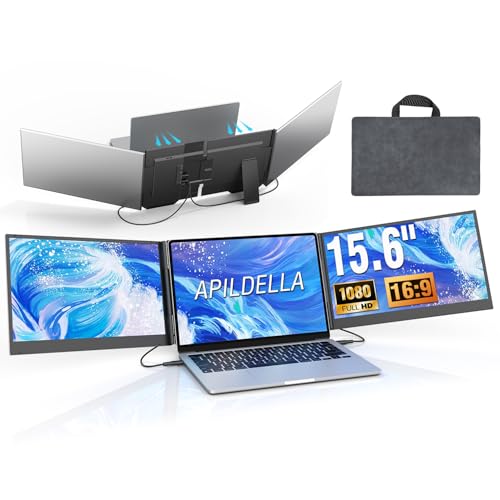
- Two-cable display setup
- Travel bag and power adapter included
- M1–M4 MacBooks need a separate H5-T
Best For: Users with suitable display ports who prefer fewer cables
Best for Larger Screens
Synnov 15.6-Inch Laptop Screen Extender

- Two 15.6-inch FHD IPS screens
- No-clip design with metal stand
- Check USB-C and MacBook chip compatibility
Best For: Larger side displays with a no-clip setup
Best for Flexible Connections
KEFEYA 14.2-Inch Laptop Screen Extender

- Foldable 14.2-inch FHD IPS screens
- USB-C, HDMI, and USB-A cables included
- Specified MacBook chips need a separate H5-T cable
Best For: Travelers who want foldable screens and multiple cable options
Best Lightweight Option
Vixtan 14-Inch Triple Laptop Screen Extender

- Listed at 3.0 pounds
- 14-inch FHD IPS screens and adjustable stand
- M1/M2/M3 MacBooks need DisplayLink for two added screens
Best For: Portable setups where lower listed weight matters
One-Cable Option
15.6-Inch Ultra-Thin Screen Extender

- Dual 15.6-inch 1080p IPS displays
- One-cable option with full-featured USB-C
- Driver required; adapter included
Best For: MacBook users seeking fewer display cables
Compact Travel Pick
Enzion 14-Inch Dual-Display Extender

- Dual 14-inch 1080p IPS screens
- Adjustable support bracket
- M1–M3 Macs need extra connection hardware
Best For: Travelers wanting a compact, adjustable setup
More Vertical Space
AetherSpark 16-Inch 1200p Extender

- Dual 16-inch 1920×1200 IPS screens
- Two USB-C cables on full-featured devices
- 4.4-pound travel weight
Best For: Larger documents, spreadsheets, and code
Lightweight Travel Pick – BKVOO S8PRO 14-Inch Triple Screen Extender
Among triple screen extenders for MacBook, the BKVOO S8PRO stands out for its two 14-inch FHD IPS displays and a listed weight of 2.2 pounds. Its aluminum construction, adjustable stand, and included leather case make it a practical option for a mobile workstation.
Best For: MacBook users who prioritize a lighter setup and flexible viewing angles.
Pros:
- Two 14-inch 1920 × 1080 IPS screens with matte, anti-glare finish.
- Stand supports 180° rotation, tilt, and height adjustments.
- Includes several connection cables, including an H5-T option for laptops with limited display ports.
Cons:
- The H5-T connection may require installing the USB-DISPLAY driver.
- Its 14-inch panels offer less screen space than the 15.6-inch options here.
The broad cable selection is useful, but confirm your MacBook’s ports and the required connection method before buying—particularly if you want to avoid driver installation.
Flexible Screen Layouts – Detachable 15.6-Inch Laptop Extender
If you’re comparing triple screen extenders for MacBook and want more ways to position the displays, this model offers two detachable 15.6-inch FHD IPS screens. Its stand supports landscape, portrait, and stacked arrangements, with 235° horizontal and 90° vertical rotation.
Best For: Users with a compatible MacBook Pro or Max chip who want adjustable screens for presenting or multitasking.
Pros:
- Detachable screens can be used individually; each side is listed at 2.1 pounds.
- 15.6-inch 1080p IPS panels include built-in speakers.
- USB-C, USB-A, and HDMI connection options are described as driver-free.
Cons:
- The listing explicitly excludes base M1, M2, and M3 chips, while listing their Pro and Max variants as supported.
- HDMI use requires an additional USB-A-to-USB-C cable for power on the same screen.
The detachable design is the main reason to choose it. Check your exact MacBook chip and available ports first; the stated Mac compatibility is narrower than the title alone suggests.
Two-Cable Setup – APILDELLA 15.6-Inch Triple Screen Extender
The APILDELLA is worth considering among triple screen extenders for MacBook if you want two 15.6-inch displays with a less cluttered connection setup. Its two-cable design gives each screen an independent video signal while sharing power, and the package includes a travel bag and power adapter.
Best For: Users whose MacBook has the required display-capable ports and who want a two-cable, 15.6-inch setup.
Pros:
- Two-cable connection is designed to reduce the usual multi-cable clutter.
- Aluminum housing is listed at 0.16 inches thick, with a 4-pound total weight.
- Includes two USB-C cables, USB-A and HDMI cables, a power adapter, and a travel bag.
Cons:
- Requires two DisplayPort-capable USB-C ports, or one such USB-C port plus HDMI, for the described setup.
- The listing says M1–M4 MacBooks need a separate H5-T accessory.
Its included accessories make the standard connection straightforward, but the separate H5-T requirement is an important extra check for M-series MacBook owners. Confirm your ports and accessory needs before ordering.
One-Cable Mac Option – UK BONITOYS 15.6-Inch Screen Extender
For buyers comparing triple screen extenders for MacBook, this UK BONITOYS model offers a notably simple physical connection: one cable runs both 15.6-inch FHD IPS screens. The listing states support for M1 through M5 Macs, but a driver must be installed before use.
Best For: MacBook users who want a one-cable desk setup and are comfortable installing a driver.
Pros:
- Single-cable connection carries video and power to both screens.
- Two 15.6-inch 1920 × 1080 IPS panels with a matte finish.
- Includes a dual-head USB drive with an installation video, plus a power adapter and carrying case.
Cons:
- Driver installation is required.
- The included power adapter may be needed if the screens flicker or receive insufficient power.
- The bracket requires a laptop width under 15.85 inches.
This is the clearest fit here for shoppers prioritizing one cable and stated base M-series Mac support. The trade-off is software setup, so check the driver requirement and your laptop’s physical width before buying.
Best for Larger Screens – Synnov 15.6-Inch Laptop Screen Extender
Among triple screen extenders for MacBook, the Synnov stands out for its two 15.6-inch, 1080p IPS screens and no-clip design. Its metal stand supports the displays without putting pressure on your laptop’s screen or hinge.
Best For: MacBook users who want larger side displays and can confirm their laptop supports the required connections.
Pros:
- Two large FHD IPS screens with 178° viewing angles and adjustable brightness.
- Driver-free setup using two full-featured USB-C connections or full-featured USB-C plus HDMI.
- Includes cables, a power adapter, and a carry bag.
Cons:
- Requires at least one full-featured USB-C port.
- The listing flags M1/M2/M3 MacBook chip limitations, so verify your exact model before buying.
The larger panels offer useful room for documents and meetings, but the connection requirements make a compatibility check essential.
Best for Flexible Connections – KEFEYA 14.2-Inch Laptop Screen Extender
The KEFEYA is worth considering when comparing triple screen extenders for MacBook because it includes USB-C, HDMI, and USB-A cables. Its 14.2-inch FHD IPS screens fold for storage, with 0–180° screen rotation for adjusting your viewing setup.
Best For: Travelers who want a foldable extender and are willing to check MacBook-specific connection requirements.
Pros:
- 1920 × 1080 IPS displays with adjustable brightness, contrast, and color temperature.
- Tool-free attachment, a 0–90° adjustable kickstand, and an included carrying case.
- Driver-free setup with included Type-C, HDMI, and USB-A cables.
Cons:
- The listing says M1/M2/M3/M4/M4 Pro MacBooks need a separate H5-T cable for full triple-screen functionality.
- USB-C single-cable operation requires a full-featured Type-C port.
Its included connection options are helpful, but MacBook owners should budget for the specified H5-T cable if their chip requires it.
Best Lightweight Option – Vixtan 14-Inch Triple Laptop Screen Extender
At a listed 3.0 pounds, the Vixtan is a portable choice among triple screen extenders for MacBook. Its 14-inch FHD IPS displays, adjustable stand, and included cables suit users who move between workspaces.
Best For: Travelers prioritizing a lighter extender for a compatible MacBook setup.
Pros:
- 14-inch 1920 × 1080 IPS screens with anti-glare coating and 178° viewing angles.
- Adjustable stand fits 13- to 17.3-inch laptops.
- Driver-free setup; USB-C, USB-C-to-USB-A, and HDMI cables are included.
Cons:
- The listing says M1/M2/M3 MacBooks support only one added screen without a DisplayLink adapter.
- Screen flicker or low brightness may require a separate 5V/3A-or-higher power adapter.
This is the lighter listed option of the three, but M-series MacBook buyers should account for the stated adapter requirement before expecting a triple-screen workspace.
One-Cable Option – 15.6-Inch Ultra-Thin Screen Extender
Among triple screen extenders for MacBook, this 15.6-inch model stands out for connecting both external displays through one full-featured USB-C port. It requires a driver installation first, so it is not an out-of-the-box plug-and-play choice.
Best For: MacBook users who prioritize fewer cables and have a compatible full-featured USB-C port.
Pros:
- Two 15.6-inch, 1080p IPS displays provide room for multiple windows.
- One USB-C cable can run both displays when the laptop port supports it.
- Includes cables, a power adapter, and a carrying bag.
Cons:
- Driver installation is required.
- Some laptops may need the included power adapter if USB power is insufficient.
The streamlined connection is appealing for a portable workstation, but confirm your MacBook’s port capabilities and allow time for setup before relying on it for travel.
Compact Travel Pick – Enzion 14-Inch Dual-Display Extender
If you are comparing triple screen extenders for MacBook travel, this Enzion model pairs two 14-inch 1080p IPS displays with a slim build and an adjustable support bracket. Its MacBook connection requirements deserve a close look before purchase.
Best For: Travelers who want smaller external screens and can verify their MacBook’s required cable setup.
Pros:
- Dual 1080p IPS displays are rated at 300 nits and 100% sRGB.
- Built-in telescopic bracket adjusts up to 90 degrees.
- Supports extended, mirrored, portrait, and presentation modes.
Cons:
- M1, M2, and M3 MacBooks require an additional H5-T cable, HDMI and USB-A connections, external power, and driver installation.
- The listing gives conflicting weight figures of 3 and 3.37 pounds.
The 14-inch format suits a tighter travel setup, but check cable availability and compatibility with your specific MacBook before ordering.
More Vertical Space – AetherSpark 16-Inch 1200p Extender
For shoppers considering triple screen extenders for MacBook, the AetherSpark offers two 16-inch, 1920×1200 displays. Their 16:10 aspect ratio gives documents, code, and spreadsheets more vertical room than standard 1080p screens.
Best For: MacBook users who value larger screens and extra vertical workspace for reading or editing.
Pros:
- Dual 16-inch IPS displays have 1920×1200 resolution and 350-nit rated brightness.
- Full-featured devices connect with two USB-C cables without driver installation.
- Displays support 180-degree rotation for sharing or private viewing.
Cons:
- At 4.4 pounds, it adds noticeable weight to a travel bag.
- The two-cable setup depends on having suitable full-featured connections; verify your MacBook configuration.
This is the strongest fit of the three for vertical screen space. Check your available ports and desk space before choosing the larger panels.
How We Picked the Best Triple Screen Extenders for Macbook
We focused on the specifications most useful to MacBook buyers: display size and resolution, claimed laptop fit, connection type, portability, and whether the listing calls for a driver. The 10 selected products include 14-inch and 15.6-inch 1080p options, plus a 16-inch 1200p model. Listed features are a starting point, not proof that both added screens will work with every MacBook; confirm support with the seller before ordering.
Quick Comparison: Which Format Fits Your Setup?
For frequent travel: A slimmer 14-inch option may be easier to pack and less cumbersome on a small table. The Vixtan and another listed 14-inch model claim weights of about 3.0 pounds, but check total packed weight if you also need cables or a power adapter.
For a roomier workspace: The 15.6-inch options offer more screen area for side-by-side windows. The listed 16-inch 1200p extender offers extra vertical pixels, which may help with long documents and spreadsheets.
For simpler cabling: Some listings advertise one-cable or plug-and-play operation; another explicitly says a driver is required. Treat those claims as model- and laptop-dependent rather than assuming they apply to your MacBook.
Key Buying Factors for Triple Screen Extenders for Macbook
External Display Support Comes First
Check your MacBook’s exact model, chip, and macOS version to establish how many external displays it supports natively. Some MacBooks cannot drive two additional displays through ordinary USB-C video connections alone. A driver-based solution may enable a different setup, but it can introduce installation requirements and limitations. Ask the seller whether both extender panels work as separate displays on your specific machine, and whether any driver or dock is needed.
Ports, Power, and Cables
USB-C connectors do not all provide the same video or power capabilities. Check whether each screen needs a video-capable USB-C port, HDMI, separate USB power, or a compatible adapter. A product advertised as “one cable” may still require supplemental power in some setups. Compare the included cables with the ports you actually have.
Fit and Everyday Usability
Match the extender’s stated laptop-size range to your MacBook, then check how its mounting mechanism sits around the lid and webcam. Consider hinge adjustment, available desk space, and whether the combined weight will be comfortable to use while traveling. Most listed models are 1080p; evaluate text sharpness, brightness, and scaling expectations before choosing the largest panel.
Who Should Buy Which Triple Screen Extenders for Macbook?
Choose a 14-inch extender if portability matters most; consider a 15.6-inch model if you prioritize window space; and look at the 16-inch 1200p option if extra vertical room appeals to you. If your MacBook has limited external-display support, prioritize a listing that explicitly documents compatibility with your exact model and explains its driver or adapter requirements. When that information is missing, verify it before buying rather than relying on a generic “Mac compatible” claim.
