
Adding three external monitors to a MacBook Pro is not as simple as counting HDMI ports. Your MacBook’s chip, the dock’s display technology, and the monitors’ resolution all affect what will work.
These 10 docks offer different combinations of DisplayLink support, video outputs, charging, and USB connectivity. Use the guide below to narrow the choices to your MacBook and desk setup.
Best 10 Triple Monitor Docking Station for Macbook Pro Picks for 2026
Best for Everyday Office Work
WAVLINK DisplayLink 15-in-1 Dock

- Up to dual 2K@60Hz via DisplayLink channels
- Up to 100W laptop charging
- Driver and USB-C video support required
Best For: Port-rich office workstations
Best for Triple 4K Productivity

- Up to three 4K@60Hz displays
- Up to 100W laptop Power Delivery
- Third screen needs USB-C video output
Best For: High-resolution, three-screen office setups
Best for Accessory-Heavy Desks
19-in-1 DisplayLink USB-C Dock

- Up to three 4K@60Hz extended displays
- Seven USB data ports plus card readers
- Laptop PD charger sold separately
Best For: Multi-accessory MacBook Pro desks
Best for Fast USB Connections
WAVLINK 4K Triple-Monitor Dock

- Six USB ports rated up to 10Gbps
- Triple-monitor support up to 4K@60Hz
- Includes 160W adapter; up to 100W laptop PD
Best For: Fast-USB, multi-monitor workstations
Best for High-Refresh Displays

- Three HDMI displays up to 4K 60Hz
- Up to 100W laptop charging
- DisplayLink driver required
Best For: Three high-resolution, 60Hz monitors and ample ports
Best for Everyday Workstations
TobenONE 14-in-1 DisplayLink Dock
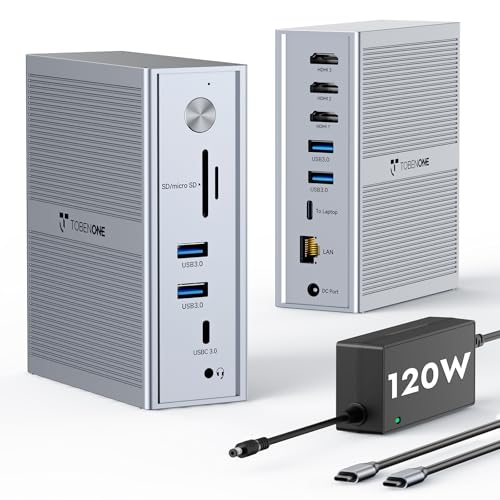
- One 4K 30Hz plus two 1920 × 1200 60Hz displays
- 100W laptop charging with included adapter
- Five 5Gbps USB ports and Gigabit Ethernet
Best For: Three-screen productivity with everyday peripherals
Best for Mixed-Device Offices
StarTech Universal USB-C Triple 4K Dock

- Two 4K 60Hz displays plus one 4K 30Hz
- Supports macOS, Windows, ChromeOS, and Ubuntu
- 100W charging and listed three-year warranty
Best For: Cross-platform office deployments
Hybrid Office Pick
Plugable 12-in-1 Triple HDMI Dock

- Three HDMI displays: 4K/30Hz plus two 1080p/60Hz
- 100W charging, six USB 3.0 ports, Gigabit Ethernet
- DisplayLink installation required on macOS
Best For: Shared desks needing triple HDMI and wired connectivity
High-Resolution Pick

- Up to two 4K/60Hz screens plus one 2K/60Hz screen
- Six 10Gbps USB ports and 100W laptop charging
- DisplayLink driver required for Apple Silicon Macs
Best For: High-resolution productivity and fast USB peripherals
Device-Charging Pick
Plugable 13-in-1 Triple Monitor Dock

- Three HDMI screens: 4K/30Hz plus two 1920×1200/60Hz
- 100W laptop charging and 20W accessory charging
- SD reader, Gigabit Ethernet, four USB-A ports
Best For: Triple-monitor desks with phones or accessories to charge
Best for Everyday Office Work – WAVLINK DisplayLink 15-in-1 Dock
If you need a triple monitor docking station for MacBook Pro for spreadsheets, dashboards, and general office work, this WAVLINK model offers three HDMI outputs, two DisplayPort outputs, and a broad selection of everyday connections. Its DisplayLink-based channels support up to two 2K@60Hz displays; the additional HDMI Alt Mode output depends on your laptop’s USB-C video capability.
Best For: MacBook Pro users building a multi-screen office setup who value ports and charging over gaming performance.
Pros:
- Three HDMI and two DisplayPort connectors provide flexible monitor hookups.
- Up to 100W laptop Power Delivery from the included 130W adapter.
- Five USB data ports, Gigabit Ethernet, and SD/TF card readers cover common desk accessories.
Cons:
- Requires DisplayLink driver installation; it is not plug-and-play.
- HDMI and DisplayPort connectors sharing a display channel cannot be used at the same time.
- The HDMI Alt Mode output requires USB-C video support from the host.
This is a practical productivity dock, but verify your MacBook Pro’s video-output compatibility before planning a three-screen layout. WAVLINK recommends it for office applications rather than gaming or professional video editing.
Best for Triple 4K Productivity – WAVLINK DisplayLink-6950 Dock
For shoppers seeking a triple monitor docking station for MacBook Pro with sharper desktop displays, this WAVLINK dock supports up to three 4K@60Hz monitors on compatible systems. Two displays use its DisplayLink-6950 channels, while the third uses HDMI Alt Mode and therefore needs a USB-C host port that supports video output.
Best For: Spreadsheet-heavy and research-focused workstations that need three high-resolution screens plus a full set of desk connections.
Pros:
- Supports up to three 4K@60Hz displays when the host meets its video requirements.
- Includes three HDMI ports, two DisplayPort ports, five USB data ports, and Gigabit Ethernet.
- Provides up to 100W laptop Power Delivery and includes a 130W adapter.
Cons:
- DisplayLink software and the appropriate driver must be installed.
- The third display relies on HDMI Alt Mode; a compatible USB-C video output is essential.
- HDMI and DisplayPort on the same display channel cannot operate simultaneously.
Choose this model when triple 4K resolution matters more than plug-and-play simplicity. Check your MacBook Pro’s USB-C video support before counting on all three external displays.
Best for Accessory-Heavy Desks – 19-in-1 DisplayLink USB-C Dock
This 19-in-1 option is a triple monitor docking station for MacBook Pro shoppers who also need plenty of USB, card-reader, network, and audio connections. Its listing specifies up to three extended 4K@60Hz displays on macOS with the required drivers installed, using HDMI for the first monitor, DisplayPort for the second, and either HDMI or DisplayPort for the third.
Best For: Desks with multiple USB accessories and audio devices where three external screens and flexible connectivity are priorities.
Pros:
- Supports up to three 4K@60Hz extended displays with the specified driver setup.
- Offers six USB-A data ports, a USB-C data port, SD/microSD readers, Gigabit LAN, and multiple audio connections.
- Includes a 12V/3A dock power adapter and provides an 18W quick-charge output.
Cons:
- A separate PD charger is required to power the laptop and dock simultaneously; the recommended 100W charger is not included.
- Specific drivers must be installed for the described multi-display modes.
- The third monitor uses either HDMI or DisplayPort, not both outputs at once.
The generous port mix suits a crowded workstation, but factor the separate laptop PD charger into your setup. Despite a general plug-and-play claim in the listing, its triple-display instructions call for driver installation.
Best for Fast USB Connections – WAVLINK 4K Triple-Monitor Dock
If fast peripheral connections are high on your list for a triple monitor docking station for MacBook Pro, this WAVLINK dock combines six 10Gbps USB ports with a stated triple-monitor capability of up to 4K@60Hz. It also supplies Gigabit Ethernet, an audio connection, and laptop charging from its included 160W power adapter.
Best For: MacBook Pro workstations that need several fast USB connections alongside multiple external displays.
Pros:
- Six USB Gen 2 ports are rated for up to 10Gbps.
- Supports up to 100W laptop charging with the included 160W adapter.
- Lists triple-monitor support at up to 4K@60Hz.
Cons:
- Requires the latest DisplayLink drivers before use.
- The HDMI Alt Mode port needs a host USB-C port with video output.
- Laptop charging requires host-port Power Delivery support.
This is a strong fit when fast USB expansion matters, provided your MacBook Pro supports the required USB-C video and charging functions. Install the DisplayLink driver before configuring the external screens.
Best for High-Refresh Displays – iVANKY FusionDock Pro 2
If you want a triple monitor docking station for MacBook Pro with sharp, smooth screens, the iVANKY FusionDock Pro 2 supports three HDMI displays at up to 4K at 60Hz. Install the appropriate DisplayLink driver before use; the dock needs it for its multi-display setup.
Best For: MacBook Pro users who want three 4K 60Hz displays alongside extensive USB connectivity.
Pros:
- Three HDMI outputs support up to 4K at 60Hz each.
- Includes 10Gbps and 5Gbps USB ports, SD/TF card slots, and Ethernet.
- Included 180W adapter supports up to 100W laptop charging and up to 20W charging through its USB-C PD port.
Cons:
- Requires the appropriate DisplayLink driver for the multi-monitor outputs.
- Supplied product details conflict on warranty length, listing both 24 and 18 months.
This is the most compelling option here if all three monitors need a stated 4K 60Hz capability. Confirm the warranty terms before buying if coverage matters to you.
Best for Everyday Workstations – TobenONE 14-in-1 DisplayLink Dock
The TobenONE is a triple monitor docking station for MacBook Pro buyers who need more desktop space for everyday work rather than three 4K screens. With the free DisplayLink driver installed, its three HDMI outputs support one display at up to 4K 30Hz and two at up to 1920 × 1200 60Hz.
Best For: Multitaskers who want three extended displays, laptop charging, and wired accessories from one USB-C connection.
Pros:
- DisplayLink enables three extended monitors on compatible MacBooks that otherwise have external-display limits.
- Included 120W adapter provides up to 100W laptop charging.
- Five 5Gbps USB ports and Gigabit Ethernet cover common desk accessories.
Cons:
- Only one HDMI display reaches 4K, and it is limited to 30Hz.
- Requires installation of the DisplayLink driver.
Choose this dock for documents, dashboards, and other side-by-side tasks; look elsewhere if you need all three displays at 4K 60Hz.
Best for Mixed-Device Offices – StarTech Universal USB-C Triple 4K Dock
For a triple monitor docking station for MacBook Pro that can also serve a mixed laptop fleet, this StarTech dock supports macOS, Windows, ChromeOS, and Ubuntu. It connects up to three 4K monitors through one USB-C port: two at 60Hz via DisplayLink and a third at 30Hz via DisplayPort Alt Mode.
Best For: Offices sharing a docking standard across MacBooks and other laptop platforms.
Pros:
- Supports three 4K displays, including two at 60Hz.
- Works across multiple operating systems and Intel, Apple Silicon, AMD, and Snapdragon X hardware.
- Includes an adapter for up to 100W laptop charging and carries a listed three-year warranty.
Cons:
- The third 4K display is limited to 30Hz.
- Two of the three displays use DisplayLink rather than native video output.
Its cross-platform support makes the strongest case for workplace standardization. If matching 60Hz refresh rates on all three 4K monitors is your priority, the third output is the limiting factor.
Hybrid Office Pick – Plugable 12-in-1 Triple HDMI Dock
If you need a triple monitor docking station for MacBook Pro in a shared or hybrid workspace, this Plugable dock connects three HDMI displays, six USB 3.0 peripherals, and Gigabit Ethernet through a USB-C host connection. It also supplies up to 100W of laptop charging.
Best For: MacBook Pro users and mixed-device teams that want three HDMI screens and dependable wired desk connectivity.
Pros:
- Supports one display up to 4K at 30Hz and two up to 1080p at 60Hz.
- DisplayLink enables three extended displays on supported Apple Silicon MacBooks.
- Includes six USB 3.0 ports, Gigabit Ethernet, and 100W Power Delivery.
Cons:
- macOS requires DisplayLink driver installation.
- Does not support HDCP-protected content or Linux.
This is a practical choice when HDMI-only monitor connections and plenty of USB ports matter more than higher refresh rates on the primary 4K display. Check that your MacBook Pro supports the required USB-C video and charging features.
High-Resolution Pick – WAVLINK Triple-Display Dock
For a triple monitor docking station for MacBook Pro that prioritizes screen resolution and fast peripheral connections, this WAVLINK model supports up to two 4K 60Hz displays plus a 2K 60Hz display. Its six USB ports are each rated for up to 10Gbps, with 100W laptop charging over the host connection.
Best For: Home-office MacBook Pro users who need three external screens and frequent transfers to USB drives or external SSDs.
Pros:
- Supports up to two 4K 60Hz displays and one 2K 60Hz display.
- Offers three HDMI and two DisplayPort connectors for display setup flexibility.
- Provides six 10Gbps USB ports, Gigabit Ethernet, and a 130W power adapter.
Cons:
- Apple Silicon Macs require a DisplayLink driver, and the host USB-C port must support video output.
- Not recommended for gaming or HDCP-protected 4K streaming.
Choose this one if sharper multi-screen output and faster USB connections are worth the driver setup. It is better suited to productivity work than protected streaming or gaming.
Device-Charging Pick – Plugable 13-in-1 Triple Monitor Dock
This Plugable triple monitor docking station for MacBook Pro combines three HDMI outputs with up to 100W laptop charging and a separate front USB-C port that delivers up to 20W to a phone or accessory. An SD card reader, Gigabit Ethernet, and four USB-A ports round out the desk setup.
Best For: MacBook Pro desks that need three HDMI monitors, an SD reader, and convenient accessory charging.
Pros:
- Supports one HDMI display up to 4K at 30Hz and two up to 1920×1200 at 60Hz.
- Combines 100W laptop charging with a front 20W USB-C charging port.
- Includes an SD card reader, four 5Gbps USB-A ports, and Gigabit Ethernet.
Cons:
- HDMI 2 and 3 require DisplayLink Manager installation on macOS.
- Does not support HDCP-protected playback, including services such as Netflix and Hulu.
The extra device-charging port and SD reader distinguish this dock from simpler triple-HDMI options. Its display limits make it a better fit for office applications than high-refresh 4K work.
How We Picked the Best Triple Monitor Docking Station for Macbook Pro
We focused on docks marketed for three external displays and compared their stated video outputs, DisplayLink support, laptop charging, and everyday connectivity. Manufacturer claims are a starting point, not a guarantee for every MacBook Pro: display behavior can depend on the chip, macOS version, dock drivers, cables, and monitor settings. Check the current specifications for the exact model before buying.
Quick Comparison: Where to Start
The WAVLINK options offer several HDMI- and DisplayPort-focused configurations; choose by the connectors on your monitors rather than by the number of video sockets alone. The listed 130W PD WAVLINK model may appeal if your MacBook Pro has higher charging demands, but verify the actual power delivered to the laptop. Plugable’s listed options include a three-HDMI dock and a 13-in-1 model with 100W charging. TobenONE and StarTech are worth comparing for their stated triple-4K capabilities, while the iVANKY listing specifies a 180W power adapter—not necessarily 180W charging to the MacBook. Confirm each dock’s supported resolution and refresh rate across all three screens at once.
Key Buying Factors for a Triple Monitor Docking Station for Macbook Pro
Display Technology and Mac Compatibility
Start with your MacBook Pro’s exact chip and its native external-display limit. A dock cannot increase that native limit merely by adding HDMI ports. Many three-screen setups on Macs use DisplayLink, which requires compatible software and macOS permissions. It can be practical for documents, coding, and general productivity, but buyers who prioritize gaming, color-critical work, or protected streaming content should investigate its limitations before relying on it.
Resolution, Outputs, and Cables
“Triple 4K” does not always mean three 4K monitors at 60Hz simultaneously on your particular Mac. Check the dock’s per-display specifications and any restrictions when HDMI and DisplayPort outputs are mixed. Match the outputs to your monitors, then use cables rated for the desired resolution and refresh rate. Extra video ports may provide flexibility without supporting extra active screens.
Charging and Desk Connectivity
Compare the dock’s laptop power delivery—not its adapter wattage—with the charger supplied with your MacBook Pro. A 100W dock may suit many workdays, while a higher-power model could be preferable for a power-hungry configuration; check the dock’s actual USB-C power-delivery rating. Count the USB ports you will use, and look for Ethernet, audio, or card readers only if they matter to your workflow.
Who Should Buy Which Triple Monitor Docking Station for Macbook Pro?
For an M-series MacBook Pro that needs three independent external screens, begin with a dock that explicitly supports your chip through DisplayLink, then confirm its macOS setup instructions. If all three monitors use HDMI, prioritize a verified three-HDMI configuration; for a mix of HDMI and DisplayPort monitors, compare the WAVLINK and StarTech output layouts. Choose based on confirmed laptop charging and port needs, not the largest adapter number or longest feature list. If you want a driver-free setup, first check how many displays your specific MacBook Pro supports natively—none of these docks should be assumed to bypass that limit without DisplayLink.
