
If you’re looking to enhance your Mac’s storage capabilities, choosing the right Thunderbolt SSD enclosure is essential. These enclosures not only boost your speed but also improve overall performance. With various options available, each designed to meet different needs, you might be wondering which ones truly stand out. Let’s explore the top contenders that promise to elevate your workflow without the usual bottlenecks.
40Gbps M.2 NVMe SSD Enclosure for Thunderbolt and USB

If you’re a creative professional working with 4K or 8K content, the 40Gbps M.2 NVMe SSD enclosure for Thunderbolt and USB is your best choice for high-speed storage. It supports an impressive 40Gbps bandwidth, enabling lightning-fast transfer speeds of up to 3000MB/s. You can easily transfer 3GB files in just one second! This enclosure is compatible with various SSD sizes and devices, including MacBook Pro and Dell XPS. Plus, its robust heat management keeps everything cool without noisy fans. With tool-free installation, you’ll enjoy seamless setup and reliable, high-speed performance for all your storage needs.
Best For: Creative professionals working with 4K and 8K content who need high-speed storage solutions for large files.
Pros:
- Supports high transfer speeds of up to 3000MB/s, allowing for quick file transfers and efficient workflows.
- Compatible with various SSD sizes and devices, making it versatile for different setups and needs.
- Efficient heat management with a fan-free design, ensuring reliable performance without noise or dust issues.
Cons:
- Older Thunderbolt 3 controllers may not achieve maximum bandwidth with USB4, potentially limiting performance.
- Requires M-Key SSD for optimal speed, which may not be compatible with all SSDs.
- Limited to specific SSD sizes (2230, 2242, 2260, and 2280), which may restrict options for some users.
OWC Express 1M2 Portable NVMe SSD USB4 Drive (Enclosure Only)

The OWC Express 1M2 Portable NVMe SSD USB4 Drive enclosure is the ultimate choice for tech enthusiasts who demand lightning-fast performance without sacrificing portability. With speeds exceeding 3151MB/s, it’s over twice as fast as traditional Thunderbolt enclosures. This enclosure is ultra-compatible, working seamlessly with USB4, Thunderbolt, and USB-C devices. Its patent-pending heat-dissipating design guarantees reliable performance, keeping your SSD cool. You can customize it with NVMe M.2 2280, 2242, or 2230 SSDs. Plus, its palm-sized, bus-powered design makes it easy to take anywhere, backed by a 2-year warranty for peace of mind.
Best For: Tech enthusiasts and professionals seeking high-speed, portable storage solutions for their NVMe SSDs.
Pros:
- Ultra-fast performance with speeds exceeding 3151MB/s, significantly faster than traditional Thunderbolt enclosures.
- Wide compatibility with USB4, Thunderbolt, and USB-C devices, ensuring it works with a variety of systems.
- Customizable design allows users to choose from different NVMe M.2 sizes (2280, 2242, or 2230) for flexibility.
Cons:
- Enclosure only means users need to purchase an NVMe SSD separately, which can add to overall costs.
- Limited warranty of 2 years for the enclosure may not be as reassuring as longer warranties offered by competitors.
- Portable design may lead to concerns about durability during transport if not handled with care.
OWC 4TB Envoy Ultra Thunderbolt 5 Portable SSD Enclosure

For professionals seeking high-speed data transfer, the OWC 4TB Envoy Ultra Thunderbolt 5 Portable SSD Enclosure delivers exceptional performance with transfer rates exceeding 6000MB/s. It’s up to twice as fast as Thunderbolt 4 and USB4, making it perfect for demanding projects. This enclosure is compatible with Macs, PCs, iPad Pros, Chromebooks, and Surface devices, ensuring versatility for all your data needs. Its fanless, heat-dissipating aluminum design is weatherproof, safeguarding against dust, drops, and water. Plus, it’s bus-powered and comes with a built-in Thunderbolt cable, making it easy to use and transport. Enjoy peace of mind with a 5-year warranty.
Best For: Professionals and creatives who require high-speed data transfer and reliable performance for demanding projects.
Pros:
- Over 6000MB/s transfer rates for lightning-fast data access and transfer.
- Compatible with a wide range of devices including Macs, PCs, iPad Pros, Chromebooks, and Surface devices.
- Weatherproof and durable design protects against dust, drops, and moisture.
Cons:
- Higher price point compared to standard SSD enclosures.
- Limited to Thunderbolt 3, 4, and USB4 connections, which may not suit all users.
- Fanless design may lead to heat buildup during prolonged use under heavy loads.
Cable Matters Premium Aluminum USB C Hard Drive Enclosure for 2.5 SSD/HDD

Designed for Mac users seeking a reliable and fast storage solution, the Cable Matters Premium Aluminum USB C Hard Drive Enclosure excels with its compatibility across various devices, including Thunderbolt 4 and USB4. With data transfer rates up to 10Gbps, it’s perfect for both SSDs and HDDs, supporting drives up to 5TB. The sturdy aluminum housing guarantees durability and effective heat dissipation. Plus, tool-free installation means you can quickly swap drives without hassle. Although some users noted minor build quality concerns, its competitive pricing and performance make it a top choice for anyone needing a dependable 2.5-inch drive enclosure.
Best For: Users seeking a reliable, fast, and versatile storage solution for 2.5-inch SSDs and HDDs, especially those with Mac and Thunderbolt devices.
Pros:
- Easy tool-free installation for quick drive swaps.
- High data transfer rates up to 10Gbps, making it suitable for both SSDs and HDDs.
- Sturdy aluminum design provides durability and effective heat dissipation.
Cons:
- Some users report weak clips on the plastic bottom affecting build quality.
- Extra space for thinner drives may cause movement within the enclosure.
- The activity LED light’s effectiveness has received minor criticism.
ACASIS M.2 NVMe SSD Enclosure with Cooling Fan

With its built-in adjustable cooling fan, the ACASIS M.2 NVMe SSD Enclosure is ideal for users who demand high performance during intense tasks, such as video editing or gaming. This enclosure supports B+M M-Key SSDs and offers read/write speeds up to 6000 MB/s, making it a powerhouse for data-intensive applications. Its plug-and-play setup guarantees hassle-free installation, while the customizable cooling fan keeps temperatures stable, enhancing SSD longevity. Though some users report occasional overheating and connectivity issues, many praise its solid build and impressive speed, often matching internal SSDs. Just remember, customer service experiences vary, so proceed with caution.
Best For: Users seeking a high-performance SSD enclosure for data-intensive tasks like video editing and gaming.
Pros:
- Fast Data Transfer: Achieves read/write speeds up to 6000 MB/s, comparable to internal SSDs.
- Effective Cooling: Built-in adjustable cooling fan helps maintain stable temperatures and prolongs SSD lifespan.
- User-Friendly Setup: Plug-and-play installation requires no drivers, making it easy to use.
Cons:
- Customer Service Issues: Mixed reviews on support responsiveness and problem resolution.
- Potential Overheating: Some users report overheating and connectivity problems during extended use.
- Performance Variability: Initial speeds may decline over time, affecting overall performance.
ACASIS 40Gbps M.2 NVMe SSD Enclosure (TBU 405 Pro)

The ACASIS 40Gbps M.2 NVMe SSD Enclosure (TBU 405 Pro) stands out as an ideal choice for creative professionals and power users seeking high-speed external storage for their Mac devices. Supporting various SSD sizes up to 8 TB, it delivers impressive transfer speeds of up to 2805MB/s read and 2734MB/s write. The aluminum build enhances durability while built-in cooling features help manage heat during intensive tasks. Installation is a breeze with no tools required, and the included USB4 cable guarantees peak performance. With high ratings and positive feedback, this enclosure is perfect for anyone needing reliable, fast external storage.
Best For: Creative professionals and power users seeking high-speed external storage for their Mac devices.
Pros:
- High-speed performance with transfer rates up to 2805MB/s read and 2734MB/s write.
- Durable aluminum construction with built-in cooling features to manage heat effectively.
- Easy installation with no tools required and a USB4 cable included for optimal performance.
Cons:
- Some users report the enclosure can get warm during heavy use, despite the cooling fan.
- The cooling fan may be difficult to feel in terms of airflow.
- Thermal pads may be necessary for improved heat management during intensive tasks.
ACASIS 40Gbps M.2 NVMe SSD Enclosure (Compatible with Thunderbolt 4/3 USB4)
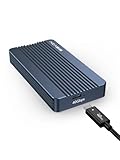
For creative professionals and power users seeking lightning-fast data transfer, the ACASIS 40Gbps M.2 NVMe SSD Enclosure is an excellent choice. Compatible with Thunderbolt 4/3 and USB4, it supports M-Key interface SSDs up to 8TB, allowing you to transfer large files in about one second. Its tool-free, plug-and-play design makes installation a breeze, while the lightweight build guarantees portability. With the DSL6340 chipset, you get stable performance and efficient heat dissipation. Rated 4.3 out of 5 stars, this enclosure is perfect for design, photography, and gaming, enhancing your workflow with minimal bottlenecks.
Best For: Creative professionals and power users who require high-speed data transfer for large files.
Pros:
- Tool-free installation allows for quick and easy setup without the need for screws or additional drivers.
- Supports hot-swapping, enabling you to change SSDs without affecting server performance.
- High-performance speeds of up to 6,000 MB/s in RAID 0 setups, significantly enhancing data transfer efficiency.
Cons:
- Not backward compatible with USB 3.2/3.1/3.0/2.0, limiting use with older devices.
- Requires high-quality Thunderbolt 3/4 cables for optimal performance, which may add additional costs.
- Can reach high temperatures (up to 110°F) during extensive data transfers, which may be a concern for prolonged use.
Qwiizlab Fanless USB4 Thunderbolt External SSD Enclosure

Designed for users seeking high-speed data transfer without the noise of traditional cooling systems, the Qwiizlab Fanless USB4 Thunderbolt External SSD Enclosure stands out with its fanless, rugged aluminum design. Supporting M.2 NVMe PCIe SSDs up to 8TB, you’ll experience blazing sequential read speeds up to 40Gbps. It connects seamlessly with USB4 and Thunderbolt 4/5 ports, and is backward compatible with Thunderbolt 3. The included accessories, such as a coaxial USB-C data cable and thermal pads, guarantee top performance. Plus, its sleek design enhances any setup, making it a perfect choice for both macOS and Windows users.
Best For: Professionals and enthusiasts who require high-speed, reliable data transfer for large files in a quiet environment.
Pros:
- Supports high-speed data transfer with sequential read speeds up to 40Gbps.
- Fanless design ensures silent operation while maintaining efficient heat dissipation.
- Compatible with multiple SSD sizes and both macOS and Windows operating systems, accommodating various user needs.
Cons:
- SSD not included, requiring an additional purchase for functionality.
- Limited to M.2 NVMe PCIe SSDs, which may not suit users with different SSD types.
- Backward compatibility only with Thunderbolt 3, potentially limiting use with older devices.
ACASIS 40Gbps M.2 NVMe SSD Enclosure (TBU401)

Looking for a high-performance solution to boost your Mac’s storage capabilities? The ACASIS 40Gbps M.2 NVMe SSD Enclosure (TBU401) is your answer. With tool-free installation and compatibility across various devices, including M1 Pro/Max Macs, it supports multiple SSD sizes up to 8TB. You’ll enjoy impressive data transfer rates of up to 2300 MB/s, thanks to the Intel JHL7440 chip. Its built-in cooling fan effectively manages heat, ensuring consistent performance during extended use. Users rave about its speed and reliability, making it perfect for backups and demanding applications like Lightroom and Photoshop.
Best For: Users seeking a high-performance and versatile storage solution for their Mac devices, particularly those using demanding applications like Lightroom and Photoshop.
Pros:
- Tool-free installation makes setup quick and easy for various SSD sizes.
- High data transfer rates of up to 2300 MB/s ensure fast performance for intensive tasks.
- Built-in cooling fan and heat dissipation features maintain optimal operating temperatures during extended use.
Cons:
- Some users may experience heat management issues without the cooling fan version.
- Initial product releases had reports of missing accessories, which may require replacements.
- The enclosure can still get warm during heavy use, potentially affecting performance if not adequately cooled.
Lexar E750 M.2 NVMe SSD Enclosure

The Lexar E750 M.2 NVMe SSD Enclosure stands out for users who demand lightning-fast transfer speeds, reaching up to 40Gbps (3800MB/s). It’s compatible with Thunderbolt 4/3, USB4, and various USB standards, accommodating M Key SSD sizes up to 8TB. The tool-free design guarantees quick setup, while the aircraft-grade aluminum body provides efficient cooling through thermal pads and heat dissipation grooves. Though some users report it can get warm during use, its performance remains stable and impressive. With a 4.4-star rating and a 2-year warranty, you can trust Lexar for both quality and support.
Best For: Users seeking high-speed data transfer and efficient cooling solutions for their NVMe SSDs.
Pros:
- Tool-free installation allows for quick and easy setup without the need for additional tools.
- High transfer speeds of up to 40Gbps ensure optimal performance with compatible NVMe drives.
- Durable aluminum design with thermal management features helps keep the enclosure cool during operation.
Cons:
- Some users report that the enclosure can get warm during extended use.
- Limited to M Key SSD sizes, which may not accommodate all SSD types.
- Requires adjustment in device settings for optimal performance on Windows, which may be inconvenient for some users.
Factors to Consider When Choosing Thunderbolt SSD Enclosures for Mac
When you’re choosing a Thunderbolt SSD enclosure for your Mac, you need to take into account several key factors. Speed and performance, compatibility with your devices, and effective heat management can make a big difference in your experience. Additionally, pay attention to installation ease and the build quality to guarantee you get a reliable and durable product.
Speed and Performance
Choosing the right Thunderbolt SSD enclosure for your Mac hinges on understanding speed and performance factors. These enclosures can support data transfer speeds up to 40Gbps, allowing real-world performance of around 3000MB/s. This means transferring a 3GB file takes about one second! To maximize these speeds, opt for M.2 NVMe PCIe Gen4*4 SSDs. Look for enclosures with robust heat management features, like aluminum construction and built-in cooling, to maintain stable speeds under heavy loads. Keep in mind that the Thunderbolt controller’s compatibility can affect performance; older versions may not reach maximum bandwidth with newer USB4 devices. Finally, many enclosures offer tool-free installation and plug-and-play functionality for an effortless setup.
Compatibility With Devices
To guarantee your Thunderbolt SSD enclosure works seamlessly with your Mac, it’s essential to take into account compatibility with both hardware and software. First, verify the enclosure supports M1 and M2 chipsets, along with older models featuring Thunderbolt 3 or 4 ports. You should also check for support of various SSD sizes—2230, 2242, 2260, and 2280—to enjoy flexible storage options. Verify backward compatibility with Thunderbolt 3 and USB4, especially if you’re using older devices. Look for enclosures utilizing the M-Key interface (B+M) for smooth integration with NVMe SSDs. Finally, confirm compatibility with your macOS version to ensure proper functionality and driver support. Taking these factors into account will help you make an informed choice.
Cooling and Heat Management
Effective cooling is essential for ensuring your Thunderbolt SSD enclosure performs at its best, especially during intense data transfers that can considerably raise temperatures. Look for enclosures made from aluminum, as they dissipate heat efficiently. Many high-performance models come with built-in thermal pads to help maintain ideal temperature ranges. If you want added protection, consider enclosures with adjustable or built-in cooling fans that activate at specific temperatures, like 55°C, to prevent overheating. On the other hand, fanless designs use passive cooling methods, such as rugged aluminum housing and heat dissipation grooves, for quiet operation. Always check thermal performance ratings and cooling features, as overheating can lead to thermal throttling, harming both transfer speeds and reliability.
Installation and Usability
When you’re considering a Thunderbolt SSD enclosure for your Mac, installation and usability are key factors that can greatly enhance your experience. Look for enclosures that offer tool-free installation, allowing you to quickly access and replace SSDs without any extra tools. Plug-and-play functionality is essential, letting you use the enclosure right away without needing to install drivers. Opt for models that support various SSD sizes, like 2230, 2242, 2260, and 2280, ensuring versatility for your M.2 NVMe options. Evaluate the setup process—some enclosures come with helpful accessories, such as USB cables and thermal pads, to aid in heat management. Clear instructions and necessary components will streamline your overall setup experience, making it hassle-free.
Build Quality and Materials
As you explore Thunderbolt SSD enclosures for your Mac, the build quality and materials play a significant role in your overall satisfaction. Look for enclosures made from sturdy materials like aluminum, which not only guarantees durability but also helps with heat dissipation. Fanless designs often incorporate aluminum heat sinks or grooves, keeping noise to a minimum while managing temperatures effectively. A robust construction protects against drops and environmental factors, extending the lifespan of both the enclosure and the SSD. Additionally, consider enclosures with effective heat management systems, such as thermal pads or ventilation holes, to maintain performance during high-speed transfers. Finally, tool-free installation mechanisms indicate a thoughtful design, allowing easy access for SSD upgrades without compromising integrity.
Warranty and Support Options
Choosing the right Thunderbolt SSD enclosure for your Mac goes beyond just performance and build quality; warranty and support options are equally essential. Look for a warranty lasting between 2 to 5 years, as it reflects the manufacturer’s confidence in durability. Responsive customer support is important, too; positive feedback on issue resolution can enhance your overall experience. If you’re a professional user, consider enclosures that offer extended warranties or additional support tailored for critical workflows. Also, check for warranty service options, like online registration and easy return processes, to guarantee hassle-free support. Finally, read user reviews about customer service responsiveness, as they highlight the manufacturer’s commitment to after-sales care.
