
As a photographer, you know the importance of speed and reliability when it comes to storing large files. Thunderbolt RAID storage solutions are designed to meet these demands, offering impressive performance for your workflows. From portable SSDs to robust RAID arrays, there’s a wide range of options tailored for professionals like you. Let’s explore the ten best solutions that can elevate your storage game and keep your projects running smoothly.
SanDisk Professional 52TB G-RAID Project 2 External Hard Drive

If you’re a photographer or videographer working with high-resolution 4K and 8K content, the SanDisk Professional 52TB G-RAID Project 2 External Hard Drive is an exceptional choice for your storage needs. With a massive 52TB capacity, this 7200 RPM mechanical hard disk guarantees you can store and manage large video files effortlessly. It features impressive read and write speeds of up to 520 MB/s and 510 MB/s, respectively, making your workflow smoother. The Thunderbolt 3 and USB interfaces allow for quick data transfer, while the RAID 0 configuration boosts performance. Plus, its PRO-BLADE SSD Mag slot offers expandable storage options.
Best For: This external hard drive is best for professional photographers and videographers who need to store and manage high-resolution 4K and 8K video content.
Pros:
- High storage capacity of up to 52TB, accommodating large files and projects.
- Fast read and write speeds (up to 520 MB/s and 510 MB/s) enhance workflow efficiency.
- RAID 0 configuration improves performance, making it suitable for demanding video editing tasks.
Cons:
- Being a mechanical hard disk, it may be slower compared to SSD options.
- Weighs 6.68 pounds, which may be less portable for on-the-go professionals.
- Pre-configured RAID 0 may not provide data redundancy, increasing the risk of data loss.
Corsair EX400U 2TB USB4 Portable External SSD

The Corsair EX400U 2TB USB4 Portable External SSD is an excellent choice for photographers who need lightning-fast data transfer speeds and robust storage capacity. With read speeds up to 4,000MB/s and write speeds reaching 3,600MB/s, it guarantees your files transfer in a snap. Weighing just 0.2 pounds and featuring a compact 2.5-inch form factor, it’s perfect for on-the-go use. Its USB4 interface assures compatibility with various devices, including Thunderbolt 4. Plus, the plug-and-play setup makes it incredibly user-friendly. Backed by a 3-year warranty and solid customer support, the EX400U is a reliable addition to your photography toolkit.
Best For: Photographers and creative professionals seeking high-speed data transfer and portable storage solutions.
Pros:
- Ultra-fast read/write speeds of up to 4,000MB/s and 3,600MB/s, respectively, for efficient file transfers.
- Compact and lightweight design makes it easy to carry for on-the-go use.
- Broad compatibility with USB4, USB 3.2, and Thunderbolt 4, ensuring versatility with various devices.
Cons:
- Higher price point compared to traditional external hard drives.
- Limited to newer operating systems (macOS 13 or later, Windows 10 or later), which may not suit all users.
- Potential overheating during prolonged use due to high-speed operations.
SanDisk Professional G-RAID Shuttle 8-Bay Thunderbolt 3 RAID Array
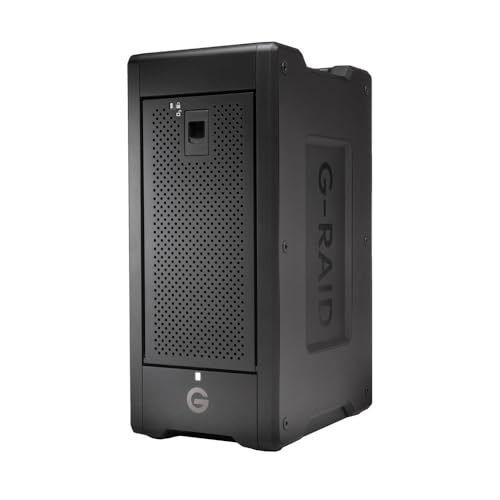
For photographers who demand speed and reliability, the SanDisk Professional G-RAID Shuttle 8-Bay Thunderbolt 3 RAID Array is an exceptional choice. With a massive 160TB capacity, it features removable enterprise-class Ultrastar hard drives, ensuring enhanced reliability for your mission-critical footage. You’ll appreciate read speeds up to 1900MB/s and write speeds up to 2000MB/s for seamless multi-stream 4K, 8K, and VR editing. The dual Thunderbolt 3 ports let you daisy-chain up to five additional devices, while USB Power Delivery keeps your MacBook charged. Backed by a 5-year limited warranty, it’s a robust solution for any serious photographer.
Best For: Professional photographers and videographers seeking high-capacity, high-speed storage solutions for demanding editing tasks.
Pros:
- Massive 160TB capacity with removable enterprise-class drives for enhanced reliability.
- High data transfer rates with read speeds up to 1900MB/s and write speeds up to 2000MB/s, ideal for 4K, 8K, and VR editing.
- Dual Thunderbolt 3 ports allow daisy-chaining of multiple devices and USB Power Delivery for charging compatible laptops.
Cons:
- High initial investment compared to standard external storage solutions.
- Weight and portability may be a concern for users needing a truly mobile solution.
- Limited to specific RAID configurations, which may not suit all user preferences or requirements.
SANDISK 8TB Extreme Portable SSD (SDSSDE61-8T00-G25)

Photographers seeking a reliable and high-capacity storage solution will find the SANDISK 8TB Extreme Portable SSD (SDSSDE61-8T00-G25) an exceptional choice. With impressive read speeds of up to 1050MB/s and write speeds reaching 1000MB/s, it guarantees quick access to your important files. Its durable design features a silicone shell, offering 3-meter drop protection and IP65-rated water and dust resistance. The built-in 256-bit AES hardware encryption keeps your data secure, while the USB-C interface provides easy connectivity. Plus, the handy carabiner loop makes it convenient to attach to your gear, making it an ideal companion for on-the-go photographers.
Best For: Photographers and creative professionals who need a high-capacity, durable, and fast storage solution for their files.
Pros:
- High Performance: Offers read speeds up to 1050MB/s and write speeds up to 1000MB/s for efficient file access.
- Durable Design: Features a silicone shell with 3-meter drop protection and IP65-rated water and dust resistance.
- Secure Storage: Includes 256-bit AES hardware encryption for enhanced data security.
Cons:
- Price Point: Higher cost compared to standard portable SSDs with less capacity.
- Weight: Slightly heavier than other portable SSDs due to its robust build.
- Limited Compatibility: May require an adapter for older USB interfaces, as it primarily uses USB-C.
OWC ThunderBay 4 RAID Storage Enclosure

Designed with versatility in mind, the OWC ThunderBay 4 RAID Storage Enclosure is perfect for creative professionals who need reliable and high-speed data storage. This four-bay Thunderbolt enclosure supports both 3.5 and 2.5 drives, allowing you to configure it in various RAID modes, including RAID 0, 1, 4, 5, and 10. With dual Thunderbolt 3 ports, you’ll enjoy sustained performance up to 1527MB/s, making file transfers a breeze. Its aluminum design not only looks sleek but also guarantees durability. Backed by a 3-year warranty, you can count on the ThunderBay 4 to protect your valuable data.
Best For: Creative professionals who require high-speed and reliable data storage solutions.
Pros:
- High-speed performance: Sustained data transfer rates up to 1527MB/s facilitate quick file transfers.
- Versatile RAID configurations: Supports multiple RAID modes (0, 1, 4, 5, 10) for tailored data management.
- Durable aluminum design: Ensures longevity and a sleek appearance while protecting internal drives.
Cons:
- No drives included: The enclosure comes empty, requiring separate purchase of drives.
- Weighty design: At 3900 grams, it may be less portable compared to lighter storage options.
- Potential restocking fees: Returns may incur fees, depending on the condition of the item.
LaCie 2big Dock RAID 16TB External HDD

With a massive 16TB of storage, the LaCie 2big Dock RAID External HDD is an ideal solution for creative professionals managing large volumes of high-resolution images and videos. You’ll enjoy speeds up to 550MB/s, ensuring your workflow remains efficient. The dual Thunderbolt 3 ports, along with USB 3.2 and card slots for CFexpress Type B, CFast 2.0, and SD, provide versatile connectivity options. Plus, configuring RAID 0/1 is a breeze with the intuitive wizard, allowing you to optimize for performance or redundancy. With hot-swappable IronWolf Pro drives, you gain reliability and peace of mind thanks to the included data recovery services.
Best For: Creative professionals managing large volumes of high-resolution images and videos.
Pros:
- Fast data transfer speeds of up to 550MB/s enhance workflow efficiency.
- Versatile connectivity options with dual Thunderbolt 3 ports and various card slots.
- Easy RAID 0/1 configuration for performance optimization or redundancy.
Cons:
- Higher price point compared to standard external HDDs.
- Requires knowledge of RAID configurations for optimal setup.
- Limited compatibility with older USB devices due to advanced connectivity options.
OWC ThunderBay 4 0TB Four-Bay Thunderbolt 40Gb/s RAID Storage Enclosure
For creative professionals who demand speed and reliability, the OWC ThunderBay 4 0TB Four-Bay Thunderbolt RAID Storage Enclosure stands out as an exceptional choice. With up to 1527MB/s sustained performance, you’ll handle large files effortlessly. It supports RAID configurations 0, 1, 4, 5, and 1+0, ensuring your data is both fast and secure. Compatible with 3.5 or 2.5 drives, no adapter is needed, making setup a breeze. The sleek aluminum chassis dissipates heat quietly, while dual Thunderbolt 3 ports enhance connectivity. Backed by a 3-year warranty, it’s a reliable investment for any photographer’s workflow.
Best For: Creative professionals who require high-speed and reliable storage solutions for handling large files.
Pros:
- High Performance: Delivers up to 1527MB/s sustained performance for efficient data transfer.
- User Configurable RAID: Supports multiple RAID configurations (0, 1, 4, 5, 1+0) for enhanced data security and speed.
- Easy Compatibility: Works with both 3.5 and 2.5 drives without the need for additional adapters.
Cons:
- No Drives Included: The enclosure comes without pre-installed drives, requiring an additional purchase.
- Weight: At 4.3 kilograms, it may be less portable for on-the-go professionals.
- Potential Restocking Fees: Returns may incur restocking fees depending on product condition.
TERRAMASTER D4 SSD NVMe Enclosure – 4 Bay Type-C Storage

Photographers looking for high-speed storage will find the TERRAMASTER D4 SSD NVMe Enclosure an exceptional choice. This compact, 4-bay enclosure supports up to four M.2 NVMe 2280 SSDs, allowing for a massive total of 32TB storage. With an impressive 40Gbps transfer rate, you can experience lightning-fast read speeds up to 3,224 MB/s. The enclosure’s advanced cooling system guarantees whisper-quiet operation while keeping your drives at peak temperatures. Compatible with various devices and operating systems, it also offers convenient backup options through its TDAS Mobile App. With a 2-year warranty, it’s a reliable solution for your photography needs.
Best For: Photographers and content creators seeking high-speed, reliable storage solutions for large files and efficient backup options.
Pros:
- Ultra-fast data transfer rate of up to 40Gbps, ensuring quick access to files.
- Compact design allows for easy portability and storage in small spaces.
- Advanced cooling system keeps drives at optimal temperatures with minimal noise.
Cons:
- Requires additional M.2 NVMe SSDs, which may increase overall setup costs.
- Limited to specific SSD sizes (M.2 NVMe 2280), potentially restricting compatibility with other SSD types.
- May not be fully utilized by older devices that do not support high-speed connections like Thunderbolt 3 or USB 3.2.
SanDisk 4TB Extreme PRO Portable SSD

The SanDisk 4TB Extreme PRO Portable SSD stands out as an ideal choice for photographers who need reliable, high-speed storage solutions. With NVMe solid-state performance, you’ll experience lightning-fast read/write speeds of up to 2000MB/s. Its USB-C and USB 3.2 Gen 2×2 connectivity guarantees compatibility with modern devices. Built to last, the forged aluminum chassis offers durability, while the IP65 rating protects against water and dust. Plus, the handy carabiner loop makes it easy to secure during shoots. With a 5-year limited warranty, you can travel worry-free, knowing your data is safe and sound.
Best For: Photographers and content creators seeking high-speed, durable portable storage solutions for their data.
Pros:
- NVMe performance with read/write speeds up to 2000MB/s ensures quick file transfers.
- Robust design featuring an aluminum chassis and IP65 rating for water and dust resistance.
- Convenient carabiner loop allows for easy attachment and portability during shoots.
Cons:
- Higher price point compared to standard portable SSDs may not suit budget-conscious users.
- Limited compatibility with older USB standards without an adapter.
- Size may be bulky for some users looking for ultra-compact storage solutions.
Glyph Blackbox Pro Raid Desktop Drive (40TB, Thunderbolt 3)

When it comes to high-capacity storage, the Glyph Blackbox Pro RAID Desktop Drive stands out as an ideal solution for creative professionals who need reliable and fast data access. With a massive 40TB capacity and Thunderbolt 3 connectivity, you’ll experience impressive read speeds of 550 MB/s, ensuring quick transfers for your multimedia projects. Its 7200 RPM rotational speed and durable, anti-shock design make it perfect for demanding environments. Weighing in at 5.01 kilograms, it’s portable enough for on-the-go use. Plus, the 30-day return policy gives you peace of mind. This drive is a solid choice for your storage needs.
Best For: Creative professionals and businesses that require high-capacity, fast, and reliable storage solutions for multimedia projects.
Pros:
- High storage capacity of 40TB, ideal for large files and projects.
- Fast data transfer speeds of up to 550 MB/s with Thunderbolt 3 connectivity.
- Durable design with anti-shock features, suitable for demanding environments.
Cons:
- Relatively heavy at 5.01 kilograms, which may affect portability.
- Average customer rating of 3.4 out of 5 stars, indicating mixed user experiences.
- Limited return policy with no returns accepted after 30 days.
Factors to Consider When Choosing Thunderbolt Raid Storage for Photographers
When choosing Thunderbolt RAID storage, you’ll want to think about your storage capacity needs and how fast you need to transfer your data. Consider the available RAID configurations and whether portability and design fit your workflow. Finally, make certain to check the connectivity options offered to guarantee compatibility with your devices.
Storage Capacity Needs
As you consider Thunderbolt RAID storage solutions, evaluating your storage capacity needs is essential, especially given the high demands of modern photography. Start by reviewing the resolution and format of your images; high-resolution files, like RAW photos, can quickly consume significant space. If you frequently shoot, at least 8TB is recommended, particularly for 4K images. For video content, especially in 4K or 8K formats, aim for a RAID solution with 16TB or more to manage larger file sizes effectively. Don’t forget to factor in backup and redundancy needs, as RAID configurations often require extra storage for data mirroring. Finally, think about future growth; choosing a scalable solution allows you to add drives as your storage needs increase.
Data Transfer Speeds
After pinpointing your storage capacity needs, it’s time to contemplate data transfer speeds. Thunderbolt 3 technology can offer data transfer rates of up to 40 Gbps, making it perfect for transferring large files like high-resolution photos and videos quickly. If you opt for RAID configurations, you can further enhance these speeds; for instance, RAID 0 stripes data across multiple drives to boost throughput. External SSDs typically outperform traditional HDDs, with some achieving read speeds up to 4,000 MB/s and write speeds around 3,600 MB/s. While HDDs at 7200 RPM can still perform decently in RAID setups, they can’t compete with SSDs. Prioritizing maximum data transfer speeds is essential for efficiently handling multi-stream workflows, especially when editing 4K and 8K videos.
RAID Configurations Available
Choosing the right RAID configuration is essential for photographers who rely on Thunderbolt RAID storage, especially since it directly impacts both performance and data protection. RAID 0 boosts speed by striping data across drives but offers no redundancy, which can be risky if a drive fails. In contrast, RAID 1 mirrors data on two drives, ensuring data safety at the expense of half your storage. RAID 5 strikes a balance, allowing one drive failure without losing data while maximizing storage efficiency. RAID 10 combines the advantages of RAID 0 and RAID 1, delivering both high performance and redundancy but requires at least four drives. RAID 6 enhances RAID 5 by tolerating two drive failures, though it may reduce write speeds.
Portability and Design
When you’re on location, portability and design can make all the difference in your Thunderbolt RAID storage choice. Opt for lightweight and compact models that enhance mobility without sacrificing storage capacity. Many options feature rugged designs, offering drop protection and water resistance, guaranteeing your gear stays safe during travel. Pay attention to the form factor—2.5-inch SSDs are generally more portable than 3.5-inch HDDs, impacting how easily you can carry them. Look for color-coded cable indicators and simple connectivity options, making setup and organization a breeze on the go. Some portable RAID solutions even include built-in handles or carabiner loops, making them easier to transport in various shooting environments. Choose wisely to verify your equipment’s agility matches your creative process.
Connectivity Options Offered
As you explore Thunderbolt RAID storage solutions, understanding connectivity options is essential for maximizing your workflow. Thunderbolt 3 interfaces offer impressive data transfer rates of up to 40Gbps, greatly enhancing your efficiency compared to traditional USB connections. Many RAID systems also feature USB-C compatibility, giving you versatile connectivity with various devices. The ability to daisy-chain multiple Thunderbolt devices streamlines your workflow, allowing you to connect several storage units or peripherals through a single port. Some RAID systems include additional connections like USB 3.2, ensuring backward compatibility with older devices while still delivering high-speed performance. With support for various RAID configurations, you can customize your storage solutions based on your performance needs and data redundancy requirements.
Durability and Reliability
Durability and reliability are critical factors to evaluate in Thunderbolt RAID storage solutions, especially for photographers who often work in challenging environments. You’ll want a RAID system that can withstand drops, water, and dust to keep your valuable data safe during fieldwork. Opt for configurations like RAID 1 or RAID 5 for added reliability, as they allow for data recovery in case of a drive failure. Look for systems with enterprise-class hard drives boasting high MTBF ratings, which promise longer lifespans and reduced downtime. Advanced cooling systems in RAID enclosures help maintain ideal temperatures, preventing overheating and extending drive life. Ultimately, a longer warranty can also signal the manufacturer’s confidence in the product’s durability and reliability, making it an essential consideration.
Warranty and Support Services
Selecting the right Thunderbolt RAID storage involves more than just performance; you should also pay close attention to warranty and support services. Look for warranties lasting between 2 to 5 years, as this indicates the manufacturer’s confidence in their product. Check the support terms, especially return policies that offer full refunds within 30 days for defective items. It’s vital to guarantee the warranty covers both hardware malfunctions and operational failures, assuring long-term reliability. Additionally, find out if the manufacturer provides extra resources like online tutorials or customer service for troubleshooting. Finally, verify if the warranty includes data recovery services, which can be essential for safeguarding your irreplaceable content as a photographer.
