
Choosing the right expansion chassis can make a huge difference in latency, stability, and future upgrade flexibility for studio systems.
This roundup focuses on the best Thunderbolt PCIe expansion for audio cards, with options for compact rigs, multi-card workflows, and newer Thunderbolt 5 setups.
Best 9 Thunderbolt Pcie Expansion for Audio Cards Picks for 2026
Best for External PCIe Audio Workflows

- Thunderbolt 3/4 with up to 40Gbps bandwidth
- One external PCIe 3.0 x16 slot for single-width cards
- Driverless setup on macOS and Windows
Best For: Creators and studio users who need a simple external enclosure for a single PCIe audio card.
Best for Mac and Windows Workflows
Sonnet Echo Express SE1 TB3 Chassis

- Thunderbolt 3 provides high-bandwidth PCIe access for pro audio cards
- Single-slot design keeps the chassis compact for desktop studios
- Works with Mac and Windows systems that have a TB3 port
Best For: Users who need a compact, high-speed enclosure for one PCIe audio card.
Best for Thunderbolt 5 Workflows
OWC Mercury Helios 5S TB5 PCIe Enclosure

- TB5 bandwidth suits demanding audio and pro cards
- One PCIe 4.0 x4 slot for half-length, full-height cards
- Three extra Thunderbolt 5 ports with 15W power
Best For: Users who need fast external PCIe expansion for audio I/O and other pro cards on compact Macs.
Best for Pro Tools HDX
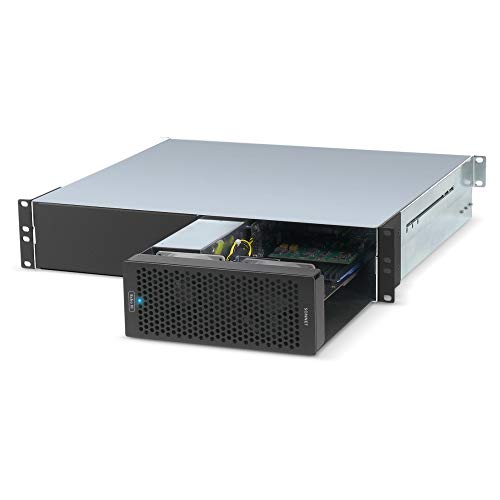
- Three PCIe 3.0 slots for multiple non-GPU audio cards
- HDX compatibility mode for Pro Tools | HDX setups
- 400W integrated power supply with automatic power on/off
Best For: Pro studios needing a rackmount Thunderbolt 3 expansion chassis for HDX or other PCIe audio cards.
Best for Dual-Card Expansion
Thunderbolt 3 to 2 PCIe Chassis

- Dual PCIe slots for flexible expansion
- Quiet fanless aluminum enclosure
- Windows, Mac, and Linux support
Best For: Users who need an external Thunderbolt enclosure for audio cards and other PCIe devices.
Best for HDX Studios
Sonnet Echo III Desktop Thunderbolt 3 PCIe Expansion

- Three PCIe slots for non-GPU audio and DSP cards
- HDX compatibility mode for Pro Tools | HDX users
- 400W built-in power with 75W auxiliary support
Best For: Pro Tools | HDX studios and audio pros needing a multi-card Thunderbolt 3 PCIe expansion chassis.
Best for Dual PCIe Expansion
Dual PCIe Thunderbolt 3/4 Enclosure

- Two external PCIe 3.0 x16 slots for expansion cards
- 40Gbps Thunderbolt 3/4/USB4 connectivity
- Silent fanless aluminum chassis with 60W PSU
Best For: Creators and pros who need a quiet external dual-slot PCIe enclosure for Thunderbolt or USB4 systems.
Best for Multi-Card Audio Rigs
Sonnet Echo Express SEIIIe TB3

- Three PCIe 3.0 slots for multiple cards
- Thunderbolt 3 bandwidth up to 2750 MB/s
- Good fit for Mac-based pro audio setups
Best For: Mac users building a multi-card Thunderbolt 3 audio expansion setup.
Best for Thunderbolt 5 Power Users
Sonnet Echo SE I T5 PCIe Chassis

- Thunderbolt 5 / USB4 with up to 6000 MB/s PCIe bandwidth
- Fits one full-height, single-width PCIe 4.0 x8 card
- Quiet aluminum case with auxiliary PCIe power
Best For: Pro audio and workstation users who need a fast external PCIe chassis for one demanding card.
Best for External PCIe Audio Workflows – StarTech TB3 PCIe Chassis
If you need thunderbolt pcie expansion for audio cards, this StarTech chassis gives you a practical way to add a single full-height PCIe card to a Thunderbolt 3 or 4 system. It’s a solid fit for studios that need reliable external expansion without building a desktop, especially when you want a straightforward enclosure for pro audio interfaces and other single-slot cards.
Best For: Laptop or desktop users who need a driverless Thunderbolt enclosure for a single PCIe audio card or similar expansion card.
Pros:
- Thunderbolt 3/4 connection with up to 40Gbps bandwidth
- Supports one external PCIe 3.0 x16 slot for many single-width cards
- Driverless operation on macOS and Windows makes setup simpler
- Includes active cooling and a 65W power adapter for steady use
Cons:
- Does not support GPU graphics cards
- Limited to single-width cards up to 8 inches long
- Overkill if you only need basic port expansion
For buyers comparing thunderbolt pcie expansion for audio cards, this enclosure stands out for its compatibility, power delivery, and no-fuss approach. It’s best when you need dependable external PCIe access for a compatible audio or production card rather than a multi-slot workstation upgrade.
Best for Mac and Windows Workflows – Sonnet Echo Express SE1 TB3 Chassis
If you need thunderbolt pcie expansion for audio cards, the Sonnet Echo Express SE1 is a compact way to add a single full-performance PCIe card to a Mac or Windows system with Thunderbolt 3. It’s a practical fit for pro audio interfaces, DSP cards, and other half-length PCIe gear that needs reliable bandwidth without a tower case.
Best For: Engineers, musicians, and editors who want a compact Thunderbolt 3 enclosure for one serious PCIe audio card.
Pros:
- Thunderbolt 3 connection delivers up to 2750 MB/s of PCIe bandwidth
- Supports one half-length, full-height, single-width PCIe card at full performance
- Small desktop footprint works well in tight studio setups
- Second TB3 port supports daisy-chaining and display output flexibility
Cons:
- Only one PCIe slot, so it is not ideal for multi-card systems
- Not designed for GPU use
- Best suited to cards within the size limit, which narrows compatibility
For a focused studio rig, this chassis covers the core need behind thunderbolt pcie expansion for audio cards: stable external PCIe access with enough throughput for demanding pro audio hardware. It’s a strong choice when you only need one card and want to keep the setup compact.
Best for Thunderbolt 5 Workflows – OWC Mercury Helios 5S TB5 PCIe Enclosure
If you need thunderbolt pcie expansion for audio cards in a compact studio setup, the OWC Mercury Helios 5S is built to give space-constrained Macs a real PCIe slot over Thunderbolt 5. It delivers plenty of bandwidth for low-latency interfaces and other demanding cards, while also adding extra TB5 ports for displays, drives, and peripherals.
Best For: MacBook, Mac Studio, and Mac mini users who need a fast external PCIe expansion chassis for audio I/O or other pro cards.
Pros:
- Thunderbolt 5 connectivity with over 6000MB/s of bandwidth for demanding PCIe workloads
- Supports half-length, full-height, single- or double-width cards in a PCIe 4.0 x4 slot
- Three TB5 ports with 15W power delivery add useful expansion around the chassis
Cons:
- Only one PCIe slot, so it suits a single card rather than multi-card rigs
- More expensive than basic Thunderbolt expansion boxes
This is a strong fit when you want thunderbolt pcie expansion for audio cards without giving up the portability of a small computer. It is especially compelling for users who need fast external access to a pro card and extra high-speed ports in one enclosure.
Best for Pro Tools HDX – Sonnet Echo III Rackmount
Sonnet Echo III Rackmount a 3-Slot Rackmount Thunderbolt 3 to PCIe Card Expansion System
Check Price On AmazonThe Sonnet Echo III Rackmount is a strong choice for thunderbolt pcie expansion for audio cards when you need a rack-ready way to add multiple professional PCIe devices to a Thunderbolt 3 system. With three PCIe 3.0 slots, wide card compatibility, and a built-in 400W power supply, it is aimed at studio setups that need dependable expansion rather than a generic desktop adapter.
Best For: Studio users who need a rackmount Thunderbolt 3 expansion chassis for Pro Tools | HDX or other non-GPU audio PCIe cards.
Pros:
- Supports up to three high-performance non-GPU PCIe cards over Thunderbolt 3
- HDX compatibility mode works with up to three Pro Tools | HDX cards
- 400W power supply with 75W auxiliary power for demanding cards
- Rackmount design is ideal for permanent studio installations
Cons:
- Overkill if you only need a single audio interface card
- Designed for non-GPU cards only, so it is not a general-purpose expansion box
- Premium hardware comes with a higher price than basic Thunderbolt enclosures
For serious thunderbolt pcie expansion for audio cards, this Sonnet chassis stands out because it is built for pro workflows, especially HDX-based rigs. If you need a stable rackmount solution with real card support and proper power delivery, it is one of the most capable options in this category.
Best for Dual-Card Expansion – Thunderbolt 3 to 2 PCIe Chassis
If you need thunderbolt pcie expansion for audio cards, this dual-slot chassis is a practical way to move a pro interface or DSP card out of a laptop and into a quieter external enclosure. It gives you two PCIe 3.0 x16 slots over a 40Gbps Thunderbolt 3/4 or USB4 connection, making it useful when you want room for an audio card plus another expansion device.
Best For: Creators and workstation users who want an external Thunderbolt enclosure for audio cards, capture hardware, or other PCIe add-ins.
Pros:
- Two PCIe slots give more flexibility than single-slot Thunderbolt enclosures.
- Silent, fanless aluminum design suits recording setups and quiet studios.
- Works with Windows, macOS, and Linux in a plug-and-play setup.
- Includes 60W power supply plus extra 8-pin support for compatible cards.
Cons:
- At 30W per slot, very power-hungry cards may need closer compatibility checking.
- Performance depends on the installed card and its drivers, not just the enclosure.
- Large cards still need to fit within the stated chassis dimensions.
Overall, this is a solid pick if your priority is thunderbolt pcie expansion for audio cards in a compact, quiet enclosure with room to grow. The dual-slot design and broad OS support make it especially appealing for mobile studios and hybrid production rigs.
Best for HDX Studios – Sonnet Echo III Desktop Thunderbolt 3 PCIe Expansion
If you need reliable thunderbolt pcie expansion for audio cards, the Sonnet Echo III Desktop is built for serious studio workflows. It adds three PCIe slots over Thunderbolt 3, supports non-GPU cards, and includes the power and compatibility features needed for high-end audio hardware.
Best For: Pro Tools | HDX users and studios that need a desktop Thunderbolt 3 expansion chassis for multiple audio PCIe cards.
Pros:
- Supports up to three PCIe 3.0 cards in one desktop enclosure
- HDX compatibility mode is designed for Pro Tools | HDX setups
- 400W power supply with 75W auxiliary power for demanding cards
- Auto power on/off helps keep studio use simple
Cons:
- Not intended for GPU expansion
- Desktop chassis is larger than portable Thunderbolt options
- Overkill if you only need a single PCIe audio interface card
For buyers prioritizing stable thunderbolt pcie expansion for audio cards, this Sonnet enclosure stands out for HDX support, three-slot capacity, and strong integrated power. It is a practical choice when compatibility and multi-card flexibility matter more than compact size.
Best for Dual PCIe Expansion – Dual PCIe Thunderbolt 3/4 Enclosure
If you need thunderbolt pcie expansion for audio cards, this dual-slot enclosure is a practical way to add serious PCIe hardware to a laptop or mini PC without opening the machine. It connects over Thunderbolt 3/4 or USB4 and offers two PCIe 3.0 x16 slots, making it a useful fit for capture cards, 10GbE adapters, and other demanding add-in cards.
Best For: Creators and pros who want an external dual-slot PCIe box for expansion cards on Thunderbolt 3/4 or USB4 systems.
Pros:
- Dual PCIe slots let you run more than one expansion card externally
- 40Gbps Thunderbolt/USB4 link is well suited for high-bandwidth peripherals
- Fanless aluminum chassis keeps operation silent for studio use
- Built-in 60W PSU provides dedicated power for installed cards
Cons:
- Does not charge the host laptop with Power Delivery
- Card size is limited, so compatibility should be checked carefully
- Requires drivers for the installed PCIe cards themselves
For buyers comparing thunderbolt pcie expansion for audio cards, the biggest appeal here is the quiet, external, dual-slot design that keeps a studio setup flexible. Just make sure your card dimensions and power needs match the chassis before buying.
Best for Multi-Card Audio Rigs – Sonnet Echo Express SEIIIe TB3
If you need reliable thunderbolt pcie expansion for audio cards, this Sonnet chassis is built for running multiple PCIe devices from a single Thunderbolt 3 connection. It gives you three PCIe 3.0 slots, solid bandwidth, and a practical way to house pro audio hardware like DSP, capture, or interface cards on a Mac workflow.
Best For: Mac users who want to run several PCIe audio cards or other high-performance expansion cards from one Thunderbolt 3 chassis.
Pros:
- Three PCIe 3.0 slots for multiple cards at once
- Thunderbolt 3 connection with up to 2750 MB/s PCIe bandwidth
- Supports full-height, half-length cards for flexible audio setups
- Includes two Thunderbolt 3 ports and a 2-year warranty
Cons:
- Designed for Macs with Thunderbolt 3, so compatibility is more limited
- Not ideal for long PCIe cards beyond the half-length support limit
For buyers comparing thunderbolt pcie expansion for audio cards, this model stands out because it focuses on multi-card flexibility rather than just a single-slot adapter. It is a strong fit when you need a dependable chassis for a compact pro audio rig.
Best for Thunderbolt 5 Power Users – Sonnet Echo SE I T5 PCIe Chassis
If you need thunderbolt pcie expansion for audio cards, this Sonnet enclosure is built for serious desktop workflows. It turns a Thunderbolt 5 or USB4 connection into a full-height PCIe slot with enough bandwidth for demanding pro audio, video, storage, and networking gear.
Best For: Mac, Windows, and Linux users who want a fast, compact external PCIe chassis for a single full-height audio interface or DSP card.
Pros:
- Thunderbolt 5 connectivity with up to 6000 MB/s bi-directional PCIe bandwidth
- Supports half-length+, full-height, single-width PCIe 4.0 x8 cards
- Includes auxiliary PCIe power for more demanding expansion cards
- Quiet aluminum enclosure with temperature-controlled cooling
Cons:
- Only supports one PCIe card, so it is not ideal for multi-card rigs
- Higher-end feature set may be overkill for basic interface upgrades
- Best value depends on already owning a compatible Thunderbolt 5/USB4 setup
This is a strong pick if your priority is dependable thunderbolt pcie expansion for audio cards in a portable but studio-ready chassis. It is especially appealing for users who need speed, cooling, and broad OS support in one enclosure.
How We Picked the Best Thunderbolt Pcie Expansion for Audio Cards
We prioritized chassis that are relevant for Thunderbolt Pcie Expansion for Audio Cards use cases: dependable host connectivity, proven PCIe compatibility, enough clearance for professional cards, and sensible lane/slot layouts for real studio workflows. We also considered port generation, enclosure style, and whether the design fits a desktop, rack, or mobile setup.
Quick Comparison
For a single audio interface or DSP card, one-slot enclosures are often the cleanest and most cost-effective choice. If you need multiple cards, redundant workflows, or room to grow, a 2-slot or 3-slot chassis is the better fit. Thunderbolt 5 models can offer more headroom for newer systems, while Thunderbolt 3 and USB4 options remain strong picks for many current studios.
Key Buying Factors for Thunderbolt Pcie Expansion for Audio Cards
Slot Count and Card Size
Start by matching the enclosure to your actual card count. A one-slot chassis works well for a single PCIe audio card, but check card height, length, and power requirements. Multi-slot units are useful if you expect to add DSP, video I/O, network, or storage cards later.
Bandwidth and Thunderbolt Version
Bandwidth matters most when you run high-channel-count audio, multiple peripherals, or demanding content workflows alongside your audio card. Thunderbolt 3 is still widely supported, Thunderbolt 4/USB4 can improve host compatibility, and Thunderbolt 5 brings more future-proofing for newer machines.
Power Delivery and Internal PSU
Audio cards may not be power-hungry, but a stable power supply is essential for low-noise, reliable operation. Look for chassis with enough auxiliary power overhead and clear specs for the card class you plan to install.
Noise, Cooling, and Rack Vs Desktop Form Factor
In studios, fan noise can matter as much as raw performance. Desktop enclosures are often easier to place near a workstation, while rackmount models are better if your studio is already built around a rack. Good airflow helps maintain consistent performance during long sessions.
Who Should Buy Which Thunderbolt Pcie Expansion for Audio Cards?
If you need the simplest setup for one card, choose a compact one-slot enclosure. If you are building a modular studio rig or want to support multiple expansion cards, a 2-slot or 3-slot chassis is usually the better long-term value. Mobile producers and laptop users should favor lighter desktop units, while installed studios may prefer rackmount options for cable management and permanence. For newer Macs and PCs, consider Thunderbolt 5 or USB4 models if you want extra headroom, but do not overspend if your current audio workflow is already well served by Thunderbolt 3.
