
If you need desktop-class 10GbE networking from a laptop or compact system, the right enclosure matters as much as the card itself. The best options balance bandwidth, cooling, slot layout, and host compatibility.
This roundup focuses on practical thunderbolt pcie expansion for 10gbe cards setups that are easier to deploy, easier to cool, and more likely to deliver stable performance in real-world use.
Best 5 Thunderbolt Pcie Expansion for 10gbe Cards Picks for 2026
Best Multi-Slot Thunderbolt Chassis

- Three PCIe 3.0 slots for multiple expansion cards
- 40Gbps Thunderbolt 3 with up to 2750 MB/s PCIe bandwidth
- Good fit for Mac users adding a 10GbE card and more
Best For: Mac users who need a flexible multi-slot Thunderbolt 3 enclosure for 10GbE and other PCIe cards.
Best for Capture Cards
Thunderbolt 4/3 USB4 to PCIe Enclosure
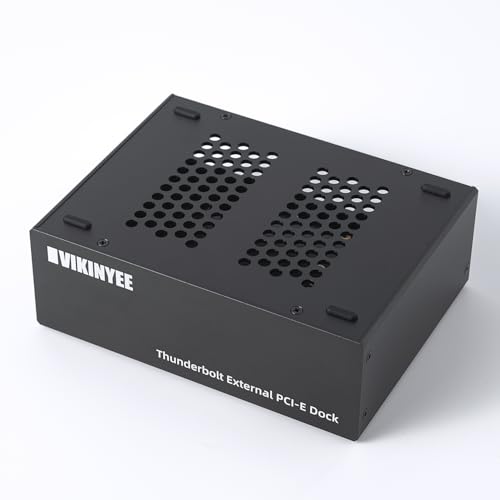
- PCIe 3.0 x4 support for 10GbE and capture cards
- Silent all-aluminum chassis with passive cooling
- Works with macOS, Windows, and Linux
Best For: Editors, streamers, and workstation users who need a quiet external PCIe enclosure for 10GbE cards or capture hardware.
Best Compact 10GbE Enclosure

- Single PCIe 3.0 x8 slot for one high-speed card
- 40Gbps Thunderbolt 3 link with strong PCIe bandwidth
- Compact chassis with daisy-chainable Thunderbolt ports
Best For: Mac and Windows users who want a compact Thunderbolt 3 enclosure for a 10GbE card.
Best Dual-Slot Pick
Thunderbolt 3 to 2 PCIe Expansion Chassis

- Dual PCIe slots for a 10GbE card plus another add-in card
- 40Gbps Thunderbolt 3/4 and USB4 connectivity
- Silent all-aluminum, fanless enclosure with included power
Best For: Users who need a compact Thunderbolt enclosure for a 10GbE NIC plus another PCIe card.
Best for Thunderbolt 5 Speed
Sonnet Echo SE I T5 PCIe Expansion Chassis

- Thunderbolt 5 with up to 6000 MB/s PCIe bandwidth
- Fits half-length, full-height, single-width PCIe 4.0 x8 cards
- Auxiliary power and quiet cooling for demanding cards
Best For: Mac, Windows, and Linux users needing a fast external enclosure for a 10GbE or other high-bandwidth PCIe card.
Best Multi-Slot Thunderbolt Chassis – Sonnet Echo Express SEIIIe
If you need thunderbolt pcie expansion for 10gbe cards plus room for other add-in cards, the Sonnet Echo Express SEIIIe is built for flexibility. Its three PCIe 3.0 slots and 40Gbps Thunderbolt 3 connection make it a strong fit for Mac-based workflows where you want multiple high-performance cards in one external chassis.
Best For: Mac users who want a three-slot Thunderbolt 3 expansion chassis for a 10GbE adapter and other PCIe cards.
Pros:
- Three PCIe 3.0 slots let you run multiple cards at once
- 40Gbps Thunderbolt 3 connection delivers up to 2750 MB/s of PCIe bandwidth
- Supports full-height, half-length cards up to 7.75 inches long
- Includes a 2-year warranty and lifetime customer support
Cons:
- Designed for Macs with Thunderbolt 3, so compatibility is limited
- Not ideal if you only need a single 10GbE card
- Requires external cabling and dedicated desk space
For buyers comparing thunderbolt pcie expansion for 10gbe cards, this chassis stands out because it is not just a single-slot adapter; it gives you room to scale. If your setup needs a fast network card today and room for capture, storage, or audio hardware later, the SEIIIe is a practical long-term enclosure.
Best for Capture Cards – Thunderbolt 4/3 USB4 to PCIe Enclosure
If you need reliable thunderbolt pcie expansion for 10gbe cards, this VK-G2 enclosure is built for serious external PCIe use rather than casual accessories. It gives you a PCIe 3.0 x4 slot over 40Gbps Thunderbolt 3/4 or USB4, making it a practical way to run a 10GbE adapter, capture card, or NVMe expansion from a laptop or mini PC.
Best For: Editors, streamers, and workstation users who want a silent external chassis for a PCIe 3.0 x4 card, especially 10GbE networking or capture workflows.
Pros:
- Supports PCIe 3.0 x4 cards up to 145mm, including many 10GbE adapters
- Passive aluminum design stays silent for studio and editing setups
- Driverless on macOS, Windows, and Linux for easier plug-and-play use
- Extra DP 1.4 and daisy-chain Thunderbolt port add flexibility
Cons:
- Only works with Thunderbolt 3/4 or USB4 hosts
- Not ideal for larger PCIe cards beyond the 145mm length limit
- 30W card power is enough for many adapters, but not every add-in card
For buyers focused on thunderbolt pcie expansion for 10gbe cards, this enclosure stands out because it combines a quiet chassis, broad OS support, and enough bandwidth for network adapters and other pro cards. It is a strong fit if you want a compact external PCIe box for work rather than a general-purpose dock.
Best Compact 10GbE Enclosure – Sonnet Echo Express SE1
If you need reliable thunderbolt pcie expansion for 10gbe cards, the Sonnet Echo Express SE1 is a straightforward way to add a full-performance PCIe slot to a Mac or Windows system without internal expansion bays. Its Thunderbolt 3 connection and compact chassis make it a practical desk-side option for network adapters, capture cards, and other low-profile PCIe hardware.
Best For: Mac or Windows users who need a compact Thunderbolt 3 enclosure for a single high-speed PCIe card like a 10GbE adapter.
Pros:
- One PCIe 3.0 x8 slot supports many full-height, half-length cards
- 40Gbps Thunderbolt 3 connection delivers strong PCIe bandwidth
- Compact chassis fits easily on a desktop or in a small workspace
- Two Thunderbolt 3 ports allow daisy-chaining with other devices
Cons:
- Only one PCIe card is supported
- Not intended for GPU use
- Card length and format limits rule out some larger expansion cards
For buyers focused on thunderbolt pcie expansion for 10gbe cards, this Sonnet enclosure makes more sense than larger multi-slot options because it prioritizes stable bandwidth and simple compatibility over expansion flexibility. If your goal is a clean, compact external home for a single fast NIC, it’s an easy chassis to justify.
Best Dual-Slot Pick – Thunderbolt 3 to 2 PCIe Expansion Chassis
If you need thunderbolt pcie expansion for 10gbe cards and want room for a second add-in card, this dual-slot chassis is a practical way to turn a Thunderbolt 3/4 or USB4 laptop into a more capable workstation. It offers a 40Gbps link, passive cooling, and broad OS support, making it a flexible enclosure for networking, capture, or storage cards.
Best For: Users who need a compact Thunderbolt enclosure for a 10GbE NIC plus another PCIe card.
Pros:
- Two PCIe 3.0 x16 slots provide more expansion than single-slot enclosures.
- Works with Thunderbolt 3/4 and USB4 systems on Windows, macOS, and Linux.
- All-aluminum, fanless design keeps operation silent.
- Includes 60W power adapter and extra power support for demanding cards.
Cons:
- Compact size limits card fitment to shorter boards and specific dimensions.
- PCIe cards still need their own drivers, so setup is not fully plug-and-play.
- 60W external power may be tight for especially power-hungry hardware.
For buyers comparing thunderbolt pcie expansion for 10gbe cards, this enclosure stands out because it combines dual-slot flexibility with quiet, portable hardware. It is a strong fit when you want networking expansion without jumping to a larger desktop tower.
Best for Thunderbolt 5 Speed – Sonnet Echo SE I T5 PCIe Expansion Chassis
If you need thunderbolt pcie expansion for 10gbe cards, the Sonnet Echo SE I T5 is built for serious external PCIe use with Thunderbolt 5 bandwidth, broad card compatibility, and a compact desktop chassis. It’s a strong fit for users who want to add networking, pro audio, or video hardware without opening their main system.
Best For: Mac, Windows, and Linux users who want a fast external enclosure for a full-height PCIe networking or pro workflow card.
Pros:
- Thunderbolt 5 connection with up to 6000 MB/s bi-directional PCIe bandwidth
- Supports half-length, full-height, single-width PCIe 4.0 x8 cards
- Auxiliary PCIe power helps run more demanding cards
- Quiet aluminum enclosure with temperature-controlled cooling
Cons:
- Only supports one PCIe card, so it’s not a multi-card expansion solution
- Requires a compatible Thunderbolt 5/USB4 setup to get the best results
- Premium feature set may be more than casual users need
For buyers comparing thunderbolt pcie expansion for 10gbe cards, this Sonnet chassis stands out for performance headroom and pro-grade compatibility. It’s a practical choice when you want an external enclosure that can keep up with fast networking cards and other bandwidth-hungry PCIe hardware.
How We Picked the Best Thunderbolt Pcie Expansion for 10gbe Cards
For Thunderbolt Pcie Expansion for 10gbe Cards, we prioritized enclosures with enough PCIe bandwidth for network adapters, dependable power delivery, and a chassis design that supports sustained transfers without throttling. We also looked for clear compatibility with macOS, Windows, and Linux where possible, since 10GbE buyers often want cross-platform flexibility.
Slot count also matters. Some users only need one card, while others may want room for additional capture, storage, or accelerator hardware. We favored options that make it easier to match the enclosure to the actual workload rather than overspending on unused capacity.
Quick Comparison
Single-slot chassis are usually the simplest and most cost-effective choice for a 10GbE NIC. Two-slot and three-slot enclosures are better if you expect to expand later or need a card with a larger heatsink or bracket footprint. Thunderbolt 5 and USB4 models offer the most future-proof connectivity, while Thunderbolt 3 units remain a solid value for many systems.
Key Buying Factors for Thunderbolt Pcie Expansion for 10gbe Cards
Host Port and Bandwidth
Make sure your laptop or desktop has the right Thunderbolt or USB4 port and that the enclosure can deliver enough throughput for your network card. A 10GbE adapter does not always need the absolute highest link speed available, but you do want a stable connection with minimal overhead.
Slot Size and Card Fit
Check whether your NIC is full-height or low-profile, single-slot or dual-slot. Many 10GbE cards fit easily in compact enclosures, but larger models with substantial cooling may require more space.
Cooling and Noise
Network cards can run warm during heavy file transfers. A good enclosure should have active cooling or a design that promotes airflow, especially if it will be used for long transfers, virtual machines, or NAS access.
Power and Compatibility
Confirm external power support and OS compatibility before buying. If you use macOS, Windows, and Linux across different machines, choose a chassis with broad driver and platform support for your exact 10GbE card.
Who Should Buy Which Thunderbolt Pcie Expansion for 10gbe Cards?
If you want a straightforward setup for one network adapter, a single-slot chassis is usually the smartest pick. If you need room for a larger card or possible future expansion, a two-slot or three-slot enclosure is the safer buy. Creators and IT users who want the newest connection standard should lean toward Thunderbolt 5 or USB4 models, while value-focused buyers with Thunderbolt 3 systems can still get excellent results from a well-built TB3 enclosure.
In short, choose the smallest enclosure that fits your card and workflow, then prioritize compatibility, cooling, and host bandwidth over extra features you may never use.
