
If you need external PCIe storage expandability without replacing your system, the right enclosure can add serious flexibility fast. These Thunderbolt PCIe expansion chassis for storage cards are built to connect high-performance adapters, RAID cards, capture cards, and other PCIe devices to modern laptops and desktops.
In this roundup, we focus on real-world compatibility, bandwidth, slot layout, power delivery, and host support so you can choose a chassis that fits your storage workflow, not just your port count.
Best 10 Thunderbolt Pcie Expansion Chassis for Storage Cards Picks for 2026
Best for Thunderbolt 5 Speed
Sonnet Echo SE I T5 PCIe Card Expansion Chassis

- Thunderbolt 5 connection with up to 6000 MB/s bi-directional bandwidth
- Supports one full-height, single-width PCIe 4.0 x8 card
- Quiet aluminum build with auxiliary power and daisy-chaining
Best For: Users who need a compact Thunderbolt 5 enclosure for a single fast PCIe storage or expansion card.
Best for High-Speed Storage Cards
OWC Mercury Helios 5S TB5 Expansion

- 6000MB/s+ bandwidth for demanding storage workloads
- PCIe 4.0 x4 slot for half-length, full-height cards
- Three TB5 ports with 15W power delivery
Best For: Users adding fast storage, networking, or capture cards to MacBooks and compact desktops.
Best for Single-Card Storage Builds
Sonnet Echo Express SE1 Thunderbolt 3 Expansion Chassis

- One PCIe 3.0 x8 slot for a single storage card
- 40Gbps Thunderbolt 3 connection with strong bandwidth
- Compact chassis with two Thunderbolt 3 ports
Best For: Users who need a compact Thunderbolt 3 enclosure for one storage or other PCIe add-in card.
Best for GPU + PCIe Flexibility
Thunderbolt 3/4 eGPU Enclosure

- Supports Thunderbolt 3/4 and USB4
- Works with NVIDIA, AMD, and PCIe cards
- Uses an ATX power supply with 85W PD
Best For: Users who want a flexible Thunderbolt enclosure for GPUs, storage cards, and other PCIe add-ins.
Best Compact Pick
Sonnet Echo Express SEL Thunderbolt 3 PCIe Chassis

- Low-profile PCIe slot in a very small enclosure
- Thunderbolt 3 supports up to 2750 MB/s PCIe bandwidth
- Includes cable and ThunderLok for secure connection
Best For: Users who need a compact Thunderbolt 3 PCIe chassis for compatible low-profile storage or expansion cards.
Best for Thunderbolt 5 Performance
Razer Core X V2 eGPU Enclosure

- Thunderbolt 5 with up to 80 Gbps bandwidth
- Fits 4-slot desktop PCIe graphics cards
- Works with Thunderbolt 4, Thunderbolt 5, and USB4 devices
Best For: Windows 11 users who want a fast external PCIe enclosure with room for large cards.
Best for Multi-Card Expansion
Sonnet Echo III Desktop 3-Slot Thunderbolt 3 PCIe

- Runs up to three non-GPU PCIe cards over Thunderbolt 3.
- Includes a 400W PSU with 75W auxiliary power.
- Compatible with full-height, single-width cards and HDX setups.
Best For: Users who need a Thunderbolt 3 chassis for multiple PCIe expansion cards and pro workflows.
Best for Storage Add-Ons
StarTech Thunderbolt 3 PCIe Expansion Chassis

- Thunderbolt 3/4 support with up to 40Gbps bandwidth
- Ideal for NVMe adapters, fiber, Ethernet, and capture cards
- Toolless aluminum build with active cooling
Best For: Laptop and desktop users who need one dependable external PCIe slot for storage and connectivity cards.
Best for Pro Tools HDX
Sonnet Echo III Rackmount 3-Slot Thunderbolt 3
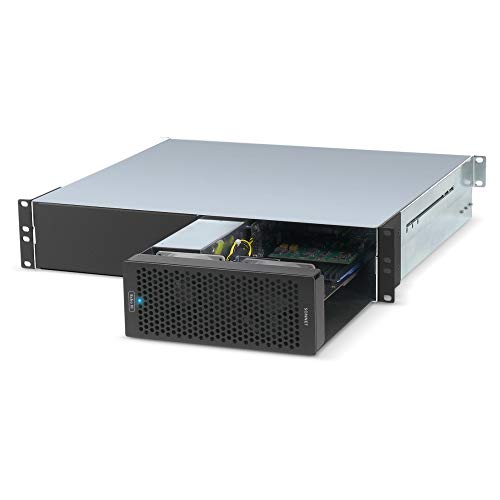
- Three PCIe 3.0 slots for multiple expansion cards
- Broad non-GPU Thunderbolt 3 card compatibility
- 400W PSU with automatic power switching
Best For: Pro Tools HDX users and rackmount buyers needing multi-card PCIe expansion.
Best for Dual-Slot Workflows
Dual PCIE to Thunderbolt 3/4 USB4 Expansion Chassis

- Adds two external PCIe slots over a single Thunderbolt/USB4 connection.
- 40Gbps bandwidth handles capture, networking, and storage cards.
- Fanless aluminum build stays quiet for studio use.
Best For: Creators and power users who need multiple external PCIe cards from a laptop or mini PC.
Best for Thunderbolt 5 Speed – Sonnet Echo SE I T5 PCIe Card Expansion Chassis
If you need a thunderbolt pcie expansion chassis for storage cards, the Sonnet Echo SE I T5 is a strong fit for fast, external PCIe access on Mac, Windows, and Linux systems. It brings Thunderbolt 5 bandwidth to a single full-height PCIe card, making it a practical choice for pro storage, networking, and other performance-focused add-ins.
Best For: Creators and IT users who want a compact Thunderbolt 5 enclosure for one high-speed PCIe storage or expansion card.
Pros:
- Up to 6000 MB/s bi-directional PCIe bandwidth over Thunderbolt 5
- Fits half-length+ and full-height single-width PCIe 4.0 x8 cards
- Auxiliary PCIe power helps support demanding cards
- Quiet aluminum enclosure with variable-speed fan
Cons:
- Only supports one PCIe card, so it is not a multi-card chassis
- Premium price is expected for Thunderbolt 5 performance
- Best suited to users who already have a compatible PCIe card
This is a capable thunderbolt pcie expansion chassis for storage cards when speed, portability, and broad OS support matter more than expansion depth. If you need a quiet desktop enclosure for a single high-performance card, it is one of the more compelling Thunderbolt 5 options.
Best for High-Speed Storage Cards – OWC Mercury Helios 5S TB5 Expansion
If you need a thunderbolt pcie expansion chassis for storage cards, the OWC Mercury Helios 5S is built for serious throughput on compact Macs and other slot-less systems. Its PCIe 4.0 x4 slot and Thunderbolt 5 connection make it a strong fit for NVMe RAID adapters, fast fiber/Ethernet cards, and other demanding add-ins that benefit from class-leading external bandwidth.
Best For: MacBook, Mac mini, and Mac Studio users who want to add high-speed PCIe storage or networking cards without opening up their computer.
Pros:
- Over 6000MB/s bandwidth helps keep fast storage cards from bottlenecking.
- PCIe 4.0 x4 slot supports half-length, full-height, single- or double-width cards.
- Three Thunderbolt 5 ports add flexible daisy-chaining and accessory expansion.
- 15W power delivery on each TB5 port is useful for connected peripherals.
Cons:
- Only one PCIe slot, so it is best for a single primary expansion card.
- Performance depends on a Thunderbolt 5 host to reach its full potential.
- More expensive than basic Thunderbolt enclosures aimed at light-duty use.
This is a compelling thunderbolt pcie expansion chassis for storage cards when your priority is external PCIe performance rather than broad card flexibility. It is especially appealing for users who want workstation-like bandwidth in a compact desktop or laptop setup.
Best for Single-Card Storage Builds – Sonnet Echo Express SE1 Thunderbolt 3 Expansion Chassis
If you need a thunderbolt pcie expansion chassis for storage cards, the Sonnet Echo Express SE1 is a straightforward way to add one high-performance PCIe card to a Mac or Windows computer without an internal slot. Its Thunderbolt 3 connection provides plenty of bandwidth for many storage-focused adapters, while the compact desktop design keeps the setup relatively tidy.
Best For: Users who want a compact Thunderbolt 3 chassis for a single storage or capture card and need full-performance PCIe access from a laptop or slotless desktop.
Pros:
- One PCIe 3.0 x8 slot supports a half-length, full-height card at full performance
- 40Gbps Thunderbolt 3 interface is well suited to fast storage expansion cards
- Two Thunderbolt 3 ports allow daisy-chaining and display connectivity
- Small, light chassis is easy to place on a desk or in a mobile rig
Cons:
- Only supports one PCIe card, so it is not ideal for multi-card workflows
- Not intended for GPU use
- Card length and layout limits may exclude some larger storage adapters
For buyers focused on a thunderbolt pcie expansion chassis for storage cards, the SE1 makes sense when you want reliable bandwidth in a simple single-slot enclosure. It is less flexible than multi-slot chassis options, but that tradeoff helps keep the footprint small and the performance easy to predict.
Best for GPU + PCIe Flexibility – Thunderbolt 3/4 eGPU Enclosure
If you need a thunderbolt pcie expansion chassis for storage cards and other add-in cards, the VK-Y900 is built around flexibility rather than a single-use design. It supports Thunderbolt 3/4 and USB4 connections, takes an ATX power supply, and can work with NVIDIA or AMD graphics cards as well as other PCIe devices, making it a practical pick for mixed upgrade setups.
Best For: Users who want a versatile Thunderbolt enclosure for GPUs and PCIe expansion, especially when they may also need room for storage cards or other add-in hardware.
Pros:
- Supports Thunderbolt 3/4 and USB4 for broad host compatibility
- Works with NVIDIA and AMD graphics cards plus other PCIe cards
- Uses an ATX power supply for flexible system planning
- Includes up to 85W USB-C PD charging support
Cons:
- Requires a separate ATX power supply, which adds cost and setup time
- Designed more like an expansion platform than a compact all-in-one solution
As a thunderbolt pcie expansion chassis for storage cards, this model stands out for users who want one enclosure that can handle a GPU now and still leave room for future PCIe add-ons. It is a strong fit if you value compatibility and expansion headroom over a minimalist design.
Best Compact Pick – Sonnet Echo Express SEL Thunderbolt 3 PCIe Chassis
Sonnet Echo Express SEL Thunderbolt 3-to-PCIe Expansion Chassis (1 Low Profile Slot)
Check Price On AmazonIf you need a thunderbolt pcie expansion chassis for storage cards but don’t have room for a full-size enclosure, the Sonnet Echo Express SEL is a practical low-profile option. It gives Mac and Windows users a single PCIe slot over Thunderbolt 3, with enough bandwidth for high-speed expansion in a compact desktop footprint.
Best For: Users who want a small, reliable Thunderbolt 3-to-PCIe chassis for compatible low-profile storage or expansion cards.
Pros:
- Compact chassis designed for low-profile PCIe cards
- 40Gbps Thunderbolt 3 connection with up to 2750 MB/s of PCIe bandwidth
- Includes Thunderbolt cable and ThunderLok retainer for a more secure setup
- Two Thunderbolt 3 ports support daisy chaining and display connectivity
Cons:
- Only supports one low-profile PCIe card
- Not suitable for full-height expansion cards
- Best value only if you specifically need Thunderbolt 3 compatibility
For buyers focused on a space-saving thunderbolt pcie expansion chassis for storage cards, this Sonnet unit stands out for its small footprint and solid Thunderbolt 3 performance. It is a good fit when you want dependable expansion without moving up to a larger, more expensive enclosure.
Best for Thunderbolt 5 Performance – Razer Core X V2 eGPU Enclosure
If you need a thunderbolt pcie expansion chassis for storage cards or a GPU, the Razer Core X V2 stands out for its Thunderbolt 5 bandwidth, 4-slot card support, and easy single-cable setup. It’s aimed at users who want a flexible external enclosure that can handle demanding PCIe hardware without a complicated install.
Best For: Windows 11 laptops, Thunderbolt 5/4 and USB4 devices, and users who want a fast external PCIe enclosure with room for large cards.
Pros:
- Thunderbolt 5 connection with up to 80 Gbps bandwidth and 140W power delivery
- Fits desktop PCIe graphics cards up to 4 slots wide
- Works with Thunderbolt 4, Thunderbolt 5, and USB4-compatible devices
- Tool-free thumbscrew install and built-in active cooling
Cons:
- GPU and power supply are sold separately
- Primarily designed for Windows systems; Mac M1 and later do not support eGPUs
- More of a GPU enclosure than a dedicated storage-card chassis
For buyers comparing a thunderbolt pcie expansion chassis for storage cards, this enclosure is most compelling when you also want top-tier bandwidth and room for larger PCIe cards. It’s a strong pick for mixed-use setups, but the GPU-first design means storage-only users may find more specialized options elsewhere.
Best for Multi-Card Expansion – Sonnet Echo III Desktop 3-Slot Thunderbolt 3 PCIe
If you need a thunderbolt pcie expansion chassis for storage cards, the Sonnet Echo III Desktop is a strong pick because it gives you three full-size PCIe slots over a single Thunderbolt 3 connection. It’s aimed at non-GPU cards, so it fits well in setups where storage, audio, or other pro expansion cards need reliable external bandwidth without adding internal slots.
Best For: Creators and pros who need to connect multiple high-performance PCIe cards to a Thunderbolt 3 laptop or desktop.
Pros:
- Supports up to three Thunderbolt 3-compatible non-GPU PCIe cards.
- Three-slot layout with one x16 and two x8 slots for flexible card combinations.
- 400W power supply with 75W auxiliary power for demanding cards.
- Auto power on/off helps keep the setup simple and efficient.
Cons:
- Not intended for GPU expansion.
- Overkill if you only need a single PCIe card.
- Requires Thunderbolt 3 compatibility to get the full benefit.
For buyers comparing a thunderbolt pcie expansion chassis for storage cards, this Sonnet unit stands out for its capacity, broad PCIe compatibility, and serious power delivery. It’s a practical choice when you need a compact desktop enclosure that can handle multiple cards at once.
Best for Storage Add-Ons – StarTech Thunderbolt 3 PCIe Expansion Chassis
If you need a practical thunderbolt pcie expansion chassis for storage cards, this StarTech enclosure is a solid way to bring PCIe expansion to a Thunderbolt 3 or 4 system. It gives you one external PCIe 3.0 x16 slot, making it useful for adding NVMe adapters, fiber or Ethernet cards, and other single-width expansion options without opening up your laptop.
Best For: Laptops or compact desktops that need a reliable external PCIe slot for storage cards, capture gear, or networking add-ons.
Pros:
- Supports Thunderbolt 3/4 with up to 40Gbps bandwidth for external PCIe expansion
- Useful for storage-focused add-ons like NVMe adapter cards and high-speed connectivity cards
- Toolless aluminum enclosure with active cooling and included Thunderbolt cable
- Driverless compatibility for macOS and Windows makes setup straightforward
Cons:
- Does not support GPU graphics cards
- Limited to single-width cards up to 8 inches long
- Only one PCIe slot, so it is not ideal for multi-card builds
For buyers specifically comparing a thunderbolt pcie expansion chassis for storage cards, this model stands out for its simple external slot access, strong compatibility, and sensible power delivery. It is best suited to single-card expansion rather than a full workstation-style enclosure.
Best for Pro Tools HDX – Sonnet Echo III Rackmount 3-Slot Thunderbolt 3
Sonnet Echo III Rackmount a 3-Slot Rackmount Thunderbolt 3 to PCIe Card Expansion System
Check Price On AmazonIf you need a dependable thunderbolt pcie expansion chassis for storage cards and other non-GPU PCIe hardware, the Sonnet Echo III Rackmount gives you three slots, strong power delivery, and broad card support in a 2U-friendly rackmount design. It is especially useful when you want to add high-performance expansion without replacing your computer.
Best For: Pro Tools HDX users and power users who need a rackmount Thunderbolt 3 expansion chassis for multiple PCIe storage or audio cards.
Pros:
- Three PCIe 3.0 slots support up to three full-height, single-width cards
- Compatible with a wide range of Thunderbolt 3 non-GPU PCIe cards
- Built-in 400W power supply with 75W auxiliary power
- Automatic power on/off helps keep setup simple
Cons:
- Designed for non-GPU cards only
- Overkill if you only need a single expansion card
- Rackmount format is less convenient for desktop-only setups
As a thunderbolt pcie expansion chassis for storage cards, this model stands out for its capacity, compatibility, and pro-audio-friendly HDX mode. It is a strong choice when you need rack-ready expansion that can handle serious card-based workflows.
Best for Dual-Slot Workflows – Dual PCIE to Thunderbolt 3/4 USB4 Expansion Chassis
If you need a thunderbolt pcie expansion chassis for storage cards or other pro add-in hardware, this dual-slot enclosure is built for desktop-class flexibility from a laptop or mini PC. It uses a single Thunderbolt 3/4 or USB4 connection to expose two PCIe 3.0 x16 slots, making it a practical way to run capture cards, 10GbE adapters, and NVMe-based workflows without opening your machine.
Best For: Creators, editors, and power users who want two external PCIe slots for capture, networking, or storage expansion over Thunderbolt/USB4.
Pros:
- Dual PCIe slots give you room for more than one expansion card at once.
- 40Gbps Thunderbolt 3/4 and USB4 support suits demanding data-heavy tasks.
- Built-in 60W PSU provides dedicated power for installed cards.
- Fanless aluminum chassis runs silently for studio and editing environments.
Cons:
- Does not provide laptop charging or power delivery.
- Card size is limited, so oversized boards may not fit.
- Performance depends on your host port and the specific PCIe card used.
For buyers comparing a thunderbolt pcie expansion chassis for storage cards, this model stands out for its dual-slot design and quiet, no-fuss operation. It is a strong fit when you need flexible external expansion rather than a simple single-card enclosure.
How We Picked the Best Thunderbolt Pcie Expansion Chassis for Storage Cards
We focused on chassis that make sense for storage-related PCIe use: stable Thunderbolt connectivity, reliable host compatibility, sufficient power for expansion cards, and layouts that suit common storage adapters and controller cards. We also favored models with clear support for macOS, Windows, Linux, USB4, or Thunderbolt 4/5 where applicable.
Quick Comparison
Single-slot desktop enclosures are the simplest choice for one storage or I/O card. Multi-slot systems are better when you need multiple adapters, expansion headroom, or a mix of storage and video hardware. Rackmount units fit server-style setups, while eGPU-style enclosures can offer extra space and power for certain PCIe cards, but they are not always the most storage-friendly option.
Key Buying Factors for Thunderbolt Pcie Expansion Chassis for Storage Cards
Slot Count and Card Height
Match the enclosure to the card you already own or plan to buy. Full-height slots are usually more flexible for storage controllers, while low-profile enclosures are better for compact builds. If you expect future upgrades, leave room for a larger card or a second adapter.
Thunderbolt Version and Bandwidth
Thunderbolt 3 remains common and is fine for many storage cards, but Thunderbolt 4, USB4, and Thunderbolt 5 offer broader compatibility and higher headroom on newer systems. For demanding arrays or workflows, the host connection matters as much as the card itself.
Power Delivery and PSU Design
Storage cards can be sensitive to weak or unstable power. Check whether the chassis includes its own power supply, supports bus power for accessories, or needs an external ATX supply. If your card draws extra power, make sure the enclosure can handle it without compromise.
Drive and Device Compatibility
Not every PCIe enclosure is equally suited to every storage device. Verify support for RAID controllers, NVMe adapters, SAS cards, or specialized I/O cards before buying. Some enclosures are more open-ended, while others are tuned for graphics or general expansion.
Who Should Buy Which Thunderbolt Pcie Expansion Chassis for Storage Cards?
If you want a simple setup for one storage card, choose a single-slot desktop chassis. If you manage multiple PCIe devices or want future expansion, a 3-slot system is the better long-term fit. Mac and Windows users should pay extra attention to official platform support, and rackmount buyers should prioritize serviceability and airflow over compact size. For the best overall experience, pick the enclosure that matches your card type, power needs, and host connection first, then compare extras like port count and chassis form factor.
