
If you need desktop-class PCIe expandability from a Mac Studio, a Thunderbolt PCIe enclosure can unlock capture cards, NVMe storage, audio interfaces, and other specialty hardware without opening the computer.
This roundup focuses on current options that balance performance, slot configuration, and macOS compatibility for real-world studio and pro workflows.
Best 10 Thunderbolt Pcie Expansion Chassis for Mac Studio Picks for 2026
Best for Thunderbolt 5 Speed
Sonnet Echo SE I T5 PCIe Chassis

- Up to 6000 MB/s bi-directional PCIe bandwidth
- Supports many full-height PCIe 4.0 x8 cards
- Quiet aluminum enclosure with auxiliary PCIe power
Best For: Mac Studio users and pro workflows that need fast external PCIe card expansion.
Best for Thunderbolt 5 Performance
OWC Mercury Helios 5S TB5 Expansion

- Thunderbolt 5 with up to 80Gb/s ports
- PCIe 4.0 x4 slot for pro add-in cards
- Three TB5 ports with 15W power delivery
Best For: Mac Studio users needing fast single-card PCIe expansion with modern Thunderbolt 5 connectivity.
Best for Compact PCIe Expansion
Sonnet Echo Express SE1 Thunderbolt 3

- Single PCIe 3.0 x8 slot for pro cards
- Compact Thunderbolt 3 chassis with 40Gbps bandwidth
- Good fit for Mac Studio workflows needing one card
Best For: Users who need a small Thunderbolt 3 enclosure for one PCIe card on a Mac Studio.
Best Thunderbolt Hub Expansion
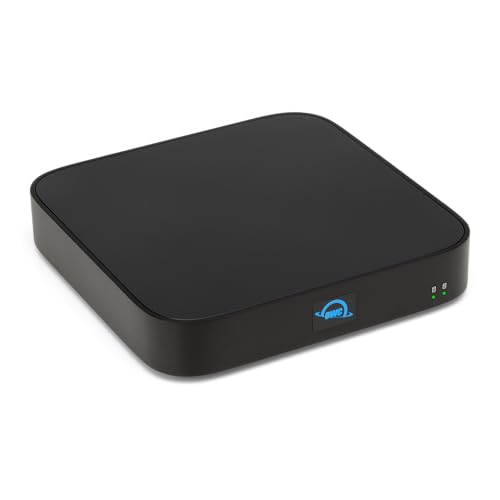
- Three Thunderbolt 4 ports with 96W host power
- Supports one SATA drive and one NVMe M.2 SSD
- Compact Mac Studio-friendly desk setup
Best For: Mac Studio users who want extra Thunderbolt ports and flexible storage in a compact enclosure.
Best Compact Thunderbolt 3 PCIe Pick
Sonnet Echo Express SEL 1-Slot Chassis

- Smallest-style Thunderbolt 3 PCIe expansion for a single low-profile card
- Up to 2750 MB/s PCIe bandwidth for serious peripherals
- Includes Thunderbolt cable and ThunderLok retainer
Best For: Mac Studio users who only need one low-profile PCIe card in a compact enclosure.
Best for Intel Thunderbolt 5 Upgrades
ASUS ThunderboltEX 5 Expansion Card

- Dual Thunderbolt 5 USB-C ports
- Up to 120Gbps bandwidth and daisy-chaining
- DisplayPort 2.1 with up to three 8K displays
Best For: Intel desktop builders who need a fast Thunderbolt 5 add-in card with strong display and charging support.
Best for Single-Slot Builds
StarTech Thunderbolt 3 PCIe Chassis

- Single PCIe slot for focused expansion
- Thunderbolt 3 connection for pro peripherals
- Compact choice for one critical add-in card
Best For: Mac Studio owners who need one reliable PCIe expansion slot without extra bulk.
Best for Multi-Card Rigs
Sonnet Echo III Rackmount Thunderbolt 3
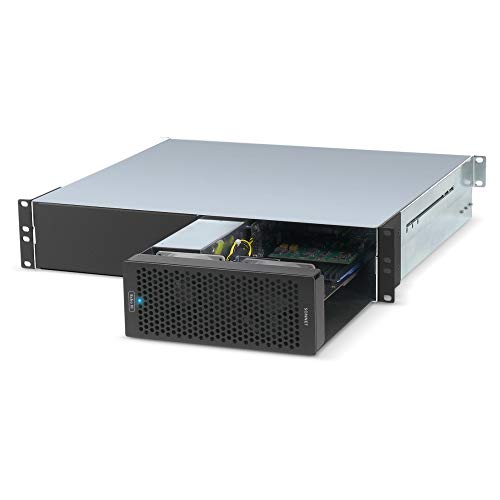
- Three PCIe 3.0 slots for expansion
- Broad non-GPU card compatibility
- 400W PSU with 75W auxiliary power
Best For: Mac Studio users building a rackmount, multi-card Thunderbolt expansion setup.
Best for Dual-Slot Expansion
Dual PCIe to Thunderbolt 3/4 USB4 Chassis

- Adds two external PCIe 3.0 x16 slots over one Thunderbolt/USB4 connection
- Silent fanless aluminum design fits studio and editing environments
- Built-in 60W PSU supports cards like capture, networking, and SSD adapters
Best For: Creators who want to run two PCIe cards from a Mac Studio or mini PC without internal upgrades.
Best for 3-Card Workflows
Sonnet Echo Express SEIIIe Thunderbolt 3

- Three PCIe 3.0 slots for running multiple cards
- 40Gbps Thunderbolt 3 with up to 2750 MB/s bandwidth
- Mac-friendly enclosure with warranty and lifetime support
Best For: Creators and pros who need to expand a Mac with multiple PCIe cards at once.
Best for Thunderbolt 5 Speed – Sonnet Echo SE I T5 PCIe Chassis
If you want a thunderbolt pcie expansion chassis for mac studio that can move serious data without giving up desktop flexibility, the Sonnet Echo SE I T5 is built for exactly that job. It gives you an external way to run a single full-height PCIe card over Thunderbolt 5, making it a strong fit for pro audio, video, storage, and networking workflows.
Best For: Mac Studio owners and other desktop users who need fast external PCIe card support for demanding pro workflows.
Pros:
- Thunderbolt 5 connection delivers up to 6000 MB/s bi-directional PCIe bandwidth
- Supports many full-height, half-length PCIe 4.0 x8 cards, including cards with daughter boards
- Auxiliary PCIe power helps support more demanding expansion cards
- Aluminum chassis and temperature-controlled fan keep operation compact and quiet
Cons:
- Only fits one PCIe card, so it is not ideal for multi-card builds
- Premium Thunderbolt 5 features may be more than some users need
- Compatibility still depends on the specific card and its power requirements
For buyers comparing a thunderbolt pcie expansion chassis for mac studio, this Sonnet enclosure stands out for speed, power support, and studio-friendly noise levels. It is a practical pick when you need external PCIe performance without moving to a full internal tower workflow.
Best for Thunderbolt 5 Performance – OWC Mercury Helios 5S TB5 Expansion
If you need a thunderbolt pcie expansion chassis for mac studio that can push serious bandwidth, the OWC Mercury Helios 5S is built for pro add-ins like capture cards, NVMe RAID, audio interfaces, and high-speed networking. Its Thunderbolt 5 connection and PCIe 4.0 slot make it a strong fit for compact Macs that need desktop-class expansion without giving up desk space.
Best For: Mac Studio users who want a fast Thunderbolt 5 PCIe chassis for video, storage, audio, or networking cards.
Pros:
- Thunderbolt 5 with up to 80Gb/s ports for high-bandwidth expansion
- PCIe 4.0 x4 slot supports half-length, full-height, single- or double-width cards
- Three TB5 ports add connectivity and 15W power delivery for peripherals
- Strong fit for space-limited Macs that still need pro-level I/O
Cons:
- Only one PCIe slot, so it suits single-card setups
- Premium pricing may be overkill for basic expansion needs
- Best results depend on choosing a compatible card for your workflow
For buyers comparing a thunderbolt pcie expansion chassis for mac studio, this is a performance-first option that favors speed and modern connectivity over multi-slot flexibility. It makes the most sense when you need one powerful PCIe card and want the added benefit of extra Thunderbolt 5 ports.
Best for Compact PCIe Expansion – Sonnet Echo Express SE1 Thunderbolt 3
If you need a practical thunderbolt pcie expansion chassis for mac studio, the Sonnet Echo Express SE1 is a straightforward way to add one high-performance PCIe card over Thunderbolt 3. It keeps the footprint small while still offering full-speed support for many pro cards, making it a solid fit for desk setups that need capability without a bulky enclosure.
Best For: Mac Studio users who need to run a single PCIe card such as storage, capture, audio, or networking hardware through Thunderbolt 3.
Pros:
- One PCIe 3.0 x8 slot supports many full-performance pro cards.
- Compact chassis design works well on crowded desktops.
- 40Gbps Thunderbolt 3 connectivity with daisy-chaining support.
- Compatible with Mac and Windows systems that have Thunderbolt 3.
Cons:
- Only fits one PCIe card, so it is not ideal for multi-card expansion.
- Not intended for GPU use.
- Requires a Thunderbolt 3-equipped computer for best compatibility.
For buyers shopping for a thunderbolt pcie expansion chassis for mac studio, this Sonnet model is a dependable choice when you only need one expansion card and want to preserve desk space. It is best suited to users who value simplicity, portability, and strong PCIe bandwidth over maximum expansion capacity.
Best Thunderbolt Hub Expansion – OWC miniStack STX Enclosure
If you want a practical thunderbolt pcie expansion chassis for mac studio without going all-in on a full PCIe tower, the OWC miniStack STX is a smart expansion hub and storage enclosure in one. It adds three Thunderbolt 4 ports, supports both SATA and NVMe drives, and is built to sit neatly beside a Mac Studio setup.
Best For: Mac Studio owners who need extra Thunderbolt 4 ports plus flexible internal storage for backups, media, and everyday expansion.
Pros:
- Three extra Thunderbolt 4 ports plus up to 96W host power delivery
- Dual-drive design supports a 3.5-inch or 2.5-inch SATA drive and an NVMe M.2 SSD
- Useful for 4K workflows, backups, and adding fast external storage
- Compact enclosure-only setup keeps the desk footprint manageable
Cons:
- Not a true PCIe slot expansion chassis for adding internal cards
- Drives are not included, so total cost rises once you add storage
- Enclosure-only model means no built-in SSD or HDD out of the box
For buyers comparing a thunderbolt pcie expansion chassis for mac studio, this OWC unit is best viewed as a high-speed Thunderbolt hub with storage expansion rather than a PCIe card cage. That makes it a strong fit if your priority is connectivity, external drive flexibility, and a cleaner Mac Studio desktop.
Best Compact Thunderbolt 3 PCIe Pick – Sonnet Echo Express SEL 1-Slot Chassis
Sonnet Echo Express SEL Thunderbolt 3-to-PCIe Expansion Chassis (1 Low Profile Slot)
Check Price On AmazonIf you need a thunderbolt pcie expansion chassis for mac studio but only plan to run one low-profile card, the Sonnet Echo Express SEL is a compact, high-bandwidth option. It gives you a Thunderbolt 3 connection with up to 2750 MB/s of PCIe bandwidth, making it a practical way to add capture, networking, storage, or other expansion cards to a slotless Mac setup.
Best For: Mac Studio owners who want a small, simple enclosure for a single low-profile PCIe card without giving up full Thunderbolt 3 performance.
Pros:
- Compact chassis with a single low-profile PCIe slot
- Thunderbolt 3 throughput is strong enough for demanding expansion cards
- Two Thunderbolt 3 ports support daisy-chaining and flexible display/peripheral setups
- Includes a Thunderbolt cable and ThunderLok retainer for a more secure connection
Cons:
- Only supports one low-profile card, so it is not ideal for multi-card builds
- Not suitable for full-height PCIe cards
- Best when your workflow fits Thunderbolt-compatible expansion hardware
This is a strong fit if you want a no-fuss thunderbolt pcie expansion chassis for mac studio and value small size over maximum slot count. It is especially appealing for users who need dependable bandwidth for a single focused PCIe workflow rather than a large expansion rig.
Best for Intel Thunderbolt 5 Upgrades – ASUS ThunderboltEX 5 Expansion Card
If you’re comparing a thunderbolt pcie expansion chassis for mac studio, this ASUS card is better understood as a motherboard add-on for Intel 800 series systems rather than a Mac Studio solution. It stands out for buyers who need Thunderbolt 5 speed, modern display support, and strong device-chaining in a PCIe expansion slot.
Best For: Intel desktop builders who want a high-bandwidth Thunderbolt 5 add-in card with fast charging and multi-display support.
Pros:
- Dual Thunderbolt 5 USB-C ports with up to 120Gbps bandwidth
- Supports up to five daisy-chained Thunderbolt devices
- DisplayPort 2.1 support for up to three 8K 60Hz displays with DSC
- Flexible fast charging with up to 130W total power delivery
Cons:
- Only compatible with Intel 800 series motherboards with the proper Thunderbolt header
- Not a direct plug-and-play option for Mac Studio users
- Requires an available PCIe slot and compatible internal wiring
For desktop users building around Intel hardware, this is a feature-rich expansion option, but it is not the right match if your main goal is a thunderbolt pcie expansion chassis for mac studio. Mac Studio buyers should look for a true external Thunderbolt PCIe enclosure instead.
Best for Single-Slot Builds – StarTech Thunderbolt 3 PCIe Chassis
If you need a thunderbolt pcie expansion chassis for mac studio that keeps things simple, this StarTech enclosure is a straightforward way to add one full PCIe card over Thunderbolt 3. It’s a practical choice when you only need to host a single expansion card such as capture, networking, storage, or audio hardware without moving to a larger multi-slot enclosure.
Best For: Mac Studio users who want a compact, no-frills Thunderbolt PCIe enclosure for one high-priority expansion card.
Pros:
- Single PCIe slot keeps the setup compact and easy to manage
- Thunderbolt 3 connectivity works well for high-bandwidth peripherals
- Useful for common pro cards like audio interfaces, capture, or NVMe adapters
- TAA-compliant design may suit business and institutional buyers
Cons:
- Only supports one PCIe card, so it won’t suit multi-card workflows
- Thunderbolt 3 performance and compatibility depend on the installed card
- Not the cheapest option if you just need basic expansion
For buyers comparing a thunderbolt pcie expansion chassis for mac studio, this StarTech model makes the most sense when one expansion card is all you need and you value a simple, focused enclosure over extra slots or advanced features.
Best for Multi-Card Rigs – Sonnet Echo III Rackmount Thunderbolt 3
Sonnet Echo III Rackmount a 3-Slot Rackmount Thunderbolt 3 to PCIe Card Expansion System
Check Price On AmazonIf you need a thunderbolt pcie expansion chassis for mac studio that can handle multiple professional cards, the Sonnet Echo III Rackmount is built for exactly that kind of workflow. It adds three PCIe slots over a Thunderbolt 3 connection, supports a wide range of non-GPU cards, and is aimed at demanding audio, video, and specialty I/O setups.
Best For: Mac Studio owners who need a rackmount Thunderbolt 3 PCIe enclosure for multi-card expansion, especially in pro audio or studio rigs.
Pros:
- Three PCIe 3.0 slots for flexible multi-card expansion
- Supports a broad range of Thunderbolt 3-compatible non-GPU cards
- 400W power supply with 75W auxiliary power for demanding setups
- HDX compatibility mode for Pro Tools | HDX workflows
Cons:
- Not intended for GPU cards
- Rackmount design may be overkill for desktop-only setups
- Premium pricing for users who only need one expansion card
This is a strong choice if you want a serious thunderbolt pcie expansion chassis for mac studio use and plan to run more than one add-in card. Its power, slot count, and HDX support make it especially practical for production environments rather than casual desktop expansion.
Best for Dual-Slot Expansion – Dual PCIe to Thunderbolt 3/4 USB4 Chassis
If you need a thunderbolt pcie expansion chassis for mac studio that can host more than one add-in card, the VK-N2L is built for exactly that kind of workflow. It turns a single Thunderbolt 3/4 or USB4 connection into two external PCIe 3.0 x16 slots, making it a practical pick for capture, networking, and storage upgrades without opening your system.
Best For: Creators and power users who need to run two PCIe cards from a Mac Studio, mini PC, or laptop for video capture, high-speed networking, or SSD expansion.
Pros:
- Dual PCIe slots give you room for two expansion cards at once
- 40Gbps Thunderbolt 3/4 and USB4 support suits demanding pro workflows
- Fanless aluminum chassis keeps operation silent for studios and edit bays
- Built-in 60W PSU helps maintain stable power for installed cards
Cons:
- Does not provide Power Delivery, so it will not charge your Mac Studio or laptop
- Card size is limited, so larger PCIe boards may not fit
- Performance depends on the bandwidth needs of the installed cards
This is a strong option if your setup calls for flexible, silent expansion and you want a thunderbolt pcie expansion chassis for mac studio that can handle two cards instead of one. Just make sure your specific PCIe hardware fits the enclosure and matches your workflow needs.
Best for 3-Card Workflows – Sonnet Echo Express SEIIIe Thunderbolt 3
If you need a thunderbolt pcie expansion chassis for mac studio that can handle multiple add-in cards at once, the Sonnet Echo Express SEIIIe is built for exactly that job. With three PCIe 3.0 slots over a 40Gbps Thunderbolt 3 connection, it gives creators and pros a practical way to add capture, networking, storage, or specialty cards to a Mac setup.
Best For: Users who want to run several PCIe cards from one Thunderbolt 3 enclosure and need a straightforward Mac-friendly expansion solution.
Pros:
- Three PCIe 3.0 slots let you use multiple cards simultaneously.
- Thunderbolt 3 connectivity delivers up to 2750 MB/s of PCIe bandwidth.
- Mac-compatible design with two Thunderbolt 3 ports and a dedicated host connection.
- Includes a 2-year warranty and lifetime customer support.
Cons:
- Only supports full-height, half-length cards up to 7.75 inches.
- Not ideal if you need a compact or highly portable setup.
- Compatibility should be checked carefully before buying.
For buyers comparing a thunderbolt pcie expansion chassis for mac studio, this Sonnet model stands out for its three-slot flexibility and solid bandwidth, making it a strong fit for multi-card professional workflows rather than simple single-card expansion.
How We Picked the Best Thunderbolt Pcie Expansion Chassis for Mac Studio
For this roundup, we prioritized a mix of macOS compatibility, Thunderbolt generation, PCIe slot flexibility, power delivery, and enclosure design. For a Thunderbolt Pcie Expansion Chassis for Mac Studio, the most important factor is not just raw bandwidth, but whether the chassis can reliably support the card type you actually need.
We also looked for practical features that matter in daily use: external power, active cooling, support for full-height or low-profile cards, and clear compatibility with common pro cards used for video I/O, audio, networking, and storage.
Quick Comparison
Use a single-slot Thunderbolt 3 chassis if you only need one specialized card and want a simpler, lower-cost setup. Choose a Thunderbolt 5 or USB4-based model if you want more headroom for modern peripherals and better future-proofing. Go with a multi-slot or rackmount chassis when you are building a heavier production setup that needs several PCIe cards at once.
If your workflow is mostly storage and hub expansion rather than add-in cards, a dock-style expansion unit may be the better fit than a traditional PCIe enclosure.
Key Buying Factors for Thunderbolt Pcie Expansion Chassis for Mac Studio
PCIe Slot Type and Card Size
Check whether the enclosure supports full-height, low-profile, or full-length cards. Many pro cards fit only certain chassis layouts, so physical compatibility matters as much as interface speed.
Thunderbolt Version and Bandwidth
Thunderbolt 5 offers more bandwidth than Thunderbolt 3 or 4, which can improve headroom for high-demand cards and reduce bottlenecks in busy setups. That said, a Thunderbolt 3 chassis can still be a smart buy if your card does not need extreme throughput.
Power and Cooling
PCIe cards can draw meaningful power and generate heat. Look for a chassis with a power supply sized for your card and enough cooling to keep performance stable during long sessions.
MacOS Compatibility
Not every PCIe card is equally plug-and-play on macOS. Before buying, confirm driver support, firmware requirements, and whether the card is known to work well with Apple silicon Macs.
Expandability Vs. Simplicity
Single-slot enclosures are easier to manage and usually more affordable. Multi-slot systems are better if you expect to add video capture, audio I/O, networking, or storage cards over time.
Who Should Buy Which Thunderbolt Pcie Expansion Chassis for Mac Studio?
If you are a solo creator or engineer with one essential PCIe card, a compact single-slot enclosure is usually the best value. If you run a studio with multiple specialized cards, choose a multi-slot or rackmount system for better scalability.
For users who want the newest connectivity and the most future-proof setup, a Thunderbolt 5 model is the most compelling choice. If your budget is tighter or your card is older, a well-reviewed Thunderbolt 3 chassis can still deliver excellent results with the Mac Studio.
