
Need to run a capture card from a laptop, mini PC, or compact desktop? A Thunderbolt PCIe expansion chassis can turn a portable system into a flexible video capture setup.
Below, we focus on the best options for stability, card fit, and real-world compatibility so you can choose the right enclosure with confidence.
Best 8 Thunderbolt Pcie Expansion Chassis for Capture Cards Picks for 2026
Best for Capture Cards
StarTech Thunderbolt 3 PCIe Expansion Chassis

- One PCIe slot for capture cards and other expansion cards
- Driverless macOS and Windows compatibility
- 40Gbps Thunderbolt 3 bandwidth with included cable
Best For: Creators and streamers who need dependable Thunderbolt-to-PCIe expansion for capture cards.
Best for Thunderbolt 3 Capture Setups
Sonnet Echo Express SE1 Thunderbolt 3 Expansion Chassis

- 40Gbps Thunderbolt 3 link for strong PCIe bandwidth
- One PCIe 3.0 x8 slot for a single capture card
- Compact enclosure with daisy-chain capable Thunderbolt ports
Best For: Creators and streamers who need a compact enclosure for one high-bandwidth capture card.
Best Budget
Thunderbolt 3 to PCIe 3.0x16 Dock

- Designed for DeckLink and other capture cards
- Thunderbolt 3/4 and USB4 support up to 40Gbps
- Silent aluminum enclosure with passive cooling
Best For: Creators and streamers needing a quiet external PCIe chassis for capture-card workflows.
Best for Low-Profile Cards
Sonnet Echo Express SEL Thunderbolt 3

- 40Gbps Thunderbolt 3 with up to 2750 MB/s PCIe bandwidth
- Compact enclosure for one low-profile PCIe card
- Includes Thunderbolt cable and ThunderLok clip
Best For: People who need a compact enclosure for a single low-profile capture card or similar PCIe card.
Best for Easy Setup
Thunderbolt 4/3 USB4 PCIe Enclosure
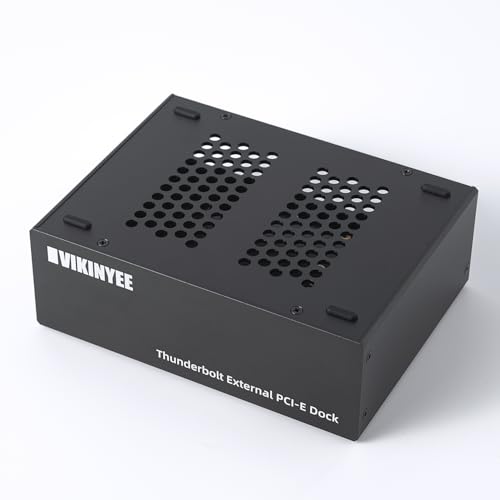
- 40Gbps external PCIe 3.0 x4 slot for pro cards
- Silent all-aluminum, 0dB passive cooling
- Dual Thunderbolt ports plus DisplayPort 1.4
Best For: Editors and creators who need an external capture-card enclosure for laptops or mini PCs.
Best for Capture Cards & Dual PCIe Slots
StarTech Thunderbolt 3 PCIe Enclosure

- Two external PCIe slots for a capture card plus a second add-in card
- Driverless macOS/Windows support keeps setup straightforward
- Includes cooling, power adapter, and Thunderbolt cable
Best For: Creators and streamers who need external PCIe expansion for capture cards and another add-in card.
Best for Dual-Slot Capture Workflows
Dual PCIe Thunderbolt 3/4 Expansion Chassis

- Dual PCIe slots for flexible capture-card setups
- Thunderbolt 3/4 and USB4 connectivity
- Works with DeckLink and multiple OS platforms
Best For: Creators and pro users who need portable PCIe expansion for one or two capture cards.
Best for Dual-Slot Capture Rigs
Thunderbolt 3/4 USB4 PCIe Chassis
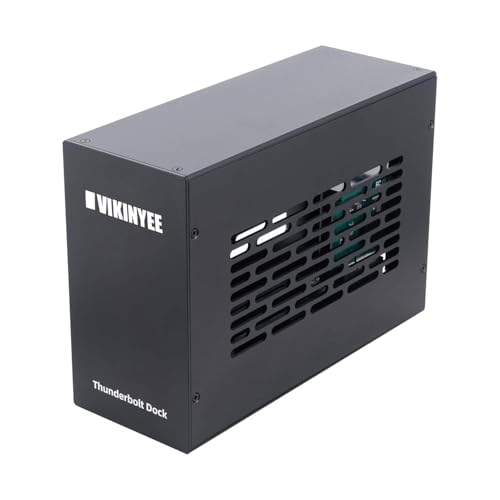
- Two external PCIe slots for capture cards and add-on hardware
- 40Gbps Thunderbolt/USB4 support for demanding pro workflows
- Silent aluminum enclosure with stable internal power
Best For: Streamers and AV users who need dual-slot PCIe expansion for capture cards and other pro hardware.
Best for Capture Cards – StarTech Thunderbolt 3 PCIe Expansion Chassis
If you need a reliable thunderbolt pcie expansion chassis for capture cards, this StarTech enclosure is built for turning a Thunderbolt 3/4 laptop or desktop into a PCIe-ready workstation. It offers one external PCIe 3.0 x16 slot, up to 40Gbps bandwidth, and broad compatibility with single-width expansion cards for live video workflows, networking, and storage.
Best For: Creators, streamers, and editors who want a dependable Thunderbolt 3 PCIe chassis for capture cards and other single-slot expansion cards.
Pros:
- Single PCIe slot works well with many capture cards and other pro I/O cards
- Driverless design supports macOS and Windows for simpler setup
- Included Thunderbolt cable, built-in fan, and aluminum enclosure improve usability
- Supports daisy chaining and external display output up to 4K/5K 60Hz
Cons:
- Does not support GPU graphics cards
- Limited to single-width cards up to 8 inches long
- Premium price may be hard to justify for occasional use
For buyers comparing a thunderbolt pcie expansion chassis for capture cards, this model stands out for straightforward compatibility, solid power delivery, and the kind of no-fuss expansion that suits serious production setups.
Best for Thunderbolt 3 Capture Setups – Sonnet Echo Express SE1 Thunderbolt 3 Expansion Chassis
If you need a dependable thunderbolt pcie expansion chassis for capture cards, the Sonnet Echo Express SE1 is built for exactly that kind of desktop workflow. It gives you one full-performance PCIe slot over Thunderbolt 3, making it a practical way to add a pro capture card to a Mac or Windows laptop or mini PC without internal expansion.
Best For: Creators and streamers who want a compact Thunderbolt 3 enclosure for a single capture card or other high-bandwidth PCIe device.
Pros:
- Thunderbolt 3 connection delivers up to 40Gbps for strong PCIe bandwidth
- Supports one half-length, full-height, single-width PCIe card at full performance
- Small desktop footprint with a sturdy, pro-oriented design
- Extra Thunderbolt port supports daisy-chaining and display connections
Cons:
- Only one PCIe slot, so it is not for multi-card expansion
- Not intended for GPU use
- Best fit is limited to cards within the size constraints
This is a smart pick if you want a focused, no-frills thunderbolt pcie expansion chassis for capture cards and similar pro peripherals. It keeps the setup compact while still aiming for near-native performance from a single PCIe device.
Best Budget – Thunderbolt 3 to PCIe 3.0×16 Dock
If you need a thunderbolt pcie expansion chassis for capture cards, this Thunderbolt 3 to PCIe 3.0×16 dock is built around exactly that job. It gives laptops, desktops, and mini PCs a full external PCIe slot for DeckLink and other add-in cards, with 40Gbps Thunderbolt bandwidth and a simple driverless enclosure design.
Best For: Creators, streamers, and editors who want a compact external chassis for DeckLink-style capture cards on Thunderbolt 3/4 or USB4 systems.
Pros:
- Compatible with DeckLink capture cards and other PCIe add-in cards
- Thunderbolt 3/4 and USB4 support with up to 40Gbps bandwidth
- All-aluminum, passive-cooled design for silent operation
- Includes a 36W power adapter and 36W slot power
Cons:
- Does not support GPU cards
- Limited to PCIe cards within the stated size envelope
- Installed cards may still need their own drivers
For a focused thunderbolt pcie expansion chassis for capture cards, the TD1-L makes sense when you want a quiet, external PCIe slot for video I/O rather than a general-purpose expansion box. It is especially appealing if your workflow centers on a DeckLink card and you value simple setup over extra bays or graphics support.
Best for Low-Profile Cards – Sonnet Echo Express SEL Thunderbolt 3
Sonnet Echo Express SEL Thunderbolt 3-to-PCIe Expansion Chassis (1 Low Profile Slot)
Check Price On AmazonIf you need a thunderbolt pcie expansion chassis for capture cards, the Sonnet Echo Express SEL is a compact way to add a single low-profile PCIe card to a Mac or Windows system with Thunderbolt 3. It’s built for practical, high-bandwidth expansion without the bulk of a full-size enclosure.
Best For: Users who need a small Thunderbolt 3 PCIe enclosure for a low-profile capture card, fast storage card, or similar compatible expansion card.
Pros:
- 40Gbps Thunderbolt 3 connection with up to 2750 MB/s PCIe bandwidth
- Supports popular low-profile PCIe cards at full performance
- Very compact chassis that saves desk space
- Includes Thunderbolt cable and ThunderLok retainer
Cons:
- Only one low-profile slot, so it won’t suit multi-card builds
- Not compatible with full-height PCIe cards
- Requires a Thunderbolt 3 port to use
For buyers prioritizing size and speed over expansion flexibility, this is a strong thunderbolt pcie expansion chassis for capture cards. It’s especially appealing if you only need one compatible card and want a simple, portable setup.
Best for Easy Setup – Thunderbolt 4/3 USB4 PCIe Enclosure
If you need a thunderbolt pcie expansion chassis for capture cards, the VK-G2 is built for exactly that workflow: it turns a Thunderbolt 3/4 or USB4 port into a PCIe 3.0 x4 slot for devices like Blackmagic DeckLink cards, 10GbE adapters, or NVMe expansion. The 40Gbps link, dual Thunderbolt ports, and silent aluminum shell make it a practical choice for editing bays, studios, and compact systems.
Best For: Creators and editors who need a reliable external PCIe enclosure for capture cards, networking, or storage on a laptop or mini PC.
Pros:
- Works with Thunderbolt 3/4 and USB4 systems for flexible compatibility
- Designed for pro cards like Blackmagic DeckLink and other PCIe 3.0 x4 devices
- Passive aluminum cooling keeps operation silent
- Includes DisplayPort 1.4 and daisy-chain Thunderbolt connectivity
Cons:
- Limited to PCIe 3.0 x4 cards up to 145mm long
- Not a universal dock replacement if you need lots of extra ports
- Requires the right Thunderbolt/USB4 host support for full performance
This is a strong fit if your priority is a dependable thunderbolt pcie expansion chassis for capture cards rather than a general-purpose dock. It focuses on clean bandwidth, quiet cooling, and pro-card compatibility, which matters most for capture and editing setups.
Best for Capture Cards & Dual PCIe Slots – StarTech Thunderbolt 3 PCIe Enclosure
If you need a thunderbolt pcie expansion chassis for capture cards, this StarTech enclosure is a practical way to turn a Thunderbolt 3/4 machine into a fuller workstation. It gives you two external PCIe 3.0 x16 slots, so you can run a capture card alongside another add-in card, with support for laptops, desktops, and all-in-ones.
Best For: Creators, streamers, and AV users who want dual-card flexibility in a Thunderbolt 3/4 enclosure without using an internal desktop slot.
Pros:
- Dual PCIe slots make it easy to pair a capture card with storage or networking hardware.
- Driverless design works with macOS and Windows for simpler setup.
- Active cooling, aluminum construction, and included power supply help with sustained use.
- Supports 8K/4K display output via TB3/DP 1.4 for more versatile desk setups.
Cons:
- Not suitable for GPU cards, so it’s not a full eGPU solution.
- Per-slot bandwidth and power are limited compared with internal PCIe connections.
- Single-width cards up to 8 inches long only, which limits hardware choices.
For a thunderbolt pcie expansion chassis for capture cards, this model stands out because it balances dual-slot expandability with broad compatibility and straightforward operation. It’s a strong fit if you want reliable external PCIe support without a lot of setup friction.
Best for Dual-Slot Capture Workflows – Dual PCIe Thunderbolt 3/4 Expansion Chassis
If you need a thunderbolt pcie expansion chassis for capture cards that can support a dual-card setup from a laptop or mini PC, this external enclosure is built for that exact workflow. It gives you a practical way to add PCIe expansion over Thunderbolt 3/4 or USB4, making it a strong fit for live production, monitoring, and other portable editing rigs.
Best For: Creators and pro users who want a compact external PCIe enclosure for one or two capture cards on Windows, macOS, or Linux.
Pros:
- Dual PCIe slot design supports more flexible capture-card builds
- Works with Thunderbolt 3/4 and USB4 systems
- Compatible with DeckLink capture cards and cross-platform setups
- Useful for laptops and mini PCs that need external PCIe expansion
Cons:
- Not the simplest plug-and-play option for first-time buyers
- External chassis setup adds cost and cable management
- Compatibility still depends on the specific capture card and host system
For buyers building a portable production station, this is a focused thunderbolt pcie expansion chassis for capture cards rather than a general-purpose dock. The dual-slot layout makes it more versatile than basic single-card enclosures, especially when you need room to scale your setup.
Best for Dual-Slot Capture Rigs – Thunderbolt 3/4 USB4 PCIe Chassis
If you need a practical thunderbolt pcie expansion chassis for capture cards, this VK-K2L enclosure gives you two external PCIe 3.0 x16 slots over Thunderbolt 3/4 or USB4, making it a strong fit for laptop and mini PC workflows. It’s especially useful for creators who want to run a capture card alongside another pro card, with broad Mac, Windows, and Linux support.
Best For: Streamers, editors, and AV users who need dual-slot expansion for capture cards, networking, or other pro PCIe hardware.
Pros:
- Two PCIe slots let you pair a capture card with another expansion card
- 40Gbps Thunderbolt/USB4 bandwidth helps avoid obvious performance bottlenecks
- All-aluminum, fanless design stays silent for studios and quiet workspaces
- Includes 15W power delivery per Thunderbolt port plus a stable internal PSU
Cons:
- Card fit is limited, so you’ll need to check dimensions before buying
- PCIe cards may still require their own drivers and software setup
- Not the cheapest option if you only need a single-slot enclosure
This is a well-rounded thunderbolt pcie expansion chassis for capture cards if you want more than basic single-card support and value quiet, dependable operation. The dual-slot layout and broad OS compatibility make it a smart pick for compact pro rigs, though buyers should verify card size and driver needs first.
How We Picked the Best Thunderbolt Pcie Expansion Chassis for Capture Cards
We prioritized chassis that are commonly used with capture cards, especially DeckLink-style models and other PCIe-based video inputs. The most important factors were slot compatibility, Thunderbolt version, power delivery, enclosure size, and whether the design supports single- or dual-slot cards without clearance issues.
We also favored units with clear host compatibility for macOS and Windows, plus practical builds that suit studio desks, mobile rigs, and mini PC setups.
Quick Comparison
For simple, single-card workflows, a compact one-slot chassis is usually the easiest fit. If you need more expansion headroom or are using a larger capture card, a dual-slot enclosure is often the safer choice. Thunderbolt 4 and USB4 models can be appealing for newer systems, but the capture card itself still needs to match the enclosure’s available lane width and physical dimensions.
Key Buying Factors for Thunderbolt Pcie Expansion Chassis for Capture Cards
Slot Size and Card Clearance
Check whether the enclosure supports a low-profile card, a full-height card, or multiple slots. Many capture cards require more space than a basic adapter-style enclosure provides, so physical fit matters as much as bandwidth.
Thunderbolt and Host Compatibility
Look for a true Thunderbolt connection and confirm support for your laptop, Mac, or Windows machine. Some Thunderbolt Pcie Expansion Chassis for Capture Cards are more forgiving with mixed systems, while others are tuned for specific operating systems or host chipsets.
Bandwidth and Capture Workload
Most capture workflows do not need maximum PCIe bandwidth, but higher resolutions, multi-input setups, and demanding broadcast pipelines benefit from a chassis with stable throughput and low latency.
Power and Cooling
Capture cards can run for long sessions, so reliable internal power and active cooling are important. A well-ventilated chassis helps maintain stability during live production, recording, and stream encoding.
Portability Vs. Permanence
If you travel for shoots or events, choose a smaller enclosure that is easy to pack. If the setup stays on a desk or in a rack area, a larger dual-slot model may offer better flexibility and easier cable management.
Who Should Buy Which Thunderbolt Pcie Expansion Chassis for Capture Cards?
Choose a compact single-slot chassis if you want the simplest path to external capture on a laptop or mini PC. Pick a dual-slot enclosure if your card is larger, your rig needs extra breathing room, or you want more future-proofing. If you are building a mixed Mac/Windows workflow, focus first on verified host compatibility and power stability, then compare size and slot layout.
For most buyers, the best Thunderbolt Pcie Expansion Chassis for Capture Cards is the one that matches the card physically, connects cleanly to your system, and stays stable under long recording sessions. Narrow your choice by slot count, supported card size, and the kind of workstation you actually use day to day.
