
If you need 10GbE on a laptop, mini PC, or all-in-one, a Thunderbolt PCIe expansion chassis is often the cleanest way to add the right network card without replacing your system.
This roundup focuses on practical, buyer-friendly options for different workloads, from single-slot setups to larger enclosures that can support extra expansion now or later.
Best 9 Thunderbolt Pcie Expansion Chassis for 10gbe Cards Picks for 2026
Best for 10GbE Add-Ins
StarTech Thunderbolt 3 PCIe Expansion Chassis

- Ideal for 10GbE NICs and other single-width PCIe cards
- 40Gbps Thunderbolt 3 bandwidth for desktop-like expansion
- Driverless setup with macOS and Windows support
Best For: Users who want a simple external PCIe box for 10GbE networking or pro add-in cards.
Best Thunderbolt 3 Bridge
Sonnet Echo Express SE1 Thunderbolt 3 Expansion Chassis

- 40Gbps Thunderbolt 3 bandwidth for demanding PCIe peripherals
- Fits many full-height, single-width 10GbE PCIe adapters
- Compact enclosure with a second Thunderbolt port for daisy-chaining
Best For: People who need a compact Thunderbolt 3 enclosure for a single 10GbE PCIe card.
Best for Quiet 10GbE Builds
Thunderbolt 4/3 USB4 PCIe Enclosure VK-G2
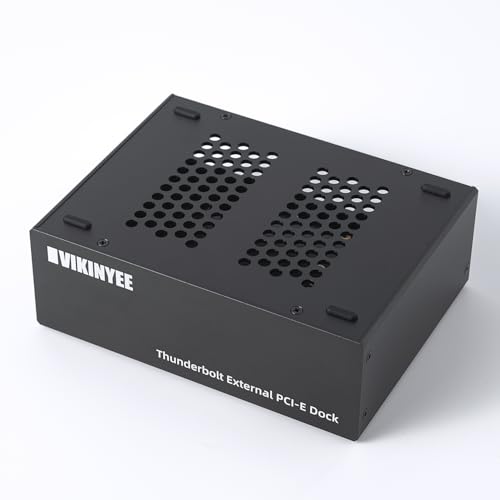
- Supports PCIe 3.0 x4 cards up to 145mm
- Passive aluminum case for silent operation
- Driverless on macOS, Windows, and Linux
Best For: Creators and power users adding quiet external 10GbE or capture hardware to a Thunderbolt system.
Best for Low-Profile 10GbE Builds
Sonnet Echo Express SEL Thunderbolt 3 Chassis

- Works with low-profile PCIe 10GbE cards
- 40Gbps Thunderbolt 3 connection
- Compact single-slot enclosure with cable included
Best For: People who need a compact Thunderbolt 3 enclosure for a low-profile 10GbE adapter.
Best Dual-Slot Chassis
StarTech Thunderbolt 3 PCIe Enclosure

- Dual PCIe slots for add-in cards like 10GbE
- Driverless Thunderbolt 3/4 support on Mac and Windows
- Active cooling and toolless installation
Best For: Users who need a Thunderbolt PCIe enclosure for networking, capture, or storage cards.
Best Multi-Card Thunderbolt Chassis
Sonnet Echo Express SEIIIe TB3

- Three PCIe 3.0 slots for multiple add-in cards
- 40Gbps Thunderbolt 3 connection with solid bandwidth
- Good fit for Mac users building a 10GbE expansion setup
Best For: Mac users who need a Thunderbolt 3 PCIe enclosure for a 10GbE card plus extra expansion cards.
Best Dual-Slot Expansion
Thunderbolt 3 to 2 PCIe Expansion Chassis

- Two PCIe slots for a 10GbE card plus another add-in card
- Silent all-aluminum enclosure with passive cooling
- 40Gbps Thunderbolt connectivity with included power support
Best For: Laptop and mini-PC users who need a compact dual-slot Thunderbolt enclosure for 10GbE and other PCIe cards.
Best for Dual PCIe Expansion
Dual PCIe Thunderbolt 3/4/USB4 Chassis

- Two PCIe slots for 10GbE and capture cards
- 40Gbps Thunderbolt 3/4/USB4 connectivity
- Silent fanless aluminum build with 60W PSU
Best For: Users who need a quiet external chassis for a 10GbE adapter plus another PCIe card.
Best for Dual-Card Builds
Thunderbolt 3/4 USB4 PCIe Chassis
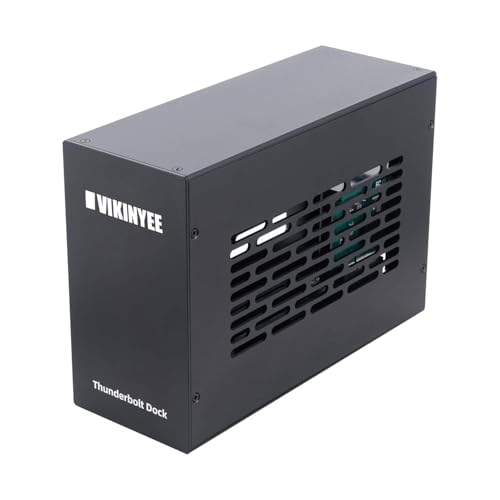
- Dual PCIe slot layout for flexible expansion
- 40Gbps Thunderbolt bandwidth suits 10GbE cards
- Quiet aluminum chassis with passive cooling
Best For: People who need a quiet dual-slot external PCIe enclosure for 10GbE adapters, capture cards, or other pro hardware.
Best for 10GbE Add-Ins – StarTech Thunderbolt 3 PCIe Expansion Chassis
If you need a reliable thunderbolt pcie expansion chassis for 10gbe cards, this StarTech enclosure is built for exactly that kind of upgrade path. It gives you a single external PCIe slot over Thunderbolt 3 with enough bandwidth for network adapters, capture cards, and other single-width expansion hardware, making it a practical way to add desktop-class connectivity to a laptop or small workstation.
Best For: Laptop and desktop users who want a simple, driverless Thunderbolt 3 enclosure for adding a 10GbE adapter or other single-width PCIe card.
Pros:
- Single PCIe slot works well for 10GbE and other add-in cards.
- Thunderbolt 3 connection provides up to 40Gbps bandwidth.
- Driverless support for macOS and Windows keeps setup straightforward.
- Built-in cooling, included power supply, and daisy-chain support add flexibility.
Cons:
- Does not support GPU graphics cards.
- Only fits single-width cards up to 8 inches long.
- Thunderbolt 3 design may be less future-proof than newer TB4-first options.
For buyers focused on expansion rather than graphics, this is a dependable thunderbolt pcie expansion chassis for 10gbe cards with the essentials covered: solid power, broad OS compatibility, and a straightforward external PCIe slot for networking or pro A/V gear.
Best Thunderbolt 3 Bridge – Sonnet Echo Express SE1 Thunderbolt 3 Expansion Chassis
If you need a reliable thunderbolt pcie expansion chassis for 10gbe cards, the Sonnet Echo Express SE1 is a straightforward way to add a single PCIe card to a Mac or Windows system with Thunderbolt 3. It’s compact, supports full-performance PCIe cards, and gives you enough bandwidth for demanding networking, storage, and capture workflows without taking over your desk.
Best For: Users who want a compact Thunderbolt 3 expansion chassis for a single 10GbE PCIe card on a Mac or Windows PC.
Pros:
- Thunderbolt 3 connection delivers up to 40Gbps of bandwidth for high-speed PCIe cards
- Supports one full-height, single-width half-length+ PCIe card, which fits many 10GbE adapters
- Compact desktop design is easier to place than larger multi-slot enclosures
- Second Thunderbolt port allows daisy-chaining or display connectivity
Cons:
- Only one PCIe slot, so it’s not ideal if you need multiple expansion cards
- Not suitable as a GPU chassis
- Card length and form-factor limits may rule out some larger network adapters
For buyers focused on a thunderbolt pcie expansion chassis for 10gbe cards, this Sonnet enclosure hits the sweet spot between size, compatibility, and performance. It’s a practical choice when you only need one fast expansion card and want Thunderbolt 3 bandwidth without paying for extra slots you won’t use.
Best for Quiet 10GbE Builds – Thunderbolt 4/3 USB4 PCIe Enclosure VK-G2
If you need a thunderbolt pcie expansion chassis for 10gbe cards, the VK-G2 is a practical way to add a PCIe 3.0 x4 adapter to a Thunderbolt 3/4 or USB4 laptop, mini PC, or workstation. It’s aimed at pro workflows where you want external 10GbE networking, capture hardware, or an NVMe expansion card without giving up portability.
Best For: Editors, creators, and power users who want a silent, aluminum Thunderbolt PCIe enclosure for 10GbE networking or capture cards.
Pros:
- Supports PCIe 3.0 x4 cards up to 145mm, including many 10GbE adapters
- Fully passive, 0dB cooling for quiet studios and editing setups
- Dual Thunderbolt ports plus DisplayPort 1.4 for flexible desk connections
- Driverless on macOS, Windows, and Linux for straightforward setup
Cons:
- 40Gbps Thunderbolt bandwidth can limit the fastest PCIe cards
- Best suited to low-profile, short cards rather than larger add-in boards
- Needs Thunderbolt 3/4 or USB4 support to reach full capability
For buyers comparing a thunderbolt pcie expansion chassis for 10gbe cards, this model stands out for its quiet all-aluminum build and broad OS support, but it makes the most sense when you value silence and convenience over maximum PCIe throughput.
Best for Low-Profile 10GbE Builds – Sonnet Echo Express SEL Thunderbolt 3 Chassis
Sonnet Echo Express SEL Thunderbolt 3-to-PCIe Expansion Chassis (1 Low Profile Slot)
Check Price On AmazonIf you need a thunderbolt pcie expansion chassis for 10gbe cards and only have a Thunderbolt 3 port to work with, the Sonnet Echo Express SEL is a compact way to add a low-profile PCIe card without giving up much desk space. It’s built for Macs and Windows PCs, delivers 40Gbps connectivity, and is aimed at users who want near full card performance in a small enclosure.
Best For: Users who need a compact Thunderbolt 3 enclosure for a low-profile 10GbE adapter or similar PCIe card.
Pros:
- Supports low-profile PCIe cards, which is the key requirement for many 10GbE adapters
- 40Gbps Thunderbolt 3 bandwidth helps keep networking performance from becoming the bottleneck
- Very compact design for tighter desks, edit stations, or portable setups
- Includes Thunderbolt cable and ThunderLok retainer for a more complete package
Cons:
- Only one PCIe slot, so it’s not for multi-card expansion
- Low-profile cards only, which limits compatibility with full-height 10GbE hardware
- Best suited to Thunderbolt 3 systems rather than broader legacy workflows
This is a practical pick if your priority is a simple thunderbolt pcie expansion chassis for 10gbe cards and you specifically need a small enclosure for one low-profile adapter. It’s less flexible than larger chassis, but it makes sense when space is tight and performance still matters.
Best Dual-Slot Chassis – StarTech Thunderbolt 3 PCIe Enclosure
If you need a thunderbolt pcie expansion chassis for 10gbe cards and other pro add-in cards, this StarTech enclosure is a practical option thanks to its dual PCIe slots, active cooling, and straightforward Thunderbolt 3/4 compatibility. It is a better fit for single-width cards and non-GPU workflows than for raw graphics expansion.
Best For: Laptop, desktop, or all-in-one users who want a dual-slot Thunderbolt PCIe chassis for networking, capture, storage, or other high-bandwidth expansion cards.
Pros:
- Dual PCIe 3.0 x16 slots with enough flexibility for add-in cards like 10GbE adapters
- Driverless macOS and Windows support with a Thunderbolt 3/4 connection
- Built-in fan, aluminum chassis, and toolless card installation for easier daily use
- Includes DP 1.4 video output support up to dual 4K or 8K-class setups
Cons:
- Not designed for GPU graphics cards
- Single-width cards only, with an 8-inch length limit
- Per-slot bandwidth is shared across the chassis, so top-end cards may not run at full desktop speed
For buyers comparing a thunderbolt pcie expansion chassis for 10gbe cards, this one stands out for its dual-slot design and solid power delivery, but it makes the most sense when your priority is networking, capture, or storage expansion rather than graphics.
Best Multi-Card Thunderbolt Chassis – Sonnet Echo Express SEIIIe TB3
Sonnet Echo Express SEIIIe Thunderbolt 3 Edition (3-Slot PCIe Card Expansion Chassis)
Check Price On AmazonIf you need a thunderbolt pcie expansion chassis for 10gbe cards and other add-in cards on a Mac, the Sonnet Echo Express SEIIIe gives you three PCIe 3.0 slots in a compact Thunderbolt 3 enclosure. It’s a practical choice for users who want to run multiple high-performance cards at once, especially when a 10GbE adapter is part of a larger workflow.
Best For: Mac users who need a Thunderbolt 3 PCIe enclosure for a 10GbE card plus additional expansion hardware.
Pros:
- Three PCIe 3.0 slots let you install multiple cards at once
- 40Gbps Thunderbolt 3 connection delivers strong expansion bandwidth
- Two Thunderbolt 3 ports make desk setup and chaining easier
- Backed by a 2-year warranty and lifetime customer support
Cons:
- Designed for Mac systems with Thunderbolt 3, so compatibility is limited
- Not the smallest or simplest option if you only need a single card
- Performance depends on the specific cards you install and your workflow
For buyers comparing a thunderbolt pcie expansion chassis for 10gbe cards, this Sonnet model stands out because it can handle more than one PCIe card without stepping up to a larger workstation-class enclosure. It’s a strong fit when flexibility matters more than minimal size.
Best Dual-Slot Expansion – Thunderbolt 3 to 2 PCIe Expansion Chassis
If you need a thunderbolt pcie expansion chassis for 10gbe cards and other full-size peripherals, this dual-slot enclosure gives you a straightforward way to add desktop-class PCIe support to a Thunderbolt 3/4 or USB4 system. It’s a practical choice when you want room for a NIC plus a second add-in card, with silent passive cooling and enough power for many common expansion cards.
Best For: Laptop and mini-PC users who need a compact, dual-slot Thunderbolt enclosure for 10GbE networking, capture, or storage cards.
Pros:
- Two PCIe slots make it easier to run a 10GbE card alongside another expansion card
- 40Gbps Thunderbolt link is suitable for high-bandwidth peripherals
- Passive aluminum design keeps operation silent
- Includes 60W power adapter plus extra 8-pin power support
Cons:
- Cards still need their own drivers and compatibility check
- Best for shorter cards due to the 205mm length limit
- Not ideal if you only need a single-slot, ultra-simple enclosure
This is a sensible pick for buyers comparing a thunderbolt pcie expansion chassis for 10gbe cards, especially if you want the flexibility of two slots without adding fan noise. It’s less about portability and more about giving a compact workstation or laptop the expansion room to handle serious I/O.
Best for Dual PCIe Expansion – Dual PCIe Thunderbolt 3/4/USB4 Chassis
If you need a thunderbolt pcie expansion chassis for 10gbe cards, this VK-N2L enclosure is built for exactly that kind of workstation-style upgrade. It gives you two external PCIe slots over a single Thunderbolt 3/4 or USB4 connection, making it a practical way to add network, capture, or storage hardware to a laptop or mini PC without opening the system.
Best For: Editors, creators, and IT users who want to run a 10GbE adapter or other high-bandwidth PCIe card from a Thunderbolt or USB4 host.
Pros:
- Dual PCIe slots make it flexible for 10GbE cards plus a second expansion card.
- 40Gbps Thunderbolt/USB4 bandwidth is suitable for demanding external PCIe use.
- Built-in 60W PSU helps keep installed cards stable under load.
- Fanless aluminum chassis runs silently for studio or office setups.
Cons:
- No host charging or Power Delivery, so you still need your laptop’s own charger.
- Card size is limited, so some larger PCIe boards may not fit.
- It is a chassis only, so you must supply your own PCIe cards and drivers.
This is a strong fit if you want a thunderbolt pcie expansion chassis for 10gbe cards and value quiet operation plus room for a second add-in card. It is less about convenience extras and more about giving desktop-class PCIe expandability to compact computers.
Best for Dual-Card Builds – Thunderbolt 3/4 USB4 PCIe Chassis
If you need a practical thunderbolt pcie expansion chassis for 10gbe cards, this VK-K2L enclosure is a strong fit thanks to its dual PCIe slot design, 40Gbps Thunderbolt bandwidth, and broad Windows, macOS, and Linux support. It’s built for users who want to add serious desktop-class expansion to a laptop or mini PC without a lot of setup hassle.
Best For: Users who want a dual-slot Thunderbolt enclosure for 10GbE adapters, capture cards, or other pro PCIe hardware.
Pros:
- Two external PCIe 3.0 x16 slots for flexible expansion
- 40Gbps Thunderbolt 3/4 and USB4 support for high-bandwidth cards
- Quiet all-aluminum design with passive cooling
- Includes DisplayPort 1.4 and 15W PD support
Cons:
- PCIe cards may require separate drivers
- Size limits mean not every full-length card will fit
- 60W internal PSU is adequate, but not ideal for especially power-hungry builds
As a thunderbolt pcie expansion chassis for 10gbe cards, this model stands out for users who need quiet, straightforward external expansion rather than the smallest possible enclosure. If your card fits the chassis dimensions, it offers a clean way to bring networking or capture hardware to a portable system.
How We Picked These Thunderbolt Pcie Expansion Chassis for 10gbe Cards
We prioritized enclosures that make sense for Thunderbolt Pcie Expansion Chassis for 10gbe Cards use cases: reliable Thunderbolt connectivity, enough PCIe bandwidth for a 10GbE adapter, solid power delivery, and a slot layout that matches real-world installs. We also favored models with broad compatibility across laptops, Mac systems, Windows machines, and compact desktops.
Quick Comparison: What Matters Most
The biggest difference between enclosures is not just how many slots they have, but how much room they leave for your card, cooling, and future upgrades. Single-slot chassis are usually the simplest choice for a dedicated 10GbE card. Dual- and triple-slot designs make more sense if you plan to add a capture card, storage controller, or another PCIe device later.
Key Buying Factors for Thunderbolt Pcie Expansion Chassis for 10gbe Cards
Slot Count and Card Fit
Most 10GbE network cards are single-slot, but some need low-profile brackets or extra clearance for airflow. Confirm physical fit before buying, especially if you want to use a thicker heatsink or a card with a larger cooling shroud.
Thunderbolt Version and Bandwidth
Thunderbolt 3, Thunderbolt 4, and USB4 options can all work well, but the enclosure should provide stable throughput and low latency. For 10GbE, you do not need extreme PCIe lane counts, but you do want an enclosure that does not bottleneck the card under sustained transfers.
Cooling and Noise
10GbE adapters can run warm, especially during backups, NAS transfers, or virtual machine workloads. Look for active cooling, sensible venting, and a chassis design that keeps temperatures under control without becoming overly loud.
Power and Compatibility
Make sure the enclosure supports the card’s power needs and your host system’s Thunderbolt/USB4 requirements. If you are using a Mac, Windows laptop, or mini PC, confirm driver support for the specific 10GbE chipset you plan to install.
Who Should Buy Which Thunderbolt Pcie Expansion Chassis for 10gbe Cards?
Choose a single-slot chassis if you only need one 10GbE card and want the easiest setup. Choose a dual-slot enclosure if you want room for expansion or a second PCIe device. Choose a triple-slot chassis if you need maximum flexibility for a creator, lab, or workstation build. For most buyers, the best Thunderbolt Pcie Expansion Chassis for 10gbe Cards is the one that matches your card size, cooling needs, and long-term upgrade plan rather than the one with the most slots.
