
If you’re looking to enhance your connectivity, finding the right Thunderbolt hub with USB-A ports is essential. These hubs not only streamline your setup but also provide high-speed data transfer and power delivery capabilities. With various options available, it’s important to know which ones stand out regarding performance and design. Let’s explore the top choices that can elevate your tech experience and keep you connected effortlessly.
Anker 7-in-2 USB C Hub for MacBook

If you’re a MacBook user looking to expand your connectivity options, the Anker 7-in-2 USB C Hub is an excellent choice. This hub transforms two USB-C ports into a versatile array, including a multi-function USB-C port, USB-A ports, HDMI, and SD/microSD card slots. With support for charging up to 100W and data transfer speeds of 40 Gb/s, it’s perfect for multitasking and streaming. Its sleek design integrates seamlessly with your MacBook, ensuring no obstruction to the MagSafe port. Users praise its reliability and performance, making it a valuable addition to your tech setup.
Best For: MacBook users seeking to enhance their connectivity options with a reliable and versatile USB-C hub.
Pros:
- High-speed data transfer with speeds up to 40 Gb/s, ideal for multitasking and large file transfers.
- Sleek and compact design that fits seamlessly with MacBook, without blocking the MagSafe port.
- Versatile port selection including USB-A, HDMI, and SD/microSD slots for diverse connectivity needs.
Cons:
- Difficulty accessing the card reader can be inconvenient for some users.
- Occasional loosening from the port may lead to connection issues during use.
- Limited compatibility primarily focused on MacBook users, which may not suit other device types.
Rosonway 7-Port USB Hub (RSH-A107C)

The Rosonway 7-Port USB Hub (RSH-A107C) is an excellent choice for users juggling multiple devices, thanks to its impressive array of ports, including one USB-A 3.2 and four USB 3.0 connections. With a data transfer speed of up to 10Gbps, you’ll efficiently manage HD files and peripherals. The hub features individual port switches for easy power control and comes with a 3.3ft cable for flexible setups. Built with premium aluminum, it’s both attractive and sturdy. While most users praise its performance, some have reported compatibility issues. Overall, it’s a solid addition for any organized workspace.
Best For: Users needing to connect multiple USB devices quickly and efficiently while maintaining an organized workspace.
Pros:
- Premium Build Quality: Constructed from sturdy aluminum, ensuring durability and an attractive appearance.
- High Data Transfer Speeds: Supports data transfer rates of up to 10Gbps, ideal for handling large files and HD media.
- Individual Port Control: Each port features an On/Off switch with LED indicators for easy power management.
Cons:
- Compatibility Issues: Some users have reported problems connecting certain devices.
- Electrical Shock Reports: A few customers have experienced electrical shocks when using the hub.
- Short Cable Length: The 3.3ft cable may require an extension for optimal placement away from the PC.
USB C Hub with 7 Ports and 3.2ft Cable

For tech enthusiasts and professionals juggling multiple devices, the USB C Hub with 7 Ports and a 3.2ft Cable is an ideal solution. This compact hub features four USB 3.0 ports and three USB-C ports, seamlessly connecting to Thunderbolt 3 and 4 devices. With data transfer speeds up to 5Gbps, you’ll experience lightning-fast performance. Its plug-and-play functionality means no driver setup is needed, and it’s compatible with various operating systems like Windows and Mac OS. Weighing just 2.88 ounces, it’s a portable powerhouse perfect for enhancing your connectivity on the go, although it doesn’t support power or monitor connections.
Best For: Tech enthusiasts and professionals looking for a compact and efficient way to connect multiple USB and USB-C devices.
Pros:
- Versatile Connectivity: Offers four USB 3.0 ports and three USB-C ports, compatible with various devices including Thunderbolt 3 and 4.
- High Data Transfer Speeds: Capable of transferring data at speeds up to 5Gbps, significantly faster than USB 2.0.
- Portable Design: Weighs only 2.88 ounces and features a 3.2ft cable, making it easy to carry and use on the go.
Cons:
- Limited Functionality: Does not support charging laptops or monitor connections, focusing solely on data transfer.
- Device Recognition Issues: Some users have reported problems with recognizing external USB HDDs and functionality with the USB-C port.
- No Driver Installation Required: While plug-and-play is convenient, it may lead to compatibility issues with certain devices.
Plugable USB C Hub Multiport Adapter (9-in-1)

Looking for a versatile docking solution? The Plugable USB C Hub Multiport Adapter (9-in-1) is your answer. With 140W pass-through charging and a 4K 60Hz HDMI port, it’s perfect for both work and play. You’ll benefit from multiple ports, including two USB-A 10Gbps, USB-C, SD, and Gigabit Ethernet, ensuring seamless connectivity. The built-in 7.48″ USB-C cable makes setup a breeze. Plus, it’s compatible with various devices like MacBook Pro, Dell XPS, and Chromebook. Enjoy a hassle-free experience with lifetime support from North American experts, making it ideal for home office or IT deployments.
Best For: Professionals and creatives using USB-C devices who need a reliable docking solution with multiple connectivity options.
Pros:
- 9-in-1 functionality provides a variety of ports for seamless connectivity, including 4K HDMI and Gigabit Ethernet.
- 140W pass-through charging allows for quick power delivery, making it ideal for MacBook Pro and other power-hungry devices.
- Lifetime support from North American connectivity experts ensures assistance whenever needed.
Cons:
- Limited compatibility with some older devices that may not support USB-C or DisplayPort Alt Mode.
- Heat generation may occur during high-demand tasks, which could affect performance.
- Physical size may not be portable enough for users who prefer compact solutions for travel.
Syntech USB C to USB Hub with 4 Ports
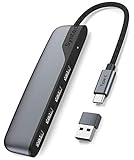
Syntech’s USB C to USB Hub with 4 Ports stands out as an essential accessory for tech-savvy users who demand high-speed connectivity and versatility. With four USB 3.0 ports, you can transfer data at speeds up to 5Gbps—ten times faster than USB 2.0—making it perfect for moving large files like HD movies. Its compact design guarantees portability, while the durable construction protects against common electrical issues. Setup is a breeze; simply plug it in without any drivers needed. Plus, with an impressive 4.6-star rating and an 18-month warranty, you can trust its quality and performance for all your devices.
Best For: Tech-savvy users who require high-speed data transfer and versatile connectivity for multiple devices.
Pros:
- High-speed data transfer with USB 3.0 ports offering speeds up to 5Gbps, perfect for large file transfers.
- Compact and lightweight design makes it highly portable for both home and office use.
- Plug and play setup requires no drivers, ensuring easy connectivity across various devices.
Cons:
- The included USB 2.0 adapter limits data transfer speeds to 480 Mbps.
- May not support certain older devices that lack USB-C or USB-A compatibility.
- Limited number of ports (4) may not be sufficient for users with multiple peripherals.
LEINSIS 10-Port USB 3.2 Hub with Individual On/Off Switches

The LEINSIS 10-Port USB 3.2 Hub with Individual On/Off Switches is perfect for tech enthusiasts and professionals who need extensive connectivity options. With 10Gbps USB-A 3.2 ports, 2 USB-C 3.2 ports, and 7 USB 3.0 ports, it enhances your device’s capabilities. You’ll love the plug-and-play design, allowing for quick setup without drivers. Enjoy rapid data transfers and charge devices at up to 2.4 amps. The individual switches and LED indicators make managing connected devices easy. Plus, its aluminum housing is sleek and durable, while the built-in surge protection keeps everything safe during heavy use.
Best For: Tech enthusiasts and professionals needing extensive connectivity options for multiple devices.
Pros:
- High-speed data transfer: Supports up to 10Gbps for USB 3.2 ports and 5Gbps for USB 3.0 ports, enabling rapid file transfers.
- Individual port control: Each port features an on/off switch with LED indicators for easy management of connected devices.
- Versatile compatibility: Works seamlessly with a wide range of devices, including USB-A, USB-C, and Thunderbolt 3.
Cons:
- Limited to 12V/2A power adapter: May not support power-hungry devices requiring higher amperage.
- No built-in SD card reader or additional features: Lacks extra functionalities that some users may expect from a hub.
- Bulkier design: The aluminum housing, while durable, may be less portable compared to smaller hubs.
Lention 2FT USB C Hub with 4 USB C Ports and PD Charging

For content creators and tech enthusiasts seeking a reliable connectivity solution, the Lention 2FT USB C Hub stands out with its four high-speed USB C 3.2 Gen 2 ports, delivering data transfer speeds of up to 10Gbps. You can transfer large files, like a 75G HD movie, in just 60 seconds. With a maximum power delivery of 100W, it efficiently charges your devices while you work. The 2-foot cable keeps your workspace tidy and prevents damage from frequent plugging. Compatible with a wide range of devices, this hub is perfect for video editors, gamers, and anyone needing robust connectivity.
Best For: Content creators, gamers, and tech enthusiasts seeking high-speed connectivity and efficient charging solutions.
Pros:
- High-speed data transfer: Up to 10Gbps speeds allow for quick file transfers, such as moving a 75G HD movie in just 60 seconds.
- Efficient power delivery: Provides a maximum of 100W power delivery for charging host devices and connected peripherals.
- Convenient design: The 2-foot cable length keeps your workspace organized and reduces wear on host ports from frequent plugging.
Cons:
- Limited functionality: USB C ports support data transfer only, with no display or charging capabilities for connected devices.
- Not compatible with Apple Superdrive: Users of this specific device will need to seek alternative connectivity solutions.
- Weight and size: At 3.2 ounces, some may find it slightly heavier compared to other compact hubs on the market.
UGREEN USB C Hub 10Gbps Multiport Adapter
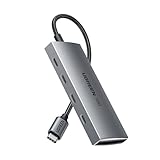
Need a reliable solution for fast data transfers? The UGREEN USB C Hub 10Gbps Multiport Adapter is your answer. With four USB-C 3.2 ports that support up to 10Gbps, you can transfer a 20 GB file in just 16.4 seconds. It’s compact and lightweight, making it easy to carry around. This hub is compatible with a wide range of devices, including MacBook Air/Pro and iPhone 15. However, keep in mind it doesn’t support charging or external monitors. Enjoy plug-and-play functionality without needing any drivers, ensuring a hassle-free experience every time you connect.
Best For: Users looking for a compact and efficient USB-C hub for fast data transfers without the need for charging or video output.
Pros:
- High-speed data transfer with support for up to 10Gbps, allowing quick file transfers.
- Compact and lightweight design makes it portable and easy to carry.
- Plug-and-play functionality ensures compatibility across multiple operating systems without the need for drivers.
Cons:
- No support for charging devices or connecting to external monitors.
- Limited compatibility with Thunderbolt 3/4 devices and certain HDMI adapters.
- Some users have reported issues with one port functioning correctly.
OWC Thunderbolt 5 Hub with 3 Ports

Designed for creative professionals and tech enthusiasts, the OWC Thunderbolt 5 Hub with 3 Ports offers exceptional performance with its three Thunderbolt 5 ports and a USB-A port. It delivers blazing-fast data speeds of up to 80Gb/s, perfect for connecting your current and future devices. Imagine supporting up to three 8K displays or connecting various USB-C and DisplayPort displays effortlessly. Plus, with 140 watts of charging power and the ability to daisy chain multiple devices, you’ll enjoy seamless connectivity. Compatible with Mac and PC, this hub is a reliable investment for anyone seeking enhanced productivity.
Best For: Creative professionals and tech enthusiasts looking for high-speed connectivity and multiple display support.
Pros:
- High data transfer speeds of up to 80Gb/s, ensuring quick file transfers and device connectivity.
- Supports multiple high-resolution displays, including up to three 8K displays for enhanced visual experiences.
- Daisy chaining capability allows for connecting multiple devices without interruption, providing flexibility in device management.
Cons:
- Higher price point compared to standard hubs, which may not be suitable for budget-conscious consumers.
- Limited USB-A port availability, which might require additional adapters for users with multiple USB-A devices.
- Compatibility issues may arise with older devices that do not support Thunderbolt or USB-C connectivity.
WALNEW 7 in 1 USB-C Hub with 4K HDMI and Thunderbolt 4 Dock

The WALNEW 7 in 1 USB-C Hub stands out with its impressive 4K HDMI output, making it an excellent choice for creatives and professionals who need to connect to high-definition displays. With 100W Power Delivery and three 5Gbps data ports, you can easily connect your devices and transfer files quickly. The dual SD/MicroSD card reader supports high-speed data transfer, streamlining your workflow. Plus, it’s compatible with a wide range of USB-C and Thunderbolt 4/3 devices. Weighing only 2.22 ounces and featuring a sleek pink design, it’s perfect for travel and everyday use. Enjoy seamless connectivity wherever you go!
Best For: Professionals and creatives who need to connect multiple devices and high-definition displays while on the go.
Pros:
- 4K HDMI output for connecting to ultra HD displays, enhancing visual experience.
- Lightweight and portable design makes it ideal for travel and everyday use.
- Plug and play functionality allows for easy connectivity across various operating systems without the need for drivers.
Cons:
- Some users report intermittent display issues with HDMI output that may relate to monitor refresh rates.
- Instances of USB ports failing to recognize devices after a short period, leading to inconsistent performance.
- Reports of slower than expected transfer speeds on SD card slots, raising concerns about advertised capabilities.
Factors to Consider When Choosing Thunderbolt Hubs With USB A Ports
When you’re choosing a Thunderbolt hub with USB-A ports, consider the number of ports you’ll need and their data transfer speeds. You’ll also want to think about power delivery capability and how well the hub matches your devices. Finally, don’t overlook build quality and design, as these factors can impact your overall experience.
Number of Ports
Choosing the right Thunderbolt hub for your needs often hinges on the number of ports it offers. You’ll find options ranging from as few as 2 ports to more than 10, so pick one that suits your connectivity requirements. Hubs with multiple ports enhance productivity by allowing you to connect various devices like external drives, keyboards, and displays simultaneously. Consider the mix of port types available, as having USB-A and USB-C ports accommodates a wider range of peripherals. Some hubs even feature individual on/off switches for better power management, enabling you to control each device’s connectivity independently. Just keep in mind that more ports may share bandwidth, potentially affecting performance when multiple devices are in use.
Data Transfer Speed
Understanding data transfer speeds is essential for maximizing the performance of your Thunderbolt hub with USB-A ports. With USB 3.2 ports offering up to 10 Gbps and USB 3.0 reaching 5 Gbps, you’ll want to choose a hub that meets your needs. Hubs featuring USB 3.2 Gen 2 technology excel at transferring large files, like HD videos, quickly. To avoid bottlenecks, make sure all connected devices are compatible with the hub’s capabilities. Look for hubs that support UASP (USB Attached SCSI Protocol), as this can optimize data flow and enhance performance. Finally, consider the number of high-speed ports available; supporting simultaneous connections can greatly improve overall efficiency, making it easier to manage your devices effectively.
Power Delivery Capability
Power delivery capability is an essential factor to take into account in Thunderbolt hubs with USB-A ports, especially if you rely on multiple devices. Some hubs can provide up to 140 watts of pass-through charging, allowing you to power laptops and peripherals while transferring data simultaneously. This enhances efficiency, particularly for users connecting multiple devices. You’ll typically see ratings like 60W, 100W, or 140W, which affect how many devices can be powered and their charging speeds. Always check compatibility with your host device, as not all support high power delivery levels. If your hub can’t meet your devices’ power requirements, you might experience slower charging or even find it can’t power high-demand devices effectively.
Build Quality and Design
When selecting a Thunderbolt hub with USB-A ports, build quality and design play a significant role in ensuring durability and usability. Look for materials like aluminum, which provide excellent durability and heat dissipation, preventing damage from daily use. A compact and sleek design not only enhances portability but also keeps your workspace tidy without excessive bulk. Consider hubs with individual On/Off switches for each port; they offer better power management and control over your devices. Additionally, weigh the hub’s dimensions, as a lightweight option is ideal for travel. Finally, features like LED indicators help you easily monitor the power and connectivity status of each port, making your experience more convenient.
Compatibility With Devices
Choosing the right Thunderbolt hub with USB-A ports hinges on compatibility with your devices. First, verify the hub works with your specific laptops, desktops, and peripherals that may use USB-A or USB-C connections. Next, check for support across various operating systems; some hubs perform best with particular OS versions like Windows, macOS, or Linux. It’s essential to confirm that the hub supports Thunderbolt versions, such as Thunderbolt 3 or 4, to maximize data transfer speeds and functionality. Additionally, look for backward compatibility with older USB standards like USB 2.0 or 3.0, making sure you can connect a wide range of devices. Finally, consider how many USB-A ports are available for seamless connectivity.
Port Management Features
While selecting a Thunderbolt hub with USB-A ports, considering port management features can greatly enhance your user experience. Look for hubs that offer individual on/off switches for each port, allowing you to manage power consumption and control devices easily without unplugging them. LED indicators for each port can provide visual confirmation of connectivity and power status, adding convenience. A mix of USB-A and USB-C ports will enhance compatibility with a wider range of devices. It’s also essential to choose hubs that support fast data transfer speeds, like 10Gbps for USB 3.2 ports, ensuring quick file transfers. Finally, evaluate the hub’s build quality; a sturdy design aids in durability and effective cable management for a tidy workspace.
Warranty and Support
Considering warranty and support can make a significant difference in your experience with Thunderbolt hubs featuring USB-A ports. When you choose a hub, look for a warranty period of at least 18 months to 2 years; this often indicates the manufacturer’s confidence in their product’s durability. Additionally, check for available customer support services, as responsive assistance can greatly enhance your user experience, especially when facing technical issues. Understanding the return policy is essential too; many companies allow returns within 30 days if the product is faulty. Finally, read reviews and customer feedback to gauge the effectiveness of a company’s warranty and support services, giving you insight into overall customer satisfaction before making your purchase.
