
If you’re looking to elevate your gaming experience, exploring Thunderbolt 5 eGPU enclosures is a smart move. These enclosures can provide the performance boost you need, facilitating faster data transfer and enhanced graphics. With various options available, each offering unique features, it’s crucial to know which ones stand out. Let’s take a closer look at the top contenders that could transform your setup and make a significant difference in your gameplay.
Sonnet Breakaway Box 850 T5 eGPU Enclosure
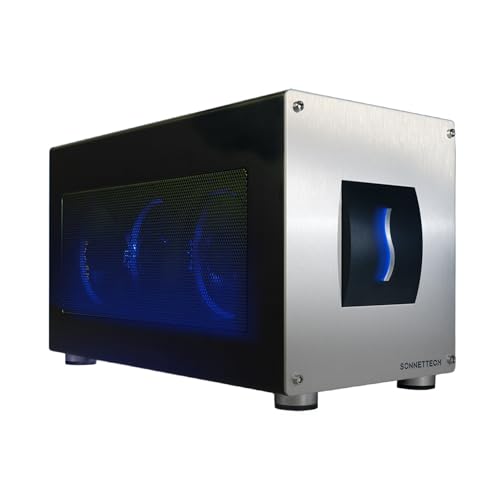
If you’re a creative professional using a Windows 11 laptop and need powerful graphics performance, the Sonnet Breakaway Box 850 T5 eGPU Enclosure is an excellent choice. With 80 Gbps Thunderbolt 5 connectivity, it supports triple-wide graphics cards, delivering near-desktop GPU power. You’ll appreciate its compatibility with NVIDIA GeForce and AMD Radeon series, backed by an 850W power supply for demanding tasks. Plus, the built-in, temperature-controlled fan guarantees your graphics card stays cool during intensive workloads. This eGPU markedly accelerates workflows in editing, rendering, and animation, making it a must-have tool for enhancing your creative projects.
Best For: Creative professionals using Windows 11 laptops who require powerful graphics performance for demanding tasks.
Pros:
- High performance: Delivers near-desktop GPU power with 80 Gbps bandwidth, enhancing productivity in graphics-intensive applications.
- Compatibility: Supports a wide range of graphics cards from NVIDIA and AMD, catering to various user needs.
- Effective cooling: Features a temperature-controlled fan to maintain optimal performance during intensive workloads.
Cons:
- Cost: May be expensive compared to other eGPU options on the market.
- Size: The enclosure’s size may not be ideal for users with limited desk space.
- Windows 11 only: Specifically designed for Windows 11 laptops, limiting usability for other operating systems.
Razer Core X V2 External Graphics Enclosure (eGPU)

The Razer Core X V2 External Graphics Enclosure is ideal for gamers and creative professionals seeking a powerful boost for their Thunderbolt 4 or 5 laptops. With support for PCIe desktop graphics cards up to four slots wide, you can seamlessly enhance your gaming experience. The Thunderbolt 5 connection delivers ultra-fast bandwidth of up to 80 Gbps, perfect for demanding applications. It features a smart cooling system with a 120 mm fan to keep your GPU running efficiently. Setup is a breeze—just connect via the included Thunderbolt 5 cable, and you’re ready to go. Enjoy a 2-year warranty for added peace of mind.
Best For: Gamers and creative professionals looking to enhance their Thunderbolt 4 or 5 laptops with powerful external graphics capabilities.
Pros:
- Ultra-fast Thunderbolt 5 connection provides bandwidth of up to 80 Gbps, improving performance for demanding applications.
- Tool-free installation allows for easy swapping of GPUs and ATX power supplies, making upgrades simple.
- Smart cooling system with an adjustable fan ensures optimal performance during heavy usage.
Cons:
- Weighty design at 5.06 kg may not be ideal for portability.
- Limited to Thunderbolt 4/5 and USB 4 devices, which may restrict compatibility with older laptops.
- Single USB port may limit connectivity options for additional peripherals.
TREBLEET eGPU Enclosure, Compatible with Thunderbolt 5 & USB4
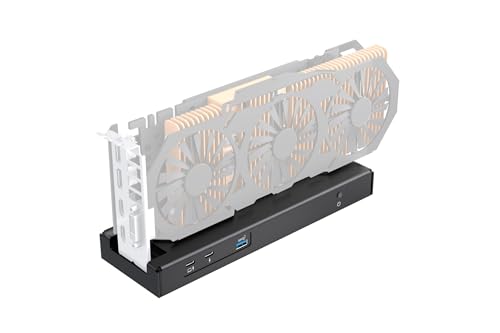
Designed for gamers and creative professionals, the TREBLEET 80Gbps eGPU Enclosure stands out with its impressive 80Gbps bandwidth, doubling the performance of previous generations. It’s compatible with Thunderbolt 5, USB4, and works seamlessly with both Windows and Mac systems. You’ll love the flexibility it offers, supporting various power supplies and delivering up to 140W PD charging for your laptop. Whether you’re gaming, rendering 3D graphics, or editing videos, this enclosure supports NVIDIA and AMD PCIe cards. Plus, with a one-year warranty and a 30-day return policy, you can buy with confidence knowing help is available if you need it.
Best For: Gamers and creative professionals seeking a high-performance eGPU solution for enhanced graphics and processing power.
Pros:
- High Bandwidth: Offers 80Gbps bandwidth, providing double the performance compared to previous generations.
- Versatile Compatibility: Works with various devices, including NUCs, laptops, and handheld gaming consoles.
- Power Delivery Support: Delivers up to 140W PD charging, allowing for fast charging of laptops while in use.
Cons:
- Driver Requirements: Specific drivers must be active based on CPU type (Intel or AMD), which may complicate setup for some users.
- Higher Power Supply Needed: Requires a minimum of 180W power supply when using PD charging, which may limit options for some users.
- Limited to PCIe Cards: Only compatible with NVIDIA and AMD PCIe graphics cards, excluding other types of GPUs.
TREBLEET eGPU Enclosure with Built-in 600W PSU

For gamers, content creators, and professionals seeking unparalleled performance, the TREBLEET eGPU Enclosure with its built-in 600W PSU stands out as a top-tier choice. With next-gen 80Gbps speeds via Thunderbolt 5, it doubles your performance potential compared to Thunderbolt 4. The 600W SFX PSU delivers up to 450W for your GPU, eliminating extra power bricks while providing 140W USB Power Delivery for quick laptop charging. Its compact, durable design accommodates high-end GPUs and offers multiple connectivity options, making it a powerful docking station. Enjoy seamless compatibility with Windows 10/11 and select Intel-based Macs for an enhanced gaming experience.
Best For: Gamers, content creators, and professionals who demand high performance and speed from their external GPU setup.
Pros:
- Next-gen 80Gbps speeds via Thunderbolt 5, offering double the performance of Thunderbolt 4.
- Built-in 600W PSU provides ample power for high-end GPUs and eliminates the need for extra power bricks.
- Compact and durable design made from premium sandblasted aluminum, accommodating various modern triple-fan GPUs.
Cons:
- Limited compatibility with NVIDIA GPUs and Bootcamp on macOS, restricting options for some users.
- Size constraints may limit the choice of graphics cards to those that fit within the 340 x 154 x 57mm dimensions.
- Higher price point compared to standard eGPU enclosures, which may not fit all budgets.
Plugable Thunderbolt 5 AI eGPU Enclosure & Dock (TBT5-AI)

If you’re looking to boost your AI workloads with top-tier performance, the Plugable Thunderbolt 5 AI eGPU Enclosure & Dock (TBT5-AI) is an exceptional choice. Offering 80Gbps Thunderbolt 5 speeds and an 850W ATX 3.1 PSU, it supports custom GPU installations up to 600W. Its modular design includes 96W host charging, 2.5Gbps Ethernet, and multiple USB ports, ensuring seamless connectivity. With compatibility for Windows 11 and major AI software, you can run models securely without cloud risks. Plus, its lifetime support and 2-year warranty provide peace of mind for both home and IT environments.
Best For: Professionals and enthusiasts looking to enhance their AI processing capabilities with high-performance GPU solutions.
Pros:
- 80Gbps Thunderbolt 5 speeds provide exceptional data transfer rates for demanding workloads.
- Modular design allows for custom GPU installations and includes multiple connectivity options for versatile usage.
- Lifetime support and a 2-year warranty ensure reliability and assistance for users in both home and IT environments.
Cons:
- Not compatible with macOS, Linux, ChromeOS, or Thunderbolt 3, limiting user options.
- GPU not included, requiring additional investment for a complete setup.
- Large dimensions may not fit all workstation setups, especially in compact spaces.
AOOSTAR AG03 EGPU Dock with 800W PSU
The AOOSTAR AG03 eGPU Dock, equipped with an impressive 800W power supply, stands out as an ideal choice for gamers and professionals seeking robust performance. With support for up to 500W dedicated to your graphics card, this dock guarantees your high-end GPUs run smoothly. It’s compatible with Windows 11 and Thunderbolt 4/5 devices, providing PCIe 4.0 x4 speeds of up to 7,000 MB/s. The open metal body design enhances airflow, while dual signal boosters maintain stability. Plus, its hot-swap feature and generous warranty make it a reliable option for your gaming setup or workstation.
Best For: Gamers and professionals seeking a high-performance eGPU dock that supports demanding graphics cards and offers fast connectivity.
Pros:
- Built-in 800W power supply, with 500W dedicated to graphics cards, ensuring stable performance even under heavy loads.
- Compatible with a wide range of devices, including Windows 11 and Thunderbolt 4/5, offering versatile usage options.
- Features dual signal boosters for enhanced stability and an open metal design for improved airflow.
Cons:
- OCuLink does not support hot-plugging, which may limit convenience for some users.
- Operating noise can reach up to 45dB under full load, which might be noticeable in quiet environments.
- Requires verification of device compatibility before purchase, potentially complicating the buying process for some consumers.
RayCue M.2 NVMe SSD Enclosure with Cooling Fan

Designed for high-performance users, the RayCue M.2 NVMe SSD Enclosure with Cooling Fan is perfect for those who demand speed and efficiency in their data storage solutions. With lightning transfer speeds of up to 7000MB/s via Thunderbolt 5, it’s ideal for gamers and professionals alike. This enclosure supports M-Key NVMe 2280 SSDs up to 8TB and works with Thunderbolt 4/3 and USB 4. Its aluminum construction guarantees maximum heat dissipation, while the built-in cooling fan activates at 40°C for enhanced performance. Plus, its ultra-slim design makes it highly portable. With a 4.9-star rating, it’s a top choice for storage.
Best For: High-performance users, including gamers and professionals, who demand fast and efficient data storage solutions.
Pros:
- Lightning-fast transfer speeds of up to 7000MB/s with Thunderbolt 5 for quick data access.
- Built-in cooling fan enhances performance by activating at 40°C, ensuring optimal temperature management.
- Ultra-slim and portable design with an aluminum construction for effective heat dissipation.
Cons:
- Requires compatible Thunderbolt 5 cables for optimal performance, which may not be included.
- Not compatible with M.2 (B-KEY) and SATA NGFF SSDs, limiting options for some users.
- Limited warranty period of only 1 year may not satisfy users looking for longer coverage.
MOKiN M.2 NVMe SSD Enclosure with LCD Display and Cooling Fan

For enthusiasts who demand high-speed data transfer and efficient thermal management, the MOKiN M.2 NVMe SSD Enclosure is an exceptional choice. Supporting PCIe Gen5, it delivers an impressive 80Gbps transfer rate, allowing you to transfer 100GB of data in just 15 seconds. The built-in cooling fan activates at 40°C, ensuring peak performance while the LCD display keeps you informed of the temperature and fan speed. With compatibility for NVMe M.2 SSDs up to 8TB and support for various operating systems, this enclosure is perfect for gamers and creators alike. Plus, it comes with an 18-month warranty for peace of mind.
Best For: The MOKiN M.2 NVMe SSD Enclosure is best for tech enthusiasts, gamers, and content creators who require high-speed data transfer and robust thermal management for their NVMe SSDs.
Pros:
- High Transfer Rate: Achieves up to 80Gbps, allowing for rapid data transfers of 100GB in just 15 seconds.
- Effective Cooling System: Features a built-in silent fan that activates at 40°C, preventing thermal throttling and ensuring consistent performance.
- Wide Compatibility: Supports a variety of operating systems and NVMe M.2 SSD sizes, accommodating up to 8TB of storage.
Cons:
- Requires Thunderbolt 5 Port for Maximum Speed: To utilize the full potential of the enclosure, a Thunderbolt 5 port is necessary.
- Not Compatible with SATA M.2 SSDs: Only supports NVMe M/B+M Key SSDs, limiting options for users with SATA SSDs.
- Higher Price Point: The advanced features and performance may come at a premium compared to standard SSD enclosures.
RIITOP eGPU Enclosure USB4.0 for Thunderbolt 4 Graphics Card
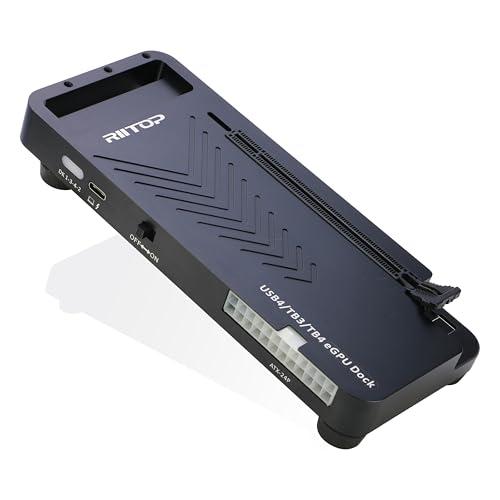
Seeking a powerful solution to elevate your gaming or creative experience? The RIITOP eGPU Enclosure USB4.0 is your go-to for harnessing performance. With a 40Gbps speed and compatibility with Thunderbolt 4, it boosts graphics capabilities for PCIe 4.0 x16 cards like the NVIDIA RTX 50 Series and AMD RX 7000 Series. Perfect for gaming, AI computing, and video editing, it overcomes limitations found in lighter laptops and older systems. Installation is simple—just secure your graphics card, connect the necessary cables, and power up. Make sure your device has a Thunderbolt 4 or USB4 port to enjoy this powerful upgrade!
Best For: Gamers and creative professionals looking to enhance their graphics performance on laptops and older systems.
Pros:
- High-speed performance: Offers 40Gbps data transfer via Thunderbolt 4, significantly boosting graphics capabilities.
- Wide compatibility: Supports a range of NVIDIA RTX 50 Series and AMD RX 7000 Series graphics cards for versatile usage.
- Easy installation: Simplified setup process allows for quick and hassle-free integration with existing systems.
Cons:
- Hardware requirements: Requires a specific Thunderbolt 4 or USB4 port and a compatible power supply, which may not be available on all devices.
- Limited Mac support: Compatible only with AMD GPUs on Mac OS, restricting options for Mac users.
- Size considerations: Open design may not suit all setups, particularly in compact spaces.
Mini eGPU Enclosure Compatible with Thunderbolt 3/4

If you’re a gamer or content creator looking to enhance your system’s graphics performance, the Mini eGPU Enclosure compatible with Thunderbolt 3/4 is an excellent choice. It supports NVIDIA and AMD PCIe graphics cards while providing PD 85W charging and daisy chaining capabilities. Confirm your system supports USB4 or Thunderbolt 3/4 before purchasing; check your Intel or AMD CPU compatibility via Device Manager. The enclosure includes a USB A port and an additional TB3 port, functioning as a hub for other Thunderbolt devices. With a one-year warranty and customer support, you’re set for a stable and efficient expansion experience.
Best For: Gamers and content creators seeking to boost their graphics performance with an external GPU solution.
Pros:
- Supports a wide range of NVIDIA and AMD PCIe graphics cards, enhancing overall system graphics performance.
- Includes PD 85W charging support and daisy chaining capabilities for added convenience and functionality.
- Comes with a one-year warranty and customer support for assistance with setup and troubleshooting.
Cons:
- Requires verification of system compatibility with USB4 or Thunderbolt 3/4, which may be a barrier for some users.
- Setup may require some DIY knowledge, including driver and hardware compatibility adjustments.
- Graphics card, power supply, and laptop are not included, necessitating additional purchases.
Factors to Consider When Choosing Thunderbolt 5 eGPU Enclosures
When choosing a Thunderbolt 5 eGPU enclosure, you need to take into account several key factors. Performance specifications, compatibility requirements, power supply options, cooling solutions, and the installation process all play essential roles in your decision. By evaluating these aspects, you can guarantee you pick the right enclosure for your needs.
Performance Specifications
Choosing the right Thunderbolt 5 eGPU enclosure hinges on several key performance specifications that can greatly impact your computing experience. First, look for enclosures offering 80 Gbps Thunderbolt 5 speeds, doubling the bandwidth of Thunderbolt 4 and boosting performance for demanding applications. Confirm the enclosure supports high-performance graphics cards like NVIDIA GeForce and AMD Radeon, essential for gaming and rendering. Power supply is critical; opt for at least 850W to meet GPU demands and guarantee stability. Additionally, effective cooling solutions, such as variable-speed fans, are necessary to prevent thermal throttling during intense tasks. Finally, pay attention to PCIe slot configuration; enclosures with PCIe 4.0 x16 slots allow for peak GPU installation, maximizing performance.
Compatibility Requirements
To guarantee ideal performance with your Thunderbolt 5 eGPU enclosure, you must consider several compatibility requirements. First, verify your laptop or device supports Thunderbolt 5 or USB4 for peak functionality. Next, confirm that the eGPU enclosure is compatible with your specific graphics card, paying attention to size and power needs. Don’t forget about driver compatibility, as Intel and AMD CPUs may require different Thunderbolt or USB4 drivers. Also, confirm that the enclosure’s power supply meets the demands of your chosen graphics card—high-end GPUs often need more wattage. Finally, seek enclosures that support various power supply types (ATX, SFX, FLEX) for flexibility in installation based on your current components.
Power Supply Options
Power supply options play an essential role in the performance of your Thunderbolt 5 eGPU enclosure. When choosing, consider the wattage, which usually ranges from 600W to 850W, to guarantee it can handle high-performance graphics cards. Look for enclosures with dedicated power delivery (PD) capabilities, as some can provide up to 140W PD charging to your laptop while powering the GPU. Ascertain compatibility with various power supply types like ATX, SFX, or FLEX, and check for universal power inputs for different graphics cards. Assess redundancy features, as some enclosures offer an extra 150-300W for high-end GPUs, preventing performance bottlenecks. Finally, prioritize enclosures with 80+ Gold rated power supplies for better efficiency and reliability.
Cooling Solutions
Effective cooling solutions are essential for ensuring your Thunderbolt 5 eGPU enclosure performs at its best, especially during demanding tasks like gaming or rendering. High temperatures can lead to thermal throttling, so look for enclosures with large, variable-speed fans that adjust based on your graphics card’s temperature. Some models activate built-in cooling systems at specific temperatures, like 40°C, improving airflow and preventing overheating. The enclosure’s design matters too; aluminum models typically offer better heat dissipation than plastic ones. For peak performance, consider enclosures with dual or multiple fan setups, as they distribute airflow more evenly and effectively manage heat from high-powered graphics cards. Prioritizing these cooling features will enhance your gaming experience and prolong component lifespan.
Installation Process
When installing a Thunderbolt 5 eGPU enclosure, it’s crucial to pay attention to several factors that guarantee a smooth setup. First, make certain your graphics card is securely installed in the PCIe x16 slot, using the provided copper pillars or brackets for stability. Next, connect the power supply to the enclosure, confirming it meets the graphics card’s power requirements. Then, use the included Thunderbolt 5 cable to link the eGPU enclosure to your host device, which should have a compatible Thunderbolt 4 or USB4 port. Follow any specific driver installation instructions for your operating system to guarantee the eGPU gets recognized properly. Finally, power on both the eGPU enclosure and your host device, allowing automatic detection and configuration.
