
In 2026, the right Thunderbolt 5 dock with 2.5GbE Ethernet can greatly enhance your workflow. These docks not only provide exceptional bandwidth but also support multiple high-resolution displays, making them essential for any professional setup. With various options available, each offering unique features, you’ll want to know which ones stand out. Let’s explore the top contenders that promise to elevate your connectivity experience.
Anker Prime TB5 Docking Station (14-in-1 Thunderbolt 5 Dock)

If you’re a professional or creative who demands high-speed data transfer and superior display capabilities, the Anker Prime TB5 Docking Station is tailor-made for you. With its 14-in-1 configuration, it offers a Thunderbolt 5 upstream port, dual Thunderbolt 5 downstream ports, and multiple USB connections, ensuring all your devices stay connected. Experience lightning-fast transfer speeds, moving a 150GB file in just 25 seconds, and dual 8K displays for stunning visuals. Plus, the active cooling system prevents overheating while the 140W charging keeps your laptop and devices powered. Elevate your workspace with this powerful docking station, perfect for any tech-savvy user.
Best For: Professionals and creatives who require high-speed data transfer and dual 8K display capabilities.
Pros:
- Supports lightning-fast data transfer speeds, allowing you to move large files efficiently (150GB in 25 seconds).
- Versatile connectivity options with 14 ports, including Thunderbolt 5, USB-C, USB-A, and card readers.
- Active cooling system prevents overheating during heavy use, ensuring stable performance.
Cons:
- Weight may be a consideration for those seeking a lightweight travel solution (2.4 pounds).
- Potential compatibility issues with non-Thunderbolt devices, limiting usage for some users.
- Higher price point compared to standard docking stations, which may not be justifiable for casual users.
StarTech Thunderbolt 5 Docking Station

For professionals who demand high-resolution displays and robust connectivity, the StarTech Thunderbolt 5 Docking Station stands out with its ability to support dual 8K 60Hz and triple 4K setups. It’s compatible with Thunderbolt 5/4 and USB4 devices, ensuring seamless integration with your tech. With 140W power delivery, it easily charges high-powered laptops like the MacBook Pro. The 2.5GbE Ethernet connection enhances your internet speed, while built-in SD and microSD slots streamline data transfers. This dock is perfect for multitasking and elevating your productivity, making it a must-have for any creative professional or power user.
Best For: Creative professionals and power users who require high-resolution displays and robust connectivity for multitasking and productivity.
Pros:
- Supports dual 8K 60Hz and triple 4K setups, providing exceptional display capabilities for demanding tasks.
- 140W power delivery allows for charging high-powered laptops, making it convenient for on-the-go professionals.
- Multiple connectivity options, including 2.5GbE Ethernet and built-in SD/microSD slots, enhance productivity and streamline data transfer.
Cons:
- Higher price point may not be suitable for casual users or those with less demanding connectivity needs.
- Limited compatibility with devices that do not support Thunderbolt 4 or USB4, potentially restricting its user base.
- Daisy chaining may require additional compatible monitors, which could lead to increased setup complexity and cost.
OWC 11-Port Thunderbolt 5 Docking Station

The OWC 11-Port Thunderbolt 5 Docking Station is perfect for creative professionals and gamers who demand high performance from their devices. With three Thunderbolt 5 ports and 2.5GbE Ethernet, you’ll experience lightning-fast data transfer and improved online connectivity. This dock supports daisy chaining, so you can connect multiple devices without hassle. You can also connect up to three stunning 8K displays for an immersive visual experience. Weighing just 530 grams and featuring a sleek space gray design, it’s both portable and stylish. Plus, the fanless aluminum enclosure guarantees quiet operation, making it an excellent addition to your workspace.
Best For: Creative professionals and gamers seeking high-performance connectivity and multi-display support.
Pros:
- Supports daisy chaining for easy connection of multiple devices without interruptions.
- Connects up to three 8K displays for enhanced visual clarity and immersive experiences.
- Fanless aluminum design ensures quiet operation, making it suitable for noise-sensitive environments.
Cons:
- Higher price point compared to basic docking stations may not suit budget-conscious users.
- Weight of 530 grams might be less portable for users looking for ultra-light options.
- Limited to Thunderbolt-compatible devices, which may exclude some older hardware.
UGREEN Maxidok Thunderbolt 5 Dock (17 in 1)

Engineered for professionals who demand high-speed connectivity and versatility, the UGREEN Maxidok Thunderbolt 5 Dock (17 in 1) stands out with its impressive array of ports and capabilities. This dock features 17 ports, including three USB-A and three USB-C connections, a 2.5G Ethernet port, and dual Thunderbolt 5 outputs. With Thunderbolt 5 speeds reaching up to 120Gbps, you can enjoy seamless multi-monitor support for your Mac or Windows laptop. The built-in AI smart cooling guarantees peak performance, while the premium aluminum design offers durability and heat dissipation. Plus, it’s backed by a two-year warranty for peace of mind.
Best For: Professionals and creatives who require high-speed connectivity and multiple ports for their MacBooks or Thunderbolt laptops.
Pros:
- Versatile Connectivity: Offers 17 ports, including USB-A, USB-C, Ethernet, and dual Thunderbolt 5 outputs for extensive device compatibility.
- High-Speed Performance: Thunderbolt 5 speeds of up to 120Gbps enable seamless multi-monitor setups and fast data transfers.
- Efficient Cooling System: Features AI smart cooling with an ultra-thin fan to maintain performance during intense workloads.
Cons:
- Cost: As a high-end docking station, it may be more expensive compared to simpler alternatives.
- Size: Its larger size may not be suitable for users looking for a compact, portable solution.
- Limited Compatibility: Primarily designed for MacBooks and Thunderbolt 5/4 Windows laptops, potentially limiting use with other devices.
Lenovo ThinkPad Thunderbolt 5 Smart Dock 7500

Designed with commercial users in mind, the Lenovo ThinkPad Thunderbolt 5 Smart Dock 7500 stands out for its impressive connectivity options, including support for 2.5Gbps Ethernet. With Thunderbolt 5 technology, you can enjoy blazing data speeds of up to 120Gbps. Connect up to three 8K 60Hz displays or four monitors, enhancing your workspace versatility. The dock supports power delivery of up to 180W, rapidly charging your notebook without needing extra adapters. Additionally, it features multiple ports for all your devices, while the Lenovo Accessories Fleet Manager guarantees seamless remote management for IT teams. This dock truly boosts productivity.
Best For: Commercial users seeking a versatile and efficient docking solution to enhance productivity through advanced connectivity options.
Pros:
- Supports up to 120Gbps data speeds, enabling rapid file transfers and seamless multitasking.
- Allows connection of multiple high-resolution displays, enhancing workspace versatility for users.
- Features power delivery of up to 180W, enabling rapid charging of notebooks without the need for separate adapters.
Cons:
- May be overkill for casual users who do not require high-resolution display support or advanced connectivity options.
- Potentially higher price point compared to simpler docking solutions.
- Requires compatible devices to fully utilize Thunderbolt 5 capabilities.
Satechi Thunderbolt 5 CubeDock™ Dock Station

For high-performance users like editors, designers, and gamers, the Satechi Thunderbolt 5 CubeDock™ Dock Station stands out with its impressive multi-display support, allowing seamless connections to up to three 8K displays. With USB4 v2 compatibility and an outstanding 80Gbps/120Gbps bandwidth, it offers 140W host charging, perfect for powering your laptop. The dock’s built-in NVMe SSD enclosure accommodates up to 8TB of storage, while its active cooling system guarantees peak performance. Plus, with 2.5GbE Ethernet and various USB connections, you can streamline your workspace effortlessly. Backed by a two-year warranty, this dock is a reliable choice for your connectivity needs.
Best For: High-performance users like editors, designers, and gamers seeking a powerful and versatile dock station for advanced connectivity and display capabilities.
Pros:
- Supports up to three 8K displays for exceptional visual quality.
- Built-in NVMe SSD enclosure with speeds up to 6000MB/s for fast data access.
- Compact aluminum design with active cooling system ensures efficient performance.
Cons:
- SSD is not included, requiring additional purchase for complete functionality.
- Higher price point may not be suitable for casual users.
- Requires a single Thunderbolt 5 connection, limiting compatibility with older devices.
Kensington SD5000T5 EQ Thunderbolt 5 Docking Station

If you’re using a USB-C based Surface device and need a powerful docking solution, the Kensington SD5000T5 EQ Thunderbolt 5 Docking Station is an excellent choice. With up to 80Gbps data transfer, it supports triple 4K or single 8K video output. You’ll appreciate the 11-in-1 design, featuring seven USB ports, 2.5Gbps Ethernet, and built-in card readers for quick file transfers. Plus, it delivers up to 140W for high-power workstations. The zero-footprint mounting keeps your workspace tidy, while the Kensington DockWorks software guarantees peak performance. With a three-year warranty, it’s a reliable investment for your connectivity needs.
Best For: Users of USB-C based Surface devices who require a high-performance docking solution with extensive connectivity options.
Pros:
- 11-in-1 design provides multiple connectivity options including seven USB ports and card readers.
- Supports high-resolution video output, allowing for triple 4K or single 8K displays.
- Delivers up to 140W power, making it suitable for high-power workstations.
Cons:
- Limited compatibility as it is specifically designed for USB-C based Surface devices.
- Higher price point compared to standard docking stations due to advanced features.
- Weight may be cumbersome for portable use at 2.15 pounds.
iVANKY 23-in-1 Thunderbolt 5 Docking Station
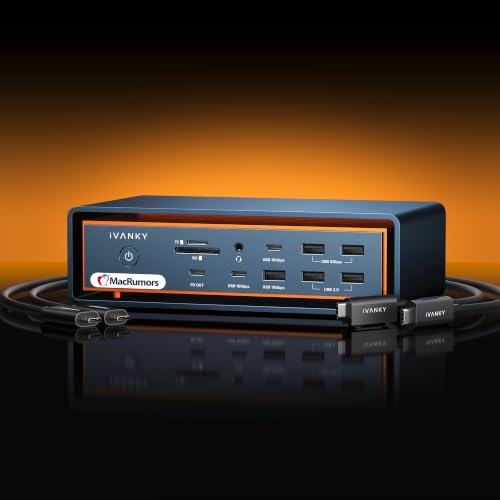
The iVANKY 23-in-1 Thunderbolt 5 Docking Station is an excellent choice for Mac users seeking a powerful hub that maximizes display capabilities and data transfer speeds. With support for triple displays, you can enjoy stunning visuals, including dual 6K@60Hz outputs on compatible devices. It boasts 120Gbps data transfer through three Thunderbolt 5 ports and ten USB ports for seamless connectivity. The built-in 2.5Gbps RJ45 Ethernet port guarantees fast internet access. Plus, its hybrid cooling system keeps everything running smoothly. Backed by a 24-month warranty and responsive customer service, you can depend on this dock for all your connectivity needs.
Best For: Mac users seeking a versatile, high-performance docking station for enhanced display and data transfer capabilities.
Pros:
- Supports triple displays with stunning resolutions up to dual 6K@60Hz.
- Offers exceptional data transfer speeds with 120Gbps through Thunderbolt 5 ports.
- Includes a robust cooling system to ensure optimal performance during heavy usage.
Cons:
- Incompatible with Windows and Chrome laptops, limiting its usability for non-Mac users.
- Higher price point compared to standard docking stations.
- Limited customer reviews may raise concerns about long-term reliability.
CalDigit TS5 PLUS Thunderbolt 5 Dock

Engineered for professionals and creatives alike, the CalDigit TS5 PLUS Thunderbolt 5 Dock offers a remarkable array of connectivity options, making it the ideal choice for those who demand high-speed performance. With 20 ports—including 3 Thunderbolt 5 and 10Gb Ethernet—you’re equipped for any task. Power-hungry laptops receive up to 140W of charging, while dual USB controllers guarantee smooth performance across all connections. You can connect dual 8K displays, making multitasking effortless. Plus, the 10Gb Ethernet delivers ten times the speed of traditional connections, perfect for fast file transfers. Just remember to install the necessary drivers for peak use on Windows.
Best For: Professionals and creatives who need high-speed connectivity and versatile display options for demanding tasks.
Pros:
- High Connectivity: Offers 20 ports, including 3 Thunderbolt 5 and 10Gb Ethernet for extensive device support.
- Powerful Charging: Delivers up to 140W for power-hungry laptops, ensuring they stay charged during intensive use.
- Advanced Display Capabilities: Supports dual 8K displays and high-refresh rate connections for seamless multitasking.
Cons:
- Not Compatible with Non-Thunderbolt Devices: Limited to Thunderbolt and USB4 hosts, restricting usability with older devices.
- Windows Driver Requirement: Windows users must install additional drivers for full functionality, which may be inconvenient.
- Size and Heat Management: Requires ample clearance for optimal performance due to its aluminum chassis acting as a heat sink.
Kensington EQ Pro Thunderbolt 5 Dock for MacBook

Designed specifically for MacBook users, the Kensington EQ Pro Thunderbolt 5 Dock excels with its compatibility for M-Series Pro and Max models, delivering a robust 80Gbps bi-directional bandwidth. It supports up to one 8K or two 6K monitors at 60Hz, ensuring stunning visuals for your projects. With 140W Dynamic Power Delivery, you’ll enjoy seamless power and connectivity. The 19-in-1 design includes multiple Thunderbolt and USB ports, plus triple card readers for quick data transfers. Built-in security features, like a PCIe M.2 SSD slot, protect your valuable data, making it an ideal choice for professionals.
Best For: The Kensington EQ Pro Thunderbolt 5 Dock is best for creative professionals and power users who require high-performance connectivity and extensive expansion options for their MacBook.
Pros:
- Supports high-resolution displays with up to one 8K or two 6K monitors at 60Hz for enhanced multitasking and visual quality.
- Offers a comprehensive 19-in-1 design, providing multiple ports and slots for diverse connectivity needs.
- Features built-in security options, including a lockable PCIe M.2 SSD slot, ideal for protecting sensitive data.
Cons:
- The mounting bracket for zero-footprint installation is sold separately, adding to the overall cost.
- Security cable locks are not included and must be purchased separately, which may be an extra expense for users.
- Limited compatibility with non-MacBook devices may restrict its use for users with other brands.
Factors to Consider When Choosing Thunderbolt 5 Docks With 2.5gbe Ethernet
When you’re choosing a Thunderbolt 5 dock with 2.5gbe Ethernet, consider factors like data transfer speeds and display capabilities that suit your needs. You’ll also want to evaluate power delivery options, port configurations, and the efficiency of the cooling system. These elements can greatly impact your overall experience and device performance.
Data Transfer Speeds
Choosing the right Thunderbolt 5 dock with 2.5GbE Ethernet is essential for maximizing your data transfer speeds. Thunderbolt 5 technology boasts speeds of up to 120Gbps, greatly improving file transfer capabilities. With 2.5GbE ports, you’ll enjoy networking that’s 2.5 times faster than standard Gigabit Ethernet, perfect for high-performance tasks. When connected to compatible devices, you can transfer large files, like a 150GB file, in just 25 seconds. This makes Thunderbolt 5 docks ideal for demanding workflows, as they enable low latency and high-speed connectivity for cloud services and large data transfers. By prioritizing these features, you can enhance your overall productivity and efficiency while working with data-intensive applications.
Display Capabilities
As you explore Thunderbolt 5 docks with 2.5GbE Ethernet, the display capabilities become a significant factor in your decision. You’ll appreciate that these docks can support multiple high-resolution displays, enabling configurations like dual 8K at 60Hz or triple 4K setups. If you’re a macOS user, expect to connect dual 6K displays or one 8K display, while Windows users can achieve similar results, depending on their laptop’s specs. The impressive bandwidth of up to 120Gbps guarantees high-quality video output and fast data transfers, perfect for video editing or gaming. Look for features like daisy chaining to connect multiple monitors seamlessly and bandwidth boost technology for peak performance, especially during demanding tasks.
Power Delivery Options
Power delivery options play an essential role in maximizing the functionality of Thunderbolt 5 docks with 2.5GbE Ethernet. When choosing a dock, consider the power output, which typically ranges from 140W to 180W, ensuring compatibility with high-powered devices like laptops. Many docks use the Power Delivery (PD) 3.1 protocol, providing efficient charging while maintaining data transfer speeds. Look for docks that offer combined charging across multiple ports, enhancing your charging experience for all connected devices. Additionally, docks equipped with 2.5GbE Ethernet often feature dedicated power delivery ports, ensuring your network performance remains strong while supplying power to your laptop. Always check the maximum wattage supported to meet your device’s power requirements effectively.
Port Configuration Variety
When evaluating Thunderbolt 5 docks with 2.5GbE Ethernet, the variety of port configurations greatly impacts your overall setup. Look for docks that offer between 11 to 20 total ports to guarantee flexibility for your devices and peripherals. Multiple Thunderbolt 5 downstream ports allow you to daisy chain displays and additional devices, enhancing your connectivity options. You’ll also want to check for USB-A and USB-C ports, often totaling six each, which accommodate fast storage devices and accessories seamlessly. Integrated card readers, like SD and microSD slots, make transferring data from cameras quick and easy. Finally, a combination of Ethernet ports, including 2.5GbE, will markedly boost your network connectivity and data transfer rates.
Cooling System Efficiency
Choosing the right Thunderbolt 5 dock with 2.5GbE Ethernet goes beyond just port variety; the efficiency of its cooling system plays an essential role in maintaining peak performance. Look for docks with active cooling or fanless designs that keep operating temperatures ideal during high data transfers, preventing overheating. Advanced technologies like AI smart cooling systems and aluminum chassis enhance heat dissipation, extending your device’s lifespan. An effective cooling system can also minimize noise, keeping sound levels between 20-40 dB(A) for a quieter workspace. Proper airflow and heat management not only improve thermal efficiency but guarantee stable connectivity, especially when using multiple high-resolution displays. Consider the cooling design, as it can directly influence data transfer speeds and performance.
Build Quality and Design
Build quality and design are essential factors in selecting a Thunderbolt 5 dock with 2.5GbE Ethernet. A sturdy chassis, often made from aluminum, enhances durability and improves heat dissipation, ensuring your device runs smoothly. Look for a compact form factor that minimizes desk clutter while maximizing port availability for all your connectivity needs. Pay attention to the cooling system—active or passive cooling designs are vital for preventing overheating during extended use. Ergonomic features like adjustable angles and cable management can enhance your experience by providing easy access to ports and reducing cable tangling. Finally, consider aesthetics; a sleek, modern finish will complement your workspace and elevate your setup. Choose wisely for both performance and style!
Compatibility With Devices
Selecting the right Thunderbolt 5 dock with 2.5GbE Ethernet means ensuring compatibility with your devices. Most Thunderbolt 5 docks support a variety of devices, including Thunderbolt 5 and 4 laptops, so you should find one that works with your brand and model. Look for docks that offer driverless functionality for easy connections with both Windows 11 and macOS. If you need high-resolution displays, check if the dock supports multiple 8K or 4K displays based on your device’s capabilities. Also, verify the power delivery output; some docks can deliver up to 180W, perfect for charging high-powered laptops. Remember, not all Thunderbolt 5 docks work with non-Thunderbolt devices, so double-check the specifications before you buy.
