
Thunderbolt 5 docks for Mac Studio can turn a powerful desktop into a cleaner, faster, more flexible workstation. The best options combine high-bandwidth connectivity, strong display support, and practical extras like Ethernet, card readers, and SSD expansion.
In this roundup, we focused on docks that make sense for real Mac Studio workflows, from creative editing and multi-monitor setups to external storage and pro-level peripherals.
Best 10 Thunderbolt 5 Docks for Mac Studio Picks for 2026
Best for Mac Studio Expansion

- Dual SSD bays with up to 16TB and RAID 0/1 support
- 2x HDMI 2.1 plus DisplayPort 2.1 for multi-monitor setups
- CFexpress readers and Hi-Fi audio for creator workflows
Best For: Mac Studio owners who want storage expansion, pro media access, and flexible display output.
Best for High-Bandwidth Mac Setups

- 4 Thunderbolt 5 ports for fast drives and expansion
- Dual 6K/8K or 2x 4K@240Hz display support on Macs
- 90W charging with a 180W PSU for steady power
Best For: Mac Studio users who need a fast, display-focused Thunderbolt 5 hub.
Best for Triple Displays

- Triple 6K support on compatible Max-chip Macs
- 3 Thunderbolt 5 ports and 10 USB ports
- 140W PD, 2.5GbE, and hybrid cooling
Best For: Mac users who need a high-end, multi-display Thunderbolt 5 dock with lots of expansion.
Best High-Capacity Storage Pick
Mate Studio Stand-A 80Gbps SSD Dock
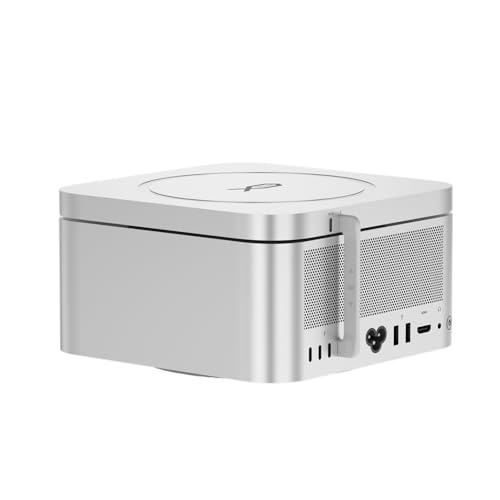
- Dual M.2 slots with up to 16TB capacity
- 80Gbps USB-C with claimed 3600MB/s reads
- Aluminum stand design with PD 3.0 support
Best For: Mac Studio users who want a compact, high-capacity SSD expansion base for demanding workflows.
Best for Quad Displays

- Drives up to 4 external 4K@60Hz displays
- 20 ports include HDMI, DP, USB, Ethernet, and card readers
- 100W charging with support for Thunderbolt 5/4/3 and USB4
Best For: Mac Studio users who need maximum monitor expansion and lots of connectivity.
Best for Power Users
CalDigit TS5 Plus Thunderbolt 5 Dock

- 20-port layout with 3 Thunderbolt 5 ports and 10Gb Ethernet
- 140W host charging plus 330W PSU for sustained power
- Dual USB controllers help keep busy accessory loads responsive
Best For: Mac Studio owners who want a high-capacity dock for demanding creative and pro workflows.
Best for Maximum Display Output

- Quad 6K or dual 8K display support
- 10GbE Ethernet and four fast downstream USB-C ports
- Mac-only design with 140W passthrough charging
Best For: Mac power users who need extreme monitor support and fast wired expansion.
Best for Mac mini Storage Expansion
80Gbps Thunderbolt 5 Mac mini Dock

- 80Gbps USB-C connection on Mac mini M4 Pro
- Dual M.2 SSD bays support up to 16TB
- Adds 2.5G LAN, SD 4.0, and USB-A ports
Best For: Mac mini M4 and M4 Pro users who want fast storage expansion and a tidier desk.
Best Heavy-Duty Pick
Anker Prime TB5 Docking Station

- 14-in-1 port selection for broad connectivity
- Up to 140W charging with Thunderbolt 5 speeds
- Active cooling for sustained high-load performance
Best For: Mac Studio users who need a high-end dock for fast transfers, charging, and lots of peripherals.
Best for High-Speed Expansion
UGREEN Maxidok Thunderbolt 5 Dock

- 17-in-1 dock with dual Thunderbolt 5 downstream ports
- Built-in NVMe M.2 slot supports up to 8TB storage
- 2.5GbE, 140W charging, and 8K/6K display support
Best For: Power users who want a feature-packed Thunderbolt 5 dock with built-in storage and broad connectivity.
Best for Mac Studio Expansion – RayCue 10-in-1 80Gbps Dock
If you want one of the most capable thunderbolt 5 docks for mac studio-style workflows, the RayCue 10-in-1 is built for heavy storage, multi-display output, and pro media access. It pairs an 80Gbps connection with dual NVMe SSD bays, making it a strong fit for creators who need both speed and expansion in a single desktop dock.
Best For: Mac Studio owners who need dual SSD storage, triple-display flexibility, and fast card-reader access for creative work.
Pros:
- Dual NVMe SSD bays support up to 16TB and RAID 0/1 setups
- 2x HDMI 2.1 plus DisplayPort 2.1 for flexible multi-monitor builds
- CFexpress Type A/B readers, dual USB-A, and Hi-Fi audio for pro workflows
- Precision-aluminum design matches Mac Studio and helps keep the desk tidy
Cons:
- 45W power input is for dock functionality, not full host charging
- Best features are most useful if you actually need extra internal-style storage
- Primarily tuned for newer Mac Studio and Mac mini configurations
Overall, this is a specialized expansion dock rather than a simple port splitter, and that makes it stand out in the growing category of thunderbolt 5 docks for mac studio setups. If your priority is adding fast storage, pro card access, and a cleaner multi-monitor desk layout, it delivers a lot in one enclosure.
Best for High-Bandwidth Mac Setups – CalDigit E5 Thunderbolt 5 Hub
If you want one of the most capable thunderbolt 5 docks for mac studio-style workflows, the CalDigit E5 is built for speed, display flexibility, and clean desk setups. It is a strong fit if you need multiple fast peripherals, high-refresh monitors, and plenty of power from a compact hub instead of a full-size dock.
Best For: Mac Studio users who want a high-end hub for fast storage, multiple displays, and everyday charging.
Pros:
- Four Thunderbolt 5 ports plus 3 USB-A and 2 USB-C 10Gb/s connections
- Supports up to dual 6K/8K or two 4K@240Hz displays on compatible Macs
- 90W charging with a 180W power supply for sustained power delivery
- Fast 64Gb/s PCIe support on all Thunderbolt ports for speedy SSDs
Cons:
- Full Thunderbolt 5 performance requires a compatible TB5 or USB4 v2 host
- Not a traditional port-heavy dock with Ethernet or audio built in
- Some display modes depend on the Mac model and macOS support
For buyers comparing thunderbolt 5 docks for mac studio, the E5 stands out more as a high-bandwidth expansion hub than an all-in-one workstation dock. If your priority is top-tier display support, fast external drives, and a simple but powerful port layout, it is an easy one to shortlist.
Best for Triple Displays – iVANKY FusionDock Max 2
If you want one of the more fully featured thunderbolt 5 docks for mac studio-style workflows, the iVANKY FusionDock Max 2 is built for heavy display and I/O needs. It is especially appealing for Mac users who want fast external storage, multiple peripherals, and a dock that can handle serious multitasking without feeling stripped down.
Best For: Mac owners with M1/M2/M3/M4 Max systems who want triple-display support, lots of ports, and high-speed Thunderbolt 5 connectivity in one desktop dock.
Pros:
- Supports triple 6K@60Hz output on compatible Max-chip Macs
- Three Thunderbolt 5 ports plus 10 USB ports for broad expansion
- 140W power delivery and 2.5GbE help replace a full desk setup
- Hybrid cooling design aims to keep sustained performance stable
Cons:
- Not compatible with Windows or Chrome laptops
- Display support depends heavily on your specific Mac chip tier
- Only works with one Mac and cannot be switched between systems
For buyers comparing thunderbolt 5 docks for mac studio, this model stands out for display flexibility and sheer port count, but only if your Mac’s chip class matches its supported monitor setup. If you need a dock that doubles as a high-capacity workstation hub, it is a strong specialized pick.
Best High-Capacity Storage Pick – Mate Studio Stand-A 80Gbps SSD Dock
If you want one of the more storage-focused thunderbolt 5 docks for mac studio-style setups, this Mate Studio Stand-A is worth a look. It combines an aluminum stand with dual M.2 NVMe slots, up to 16TB total capacity, and an 80Gbps USB-C connection, making it a practical way to add fast local storage without cluttering your desk.
Best For: Mac Studio users who need a compact dock with lots of fast SSD expansion for media projects, large libraries, or workspace-heavy workflows.
Pros:
- Dual M.2 slots support up to 16TB of expandable NVMe storage
- 80Gbps USB-C connection and up to 3600MB/s claimed read speeds help keep transfers moving
- Built-in aluminum stand design saves space and improves cooling
- PD 3.0 support adds flexibility for power-sensitive drives and setups
Cons:
- Storage performance depends heavily on the SSDs you install
- More of an SSD expansion base than a full-featured peripheral hub
- Not ideal if you mainly need lots of traditional USB or display ports
For Mac Studio owners who care more about fast local storage than extra connectivity, this dock fills a useful niche. It is especially appealing if you are comparing thunderbolt 5 docks for mac studio and want a space-saving expansion option that prioritizes capacity, cooling, and simple desktop integration.
Best for Quad Displays – TobenONE 20-in-1 Quad 4K Dock
If you want one of the more aggressive display-expansion options among thunderbolt 5 docks for mac studio, this TobenONE model is built around multi-monitor productivity. It can drive up to four 4K@60Hz displays, adds a wide mix of USB, card-reader, Ethernet, and audio connections, and includes 100W laptop charging from a 150W power supply.
Best For: Mac Studio users and mixed-device setups that need maximum display output and lots of rear-panel ports.
Pros:
- Supports up to 4 external displays at 4K@60Hz for serious multitasking
- 20 total ports cover USB, HDMI, DisplayPort, SD/microSD, Ethernet, and audio
- 100W charging helps keep a connected laptop powered through the dock
- Works with Thunderbolt 3/4/5, USB4, USB-C, Windows, and macOS
Cons:
- Requires DisplayLink driver installation before use
- HDCP is not supported, which can limit some protected streaming apps
- May be more dock than needed if you only want one or two monitors
For shoppers comparing thunderbolt 5 docks for mac studio, this is a strong pick when your priority is screen count and port density over minimalist design. It is especially useful for creators, analysts, and desk-heavy users who want a single dock to handle nearly everything.
Best for Power Users – CalDigit TS5 Plus Thunderbolt 5 Dock
If you want one of the most feature-packed thunderbolt 5 docks for mac studio setups, the CalDigit TS5 Plus is built for serious desk expansion. It combines 20 ports, 10Gb Ethernet, and 140W host charging with enough bandwidth to handle fast storage, multiple peripherals, and high-end display workflows without feeling cramped.
Best For: Mac Studio owners who need maximum port density, fast networking, and a dock that can anchor a demanding workstation.
Pros:
- 20 total ports with 3 Thunderbolt 5 connections, 10 USB data ports, and card readers
- 10Gb Ethernet is ideal for NAS transfers, media workflows, and pro network setups
- Dual USB controllers help reduce bottlenecks when multiple fast devices are connected
- Supports up to dual 8K/60Hz displays on compatible Macs
Cons:
- More dock than many casual users need
- Full performance depends on a Thunderbolt 5 or USB4 v2 host
- Large power brick and desk footprint may not suit minimal setups
For a Mac Studio workflow that demands lots of connections, the TS5 Plus stands out as a no-compromise hub. Among thunderbolt 5 docks for mac studio, it is one of the strongest choices if you prioritize expansion, speed, and network performance over simplicity.
Best for Maximum Display Output – iVANKY FusionDock Ultra
If you need one of the most ambitious thunderbolt 5 docks for mac studio-style workflows, the iVANKY FusionDock Ultra stands out for its Mac-only focus, 10GbE networking, and extreme multi-display support. It is built for Apple Silicon users who want a dock that can push serious peripherals, high-speed storage, and multiple monitors without juggling adapters.
Best For: Mac users running demanding creative or production setups who want top-tier display flexibility, fast Ethernet, and lots of expansion from a single dock.
Pros:
- Supports up to quad 6K or dual 8K displays on compatible Mac hardware
- Includes 10GbE Ethernet plus four high-bandwidth downstream USB-C ports
- Mac-focused design with 140W power delivery passthrough
- Built-in thermal system is designed for sustained heavy use
Cons:
- Incompatible with Windows, so it is not a cross-platform pick
- Full display support depends on the right Mac model and workflow
- Likely overkill if you only need a simple single-monitor dock
For buyers comparing thunderbolt 5 docks for mac studio, this is a niche but powerful option that prioritizes display output, wired networking, and workstation-level expansion over broad compatibility. It makes the most sense when your Mac setup is already high-end and you want a dock that is built to keep up.
Best for Mac mini Storage Expansion – 80Gbps Thunderbolt 5 Mac mini Dock
If you want one of the more storage-focused thunderbolt 5 docks for mac studio-style workflows, this Mac mini M4 dock is built for fast transfers, direct NVMe expansion, and a cleaner desk layout. It combines an 80Gbps USB-C connection with dual M.2 SSD slots, making it a strong fit for editors, creators, and anyone juggling large project files.
Best For: Mac mini M4 and M4 Pro users who need fast Thunderbolt-class storage expansion and extra front-facing ports.
Pros:
- 80Gbps connection on Mac mini M4 Pro for very fast file transfers
- Dual M.2 SSD slots support up to 16TB of expandable storage
- Useful extras like 2.5G LAN, SD 4.0, and dual USB-A ports
- Built-in cooling helps keep SSDs stable during long workloads
Cons:
- SSD drives are not included
- Best suited to Mac mini M4/M4 Pro, not a universal all-in-one dock
- Some non-Mac setups may need a separate USB4 cable
This is a smart pick if you need one of the more practical thunderbolt 5 docks for mac studio-adjacent desks, especially when storage expansion matters as much as port count. It’s less about maximum hub versatility and more about giving compact Macs faster external storage in a neat, integrated package.
Best Heavy-Duty Pick – Anker Prime TB5 Docking Station
If you want one of the most feature-packed thunderbolt 5 docks for mac studio, the Anker Prime TB5 Docking Station is built for heavy desk setups with fast storage, multiple peripherals, and serious charging needs. It combines Thunderbolt 5 bandwidth with a wide mix of ports, plus active cooling to help keep performance stable under load.
Best For: Mac Studio users who want a high-end dock for fast file transfers, multi-device connectivity, and a cleaner single-cable desk setup.
Pros:
- 14-in-1 layout covers Thunderbolt, USB-C, USB-A, Ethernet, SD/TF, audio, and display connections
- Up to 140W upstream charging and 45W shared front USB-C power for flexible device charging
- Thunderbolt 5 support is ideal for fast transfers and high-bandwidth workflows
- Active cooling helps maintain performance during sustained use
Cons:
- Premium price compared with simpler Thunderbolt 4 docks
- Mac systems with standard M1/M2/M3 chips are limited to one external display
- Not a fit if you need USB-A hub chaining, which it does not support
For a desk that needs speed, charging, and plenty of ports in one unit, this is a strong pick among thunderbolt 5 docks for mac studio users. It is especially appealing if your workflow pushes large files, external storage, and multiple accessories at once.
Best for High-Speed Expansion – UGREEN Maxidok Thunderbolt 5 Dock
If you want one of the most fully loaded thunderbolt 5 docks for mac studio-style setups, the UGREEN Maxidok is built for users who need lots of ports, fast external storage, and serious display output in a single hub. It combines Thunderbolt 5 bandwidth, an internal M.2 SSD slot, 2.5GbE, and a wide mix of USB and audio connections for a cleaner desk.
Best For: Power users who want a dock with built-in NVMe storage, multi-port expansion, and strong display support for a demanding workstation.
Pros:
- 17-in-1 layout adds USB-A, USB-C, SD/TF, audio, Ethernet, and dual Thunderbolt 5 downstream ports
- Built-in M.2 NVMe slot supports up to 8TB for fast external storage
- Up to 120Gbps Thunderbolt 5 performance with 8K/6K monitor support
- 2.5GbE and 140W charging help keep a desktop setup fast and organized
Cons:
- More dock than casual Mac users need if you only want a few ports
- Dual-display support on Mac is good, but not as flexible as Windows multi-monitor output
- Cooling fan and large feature set may be overkill for minimal desks
This is a strong pick among thunderbolt 5 docks for mac studio buyers who prioritize bandwidth, storage expansion, and a true workstation dock rather than a simple adapter. If you can use the extra connectivity, it offers a lot in one unit.
How We Picked the Best Thunderbolt 5 Docks for Mac Studio
We prioritized docks that offer a strong balance of performance, Mac compatibility, port variety, and desktop utility. For Thunderbolt 5 Docks for Mac Studio, the most important factors are reliable high-speed connectivity, enough display output for your monitor setup, and power delivery or pass-through behavior that fits a stationary workstation.
We also favored models that add meaningful value beyond basic USB expansion, such as 10GbE networking, SD card support, M.2 SSD bays, and multiple high-speed downstream ports.
Quick Comparison: What Matters Most
Before choosing, compare your monitor count, storage needs, and peripheral load. Some docks are best for display-heavy creative work, while others are better if you want storage expansion or a minimal, high-performance hub. If you use multiple SSDs, large media files, or a fast wired network, those features may matter more than raw port count.
Best for High-End Workstation Expansion
Look for docks with 80Gbps or 120Gbps-class connectivity, 10GbE, and enough downstream ports to keep drives, displays, and accessories running without constant swapping.
Best for Clean Desk Setups
Stand-style docks and dock-plus-storage designs can reduce cable clutter while adding useful placement for the Mac Studio itself.
Key Buying Factors for Thunderbolt 5 Docks for Mac Studio
Display support: Check the maximum number of external displays and the resolutions supported. Creative users should pay close attention to whether a dock can handle dual 6K, dual 8K, or multi-display arrangements without workarounds.
Bandwidth: Thunderbolt 5 offers more headroom than previous generations, but the real-world benefit depends on the dock’s internal design. If you move large media files, use fast NVMe storage, or connect several high-speed accessories, bandwidth matters.
Power and charging: Mac Studio does not need laptop-style charging, so prioritize stable power, thermal design, and reliable uptime instead of USB-C charging wattage.
Storage expansion: Some Thunderbolt 5 Docks for Mac Studio include M.2 slots or SSD bays. These are valuable if you want local scratch storage, project libraries, or backup drives built into the dock.
Ports and networking: Consider how many USB-A, USB-C, audio, SD, and Ethernet connections you actually use. A 10GbE port can be especially useful for shared storage and fast NAS workflows.
Who Should Buy Which Thunderbolt 5 Docks for Mac Studio?
Creative professionals: Choose a dock with strong multi-display support, fast storage options, and robust connectivity for cameras, drives, and color-critical peripherals.
Power users and editors: Prioritize high bandwidth, 10GbE, and multiple expansion ports if you regularly juggle large files and external storage.
Minimalist desk setups: A simpler hub or dock stand may be enough if you mainly want fewer cables and a few essential ports.
Storage-heavy users: If you want built-in SSD expansion, pick a dock with M.2 bays or dedicated storage slots so you can keep your fastest workspace drives in one place.
In short, the best choice depends less on port count alone and more on how well the dock matches your displays, storage, and workflow. For Mac Studio buyers, that balance is what separates a good dock from a genuinely useful one.
