
In 2026, Thunderbolt 5 docking stations are changing how you connect and work with your devices. With features like rapid data transfer, extensive port options, and high-resolution display support, these docks are designed to enhance your productivity. Whether you need multiple monitors or powerful charging capabilities, there’s a perfect dock for you. Let’s explore the top options available this year and discover which one can truly release your device’s potential.
iVANKY FusionDock Ultra 26-in-1 MacBook Dock for Thunderbolt 5
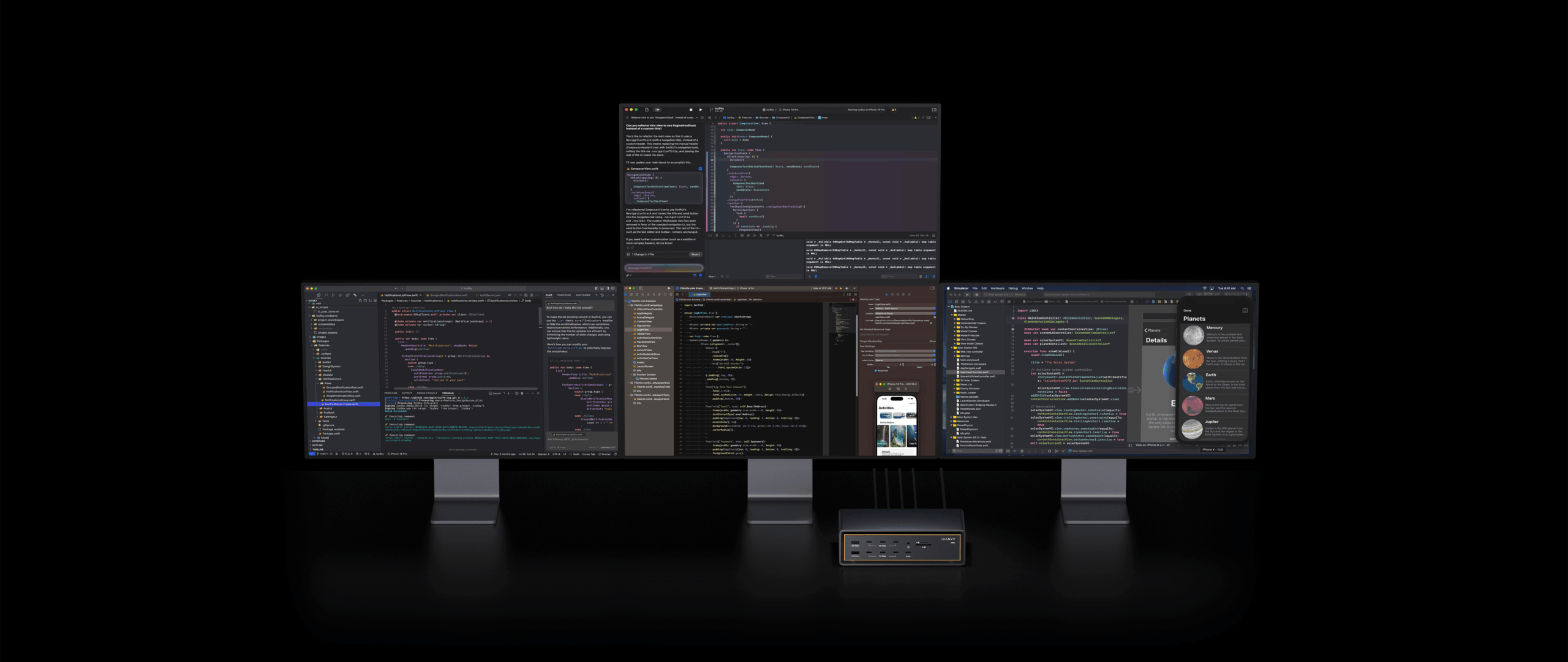
If you’re building a high-performance Apple Silicon workstation, the iVANKY FusionDock Ultra is designed to support stable, sustained use across multiple displays, high-speed storage, networking, and other demanding peripherals. Its dual-chip architecture and adaptive dual-fan cooling system help manage complex, high-bandwidth workloads over extended periods, making it a strong choice for users who need more than basic desktop connectivity.
It supports up to four native 6K displays on compatible Macs without requiring DisplayLink software or third-party drivers. (Display support varies by Mac model and chip.) The expanded display workspace gives professionals more room for editing timelines, monitoring data, managing development tools, or working
across multiple applications.
With up to 80Gbps of bidirectional bandwidth and up to 120Gbps for display-intensive workflows on supported Macs, the dock allows displays, external storage, and other demanding devices to operate together with fewer bandwidth constraints.
Its 10Gb Ethernet connection is well suited to large file transfers, NAS workflows, shared media libraries, and other network-heavy tasks where standard 1GbE or 2.5GbE connections may become limiting. This can be especially useful for video editors, developers, and data professionals regularly moving large files between
local and network storage.
The 26-port design includes DisplayPort 2.1, HDMI 2.0, multiple high-bandwidth USB-C ports, UHS-II SD and microSD card readers, optical audio, and a wide range of USB connections. This allows users to connect monitors, external SSDs, cameras, memory cards, audio equipment, and everyday accessories through one centralized setup instead of relying on multiple hubs and adapters.
Up to 140W host charging can keep a compatible MacBook Pro powered during demanding workloads, while a separate 45W USB-C port provides convenient charging for a phone, tablet, or another device.
Together with its active thermal design, this makes the dock better suited to long editing sessions, sustained file transfers, and multi-device workflows than a basic passive hub.
Best For: Apple Silicon power users, content creators, developers, and data professionals who need reliable high-load connectivity, native multi-display support, fast networking, and extensive I/O from a single dock.
Pros:
- Designed for Sustained Workloads: Its dual-chip architecture and adaptive dual-fan cooling help manage extended multi-display, storage, and network-heavy workflows.
- Native Multi-Display Workspace: Supports up to four native 6K displays on compatible Apple Silicon
- Macs, providing more room for editing, coding, data monitoring, and multitasking without DisplayLink software.
- Built for Data-Heavy Workflows: Thunderbolt 5 bandwidth and 10Gb Ethernet help users work efficiently with external SSDs, NAS systems, large media files, and other high-speed devices.
- Replaces Multiple Adapters: Its 26 ports cover displays, storage, networking, memory cards, audio, charging, and everyday peripherals in one centralized setup.
- High-Power Charging: Delivers up to 140W to the connected Mac, while the additional 45W USB-C port can charge another device at the same time.
Cons:
- Apple Silicon Only: It is designed specifically for Apple Silicon Macs and requires macOS 15.1 or later, so it is not suitable for Windows PCs, Chromebooks, or Intel-based Macs.
- Premium Price: Its multi-display capabilities, 10Gb Ethernet, extensive port selection, and active cooling place it in the higher-priced segment of the docking-station market.
- More Than Casual Users May Need: Users with a single monitor and only a few basic peripherals may not benefit from its full range of connectivity and performance features.
Anker Prime TB5 Docking Station (14-in-1 Thunderbolt 5 Dock)

The Anker Prime TB5 Docking Station is an ideal choice for professionals who demand high performance and versatility in their workspace. With 14 ports, including Thunderbolt 5 and multiple USB options, you can connect all your essential devices effortlessly. Experience lightning-fast file transfers, moving 150GB in just 25 seconds. Plus, enjoy stunning dual display support, delivering up to 8K@60Hz. Its advanced cooling system guarantees it runs smoothly without overheating. Although it has a hefty price tag, users rave about its build quality and seamless integration. With a 24-month warranty, you can trust this dock to enhance your productivity.
Best For: Professionals and creatives who require high-performance connectivity and versatile device integration in their workspace.
Pros:
- Seamless integration with multiple devices and high build quality enhances user experience.
- Lightning-fast file transfer speeds, allowing 150GB to be moved in just 25 seconds.
- Dual display support up to 8K@60Hz for enhanced visual productivity.
Cons:
- Limited SD card reader speed (UHS-I) may not meet the needs of some users.
- Only one video output is available at a time (either HDMI or DisplayPort).
- Occasional issues with SD card functionality after the device goes into sleep mode.
Plugable Thunderbolt 5 Dock (TBT-UDT3)

If you’re seeking a powerful docking solution that can handle demanding tasks, the Plugable Thunderbolt 5 Dock (TBT-UDT3) stands out with its impressive 11-in-1 capabilities. With three Thunderbolt 5 ports delivering up to 120Gbps and 140W power, it seamlessly supports dual 8K 120Hz displays for Windows or dual 6K 60Hz for Mac. You’ll appreciate its extensive connectivity, featuring USB ports, SD, MicroSD slots, and a 2.5Gbps Ethernet connection. Designed for reliability, it’s perfect for both IT deployments and home offices. Plus, you’ll benefit from lifetime support from North American connectivity experts, ensuring peace of mind.
Best For: Professionals and creatives who require a high-performance docking solution for demanding tasks with multiple high-resolution displays.
Pros:
- Versatile Connectivity: Offers multiple ports including Thunderbolt 5, USB, SD, and Ethernet for extensive device compatibility.
- High Display Capability: Supports dual 8K 120Hz displays for Windows and dual 6K 60Hz displays for Mac, ideal for graphic-intensive work.
- Lifetime Support: Comes with lifetime support from North American connectivity experts, ensuring reliable assistance.
Cons:
- Price Point: May be more expensive compared to standard docks, which could be a consideration for budget-conscious users.
- Compatibility Limitations: Requires Thunderbolt 5 or compatible ports, limiting use with older devices.
- Size and Portability: The dock’s size may not be as portable as smaller alternatives, making it less ideal for travel.
OWC 11-Port Thunderbolt 5 Docking Station

Designed for professionals and gamers alike, the OWC 11-Port Thunderbolt 5 Docking Station stands out with its impressive array of ports and robust performance capabilities. You’ll enjoy three Thunderbolt 5 ports, USB 3.2 Type-A ports, an SD/Micro-SD card reader, and a 2.5GbE Ethernet port, optimizing your connectivity. Experience seamless dual 4K monitor setups and quick data transfers without hassle. With 140W power delivery, it efficiently charges your devices too. While most users appreciate its reliability and solid build, some feel the Thunderbolt cable port could be better placed. Overall, it’s a valuable investment for any tech-savvy user.
Best For: Professionals and gamers seeking a high-performance docking solution with extensive connectivity options.
Pros:
- Multiple Ports: Offers three Thunderbolt 5 ports and various other connections for versatile device compatibility.
- High Performance: Supports dual 4K monitor setups and fast data transfers, enhancing productivity and gaming experiences.
- Strong Power Delivery: Provides 140W power delivery for fast charging of laptops and powering peripherals.
Cons:
- Cable Placement: Some users find the placement of the Thunderbolt cable port affects workspace organization.
- Price Concerns: A few users feel the cost is relatively high compared to other docking solutions on the market.
- Compatibility Checks Needed: Users must ensure their devices are compatible for optimal performance and charging efficiency.
Razer Thunderbolt 5 Dock Chroma 11 Port Docking Station

With its impressive 120Gbps transfer speeds and support for up to three 4K displays at 144 Hz, the Razer Thunderbolt 5 Dock Chroma stands out as an ideal choice for gamers and creative professionals alike. This 11-port docking station offers a robust M.2 SSD slot, 140W power delivery, and effective active cooling. You’ll appreciate the multiple Thunderbolt 5 ports, Gigabit Ethernet, and UHS-II SD card slot for seamless connectivity. Weighing just 4.4 pounds, it’s portable too. Although it lacks an HDMI port, its high build quality and RGB lighting make it a stylish addition to your setup.
Best For: Gamers and creative professionals seeking high-performance connectivity and display options.
Pros:
- High build quality with stylish RGB lighting enhances your setup.
- Multiple ports, including Thunderbolt 5 and UHS-II SD card slot, provide versatile connectivity.
- Effective active cooling system ensures optimal performance during intensive tasks.
Cons:
- Lacks an HDMI port, which may limit display options for some users.
- Only offers 1GbE Ethernet, which may not meet the demands of all users.
- Requires specific cables for display connections, which may add to setup complexity.
iVANKY Thunderbolt 5 Docking Station with 11 Ports

The iVANKY Thunderbolt 5 Docking Station with 11 Ports stands out as an ideal choice for professionals and creators who demand high performance from their devices. With a powerful 180W adapter, it supports charging for laptops up to 140W and PD USB-C devices at 60W. Enjoy stunning visuals with dual 8K@60Hz displays for Windows laptops or dual 6K for MacBooks. Data transfer rates reach up to 80Gbps, and Bandwidth Boost technology enhances that to 120Gbps. Users rave about its ease of setup, solid build quality, and minimal heat generation, making it a reliable addition to your workspace.
Best For: Professionals and creators who require high-performance connectivity and charging capabilities for multiple devices.
Pros:
- Supports stunning dual 8K@60Hz or dual 6K@60Hz display configurations for enhanced visual experiences.
- Fast data transfer rates of up to 80Gbps, with Bandwidth Boost technology reaching up to 120Gbps.
- Solid build quality with minimal heat generation, ensuring reliability during extended use.
Cons:
- Lacks a functional power button, requiring users to unplug the device to power it off.
- Some concerns about LAN speed and port arrangement affecting usability.
- Minor drawbacks noted compared to other brands, despite overall high satisfaction ratings.
iVANKY 23-in-1 FusionDock Max 2 for Thunderbolt 5
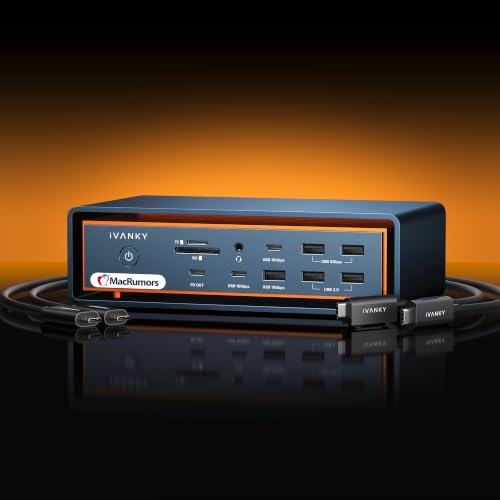
For professionals and creatives seeking a powerful docking solution, the iVANKY 23-in-1 FusionDock Max 2 stands out with its impressive display capabilities. You can enjoy triple displays up to 6K@60Hz, perfect for multitasking on Mac M1/M2/M3/M4 Max chips. Its robust cooling system guarantees stable performance, utilizing a multi-layer heat dissipation design and built-in fan. With a 240W power adapter, it efficiently charges your laptop and devices. Plus, you get lightning-fast 120Gbps data transfer through three Thunderbolt 5 ports and multiple USB options. Backed by a 24-month warranty, it promises reliability for your tech needs.
Best For: Professionals and creatives who require a powerful and versatile docking solution for high-performance multitasking with multiple displays.
Pros:
- Supports triple displays up to 6K@60Hz, enhancing productivity and multitasking capabilities.
- Efficient cooling system ensures stable performance during extended use, preventing overheating.
- High-speed data transfer of 120Gbps via Thunderbolt 5 ports, along with multiple USB connectivity options.
Cons:
- May be overkill for casual users who do not require extensive display or data transfer capabilities.
- Higher price point compared to simpler docking stations may not be justifiable for all users.
- Requires compatible Mac models for full utilization of display capabilities.
Plugable USB C Docking Station for 5 Monitors

Supporting up to five high-resolution displays, the Plugable USB C Docking Station UD-7400PD is perfect for professionals who need to maximize their multitasking capabilities. With its ability to support 3x 8K or 1x 8K plus 4x 4K screens, you’ll experience stunning visuals. Plus, it offers 140W laptop charging and 30W for devices, keeping your workspace powered. The docking station features HDMI and USB-C DisplayLink ports, ensuring compatibility with your Windows or macOS devices. With lifetime support from a North American team, you’ll have peace of mind that your connectivity needs are met with reliability and ease.
Best For: Professionals and multitaskers who require multiple high-resolution displays for enhanced productivity.
Pros:
- Supports up to 5 high-resolution displays, including 3x 8K or 1x 8K + 4x 4K, catering to demanding visual needs.
- Provides robust charging capabilities with 140W for laptops and 30W for devices, ensuring your workspace remains powered.
- Includes lifetime support from a North American team, offering reliable assistance and peace of mind.
Cons:
- Requires installation of DisplayLink software for HDMI outputs, which may be an additional step for users.
- HDCP video playback (e.g., Netflix, Hulu) is not supported, limiting some media consumption options.
- Compatibility is restricted to video-enabled USB-C or Thunderbolt devices running specific operating systems, which may exclude some users.
TobenONE DisplayLink Docking Station for 4 Monitors

Designed for professionals juggling multiple tasks, the TobenONE DisplayLink Docking Station stands out with its ability to connect up to four monitors, enabling seamless multitasking and enhanced productivity. With 20-in-1 functionality, it offers 4 HDMI, 4 DP, and various USB ports, ensuring you have all the connections you need. Enjoy stunning visuals with 4K@60Hz resolution across your monitors. This docking station provides 100W charging for laptops and 18W for phones, keeping your workspace neat. Compatible with multiple systems, it includes a 2-year warranty and dedicated support, making it a reliable choice for your tech setup.
Best For: Professionals who require efficient multitasking with multiple monitors and a variety of connections.
Pros:
- Supports up to 4 external monitors with 4K@60Hz resolution for enhanced productivity.
- 20-in-1 functionality with multiple HDMI, DP, and USB ports for versatile connectivity.
- Includes a 2-year warranty and dedicated technical support for peace of mind.
Cons:
- M1 chip MacBooks can only extend to 3 monitors, limiting compatibility for some users.
- Requires installation of DisplayLink Drivers, which may be an additional step for setup.
- Not compatible with Linux/Unix systems, restricting some potential users.
iVANKY Thunderbolt 5 Dock FusionDock Pro 3 Docking Station

The iVANKY Thunderbolt 5 Dock FusionDock Pro 3 stands out as an exceptional choice for professionals and gamers alike, thanks to its impressive dual display support of up to 8K@60Hz on Windows devices. This 11-in-1 docking station offers data transfer rates of up to 80Gbps and features a robust 180W adapter, charging laptops up to 140W. With compatibility across MacBook M1 to M5 and Windows Thunderbolt 5 laptops, you’ll enjoy seamless connections for video calls and multiple monitors. While it might heat up during heavy use, its quick setup and responsive customer service make it a reliable option for your setup.
Best For: Professionals and gamers seeking a high-performance docking station with extensive display support and fast data transfer rates.
Pros:
- Quick plug-and-play setup with no need for drivers.
- Supports dual monitor configurations and multiple peripherals seamlessly.
- Responsive customer service with a 24-month warranty.
Cons:
- Some users report random disconnections, especially with SSDs.
- The dock can heat up during heavy use.
- Limited USB port selection may not meet all user needs.
Kensington SD5000T5 Thunderbolt 5 Docking Station

If you’re a creative professional or gamer looking for cutting-edge performance, the Kensington SD5000T5 Thunderbolt 5 Docking Station is an excellent choice. It supports MacBooks with impressive dual 6K or single 8K outputs, while Windows users can enjoy triple 4K or dual 8K displays. With data transfer speeds up to 80Gbps and 140W Power Delivery, your devices stay powered and connected effortlessly. The docking station features multiple Thunderbolt 5 ports, USB-A connections, and SD card readers for versatile connectivity. Plus, its zero-footprint mounting option helps you save desktop space, making it a perfect addition to your setup.
Best For: Creative professionals and gamers seeking high-performance connectivity and display options for their MacBooks or Windows devices.
Pros:
- Supports high-resolution displays: Offers dual 6K or single 8K outputs for Mac and triple 4K or dual 8K for Windows.
- Fast data transfer speeds: Achieves up to 80Gbps with a bandwidth boost for video-intensive tasks.
- Versatile connectivity options: Includes multiple Thunderbolt 5 ports, USB-A connections, and SD card readers.
Cons:
- Requires specific operating systems: Compatibility limited to Windows 11 (23H2 or later) and macOS (14.5 or later).
- Mounting bracket sold separately: Zero-footprint mounting option requires an additional purchase for full functionality.
- Security cable lock sold separately: Additional cost for securing the docking station with a Kensington lock.
Factors to Consider When Choosing Thunderbolt 5 Docking Stations
When you’re choosing a Thunderbolt 5 docking station, consider the variety of ports and their types to guarantee compatibility with your devices. You’ll also want to look at power delivery capacity, display support options, and data transfer speeds to meet your performance needs. Finally, don’t overlook the importance of cooling and design for peak functionality and aesthetics.
Port Variety and Types
Choosing the right Thunderbolt 5 docking station hinges on the variety of ports it offers, as this directly influences your connectivity options. Look for multiple Thunderbolt 5 ports, USB-A, USB-C, Ethernet, audio jacks, and card readers to meet your diverse needs. High-speed data transfer capabilities are vital, with some docks supporting speeds up to 120Gbps, perfect for quickly transferring large files. Evaluate display output options, as many stations can handle dual 8K or triple 4K setups, which is ideal for professionals. Don’t forget about additional features, like built-in cooling systems and daisy chaining, to enhance performance while keeping your workspace organized. The right port variety guarantees you can connect all your essential devices effortlessly.
Power Delivery Capacity
Power delivery capacity is a critical factor in selecting a Thunderbolt 5 docking station, as it directly impacts your device’s performance and charging efficiency. Typically ranging from 140W to 180W, these docks can charge your laptop and connected devices simultaneously without sacrificing performance. Many docks support Power Delivery protocols, ensuring safe and efficient charging. If you’re using a high-performance laptop for tasks like video editing or gaming, look for models that deliver higher wattage. Some stations feature multiple USB-C ports with shared power delivery, allowing you to connect and charge several devices at once. Keep in mind that insufficient power may lead to performance throttling, so choose a dock that meets your power needs for an ideal connectivity experience.
Display Support Options
Alongside power delivery capacity, display support options play a significant role in your decision-making process for a Thunderbolt 5 docking station. You’ll appreciate the ability to connect multiple high-resolution displays, from single 8K@60Hz to dual 8K@120Hz setups or even triple 4K@144Hz, depending on your devices. If you’re using a MacBook with M1/M2/M3/M4 chips, you can easily manage dual 6K@60Hz displays. Windows laptops can handle dual 8K@60Hz or higher refresh rates under compatible conditions. Many docks also support various monitor resolutions simultaneously, enhancing your multitasking. With Bandwidth Boost technology, you’ll enjoy seamless performance for intensive video tasks. Plus, compatibility with Thunderbolt 4 and USB4 devices guarantees versatile display options for your needs.
Data Transfer Speeds
When evaluating Thunderbolt 5 docking stations, understanding data transfer speeds is essential, as they can greatly impact your productivity. These docks can achieve maximum speeds of up to 120Gbps, markedly enhancing file transfer efficiency compared to previous versions. Many support dual 8K displays at 60Hz, leveraging high bandwidth for seamless video performance. With Bandwidth Boost technology, you can enjoy faster data transfers even when multiple devices are connected. However, keep in mind that data transfer rates can vary by configuration, with some docks typically supporting up to 80Gbps. Finally, remember that the choice of cables and connected devices plays a vital role, as not all USB-C or Thunderbolt cables can handle the maximum throughput.
Cooling and Design
Choosing a Thunderbolt 5 docking station involves more than just looking at data transfer speeds; you also need to contemplate cooling and design. Advanced active cooling systems in these stations help prevent overheating during extensive data transfers, ensuring peak performance. Many models feature multi-layer heat dissipation designs, including internal copper plates and built-in fans, which keep temperatures stable during prolonged use.
Additionally, the compact designs often showcase streamlined shapes and well-placed ports, promoting tidy workspace setups and efficient cable management. High-quality materials, like premium metals, enhance durability and aesthetic appeal. Some docking stations even offer zero-footprint mounting options, allowing flexible placement while maximizing desk space without sacrificing accessibility. These factors are essential for an effective and stylish setup.
Compatibility With Devices
To guarantee you get the most out of your Thunderbolt 5 docking station, compatibility with your devices is essential. Start by checking if your docking station supports the Thunderbolt version of your device; Thunderbolt 5 docks usually work with Thunderbolt 5, 4, and full-featured USB4 devices. Next, verify display support; some docks may handle dual 8K displays for Windows but only one for certain MacBook models. Don’t overlook power delivery; many Thunderbolt 5 docks offer up to 140W charging for high-performance laptops. Additionally, assess the number and types of ports available for your peripherals, such as USB-A, USB-C, Ethernet, and SD card readers. Finally, confirm the operating system requirements to ascertain full functionality with your version of Windows or macOS.
Warranty and Support
While exploring Thunderbolt 5 docking stations, it is crucial to evaluate warranty and support options that can greatly influence your user experience. Many models offer warranties ranging from 24 months to lifetime support, ensuring you’re covered against defects and performance issues. Responsive customer support can assist with troubleshooting, device compatibility, and setup, making your experience smoother. Some brands even prioritize user satisfaction by encouraging feedback and providing quick resolutions for any reported problems. Warranty terms often include provisions for product exchanges or repairs, giving you peace of mind if your docking station doesn’t meet expectations. Additionally, having access to extensive technical documentation can help you optimize performance and streamline the setup process, enhancing your overall satisfaction.
Price and Value
Understanding warranty and support options is important, but equally essential is considering the price and value of Thunderbolt 5 docking stations. Typically ranging from $430 to $500, these docks justify their costs with high data transfer speeds and versatile connectivity. When you look at popular models, their average price reflects capabilities like supporting dual 8K displays and delivering up to 140W for laptop charging. While some may seem pricey, they often feature advanced elements like active cooling systems that enhance performance. Many users find value in investing for seamless integration and reliability, especially for demanding tasks. Ultimately, if a docking station effectively supports multiple peripherals and high-resolution displays, it’s a worthwhile investment for professionals and creatives alike.
