
In 2026, upgrading your workspace with the best Thunderbolt 5 desk docking stations can greatly enhance your productivity. These innovative devices offer exceptional connectivity, robust power delivery, and support for multiple high-resolution displays. As you explore options like the Anker Prime TB5 and StarTech Thunderbolt 5 Dock, you’ll discover how they cater to various needs. But which models truly stand out? Let’s find out.
Anker Prime TB5 Docking Station (14-in-1 Thunderbolt 5)

If you’re a power user seeking unparalleled performance and connectivity, the Anker Prime TB5 Docking Station is an excellent choice. This 14-in-1 Thunderbolt 5 dock boasts impressive features, including 120Gbps max transfer speeds and 140W max charging capabilities. You’ll appreciate the dual 8K display support for enhanced visuals and the active cooling system that keeps it running smoothly. With various ports—like Thunderbolt 5, USB-C, USB-A, and HDMI—you can connect multiple devices effortlessly. Weighing just 2.4 pounds, it’s portable yet powerful, making it a top contender in the world of docking stations. Plus, it comes with a 24-month warranty.
Best For: Power users and professionals needing high-performance connectivity and dual display capabilities.
Pros:
- Supports dual 8K displays, providing exceptional visual clarity for graphic-intensive tasks.
- High transfer speeds of up to 120Gbps, allowing for quick file transfers and efficient multitasking.
- Active cooling system prevents overheating, ensuring reliable performance during demanding usage.
Cons:
- Relatively heavy at 2.4 pounds, which may not be as portable as lighter alternatives.
- Higher price point compared to basic docking stations, which may deter budget-conscious buyers.
- Limited compatibility with non-Thunderbolt devices, potentially restricting usage for users with older technology.
StarTech Thunderbolt 5 Docking Station

The StarTech Thunderbolt 5 Docking Station stands out as the perfect choice for creative professionals and multitaskers who need robust display capabilities and high-speed connectivity. You can support dual 8K 60Hz or triple 4K displays on Windows, while Mac users can enjoy dual 6K 60Hz. With 140W power delivery, it charges your high-powered laptop effortlessly. The 2.5GbE Ethernet guarantees rapid file transfers, and the built-in SD 4.0 slots make accessing memory cards a breeze. Plus, its driverless compatibility with Windows 11 and macOS 15/26 means you’ll enjoy seamless plug-and-play functionality across modern systems.
Best For: Creative professionals and multitaskers who require high-resolution display support and fast connectivity options.
Pros:
- Supports dual 8K 60Hz and triple 4K displays, enhancing productivity for multiple tasks.
- 140W power delivery efficiently charges high-powered laptops, making it ideal for on-the-go work.
- Driverless compatibility with Windows 11 and macOS 15/26 ensures hassle-free setup and use.
Cons:
- High price point may not be suitable for casual users or those with basic needs.
- Limited compatibility with non-Thunderbolt devices may restrict usage options.
- Physical size may take up more desk space compared to smaller docking stations.
Razer Thunderbolt 5 Dock Chroma Docking Station

For tech enthusiasts and creative professionals seeking unparalleled performance, the Razer Thunderbolt 5 Dock Chroma stands out with its impressive array of connectivity options. With 11 ports, including multiple Thunderbolt 5 connections and a UHS-II SD card slot, you’ll enjoy seamless data transfer at speeds up to 120 Gb/s. This dock supports triple 4K displays at 144 Hz or an 8K display at 60 Hz, perfect for multitasking. Plus, with 140W power delivery, your laptop stays charged while the active cooling system maintains peak performance. It’s a powerful addition to any workspace, backed by a one-year warranty.
Best For: Tech enthusiasts and creative professionals who require high-speed connectivity and multi-display support for their workflows.
Pros:
- High Transfer Speeds: Achieves data transfer rates of up to 120 Gb/s for efficient file management.
- Versatile Display Support: Capable of supporting triple 4K displays at 144 Hz or an 8K display at 60 Hz, ideal for multitasking and high-resolution work.
- Powerful Charging: Offers 140W power delivery, ensuring laptops remain charged during intensive use.
Cons:
- Price Point: May be considered expensive compared to basic docking stations, which could deter budget-conscious consumers.
- Size and Portability: The larger form factor may be less portable for users who need a more compact solution.
- Limited Warranty: Only a one-year manufacturer warranty might not provide enough coverage for long-term users.
HP Thunderbolt 4 100W G6 Dock for Desktop PC and Notebook

Designed with versatility in mind, the HP Thunderbolt 4 100W G6 Dock is perfect for professionals who need seamless connectivity for both desktop PCs and notebooks. With a robust 120W charging capability, it supports up to four displays and offers five USB ports, ensuring you’ve got all the connections you need. Its HP Quick Connect feature wakes your devices as you approach, enhancing convenience. You’ll appreciate the built-in security measures, including HP Wolf Security and Zero Trust Framework. Plus, its durable design and plastic-free packaging highlight a commitment to sustainability, making it a smart choice for your workspace.
Best For: Professionals seeking seamless connectivity and robust charging capabilities for both desktop PCs and notebooks.
Pros:
- High charging capability: Offers 120W charging to keep devices powered.
- Multiple display support: Can connect up to four displays for enhanced productivity.
- Robust security features: Includes HP Wolf Security and Zero Trust Framework for added protection.
Cons:
- Average customer rating: Only a 3.7 out of 5 stars from 7 reviews may indicate some user dissatisfaction.
- Limited compatibility: Minimum operating system requirement is Windows 10, excluding other OS users.
- Weight: At 1.6 pounds, it may be less portable for users who need to frequently move their setup.
Anker Prime Docking Station with 14 Ports and Dual 4K Displays

Ideal for professionals juggling multiple devices and high-resolution displays, the Anker Prime Docking Station offers an impressive 14 ports, making it a powerful hub for connectivity. With a maximum output of 160W, you can charge up to four devices simultaneously through three USB-C ports. The dual HDMI ports support dual 4K displays, ensuring seamless multitasking. You’ll enjoy fast data transfers with 11 ports providing speeds up to 10Gbps. While it’s compatible with Windows 10, 11, and ChromeOS, note that it doesn’t support Linux. With friendly customer service and included USB-C cables, it’s perfect for enhancing your workspace.
Best For: Professionals who require a reliable docking station for multiple devices and high-resolution displays.
Pros:
- Supports dual 4K displays for enhanced multitasking capabilities.
- High charging output of 160W allows for simultaneous charging of multiple devices.
- Fast data transfer speeds of up to 10Gbps through 11 ports.
Cons:
- Not compatible with Linux operating systems.
- External monitors on macOS display identical images, limiting multitasking options.
- Does not support 5120*1440 monitor resolution, which may be a drawback for some users.
Plugable Thunderbolt 4 Dock with 100W Charging (TBT4-UD5)
The Plugable Thunderbolt 4 Dock (TBT4-UD5) stands out with its impressive 100W Power Delivery, making it a top choice for power users who need robust charging capabilities alongside superior connectivity options. With a remarkable 40Gbps speed, you can connect dual 4K displays or a single 8K display effortlessly. Its extensive 13-port design includes HDMI, USB-C, and Gigabit Ethernet, ensuring compatibility with various devices. Weighing just 2.4 pounds, it’s portable yet powerful. Plus, with a 4.3-star rating from over 440 reviews, you can trust its award-winning performance. Elevate your workspace with this reliable docking station.
Best For: Power users seeking robust charging capabilities and superior connectivity options for their laptops and peripherals.
Pros:
- Versatile Connectivity: Supports dual 4K or single 8K display setups, making it perfect for creative professionals and multitaskers.
- High Power Delivery: Offers 100W charging, ensuring your devices stay powered during intensive usage.
- Extensive Port Options: Features a comprehensive 13-port design, accommodating various devices and peripherals seamlessly.
Cons:
- Weight: At 2.4 pounds, it may be less portable compared to lighter docking stations.
- Price Point: Higher price compared to basic docks might not be justified for casual users.
- Limited Compatibility with Base Models: Some features are restricted on base models of M1 and M2 Macs, which may limit usage for those users.
iVANKY 23-in-1 Thunderbolt 5 Docking Station
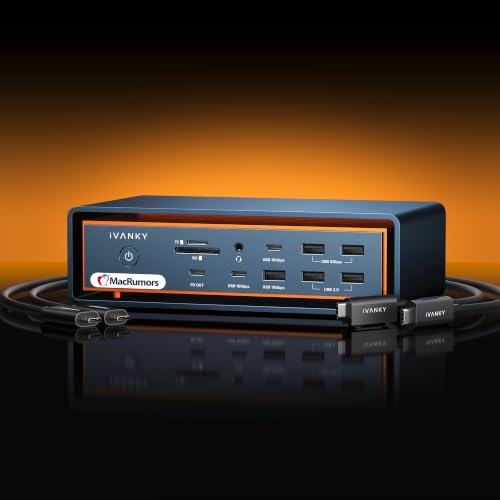
For Mac users seeking a powerful and versatile solution, the iVANKY 23-in-1 Thunderbolt 5 Docking Station stands out with its impressive support for triple displays. You can connect dual 6K@60Hz and a single 4K@60Hz display depending on your Mac model. With 120Gbps data transfer via three Thunderbolt 5 ports, plus ten USB ports, it guarantees fast connectivity. The hybrid cooling system keeps everything running smoothly, while the RJ45 Gigabit Ethernet delivers a 2.5Gbps connection. Backed by a 24-month warranty and a responsive customer service team, this dock enhances your workspace efficiently.
Best For: Mac users who require high-performance connectivity and support for multiple displays in their workstations.
Pros:
- Supports triple displays, including dual 6K@60Hz outputs for enhanced productivity.
- Offers rapid data transfer speeds of up to 120Gbps through Thunderbolt 5 ports and 10 USB ports.
- Features a robust cooling system to maintain optimal performance during heavy usage.
Cons:
- Incompatible with Windows and Chrome laptops, limiting its user base.
- May be overkill for casual users who do not need extensive display or connection options.
- Higher price point compared to simpler docking station alternatives.
TobenONE DisplayLink Docking Station for Quad 4K Monitors

Professionals juggling multiple tasks will find the TobenONE DisplayLink Docking Station an essential tool for their workflow. With support for up to four 4K monitors at 60Hz, it enhances your multitasking capabilities effortlessly. This docking station boasts 20 versatile ports, including HDMI, DisplayPort, USB 3.2, and SD card slots, guaranteeing you’ve got everything you need at your fingertips. The 150W power adapter delivers 100W charging for your laptop and an additional 18W for your phone. Compatible with various operating systems, the TobenONE makes setup simple, while dedicated customer support ensures you’re never left in the dark.
Best For: Professionals who require efficient multitasking across multiple high-resolution monitors.
Pros:
- Supports up to four 4K monitors at 60Hz for seamless multitasking.
- Includes 20 diverse ports for comprehensive connectivity options.
- Provides 100W charging for laptops and 18W for phones, enhancing convenience.
Cons:
- Limited to three monitors for M1 chip MacBooks.
- Requires installation of Displaylink driver for functionality.
- HDCP is not supported, which may limit playback of protected content.
UGREEN Maxidok Thunderbolt 5 Dock (17 in 1)

UGREEN’s Maxidok Thunderbolt 5 Dock stands out with its impressive 17-in-1 connectivity, making it an ideal choice for users who demand versatility and high performance from their workstations. You’ll enjoy multiple USB-A and USB-C ports, alongside SD/TF card slots and a robust 2.5G Ethernet connection. With Thunderbolt 5 speeds reaching up to 120Gbps, your data transfers will be lightning-fast. Plus, it supports dual displays for Mac and high-resolution output for Windows. The sleek bronze design and AI smart cooling system guarantee your dock remains stylish and efficient. With a 240W power output, it can handle all your devices seamlessly.
Best For: Professionals and creatives using MacBooks or Thunderbolt 5/4 Windows laptops who require extensive connectivity options and high-speed performance.
Pros:
- Versatile 17-in-1 connectivity with multiple USB-A, USB-C, and SD/TF card slots.
- Supports dual displays for Mac and high-resolution output for Windows, enhancing productivity.
- Robust 240W power output ensures all connected devices are charged and powered efficiently.
Cons:
- Higher price point compared to standard docking stations.
- Limited compatibility with non-Thunderbolt devices.
- The sleek design may not appeal to all users, especially those preferring a more traditional look.
WAVLINK Thunderbolt 5 Docking Station

The WAVLINK Thunderbolt 5 Docking Station is an excellent choice for those who demand top-tier performance and connectivity. With pioneering Thunderbolt 5 technology, it offers a maximum transfer bandwidth of 120Gbps and 140W Power Delivery for your laptop. You can support single 8K@144Hz or dual 8K@60Hz displays, making multitasking seamless. Plus, it features three Thunderbolt 5 ports for charging devices, a 2.5G Ethernet port for reliable networking, and an SD 4.0 reader for fast data transfer. Its sturdy design includes anti-slip pads and a Kensington lock slot for security, ensuring your setup remains stable and protected.
Best For: Professionals and power users who require high-speed connectivity and advanced display capabilities for demanding tasks.
Pros:
- High transfer bandwidth: 120Gbps maximum transfer speed ensures rapid data transfer.
- Versatile display support: Capable of supporting single 8K@144Hz or dual 8K@60Hz displays, enhancing multitasking.
- Robust design: Equipped with anti-slip pads and security features like a Kensington lock slot for stability and theft protection.
Cons:
- Compatibility requirements: Requires a device with USB-C port supporting Thunderbolt 4 or 5 for full functionality.
- Limited support for macOS: Triple display functionality is not available on macOS, limiting users to dual displays.
- Potential overkill for casual users: The advanced features and performance may be excessive for everyday use.
Factors to Consider When Choosing Thunderbolt 5 Deskdocking Stations
When choosing a Thunderbolt 5 docking station, you should consider several key factors. Look closely at the port configuration, power delivery capabilities, and display support to guarantee it meets your needs. Additionally, pay attention to data transfer speeds and the efficiency of the cooling system for peak performance.
Port Configuration and Variety
Choosing a Thunderbolt 5 desk docking station often hinges on its port configuration and variety, which can greatly enhance your connectivity options. Look for models with 11 to 23 ports, including multiple Thunderbolt, USB-A, USB-C, HDMI, and Ethernet ports. This diversity allows you to connect various devices seamlessly. If you’re in creative fields, consider docks with SD and microSD card slots for quick data transfers. Dual and triple display support is essential, especially if you want to run dual 8K@60Hz or triple 4K@144Hz displays for expanded workspaces. Finally, with Thunderbolt 5’s high-speed data transfer capabilities of up to 120Gbps, you’ll considerably cut down on file transfer times, making your workflow more efficient.
Power Delivery Capabilities
Power delivery capabilities are a key factor in selecting a Thunderbolt 5 desk docking station, especially if you rely on high-powered laptops. Many of these docks can deliver up to 140W, guaranteeing efficient charging for demanding devices. Look for models with multiple USB-C ports that share power delivery, allowing you to charge several devices simultaneously with a total output of up to 45W. The latest Thunderbolt 5 technology supports PD 3.1, providing peak charging speeds and broad compatibility. Some docking stations even offer a total power output of 240W, which is ideal for accommodating multiple peripherals while powering your laptop. Always check the maximum wattage to verify it meets the specific power needs of your devices.
Display Support and Resolution
Display support and resolution are essential aspects to take into account for Thunderbolt 5 desk docking stations, especially if you’re aiming for a high-performance setup. Look for docks that support single 8K displays at 60Hz or dual 8K displays for stunning clarity. Many options allow dual display setups with resolutions up to 6K or even triple 4K displays, enhancing your multitasking capabilities. If gaming is on your agenda, check for refresh rates up to 144Hz on 4K displays, which can greatly improve your experience. Keep in mind that compatibility with Windows and macOS can affect maximum resolutions, so choose accordingly. Also, multiple video output ports like HDMI, DisplayPort, and Thunderbolt give you great flexibility for connecting various monitors.
Data Transfer Speed
When evaluating Thunderbolt 5 desk docking stations, data transfer speed is a critical factor that can greatly impact your workflow. With a maximum speed of 120Gbps, you can transfer a 150GB file in just 25 seconds, ideal for handling large files efficiently. This technology not only supports dual 8K displays at 60Hz but also allows daisy chaining multiple devices, ensuring seamless integration while maintaining ideal data transfer rates. Plus, many docking stations include 2.5Gbps Ethernet ports, enhancing your internet connectivity alongside high-speed data transfer. By prioritizing these speeds, you’ll considerably boost your productivity and streamline your processes, making Thunderbolt 5 an essential choice for professionals who demand the best from their workstations.
Cooling System Efficiency
Choosing a Thunderbolt 5 desk docking station means considering cooling system efficiency, as it plays an essential role in maintaining peak performance. A well-designed cooling system prevents overheating during high data transfer tasks, especially when you’re using multiple displays or high-powered devices. Active cooling systems, with fans and heat sinks, effectively dissipate heat, ensuring stability under full load. Look for thermal management technologies, like multi-layer heat dissipation and internal copper plates, which enhance cooling efficiency and sustain high transfer speeds without throttling. Some docking stations even have elevated structures to promote airflow, combined with built-in fans, boosting cooling performance and extending your components’ lifespan. Efficient cooling mechanisms also help maintain consistent power delivery rates for all your devices.
Compatibility With Devices
As you explore Thunderbolt 5 desk docking stations, ensuring compatibility with your devices is essential for ideal performance. Start by confirming that the docking station supports Thunderbolt 5 or 4 and USB4, maximizing connectivity with various laptops and desktops. Check the operating system compatibility; some may seamlessly work with Windows, macOS, or ChromeOS, but not with Linux. Verify device requirements, especially if you have M1, M2, or Intel-based processors, as not all stations support every model. Also, consider the number of external displays supported—some allow for dual 8K displays, while others have limitations. Finally, look for power delivery capabilities, as these vary greatly and impact charging efficiency for your devices.
