
Four monitors can transform a workstation, but a dock’s “quad-display” claim does not guarantee four screens will work with your laptop. Display limits vary by operating system, graphics hardware, resolution, and refresh rate.
These five Thunderbolt 4 docks are worth considering for a four-monitor desk. Use the compatibility checks below to narrow the field before you buy.
Best 5 Thunderbolt 4 Docks for 4 Monitor Setup Picks for 2026
Best Driverless Windows Pick

- Four 4K 60Hz displays on qualifying Windows laptops
- Driverless USB4 and Thunderbolt compatibility
- Up to 98W laptop charging
Best For: Qualifying Windows laptops in mixed-device workplaces
Best Managed Office Pick

- Supports up to four 4K monitors
- Up to 130W charging for Dell laptops
- Wi-Fi management and 2.5GbE
Best For: IT-managed, Dell-centered multi-monitor offices
Best Cross-Platform Quad Display
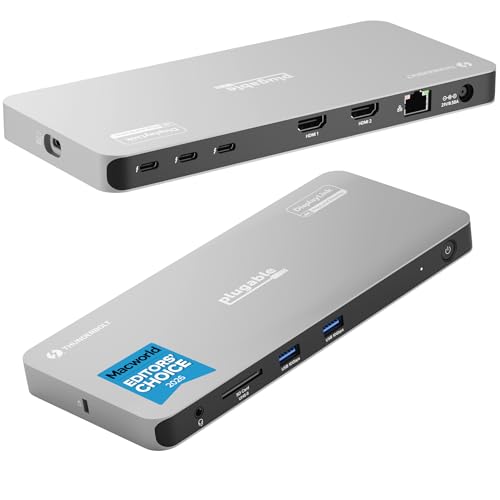
- Up to four 4K displays on many PCs and Macs
- Two HDMI outputs require DisplayLink software
- Three downstream 40Gbps Thunderbolt ports
Best For: Compatible PC and Mac users comfortable with DisplayLink
Best for Built-In Video Ports

- Two HDMI and two DisplayPort outputs
- Up to quad 4K/60Hz on Windows
- 2.5Gbps Ethernet and UHS-II card readers
Best For: Windows four-monitor desks needing dedicated video ports
Best for Managed Windows Desks
Lenovo ThinkPad Universal Thunderbolt 4 Dock

- Up to four 4K/60Hz displays
- Remote firmware updates via Dock Manager
- Up to 100W dynamic notebook charging
Best For: Managed Windows workstations with four displays
Best Driverless Windows Pick – StarTech Thunderbolt 4 Dock
For shoppers comparing thunderbolt 4 docks for 4 monitor setup, this StarTech dock offers a driverless route to four 4K 60Hz displays—but only on qualifying Windows laptops. Its USB4 and Thunderbolt compatibility also makes it a practical choice for mixed-device desks.
Best For: Windows users with an Intel 12th Gen or newer laptop that supports DP 1.4 with DSC.
Pros:
- Supports up to four 4K 60Hz monitors on qualifying Windows systems.
- Works without display drivers across Windows and macOS.
- Provides up to 98W laptop charging and a three-year warranty.
Cons:
- Four-display support depends on the Windows host’s CPU and DP 1.4 with DSC.
- Mac support tops out at two extended 4K 60Hz displays on the specified models.
Choose this dock if your Windows laptop meets the quad-display requirements and you would rather avoid display software. For a four-monitor Mac setup, look elsewhere.
Best Managed Office Pick – Dell Pro Smart Dock SD25TB4
The Dell Pro SD25TB4 stands out among thunderbolt 4 docks for 4 monitor setup when office management matters as much as screen space. It supports up to four 4K monitors and adds Wi-Fi-based remote dock management and business security features.
Best For: Dell-centered offices that need multi-monitor desks and remotely manageable docks.
Pros:
- Supports up to four 4K displays through its video-capable connections.
- Delivers up to 130W charging to Dell laptops or 96W to other laptops.
- Offers Wi-Fi management, 2.5GbE, and business security features.
Cons:
- Non-Dell laptops do not receive the advertised 130W charging.
- Four-display support should be checked against the intended laptop and connections.
This is a strong fit for an IT-managed Dell workspace. If remote management is not useful to you, its distinguishing features may be less compelling than the display and charging specs alone.
Best Cross-Platform Quad Display – Plugable TBT-6950PD
If you are shopping for thunderbolt 4 docks for 4 monitor setup across Windows and Mac, the Plugable TBT-6950PD is worth a close look. It combines two DisplayLink HDMI outputs with Thunderbolt display connections to support up to four extended 4K displays on many compatible computers.
Best For: Users who need up to four external monitors on a compatible Windows PC or Mac and are willing to install DisplayLink software.
Pros:
- Supports up to four 4K displays on many compatible Windows and Mac hosts.
- Includes three downstream 40Gbps Thunderbolt ports and up to 96W certified host charging.
- Provides HDMI, Gigabit Ethernet, an SD card slot, and lifetime support.
Cons:
- The two HDMI displays require DisplayLink software; macOS needs a one-time manual installation.
- ChromeOS and base M1/M2 Macs are limited to three extended displays; base M3 Macs need clamshell mode for four.
The DisplayLink requirement is the key trade-off: it broadens four-display options, including on compatible Macs, but makes setup less straightforward than a fully native-video dock.
Best for Built-In Video Ports – Kensington SD5800T
Among thunderbolt 4 docks for 4 monitor setup, the Kensington SD5800T is a practical choice if you want four dedicated video outputs: two HDMI and two DisplayPort. It supports up to four 4K displays at 60Hz on Windows, subject to your laptop’s display capabilities.
Best For: Windows users who want a four-monitor desk with built-in video ports and fast access to media cards.
Pros:
- Supports up to quad 4K at 60Hz on Windows.
- Includes 2.5Gbps Ethernet, UHS-II SD and microSD readers, and multiple USB ports.
- Provides up to 100W host charging (98W certified).
Cons:
- Mac display support is limited to dual 6K on listed Pro/Max chipsets or single 4K on listed base chipsets.
- The zero-footprint mounting bracket is sold separately.
Choose this dock for its straightforward four-port display layout and broad connectivity, but check your computer’s supported external-display count before buying.
Best for Managed Windows Desks – Lenovo ThinkPad Universal Thunderbolt 4 Dock
If you’re comparing thunderbolt 4 docks for 4 monitor setup in a Windows workplace, the Lenovo ThinkPad Universal Thunderbolt 4 Dock pairs support for up to four 4K displays at 60Hz with remote dock management. Its stated compatibility covers Thunderbolt 3, Thunderbolt 4, USB4, and USB-C Windows systems, though display capability still depends on the host.
Best For: Windows office setups that need multiple displays and centrally managed dock updates.
Pros:
- Supports up to four 4K displays at 60Hz.
- Dock Manager supports firmware updates without end-user interruption.
- Offers vPro pass-through and up to 100W dynamic notebook charging.
Cons:
- Four-display connectivity uses its downstream Thunderbolt 4 port alongside two DisplayPort outputs and one HDMI output.
- The stated broad compatibility is for Windows-based systems; Mac display support is not specified.
This is the stronger fit when fleet management matters as much as screen count. If you need four conventional video sockets on the dock itself, note its mix of three video ports and one downstream Thunderbolt port.
How We Picked the Best Thunderbolt 4 Docks for 4 Monitor Setup
We focused on docks marketed for up to four displays and compared the details that affect daily use: host compatibility, video connections, charging, Ethernet, and peripheral ports. We also considered how clearly each dock distinguishes its Windows and Mac display support. A four-monitor claim is a starting point, not a guarantee for every laptop.
Quick Comparison of the Five Docks
The StarTech is a candidate for a port-heavy Windows desk, but its stated display support differs by platform: quad 4K on Windows and dual 4K on Mac. The Dell SD25TB4 is worth a look for a compatible Dell workstation, with a stated 130W charging capability and a mix of DisplayPort, HDMI, and Thunderbolt outputs. The Plugable emphasizes four 4K monitors and 100W charging. The Kensington SD5800T offers two HDMI and two DisplayPort connections, plus card readers and 2.5GbE. The Lenovo ThinkPad Universal is a natural shortlist option for ThinkPad users seeking a dock advertised for four displays and 100W charging.
Key Buying Factors for Thunderbolt 4 Docks for a 4 Monitor Setup
Confirm the Laptop’s Display Limit First
Check your laptop’s specifications for the number of external displays it supports, not just whether it has a Thunderbolt 4 port. Graphics hardware and operating-system restrictions can cap the number of independent screens. Pay particular attention to Mac compatibility: a dock advertised for four displays on Windows may support fewer on a Mac. If four independent screens are essential, confirm the exact laptop-and-dock combination with the manufacturer before ordering.
Match Resolution, Refresh Rate, and Connections
“Four displays” does not always mean four 4K screens at your preferred refresh rate. Verify the supported resolution and refresh rate for all four outputs running together. Map the dock’s HDMI, DisplayPort, and Thunderbolt outputs to your monitors’ inputs, and budget for suitable cables or adapters. If a setup uses display expansion software, check whether its driver requirements and limitations fit your workflow.
Check Power and Desk Connectivity
Compare the dock’s stated laptop charging wattage with your computer’s power needs; a power-hungry laptop may still need its own charger. Charging figures can also depend on the laptop. Then check the USB ports for your peripherals, Ethernet speed for your network, and any card reader needs. These practical details often matter more than a large total port count.
Who Should Buy Which Thunderbolt 4 Docks for 4 Monitor Setup?
Start with the StarTech or Plugable if your priority is an advertised quad-4K Windows setup, then verify your laptop’s support. Consider the Kensington if direct HDMI and DisplayPort connections and card readers simplify your desk. Dell laptop owners should check the SD25TB4’s model-specific charging and display compatibility; ThinkPad owners should do the same for the Lenovo dock. For a Mac, prioritize confirmed external-display support over a dock’s four-monitor headline.
