
A Threadripper PRO workstation paired with an RTX 6000-class GPU can tackle demanding CAD assemblies, large renders, and local AI workloads. But the best configuration depends on whether your work needs more CPU cores, GPU capacity, or memory.
These 10 systems span single-, dual-, and triple-GPU builds. Compare the exact components and upgrade options before committing to a workstation this expensive.
Best 10 Threadripper Pro Workstations with Rtx 6000 Picks for 2026
Dual-GPU Creator Pick
Sentinel Wood 9975WX Workstation

- 32-core Threadripper PRO 9975WX
- Two 96GB RTX PRO 6000 GPUs
- 384GB ECC RAM; 10TB Gen5 SSD storage
Best For: Dual-GPU creation and local AI with substantial storage
64-Core CPU Pick
Adamant Custom 9985WX Workstation
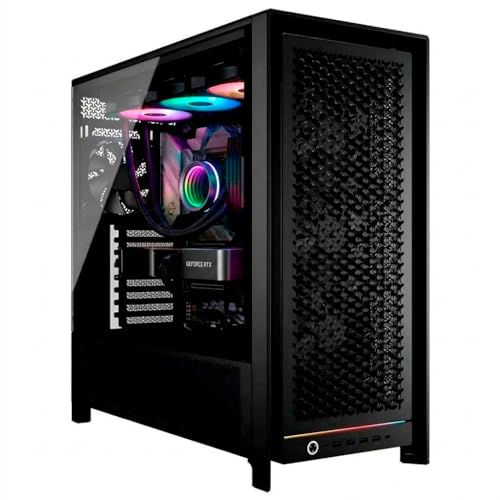
- 64-core Threadripper PRO 9985WX
- One 96GB RTX PRO 6000 Blackwell
- 128GB DDR5; 2TB Samsung 990 PRO
Best For: CPU-intensive work needing one 96GB GPU
Networked CAD Pick
Cloud Ninjas Iron Bull Workstation

- 32-core Threadripper PRO 9975WX
- 96GB RTX PRO 6000 Blackwell Max-Q
- 256GB ECC RAM; 10GbE and 2.5GbE
Best For: CAD workflows with large files and fast networking
Triple-GPU AI Pick
Empowered PC 9975WX Workstation

- Three 96GB RTX 6000 GPUs
- 384GB ECC RAM; 10TB Gen5 SSD storage
- 240V/20A specified for maximum utilization
Best For: Multi-GPU AI or rendering with appropriate power
Best Balanced Configuration
APC ES620 32-Core RTX PRO 6000 Workstation

- 32-core Threadripper PRO 9975WX
- 96GB GPU; 256GB ECC RAM
- 4TB SSD; dual 10Gb Ethernet
Best For: Demanding single-GPU workloads
Best Warranty Coverage
Adamant Custom 32-Core RTX PRO 6000 Desktop
- 32-core CPU; 96GB GPU
- Three-year parts-and-labor warranty
- Wi-Fi 7; 2TB Samsung SSD
Best For: Buyers prioritizing warranty and wireless connectivity
Best Dual-GPU Capacity
APC ES620 Dual RTX PRO 6000 Workstation
- Two 96GB GPUs; memory per card
- 384GB ECC RAM; 8TB RAID storage
- Requires a 220–240V outlet
Best For: Multi-GPU workloads with suitable power
Siemens NX Pick
Cloud Ninjas Iron Bull 32-Core Workstation
- 32-core Threadripper PRO 9975WX
- 96GB RTX PRO 6000 Blackwell Max Q
- 256GB ECC DDR5; 4TB NVMe
Best For: Siemens NX-focused buyers seeking a 32-core tower
Autodesk M&E Pick
Cloud Ninjas Iron Bull 32-Core Tower
- 32-core Threadripper PRO 9975WX
- 96GB RTX PRO 6000 Blackwell Max Q
- 256GB ECC DDR5; 4TB NVMe
Best For: Autodesk M&E-focused buyers seeking the listed hardware
Dual-GPU Creator Pick – Sentinel Wood 9975WX Workstation
Among threadripper pro workstations with rtx 6000, this Sentinel Wood configuration pairs a 32-core Threadripper PRO 9975WX with two RTX PRO 6000 GPUs. Its 384GB of ECC memory and 10TB of listed Gen5 NVMe storage make it a substantial option for local AI, rendering, and large creative projects.
Best For: Creators and technical teams that want two professional GPUs, ample memory, and generous fast local storage.
Pros:
- Two RTX PRO 6000 GPUs, each listed with 96GB of GDDR7 memory.
- 384GB ECC DDR5 RDIMM memory supports demanding multitasking.
- Two 1TB and two 4TB Gen5 NVMe SSDs provide 10TB of listed storage.
Cons:
- The listing guarantees only one HDMI and one DisplayPort output; additional ports may vary.
- The wood-front, tempered-glass tower may not suit buyers seeking a conventional server chassis.
The combination favors buyers who can use both GPUs and the large SSD allocation. Confirm display connectivity against your monitor setup before ordering.
64-Core CPU Pick – Adamant Custom 9985WX Workstation
For buyers comparing threadripper pro workstations with rtx 6000, this Adamant Custom build emphasizes CPU capacity: a 64-core Threadripper PRO 9985WX sits alongside one RTX PRO 6000 Blackwell with 96GB of graphics memory. A 360mm liquid cooler, 1600W power supply, and Windows 11 Pro round out the listed configuration.
Best For: CPU-heavy workstation tasks that also need a single high-memory professional GPU.
Pros:
- 64-core Threadripper PRO 9985WX offers the highest listed core count in this group.
- RTX PRO 6000 Blackwell has 96GB of listed graphics memory.
- Includes a 2TB Samsung 990 PRO SSD, Wi-Fi 7, and a three-year parts-and-labor warranty.
Cons:
- 128GB of installed RAM and 2TB of storage are more modest than several other configurations here.
- Only one GPU is listed for workloads that benefit from multiple cards.
Choose this build primarily for its 64-core processor and single-GPU balance. Check whether its starting memory and storage meet your project sizes.
Networked CAD Pick – Cloud Ninjas Iron Bull Workstation
Within threadripper pro workstations with rtx 6000, the Cloud Ninjas Iron Bull is a CAD-oriented option advertised for Dassault Systèmes CATIA. It combines a 32-core Threadripper PRO 9975WX, one RTX PRO 6000 Blackwell Max-Q GPU, 256GB of ECC registered memory, and a 4TB Gen4 NVMe SSD.
Best For: CAD teams that prioritize a 96GB professional GPU, substantial system RAM, and fast wired networking.
Pros:
- 256GB ECC registered DDR5 memory is installed as four 64GB modules.
- Includes 10GbE, 2.5GbE, and Wi-Fi 7 connectivity.
- 4TB NVMe SSD offers more starting storage than a typical single-drive 2TB configuration.
Cons:
- The listed warranty is one year.
- Its SSD is Gen4 rather than the Gen5 drives listed in some alternatives.
The networking and memory make this a practical fit for large project files and shared-workflow environments. The notes conflict on GPU memory type and cooling description, so verify those specifications with the seller if they matter to your purchase.
Triple-GPU AI Pick – Empowered PC 9975WX Workstation
For shoppers seeking threadripper pro workstations with rtx 6000 for local AI or rendering, this Empowered PC system stands out for its three listed RTX 6000 96GB GPUs. It pairs them with a 32-core Threadripper PRO 9975WX, 384GB of ECC DDR5 memory, and 10TB of listed Gen5 NVMe storage.
Best For: Teams with software that can use three GPUs and a suitable high-capacity power connection.
Pros:
- Three 96GB GPUs provide 288GB of aggregate listed VRAM, distributed across separate cards.
- 384GB ECC memory and two 1TB plus two 4TB Gen5 SSDs support large local datasets.
- WRX90 workstation motherboard, 3000W Titanium power supply, and Windows 11 Pro are listed.
Cons:
- The seller says operation on 120V/15A reduces compute power; maximum utilization calls for 240V/20A.
- Three separate GPUs do not automatically function as one shared 288GB memory pool.
This is the most GPU-dense configuration in the roundup, but the electrical requirement is a key buying consideration. Confirm your software’s multi-GPU behavior and your available circuit before committing.
Best Balanced Configuration – APC ES620 32-Core RTX PRO 6000 Workstation
Among threadripper pro workstations with rtx 6000, this APC ES620 pairs a 32-core Threadripper PRO 9975WX with one RTX PRO 6000 Blackwell GPU featuring 96GB of GDDR7. Its 256GB of ECC memory and 4TB NVMe SSD make it a practical single-GPU choice for demanding projects.
Best For: Buyers who want substantial CPU, GPU, and memory capacity without moving to a dual-GPU system.
Pros:
- 32-core processor and 96GB GPU memory.
- 256GB of eight-channel ECC RAM, expandable to 2TB.
- Dual 10Gb Ethernet and a dedicated management LAN.
Cons:
- No onboard Wi-Fi.
- One-year parts and labor warranty.
The 1600W power supply uses a standard North American outlet, which makes this configuration simpler to place than the dual-GPU ES620. Choose it when one high-memory GPU is enough.
Best Warranty Coverage – Adamant Custom 32-Core RTX PRO 6000 Desktop
For shoppers comparing threadripper pro workstations with rtx 6000, this Adamant Custom desktop offers a 32-core Threadripper PRO 9975WX and a 96GB RTX PRO 6000 Blackwell. Its distinguishing features are a three-year parts-and-labor warranty and lifetime tech support.
Best For: Buyers who prioritize longer warranty coverage and built-in wireless connectivity.
Pros:
- Three-year parts-and-labor warranty plus lifetime tech support.
- Wi-Fi 7 and Bluetooth 5.3.
- 2TB Samsung 990 PRO NVMe SSD and 360mm liquid CPU cooler.
Cons:
- 64GB installed RAM is less than in the other listed configurations.
- 2TB storage may require expansion for larger local datasets.
This is a sensible pick if support terms matter more than maximum out-of-box memory. Confirm that its 64GB RAM configuration meets your workload before ordering.
Best Dual-GPU Capacity – APC ES620 Dual RTX PRO 6000 Workstation
Of these threadripper pro workstations with rtx 6000, the dual-GPU APC ES620 has the most graphics hardware: two RTX PRO 6000 Blackwell cards with 96GB of GDDR7 each. It combines them with a 24-core Threadripper PRO 9965WX, 384GB of ECC RAM, and 8TB of NVMe storage configured as two 4TB drives in RAID.
Best For: Workloads that can use two GPUs and need substantial installed system memory.
Pros:
- Two 96GB GPUs provide 192GB of aggregate GPU memory; memory remains separate per card.
- 384GB of eight-channel ECC RAM, expandable to 2TB.
- Dual 10Gb Ethernet and a dedicated management LAN.
Cons:
- Requires a 220–240V outlet for its 2000W power supply.
- No onboard Wi-Fi.
- One-year parts and labor warranty.
Check your software’s multi-GPU support and your available electrical service before choosing this model. Its second GPU is the key advantage, but it is not a substitute for a single card with 192GB of memory.
Siemens NX Pick – Cloud Ninjas Iron Bull 32-Core Workstation
Among threadripper pro workstations with rtx 6000 graphics, this Iron Bull configuration pairs a 32-core Threadripper PRO 9975WX with a 96GB RTX PRO 6000 Blackwell Max Q GPU. It is listed as designed for Siemens NX, with 256GB of ECC registered DDR5 and a 4TB NVMe SSD.
Best For: Siemens NX buyers who want a specified 32-core CPU and 96GB professional GPU in a ready-configured tower.
Pros:
- 32-core CPU boosts up to 5.4GHz.
- 256GB ECC registered DDR5 and a 4TB PCIe Gen4 NVMe SSD.
- 10GbE, 2.5GbE, and Wi-Fi 7 connectivity.
Cons:
- The supplied configuration specifies four 64GB memory modules, not a fully populated eight-module set.
- The listed manufacturer warranty is one year.
Choose this model if its Siemens NX positioning and network options fit your workflow; confirm software certification requirements separately, as certification is not specified.
64-Core Pick – MES2X Threadripper PRO AI Workstation
For buyers comparing threadripper pro workstations with rtx 6000 graphics, the MES2X steps up to a 64-core Threadripper PRO 9985WX and a 96GB RTX PRO 6000 Blackwell GPU. It includes 256GB of eight-channel ECC registered DDR5, 8TB of NVMe storage listed as two 4TB drives in RAID, and Windows 11 Pro for Workstations.
Best For: CPU-heavy professional workflows that also need a 96GB GPU, substantial included storage, and wired network connectivity.
Pros:
- 64-core CPU with a listed boost speed up to 5.4GHz.
- 256GB ECC memory, expandable to a stated 2TB across eight slots.
- Two 10Gb Ethernet ports plus a dedicated 1Gb management port.
- Windows 11 Pro for Workstations comes installed and activated.
Cons:
- No onboard Wi-Fi is listed.
- The RAID level for the two 4TB drives is not specified; verify the usable capacity and data-protection setup.
This is the strongest fit here when core count is the deciding factor. The listing also specifies US-based support and a one-year parts-and-labor warranty.
Autodesk M&E Pick – Cloud Ninjas Iron Bull 32-Core Tower
This entry in the threadripper pro workstations with rtx 6000 category is listed as designed for Autodesk M&E Collection. Its specified hardware combines a 32-core Threadripper PRO 9975WX, a 96GB RTX PRO 6000 Blackwell Max Q GPU, 256GB of ECC registered DDR5, and a 4TB PCIe Gen4 NVMe SSD.
Best For: Autodesk M&E Collection buyers seeking the listed CPU, GPU, and memory configuration in one tower.
Pros:
- 32-core processor with up to 5.4GHz listed turbo speed.
- 96GB GPU memory and 256GB ECC registered system memory.
- 4TB NVMe storage, 10GbE and 2.5GbE networking, and Wi-Fi 7.
Cons:
- The supplied notes do not specify Autodesk software certification.
- The supplied notes do not state an operating system or warranty term.
Its published core specifications closely match the Siemens NX-positioned Iron Bull configuration above, so the application-specific listing and any separately confirmed software requirements are the practical points to check before buying.
How We Picked the Best Threadripper Pro Workstations with Rtx 6000
We focused on the listed CPU, GPU count, RAM, storage, and intended workload for each system. The selection covers 24-, 32-, and 64-core Threadripper PRO configurations, from application-oriented CAD builds to multi-GPU AI machines. We did not treat a larger specification sheet as proof of better performance: software support, cooling, and the exact GPU model matter just as much. Confirm current specifications with the seller, especially where listing titles are shortened or ambiguous.
Quick Comparison: Match the Build to the Job
For interactive CAD and general workstation use, start with a single-GPU 32-core system and check your application’s certification requirements. For heavily CPU-parallel rendering or simulation, compare the 64-core options, but verify their GPU specifications before assuming they meet an RTX 6000 requirement. For local AI jobs that can use multiple GPUs, the dual- and triple-GPU listings offer more aggregate GPU capacity. That capacity is not automatically shared as one memory pool; your software must support distributing work across GPUs.
Key Buying Factors for Threadripper Pro Workstations with Rtx 6000
Check the Exact GPU
These listings use differing RTX PRO 6000 descriptions, including Blackwell and Max-Q, while some use shorter “RTX 6000” wording. Ask for the full GPU model, memory capacity, power rating, and number of installed cards. Check whether your CAD, rendering, or AI tools support that model and benefit from additional GPUs.
Balance CPU Cores and Memory
A 64-core CPU is attractive for well-parallelized rendering, compilation, and simulation. A 24- or 32-core model may be a better-balanced purchase for interactive work or GPU-bound tasks. Large datasets also need enough system RAM; compare installed capacity, ECC support, memory configuration, and the cost of expanding it later.
Verify Platform, Power, and Storage
Do not infer motherboard features from the processor name. Check the actual platform, PCIe slot layout, GPU spacing, expansion capacity, power supply, and cooling—particularly on dual- or triple-GPU builds. Compare SSD capacity separately from RAID: RAID can serve a performance or availability goal depending on its configuration, but it does not replace backups. Ask what the quoted warranty covers and whether on-site service is available.
Who Should Buy Which Threadripper Pro Workstations with Rtx 6000?
Choose a single-GPU, 32-core configuration if your priority is CAD, content creation, or a flexible all-round workstation. Consider a 64-core build when your measured workload scales across CPU cores, after confirming its GPU. Step up to dual or triple GPUs only when your applications can use them and the chassis can sustain their power and heat. Buyers working in CATIA, Siemens NX, or Autodesk software should prioritize a suitable GPU configuration and vendor-supported application setup over a generic “AI workstation” label.
