
If you’re in the market for a high-performance workstation, the Threadripper Pro 7000 series might just be what you need. These machines are designed for intensive tasks like AI training and 3D rendering, pushing the boundaries of speed and efficiency. With various advanced motherboards and processors available, choosing the right configuration can be challenging. What features matter most to you? Let’s explore the top contenders for 2025 and help you make an informed decision.
ASUS Pro WS WRX90E-SAGE SE Workstation Motherboard

The ASUS Pro WS WRX90E-SAGE SE Workstation Motherboard is the ideal choice for professionals who demand high performance from their systems, particularly those working with AMD Ryzen Threadripper PRO 7000 WX-Series CPUs. With support for up to 96 cores and 2TB of ECC R-DIMM DDR5 memory, you’ll handle intense workloads effortlessly. Its robust power design and overclocking capabilities guarantee peak performance, while seven PCIe 5.0 slots expand your configuration options. Although initial setup can present challenges, particularly with the onboard VGA controller, patience leads to a stable and powerful workstation tailored for AI training, 3D rendering, and media production.
Best For: Professionals requiring high-performance computing for tasks such as AI training, 3D rendering, and media production.
Pros:
- Supports up to 96-core AMD Ryzen Threadripper PRO CPUs and 2TB of ECC R-DIMM DDR5 memory.
- Offers extensive expansion options with seven PCIe 5.0 slots and multiple M.2 slots.
- Features robust power design and overclocking capabilities for enhanced performance.
Cons:
- Initial setup can be challenging, particularly with onboard VGA controller instability.
- Mixed user experiences regarding product quality and customer support.
- RAM training can be time-consuming, taking up to an hour on the first boot.
ASUS Pro WS TRX50-SAGE WIFI Workstation Motherboard

Engineered for high-performance tasks, the ASUS Pro WS TRX50-SAGE WIFI Workstation Motherboard stands out as an excellent choice for professionals engaged in AI training, deep learning, and media production. Supporting AMD Ryzen Threadripper PRO 7000 processors, this motherboard accommodates up to 96-core CPUs and up to 1TB of ECC DDR5 memory. With robust power delivery and thermal management, you’ll experience stability even under heavy loads. Its extensive connectivity options include WiFi 7, multiple PCIe 5.0 slots, and dual 10G LAN ports. While user feedback is mostly positive, some have noted compatibility issues with certain RAM and BIOS settings.
Best For: Professionals in AI training, deep learning, animation, and media production looking for a high-performance workstation motherboard.
Pros:
- Supports AMD Ryzen Threadripper PRO 7000 processors with up to 96 cores for exceptional performance.
- Extensive connectivity options, including WiFi 7 and dual 10G LAN ports, for fast and reliable networking.
- Robust power and thermal design ensures stability during demanding tasks.
Cons:
- Compatibility issues reported with certain RAM kits and cooling solutions.
- Some users experienced difficulties with BIOS settings and USB Type-C functionality.
- Average customer review rating of 3.8 out of 5 stars indicates mixed user experiences.
ASUS Pro WS TRX50-SAGE WiFi A Workstation Motherboard

Designed for professionals who demand unparalleled power and performance, the ASUS Pro WS TRX50-SAGE WiFi A workstation motherboard is the ideal choice for users of AMD Ryzen Threadripper PRO 9000 and 7000 WX-Series CPUs. It supports up to 96 cores and an impressive 1TB of ECC R-DIMM DDR5 memory. With 20 power stages and advanced thermal management, it provides maximum performance. You’ll appreciate the extensive connectivity options, including three PCIe 5.0 x16 slots and dual USB4 ports. Built for AI and future-ready applications, this motherboard guarantees stability and compatibility for your demanding workflows.
Best For: Professionals and content creators who require high-performance computing capabilities with advanced thermal management and extensive connectivity options.
Pros:
- Powerful Performance: Supports up to 96 cores and 1TB of ECC R-DIMM DDR5 memory for demanding applications.
- Extensive Connectivity: Features multiple PCIe 5.0 x16 slots, USB4 ports, and high-speed LAN options for versatile configuration.
- Future Ready: Built for advanced AI computing, ensuring compatibility with evolving technology needs.
Cons:
- Price Point: May be considered expensive for casual users or those with less demanding computing needs.
- Size: Its larger dimensions may not fit in compact cases, limiting compatibility with smaller builds.
- Limited Consumer Market: Primarily targeted at professionals, which may not appeal to everyday users or gamers.
GIGABYTE TRX50 AERO D Motherboard

For creative professionals and power users seeking unparalleled performance, the GIGABYTE TRX50 AERO D Motherboard stands out as an ideal foundation for Threadripper Pro 7000 Workstations. With its AMD sTR5 socket, it supports the powerful Ryzen Threadripper PRO 7000 processors. The robust 16+8+4 phases digital VRM solution guarantees stability, while the cutting-edge thermal design keeps everything cool. You’ll appreciate the DDR5 memory support and next-gen connectivity features, including dual USB4 Type-C and PCIe 5.0. Plus, with 10GbE and Wi-Fi 7, your networking capabilities are exceptional, making this motherboard a perfect choice for high-performance tasks.
Best For: Creative professionals and power users seeking unparalleled performance in high-end workstation builds.
Pros:
- Supports the latest AMD Ryzen Threadripper PRO 7000 Series processors for outstanding performance.
- Advanced thermal design with VRM Thermal Armor and M.2 Thermal Guard ensures optimal cooling during intensive tasks.
- Extensive connectivity options including dual USB4 Type-C and PCIe 5.0 for fast data transfer and expansion capabilities.
Cons:
- May be overkill for casual users or those with less demanding computing needs.
- Higher price point compared to standard motherboards, reflecting its premium features.
- Limited availability of compatible components may pose challenges during upgrades or builds.
ASUS ExpertCenter Pro ET900A Barebones Workstation

The ASUS ExpertCenter Pro ET900A Barebones Workstation is an exceptional choice for professionals who demand high-performance computing, particularly those working with intensive applications in AI, 3D modeling, and data analysis. Supporting the AMD RYZEN Threadripper PRO 7000 WX-Series, it boasts a staggering 2TB DDR5 ECC RAM capacity and can house up to four NVIDIA Quadro RTX graphics cards. With seven PCIe 4.0 x16 slots and extensive storage options, you’ll enjoy unmatched expandability. Dual 10GbE LAN enables rapid connectivity, while its robust design guarantees it meets your demanding workloads. Just be mindful of potential issues like missing components upon delivery.
Best For: Professionals in high-performance computing sectors such as AI, 3D modeling, and data analysis who require extensive expandability and powerful processing capabilities.
Pros:
- High RAM Capacity: Supports up to 2TB DDR5 ECC RAM for demanding applications.
- Extensive Expandability: Features 7 PCIe 4.0 x16 slots and multiple storage options for customization.
- Fast Connectivity: Dual 10GbE LAN provides ultra-fast network performance.
Cons:
- Delivery Issues: Reports of missing RAM and components upon delivery.
- Compatibility Concerns: Plug designed for Taiwan may not be compatible with US outlets.
- Barebones Configuration: Lacks essential components like graphics and sound cards, requiring additional purchases.
Dell Precision 7000 7865 Workstation

If you’re a content creator or professional who demands exceptional performance, the Dell Precision 7000 7865 Workstation is a top choice. Powered by the AMD Ryzen Threadripper PRO 5945WX, this 12-core powerhouse runs at 4.10 GHz, ensuring seamless multitasking. With 32 GB of DDR4 RAM and a 1 TB SSD, you’ll enjoy rapid data access and ample storage. The dedicated NVIDIA T400 graphics card enhances your visual projects, while advanced thermals keep everything cool. Plus, with Gigabit Ethernet and Windows 11 Pro, connectivity and productivity are at your fingertips. Experience unmatched performance tailored for your needs.
Best For: Content creators and professionals seeking exceptional performance for multitasking and demanding applications.
Pros:
- Responsive performance with a powerful 12-core AMD Ryzen Threadripper PRO processor.
- Ample storage with a 1 TB SSD, providing rapid data access and high performance.
- Dedicated NVIDIA T400 graphics card enhances visual projects and creative tasks.
Cons:
- Weighty design at 42.6 pounds, making it less portable.
- Higher power consumption with a 1350 W power supply unit, which may lead to increased energy costs.
- Limited upgradeability for certain components due to the workstation’s design and configuration.
SilverStone Technology XE360-TR5 360mm All-in-One Liquid Cooler
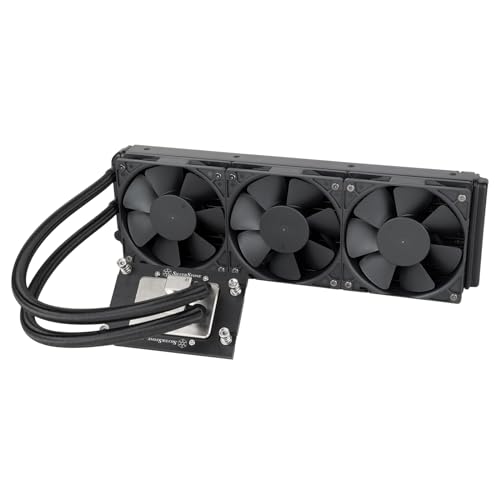
Designed specifically for AMD’s Ryzen Threadripper 7000 series processors, the SilverStone Technology XE360-TR5 360mm All-in-One Liquid Cooler excels in delivering superior cooling performance for high-end workstations. With a nickel-plated copper water block and integrated pump, it effectively manages heat. The three 120mm PWM fans push airflow up to 87.72 CFM, markedly lowering temperatures—one user reported a drop from 95°C to 72°C. While the stock fans can be noisy, many opt for quieter alternatives. Easy installation and compatibility with TR5 and SP3/TR4 systems make it a solid investment for reliable cooling and industrial-quality performance.
Best For: The SilverStone Technology XE360-TR5 is best for users seeking high-performance cooling solutions for AMD Ryzen Threadripper 7000 series processors in demanding workstation environments.
Pros:
- Excellent cooling performance with significant temperature reductions.
- Easy installation with compatibility for TR5 and SP3/TR4 mounting systems.
- Durable construction and reliable performance suitable for high-end applications.
Cons:
- Stock fans can be quite loud at high RPMs.
- Higher price point compared to other cooling solutions.
- Some users may prefer to replace the fans for quieter operation.
AMD Ryzen Threadripper PRO 9955WX Processor
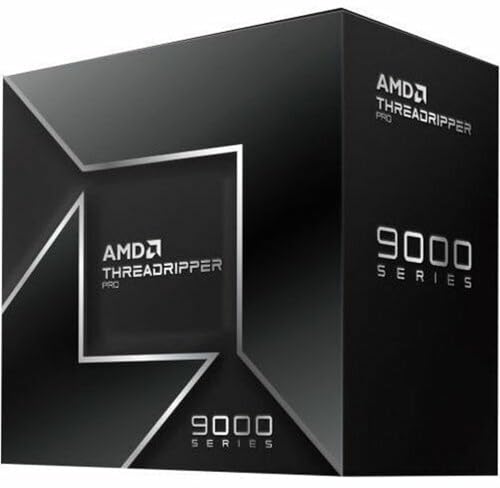
For professionals like artists, architects, and engineers seeking to maximize productivity, the AMD Ryzen Threadripper PRO 9955WX processor stands out as an exceptional choice. With a powerful speed of 4.5 GHz and a robust 16-core design, this desktop workstation processor is tailored for demanding tasks. Weighing just 12 ounces, it fits seamlessly into your workstation setup. Since its availability in July 2025, it’s quickly climbed to a best-seller ranking of #266 among computer CPUs. Plus, with a flexible return policy and warranty options, you can invest confidently in this performance powerhouse for your projects.
Best For: Professionals like artists, architects, and engineers looking to enhance their productivity with a powerful workstation processor.
Pros:
- High Performance: Offers a speedy 4.5 GHz clock rate and 16 cores for demanding applications.
- Lightweight Design: At just 12 ounces, it is easy to integrate into various workstation setups.
- Flexible Return Policy: Allows for a full refund within 30 days, providing assurance for buyers.
Cons:
- High Price Point: As a premium processor, it may be more expensive compared to standard CPUs.
- Limited Availability: Released in July 2025, availability may be restricted or limited initially.
- Best Sellers Rank: While popular, it is ranked #266, indicating it may face stiff competition from other processors.
AMD Ryzen™ Threadripper™ PRO 9975WX

The AMD Ryzen™ Threadripper™ PRO 9975WX stands out as an exceptional choice for artists, architects, and engineers seeking to boost their productivity. With a processor speed of 4 GHz, it delivers impressive performance, making multitasking a breeze. Weighing just 12 ounces and measuring 5 x 2.82 x 0.04 inches, it fits seamlessly into any workstation setup. Customers rave about its performance, giving it a perfect 5.0 out of 5 stars. Plus, you can feel secure with its return policy and manufacturer’s warranty. If you’re looking for reliability and power, the 9975WX is your go-to processor.
Best For: The AMD Ryzen™ Threadripper™ PRO 9975WX is best for artists, architects, and engineers looking to enhance their productivity with high-performance computing.
Pros:
- Exceptional processing speed of 4 GHz for seamless multitasking.
- Compact and lightweight design makes it easy to integrate into any workstation.
- High customer satisfaction with a perfect 5.0 out of 5 stars rating.
Cons:
- Limited to a single processor configuration, which may not suit all users’ needs.
- Higher price point compared to lower-tier processors.
- Return policy includes restocking fees for misrepresented returns, which could be a drawback for some customers.
AMD Ryzen™ Threadripper™ 9970X

Engineered for high-performance tasks, the AMD Ryzen™ Threadripper™ 9970X is an ideal choice for artists, architects, and engineers who demand top-tier processing power. With a processor speed of 4 GHz, it delivers exceptional performance for complex workflows. Weighing just 12 ounces and measuring 5 x 2.82 x 0.04 inches, it fits seamlessly into desktop workstations. Released on July 31, 2025, it quickly climbed to a best seller rank of #147 in computer CPU processors. Plus, you’ll appreciate the manufacturer’s warranty and Amazon’s return policy for peace of mind. Elevate your workstation’s capabilities with the 9970X.
Best For: The AMD Ryzen™ Threadripper™ 9970X is best for artists, architects, and engineers who require high-performance processing power for complex workflows.
Pros:
- Exceptional Performance: With a processor speed of 4 GHz, it efficiently handles demanding tasks.
- Compact Size: Its slim dimensions allow for easy integration into various desktop workstations.
- Manufacturer’s Warranty: Provides peace of mind with warranty coverage available upon request.
Cons:
- Weight: Weighing 12 ounces may be considered heavy compared to some other CPUs.
- Limited Availability: As a relatively new product, it may not be readily available in all markets.
- Potential Return Fees: Misrepresentation or damage may incur additional fees when returning the product.
Factors to Consider When Choosing Threadripper Pro 7000 Workstations
When choosing a Threadripper Pro 7000 workstation, you need to take into account several key factors. CPU core count, memory capacity, and cooling solutions will greatly impact your performance needs. Don’t forget to evaluate power supply requirements and expansion slot availability to guarantee your setup can grow with your demands.
CPU Core Count
Choosing a CPU with a higher core count can greatly impact your workflow, especially if you’re tackling demanding tasks like AI training, 3D rendering, or media production. The AMD Ryzen Threadripper PRO 7000 WX-Series CPUs support up to 96 cores, making them perfect for multitasking environments. Higher core counts enhance parallel processing capabilities, allowing applications optimized for multi-threading to process data faster and reduce rendering times. This efficiency is vital when dealing with complex calculations or executing multiple tasks simultaneously. However, as you increase core counts, make certain your motherboard and cooling solutions can handle the power and thermal demands of these high-performance processors. Balancing core count with adequate support systems is key to maximizing your workstation’s potential.
Memory Capacity
With high core counts driving performance, memory capacity becomes another critical factor to evaluate for Threadripper Pro 7000 workstations. These processors support up to 2TB of ECC R-DIMM DDR5 memory, perfect for handling demanding applications. The memory speeds can soar to 5600 MHz, guaranteeing rapid data transfer rates essential for memory-intensive tasks. Additionally, the dual-channel memory configurations optimize bandwidth, enhancing overall system responsiveness. You’ll also appreciate the benefits of ECC memory, which detects and corrects data corruption, making it ideal for critical workloads. Plus, compatibility with various validated memory kits ensures reliable performance and stability. By carefully considering memory capacity, you can maximize the potential of your Threadripper Pro 7000 workstation for unmatched performance.
Cooling Solutions
Effective cooling solutions are essential for maximizing the performance of your Threadripper Pro 7000 workstation, especially during demanding tasks like AI training and 3D rendering. High-performance systems, like liquid coolers, can greatly reduce temperatures, dropping from 95°C to 72°C under load, which enhances CPU longevity and stability. Look for cooling solutions with integrated pumps and large micro-channel copper base plates for improved heat dissipation and liquid flow efficiency. If noise levels concern you, consider replacing stock fans with quieter alternatives to maintain cooling efficiency in noise-sensitive environments. Finally, verify compatibility with mounting systems like TR5 and SP3/TR4 to guarantee effective installation and performance with your Threadripper Pro 7000 CPUs.
Power Supply Requirements
A power supply unit (PSU) of at least 1000W is vital for your Threadripper Pro 7000 workstation to meet the high power demands of the CPU and additional components like GPUs. Opt for an 80 Plus Platinum or Titanium rated PSU to guarantee energy efficiency and stability under load. It’s also important to choose a PSU with multiple 8-pin power connectors, as Threadripper Pro CPUs often require two for peak performance. A modular or semi-modular design can simplify cable management, enhancing airflow and thermal performance. Finally, pay attention to the total wattage and amperage ratings on the +12V rail, as this directly impacts your ability to power high-end graphics cards and other peripherals effectively.
Expansion Slot Availability
When configuring your Threadripper Pro 7000 workstation, considering the expansion slot availability is just as important as the power supply. You’ll want multiple PCIe slots for future upgrades; many models offer up to seven PCIe 5.0 x16 slots, perfect for extensive expansions. Additionally, check for M.2 slots, as they greatly enhance storage performance and capacity. If you’re into graphics-intensive tasks, make sure your workstation supports multi-GPU setups to boost performance. Don’t overlook memory expansion either; some models allow for up to 2TB ECC R-DIMM DDR5, which is essential for demanding applications. Finally, confirm the motherboard’s expansion slot layout aligns with your configuration to optimize airflow and cooling solutions.
Connectivity Options
While choosing your Threadripper Pro 7000 workstation, it’s essential to take into account the connectivity options available. Look for motherboards like the ASUS Pro WS WRX90E-SAGE SE, which features dual USB4 40Gbps Type-C ports for fast data transfers. If networking is a priority, opt for models with dual 10 Gb LAN ports to enhance performance in data-intensive environments. For wireless connectivity, consider the ASUS Pro WS TRX50-SAGE WIFI motherboard, which supports WiFi 7 for improved speeds. Additionally, motherboards like the GIGABYTE TRX50 AERO D offer dual USB4 Type-C ports and PCIe 5.0 compatibility, ensuring you can connect next-gen devices effortlessly. Prioritize these features to maximize your workstation’s potential.
Form Factor Compatibility
Selecting the right form factor is just as important as considering connectivity options for your Threadripper Pro 7000 workstation. These CPUs require EEB or CEB motherboards for proper functionality. EEB boards, like the ASUS Pro WS WRX90E-SAGE SE, measure 14.96 x 14.33 inches, while CEB boards, such as the ASUS Pro WS TRX50-SAGE WIFI, are a bit smaller at 14.88 x 12.72 inches. Make certain your case can accommodate the chosen motherboard, as not all cases support these sizes. Additionally, verify that cooling solutions and expansion components fit within the motherboard dimensions. If you’re planning a multi-GPU setup, consider the PCIe slot configurations when selecting your form factor. This attention to detail will optimize your workstation’s performance.
