
If your laptop runs hot, the right thermal pad can make a real difference in heat transfer, stability, and long-term component health.
Below, we’ve rounded up the best thermal pads for laptop cooling in 2026, along with practical buying advice to help you choose the right thickness and performance level.
Best 10 Thermal Pads for Laptop Cooling Picks for 2026
Multi-Thickness Value Kit
OwlTree 4-Pack 100x100mm Thermal Pads
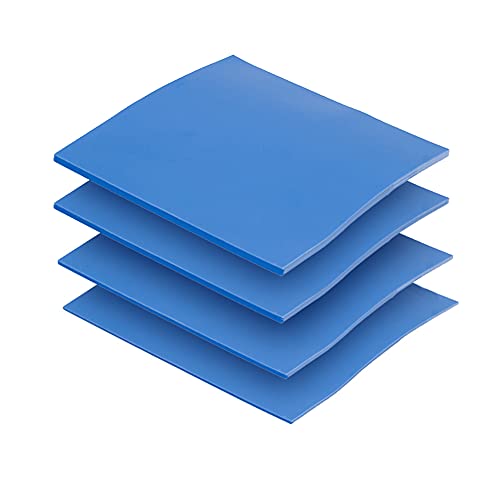
- Four thicknesses: 0.5mm, 1mm, 1.5mm, and 2mm
- 100x100mm sheets are easy to cut to fit
- 6.0 W/mK with high-temp, insulating construction
Best For: Laptop repairs needing multiple pad thicknesses
Soft Premium Fit
ARCTIC TP-3 100 x 100 x 1.5 mm

- Very soft pad with strong compression
- Electrically insulating and non-capacitive
- Designed for RAM, chipset, IC, and laptop use
Best For: Uneven chip layouts and close-component contact
High-Conductivity Budget Pack

- Higher listed conductivity at 12.8 W/mK
- Three thicknesses: 0.5mm, 1mm, and 1.5mm
- 100x100mm sheets suit laptops and other devices
Best For: Higher-conductivity cooling with common pad sizes
Thin Precision Pad
ARCTIC TP-3 100 x 100 x 0.5 mm

- 0.5mm thin format for low-gap applications
- Soft, mouldable, and compression-friendly
- Electrically insulating and non-capacitive
Best For: Thin-gap laptop cooling and precise fit
Thermal Pad Replacement Kit
6-Pack Conductive Silicone Pads for Laptops

- 6.0 W/MK conductivity
- Includes 0.5, 1.0, and 1.5 mm pads
- Electrically insulating and easy to cut
Best For: Multi-size laptop and electronics thermal pad replacement
Premium Soft Pad
ARCTIC TP-3 Thermal Pad for Laptops

- Very soft with low thermal resistance
- Large sheet for custom cutting
- Electrically insulating and non-capacitive
Best For: Custom-fit laptop cooling and uneven chip heights
Active Cooling Stand
Kootek 5-Fan Laptop Cooling Pad

- Five quiet fans with 3 fan modes
- Six adjustable height settings
- Built-in dual USB hub
Best For: External cooling for 12-17 inch laptops
Premium Thermal Interface Pad
Thermal Grizzly Minus Pad 8 0.5mm
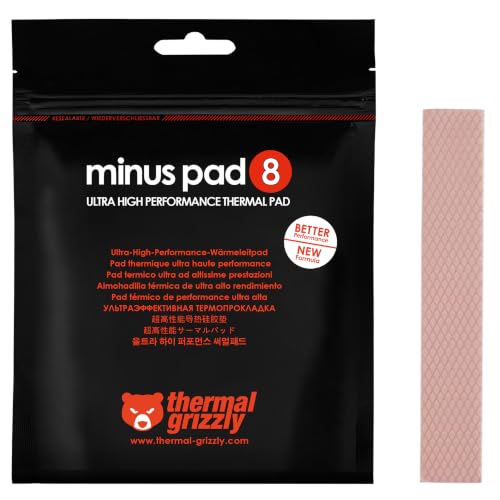
- Flexible pad fills small component gaps
- Electrically non-conductive for safer use
- 8 W/(m·K) thermal conductivity
Best For: Filling gaps where thermal paste is not practical
Portable Triple-Fan Cooler

- Three quiet USB-powered fans
- Slim, lightweight, portable design
- Two height settings for comfort
Best For: Everyday use on 15.6-inch to 17-inch laptops
Quiet Dual-USB Cooler
TECKNET 3-Fan Laptop Cooling Pad

- Three fans spin at 1200 RPM
- Whisper-quiet with on/off switch
- Two USB ports and height settings
Best For: Quiet daily cooling for 12-inch to 17-inch laptops
Multi-Thickness Value Kit – OwlTree 4-Pack 100x100mm Thermal Pads
If you want thermal pads for laptop cooling that can handle different gaps without buying multiple packs, this OwlTree 4-pack is a practical place to start. It includes four thicknesses—0.5mm, 1mm, 1.5mm, and 2mm—so you can match the pad to the component height and cut each sheet down to size as needed.
Best For: Laptop repair jobs that need a range of thicknesses in one kit.
Pros:
- Includes 0.5mm, 1mm, 1.5mm, and 2mm pads in one package
- 100 x 100mm sheets can be cut freely to fit different parts
- 6.0 W/mK thermal conductivity for general cooling use
- Rated for high-temperature use from -40°C to 200°C
Cons:
- Thermal performance is lower than the higher-rated OwlTree option in this roundup
- Using the wrong thickness could reduce contact quality
This is a straightforward multi-thickness kit for users who need flexibility more than a single fixed size. The electrical insulation, anti-static properties, and easy cutting format make it a safe, adaptable choice for common laptop cooling tasks.
Soft Premium Fit – ARCTIC TP-3 100 x 100 x 1.5 mm
For thermal pads for laptop cooling where close chip spacing and uneven heights matter, the ARCTIC TP-3 is built around softness and compression. Its 1.5mm format is meant to help bridge height differences, and the pad can be cut to size for laptop, RAM, chipset, or IC use.
Best For: Situations where a very soft, electrically insulating pad needs to conform to uneven surfaces.
Pros:
- Very soft pad with strong compression properties
- Helps minimize thermal resistance through thinner contact
- Electrically insulating and non-capacitive for safe handling
- Can be cut to size for laptops, RAM, chipset, and other electronics
Cons:
- Installation is more demanding because of the low hardness
- Single 1.5mm thickness may not suit every gap
TP-3 is a solid option when fit and conformity matter as much as raw thermal performance. If you need a soft pad that can adapt to closely spaced chips while staying electrically safe, this is an easy model to consider.
High-Conductivity Budget Pack – OwlTree 3-Pack 12.8W/mK Pads
If you are comparing thermal pads for laptop cooling and want a higher conductivity option, this OwlTree 3-pack stands out on paper with a 12.8 W/mK rating. The sheets come in 0.5mm, 1mm, and 1.5mm sizes, and each 100 x 100mm pad can be trimmed for laptop heatsinks, CPU, GPU, SSD, or IC applications.
Best For: Users who want a higher thermal conductivity pad set with multiple common thicknesses.
Pros:
- Higher listed thermal conductivity at 12.8 W/mK
- Includes three useful thicknesses: 0.5mm, 1mm, and 1.5mm
- Large 100 x 100mm sheets can be cut to fit
- Listed as suitable for laptop heatsinks, CPU, GPU, SSD, and IC cooling
Cons:
- No 2mm option in the pack
- Best results still depend on choosing the correct thickness
This is the strongest pick here if conductivity is your priority and you can work within the included thickness range. It is a practical kit for laptop cooling jobs that need performance, but only if one of the three thicknesses matches your gap.
Thin Precision Pad – ARCTIC TP-3 100 x 100 x 0.5 mm
When thermal pads for laptop cooling need to stay as thin as possible, this ARCTIC TP-3 0.5mm sheet is the most precision-oriented option in the lineup. It is designed to reduce thermal resistance with minimal thickness, and its soft, mouldable construction helps it conform to closely matched surfaces.
Best For: Thin-gap laptop cooling jobs that need a soft, electrically insulating pad.
Pros:
- Ultra-thin 0.5mm format for low-height gaps
- Soft and mouldable with good compression properties
- Electrically insulating and non-capacitive
- Can be cut to size for laptop and other electronics
Cons:
- Single-thickness sheet offers less flexibility than a multi-pack
- Low hardness makes installation more demanding
This is the best fit when the job calls for a thin, conforming pad rather than a thicker filler. If your laptop cooling setup needs a 0.5mm pad and safe electrical isolation, it is a focused and sensible choice.
Thermal Pad Replacement Kit – 6-Pack Conductive Silicone Pads for Laptops
If you need thermal pads for laptop cooling, this 6-pack is a practical pick for replacing worn pads on chips, SSDs, GPUs, and other internal components. It offers multiple thicknesses so you can match the gap more closely, and the pads are designed to be easy to cut and install.
Best For: Users who want an affordable multi-size thermal pad set for laptops and mixed electronics.
Pros:
- 6.0 W/MK thermal conductivity for heat transfer
- Three thicknesses included: 0.5 mm, 1.0 mm, and 1.5 mm
- Electrical insulation and wide temperature range from -40°C to 200°C
- Easy to cut to size for laptop and component fitment
Cons:
- Not a paste-style solution, so application depends on correct pad thickness
- Best results require selecting the right size and thickness first
Overall, this kit is a sensible option when you need thermal pads for laptop cooling and want flexibility across different component heights. The included sizes make it easier to handle common replacement jobs without buying multiple separate packs.
Premium Soft Pad – ARCTIC TP-3 Thermal Pad for Laptops
For thermal pads for laptop cooling, the ARCTIC TP-3 is built around low thermal resistance and strong compression, which helps when you’re dealing with closely spaced chips or uneven heights. It’s a large sheet you can cut to size, making it useful for laptop upgrades and other internal component work.
Best For: Laptop builders and repair users who need a soft, cut-to-size pad for chip contact.
Pros:
- Very soft pad designed to minimize thermal resistance
- Good compression properties for height differences between chips
- Electrically insulating and non-capacitive for safer handling
- Large 200 x 100 mm sheet can be trimmed for laptops
Cons:
- Installation is more demanding because the pad is extremely soft
- Requires careful fitting and cutting for best results
This is a strong choice if you want a premium pad that prioritizes conformability and safe handling. It stands out most when a laptop has uneven component heights and you need a pad that can bridge the gap cleanly.
Active Cooling Stand – Kootek 5-Fan Laptop Cooling Pad
If you’re shopping for thermal pads for laptop cooling but want a physical cooling accessory instead of internal material, this Kootek cooling pad adds five quiet fans and an adjustable stand. It’s aimed at keeping 12-17 inch laptops cooler and more comfortable during long sessions.
Best For: Users who want an external laptop cooler with adjustable height and quiet airflow.
Pros:
- Five built-in fans with separate control options
- Quiet operation for work, gaming, or watching movies
- Six height settings for a more ergonomic setup
- Dual USB hub adds extra connectivity
Cons:
- Requires USB power and may need a Type-C adapter for some devices
- Bulky compared with internal thermal pad solutions
This is the right pick if your goal is to improve overall laptop cooling from the outside rather than replace internal thermal material. The fan layout and adjustable stand make it a flexible everyday accessory for larger notebooks.
Premium Thermal Interface Pad – Thermal Grizzly Minus Pad 8 0.5mm
For thermal pads for laptop cooling, this Thermal Grizzly Minus Pad 8 is best suited to spot treatment where paste is not practical. Its flexible, compressible structure helps bridge small gaps between components, and the 0.5mm thickness makes it a sensible option for uneven surfaces or sections that need a non-conductive thermal interface.
Best For: Filling small gaps in laptops and other electronics where thermal paste cannot be used.
Pros:
- Flexible structure helps compensate for small gaps between components
- Electrically non-conductive for safer use in electronics
- 8 W/(m·K) thermal conductivity for heat transfer across interfaces
- Useful where surfaces are uneven or paste is not suitable
Cons:
- It is a thermal pad, not a fan-based cooling solution
- Best for targeted applications rather than whole-laptop cooling
- 0.5mm thickness may not fit every gap size
Overall, this is a practical thermal interface choice when you need a pad that can conform to tight spaces and help move heat away from specific components. It is most relevant for repair or upgrade jobs that need a clean, non-conductive pad instead of paste.
Portable Triple-Fan Cooler – havit HV-F2056 Slim USB Pad
If you want thermal pads for laptop cooling in the form of an external stand, the havit HV-F2056 is a straightforward airflow option. Its three quiet USB-powered fans push air beneath 15.6-inch to 17-inch laptops, while the slim build and dual height settings make it easy to use on a desk or while traveling.
Best For: Everyday laptop users who want a slim, portable fan pad with extra comfort.
Pros:
- Three quiet USB-powered fans for under-laptop airflow
- Slim, lightweight design is easy to carry
- Two height settings improve typing and viewing comfort
- Extra USB ports add convenience for connected devices
Cons:
- Designed for 15.6-inch to 17-inch laptops, so smaller systems may not be the ideal fit
- Requires USB power from the laptop or an adapter setup for Type-C devices
- Cooling is fan-based, not a direct thermal interface solution
This is a good pick if you need a simple cooling pad that prioritizes portability and comfort as much as airflow. It works best as a general-purpose laptop cooler for users who want a quiet, easy-to-carry stand.
Quiet Dual-USB Cooler – TECKNET 3-Fan Laptop Cooling Pad
For shoppers comparing thermal pads for laptop cooling, the TECKNET cooling pad is a balanced fan-based option for 12-inch to 17-inch laptops. It uses three fans at 1200 RPM to draw in air from below, while the alloy mesh, rubber pads, and two height settings focus on stable, quiet everyday use.
Best For: Users who want a quiet, widely compatible cooling pad with useful extras.
Pros:
- Three fans run at 1200 RPM to help pull in cool air from underneath
- Whisper-quiet operation with a dedicated on/off switch
- Two USB ports add flexibility for accessories
- Two adjustable height settings improve viewing comfort
Cons:
- Requires USB-A to USB-A power connection as included
- Fan-based cooling may not address hot internal components directly
- Best suited to laptops within the 12-inch to 17-inch range
In practice, this is a solid all-around cooling pad for people who want easy setup, quiet fans, and a stable platform. The combination of broad compatibility and simple controls makes it especially practical for daily work or light gaming.
How We Picked the Best Thermal Pads for Laptop Cooling
For Thermal Pads for Laptop Cooling, the most important factors are thickness options, thermal conductivity, compressibility, and electrical insulation. We also looked for products that are easy to install and suitable for common laptop contact points such as VRAM, VRM, SSDs, and other heat-generating components.
Quick Comparison
Not all pads are meant for the same job. Thinner pads are often better where clearance is tight, while thicker or softer pads can help bridge small gaps. Higher thermal conductivity may improve heat transfer, but only if the pad makes proper contact. In practice, the best choice is usually the one that matches the laptop’s spacing and mounting pressure first, then the heat rating second.
Key Buying Factors for Thermal Pads for Laptop Cooling
Thickness and Fit
Measure carefully before buying. A pad that is too thick can create pressure issues, while one that is too thin may not touch both surfaces well enough to conduct heat.
Thermal Conductivity
Look for a balance of performance and real-world usability. Very high conductivity sounds great, but consistent contact and correct installation matter just as much.
Softness and Compressibility
Soft pads are easier to apply and can help fill uneven gaps. Firmer pads may hold shape better, but they need more precise sizing.
Electrical Non-Conductivity
This is especially important inside laptops, where close component spacing increases the risk of accidental shorts. Non-conductive pads add a valuable margin of safety.
Coverage and Sheet Size
Larger sheets or multi-pack options can be more practical if you’re replacing pads on several components or want spare material for future maintenance.
Who Should Buy Which Thermal Pads for Laptop Cooling?
If you’re replacing OEM-style gap fillers or handling mixed component heights, choose a pad set with multiple thicknesses. If you want a straightforward upgrade for a known laptop gap, a single-thickness premium pad may be the better fit. Users focused on maximum convenience should prioritize soft, easy-to-cut pads, while advanced builders may prefer higher-performance materials with stronger thermal ratings.
For most buyers, the best Thermal Pads for Laptop Cooling are the ones that match the laptop’s spacing, offer safe electrical insulation, and strike a practical balance between heat transfer and easy installation.
