
A good power strip should fit your plugs, reach the outlet, and charge your everyday devices without a pile of adapters. But a high outlet count alone does not make a strip the right choice.
These 10 options range from compact six-outlet models to high-capacity strips with USB-C ports. Use the buying guide below to narrow your choice by layout, charging needs, and surge protection.
Best 10 Surge Protector Power Strips with USB Ports Picks for 2026
Best USB-C Mix
QKP 12-Outlet, 6-USB Power Strip

- 12 AC outlets plus 3 USB-A and 3 USB-C
- 2400J surge rating and resettable breaker
- 1.7-inch outlet spacing and flat plug
Best For: Desks with multiple USB-C devices and bulky adapters
Best Compact 2700J Pick

- 8 AC outlets and 4 USB ports
- 2700J surge rating
- ETL listed; 13A maximum
Best For: Moderate-size desk or TV setups
Best for Large Setups
SUPERDANNY 22-Outlet Power Strip

- 22 AC outlets plus 6 USB ports
- 2100J surge rating; 15A/1875W
- Mountable with a 6.5-foot cord
Best For: Gaming and media stations with many plugs
Best for Large Adapters

- 12 AC outlets and 4 USB ports
- Two outlets spaced two inches apart
- 2700J surge rating; ETL listed
Best For: TV cabinets and desks with a few bulky adapters
Best for Long Reach
Mifaso 10-Foot Flat-Plug Power Strip

- Six AC outlets and four USB ports
- 10-foot braided cord and angled flat plug
- 1080-joule rating and overload switch
Best For: Desks needing extra cord length and USB-A/USB-C ports
Best Simple Setup
Amazon Basics 6-Outlet USB Surge Protector
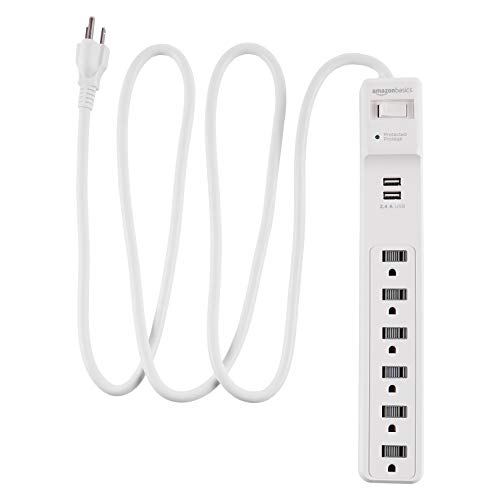
- Six AC outlets and two USB ports
- 1000-joule surge rating
- 6-foot extension cord
Best For: Basic apartment or office power setups
Best for Higher Surge Rating
Yintar 6-Outlet USB-C Power Strip

- 1680-joule surge rating
- Six AC outlets, including one widely spaced
- Two USB-A ports and one USB-C port
Best For: Indoor desks with a bulky plug and USB-C device
Most Connections
JouleLoom 17-in-1 Flat-Plug Power Strip

- 11 AC outlets plus six USB ports
- 1250-joule surge rating
- Six-foot cord with angled flat plug
Best For: Connection-heavy workstations
Simple Desk Setup
Amazon Basics 6-Outlet USB Surge Protector

- Six AC outlets and two USB ports
- 1000-joule surge rating
- Six-foot cord
Best For: Modest desks and apartment setups
Roomy Outlet Spacing
YISHU Three-Sided USB Power Strip

- Eight widely spaced AC outlets
- Four USB ports, including USB-C
- Six-foot cord and mountable design
Best For: Bulky plugs on crowded desks
Best USB-C Mix – QKP 12-Outlet, 6-USB Power Strip
Among surge protector power strips with usb ports, this QKP model stands out for its balanced mix of 12 AC outlets, three USB-A ports, and three USB-C ports. Its six-foot cord and three-sided layout suit a busy desk or entertainment area.
Best For: Setups with several USB-C devices and bulky AC adapters.
Pros:
- Six USB ports include three USB-C connections.
- 1.7-inch outlet spacing helps accommodate larger plugs.
- 2400J surge rating, resettable breaker, and protected/grounded indicators.
- Thin, angled flat plug fits behind furniture.
Cons:
- USB-A and USB-C groups are each rated at 5V/3.1A total, so they are not dedicated high-wattage charging ports.
- More outlets than a small bedside setup may need.
Choose this one when USB-C port count and accessible AC outlets matter more than compact size.
Best Compact 2700J Pick – Nuetsa 8-Outlet Power Strip
If you want surge protector power strips with usb ports without moving up to a 12- or 22-outlet model, the Nuetsa offers eight AC outlets and four USB ports on a six-foot cord. Its listed 2700J surge rating and protected indicator make the protection status easy to check.
Best For: Desks and TV areas that need moderate outlet capacity and one USB-C port.
Pros:
- Four USB ports include one USB-C port rated up to 5V/3A.
- 2700J surge rating with overload protection.
- ETL-listed strip with a protected-status indicator.
Cons:
- Rated for 13A, rather than the 15A listed for some larger options here.
- USB-C does not support devices requiring 9–22V charging.
This is a practical middle-ground choice if eight AC outlets are enough; check your USB-C device’s voltage needs before relying on that port.
Best for Large Setups – SUPERDANNY 22-Outlet Power Strip
For crowded gaming or media stations, few surge protector power strips with usb ports in this group offer as many connections: this SUPERDANNY has 22 grounded AC outlets and six USB ports. Its four-row layout and 6.5-foot cord help bring many plugs to one location.
Best For: Gaming, media, or workstations with many AC-powered devices.
Pros:
- 22 AC outlets plus five USB-A ports and one USB-C port.
- 2100J surge rating and 15A/1875W rating.
- Mounting keyholes, included screws, and an angled flat plug.
- Spaced outlet layout accommodates a variety of adapters.
Cons:
- Its 11.65-by-6.37-inch footprint takes up substantial space.
- Side outlets cannot rotate, and there is only one USB-C port.
Pick this when outlet quantity is the priority; for a smaller desk or several USB-C devices, a less expansive layout may fit better.
Best for Large Adapters – ALESTOR 12-Outlet Power Strip
The ALESTOR is a straightforward option among surge protector power strips with usb ports: it combines 12 AC outlets, four USB ports, and a six-foot cord. Two AC outlets have two-inch spacing for larger adapters, while the remaining ten use standard spacing.
Best For: TV cabinets or desks that need a couple of spacious outlets alongside standard plugs.
Pros:
- 12 AC outlets plus three USB-A ports and one USB-C port.
- 2700J surge rating, overload protection, and a protected indicator.
- ETL-listed strip with two widely spaced AC outlets.
Cons:
- Only two outlets have the wider two-inch spacing.
- Just one USB-C port for newer devices.
This model makes sense when you need plenty of conventional outlets but only a few oversized chargers; its wider spacing does not extend across the full strip.
Best for Long Reach – Mifaso 10-Foot Flat-Plug Power Strip
Among surge protector power strips with usb ports, this Mifaso model stands out when the wall outlet is far from your desk. Its 10-foot braided cord and slim, angled plug help with placement behind furniture, while six AC outlets and four USB ports accommodate a mix of devices.
Best For: Desks or dorm rooms that need a longer cord and both USB-A and USB-C connections.
Pros:
- Six AC outlets, two USB-A ports, and two USB-C ports.
- 1080-joule surge rating, protection indicator, and overload switch.
- 10-foot cord and rear keyholes for mounting.
Cons:
- The four USB ports share a stated 5V/3.1A total output.
- Its 1080-joule rating is lower than the Yintar model’s stated 1680 joules.
The long cord is the main reason to choose this strip; the shared USB output is worth noting if you regularly charge several devices at once.
Best Simple Setup – Amazon Basics 6-Outlet USB Surge Protector
If you want surge protector power strips with usb ports without a long feature list, this Amazon Basics option keeps things straightforward. It combines six AC outlets, two USB ports, a 6-foot cord, and a stated 1000-joule surge rating.
Best For: Apartment or office setups that need basic AC and USB connections in one strip.
Pros:
- Six outlets and two USB ports for everyday devices.
- 1000-joule surge protection rating.
- 6-foot cord offers some flexibility in placement.
Cons:
- Fewer USB ports than the Mifaso and Yintar options.
- The supplied details do not specify USB-C ports or USB charging output.
This is the uncomplicated pick if two USB ports suffice; choose another model if USB-C connectivity or published USB output figures are priorities.
Best for Higher Surge Rating – Yintar 6-Outlet USB-C Power Strip
Of these surge protector power strips with usb ports, the Yintar has the highest stated surge rating at 1680 joules. It pairs six AC outlets—including one widely spaced outlet—with two USB-A ports, one USB-C port, and a 6-foot cord.
Best For: Indoor workstations that need USB-C access and room for one bulkier plug.
Pros:
- 1680-joule surge rating and surge-protection indicator.
- One widely spaced AC outlet plus USB-A and USB-C ports.
- Flat plug, reusable cord ties, and rear mounting hole.
Cons:
- Rated for a maximum current of 10A, versus the Mifaso’s stated 15A.
- Only one of its six AC outlets is described as widely spaced.
The wider-spaced outlet and USB-C port make it practical for a mixed-device desk, but check the 10A limit against what you plan to plug in.
Most Connections – JouleLoom 17-in-1 Flat-Plug Power Strip
Among surge protector power strips with usb ports, this JouleLoom model stands out for capacity: 11 AC outlets, four USB-A ports, and two USB-C ports in a compact layout. Its six-foot cord and angled flat plug help it fit behind desks and furniture.
Best For: Busy workstations that need plenty of AC connections alongside USB charging.
Pros:
- 11 AC outlets and six USB ports accommodate a broad mix of devices.
- 1250-joule surge protection and an overload switch that trips when overloaded.
- Six-foot cord and 45-degree flat plug offer flexible placement.
Cons:
- USB charging is rated at a maximum of 12W/2.4A, so it is not a high-speed USB-C charger.
- Its 10A rating calls for attention when connecting power-hungry appliances.
Choose this one when connection count matters most, while checking the power needs of anything you plug into its AC outlets.
Simple Desk Setup – Amazon Basics 6-Outlet USB Surge Protector
If you want surge protector power strips with usb ports without an oversized outlet count, this Amazon Basics strip offers six AC outlets and two USB ports. Its six-foot cord gives you some flexibility in positioning it around a desk or apartment.
Best For: Straightforward desk setups with a few AC devices and two USB-powered accessories.
Pros:
- Six outlets and two USB ports cover common everyday connections.
- 1000-joule surge protection.
- Six-foot cord helps reach a conveniently placed grounded outlet.
Cons:
- Only two USB ports, fewer than the other models here.
- No USB-C port is specified in the supplied product details.
This is the uncomplicated pick for a modest setup; consider a higher-capacity model if you expect to add many chargers or plugs.
Roomy Outlet Spacing – YISHU Three-Sided USB Power Strip
For shoppers comparing surge protector power strips with usb ports, the YISHU stands out for its three-sided design and 1.8-inch spacing between its eight AC outlets. Four USB ports, a six-foot cord, and a flat plug round out a compact option for crowded desks.
Best For: Setups with bulky plugs that need more room between outlets.
Pros:
- Eight AC outlets spread across three sides help reduce plug crowding.
- Four USB charging ports include a USB-C port.
- Six-foot cord, angled flat plug, and rear mounting holes add placement options.
Cons:
- 900-joule surge rating is lower than the other two models in this roundup.
- 10A maximum current limits the total load you should connect.
Its layout is the main reason to choose it: spaced outlets make it easier to connect larger plugs, provided the strip’s load rating suits your devices.
How We Picked the Best Surge Protector Power Strips with USB Ports
We focused on practical differences buyers can check before ordering: AC outlet count and spacing, USB-A and USB-C availability, cord length, plug shape, stated surge rating, and any stated safety listing. The selected models cover smaller desks, crowded workstations, and places where a flat plug or longer cord is useful. Specifications are a starting point, not a substitute for checking the current listing and markings on the product.
Quick Comparison: Which Layout Fits?
For a modest desk setup, the six-outlet Amazon Basics and Yintar options offer fewer sockets to manage. If you have several adapters or peripherals, look at the eight-, 11-, and 12-outlet models and check whether bulky plugs can sit side by side. The SUPERDANNY model has 22 AC outlets and six USB ports for especially crowded setups, but make sure you have room for its footprint. Mifaso’s listed 10-foot cord offers more reach than the six-foot options, while the Nuetsa and Mifaso flat plugs can help behind furniture. For USB-C devices, confirm the exact port mix: some models list USB-C ports, while others list USB ports without specifying that type.
Key Buying Factors for Surge Protector Power Strips with USB Ports
Surge Protection and Electrical Limits
A joule rating indicates how much surge energy a protector is designed to absorb; it does not guarantee that connected electronics will survive every event. Ratings among these picks include 1,000J, 2,100J, 2,400J, and 2,700J, where stated. Check for a recognized safety listing on the exact model, and look for overload protection and a protection-status indicator. Keep the combined load within the strip’s labeled amperage and wattage limits. Do not use a power strip for a space heater or other high-draw appliance unless its manufacturer explicitly permits it.
USB Charging and Outlet Spacing
USB port count is not the same as charging speed. Check each port’s output, the total shared USB output, and whether a USB-C port supports the charging standard your device needs. A USB-C socket does not automatically mean fast laptop charging. Likewise, count usable AC outlets after accounting for oversized adapters; widely spaced sockets may matter more than the headline total.
Placement and Cord Management
Measure the route to your wall outlet before choosing a cord length. A flat plug may clear furniture, but it will not fix an awkward outlet layout. Leave the strip accessible, keep cords uncoiled and unobstructed, and avoid connecting power strips to one another.
Who Should Buy Which Surge Protector Power Strips with USB Ports?
Choose a six-outlet model for a tidy, lightly equipped desk; an eight- to 12-outlet option for multiple monitors, chargers, and accessories; or a higher-capacity layout when you genuinely need many AC sockets. Prioritize a flat plug for tight wall clearance, a longer cord for distant outlets, and verified USB-C charging specifications if you want to leave device chargers behind. If protecting expensive equipment is the main concern, compare safety markings, protection indicators, and warranty terms—not just the joule number.
