
A good streaming control deck for Twitch can save time, reduce mistakes, and make live shows feel far more polished. Instead of hunting through software menus mid-stream, you get one-tap control for scenes, audio, chat tools, clips, and more.
Below, we focus on the best options for streamers who want smoother production, faster workflow, and a setup that fits their content style and budget.
Best 10 Streaming Control Deck for Twitch Picks for 2026
Editor’s Pick
15-key macro control for streamers

- 15 customizable LCD keys for scenes, audio, and hotkeys
- Visual feedback confirms actions instantly
- Wide plugin support for OBS, Twitch, YouTube, and Discord
Best For: Streamers who want a proven 15-key controller for OBS and Twitch on Mac or PC
Budget Pick

- 15 customizable shortcut keys for streaming and productivity
- Built-in software includes plugins for easier setup
- Controllable RGB lighting for a more polished desk look
Best For: Streamers and gamers who want an affordable shortcut controller with RGB lighting
Advanced Control
Dial-based audio mixer and stream deck

- LCD keys plus dials and touch strip for tactile control
- Works as an audio mixer, studio controller, or production console
- Multi Actions and Smart Profiles support complex workflows
Best For: Creators who want advanced live control with dials for audio and production
Feature-Rich Pick

- 18 programmable keys with LCD visuals and physical buttons
- Supports JPG, PNG, and GIF key images and animations
- Compatible with OBS, Streamlabs, YouTube, Discord, and more
Best For: Streamers and power users who want extra keys, custom visuals, and broad macro control
Pro Studio Pick
Elgato Stream Deck XL, 32-key pro control pad

- 32 customizable LCD keys
- Works with OBS, Twitch, YouTube, Discord, and more
- Visual feedback confirms each action
Best For: Advanced streamers and live producers who need maximum one-touch control
Hub-and-Control Hybrid
ULANZI D200H stream deck with 7-in-1 hub

- Stream shortcuts plus 7-in-1 docking features
- USB-C, USB-A, SD/TF, and 100W PD charging
- Works with streaming, content creation, and office apps
Best For: Creators who want stream controls and a desk hub in one device
Value Stream Keypad
FIFINE AmpliGame D6 compact 15-key stream controller

- 15 customizable LCD macro keys
- Works with OBS, Streamlabs, Twitch, and YouTube
- RGB ring with 9 lighting modes
Best For: Streamers and multitaskers who want a compact shortcut keypad
15-Key LCD Control
15 LCD Macro Buttons for Streaming

- 15 customizable LCD keys with personal images
- Compatible with OBS, Twitch, YouTube, and more
- Includes stand, rubber feet, and USB connectivity
Best For: Streamers who want 15 customizable LCD keys and broad platform support
Visual Macro Deck
12-Key Macro Controller with Dials
- 12 controls mix LCD keys, tap buttons, and rotary dials
- Supports dynamic animated icons and plugin marketplace access
- Works with OBS, Twitch, YouTube, Discord, and more
Best For: Creators who want a compact deck with visual keys, dials, and animated icons
Compact Dial Macro Pad

- Six customizable LCD keys with JPG, PNG, and GIF support
- Three dials handle volume and playback adjustments
- Compatible with OBS, Twitch, YouTube, and more
Best For: Users who want a smaller macro keypad with LCD keys and physical dials
Editor’s Pick – 15-key macro control for streamers
If you want a reliable streaming control deck for twitch, the Elgato Stream Deck MK.2 keeps the focus on speed and consistency. Its 15 customizable LCD keys can launch scenes, trigger OBS actions, mute your mic, adjust audio, open apps, and run multi-action workflows with clear visual feedback.
Best For: Streamers who want a proven 15-key controller for OBS, Twitch, and multi-app control on Mac or PC.
Pros:
- 15 customizable LCD keys for one-touch actions and hotkeys
- Visual feedback helps confirm commands at a glance
- Strong plugin support for OBS, Twitch, YouTube, Discord, Spotify, and more
- Works with both Mac and PC via USB-C
Cons:
- Only 15 keys, so power users may want a larger layout
- Plastic enclosure may feel less premium than higher-end deskside gear
The MK.2 is the safest all-around pick if you want a straightforward, flexible stream controller that’s widely supported and easy to integrate into a live production setup.
Budget Pick – Budget shortcut deck with RGB
The FIFINE AmpliGame is a practical streaming control deck for twitch if you want macro shortcuts without overcomplicating setup. It offers 15 customizable shortcuts, built-in software with plugins, USB connectivity, and RGB lighting for a simple desktop control surface for streaming, gaming, and office tasks.
Best For: Streamers and gamers who want an affordable 15-key shortcut controller with RGB lighting and simple USB setup.
Pros:
- 15 customizable shortcut keys for OBS scenes, chat, and workflow tasks
- Built-in software with plugins for easier setup
- Controllable RGB lighting adds a customizable look
- Useful beyond streaming for office and multitasking use
Cons:
- Best performance note recommends a USB 3.0 connection
- Windows-focused support limits flexibility for non-PC users
This is a sensible entry-level option if you want a stream controller that handles core shortcuts and lighting effects while staying simple to plug in and use.
Advanced Control – Dial-based audio mixer and stream deck
If your streaming control deck for twitch needs more than simple buttons, the Elgato Stream Deck + adds dials and a touch strip for hands-on control. It combines LCD keys with tactile inputs, making it a strong fit for audio mixing, scene switching, lighting tweaks, and multi-step actions in a live production workflow.
Best For: Creators who want a more advanced stream controller with dials for audio and deeper control over live production.
Pros:
- LCD keys, dials, and touch strip provide flexible tactile control
- Works as an audio mixer, studio controller, or production console
- Multi Actions and Smart Profiles support complex workflows
- Strong plugin ecosystem for Wave Link, OBS, Twitch, YouTube, Discord, and more
Cons:
- More advanced layout may be more than casual streamers need
- Premium feature set likely makes it a higher-commitment purchase
Choose this model if audio control matters as much as button macros, since the extra dials and touch strip make it a more capable desk hub than a standard key-only deck.
Feature-Rich Pick – 18-key visual macro deck
The VSDINSIDE M18 is a feature-rich streaming control deck for twitch with 18 programmable keys, including 15 LCD visual keys and 3 physical buttons. It supports single actions, multi-step macros, GIF and image key art, RGB lighting, and compatibility with common streaming and productivity software.
Best For: Streamers and power users who want extra keys, custom visuals, and broad cross-app macro control.
Pros:
- 18 programmable keys with both LCD visuals and physical buttons
- Supports JPG, PNG, and GIF images and animations on keys
- Can run multi-step macros for streaming, editing, and office tasks
- Wide software support including OBS, Streamlabs, YouTube, Discord, Excel, Word, and Photoshop
Cons:
- Linux plug-and-play support is not available
- Newer OS requirements may make it less suitable for older systems
This deck stands out for users who want more than the usual 15-key layout and value custom icons, animated keys, and broad app compatibility in one desktop controller.
Pro Studio Pick – Elgato Stream Deck XL, 32-key pro control pad
If you want a serious streaming control deck for twitch, the Elgato Stream Deck XL is built for creators who need fast access to a lot of actions at once. Its 32 customizable LCD keys can launch scenes, switch cameras, adjust audio, trigger media, post tweets, and interact with tools like OBS, Twitch, YouTube, Discord, Spotify, and Philips Hue.
Best For: Streamers and live producers who want maximum one-touch control and broad platform integration.
Pros:
- 32 customizable LCD keys for triggering unlimited actions with a tap
- Works with major apps and services including OBS, Twitch, YouTube, Discord, Spotify, and more
- Visual feedback helps confirm each command has executed
- Includes a magnetic stand and USB-C cable
Cons:
- Likely more deck than casual streamers need
- Requires some setup to customize all 32 keys effectively
The XL stands out when you want a single controller to manage a full stream workflow without hunting through menus. If your setup is busy and you value speed plus a large button layout, this is the most capable option here.
Hub-and-Control Hybrid – ULANZI D200H stream deck with 7-in-1 hub
The ULANZI D200H is a streaming control deck for twitch that also doubles as a 7-in-1 hub, making it appealing if you want your desk setup to do more than trigger scenes. It offers customizable LCD macro keys for one-tap streaming control, plus docking features like USB-C and USB-A ports, SD/TF readers, and 100W PD fast charging.
Best For: Creators who want stream shortcuts and a built-in hub in one compact device.
Pros:
- One-tap streaming control for scenes, presets, lights, and sound
- 7-in-1 dock adds USB ports, SD/TF readers, and 100W PD charging
- Supports apps and workflows for content creation, office tasks, and live streaming
- Works with Ulanzi lights and Philips Hue via Lightmaster
Cons:
- Only 3 months warranty listed
- Compatibility for some lighting features depends on supported devices and accessories
This is the most utility-focused pick if you are trying to reduce clutter and combine control with connectivity. It makes the most sense for streamers who also move files, charge gear, and manage a multi-use workstation.
Value Stream Keypad – FIFINE AmpliGame D6 compact 15-key stream controller
The FIFINE AmpliGame D6 is a practical streaming control deck for twitch if you want customizable macro keys without moving up to a larger pro-style board. With 15 LCD macro keys, it can switch OBS scenes, control audio, launch apps, and work with OBS Studio, Streamlabs, Twitch, YouTube, Discord, and other software.
Best For: Streamers and multitaskers who want a compact shortcut keypad with visual feedback and RGB style.
Pros:
- 15 customizable LCD macro keys for stream and workflow shortcuts
- Compatible with OBS, Streamlabs, Twitch, YouTube, Discord, and more
- Touchscreen visual feedback helps confirm key actions
- RGB ring with 9 controllable lighting modes
Cons:
- Windows platform support is listed, so it may be less ideal for non-Windows users
- Smaller key count than larger studio controllers
The D6 is a solid middle-ground choice when you want stream control that is easy to understand and still flexible. It fits best on setups where space matters and you only need the most important actions close at hand.
15-Key LCD Control – 15 LCD Macro Buttons for Streaming
If you want a straightforward streaming control deck for Twitch, the SOOMFON model focuses on quick one-touch access to the actions streamers use most. With 15 customizable LCD keys, it helps you switch scenes, mute audio, launch apps, and trigger other shortcuts without leaving your main workflow.
Best For: Streamers and creators who want 15 customizable LCD keys plus broad app support.
Pros:
- 15 customizable LCD keys for assigning actions and personalized images
- Works with OBS, Twitch, YouTube, Spotify, Philips Hue, and more
- Includes a removable stand and rubber feet for desktop stability
- USB connection with support for Windows and macOS
Cons:
- Spotify integration requires an active Spotify Premium account
- Firmware updates are required through the official software link
- Best results require connecting directly to a computer USB port, not a hub
This is a practical pick if you want a clean, button-first layout and solid compatibility across common streaming tools. It is especially appealing for users who value customization and simple, dependable control over a large number of functions.
Visual Macro Deck – 12-Key Macro Controller with Dials
The TreasLin N3 is a feature-packed streaming control deck for Twitch users who want more than basic buttons. Its mix of visual LCD keys, tap buttons, and rotary controls is designed to speed up OBS actions, media control, and app shortcuts while adding support for animated icons.
Best For: Creators and streamers who want a compact deck with visual keys, dials, and animated icons.
Pros:
- 12 customizable macro keys, including LCD buttons, tap buttons, and rotary controls
- Supports OBS Studio, Streamlabs, Twitch, YouTube, Discord, Spotify, and more
- Includes access to a plugin marketplace with thousands of options
- Supports dynamic animated icons, not just static images
Cons:
- Spotify integration requires an active Spotify Premium account
- More features may take time to learn and set up
- Dependence on software and plugins may be more than casual users need
If you want a streaming deck that feels more customizable and visually expressive, this one stands out. The combination of macro keys, dials, and animated icons makes it a strong fit for streamers who like deeper control and a more personalized setup.
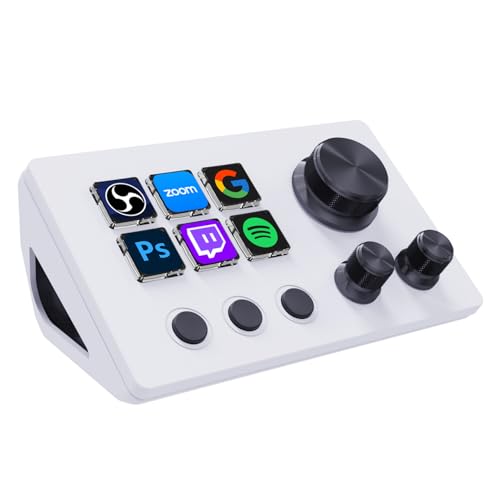
Compact Dial Macro Pad – 6-Key Macro Deck with 3 Dials
The ActionRing is a compact streaming control deck for Twitch and other content workflows, built around six customizable LCD keys and three dials. It is designed for users who want fast one-click control for OBS scenes, media, app launches, and other shortcuts without taking up much desk space.
Best For: Users who want a smaller macro keypad with LCD keys and physical dials.
Pros:
- Six customizable LCD keys with support for JPG, PNG, and GIF images
- Three dials for adjusting volume and controlling playback
- Action Flow feature supports multiple macro actions in sequence
- Compatible with Windows and macOS plus apps like OBS, YouTube, Discord, and Photoshop
Cons:
- Only six programmable keys, so it offers less surface area than larger decks
- Best suited to users comfortable working within companion software
- Advanced workflows may require time to configure properly
This is a smart pick if you want tactile control in a smaller format. The addition of three dials gives it more flexibility than a basic macro pad, making it useful for both streaming and general desktop productivity.
How We Picked the Best Streaming Control Deck for Twitch
We prioritized the features that matter most in a Streaming Control Deck for Twitch: reliable software integration, enough programmable keys for real-world streaming tasks, clear visual feedback, and a layout that stays useful as your channel grows. We also looked at build quality, ease of setup, and whether the control deck can handle streaming, recording, and general desktop automation without feeling limiting.
Quick Comparison
For most streamers, a 15-key deck is the sweet spot because it balances price and flexibility. Smaller decks work well for simple scene switching and core hotkeys, while larger options are better for complex broadcasts, multistep macros, and creators who run audio, overlays, and moderation tools at the same time. If you want hands-on control for volume and effects, a model with dials or a touch strip can be more useful than extra buttons alone.
Key Buying Factors for Streaming Control Deck for Twitch
Key Count and Layout
Choose a key count based on how many actions you actually use every stream. If you only need scene switching, mute controls, and a few clips or sound effects, a compact deck is usually enough. If you manage multiple games, overlays, chat commands, or production layers, more keys can reduce page switching and make your workflow faster.
Software Compatibility
Make sure the deck works cleanly with OBS Studio, Twitch tools, Streamlabs, Discord, YouTube, and any audio software you rely on. The best devices feel seamless because they support plugins, custom profiles, and multi-action shortcuts that can trigger several tasks at once.
Feedback and Customization
LCD buttons, status indicators, and customizable icons help you avoid misfires during a live show. Good visual feedback is especially important if you switch profiles often or share the device across streaming, editing, and general productivity.
Extra Controls
Dials, touch strips, and mixer-style inputs are valuable if you adjust mic levels, music, filters, or game audio frequently. These controls are not essential for everyone, but they can be a major upgrade for creators who want more precise live control.
Who Should Buy Which Streaming Control Deck for Twitch?
Beginners should look for a simple 15-key deck that supports the most common Twitch actions without overwhelming setup. Mid-level streamers may prefer a model with stronger visual customization or extra controls for audio and scene management. Power users, multitaskers, and creators with elaborate OBS setups should consider larger decks with more keys or advanced controls so they can keep more commands on the main page and minimize switching.
If your goal is faster, smoother live production, the right deck is the one that matches your workflow today while leaving room to grow tomorrow.
