
If you stream with OBS, the right control deck can save time, reduce mistakes, and keep your focus on the content instead of the mouse. A good setup makes scene switching, audio tweaks, and hotkeys feel instant.
In this roundup, we focus on practical options for creators who want a better streaming control deck for obs, whether you need a compact shortcut pad or a more advanced controller with dials and LCD keys.
Best 10 Streaming Control Deck for Obs Picks for 2026
Flagship Control Surface
Elgato Stream Deck XL with 32 Keys

- 32 customizable LCD keys
- Works with OBS and major apps
- Visual feedback for live control
Best For: Serious streamers who want maximum one-touch control
Compact Everyday Controller
Elgato Stream Deck Neo with 8 Keys

- 8 programmable shortcut keys
- Drag-and-drop setup
- Also controls smart home devices
Best For: People who want a small controller for shortcuts and light streaming
Value Macro Pad
FIFINE AmpliGame D6 15-Key Controller

- 15 customizable LCD macro keys
- Supports OBS Studio and Streamlabs
- RGB lighting with visual feedback
Best For: Budget-minded streamers who want lots of shortcuts
Premium Tactile Controller
Elgato Stream Deck + with Dials

- LCD keys plus dials and touch strip
- Great for OBS and audio control
- Supports multi-actions and smart profiles
Best For: Creators who want tactile control for streaming and audio
Compact Macro Deck
15-Key Streaming Control Deck for OBS

- 15 customizable shortcuts
- Built-in plugins and software
- RGB lighting and multi-scene use
Best For: Streamers who want quick OBS control and simple macro access
Docking Stream Deck
7-in-1 Streaming Control Deck for OBS

- LCD macro keys for OBS and apps
- Built-in USB hub plus 100W PD charging
- Works with lights, cards, and creator tools
Best For: Creators who want OBS shortcuts and a desk dock in one device
LCD Key Stream Deck

- 15 customizable LCD buttons
- Supports OBS, Twitch, YouTube, and more
- Removable stand with stable desktop design
Best For: Users who want personalized LCD shortcuts and wide software support
VSDINSIDE M18
18-Key Macro Deck with RGB Ring

- 18 programmable inputs with 15 LCD keys
- Custom images and GIFs for quick identification
- OBS, Streamlabs, and productivity app support
Best For: Streamers who want a visual macro deck for OBS and desktop tasks
TreasLin N1
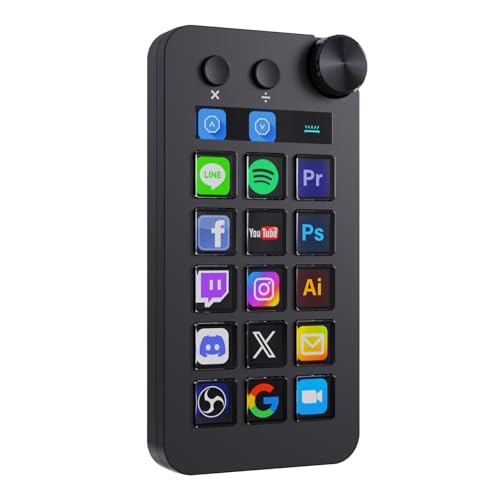
- Three modes: shortcut, calculator, and numeric keypad
- 18 controls with LCD buttons plus a rotary knob
- Large plugin marketplace with 200+ options
Best For: Creators who want a flexible OBS deck with extra utility modes
VSD Mini
6-Key Compact Stream Controller

- 6 customizable LCD keys in a small footprint
- Side RGB light bars for ambient desk lighting
- Works with OBS and other major creative apps
Best For: Small desks and streamers who only need a few OBS controls
Flagship Control Surface – Elgato Stream Deck XL with 32 Keys
If you want a streaming control deck for obs that can handle a busy live setup, the Stream Deck XL is built for high-volume control. Its 32 customizable LCD keys give you room for scenes, audio, lighting, media, and platform actions, while visual feedback helps confirm each command at a glance.
Best For: Streamers and creators who want a large, highly customizable desk controller for OBS and other production tools.
Pros:
- 32 LCD keys support a wide range of one-touch OBS and production actions.
- Works with OBS plus major platforms and tools like Twitch, YouTube, Discord, Spotify, and vMix.
- Visual feedback makes it easy to confirm commands during live production.
- USB-powered and compatible with Mac and Windows 10.
Cons:
- Larger footprint may be more than casual users need.
- Best value comes when you actually use many programmable actions.
The Stream Deck XL is the most flexible option here if you need lots of direct-access buttons and broad software support. For serious OBS workflows, its expanded control surface is the biggest advantage.
Compact Everyday Controller – Elgato Stream Deck Neo with 8 Keys
If you need a compact streaming control deck for obs without taking over your desk, the Stream Deck Neo keeps the setup simple. Its eight programmable keys are designed for quick automation, and the free Stream Deck app uses drag-and-drop setup so you can get useful shortcuts in place fast.
Best For: Users who want a small, simple controller for everyday shortcuts, meetings, and lighter OBS use.
Pros:
- Eight customizable keys are enough for core shortcuts and routine actions.
- Drag-and-drop setup makes configuration straightforward.
- Works with apps like Zoom, Teams, PowerPoint, Excel, Word, and creative software.
- Can also control smart lights, plugs, and audio devices.
Cons:
- Fewer keys than larger stream controllers.
- Micro USB connection feels less modern than USB-C.
The Neo makes sense if you want Stream Deck convenience in a smaller, more everyday-friendly format. It is less focused on heavy live-production demands, but it still fits well for streamlined shortcuts and light streaming control.
Value Macro Pad – FIFINE AmpliGame D6 15-Key Controller
For buyers comparing a streaming control deck for obs on a tighter budget, the FIFINE AmpliGame D6 focuses on practical macro control. It gives you 15 customizable LCD macro keys, support for OBS Studio and Streamlabs, and visual operation so you can trigger actions without digging through software windows.
Best For: Streamers and multitaskers who want a feature-rich macro pad for OBS, Twitch, and general desktop shortcuts.
Pros:
- 15 customizable LCD macro keys provide plenty of room for scenes and shortcuts.
- Works with OBS Studio, Streamlabs, Twitch, YouTube, Discord, and editing software.
- Touchscreen-style visual feedback helps confirm actions directly on the device.
- RGB lighting and multiple modes add customization for gaming setups.
Cons:
- Platform listing is Windows-focused in the supplied details.
- May require firmware and software updates before first use.
The D6 is a strong pick if you want more than a basic macro pad without jumping to a larger premium controller. It offers a solid mix of key count, software support, and visual control for streaming and everyday productivity.
Premium Tactile Controller – Elgato Stream Deck + with Dials
If your streaming control deck for obs needs to handle more than just buttons, the Stream Deck + adds dials and a touch strip for broader control. It combines LCD keys with tactile hardware, making it easier to manage audio, video, lighting, and other live-production tasks from one compact unit.
Best For: Streamers who want hands-on control for OBS plus audio mixing and multi-action workflows.
Pros:
- LCD keys, dials, and a touch strip provide more tactile control options.
- Works with OBS, Wave Link, Camera Hub, Twitch, YouTube, Spotify, and more.
- Multi Actions and Smart Profiles help automate complex workflows.
- Drag-and-drop setup and plugin support make customization easy.
Cons:
- Fewer physical keys than the Stream Deck XL.
- Best suited to users who will use the dials and audio-focused features.
The Stream Deck + stands out when your workflow includes both streaming control and audio adjustments. If you want a more tactile studio controller instead of a simple button pad, this model is a smart step up.
Compact Macro Deck – 15-Key Streaming Control Deck for OBS
If you want a straightforward streaming control deck for OBS, this FIFINE shortcut pad focuses on fast scene switching, chat actions, and repeat tasks without clutter. The 15 macro keys are built for streamers who want quick access during gameplay, but the same setup can also help with everyday office shortcuts and multi-scene workflows.
Best For: Streamers and creators who want 15 customizable shortcuts for OBS, chat, and media control.
Pros:
- 15 customizable shortcut keys for scenes, chat, highlights, and repetitive tasks
- Built-in software with plugins to simplify setup and expand functions
- Controllable RGB lighting for a more personalized desk setup
- Useful beyond streaming for office work and multitasking
Cons:
- Best performance note says to connect it through a USB 3.0 interface
- Does not include an LCD key display for custom icons
- Feature set is centered on shortcuts rather than broader hub-style connectivity
This is a practical pick if you want a simple streaming control deck for OBS with enough macro keys to cover core live-production tasks. It looks geared toward speed and convenience first, with RGB and plugin support as helpful extras.
Docking Stream Deck – 7-in-1 Streaming Control Deck for OBS
The ULANZI D200H is more than a streaming control deck for OBS because it combines shortcut control with a 7-in-1 dock. If you work across streaming, content creation, and general productivity, this model is designed to reduce desk clutter by putting app controls, card readers, charging, and USB expansion in one unit.
Best For: Creators who want one device for OBS control, media workflows, and desk docking.
Pros:
- LCD customizable macro keys for one-tap streaming and app control
- Supports OBS plus other creative and office software, including Twitch, YouTube, Excel, and ChatGPT
- Built-in 7-in-1 hub with USB-C, USB-A, SD/TF readers, and 100W PD charging
- Works with Ulanzi lights and Philips Hue for quick studio lighting control
Cons:
- Short 3-month warranty compared with some competing decks
- Lighting control is tied to supported Ulanzi and Philips Hue products
- Designed for Windows 10+/macOS 10.13+, so older systems are not covered
For buyers who want a streaming control deck for OBS with extra docking utility, this is the most multifunctional option here. It makes the most sense if you want your shortcut pad to do double duty as a desk hub.
LCD Key Stream Deck – 15 LCD Keys for OBS Streaming
The SOOMFON Stream Controller is a classic streaming control deck for OBS that emphasizes customizable LCD buttons and simple one-touch operation. It is set up for streamers and other creators who want quick control over audio, lights, social posts, and software actions without switching windows all the time.
Best For: Streamers and creators who want customizable LCD keys and broad app compatibility.
Pros:
- 15 customizable LCD keys for personalized icons and unlimited actions
- Integrated support for OBS Studio, Twitch, YouTube, Twitter, Spotify, and Philips Hue
- Removable stand and rubber feet help it sit securely on the desk
- Works across streaming, editing, photography, and music production tasks
Cons:
- OBS support depends on specific supported OBS Studio versions
- Spotify integration requires an active Spotify Premium account
- Setup guidance notes firmware updates and direct USB connection for best results
If you want a streaming control deck for OBS with visible LCD buttons and strong compatibility, this SOOMFON model is a solid fit. It is especially appealing for users who want their keys to feel more organized and visually customized.
VSDINSIDE M18 – 18-Key Macro Deck with RGB Ring
If you want a streaming control deck for obs that also works as a general desktop macro pad, this VSDINSIDE model gives you 18 programmable inputs, including 15 LCD keys and 3 physical buttons. It can trigger OBS scenes, launch apps, run media controls, and handle multi-step macros, while the LCD keys support JPG, PNG, and GIF custom images.
Best For: Streamers and creators who want a compact OBS control deck with visual keys and extra desktop automation.
Pros:
- 18 programmable controls, including 15 LCD visual keys
- Supports single-tap actions and multi-step macro sequences
- Works with OBS, Streamlabs, YouTube, Discord, Excel, Word, and Photoshop
- Adjustable RGB surround light ring adds visibility in dim setups
Cons:
- No native Linux plug-and-play support
- Requires compatible Windows 11+ or macOS 11+ systems
- Setup depends on software and firmware features rather than pure plug-and-play use
This is a strong pick if you want a versatile macro deck that goes beyond stream switching and can also support office and creative workflows. The visual keys and built-in utility plugins add convenience, but it is best suited to users who are comfortable installing software and customizing their layout.
TreasLin N1 – 18-Key Stream Dock with Modes
This streaming control deck for obs is built for users who want more than simple hotkeys, because it combines 18 customizable macro keys with shortcut, calculator, and numeric keypad modes. It is designed to handle OBS streaming, media control, and everyday desktop shortcuts through the included VSD Craft software and USB-C connection.
Best For: Streamers and creators who want a multifunction OBS deck with mode switching and a large plugin ecosystem.
Pros:
- Three operating modes: shortcut key, calculator, and numeric keypad
- 18 controls total, including 15 visual LCD buttons, 2 clickable buttons, and 1 rotary knob
- Supports dynamic icons and custom icon layouts through VSD Craft software
- Marketplace includes thousands of options, with 200+ plugins, icons, profiles, and scenes
Cons:
- Full use depends on installing the included software
- OBS compatibility is listed for specific Windows and macOS versions
- Spotify integration requires an active Spotify Premium account
The N1 stands out if you want an obs-ready control deck that can also act as a calculator or numeric keypad on the same desk. Its strength is flexibility, especially for users who want downloadable plugins, icon packs, and multiple layouts for different workflows.
VSD Mini – 6-Key Compact Stream Controller
If you need a smaller streaming control deck for obs, this compact VSD Mini keeps the essentials simple with 6 customizable LCD keys and side RGB light bars. It is aimed at quick actions like switching OBS scenes, launching apps, controlling media, and running common shortcuts without taking much space on the desk.
Best For: Users who want a compact OBS shortcut pad for tight desks or minimal setups.
Pros:
- Compact design with 6 fully customizable LCD keys
- Supports JPG, PNG, and GIF icons for easy visual labeling
- Side RGB light bars add ambient lighting and custom color options
- Compatible with OBS, Streamlabs, YouTube, Twitch, Discord, Office, and Photoshop
Cons:
- Only 6 keys, so it offers less direct control than larger decks
- Requires VSD Craft software for full setup
- Linux support depends on SDK-based adaptation rather than simple plug-and-play use
This model makes the most sense if you value desk space and only need a few high-frequency OBS actions at your fingertips. It is not the most expansive option, but the compact layout, visual keys, and broad app compatibility make it practical for simpler streaming setups.
How We Picked the Best Streaming Control Deck for Obs
We looked for controllers that make OBS workflows faster in real use: reliable shortcut triggering, clear visual feedback, flexible key mapping, and compatibility with common streaming tools. We also favored products with enough customization to handle scene changes, audio control, clips, overlays, and streaming software integrations without feeling cluttered.
Quick Comparison
The main differences come down to key count, control style, and workspace needs. Larger decks are better for creators with more scenes, profiles, and production tasks. Smaller pads are easier to place on a crowded desk and work well for basic OBS commands. Models with LCD keys or dials offer faster recognition and finer control, while simpler macro pads usually deliver the best value.
Key Buying Factors for a Streaming Control Deck for Obs
Key Count and Layout
More keys mean more direct actions, but only if you will use them. If you run multiple scenes, audio sources, and browser actions, a larger deck can reduce page switching. If your workflow is simple, a compact controller may be faster and easier to learn.
Software Integration
Look for strong OBS support along with compatibility for Twitch, YouTube, Streamlabs, and communication or music apps. The best Streaming Control Deck for Obs should let you trigger actions cleanly and build profiles that match your content style.
Feedback and Control Style
LCD labels, icons, RGB cues, touch strips, and dials all help you stay oriented during a live broadcast. If you adjust audio often, dials can be more useful than extra buttons. If you want simple one-tap actions, a button-focused deck is usually enough.
Automation and Profiles
Multi-actions, folders, and app-based profiles are valuable if you switch between games, podcasting, tutorials, or multitasking on stream. These features help reduce repetitive work and keep your setup organized.
Who Should Buy Which Streaming Control Deck for Obs?
Choose a full-size deck if you want maximum control and manage complex productions. Pick a mid-size controller if you want a balanced mix of shortcuts and desk efficiency. Go with a compact macro pad if you are just getting started, stream in a smaller space, or mainly need the core OBS actions. If your workflow includes frequent audio changes, prioritize models with dials or tactile controls over plain button grids.
For most buyers, the best option is the one that matches your streaming style today while leaving room to grow. A well-chosen controller should make OBS feel faster, simpler, and more consistent every time you go live.
