
Two monitors can make a desk converter feel crowded fast. The right one needs enough room for both displays, a comfortable keyboard position, and a lift you can use throughout the day.
These 10 options span compact 36-inch risers, wider work surfaces, a corner model, and electric designs. Use your monitor dimensions and available desk space to narrow the field before choosing.
Best 10 Standing Desk Converters for Dual Monitors Picks for 2026
Best Electric Lift

- Motorized 6–19.25-inch height adjustment
- 48.5-inch surface for two 27-inch monitors
- USB port and 35.5-inch keyboard tray
Best For: Wide desks and push-button sit-stand changes
Best Integrated Monitor Mounts
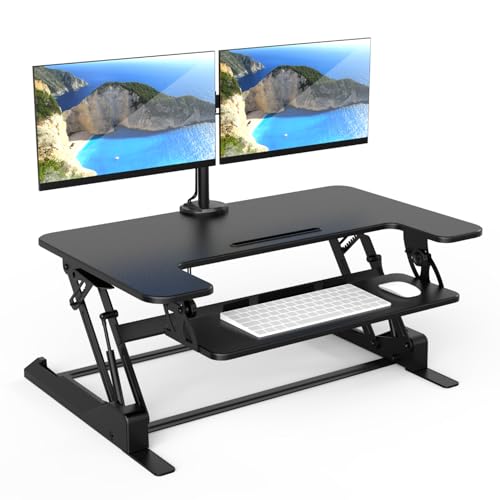
- Includes two adjustable monitor mounts
- Supports monitors up to 32 inches
- Manual 6.5–16.3-inch height range
Best For: Dual screens needing adjustable mounted positioning
Best Walnut Finish

- 38-inch-wide walnut-finish work surface
- One-handle gas-spring adjustment
- Requires 38-by-26-inch desk clearance
Best For: Roomy desks and a woodgrain workspace
Best Straight-Up Lift

- Straight-up manual lift
- 4.5–20-inch height range
- 42-inch tray rated for 4.4 pounds
Best For: Wide typing setups with a manual straight-up lift
Best for Easy Setup
FLEXISPOT 36-Inch Desk Converter

- 36-inch top fits dual monitors
- Mechanical spring lift
- 33-pound top-surface capacity
Best For: Walnut-finish home-office setups
Best for Corner Desks
VIVO 43-Inch Dual-Tier Converter

- 43.3-inch-wide desktop
- Works on corner or regular desks
- 6-to-17-inch adjustment range
Best For: Roomy corner workstations
Best Wide Keyboard Tray

- 42-inch top fits two monitors
- 42-by-11.8-inch keyboard tray
- Adjusts from 4.7 to 19.3 inches
Best For: Dual-monitor setups needing keyboard space
Best With Included Monitor Arms

- Includes adjustable mount for two monitors
- Supports 13- to 30-inch VESA screens
- Manual 4.5- to 20-inch height range
Best For: Dual-screen setups needing monitor arms included
Best Heavy-Duty Pick
VERSADESK PowerPro 36-Inch Converter

- Push-button electric height adjustment
- 80-pound load capacity
- Monitor arms sold separately
Best For: Motorized dual-monitor workstations
Best Mechanical-Spring Riser

- Mechanical-spring height adjustment
- 36-inch surface supports up to 33 pounds
- Wide tray has a 4.4-pound limit
Best For: Manual sit-to-stand setups with a wide keyboard tray
Best Electric Lift – Mount-It! 48.5-Inch Converter
Among standing desk converters for dual monitors, this Mount-It! model stands out for its motorized lift and extra-wide 48.5-inch work surface. It offers room for two 27-inch monitors alongside a laptop and accessories, provided the total load stays within 33 pounds.
Best For: Wide workstations where push-button height changes matter more than a compact footprint.
Pros:
- Electric height adjustment from 6 to 19.25 inches.
- 35.5-inch keyboard tray fits a full-size keyboard and mouse.
- Built-in USB charging port and device slot.
Cons:
- The 48.5-inch-wide surface needs a generously sized desk.
- 33-pound capacity may limit heavier multi-device setups.
Choose this one if you want to change positions without manually lifting your monitors. Check your desk width and the combined weight of your equipment before buying.
Best Integrated Monitor Mounts – Mount-It! 36-Inch Converter
If you are comparing standing desk converters for dual monitors and want the mounts included, this 36-inch Mount-It! riser is a practical option. Its integrated arms support two monitors up to 32 inches and offer tilt, swivel, and rotation adjustments.
Best For: Dual-screen users who want adjustable monitor positioning without buying separate arms.
Pros:
- Two integrated monitor mounts offer viewing-angle adjustments.
- Gas-spring lift adjusts from 6.5 to 16.3 inches.
- Cable management helps keep wires organized.
Cons:
- Manual adjustment is less hands-off than an electric lift.
- Monitor arms are rated for 17.6 pounds each; check your screens before mounting.
The included arms are its main advantage over a plain desktop riser. Confirm both monitor weights and the available desk space to make sure the setup fits.
Best Walnut Finish – Mount-It! 38-Inch Converter
This walnut-finish Mount-It! is a warmer-looking choice among standing desk converters for dual monitors. Its 38-by-19.5-inch upper surface accommodates two screens or a screen and laptop, while the separate tray keeps your keyboard and mouse below.
Best For: Larger desks where a woodgrain finish and a roomy, two-tier layout are priorities.
Pros:
- One-handle gas-spring adjustment simplifies position changes.
- 38-inch-wide surface and full-size keyboard tray.
- Device channel, cable slots, and a grommet for an optional monitor arm.
Cons:
- Requires at least 38 inches of desk width and 26 inches of depth.
- Minor movement may occur at maximum height with heavier monitor setups.
The required desk clearance is the deciding factor here. If your existing desk has the space, this model provides a broad dual-screen layout without switching to a full standing desk.
Best Straight-Up Lift – VIVO 42-Inch Converter
For shoppers seeking standing desk converters for dual monitors with a broad keyboard tray, the VIVO DESK-V042KB offers a 42-inch top surface and a tray that rises with it. Its lift travels straight upward rather than moving forward as you raise it.
Best For: Dual-monitor setups that need a wide typing area and a straight-up manual lift.
Pros:
- Height adjusts from 4.5 to 20 inches.
- 42-inch-wide upper surface and matching-width keyboard tray.
- Arrives nearly ready to use; attach the keyboard tray to finish setup.
Cons:
- Keyboard tray supports only 4.4 pounds.
- Manual lift requires you to adjust the riser yourself.
This is a useful fit if you want more height range and a wide tray without motorized controls. Keep heavier accessories off the keyboard tray and verify that your monitors fit within the top surface’s 42-by-15.7-inch dimensions.
Best for Easy Setup – FLEXISPOT 36-Inch Desk Converter
Among standing desk converters for dual monitors, this 36-inch FLEXISPOT offers a walnut finish, a separate keyboard tray, and a top surface rated for up to 33 pounds. Its mechanical spring lift is designed for smooth height changes without relying on a gas spring.
Best For: Home-office users who want a dual-monitor riser with a walnut look and minimal setup.
Pros:
- 36-inch top is designed to fit two monitors with room for accessories.
- Reinforced steel frame and mechanical spring lift support stable adjustment.
- Arrives almost fully assembled; attach the keyboard tray to get started.
Cons:
- Keyboard tray is rated for only 4.4 pounds.
- At 34.5 pounds, the unit may be cumbersome to reposition.
Check the combined weight of your monitors and accessories against the 33-pound top-surface limit, and keep heavier items off the keyboard tray.
Best for Corner Desks – VIVO 43-Inch Dual-Tier Converter
If you’re comparing standing desk converters for dual monitors on a corner workstation, this VIVO model provides a 43.3-by-28.3-inch desktop that also works on a regular desk. Its 28.2-by-10.6-inch keyboard tray rises with the main surface.
Best For: Corner-desk users who need a broad surface for two monitors and a separate keyboard level.
Pros:
- Spacious desktop accommodates single- or dual-monitor setups.
- Dual pneumatic springs assist adjustment from 6 to 17 inches.
- Requires only attachment of the keyboard tray and feet.
Cons:
- Its 43.3-inch width needs substantial desk space.
- The 42.6-pound unit may be inconvenient to move between desks.
The wide surface makes this a useful option when desk space allows, but measure your existing desktop before choosing it—especially if the corner area is crowded.
Best Wide Keyboard Tray – JOYSEEKER 42-Inch Desk Riser
For shoppers seeking standing desk converters for dual monitors with space for keyboard and mouse, the JOYSEEKER pairs a 42-by-15.7-inch top with a 42-by-11.8-inch lower tray. A single-lever, gas-spring-assisted X-lift adjusts the surface from 4.7 to 19.3 inches.
Best For: Users who want a wide keyboard tray and straight up-and-down height adjustment.
Pros:
- 42-inch top is specified to fit two monitors and includes a device slot.
- Wide lower tray accommodates a keyboard, mouse, and accessories.
- Single-lever adjustment offers a 4.7-to-19.3-inch height range.
Cons:
- Its 28.7-pound stated capacity is lower than the 33-pound ratings of the other two models here.
- The 42-inch width may not suit a narrow desk.
This is a practical pick when keyboard space matters as much as monitor space. Confirm that your display setup stays within its stated load capacity.
Best With Included Monitor Arms – VIVO 36-Inch Desk Converter
Among standing desk converters for dual monitors, this VIVO model stands out for including a mount rather than just space for two screens. Its 36-inch work surface and separate keyboard tray rise from 4.5 to 20 inches.
Best For: Shoppers who want a converter with adjustable dual monitor arms included.
Pros:
- Mount supports two 13- to 30-inch VESA monitors weighing up to 17.6 pounds each.
- Monitor arms offer tilt, swivel, rotation, and height adjustment along the center pole.
- Wide 36-inch keyboard tray and padded underside add practical workspace features.
Cons:
- Manual height adjustment requires you to lift the workstation.
- Some assembly and monitor installation are required.
Choose this one if positioning each screen matters as much as switching between sitting and standing. Check your monitors’ VESA patterns and weights before buying.
Best Heavy-Duty Pick – VERSADESK PowerPro 36-Inch Converter
If you prefer push-button adjustments, the PowerPro is an electric option among standing desk converters for dual monitors. Its 36-inch, split-level workspace accommodates screens and a keyboard, while the motor handles height changes.
Best For: Users who want motorized sit-to-stand changes and a high-capacity desktop riser.
Pros:
- Push-button motorized lift avoids manual raising and lowering.
- 80-pound load capacity supports a substantial workstation setup.
- Includes a USB charging port, cable-routing grommets, and a child safety lock.
- Ships fully assembled for minimal setup.
Cons:
- Monitor arms and monitors are sold separately.
- Electric height adjustment requires access to power.
This is a practical choice when easy height changes are the priority. Budget separately for arms if you want mounted screens rather than monitors resting on the surface.
Best Mechanical-Spring Riser – SANODESK 36-Inch Converter
For standing desk converters for dual monitors without a motor, this SANODESK riser uses a mechanical spring to move between 4.7 and 19.6 inches. Its 36-by-16.3-inch main surface pairs with a wide keyboard tray.
Best For: Shoppers seeking a manually adjustable 36-inch workspace with a dedicated keyboard tray.
Pros:
- Mechanical-spring lift provides sit-to-stand adjustment without electric controls.
- Main tier supports up to 33 pounds.
- 34.6-by-12.2-inch keyboard tray rises with the work surface.
Cons:
- Keyboard tray has a 4.4-pound weight limit.
- Attaching the tray requires your own screwdriver.
The generous tray is useful for a full-size typing setup, but check the combined weight of both monitors and any other items against the main tier’s 33-pound limit.
How We Picked the Best Standing Desk Converters for Dual Monitors
We focused on the differences that matter most when choosing Standing Desk Converters for Dual Monitors: usable work-surface width, lifting method, keyboard space, monitor-mount options, and whether the shape suits a straight or corner desk. The selected products include manual and electric converters in several sizes, so there is no single best fit for every workstation.
Product names alone cannot confirm that a converter will hold your particular screens. Check the current specifications for weight capacity, monitor dimensions, lift range, and desk-clearance requirements before buying. Count the weight of monitor arms, accessories, and anything else that will move with the platform.
Quick Comparison: Which Style Fits?
Wide Manual Platforms
The Mount-It! 38-inch model, VIVO 42-inch model, and 42-inch quick sit-to-stand riser are starting points if you want more horizontal room for two displays. Compare their actual top dimensions, not just the advertised width, especially if you use large monitor stands.
36-Inch Converters
The FLEXISPOT, SANODESK, VIVO dual-monitor-stand, and VERSADESK PowerPro models may suit desks with less available width. A 36-inch top can work for two screens, but stand footprints and preferred screen spacing matter. The VIVO model with a dual monitor stand is worth considering if you want a bundled mounting approach rather than two monitor bases on the platform.
Specialized Layouts and Lifting
The VIVO 43-inch dual-tier corner converter is the one to examine for an L-shaped workspace. If push-button adjustment is a priority, compare the Mount-It! 48.5-inch electric model with the VERSADESK PowerPro 36-inch electric model. Mount-It! also offers a converter with two screen mounts included; verify compatibility with your monitors before treating those mounts as a deciding factor.
Key Buying Factors for Standing Desk Converters for Dual Monitors
Measure the Desk and Both Screens
Measure your clear desk width and depth, then map out where each monitor, keyboard, and mouse will sit at both heights. Check whether the converter rises straight up or needs room as it moves. Leave space for cables and for any items you do not want trapped beneath the platform.
Check Capacity and Comfortable Height
Add up the weight of both monitors, their stands or arm, keyboard, and other items on the moving surface. Stay within the manufacturer’s stated capacity. Compare the lowest and highest positions with your seated and standing eye and elbow heights; maximum lift alone does not guarantee an ergonomic fit.
Decide on Mounts, Keyboard Trays, and Power
Included monitor mounts can free up top space, but check VESA compatibility and supported screen sizes and weights. A separate keyboard tray may improve typing position, provided it has enough room for your mouse. Electric lift reduces manual effort but requires a nearby outlet and adds a power cord to manage.
Who Should Buy Which Standing Desk Converters for Dual Monitors?
Choose a wider top if your monitors have bulky bases or you keep documents beside them. Look at a 36-inch option if desk width is tight, but confirm your full layout fits first. Pick the corner model for a suitable L-shaped desk, a mount-included option if freeing surface space is important, or an electric converter if you expect to change height often and prefer push-button control. In every case, dimensions and capacity should settle the choice—not the “dual monitor” label alone.
