
If you want a cleaner, more ergonomic desk, space-saving computer monitor arms are one of the easiest upgrades you can make. They lift your screen off the surface, reclaim room for your keyboard and accessories, and help you fine-tune viewing height and angle.
Below, we focus on the best options for single and dual setups, including mounts for standard displays and ultrawide screens, so you can match the arm to your desk, monitor size, and workflow.
Best 10 Space-Saving Computer Monitor Arms Picks for 2026
Space-Saving Single Mount

- Fits 13-32 inch screens up to 17.6 lbs
- 360° rotation plus tilt and swivel adjustment
- Cable clips help keep the desk tidier
Best For: Single-monitor setups that need easy desk-space savings
Stacked Desk Saver
HUANUO Vertical Dual Monitor Mount

- Stacks two 17-32 inch monitors on one stand
- Saves desk width and reduces clutter
- Clamp or grommet base supports stable mounting
Best For: Dual-monitor users with limited horizontal desk space
Low-Profile Space Saver

- Slim arm design helps reduce wall-blocking issues
- Mechanical spring support is built for smooth movement
- Fits 17-32 inch monitors with C-clamp or grommet mounting
Best For: Compact desks that need a slim, adjustable single monitor arm
Heavy-Duty Dual Mount

- Holds two 13-30 inch monitors up to 22 lbs each
- Tilt, swivel, rotation, and height adjustment available
- Cable clips help keep cords organized
Best For: Users who want a sturdy, adjustable dual-monitor setup
Space-Saving Dual Setup
ErGear Dual Monitor Arm for 13–32" Screens

- Supports two 13"–32" monitors up to 19.8 lbs each.
- Tool-free VESA plate simplifies installation.
- Clamp and grommet mounting help free desk space.
Best For: dual-monitor users who want a tidy, adjustable workstation
Flexible Single-Arm Pick
VIVO Single Ultrawide Monitor Arm

- Supports most 13"–32" monitors and ultrawides up to 38".
- Toolless clamp plus included grommet mount.
- Cable clips help keep the desk tidy.
Best For: single-monitor setups that need broad compatibility and a cleaner desk
Heavy-Duty Space Saver
Suptek Single Monitor Arm for 17–35" Screens

- Supports larger 17"–35" monitors up to 24.25 lbs.
- Tool-free clamp or grommet installation.
- Cable routing and long reach improve desk organization.
Best For: larger-monitor users who want sturdy support and extra desk space
Precision-Focused Space-Saving Pick
HUANUO FlowLift Pro Monitor Arm

- Tool-free VESA plate speeds installation
- PrecisionView shows tension adjustment clearly
- ACA-endorsed ergonomic positioning
Best For: A polished single-monitor setup with easy adjustment and desk-saving design
Balanced Budget-Friendly Option
MOUNTUP Single Monitor Desk Mount
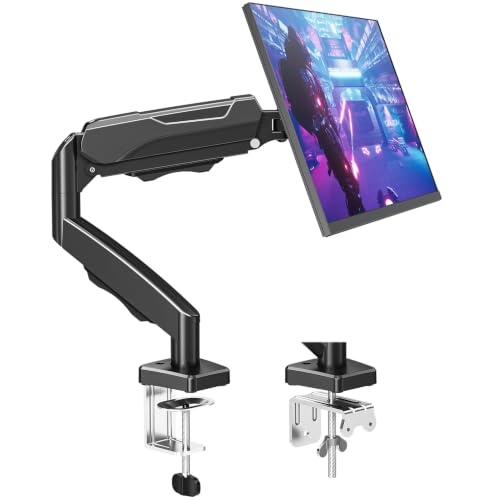
- Full-motion arm with tilt, swivel, rotation, and height adjustment
- Cable management channels help hide wires
- Clamp and grommet mounting options included
Best For: An adjustable single-monitor arm that frees space and suits most everyday desks
High-Capacity Workspace Saver
WALI Adjustable Single Monitor Arm

- Higher load capacity for flat and curved screens
- Long reach and height range for ergonomic positioning
- Cable guides help keep the desk uncluttered
Best For: A larger single-monitor setup that needs stronger support and more desk space
Space-Saving Single Mount – ErGear 13-32 Inch Monitor Arm
If you want a straightforward space-saving computer monitor arm for a single screen, this ErGear mount focuses on the essentials: desk clearance, ergonomic height, and easy adjustability. The C-clamp or grommet setup gives you flexibility at installation, while the arm’s tilt, swivel, and rotation help dial in a comfortable viewing position.
Best For: Single-monitor desks that need a simple, adjustable way to free up surface space.
Pros:
- Supports 13-32 inch monitors up to 17.6 lbs with 75×75 mm or 100×100 mm VESA patterns
- Offers 360° rotation, ±45° tilt, and ±90° swivel for flexible positioning
- Includes integrated cable clips to help keep cords organized
- C-clamp installation is drill-free, with a grommet option also included
Cons:
- Works only with desks that meet the specified thickness and underside clearance requirements
- Single-arm design is not meant for multi-monitor setups
This is a practical choice if you want a clean, adjustable mount without complicating your desk setup. Its strengths are simple installation, broad monitor compatibility, and a layout that helps make a cramped workspace feel more open.
Stacked Desk Saver – HUANUO Vertical Dual Monitor Mount
For buyers comparing space-saving computer monitor arms, this HUANUO vertical dual mount stands out because it stacks two screens on one base instead of spreading them side by side. That makes it a strong fit when desk width is tight but you still want an ergonomic dual-screen setup with adjustable viewing angles.
Best For: Users who want two monitors in a stacked layout to save horizontal desk space.
Pros:
- Holds two 17-32 inch monitors up to 17.6 lbs each
- Vertical stacking design saves desktop space and keeps the workstation clutter-free
- Offers -45° to +45° tilt, -60° to +60° swivel, and 360° rotation
- Includes stable clamp or grommet mounting for desks up to 3.14 inches thick
Cons:
- Requires two monitors with matching VESA 75×75 mm or 100×100 mm patterns
- Stacked layout may not suit users who prefer side-by-side screen placement
If your priority is maximizing open desk surface, this is one of the most efficient dual-screen layouts in the group. It combines solid adjustability with a space-saving vertical footprint, which is especially useful in compact offices and home workstations.
Low-Profile Space Saver – NB SmooVex Single Monitor Arm
This NB SmooVex arm is aimed at buyers who want a slimmer space-saving computer monitor arm with smoother movement and a simpler setup. The mechanical spring design is meant to provide stable support over time, while the narrow arm profile helps reduce wall-blocking issues on tighter desks.
Best For: Anyone wanting a slim single-arm mount with modern spring support and easy installation.
Pros:
- Mechanical spring system is designed for smooth movement and stable long-term support
- Fits most flat or curved 17-32 inch monitors with 75×75 mm or 100×100 mm VESA mounting
- Includes both C-clamp and grommet installation options
- Provides ±90° rotation, tilt from -25° to 90°, swivel, and 230 mm of height travel
Cons:
- Single-monitor design is not suitable if you need to mount multiple screens
- Requires a compatible VESA mount and monitor size within the stated range
As a space-conscious pick, this arm is appealing if you want a cleaner-looking desk with flexible positioning and no gas-spring concerns. It is especially practical for home offices, study rooms, or workstations where a slimmer mount footprint matters.
Heavy-Duty Dual Mount – VIVO STAND-V002 Monitor Arm
The VIVO STAND-V002 is a practical space-saving computer monitor arm for users who need two screens without giving up desk organization. Its dual-arm setup, height adjustment, and integrated cable clips make it a solid fit for workstations that need more screen real estate in a cleaner footprint.
Best For: Dual-monitor setups that need sturdy support and flexible positioning.
Pros:
- Supports two 13-30 inch monitors up to 22 lbs each with 75×75 mm or 100×100 mm VESA patterns
- Provides +90° to -90° tilt, 180° swivel, 360° rotation, and center-pole height adjustment
- Includes cable management clips along the arms and center pole
- Offers both heavy-duty C-clamp and optional grommet mounting
Cons:
- Desk thickness is limited to 3.25 inches for clamp mounting
- Larger dual-arm footprint may be more than a minimalist single-monitor user needs
This model makes sense if you want a durable dual-screen setup with plenty of positioning range and cleaner cable routing. It is a dependable option for users who value adjustability and a sturdier feel in a shared or busy workspace.
Space-Saving Dual Setup – ErGear Dual Monitor Arm for 13–32" Screens
If you want a space-saving computer monitor arm for two displays, this ErGear dual mount is built to lift both monitors off the desk while giving each screen independent adjustment. It supports most 13″ to 32″ flat or curved monitors, uses a tool-free VESA plate, and includes both clamp and grommet mounting options for a cleaner setup.
Best For: Dual-monitor users who want a tidy desk and flexible positioning for each screen.
Pros:
- Fits most 13″–32″ monitors up to 19.8 lbs each.
- Tool-free VESA installation speeds up setup.
- Clamp and grommet mounting options add desk compatibility.
- Independent height, tilt, swivel, and rotation adjustments help fine-tune both displays.
Cons:
- Only works with 75x75mm or 100x100mm VESA patterns.
- Best suited to wooden desks without an underside crossbeam.
For buyers focused on maximizing desk space, this model offers the core benefits of monitor arms without adding complexity. The wide adjustment range and cable clips make it a practical pick for a cleaner, more ergonomic workstation.
Flexible Single-Arm Pick – VIVO Single Ultrawide Monitor Arm
This VIVO model is a strong space-saving computer monitor arm for users who want a single screen mounted off the desk with broad compatibility. It fits most monitors from 13″ to 32″ and also supports ultrawide screens up to 38″ as long as the weight and VESA pattern match the mount.
Best For: People with one monitor who want a clean desk and broad screen support.
Pros:
- Supports monitors up to 22 lbs and ultrawide screens up to 38″.
- Offers tilt, swivel, rotation, and height adjustment for flexible positioning.
- Toolless clamp installation and included grommet mount make setup easier.
- Integrated cable clips help keep wiring organized.
Cons:
- Requires VESA 75x75mm or 100x100mm compatibility.
- Height adjustment is limited to the center pole range.
For a single-monitor desk, this arm balances versatility and simplicity well. Its broad size support and cable management features make it an easy fit for workstations that need more open surface area.
Heavy-Duty Space Saver – Suptek Single Monitor Arm for 17–35" Screens
If you need a space-saving computer monitor arm for a larger display, this Suptek single arm is designed for bigger screens while keeping the desktop clear. It supports flat and curved monitors from 17″ to 35″, includes tool-free clamp installation, and offers a long reach with substantial height adjustment.
Best For: Users with larger monitors who want strong support and more desk space.
Pros:
- Supports 17″–35″ monitors up to 24.25 lbs.
- Tool-free clamp and grommet mounting options simplify setup.
- Long reach and 18.7″ height adjustment provide flexible positioning.
- Built-in cable routing helps keep the workspace organized.
Cons:
- Only fits VESA 75x75mm or 100x100mm patterns.
- Maximum desk thickness is capped at 3.85 inches.
This is a practical choice when you want a sturdier arm for a heavier monitor without sacrificing a neat desk layout. Its weight-balanced design and extended range make it well suited to frequent adjustments throughout the day.
Precision-Focused Space-Saving Pick – HUANUO FlowLift Pro Monitor Arm
If you’re looking for space-saving computer monitor arms that still feel premium in daily use, the HUANUO FlowLift Pro is built around easy adjustment, visible tension calibration, and a clean desk setup. It supports 13–32 inch monitors with VESA 75x75mm or 100x100mm mounting, and its tool-free VESA plate is designed to speed up installation while helping hide cable clutter.
Best For: Users who want a stable, ergonomic single-monitor arm with a polished setup process and strong adjustment control.
Pros:
- MechaSpring design is rated for up to 2× the service life of conventional mounts.
- PrecisionView window gives visible tension feedback instead of relying only on guesswork.
- Tool-free InstaMount VESA plate makes setup faster and easier.
- ACA-endorsed design supports a more comfortable eye-level viewing position.
Cons:
- Works only with monitors in the stated size and weight range.
- Recommended mainly for wood desks within the specified thickness range.
- Irregular desk edges may make installation less straightforward.
The FlowLift Pro stands out for users who value adjustability and a neater desk, but compatibility checks matter here. If your monitor and desk fit the requirements, this is a well-equipped arm for a more organized workstation.
Balanced Budget-Friendly Option – MOUNTUP Single Monitor Desk Mount
For shoppers comparing space-saving computer monitor arms, the MOUNTUP single monitor desk mount focuses on broad compatibility, strong adjustability, and a cleaner desktop footprint. It supports 17–32 inch monitors, uses a tested tension system, and includes both clamp and grommet mounting options for more flexible desk setup.
Best For: People who want a versatile single-arm mount that frees desk space and offers full-motion positioning.
Pros:
- Full-motion design offers tilt, swivel, rotation, extension, and height adjustment.
- Passed over 20,000 cycle tests for the tension system.
- Built-in cable management helps keep cords organized and out of sight.
- Clamp and grommet options make it easier to match different desk setups.
Cons:
- Desk thickness is limited to the stated range for both mounting methods.
- Heavier monitors require careful tension adjustment after installation.
- For very deep-curved displays, the brand recommends looking at its heavy-duty option instead.
This is a practical monitor arm for everyday workspaces that need flexibility without adding clutter. Its strength is balanced motion and tidy cable routing, making it a solid all-around choice if your monitor falls within the supported range.
High-Capacity Workspace Saver – WALI Adjustable Single Monitor Arm
Among space-saving computer monitor arms, the WALI adjustable single monitor arm is built for larger screens and heavier loads while still keeping the desk clear. It lifts the monitor off the desktop, adds built-in cable management, and supports full-motion positioning for a more ergonomic viewing setup.
Best For: Users with a larger monitor who want extra weight capacity and a tidy, ergonomic desk layout.
Pros:
- Supports flat screens up to 26.4 lbs and curved screens up to 19.8 lbs.
- Extends 19.3 inches and raises up to 17.3 inches above the desk.
- Built-in cable management helps reduce visible cord clutter.
- Rated for 20,000+ cycles for long-term daily use.
Cons:
- Not every monitor size and VESA pattern will fit, so compatibility checks are essential.
- Best suited to wooden desks, preferably without an underside crossbeam.
- Desk thickness is limited to the stated clamp and grommet range.
The WALI arm is a strong match if you need a more capable mount for a bigger screen and still want a cleaner workspace. It combines reach, load capacity, and cable control in a straightforward single-arm design.
How We Picked the Best Space-Saving Computer Monitor Arms
We focused on models that meaningfully reduce desk clutter while still offering stable support, broad compatibility, and practical adjustability. Key factors included VESA support, screen size range, weight capacity, motion range, build quality, and ease of installation.
We also favored arms that make everyday use simpler, such as tool-free or fast-install mounting systems, smooth height adjustment, and flexible tilt, swivel, and rotation options.
Quick Comparison: What Matters Most
Single-monitor arms are usually the best choice if you want maximum simplicity and the most open desk space. Dual-monitor arms are a better fit when you need side-by-side productivity or stacked vertical viewing, but they take more planning and desk depth.
For larger or ultrawide displays, pay close attention to the arm’s weight rating and reach. A monitor arm can be fully adjustable yet still be the wrong fit if it cannot comfortably support the screen size and load.
Key Buying Factors for Space-Saving Computer Monitor Arms
Monitor Size and Weight
Always check both the diagonal screen size range and the maximum weight capacity. A monitor arm should support your display with some margin to spare, especially if you use a heavier ultrawide or a monitor with an unusually deep chassis.
Mounting Style and Desk Compatibility
Most arms use a C-clamp or grommet mount. C-clamps are the easiest choice for many desks, but you should confirm desk thickness and any clearance issues near the back edge. If your desk has a cable tray or unusual lip, compatibility matters even more.
Adjustment Range
Look for tilt, swivel, rotation, and height changes that match how you actually work. If you switch between seated and standing positions, or share a desk with another person, a wider range of motion is especially useful.
Single Vs. Dual Setup
Single arms generally maximize open space and are easier to position. Dual arms are best when you need two screens at eye level, but stacked configurations can save width when desk space is tight. If your desk is narrow, a vertical dual setup may be more practical than a side-by-side layout.
Build Quality and Stability
Steel construction, solid joints, and a reliable spring mechanism help keep the monitor steady. For Space-Saving Computer Monitor Arms, stability is just as important as motion, because wobble can quickly undermine the benefits of a cleaner workspace.
Who Should Buy Which Space-Saving Computer Monitor Arms?
If you use one standard monitor and want the simplest upgrade, choose a single arm with a strong clamp and broad adjustability. If you work with two displays, pick a dual arm based on whether you prefer a wide horizontal layout or a compact vertical stack.
Users with ultrawide monitors should prioritize higher weight capacity and extra reach. People with smaller desks, shared workstations, or minimalist setups should focus on arms that free the most surface area without compromising screen stability or comfort.
