
A good all-in-one computer can replace a separate desktop tower, monitor, and much of the cable clutter on your desk. The best space-saving all-in-one computers combine a compact footprint with a sharp display, responsive everyday performance, and useful built-in features.
This roundup compares 10 options ranging from compact 19-inch systems to larger 24-inch Full HD models, including touchscreen, high-memory, and productivity-focused configurations. Use the guide below to match screen size, processing power, storage, and connectivity to your setup.
Best 10 Space-Saving All-In-One Computers Picks for 2026
Balanced Workstation
Lenovo A100 24-inch All-in-One

- 8-core Intel Core i3-N305 processor
- 23.8-inch FHD IPS display with 99% sRGB
- Wired keyboard and mouse included
Best For: Home offices, students, and everyday productivity
Everyday Productivity Pick
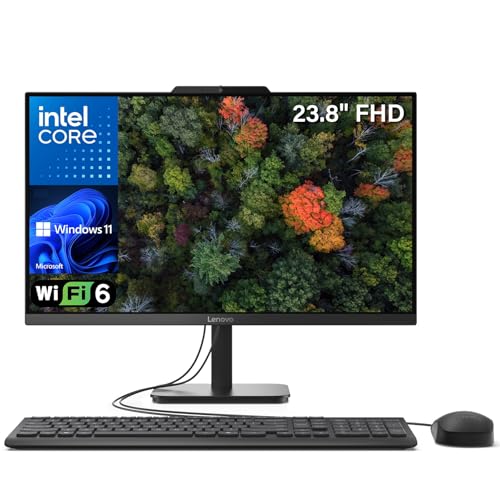
- 16GB RAM and 512GB PCIe SSD
- 23.8-inch FHD IPS anti-glare display
- Wi-Fi 6, Bluetooth 5.2, and bundled peripherals
Best For: Students, home users, and office productivity
Touchscreen Space Saver
23.8-inch Core i7 Touchscreen AIO

- 23.8-inch Full HD multi-touch display
- 16GB RAM and 512GB SSD
- HDMI, VGA, LAN, and six USB ports
Best For: Touchscreen users comfortable installing an operating system
Premium Video-Call Option

- 23.8-inch FHD IPS display with 99% sRGB
- 5MP+IR HDR camera and ComfortView Plus
- Wireless audio with Dolby Atmos support
Best For: Remote work, video calls, and comfortable everyday use
Best Balanced Pick

- 23.8-inch Full HD IPS anti-glare display
- 512GB PCIe SSD and expandable RAM
- Wi-Fi 6, Bluetooth 5.2, and Gigabit Ethernet
Best For: Home offices, students, and everyday productivity
Best Compact Budget Option

- Compact 19-inch all-in-one footprint
- Core i5, 8GB RAM, and 256GB SSD
- Six USB ports plus HDMI and VGA
Best For: Small desks, study areas, and basic home computing
Best for Multitasking

- 16GB RAM for smoother multitasking
- 512GB PCIe SSD for storage and speed
- Full HD frameless display with accessories included
Best For: Office work, online learning, and everyday multitasking
Best with Extra Features
Lenovo IdeaCentre 24-inch FHD All-in-One

- 16GB RAM and 512GB NVMe SSD
- 23.8-inch anti-glare IPS display with 99% sRGB
- Wi-Fi 6, HDMI-out, and multiple USB ports
Best For: Students, home offices, and everyday multitasking
Best Heavy-Duty Pick

- Intel Core i5 processor with 8GB RAM
- 256GB SSD and 24-inch Full HD display
- Privacy webcam, Wi-Fi 6, and Bluetooth 5.3
Best For: Professional productivity and remote collaboration
Best Simple Pick

- Compact 21.45-inch Full HD all-in-one design
- 8GB DDR5 memory with 128GB UFS storage
- Wi-Fi 6, Bluetooth 5.3, USB-C, and Ethernet
Best For: Small desks, dorm rooms, and basic everyday computing
Balanced Workstation – Lenovo A100 24-inch All-in-One
The Lenovo A100 is a practical choice for shoppers seeking space-saving all-in-one computers with a sharp 23.8-inch Full HD IPS display and straightforward wired setup. Its 8-core Intel Core i3-N305 processor, 16GB of DDR4 memory, and 256GB SSD configuration are suited to everyday productivity, browsing, study, and personal use.
Best For: Home offices, students, and everyday users who want Windows 11 Pro and a compact desktop setup.
Pros:
- 8-core Intel Core i3-N305 processor with boost speeds up to 3.8 GHz.
- 23.8-inch FHD IPS anti-glare display with 99% sRGB coverage.
- Includes a wired keyboard and mouse, plus four USB ports and HDMI output.
- Memory and storage can support configurations up to 32GB RAM and 4TB PCIe SSD.
Cons:
- The listed configuration provides 256GB of storage, which may be limiting for large media libraries.
- Integrated Intel UHD Graphics are intended for general computing rather than graphics-heavy workloads.
With Windows 11 Pro, privacy-focused webcam features, and a clean all-in-one design, the A100 offers a well-rounded desk-saving setup for routine computing.
Everyday Productivity Pick – Lenovo IdeaCentre 24 AIO
The Lenovo IdeaCentre 24 AIO combines a compact 23.8-inch design with 16GB of DDR4 RAM and a 512GB PCIe NVMe SSD, making it a capable option among space-saving all-in-one computers. Wi-Fi 6, Bluetooth 5.2, an included keyboard and mouse, and Windows 11 Home help make this a ready-to-use choice for work, school, and home tasks.
Best For: Students, home users, and office productivity with generous SSD storage.
Pros:
- 16GB RAM and 512GB PCIe NVMe SSD provide responsive everyday performance and useful storage capacity.
- 23.8-inch FHD IPS anti-glare screen offers 99% sRGB coverage and wide viewing angles.
- Wi-Fi 6, Bluetooth 5.2, Gigabit Ethernet, HDMI output, and four USB ports support varied setups.
- Includes a wired keyboard and mouse, with Office 365 web apps available in Windows 11 Home.
Cons:
- The Intel N100 processor is designed for efficient everyday computing rather than demanding professional workloads.
- The display is 250 nits, so it may be less suited to very bright environments.
This IdeaCentre is a sensible plug-and-play desktop for users who prioritize a tidy workspace, modern wireless connectivity, and more storage than a basic entry-level configuration.
Touchscreen Space Saver – 23.8-inch Core i7 Touchscreen AIO
This 23.8-inch touchscreen model stands out among space-saving all-in-one computers by adding multi-touch control to a Full HD display. Its listed Core i7 processor, 16GB of RAM, and 512GB SSD are paired with extensive connectivity, although the system ships with DOS rather than a preinstalled Windows environment.
Best For: Buyers who specifically want touchscreen interaction, abundant ports, and the flexibility to install their preferred operating system.
Pros:
- 23.8-inch Full HD multi-touch display supports intuitive gestures and commands.
- 16GB RAM and 512GB SSD provide a useful combination for everyday work and study.
- Broad connectivity includes HDMI, VGA, four USB 3.0 ports, two USB 2.0 ports, LAN, and audio connections.
- Bluetooth 5.3 and dual-band Wi-Fi add wireless flexibility.
Cons:
- DOS is listed as the operating system, so users may need to install and configure Windows or another OS.
- The supplied notes identify integrated graphics, which may not suit graphics-intensive applications.
- It includes wired keyboard and mouse rather than wireless peripherals.
The touchscreen and port selection make this a flexible compact workstation, but its DOS setup requires more preparation than the Windows-based alternatives in this roundup.
Premium Video-Call Option – Dell 24 All-in-One
The Dell 24 All-in-One is a polished choice among space-saving all-in-one computers, pairing a narrow-border 23.8-inch FHD IPS display with Windows 11 Home and a modern Intel Core 3 100U processor. Its 5MP+IR camera, ComfortView Plus technology, tilt adjustment, and built-in audio make it especially appealing for work, learning, and video calls.
Best For: Remote workers, students, and households that value camera quality, eye comfort, and a refined setup.
Pros:
- FHD IPS display provides 99% sRGB coverage, higher contrast, and a 100Hz-class refresh improvement over the prior generation noted by Dell.
- 5MP+IR camera with HDR helps maintain image quality in challenging lighting conditions.
- ComfortView Plus is designed to reduce harmful blue light, and the display tilts from 0 to 20 degrees.
- Includes wireless Bluetooth audio with Dolby Atmos spatial sound and Windows 11 Home.
Cons:
- The non-touch display may be less convenient for users who prefer direct screen interaction.
- Integrated graphics are aimed at general use rather than demanding 3D or creative workloads.
- The listed service package is 1 year of onsite service, with Dell Migrate included for six months.
For a clean desk with strong conferencing features, comfortable viewing technologies, and a supplied wireless keyboard and mouse, Dell’s AIO is a compelling premium everyday option.
Best Balanced Pick – Lenovo IdeaCentre V100
The Lenovo IdeaCentre V100 is a practical choice among space-saving all-in-one computers for home offices, student work, and everyday productivity. Its 23.8-inch Full HD IPS display, 512GB SSD, and modern connectivity provide a tidy desktop setup without sacrificing useful features.
Best For: Home offices, students, web browsing, business tasks, and everyday computing.
Pros:
- 23.8-inch Full HD IPS anti-glare display with 99% sRGB coverage.
- 512GB PCIe SSD supports quick boot times and app launches.
- Wi-Fi 6, Bluetooth 5.2, Gigabit Ethernet, and five USB ports offer flexible connectivity.
- Memory can be expanded from 8GB to up to 32GB.
Cons:
- Intel N100 and integrated graphics are intended for everyday use rather than demanding workloads.
- Windows 11 Home is included, but the system has no optical drive.
Choose this Lenovo when you want a reputable, expandable all-in-one with a sharper IPS panel and ample solid-state storage. It is a well-rounded fit for organized workspaces and routine productivity.
Best Compact Budget Option – MECHAZER NX1-19
The MECHAZER NX1-19 is designed for buyers prioritizing a small footprint and basic functionality. This 19-inch all-in-one keeps the desk clear while providing a Core i5 processor, 256GB SSD, built-in speakers, and a broad selection of ports.
Best For: Remote work, online learning, email, homework, web browsing, and home entertainment on a small desk.
Pros:
- Compact 17.13-by-11.22-inch design helps preserve desk space.
- Core i5 processor, 8GB RAM, and 256GB SSD support routine computing.
- Wi-Fi 6 and Bluetooth 5.3 provide current wireless connectivity.
- HDMI, VGA, Ethernet, and six USB ports accommodate multiple peripherals.
Cons:
- Runs DOS rather than a preinstalled Windows operating system.
- 8GB DDR3 memory is listed as the maximum, limiting future upgrades.
- The 19-inch TN display is smaller than the panels on the other options.
This model makes the most sense when compact dimensions and a low-clutter setup matter more than a larger display or newer platform. Plan for operating-system setup before using it for everyday tasks.
Best for Multitasking – HVLANYN 23.8-Inch AIO
The HVLANYN 23.8-inch all-in-one is one of the more capable space-saving all-in-one computers in this group for multitasking. It pairs 16GB of memory with a 512GB PCIe SSD, a Full HD frameless display, and Windows 11 for a ready-to-use productivity setup.
Best For: Office applications, web browsing, online learning, entertainment, and users who want extra multitasking headroom.
Pros:
- 16GB RAM supports smoother multitasking across office apps and browser tabs.
- 512GB PCIe SSD offers substantial storage and faster loading than a traditional hard drive.
- 23.8-inch Full HD frameless display provides a spacious viewing area.
- Includes a keyboard, mouse, Wi-Fi, Bluetooth, and a one-year manufacturer warranty.
Cons:
- Integrated Intel HD Graphics 630 is not designed for demanding gaming or graphics work.
- The listed DDR3 memory specification is older than the DDR4 memory in the Lenovo option.
- Only HDMI is identified as the video output interface in the supplied specifications.
Consider this HVLANYN when memory capacity and storage are higher priorities than premium display technology. Its included accessories and one-year warranty add convenience for a straightforward home or office setup.
Best with Extra Features – Lenovo IdeaCentre 24-inch FHD All-in-One
For shoppers seeking space-saving all-in-one computers for home offices, schoolwork, or everyday productivity, the Lenovo IdeaCentre combines a compact design with 16GB of RAM, a 512GB NVMe SSD, and a sharp 23.8-inch Full HD IPS display.
Best For: Students, home-office users, and small businesses that want generous memory and fast storage.
Pros:
- 16GB DDR4 RAM supports smooth everyday multitasking.
- 512GB NVMe SSD offers fast boot times and ample file storage.
- 23.8-inch FHD IPS display includes anti-glare treatment and 99% sRGB coverage.
- Wi-Fi 6, Bluetooth 5.2, HDMI-out, Ethernet, and multiple USB ports provide flexible connectivity.
Cons:
- Integrated Intel UHD Graphics is intended for light productivity rather than demanding graphics work.
- The supplied display specification lists 250 nits brightness, which may be modest in very bright rooms.
This Lenovo is a well-rounded choice among space-saving all-in-one computers, especially if fast storage, ample RAM, and a color-capable display matter more than high-end performance.
Best Heavy-Duty Pick – 24-inch i5 Full HD All-in-One
This 24-inch model is a practical option for buyers comparing space-saving all-in-one computers with a stronger multitasking focus. It pairs an Intel Core i5 processor with 8GB of RAM, a 256GB SSD, and a Full HD display in a ready-to-use Windows 11 setup.
Best For: Home offices, professional document work, video calls, and light creative tasks.
Pros:
- Intel Core i5 processor is positioned for multitasking and complex document work.
- 256GB SSD supports quick booting and application loading.
- 24-inch 1920×1080 display provides a spacious Full HD workspace.
- Privacy-protection webcam, Wi-Fi 6, and Bluetooth 5.3 suit remote collaboration.
Cons:
- 8GB RAM is the listed maximum, leaving less room for future memory expansion.
- 256GB of storage is more limited than larger-capacity alternatives.
With its Core i5 processor and professional-oriented features, this all-in-one is a sensible pick for users who prioritize everyday productivity and video conferencing in a clean, cable-conscious workspace.
Best Simple Pick – HP 22-inch N100 All-in-One
The HP A220034N1 keeps the desktop footprint small by combining its computer and monitor in one unit. For shoppers considering space-saving all-in-one computers for basic home, student, or office use, it offers an Intel N100 processor, 8GB of DDR5 memory, and a Full HD anti-glare display.
Best For: Dorm rooms, small offices, homework, web browsing, streaming, and video calls.
Pros:
- Compact all-in-one design helps reduce desk clutter and cable mess.
- 8GB DDR5-4800 memory supports common everyday tasks.
- Wi-Fi 6 and Bluetooth 5.3 provide modern wireless connectivity.
- USB-C, HDMI, Ethernet, and additional USB ports support common peripherals and displays.
Cons:
- 128GB UFS storage provides less capacity than larger SSD-equipped models.
- 8GB is the listed maximum RAM, limiting upgrade flexibility.
- The 21.45-inch display is smaller than the 23.8- and 24-inch alternatives in this roundup.
This HP is best suited to straightforward computing in a constrained workspace. Its compact footprint and current wireless standards are appealing, while the smaller storage capacity makes it less suitable for large media libraries or extensive software collections.
How We Picked These Space-Saving All-In-One Computers
We selected models based on the features that matter most in a compact desktop: overall footprint, display quality, processor class, memory, storage, wireless connectivity, webcam features, and included accessories. The list covers several budgets and use cases, from basic browsing and homework to office multitasking and demanding everyday productivity.
Because specifications can vary by configuration or retailer, verify the exact RAM, storage, operating system, ports, and included keyboard and mouse before ordering. A compact design is useful, but it should not come at the expense of performance or upgrade flexibility.
Quick Comparison
| Best For | What to Look For |
|---|---|
| Smallest footprint | 19- or 22-inch display and a compact stand |
| Everyday home use | At least 8GB RAM, an SSD, and Full HD resolution |
| Office multitasking | 16GB RAM, 512GB SSD, and a modern Core or equivalent processor |
| Video calls | Integrated webcam, microphone, Wi-Fi 6, and Bluetooth |
| Flexible interaction | Touchscreen support and an adjustable viewing position |
Key Buying Factors for Space-Saving All-In-One Computers
Size and Ergonomics
Measure the available width and depth, including the stand. A 23.8- or 24-inch screen is often the best balance of workspace and compactness, while a 19- or 22-inch model suits narrow desks. Check whether the stand offers tilt adjustment and whether the computer supports a VESA mount.
Processor, Memory, and Storage
Entry-level Intel processors are suitable for web browsing, streaming, schoolwork, and basic documents. Choose a stronger Core-class or comparable chip for heavier multitasking. Aim for 8GB of RAM for basic use and 16GB for frequent multitasking. An SSD makes startup and application loading much faster than a traditional hard drive; 512GB provides more practical room for files and apps than 128GB or 256GB.
Display and Connectivity
Full HD resolution is preferable for a 22- to 24-inch screen because text and images remain clear. IPS panels generally offer better viewing angles, while touchscreens can be convenient for kiosks, creative tasks, and shared family use. Review the USB, HDMI, audio, Ethernet, Wi-Fi, and Bluetooth specifications to ensure compatibility with your accessories.
Who Should Buy Which Space-Saving All-In-One Computers?
Choose a smaller 19- or 22-inch model if desk space is your top priority. A 23.8- or 24-inch Full HD system is the strongest all-around choice for home offices, students, and families. Select a 16GB/512GB configuration for office work, large browser sessions, and longer-term usability. A touchscreen model is worthwhile when direct on-screen control is more useful than the lowest price. For video meetings, prioritize a clear webcam, built-in microphone, and reliable Wi-Fi over cosmetic extras.
