
Need a dock that can keep up with a high-end laptop, multiple displays, and a busy desk? Sonnet Thunderbolt 5 docks are built for users who want more bandwidth, more ports, and fewer compromises.
In this roundup, we focus on the best options for creators, power users, and hybrid Mac/Windows setups—so you can choose the right dock for your workflow without overpaying for features you won’t use.
Best 10 Sonnet Thunderbolt 5 Docks Picks for 2026
Best for Power Users
Sonnet Echo 20 Thunderbolt 5 SecureDock
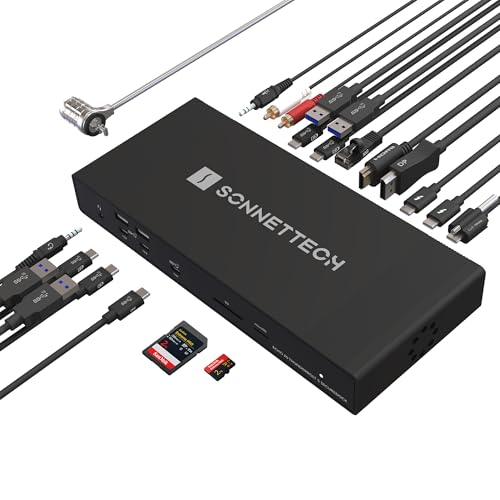
- Thunderbolt 5 with up to 80Gbps data and 120Gbps video
- Built-in 10Gb Ethernet for fast NAS and network workflows
- 20 total connections plus 140W laptop charging
Best For: Power users and creators who need top-tier connectivity, fast networking, and multi-display support.
Best for Maximum Connectivity
Sonnet Echo 20 Thunderbolt 4 SuperDock

- 20 total interfaces for broad workstation flexibility
- Up to 100W charging plus 4K/5K/6K/8K@60Hz display support
- Built-in M.2 NVMe slot for up to 8TB of extra storage
Best For: Users who want a port-rich dock with storage expansion and broad device compatibility.
Best for Mac Power Users
iVANKY FusionDock Ultra 26-in-1

- Quad 6K or dual 8K display support on compatible Macs
- Built-in 10GbE and four high-speed downstream USB-C ports
- 26-in-1 Mac-focused dock with SD 4.0, optical audio, and charging
Best For: MacBook Pro users who need maximum display output and pro-grade connectivity.
Best for Heavy-Duty Desktop Builds
UGREEN Maxidok Thunderbolt 5 Dock

- 17-in-1 port selection for a tidy workstation
- Up to 120Gbps Thunderbolt 5 with 8TB SSD support
- Single 8K or dual 6K@60Hz plus 2.5GbE
Best For: Power users who want a Thunderbolt 5 dock with storage, display, and networking built in.
Best for Built-In SSD Speed
Sonnet Echo 13 Thunderbolt 5 SSD Dock

- Built-in Kingston NVMe SSD up to 6000 MB/s
- Four Thunderbolt 5 ports plus USB-A, Ethernet, SD, and microSD
- Up to 140W laptop charging with 8K display support
Best For: Creative pros who want a Thunderbolt 5 dock with ultra-fast onboard SSD storage.
Best for MacBook Display Scaling
iVANKY FusionDock Pro 3 Thunderbolt 5 Dock

- Dual 6K/8K display support on select Mac and Windows laptops
- Intel certified Thunderbolt 5 with up to 120Gbps Bandwidth Boost
- 180W power supply, 2.5GbE, and 11-port desktop expansion
Best For: MacBook Pro/Max owners and Thunderbolt 5 laptop users who need advanced multi-monitor support.
Best for Thunderbolt 4 Expansion
Belkin Connect Thunderbolt 4 5-in-1 Dock

- 40Gbps Thunderbolt 4 connectivity
- Dual 4K/60Hz or single 8K display support
- 96W PD with a compact 5-in-1 layout
Best For: Users who want a compact Thunderbolt 4 dock for dual-monitor setups and laptop charging.
Best with Extra Features

- 14-in-1 port selection for broad desktop connectivity
- Thunderbolt 5 speeds with up to 120Gbps transfer
- 140W charging plus active cooling for sustained use
Best For: Creators and professionals who want a high-capacity Thunderbolt 5 dock with strong charging and display support.
Best Heavy-Duty Pick

- 3 Thunderbolt 4 ports plus 3 USB-A 3.2 ports
- Dual 4K@60Hz or single 8K display support
- 85W charging with included 140W GaN adapter
Best For: Mac and Windows users who want a fast Thunderbolt dock with strong display support and built-in charging.
Best Simple Pick
iVANKY 23-in-1 FusionDock Max 2

- Triple 6K display support on compatible Mac Max chips
- 3x Thunderbolt 5 ports with 10 additional USB ports
- 140W charging, 2.5GbE, and hybrid cooling
Best For: Mac power users building a high-performance multi-monitor Thunderbolt 5 workstation.
Best for Power Users – Sonnet Echo 20 Thunderbolt 5 SecureDock
If you want one of the most fully loaded sonnet thunderbolt 5 docks, the Echo 20 SecureDock is built for demanding desktop setups. It combines Thunderbolt 5 speed, 10Gb Ethernet, and a wide mix of display and USB ports so you can run a serious workstation from a single cable.
Best For: Creators, IT-managed workspaces, and power users who need fast networking, multiple displays, and lots of peripherals from one dock.
Pros:
- Thunderbolt 5 bandwidth with up to 80Gbps data and 120Gbps video capability
- Built-in 10Gb Ethernet for fast NAS access and high-speed network workflows
- 20 total connections, including 3 Thunderbolt 5 ports, HDMI, DisplayPort, and 9 USB 10Gbps ports
- 140W charging helps power laptops while keeping the setup cable-light
Cons:
- More dock than most casual users need
- Premium feature set means it’s likely overkill for basic office setups
- Full display support depends on your computer’s Thunderbolt 5 compatibility
For buyers comparing sonnet thunderbolt 5 docks, this model stands out when speed, port count, and networking matter more than price or simplicity. It’s a strong fit for high-end Mac, Windows, Chromebook, and iPad Pro workflows that need a true one-cable hub.
Best for Maximum Connectivity – Sonnet Echo 20 Thunderbolt 4 SuperDock
If you’re comparing sonnet thunderbolt 5 docks and want a hub that goes beyond the basics, the Sonnet Echo 20 Thunderbolt 4 SuperDock is a strong pick for heavy desktop setups. It combines a wide mix of display, storage, networking, and audio connections in one unit, making it easier to build a clean, flexible workstation.
Best For: Creators, power users, and hybrid Mac/Windows setups that need lots of ports, external storage, and reliable charging from a single dock.
Pros:
- Loads in 20 interfaces, including Thunderbolt, USB-A, USB-C, HDMI, Ethernet, audio, and SD
- Supports up to 100W laptop charging through the included Thunderbolt 4 cable
- Built-in M.2 NVMe SSD slot adds up to 8TB of fast internal expansion
- Compatible with a broad range of Apple, Windows, Chromebook, and iPad Pro systems
Cons:
- It is a Thunderbolt 4 dock, not a true Thunderbolt 5 model
- Large feature set may be more than casual users need
- SSD is sold separately
For buyers who care more about connectivity depth than chasing the newest standard, this dock still earns a place in sonnet thunderbolt 5 docks roundups. It’s especially appealing if you want an all-in-one station with serious expansion and display support.
Best for Mac Power Users – iVANKY FusionDock Ultra 26-in-1
If you’re comparing sonnet thunderbolt 5 docks and want a Mac-first option built for extreme display and bandwidth needs, the iVANKY FusionDock Ultra stands out. It’s designed for M1–M5 Pro/Max systems, adds 10GbE, and pushes up to quad 6K or dual 8K output for serious workstation setups.
Best For: MacBook Pro users who need the most aggressive multi-display and high-speed I/O package for pro workflows.
Pros:
- Supports up to quad 6K@60Hz or dual 8K@60Hz displays on compatible Mac systems
- Includes 10GbE plus four high-bandwidth downstream USB-C ports for demanding peripherals
- 26-in-1 layout adds SD 4.0, optical audio, and 45W USB-C charging
- Thermal design is built to sustain high throughput during long sessions
Cons:
- Not compatible with Windows, so it’s only for Mac buyers
- Premium feature set may be overkill for simpler desk setups
- Full display support depends on the exact Mac model and configuration
For Mac users shopping sonnet thunderbolt 5 docks, this is a heavy-duty alternative that prioritizes display count, network speed, and workstation-grade connectivity over broad cross-platform compatibility.
Best for Heavy-Duty Desktop Builds – UGREEN Maxidok Thunderbolt 5 Dock
If you want one of the most fully loaded sonnet thunderbolt 5 docks alternatives for a high-end workstation, this UGREEN dock stands out with Thunderbolt 5 bandwidth, built-in storage support, and serious display flexibility. It is built for users who need a dock that can handle peripherals, fast wired networking, and multi-monitor output without feeling cramped.
Best For: Power users with Thunderbolt 5 or 4 laptops who want a single dock for displays, storage expansion, and high-speed connectivity.
Pros:
- 17-in-1 layout adds plenty of ports for a clean, all-in-one desk setup
- Thunderbolt 5 support with up to 120Gbps and up to 8TB M.2 NVMe storage
- Strong display support for up to single 8K or dual 6K@60Hz on compatible systems
- Includes 2.5GbE networking and up to 140W charging for demanding laptops
Cons:
- Requires a Thunderbolt 5 or compatible Thunderbolt laptop to make sense
- Full feature set may be more than casual users need
- Windows gets the most flexible multi-display support
This is a strong pick if you need more than a basic hub and want a dock that behaves like a real workstation center. Among sonnet thunderbolt 5 docks contenders, it is especially appealing for users who value storage expansion, wired speed, and display headroom in one unit.
Best for Built-In SSD Speed – Sonnet Echo 13 Thunderbolt 5 SSD Dock
If you want one of the most capable sonnet thunderbolt 5 docks for a speed-focused workstation, the Sonnet Echo 13 stands out by combining a full dock with built-in NVMe storage. It’s a strong fit for creators and power users who need fast file access, broad port expansion, and a clean single-cable setup.
Best For: Creative professionals, editors, and multitaskers who want Thunderbolt 5 docking plus ultra-fast onboard SSD storage.
Pros:
- Integrated Kingston NVMe SSD reaches up to 6000 MB/s on Thunderbolt 5 systems
- Four Thunderbolt 5 ports plus USB-A, Ethernet, SD, microSD, and audio connections
- Delivers up to 140W laptop charging over the included Thunderbolt 5 cable
- Supports high-end display setups, including 8K on compatible Windows systems
Cons:
- Premium price compared with standard Thunderbolt 5 docks
- 8K display support is Windows-only
- May be more dock than casual users need
This is one of the more specialized sonnet thunderbolt 5 docks: ideal if you value fast internal storage and dense connectivity more than a simple docking station.
Best for MacBook Display Scaling – iVANKY FusionDock Pro 3 Thunderbolt 5 Dock
If you want one of the most capable sonnet thunderbolt 5 docks alternatives for a MacBook Pro or Max setup, this iVANKY dock stands out for its display support and high-bandwidth connectivity. It’s built for users who need a single desk dock that can handle serious multi-monitor workflows, fast charging, and modern peripherals without feeling underpowered.
Best For: MacBook Pro and Max users who want top-tier multi-display support, plus Windows laptop owners who need a future-ready Thunderbolt 5 dock.
Pros:
- Strong display output options, including dual 6K on supported Macs and dual 8K on Windows Thunderbolt 5 laptops
- Intel certified Thunderbolt 5 design with up to 120Gbps Bandwidth Boost for demanding workflows
- 180W power adapter can deliver up to 140W laptop charging
- Includes 2.5GbE networking and an 11-port layout for a cleaner desktop setup
Cons:
- Full monitor support depends heavily on your laptop chip and operating system
- Highest-resolution setups may require adapters if your displays lack USB-C inputs
- More dock than many casual users need if you only want basic USB expansion
This is a strong pick if you’re comparing sonnet thunderbolt 5 docks and care most about display flexibility, charging power, and future-proof throughput. It leans toward power users rather than simple plug-and-play buyers, but for the right workstation it offers a very compelling spec sheet.
Best for Thunderbolt 4 Expansion – Belkin Connect Thunderbolt 4 5-in-1 Dock
If you want a compact dock that covers serious workspace expansion without overcomplicating the setup, the Belkin Connect is a practical alternative to sonnet thunderbolt 5 docks for many Mac and Windows users. It delivers 40Gbps Thunderbolt 4 connectivity, dual 4K display support, and strong 96W charging in a low-profile design that fits clean desks and travel bags alike.
Best For: Mac and Windows users who want a simple, high-speed Thunderbolt dock for dual-monitor workstations and reliable laptop charging.
Pros:
- Thunderbolt 4 performance with up to 40Gbps data transfer
- Supports dual 4K/60Hz displays or one 8K/30Hz monitor
- 96W Power Delivery helps keep compatible laptops charged
- Compact 5-in-1 layout is easy to place on a desk
Cons:
- Not a Thunderbolt 5 dock, so it lacks the newest bandwidth tier
- Only one USB-A port, which may feel limited for legacy peripherals
- Dual-display support depends on host and OS compatibility
For buyers comparing sonnet thunderbolt 5 docks, this Belkin model stands out as a dependable Thunderbolt 4 option that prioritizes stability, display support, and charging over bleeding-edge specs. It is a smart pick if you need a straightforward dock today rather than the newest platform tier.
Best with Extra Features – Anker Prime TB5 14-in-1 Dock
If you’re comparing sonnet thunderbolt 5 docks and want maximum expansion in one hub, the Anker Prime TB5 Docking Station is built for heavy workstation use. It combines Thunderbolt 5 speeds, 140W charging, dual video support, and a wide mix of ports for a tidy, high-performance desk setup.
Best For: Creators, developers, and laptop users who need fast file transfers, strong charging, and flexible dual-display support.
Pros:
- 14-in-1 design with Thunderbolt 5, USB-C, USB-A, SD/TF, Ethernet, audio, and HDMI/DP options
- Up to 120Gbps transfer performance for moving large files quickly
- 140W max charging helps power demanding laptops and accessories
- Active cooling system is designed to maintain performance under load
Cons:
- Not ideal if you need external USB-A hub passthrough
- Dual-display support depends on laptop compatibility
- MacBooks with base M1/M2/M3 chips support only one external display
For buyers weighing sonnet thunderbolt 5 docks against a more feature-packed alternative, this Anker dock stands out for port density, charging power, and workstation-grade connectivity. It’s a strong pick if you want one dock to handle your laptop, monitors, and accessories with minimal compromise.
Best Heavy-Duty Pick – UGREEN Revodok Max 208
If you want a dock-style hub that covers serious I/O without overcomplicating setup, the UGREEN Revodok Max 208 is a practical pick for shoppers comparing sonnet thunderbolt 5 docks and similar high-end workstation hubs. It brings Thunderbolt 4 speed, dual-display support, and laptop charging into one compact unit, making it a strong fit for Mac and Windows users who need more ports and fewer adapters.
Best For: Mac and Windows users who want a fast Thunderbolt dock with strong display support, solid port variety, and integrated charging.
Pros:
- 3 Thunderbolt 4 ports plus 3 USB-A 3.2 ports for flexible expansion
- Supports dual 4K@60Hz or a single 8K display on compatible systems
- 85W laptop charging with the included 140W GaN power supply
- Works with Thunderbolt 4, Thunderbolt 3, USB4, and USB-C devices
Cons:
- Must stay connected to the included power adapter to function
- Mac models with base M chips are limited to one external display
- Not compatible with every USB-C device for dual-display use
This is a strong value-forward alternative if you’re comparing sonnet thunderbolt 5 docks but don’t need the newest standard yet. It prioritizes usable expansion, dependable display output, and tidy desk charging over cutting-edge branding, which makes it an easy recommendation for most power users.
Best Simple Pick – iVANKY 23-in-1 FusionDock Max 2
If you need one of the most capable sonnet thunderbolt 5 docks alternatives for a Mac-only setup, the iVANKY FusionDock Max 2 leans hard into speed, display support, and port density. It’s built for Mac M1–M5 Pro/Max systems and is a strong pick when you want a dock that can drive multiple high-resolution monitors while also handling fast storage, networking, and peripherals.
Best For: Mac users who want a high-end Thunderbolt 5 dock for a multi-monitor workstation and don’t need Windows compatibility.
Pros:
- Triple-display support up to 6K@60Hz on compatible Mac Max chips
- Three Thunderbolt 5 ports and 10 USB ports for a crowded desk setup
- 140W power delivery plus 2.5GbE for a clean all-in-one workstation
- Hybrid cooling system helps keep performance stable under load
Cons:
- Not compatible with Windows or Chrome laptops
- Display support varies by Mac chip tier, so buyers need to check compatibility carefully
- Restricted to one Mac and cannot be switched between multiple Macs
This is a specialized dock rather than a universal pick, but for the right Mac owner it offers an impressive mix of bandwidth, display flexibility, and expansion. If your shopping list for sonnet thunderbolt 5 docks is centered on maximum Mac productivity, this one deserves a close look.
How We Picked the Best Sonnet Thunderbolt 5 Docks
We prioritized real-world usefulness over raw spec sheets. The strongest options in this list offer a balanced mix of high-speed ports, reliable display output, strong laptop charging, and compatibility with modern Mac and Windows systems. We also considered whether each dock makes sense for a desk setup, mobile workstation, or content-creation rig.
Quick Comparison
Among Sonnet Thunderbolt 5 Docks, the main differences come down to port variety, monitor support, and whether the dock adds features like built-in SSD storage or 10Gb Ethernet. Some models lean toward all-around expansion, while others are better suited to users who need maximum display bandwidth or a cleaner single-cable setup.
Key Buying Factors for Sonnet Thunderbolt 5 Docks
Port Mix and Expansion
Check how many USB-A, USB-C, Thunderbolt, Ethernet, and video outputs you actually need. A dock with more total ports is not always better if the layout duplicates connections you will never use.
Display Support
Make sure the dock matches your monitor goals. If you want dual high-resolution monitors or a single 8K display, verify both the resolution and refresh-rate limits on your laptop platform, since Mac and Windows behavior can differ.
Charging Power
Higher wattage matters for larger laptops and performance systems. If you use a workstation-class notebook, look for stronger power delivery so the dock can charge the machine while driving peripherals and displays.
Storage and Network Features
Some Sonnet Thunderbolt 5 Docks add extras such as built-in NVMe storage or 2.5Gb/10Gb Ethernet. These are valuable if you move large files, edit media, or want a faster wired network for backups and cloud sync.
Who Should Buy Which Sonnet Thunderbolt 5 Docks?
Choose a premium Thunderbolt 5 dock if you want the cleanest all-in-one desk setup, especially with multiple high-resolution monitors and lots of peripherals. Creators and developers should favor models with stronger Ethernet, faster data paths, and enough charging headroom for demanding laptops.
If your workflow is lighter, a Thunderbolt 4 dock may still be the smarter buy, especially when you only need a few USB ports, one or two displays, and dependable charging. For users who want maximum flexibility, the best choice is the dock that matches your display count, laptop power needs, and expansion goals—not just the one with the longest feature list.
