
The best smart ultrawide editing monitors combine expansive workspace with useful features such as HDR, USB-C connectivity, built-in speakers, streaming platforms, and ergonomic adjustment. The right choice depends on whether you prioritize accurate color, high resolution, OLED contrast, or a flexible desktop setup.
We selected 10 wide-format displays ranging from practical 34-inch WQHD models to immersive 49-inch dual-QHD screens and an unusually sharp 5K2K option. Use the guide below to narrow the field by workflow, desk space, and budget.
Best 10 Smart Ultrawide Editing Monitors Picks for 2026
Smart Streaming Pick

- 34-inch QHD curved 21:9 display
- Built-in webOS streaming and AirPlay 2
- 100Hz refresh rate with up to 99% sRGB
Best For: Home offices, streaming, and everyday multitasking
High-Resolution Workstation

- 34-inch 5K 5120x2160 resolution
- Factory-calibrated color with delta-E below 2
- 65W USB-C power delivery and 120Hz refresh
Best For: Detailed photo/video editing and laptop workstations
Balanced Editing Workspace

- 34-inch curved WQHD 21:9 workspace
- 65W USB-C charging and Picture-by-Picture
- Height-adjustable stand with Reader Mode
Best For: Office work, laptop docking, and general editing
Extra-Wide Performance Pick

- 49-inch 32:9 screen equals roughly two 16:9 monitors
- 5120x1440 resolution with 144Hz and 1ms response
- HDR600, 1000R curve, and split-screen features
Best For: Large editing workspaces, gaming, and multitasking
Best Balanced Ultrawide

- 34-inch 3440×1440 IPS workspace
- Up to 99% sRGB with HDR10
- USB-C with up to 96W charging
Best For: Balanced editing and multitasking
Best for Maximum Workspace

- 49-inch 32:9 dual-QHD display
- USB-C docking with 90W charging
- 120Hz and DisplayHDR 400
Best For: Large-scale editing and multitasking
Best Smart Features
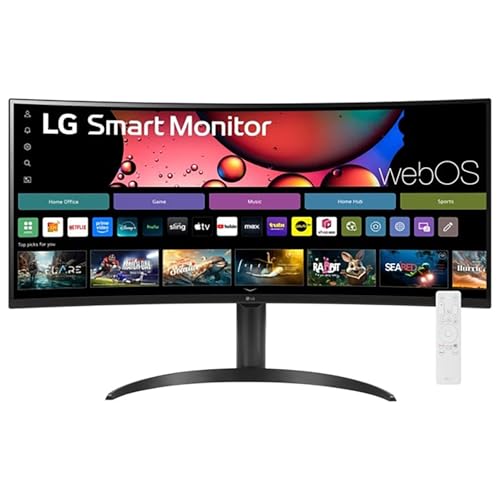
- 34-inch 3440×1440 curved display
- webOS streaming and Magic Remote
- HDR10 with up to 99% sRGB
Best For: Editing, streaming, and personal workspaces
Connectivity-Focused Ultrawide

- 49-inch 5120 x 1440 dual-QHD VA display
- USB-C with 65W power delivery and broad port selection
- PIP/PBP supports two input sources simultaneously
Best For: Multitaskers needing a large, flexible multi-device workspace
Value Dual-QHD Workstation

- 49-inch 5120 x 1440 curved VA display
- 120Hz refresh rate with Adaptive Sync and 1ms MPRT
- PIP/PBP, adjustable stand, and 120% sRGB coverage
Best For: Large-screen editing and gaming on a practical budget
Smart Streaming Pick – LG 34SR60QC-W
The LG 34SR60QC-W is a practical choice among smart ultrawide editing monitors for users who want a spacious 21:9 workspace with built-in entertainment features. Its 34-inch QHD curved screen, webOS access, and 100Hz refresh rate support everyday multitasking, streaming, and light creative work.
Best For: Home offices, multitasking, streaming, and general multimedia use.
Pros:
- 34-inch QHD resolution with a wide 3440×1440 workspace.
- Built-in webOS supports streaming apps and LG Channels without a separate device.
- Up to 99% sRGB coverage, HDR10, and a 100Hz refresh rate.
- AirPlay 2, HomeKit, HDMI, and USB connectivity add flexibility.
Cons:
- The VA panel and 300-nit brightness are better suited to general work than demanding professional color workflows.
- The Magic Remote is compatible but sold separately.
Choose this LG if smart-TV functionality is as important as screen space. It delivers a comfortable ultrawide format and useful wireless features, though specialized editors may prefer a higher-resolution display.
High-Resolution Workstation – INNOCN 34C1U
The INNOCN 34C1U stands out among smart ultrawide editing monitors for its unusually sharp 5K ultrawide resolution. Its 5120×2160 panel, factory calibration, wide color coverage, and USB-C power delivery make it well suited to detailed creative work and laptop-based productivity.
Best For: Photo and video editors, designers, researchers, and laptop users needing a high-resolution desktop workspace.
Pros:
- 5K 5120×2160 resolution provides high pixel density for detailed editing.
- Factory-calibrated color with delta-E below 2, 135% sRGB, and 106% DCI-P3 coverage.
- USB-C provides up to 65W power delivery for a one-cable laptop setup.
- 120Hz refresh rate, HDR400 readiness, and an adjustable stand support versatile use.
Cons:
- The VA panel and 350-nit brightness may not match specialized reference displays for demanding HDR work.
- Its high-resolution workload may require capable source hardware and software scaling.
This is the strongest fit for buyers who prioritize editing detail and connectivity over built-in streaming features. The 5K canvas and USB-C docking approach make it especially compelling for creative professionals working from a laptop or compact PC.
Balanced Editing Workspace – LG 34WR55QK-B
The LG 34WR55QK-B offers a balanced feature set for shoppers comparing smart ultrawide editing monitors for work and general creative tasks. Its curved 34-inch WQHD panel, USB-C connectivity with 65W power delivery, and Picture-by-Picture support help consolidate a multi-window or multi-device setup.
Best For: Office productivity, entry-level editing, laptop docking, and mixed business and multimedia use.
Pros:
- 3440×1440 resolution and a 21:9 layout allow multiple windows on one screen.
- USB-C supports up to 65W power delivery for compatible laptops.
- Picture-by-Picture can display two input sources simultaneously.
- Height and tilt adjustments, Reader Mode, HDR10, and up to 99% sRGB coverage add practicality.
Cons:
- The 100Hz refresh rate and 5ms response time are geared toward productivity rather than high-speed gaming.
- At 300 nits, HDR performance is likely best for everyday multimedia rather than premium HDR mastering.
This LG is a sensible middle ground when you need an ultrawide editing workspace plus convenient laptop connectivity. It is particularly useful for users who switch between two computers or want a cleaner desk without sacrificing screen area.
Extra-Wide Performance Pick – Samsung Odyssey G9 G91F
The Samsung Odyssey G9 G91F is the most expansive option in this group of smart ultrawide editing monitors, using a 49-inch 32:9 screen that is effectively equivalent to two 16:9 displays. Its 5120×1440 resolution, 144Hz refresh rate, 1000R curve, and HDR600 support suit users who want editing space and fast gaming performance in one display.
Best For: Users who want a dual-monitor-style workspace for gaming, photo/video editing, and intensive multitasking.
Pros:
- 49-inch 32:9 format provides an expansive single-screen workspace.
- 5120×1440 resolution, 144Hz refresh rate, and 1ms response time support smooth motion.
- DisplayHDR 600 and a 1000R curve create an immersive viewing experience.
- Picture-in-Picture, split-screen support, and AMD FreeSync Premium Pro aid multitasking and gaming.
Cons:
- The 45-inch-plus width requires substantial desk space and careful placement.
- The 280-nit listed brightness may limit the impact of HDR in especially bright rooms.
- Its extreme curve and 32:9 format may be excessive for users who prefer a conventional editing layout.
Pick the G91F when maximum horizontal workspace matters more than compactness. It can replace a two-monitor arrangement while adding strong gaming specifications, but its size and pronounced curve make it a specialized choice.
Best Balanced Ultrawide – LG 34U650A-B
The LG 34U650A-B is a practical choice among smart ultrawide editing monitors for users who want a spacious 21:9 workspace without moving up to a 49-inch display. Its 3440×1440 IPS panel, 100Hz refresh rate, HDR10 support, and USB-C connectivity suit multitasking, creative work, and everyday productivity.
Best For: Editors and multitaskers who want balanced image quality, laptop charging, and a comfortable 34-inch workspace.
Pros:
- 34-inch 3440×1440 IPS display provides generous room for multiple applications.
- Up to 99% sRGB coverage and HDR10 support help deliver balanced color and tonal detail.
- USB-C supports display, data, and up to 96W laptop charging through one cable.
- 100Hz refresh rate, built-in speakers, and adjustable stand add everyday convenience.
Cons:
- 300-nit brightness and a 1000:1 contrast ratio are more suited to general editing than demanding HDR work.
- The 34-inch screen offers less horizontal space than a 49-inch dual-QHD monitor.
For most home-office and creative setups, this LG offers a strong mix of workspace, connectivity, and comfort. Its IPS panel and USB-C charging make it especially easy to integrate into a laptop-centered editing desk.
Best for Maximum Workspace – Samsung 49-inch S95UA
The Samsung S95UA is built for demanding multitasking and wide editing timelines. As one of the largest smart ultrawide editing monitors here, it combines a 49-inch 32:9 curved screen with 5120×1440 resolution, USB-C docking, and DisplayHDR 400 support.
Best For: Video editors, designers, and professionals who need a dual-QHD canvas for multiple windows and long timelines.
Pros:
- 49-inch 32:9 display provides expansive dual-QHD workspace for side-by-side applications.
- 5120×1440 resolution and 3000:1 contrast ratio support detailed, high-contrast visuals.
- USB-C supports up to 90W charging, while DisplayPort, HDMI, and USB ports serve as a desk hub.
- 120Hz refresh rate, HDR400 support, built-in speakers, and height adjustment improve versatility.
Cons:
- Its 45.18-inch width and 32.2-pound weight require substantial desk space.
- The 32:9 format may be excessive for users who do not need multiple applications open at once.
This Samsung is the strongest workspace-first option in the group. Its panoramic format can replace a dual-monitor setup, though buyers should confirm that their desk and workflow can accommodate its substantial footprint.
Best Smart Features – LG 34SR65QC-B
The LG 34SR65QC-B stands out among smart ultrawide editing monitors by combining a 34-inch 3440×1440 curved display with webOS streaming and a Magic Remote. It is a flexible option for users who want one screen for editing, multitasking, entertainment, and connected-device use.
Best For: Personal workspaces that combine editing, streaming, and convenient smart-TV-style controls.
Pros:
- 34-inch 21:9 WQHD display offers 34% more horizontal view than a 16:9 screen.
- HDR10 and up to 99% sRGB coverage support vibrant everyday visuals.
- Built-in webOS provides access to streaming services and LG Channels without a separate device.
- Magic Remote, 100Hz refresh rate, adjustable stand, and FreeSync add convenience.
Cons:
- Its VA panel and 300-nit brightness are better suited to personal and general-purpose use than specialized HDR mastering.
- Connectivity is centered on HDMI, USB, and auxiliary connections rather than USB-C laptop docking.
- The included one-year warranty is shorter than the Samsung’s listed three-year manufacturer warranty.
This LG is a compelling hybrid monitor for buyers who value built-in entertainment features as much as editing space. Choose it when webOS and the Magic Remote matter; choose a USB-C-focused model for a cleaner laptop docking setup.
OLED Smart Gaming Pick – LG UltraGear 34GX90SA-W
The LG UltraGear 34GX90SA-W is a premium choice among smart ultrawide editing monitors for users who also want exceptionally fast gaming performance. Its 34-inch 3440 x 1440 OLED panel combines a dramatic 800R curve, 240Hz refresh rate, wide color coverage, and built-in webOS streaming.
Best For: Gamers, streamers, and editors who want OLED contrast, built-in entertainment features, and high refresh performance in one monitor.
Pros:
- OLED panel offers deep blacks, a 1.5M:1 contrast ratio, and DisplayHDR True Black 400.
- 240Hz refresh rate and 0.03ms response time support exceptionally smooth motion.
- webOS provides access to streaming and cloud-gaming services without a PC or console.
- USB Type-C supports up to 65W power delivery, alongside HDMI 2.1 and DisplayPort 1.4.
Cons:
- The steep 800R curve may not suit every editing workspace.
- Its 34-inch 3440 x 1440 canvas is smaller than the 49-inch dual-QHD alternatives here.
- The feature set is heavily gaming-focused for buyers seeking a strictly productivity-oriented display.
This is the most advanced option in the group for fast gaming and cinematic OLED image quality. Choose it when webOS convenience and contrast matter more than maximum desktop width.
Connectivity-Focused Ultrawide – INNOCN 49C1R
The INNOCN 49C1R is a strong option for shoppers comparing smart ultrawide editing monitors with expansive workspace and flexible connectivity. Its 49-inch 32:9 panel delivers 5120 x 1440 resolution, while USB-C, PIP/PBP, and a built-in RJ45 port support a versatile desk setup.
Best For: Editors, multitaskers, and gamers who want a single 49-inch screen for multiple sources and devices.
Pros:
- Dual-QHD resolution provides substantial horizontal workspace for timelines and side-by-side applications.
- USB-C offers 65W power delivery, with DisplayPort, HDMI 2.1, USB-A, USB-B, and RJ45 connectivity.
- PIP/PBP lets you display content from two separate input sources at once.
- 120Hz refresh rate, Adaptive-Sync, HDR400, and 99% sRGB coverage support both work and gaming.
Cons:
- The VA panel’s 400-nit brightness is more modest than the LG’s OLED peak brightness.
- Its glossy finish may be less suitable for brightly lit editing rooms.
- The monitor has a one-year manufacturer warranty.
The 49C1R is the practical productivity choice when screen real estate and input flexibility are priorities. Its PIP/PBP tools make it especially useful for comparing sources or keeping multiple workflows visible.
Value Dual-QHD Workstation – Amzfast AMZG49C7U
The Amzfast AMZG49C7U brings a broad 49-inch canvas to the smart ultrawide editing monitors category without sacrificing gaming-friendly speed. Its 5120 x 1440 resolution, 32:9 aspect ratio, PIP/PBP support, and adjustable stand make it suited to both large desktop workflows and immersive play.
Best For: Budget-conscious editors, office users, and gamers who want dual-QHD space with flexible positioning.
Pros:
- 49-inch 5120 x 1440 display offers wide room for timelines, documents, and side-by-side apps.
- 120Hz refresh rate and Adaptive Sync help reduce tearing and stuttering.
- 120% sRGB coverage, HDR support, and a 3000:1 contrast ratio produce vivid imagery.
- Height, swivel, and tilt adjustments complement PIP/PBP and multiple HDMI/DisplayPort inputs.
Cons:
- Its 350-nit brightness is lower than the INNOCN’s listed 400 nits.
- 120Hz is supported through DisplayPort 1.4, so connection choice matters.
- The supplied details do not list USB-C connectivity or built-in speakers.
The AMZG49C7U is a sensible fit when maximum workspace and adjustability matter more than premium panel technology. It offers a useful balance of editing room, gaming responsiveness, and multi-source support.
How We Picked the Best Smart Ultrawide Editing Monitors
We compared these displays by resolution, panel technology, refresh rate, color coverage, HDR support, connectivity, built-in smart features, and ergonomic practicality. For editing, resolution and color consistency matter more than gaming speed alone, while USB-C, picture-by-picture modes, and integrated speakers can simplify a modern workstation.
Specifications can vary by input, operating system, and picture mode. Treat advertised HDR, response time, and color-gamut figures as useful indicators rather than guarantees of professional calibration. Critical photo, video, or print work may still require a colorimeter.
Quick Comparison
| Best For | Look For | Recommended Size |
|---|---|---|
| Everyday photo and video editing | WQHD or higher, IPS, wide-gamut coverage | 34 inches |
| Maximum timeline and multitasking space | 32:9 aspect ratio, DQHD resolution, PBP/PIP | 49 inches |
| Fine detail and large canvases | 5K2K resolution and strong host connectivity | 34 inches |
| Deep blacks and fast previews | OLED, HDR, high refresh rate | 34 inches |
Key Buying Factors for Smart Ultrawide Editing Monitors
Resolution and Workspace
A 34-inch 3440×1440 display is a strong balance of sharpness, usable canvas, and manageable desk requirements. A 49-inch 5120×1440 monitor replaces two 27-inch QHD screens horizontally, but it needs a wide desk and may require window-management software. For detailed stills, UI-heavy projects, and high-resolution footage, 5120×2160 provides noticeably more vertical pixels.
Panel, Color, and HDR
IPS panels are generally dependable for consistent viewing angles and editing versatility. OLED models deliver superior black levels and contrast, but static interface elements call for sensible brightness and screen-care habits. Check stated sRGB or wider-gamut coverage, factory calibration claims, and whether the monitor offers a useful sRGB mode. HDR is most valuable when the display has enough brightness and contrast to render highlights convincingly.
Connectivity and Smart Features
USB-C is especially useful for laptops, but confirm its power-delivery wattage and whether it carries video, data, or both. DisplayPort and HDMI provide broader compatibility. Built-in webOS or other smart platforms can support streaming without a computer, while speakers, remote controls, and AirPlay-style features reduce accessory clutter but do not replace dedicated audio for serious production.
Ergonomics and Desk Fit
Measure the stand footprint, viewing distance, and desk width before buying. Height adjustment and VESA support are valuable on large curved screens. Curvature can improve peripheral viewing, but extreme 32:9 models may need more head movement and a central seating position.
Who Should Buy Which Smart Ultrawide Editing Monitors?
Choose a 34-inch WQHD IPS model for general editing, office work, and streaming with a sensible footprint. Select the 5K2K INNOCN when fine detail and vertical workspace matter most. A 49-inch DQHD display suits editors who keep timelines, bins, browsers, and reference windows open simultaneously. Pick the OLED ultrawide for premium contrast and responsive previews, provided you can manage burn-in risk. Smart LG models are appealing when built-in streaming and webOS convenience matter, while USB-C-equipped options are best for a clean laptop-centered setup.
