
The best smart OLED reference monitors combine OLED contrast with wide-gamut color, high resolution, and increasingly useful smart or productivity features. That makes them appealing to video editors, designers, photographers, gamers, and hybrid users who want one premium display.
This roundup compares 10 options ranging from color-focused ASUS ProArt models to Samsung smart monitors and fast LG and MSI gaming displays. Use the guide below to match panel quality, connectivity, ergonomics, and refresh rate to your workload.
Best 10 Smart OLED Reference Monitors Picks for 2026
Best Mac-Friendly Pick
ASUS ProArt 27-inch 4K QD-OLED

- 4K QD-OLED with 120Hz refresh
- Calman Verified, Delta E < 1.5
- USB-C with 96W Power Delivery
Best For: Mac users and creative professionals needing accurate color and flexible connectivity
Best Smart Feature Set

- Tizen OS with streaming and Microsoft 365
- 165Hz refresh and 0.03ms response
- Built-in 12MP 4K camera and 90W USB-C
Best For: Mixed-use desks combining work, entertainment, gaming, and smart features
Best for Color Calibration

- Built-in motorized colorimeter
- True 10-bit color and 99% DCI-P3
- Five-year warranty with registration
Best For: Professional photo, video, and color-critical production work
Best for OLED Gaming and Streaming
Samsung M9 32-inch Smart Monitor

- 4K QD-OLED with deep blacks
- 165Hz refresh and 0.03ms response
- Gaming Hub and direct streaming access
Best For: Gamers and streamers wanting a standalone smart display
Balanced QD-OLED Pick
Acer CE270K 4K QD-OLED Monitor

- 27-inch 4K QD-OLED panel with 99% DCI-P3 coverage
- 120Hz refresh rate and 0.03ms response time
- Full ergonomic stand and built-in eye-care features
Best For: Mixed office work, gaming, and media viewing
High-Refresh Gaming Leader
LG UltraGear 32GX870A-B OLED Monitor

- Dual mode: 4K/240Hz or Full HD/480Hz
- 0.03ms response time with adaptive-sync support
- Bright OLED panel with up to 1300 nits peak brightness
Best For: Competitive gaming across high-resolution and high-speed modes
Best Desk-Ready All-Rounder

- 31.6-inch 4K QD-OLED with 99% DCI-P3
- USB-C offers up to 90W power delivery
- Five-speaker AI-enhanced spatial audio system
Best For: Desktop setups using a USB-C laptop connection
High-Speed QD-OLED Pick

- 27-inch WQHD Quantum Dot OLED panel
- 240Hz refresh rate and 0.03ms response time
- OLED Care 2.0 and adjustable stand
Best For: Competitive gamers seeking fast QD-OLED performance
Color-Accurate OLED Work-and-Play Pick
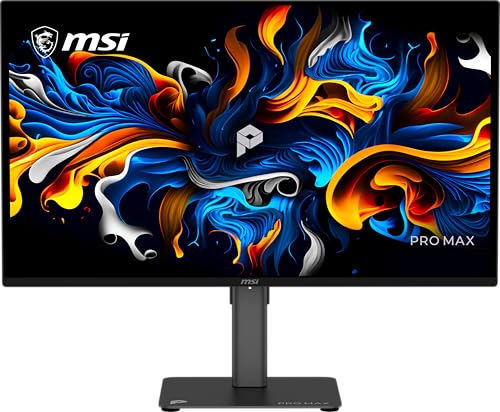
- 27-inch QHD QD-OLED display at 144Hz
- PANTONE validated with Delta E ≤2
- Height adjustment, speakers, and three-year burn-in warranty
Best For: Mixed work and gaming setups prioritizing color consistency
Best Mac-Friendly Pick – ASUS ProArt 27-inch 4K QD-OLED
The ASUS ProArt PA279CDV is a strong choice for creators seeking smart OLED reference monitors with sharp 4K detail, wide-gamut color, and convenient laptop connectivity. Its 120Hz QD-OLED panel, Calman Verified factory calibration, and USB-C power delivery make it well suited to mixed creative and everyday workflows.
Best For: Mac users, photo and video editors, and professionals who want one monitor for accurate color, fast refresh, and laptop docking.
Pros:
- 4K QD-OLED panel with 120Hz refresh, 0.1ms response time, and DisplayHDR True Black 400.
- True 10-bit color, 99% DCI-P3 coverage, and factory calibration with Delta E < 1.5.
- USB-C supports up to 96W Power Delivery, while Auto KVM simplifies switching between two computers.
- Ergonomic stand, built-in USB hub, DisplayPort daisy chaining, and three-year warranty.
Cons:
- Its 27-inch screen is smaller than the 31.5- and 32-inch alternatives here.
- It lacks the built-in streaming platform and camera offered by Samsung’s smart monitor.
Choose this ProArt model when color accuracy and flexible workstation connectivity matter more than built-in entertainment features. It offers an especially practical balance for a Mac-centered desk.
Best Smart Feature Set – Samsung 32-inch M9 4K QD-OLED
The Samsung M9 M90SF combines a large 4K QD-OLED screen with the connected features expected from smart OLED reference monitors. Tizen OS, Samsung Vision AI, direct streaming, Microsoft 365 access, and a 165Hz refresh rate make it a versatile display for work, entertainment, and gaming.
Best For: Users who want a single display for streaming, office work, gaming, and high-contrast 4K viewing.
Pros:
- 32-inch 4K QD-OLED panel with 1,000,000:1 contrast and DisplayHDR True Black 400.
- 165Hz refresh rate, 0.03ms GtG response time, and both G-Sync Compatible and FreeSync Premium Pro support.
- Vision AI provides content optimization and upscaling, while Tizen enables streaming and smart-home access.
- Includes a 12MP 4K camera, 90W USB-C charging, ergonomic pivot stand, and three-year burn-in warranty coverage.
Cons:
- Its smart features may be unnecessary for users who only need a conventional reference monitor.
- The bundle includes extras, which may not appeal to buyers seeking the simplest setup.
This is the most feature-rich option for a mixed-use desk. Its smart platform and built-in camera broaden its usefulness beyond color-critical work, while the QD-OLED panel and high refresh rate support demanding visuals and gaming.
Best for Color Calibration – ASUS ProArt 32-inch 4K OLED
The ASUS ProArt PA32DC is built for color-critical workflows where calibration control is a priority. Among smart OLED reference monitors, it stands out with a built-in motorized colorimeter, automatic calibration support, true 10-bit output, and HDR compatibility for professional photo and video work.
Best For: Professional editors, colorists, photographers, and studios that need repeatable calibration and a large 4K canvas.
Pros:
- 31.5-inch 4K RGB-stripe OLED panel with 99% DCI-P3 coverage and 1,000,000:1 contrast.
- Built-in colorimeter works with ASUS ProArt Calibration and supported professional calibration software.
- True 10-bit color and support for HDR10 and HLG help with demanding production workflows.
- Offers USB-C, DisplayPort, three HDMI ports, USB hub functionality, and a five-year warranty with registration.
Cons:
- The 60Hz refresh rate is less suited to high-refresh gaming than the other OLED options.
- It does not include the smart streaming and AI features found on Samsung’s M9.
- Its professional calibration hardware may be excessive for general office use.
For users who prioritize calibration consistency over smart entertainment features or gaming speed, the PA32DC is the specialist choice. Its integrated colorimeter can simplify maintaining accurate output over time.
Best for OLED Gaming and Streaming – Samsung M9 32-inch Smart Monitor
The 2025 Samsung M9 M90SF is a practical pick for shoppers who want smart OLED reference monitors that also function as a gaming and streaming hub. Its 4K QD-OLED panel delivers deep blacks, while Gaming Hub, Samsung TV Plus, Vision AI, and a 165Hz refresh rate support a broad range of uses.
Best For: Gamers and streamers who want direct access to content without relying on a separate PC or console.
Pros:
- 4K QD-OLED imaging provides deep blacks, strong contrast, and detailed picture quality.
- 165Hz refresh and 0.03ms GtG response time are designed for fluid fast-paced gaming.
- Gaming Hub and streaming services provide access to games and content directly from the monitor.
- Thermal modulation, logo and taskbar detection, and an automatic screen saver help address OLED burn-in risks.
Cons:
- The listed specifications provide fewer physical ports than the bundled M9 listing.
- Its gaming and smart features may be unnecessary for a dedicated color-calibration workstation.
- The supplied details list a one-year manufacturer warranty.
This M9 makes the most sense when entertainment is central to the purchase. It delivers the same compelling high-refresh QD-OLED format as a gaming display while adding standalone streaming and cloud-gaming conveniences.
Balanced QD-OLED Pick – Acer CE270K 4K QD-OLED Monitor
For shoppers comparing smart OLED reference monitors for office work and gaming, the Acer CE270K combines a sharp 27-inch 4K QD-OLED panel with a 120Hz refresh rate. Its wide DCI-P3 coverage, HDR support, extensive stand adjustments, and eye-care features make it a practical all-around display.
Best For: Users who want a compact 4K OLED monitor for mixed office work, gaming, and media viewing.
Pros:
- 4K QD-OLED display with true 10-bit color, 99% DCI-P3 coverage, Delta E<2, and DisplayHDR True Black 400.
- 120Hz refresh rate and 0.03ms response time support fluid motion, with FreeSync Premium Pro and G-Sync compatibility.
- Highly adjustable stand with height, tilt, swivel, and pivot movement.
- Eyesafe 2.0 certification and BlueLightShield Pro add eye-comfort features.
Cons:
- The 27-inch screen is smaller than the 32-inch alternatives in this roundup.
- Its 120Hz refresh rate is less suited to buyers seeking an extremely high-refresh gaming display.
The Acer is a strong choice when color accuracy, 4K detail, ergonomic flexibility, and everyday usability matter more than maximum size or refresh rate.
High-Refresh Gaming Leader – LG UltraGear 32GX870A-B OLED Monitor
Among smart OLED reference monitors, the LG UltraGear stands out for buyers who prioritize fast competitive gaming without giving up 4K image quality. Its dual-mode design switches between 4K at 240Hz and Full HD at 480Hz, while OLED contrast, HDR support, and adaptive sync enhance fast-moving scenes.
Best For: Competitive gamers who want both high-resolution visuals and exceptionally high refresh rates.
Pros:
- Dual-mode operation provides 4K at up to 240Hz or Full HD at up to 480Hz.
- 0.03ms response time, G-SYNC compatibility, and FreeSync Premium Pro support responsive, tear-reduced gameplay.
- Micro Lens Array+ technology reaches up to 1300 nits peak brightness, with DisplayHDR True Black 400 support.
- Includes USB Type-C, DisplayPort 2.1, built-in speakers, adjustable stand, webOS features, and OLED care tools.
Cons:
- Full HD mode is required to reach the maximum 480Hz refresh rate.
- Its gaming-focused feature set may be more than needed for basic office use.
The LG is the most performance-oriented option here, offering unusual flexibility for players who alternate between detailed 4K games and speed-focused competitive titles.
Best Desk-Ready All-Rounder – Dell S3225QC 32 Plus QD-OLED
The Dell S3225QC is a practical choice for shoppers seeking smart OLED reference monitors that also support a streamlined desktop setup. Its 31.6-inch 4K QD-OLED screen pairs accurate color and HDR with a 120Hz refresh rate, while USB-C connectivity, 90W power delivery, and spatial audio add everyday convenience.
Best For: Desktop users who want a large 4K OLED screen with USB-C laptop connectivity and built-in audio.
Pros:
- 31.6-inch 4K QD-OLED display with Dolby Vision, DisplayHDR True Black 400, and 99% DCI-P3 coverage.
- USB-C connection supports up to 90W power delivery for a cleaner laptop setup.
- Five 5W speakers provide AI-enhanced 3D spatial audio with head tracking.
- 120Hz refresh rate, 0.03ms response time, and FreeSync Premium Pro support smooth motion.
Cons:
- It offers a single HDMI port.
- The included warranty is one year, shorter than the Acer’s listed three-year coverage.
The Dell emphasizes comfort and convenience as much as image quality, making it especially appealing for workstations that need one-cable connectivity, large-screen detail, and integrated sound.
Immersive Smart OLED Gaming Pick – LG UltraGear 34GX90SA-W
For buyers seeking smart OLED reference monitors with an immersive ultrawide format, the LG UltraGear 34GX90SA-W combines a 34-inch WQHD OLED display, an 800R curve, and built-in webOS streaming. Its 240Hz refresh rate and 0.03ms response time also make it especially suited to fast-paced gaming.
Best For: Gamers who want an ultrawide OLED monitor with smart streaming and cloud-gaming features.
Pros:
- 34-inch 3440 x 1440 OLED panel with up to 98.5% DCI-P3 coverage and DisplayHDR True Black 400.
- 240Hz refresh rate and 0.03ms response time support fast, smooth gameplay.
- webOS provides access to streaming services, LG Channels, and supported cloud-gaming platforms.
- HDMI 2.1, DisplayPort 1.4, and USB Type-C with 65W power delivery offer flexible connectivity.
Cons:
- The steep 800R curve may not suit every desk setup or viewing preference.
- Its ultrawide 3440 x 1440 format is less conventional than a standard 16:9 monitor.
The LG stands out when immersion and built-in smart features matter as much as OLED image quality. Its combination of ultrawide resolution, high refresh rate, and webOS makes it a versatile entertainment and gaming display.
High-Speed QD-OLED Pick – MSI MAG 274QP QD-OLED X24
The MSI MAG 274QP QD-OLED X24 is a strong choice among smart OLED reference monitors for buyers prioritizing competitive gaming performance and color-rich QD-OLED imaging. Its 27-inch WQHD panel pairs 240Hz operation with a 0.03ms response time, while MSI software adds OLED care and gaming assistance.
Best For: Competitive PC and console gamers who want a fast 27-inch QD-OLED display with adjustable ergonomics.
Pros:
- Quantum Dot OLED panel supports 10-bit color, 1.07 billion colors, and 99% DCI-P3 coverage.
- 240Hz refresh rate, 0.03ms response time, and VESA ClearMR 13000 rating target smooth motion.
- OLED Care 2.0, AI Crosshair, console modes, and Game Assistance add useful gaming tools.
- Height, tilt, swivel, and VESA 100mm mounting support flexible positioning.
Cons:
- The 27-inch QHD screen provides less workspace than an ultrawide monitor.
- Its feature set is focused primarily on gaming rather than built-in smart streaming.
This MSI is best evaluated as a performance-focused QD-OLED gaming monitor. It delivers an unusually fast refresh and response combination, plus color accuracy and OLED maintenance features that support long-term use.
Color-Accurate OLED Work-and-Play Pick – MSI PRO MAX 271QPX14G
For buyers comparing smart OLED reference monitors for both productivity and gaming, the MSI PRO MAX 271QPX14G emphasizes color validation, HDR support, and compatibility with adaptive-sync standards. Its 27-inch QHD QD-OLED panel runs at 144Hz and includes a matte finish, built-in speakers, and height adjustment.
Best For: Users who want a color-conscious QD-OLED monitor for everyday work, media, and responsive gaming.
Pros:
- QHD QD-OLED panel combines OLED image quality with a 0.03ms response time.
- PANTONE validation and Delta E ≤2 support color consistency for supported workflows.
- DisplayHDR, FreeSync, and G-SYNC compatibility enhance HDR viewing and gaming flexibility.
- Matte screen finish, height adjustment, and built-in speakers suit practical desktop use.
Cons:
- Its 144Hz refresh rate is lower than the 240Hz options in this roundup.
- Connectivity is limited to HDMI and DisplayPort, with one HDMI port listed.
The PRO MAX 271QPX14G favors balanced daily usability over maximum gaming speed. Its color-focused features, matte surface, ergonomic adjustment, and three-year burn-in warranty make it a practical option for mixed work and entertainment setups.
How We Picked These Smart OLED Reference Monitors
We selected displays that offer a meaningful combination of OLED or QD-OLED image quality, strong color coverage, high contrast, and features suited to demanding desktop use. The list includes dedicated professional monitors with Calman validation or built-in calibration hardware, as well as smart and gaming-oriented models that can serve as capable creative displays.
We also considered resolution, refresh rate, response time, connectivity, adaptive sync support, panel size, and practical extras such as USB-C, built-in smart platforms, gaming hubs, and audio features. Because “reference” can mean different things, not every model is equally suitable for final color grading; buyers should prioritize measured accuracy and calibration controls when that is the main purpose.
Quick Comparison
- Best for serious color work: ASUS ProArt PA32DC, with a built-in motorized colorimeter and ΔE below 1.
- Best compact professional option: ASUS ProArt PA279CDV, offering 4K resolution, USB-C, wide gamut, and Calman verification.
- Best smart all-rounder: Samsung M9 M90SF, combining 4K QD-OLED, 165Hz, smart features, and Gaming Hub access.
- Best for 4K gaming: LG 32GX870A-B, with a 240Hz mode, OLED response, and adaptive sync support.
- Best for ultrawide gaming: LG 34GX90SA-W, with a curved 3440×1440 panel and 240Hz refresh rate.
- Best high-refresh 1440p value candidates: MSI MAG 274QP X24 and MSI PRO MAX 271QPX14G.
Key Buying Factors for Smart OLED Reference Monitors
Color Accuracy and Gamut
Look for published Delta E results, calibration certification, and coverage of the color space you use. DCI-P3 is useful for video and modern content, while sRGB accuracy remains important for web and general design work. A built-in colorimeter is especially valuable if you need repeatable calibration over time.
Resolution and Screen Size
4K is preferable for detailed photo, video, and design work, particularly on 31.5- or 32-inch screens. A 27-inch 4K display provides a very sharp desktop image, while 1440p models can deliver higher frame rates with less demand on the graphics card. Ultrawide screens provide more timeline or multitasking space but are not a substitute for 4K pixel density.
Refresh Rate and Motion
Creators may be satisfied with 120Hz or 144Hz, while competitive gamers benefit from 240Hz. OLED response times are extremely fast, but check whether the advertised refresh rate applies at the desired resolution and connection type.
Connectivity, Smart Features, and Protection
USB-C is useful for laptop charging and one-cable video connections, though power delivery varies. HDMI 2.1 can matter for modern consoles and high-refresh 4K gaming. Smart platforms, streaming apps, AI features, or Gaming Hub access add convenience, but they should not outweigh color performance if the monitor is for professional mastering. OLED buyers should also use the panel’s pixel-refresh and static-image protection features.
Who Should Buy Which Smart OLED Reference Monitors?
Choose the ASUS PA32DC if calibration consistency is central to your work. The ASUS PA279CDV is a better fit for creators who want professional color features in a smaller 27-inch 4K format. Samsung’s M9 models suit hybrid users who want a smart TV-like experience, gaming features, and a high-quality desktop display.
For gaming-first buyers, the LG 32GX870A-B is the strongest 4K high-refresh choice, while the LG 34GX90SA-W is better for immersive ultrawide play and multitasking. Acer’s 4K QD-OLED is a sensible office-oriented alternative. Dell’s S3225QC is appealing for users who value a large 4K QD-OLED panel and integrated audio features. Finally, the MSI 27-inch QD-OLED models make sense for buyers prioritizing fast 1440p gaming and a smaller footprint over 4K detail.
