
The best smart golf launch monitors turn practice swings into useful data, helping you understand distance, club speed, ball flight, and consistency without relying on guesswork.
We compared portable radar units, camera-based systems, swing-speed trackers, and simulator-ready models to help golfers choose the right balance of accuracy, features, portability, and price.
Best 10 Smart Golf Launch Monitors Picks for 2026
Best All-Around Pick

- Tracks key club and ball metrics through the Garmin Golf app
- Includes training mode, shot dispersion, and swing video recording
- Offers up to 10 hours of battery life and IPX7 water resistance
Best For: Golfers wanting versatile practice at home, indoors, or on the range
Best for Detailed Tracking

- Combines Doppler radar with dual-camera shot tracking
- Measures 15 metrics, including spin, carry, and club path
- Supports swing analysis and more than 30,000 simulator courses with Premium
Best For: Golfers seeking detailed data and simulator-focused practice
Best Renewed Value
- Provides R10 shot tracking and training features in a renewed package
- Includes swing videos, dispersion charts, and Garmin Golf app support
- Comes with a tripod, phone mount, case, and up to 10 hours of battery life
Best For: Golfers comfortable with renewed gear who want R10 functionality
Best iOS Option

- Works with iPhone and iPad for portable shot feedback
- Tracks ball speed, club speed, launch angle, carry, and shot shape
- Adds video replay with an on-screen shot tracer
Best For: Apple-device users practicing at the range, backyard, or indoors
Best for Voice Feedback

- Real-time LCD and voice feedback
- Ball-free swing-speed mode
- Stores club statistics
Best For: Portable indoor and outdoor practice
Best for Complete Shot Data

- Measures extensive club and ball metrics
- Includes one year of Core Foresight
- Adds structured game-improvement tools
Best For: Detailed practice and swing analysis
Best Budget Speed Trainer

- Measures club speed without a ball
- No Wi-Fi, Bluetooth, or app required
- Stores up to 500 swings
Best For: Portable speed and distance training
Premium Data Pick

- Tracks 16 club and ball metrics
- Built-in camera supports swing review
- Portable with iOS and Android connectivity
Best For: Detailed practice and instructor-led swing analysis
Speed Training Pick
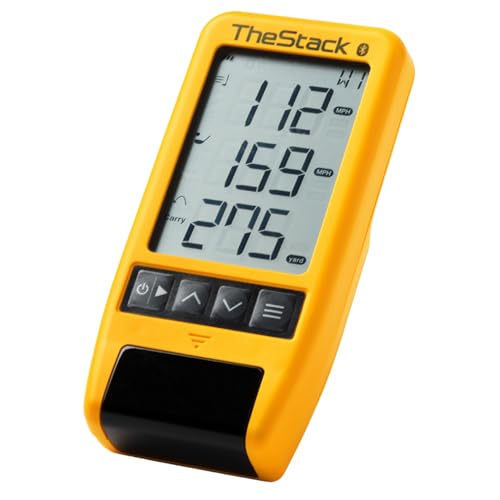
- Measures swing and ball speed
- Connects to TheStack App by Bluetooth
- Includes gamified wedge-training access
Best For: Speed training and focused wedge practice
Simulator Value Pick

- Tracks 20+ club and ball metrics
- Includes 12 months of premium app access
- Works with E6 Connect and GSPro
Best For: Versatile indoor, outdoor, and simulator practice
Best All-Around Pick – Garmin Approach R10
The Garmin Approach R10 is a versatile choice among smart golf launch monitors for golfers who want portable practice at home, indoors, or on the driving range. Pair it with the Garmin Golf app to review key swing and ball metrics, training data, shot dispersion, and automatically recorded swing videos.
Best For: Golfers seeking a portable, app-connected monitor with long battery life and virtual-course features.
Pros:
- Tracks club speed, ball speed, swing tempo, spin, launch angle, and more.
- Training mode provides club-by-club statistics and shot-dispersion charts.
- Automatically recorded swing videos can include the metrics from each swing.
- Up to 10 hours of battery life and IPX7 water resistance support outdoor use.
Cons:
- Requires a compatible smartphone and the Garmin Golf app for metric viewing.
- Virtual rounds and tournaments require an active subscription.
- Listed accuracy is approximately ±3 mph for club-head speed and ±1 mph for ball speed.
With its broad practice modes, phone mount, carrying case, and extended battery life, the R10 is a well-rounded option for golfers who want one monitor for multiple practice settings.
Best for Detailed Tracking – Rapsodo MLM2PRO
The Rapsodo MLM2PRO stands out among smart golf launch monitors for its combination of Doppler radar and dual cameras. It captures 15 metrics, including spin, launch angle, carry distance, club path, and club speed, while also supporting swing video and slow-motion impact review.
Best For: Golfers who want detailed shot data, camera-based swing feedback, and simulator practice.
Pros:
- Uses Doppler radar and dual cameras for shot tracking.
- Captures 15 metrics, including spin rate, spin axis, carry distance, and club path.
- Includes swing capture from multiple angles and slow-motion contact review.
- Premium access includes more than 30,000 home golf simulator courses.
Cons:
- The included Premium/Core trial lasts 21 days.
- Simulator courses and some features require a Premium membership.
- Its advanced feature set may be more than a golfer needs for basic range feedback.
The MLM2PRO is a strong fit for golfers building a more immersive practice setup, especially those who value both measurable shot data and visual swing analysis.
Best Renewed Value – Garmin Approach R10 Renewed
This renewed Garmin Approach R10 delivers the same practical smart golf launch monitor concept in a refurbished package. It works at home, indoors, or on the range, and pairs with the Garmin Golf app to display shot metrics, training statistics, dispersion charts, and swing videos.
Best For: Golfers who want the R10 feature set at a potentially lower renewed-product price.
Pros:
- Tracks club speed, ball speed, tempo, spin, launch angle, and other metrics.
- Training mode organizes stats by club and provides estimated shot-dispersion charts.
- Supports automatic swing-video recording with associated metrics.
- Includes a tripod stand, phone mount, carrying case, and up to 10 hours of battery life.
Cons:
- As a renewed item, it has a listed 90-day limited warranty.
- Requires a compatible smartphone and the Garmin Golf app for expanded feedback.
- Virtual rounds and tournaments require an active subscription.
If you are comfortable buying renewed, this version offers the R10’s portable training and virtual-golf capabilities while retaining the included mounting and carrying accessories.
Best iOS Option – Rapsodo Mobile Launch Monitor
The original Rapsodo Mobile Launch Monitor is a compact option among smart golf launch monitors for iPhone and iPad users. It provides shot-by-shot feedback at the range, in the backyard, or with an indoor net, including ball speed, club speed, launch angle, carry distance, and shot shape.
Best For: iPhone and iPad users who want portable range feedback with video replay.
Pros:
- Provides real-time shot data for ball speed, club speed, launch angle, and carry distance.
- Displays shot shape and offers video replay with an on-screen tracer.
- Works at the driving range, in a backyard, or with an indoor net.
- Lightweight design includes a carrying case and charging cord.
Cons:
- Compatible with iPhone and iPad only.
- Simulator courses and game modes require Premium access.
- It is an older 2019 model and has fewer listed metrics than the MLM2PRO.
For Apple-device golfers who prioritize simple portability and visual shot feedback, the original MLM remains a practical way to practice smarter without a larger simulator setup.
Best for Voice Feedback – SC200Plus Swing Analyzer
The Voice Caddie SC200Plus is a practical choice among smart golf launch monitors for golfers who want immediate feedback without a complicated setup. Doppler radar, atmospheric pressure sensors, an LCD display, voice output, and stored club statistics make it useful for indoor or outdoor practice.
Best For: Golfers who want portable shot tracking, voice feedback, and ball-free swing-speed training.
Pros:
- Provides real-time feedback through its LCD display and voice output.
- Tracks shot performance with Doppler radar and atmospheric pressure calibration.
- Supports swing-speed mode without requiring a ball and stores club statistics.
- Offers adjustable loft angles for varied club-condition practice.
Cons:
- Its listed model year is 2019, so it may lack newer monitor features.
- The supplied notes do not indicate app connectivity or advanced simulator software.
Choose the SC200Plus if simple, audible feedback and portable practice matter more than a full software-based simulator experience. Its up-to-20-hour battery life and compact 8-ounce weight suit practice at home or on the range.
Best for Complete Shot Data – SkyTrak ST MAX
The SkyTrak ST MAX is a feature-rich option among smart golf launch monitors, measuring both club and ball data for a detailed view of each shot. It includes one year of Core Foresight software, built-in practice tools, and GOLFTEC-powered speed training to support structured improvement.
Best For: Golfers seeking comprehensive shot metrics, guided speed training, and software-based practice tools.
Pros:
- Measures carry and total distance, ball speed, spin, launch angle, and club metrics.
- Includes one year of Core Foresight software at no additional cost.
- Offers skills assessments, bag mapping, randomized practice, and a wedge matrix.
- Uses dual USB-C ports for simultaneous charging and data transfer.
Cons:
- At 5 pounds, it is less lightweight than pocket-sized portable monitors.
- Its broad feature set may be more than casual golfers need.
The ST MAX stands out when detailed diagnostics and organized practice are priorities. It is a stronger fit for golfers willing to use software and work through multiple metrics rather than only checking basic distance or speed.
Best Budget Speed Trainer – PRGR HS 130-A
The PRGR HS 130-A is a compact, straightforward choice among smart golf launch monitors for golfers focused on speed and distance feedback. Its Doppler radar measures club speed with or without a ball, requires no Wi-Fi, Bluetooth, or app, and stores up to 500 past swings.
Best For: Budget-conscious golfers who want simple, portable swing-speed and distance training.
Pros:
- Measures club-head speed without a ball, making it useful for speed training.
- Tracks ball speed, smash factor, carry distance, and total distance.
- Needs no Wi-Fi, Bluetooth, or app and runs on AAA batteries.
- Pocket-sized design weighs just 4.9 ounces and stores 500 swings.
Cons:
- It does not provide the broader club-path and face-angle data offered by more advanced units.
- The supplied notes do not list a dedicated simulator or software package.
The PRGR HS 130-A is a sensible pick for uncomplicated feedback at the range, in a garage, or during multi-sport speed training. Select it when portability and affordability outweigh connectivity and deeper shot diagnostics.
Premium Data Pick – Full Swing Kit
For golfers comparing smart golf launch monitors, the Full Swing Kit stands out for its broad data coverage, portable design, and built-in video review. Its radar system tracks detailed club and ball information indoors or outdoors without requiring alignment sticks or stickers.
Best For: Golfers and instructors who want detailed swing analysis, video feedback, and a portable practice setup.
Pros:
- Measures 16 key club, ball, and flight metrics, including spin, launch, path, and distance data.
- Includes an integrated high-resolution camera for swing review and analysis.
- Connects with iOS and Android devices and stores sessions, video clips, and dispersion charts.
- Compact design includes a protective travel case and requires no alignment sticks or stickers.
Cons:
- The one-year warranty is shorter than some competing coverage periods.
- Its extensive feature set may be more than casual golfers need.
The Full Swing Kit is a strong choice when detailed feedback matters more than a minimal feature set. Its combination of radar measurements, video, and connected session history supports structured practice at home, on the range, or during a round.
Speed Training Pick – TheStack Radar
Among smart golf launch monitors, TheStack Radar is focused on speed training rather than full simulator-style analysis. It measures swing speed and ball speed, estimates carry distance and smash factor, and sends training data to TheStack App over Bluetooth.
Best For: Golfers using TheStack speed program who want a lightweight monitor for swing-speed and wedge-distance practice.
Pros:
- Measures swing speed and ball speed and calculates estimated carry distance and smash factor.
- Connects directly to TheStack App on iOS and Android for speed-training data.
- Includes access to gamified, skill-specific Stack Wedging sessions with a one-month free trial.
- Extremely lightweight at approximately 0.12 kg.
Cons:
- It provides a narrower set of measurements than monitors designed for full club and ball analysis.
- Stack Wedging and Stack Putting features are iOS-only.
- Some app functions require the separate TheStack ecosystem.
TheStack Radar makes the most sense for golfers prioritizing measurable speed gains and structured wedge practice. Buyers seeking spin, launch, path, or broader simulator metrics should consider a more comprehensive monitor.
Simulator Value Pick – Blue Tees Rainmaker
The Blue Tees Rainmaker is one of the more versatile smart golf launch monitors for golfers who want practice data, standalone modes, and simulator compatibility in one unit. It reports more than 20 ball and club metrics and includes 12 months of premium app access.
Best For: Golfers who want indoor and outdoor practice, app-based analytics, and compatibility with supported simulator platforms.
Pros:
- Tracks more than 20 real-time ball and club metrics, including speed, carry, launch, spin, and smash factor.
- Includes 12 months of premium Launch and Game AI app access with simulation, analytics, and GPS features.
- Supports E6 Connect and GSPro for indoor simulator practice.
- Offers standalone practice modes, a 4.3-inch display, IPX4 water resistance, and more than six hours of battery runtime.
Cons:
- Some advanced features depend on the included app membership and connected ecosystem.
- Simulator use requires compatible software and an appropriate indoor setup.
Rainmaker is a practical all-around option for golfers who want one monitor to cover range sessions, backyard practice, course data, and home simulation. Its included premium access adds value, while the broader ecosystem may appeal most to users willing to use Blue Tees apps.
How We Picked the Best Smart Golf Launch Monitors
We focused on the features that matter during real practice sessions: measured shot data, portability, indoor and outdoor performance, setup requirements, app quality, simulator compatibility, battery life, and overall value. The lineup includes simple swing-speed tools, range-focused monitors, and more advanced systems designed for home golf simulation.
Because launch monitors vary widely in how they capture data, we also considered whether a model uses Doppler radar, cameras, or a combination of technologies. A monitor with more metrics is not automatically better if it is difficult to position, requires costly subscriptions, or does not fit your practice space.
Quick Comparison
| Best For | Look For | Potential Trade-Off |
|---|---|---|
| Portable range practice | Radar tracking, battery life, quick setup | Fewer advanced simulation features |
| Indoor golf simulation | Accurate ball data, app support, software compatibility | More space and setup may be required |
| Swing-speed training | Club-speed and swing metrics | Limited ball-flight information |
| Serious data analysis | Multiple club and ball metrics, video, shot history | Higher purchase or subscription cost |
Key Buying Factors for Smart Golf Launch Monitors
Accuracy and Measured Data
Check which metrics are measured directly and which are estimated. Useful data may include carry distance, total distance, ball speed, club speed, launch angle, spin, smash factor, apex, and shot direction. For improving contact, club and ball speed can be especially helpful; for gapping clubs, carry distance and launch data matter more.
Indoor Versus Outdoor Use
Outdoor range use generally gives radar monitors more room to track the ball, while indoor setups may require specific spacing, lighting, or marked balls. Verify the manufacturer’s minimum distance requirements before buying, particularly if you plan to use a garage or compact room.
Apps, Subscriptions, and Compatibility
Review phone and tablet compatibility, available apps, simulator platforms, and any paid software tiers. Some monitors work best with iPhone or iPad, while others support broader device ecosystems. Include recurring software fees in the total cost.
Portability and Setup
If you practice in different locations, prioritize a compact design, dependable battery, simple alignment, and fast pairing. A monitor that takes only a few minutes to position is more likely to become part of your regular routine.
Who Should Buy Which Smart Golf Launch Monitors?
Choose a compact radar monitor if you want practical feedback at the driving range or in a backyard net. Select a camera-based or simulator-focused system if you want richer indoor practice, course play, and deeper shot analysis. Golfers primarily training swing speed can save money with a dedicated speed tracker, while players building a serious home simulator should prioritize software support, room requirements, and consistent data capture over portability.
