
Choosing a small CAD workstation computer is about balancing size, graphics support, and reliable sustained performance. The best options can handle drafting, modeling, and everyday design work without taking over your desk.
In this roundup, we focus on compact systems that make sense for CAD buyers who want a practical workstation footprint, whether you need a tiny office PC or a stronger tower for heavier projects.
Best 10 Small Cad Workstation Computer Picks for 2026
Best for Small Spaces
Lenovo ThinkStation P3 Tiny Workstation

- Ultra-compact 1L chassis saves major desk space
- 14-core i5-14500 vPro handles everyday CAD tasks well
- Dual-display support and Windows 11 Pro boost productivity
Best For: Users who want a tiny, business-class workstation for CAD, office work, and dual-monitor setups.
Best for DIY CAD Builds
PCSP P520 Xeon Workstation Tower
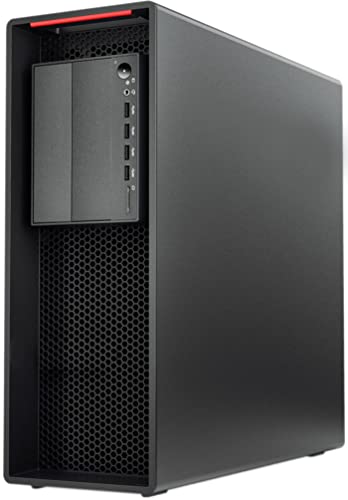
- Xeon W-2135 plus 64GB ECC RAM for CAD and multitasking
- 900W Platinum PSU supports powerful future GPU upgrades
- M.2 and SATA expansion make storage builds flexible
Best For: CAD users who want a customizable workstation tower with strong upgrade headroom.
Best Value Entry-Level CAD

- Affordable compact option for light CAD and office work
- Dual 4K display support helps with multitasking
- VESA mount keeps the setup clean and space-saving
Best For: Students, hobbyists, and office users who need a budget-friendly compact PC for basic CAD.
Best for Secure Office CAD
Dell Pro Tower i5-14500 vPro Desktop

- 14-core Core i5-14500 vPro for fast business multitasking
- 16GB DDR5 + 512GB PCIe SSD for quick load times
- Dual 4K display support for CAD-style multi-monitor setups
Best For: Office-focused buyers who need a compact, secure desktop for light CAD and multitasking.
Best for CAD Value
Dell Precision 3431 Quadro P620 Workstation

- Quadro P620 graphics for CAD and design tasks
- 16GB RAM plus 1TB SSD for responsive multitasking
- Compact renewed workstation with Windows 11 Pro
Best For: Engineers, designers, and office users who want a compact, dependable CAD workstation at a value price.
Best for Heavy CAD Loads
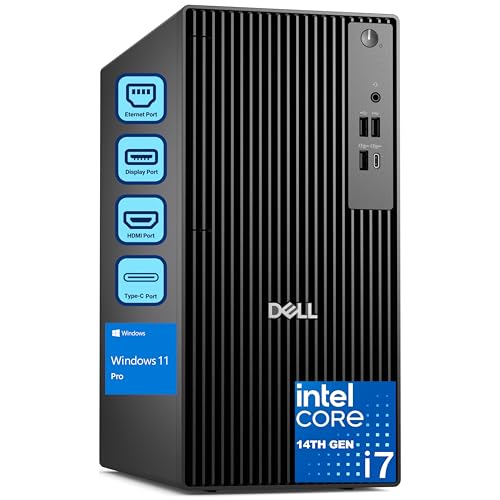
- 20-core Core i7-14700 for CAD, rendering, and multitasking
- 32GB DDR5 RAM plus 1TB PCIe SSD for fast project work
- Dual 4K display support and Windows 11 Pro for productivity
Best For: Engineers and designers who need a compact business tower for demanding CAD workflows.
Best Refurbished Xeon Value
HP Z4 G4 Xeon Workstation Tower

- Xeon W-2133 and Quadro M4000 for CAD-friendly performance
- 64GB RAM with 512GB NVMe SSD plus 2TB HDD
- Includes Windows 11 Pro and refurbished warranty coverage
Best For: Engineers and designers wanting a dependable refurbished workstation for CAD and 3D work.
Best for ISV CAD Apps
Lenovo ThinkStation P3 Tiny i7 Workstation

- ISV-certified for major CAD and engineering apps
- Tiny 3.01 lb footprint fits cramped desks
- i7-14700 + NVIDIA T400 handles pro multitasking
Best For: CAD professionals who need a compact workstation with app-certified reliability.
Best for Small Workspaces
Dell OptiPlex 7070 SFF i7 Workstation

- Compact SFF design saves desk space
- 8-core i7 and 32GB RAM support smooth multitasking
- 1TB NVMe SSD and WiFi 6E add speed and convenience
Best For: CAD users and office buyers who need a compact, responsive desktop for everyday work.
Best Refurbished CAD Value
HP i5 Workstation with Quadro K1200

- 32GB RAM + 1TB SSD for fast everyday workflow
- Quadro K1200 supports CAD and design apps
- 4TB HDD provides ample project storage
Best For: Budget-minded CAD and design users who want a capable renewed workstation.
Best for Small Spaces – Lenovo ThinkStation P3 Tiny Workstation
If you need a small cad workstation computer that can handle real work without taking over the desk, the Lenovo ThinkStation P3 Tiny is a compelling choice. Its Intel Core i5-14500 vPro processor, DDR5 memory, and NVMe storage give it the responsiveness needed for light-to-moderate CAD, 3D viewing, and everyday multitasking in a compact 1L chassis.
Best For: Engineers, designers, and business users who want a tiny workstation for CAD tasks, dual displays, and space-constrained setups.
Pros:
- Very compact 1L design fits easily on crowded desks or behind monitors.
- 14-core Intel Core i5-14500 vPro delivers strong everyday workstation performance.
- Dual-monitor support plus plenty of USB ports make it practical for office and CAD workflows.
- Includes Windows 11 Pro, keyboard, mouse, and bonus accessories for faster setup.
Cons:
- Integrated graphics limit it to lighter CAD and 3D workloads.
- 16GB RAM is workable, but serious projects may benefit from a higher-memory configuration.
- Compact systems can be less upgrade-friendly than full-size towers.
For buyers prioritizing desk space and business-class reliability, this Lenovo is a practical small cad workstation computer rather than a brute-force rendering machine. It makes the most sense when you want a tiny, tidy setup that still feels workstation-grade for day-to-day design work.
Best for DIY CAD Builds – PCSP P520 Xeon Workstation Tower
If you want a small cad workstation computer that you can tailor around your own GPU, storage, and OS, this refurbished PCSP P520 is a strong starting point. The Xeon W-2135 and 64GB of ECC memory give it the foundation for CAD, rendering, and other heavy multitasking workloads, while the 900W Platinum PSU leaves room for serious expansion.
Best For: Buyers who want a customizable workstation tower for CAD and professional apps, with plenty of upgrade headroom for a discrete graphics card.
Pros:
- Intel Xeon W-2135 and 64GB ECC RAM are well-suited for demanding CAD workflows
- 900W 80+ Platinum power supply supports high-end GPUs and future upgrades
- Multiple M.2 and SATA storage options make it easy to build out a fast, flexible system
- Renewed workstation design is aimed at reliable 24/7 professional use
Cons:
- No GPU, storage, or operating system included, so it is not ready to use out of the box
- Refurbished configuration may appeal less to shoppers who want a brand-new system
- Not the most compact option if desk space is extremely tight
This is a smart pick if you need a small cad workstation computer that prioritizes expandability over convenience. It is best for users who already know which graphics card, drives, and OS they want to add.
Best Value Entry-Level CAD – GMKtec Mini PC N95 8GB/256GB
If you need a small cad workstation computer for light 2D drafting, viewing models, and everyday office apps, the GMKtec G3 S is a sensible low-cost choice. Its Intel N95 chip, 8GB of RAM, and 256GB SSD give it enough responsiveness for routine design work without taking up much desk space.
Best For: Students, hobbyists, and office users who want an affordable compact PC for basic CAD, dual-monitor productivity, and general work.
Pros:
- Intel N95 is a clear step up from older low-power mini PC chips for everyday workloads
- Dual HDMI 2.0 outputs support two 4K displays for better multitasking
- Compact, VESA-mountable design fits neatly into tight workspaces
Cons:
- 8GB RAM limits heavier CAD assemblies and demanding multitasking
- Integrated graphics are fine for light design work, not advanced 3D rendering
- 256GB storage may fill up quickly with project files and large software installs
For anyone shopping for a small cad workstation computer on a tight budget, this model makes the most sense when your workload stays modest and portability matters more than raw power. It is better suited to basic drafting and workstation-like productivity than to professional, graphics-heavy CAD workflows.
Best for Secure Office CAD – Dell Pro Tower i5-14500 vPro Desktop
If you want a small cad workstation computer for light-to-moderate 2D design work, this Dell Pro Tower is a practical business-first option. The 14th Gen Core i5-14500 vPro, 16GB DDR5 RAM, and 512GB PCIe SSD give it the speed and responsiveness needed for everyday drafting, spreadsheets, and multitasking in a compact tower form factor.
Best For: Office users, engineers, and designers who need a secure, compact desktop for CAD-adjacent work, multitasking, and dual-monitor productivity.
Pros:
- 14-core i5-14500 vPro delivers strong all-around performance for business and design workflows
- 16GB DDR5 memory and NVMe SSD help keep apps and files opening quickly
- Intel UHD 770 supports dual 4K monitors for expanded drafting and reference space
- Windows 11 Pro and vPro add remote manageability and security features
Cons:
- Integrated graphics limit it to lighter CAD and 3D work
- Only 16GB RAM out of the box may feel modest for larger projects
- No wireless card included, so Ethernet is the primary network option
This Dell is a sensible pick if your small cad workstation computer needs prioritize reliability, security, and everyday responsiveness over heavy GPU-based modeling. It is better suited to 2D drafting, office productivity, and multi-monitor workflows than demanding 3D rendering.
Best for CAD Value – Dell Precision 3431 Quadro P620 Workstation
If you want a small cad workstation computer that balances price, reliability, and real-world design performance, this renewed Dell Precision 3431 is a practical choice. Its 9th Gen Core i5, 16GB of RAM, 1TB SSD, and Quadro P620 graphics make it well suited for everyday CAD, light 3D work, and office multitasking without taking up much desk space.
Best For: Engineers, designers, and office users who need a compact, dependable workstation for CAD and productivity tasks.
Pros:
- Quadro P620 graphics are a solid fit for CAD, drafting, and multi-display work
- 16GB RAM and a 1TB SSD deliver quick boot times and smooth multitasking
- Compact Dell Precision tower design is easy to place in a home or office setup
- Windows 11 Pro, WiFi 6, and Bluetooth add modern business-ready features
Cons:
- Renewed condition may not appeal to buyers wanting brand-new hardware
- Quadro P620 is capable for light-to-moderate CAD, but not ideal for demanding 3D rendering
- Included GPU has limited VRAM for heavier visual workloads
For buyers prioritizing value over raw power, this small cad workstation computer hits a useful middle ground: enough professional graphics support for design software, plus the storage and memory to stay responsive in day-to-day work.
Best for Heavy CAD Loads – Dell Pro Tower i7 Workstation
If you need a small cad workstation computer that can handle serious modeling, rendering, and multitasking, this Dell Pro Tower is built for business-class performance. The 20-core Intel Core i7-14700, 32GB of DDR5 memory, and 1TB PCIe SSD give it the responsiveness needed for CAD projects, creative software, and demanding office workflows.
Best For: Engineers, designers, and professionals who want a compact tower with strong CPU performance for CAD and other productivity-heavy work.
Pros:
- 20-core Intel Core i7-14700 delivers strong performance for CAD, rendering, and multitasking
- 32GB DDR5 RAM and 1TB PCIe SSD help keep large projects and files moving quickly
- Dual 4K display support works well for detailed design and multi-window workflows
- Windows 11 Pro adds business features like remote desktop and stronger security tools
Cons:
- No built-in Wi-Fi, so wired networking or a separate adapter is required
- Not a graphics-focused workstation, so heavy GPU-based 3D work may need a different setup
- Tower design is smaller than many desktops, but still not as space-saving as an SFF PC
For buyers comparing a small cad workstation computer for office or studio use, this Dell stands out for CPU strength, memory capacity, and business-ready reliability. It’s a practical choice when you want dependable performance first and extra workstation-style features second.
Best Refurbished Xeon Value – HP Z4 G4 Xeon Workstation Tower
If you want a small cad workstation computer that can handle serious 3D and engineering work without paying for brand-new hardware, this refurbished HP Z4 G4 is a smart pick. It pairs a Xeon W-2133 CPU with 64GB of RAM and Quadro graphics, so it’s built for stable performance in CAD, modeling, and simulation workflows.
Best For: Engineers, designers, and architects who need a dependable refurbished workstation with strong multitasking headroom.
Pros:
- Xeon W-2133 and Quadro M4000 are well-suited to CAD and 3D design apps
- 64GB RAM plus NVMe SSD and 2TB HDD offer fast boot times and plenty of storage
- Windows 11 Pro is included, so it’s ready for work out of the box
- Refurbished value can make it more affordable than a new workstation tower
Cons:
- Older Xeon and Quadro parts won’t match newer-generation workstation speed
- Large tower design is not ideal if desk space is extremely tight
- No optical drive included
Overall, this is a practical choice if you need a small cad workstation computer with proven workstation hardware and enough memory to stay comfortable in demanding professional software. It favors reliability and value over cutting-edge performance.
Best for ISV CAD Apps – Lenovo ThinkStation P3 Tiny i7 Workstation
If you need a small cad workstation computer that can handle serious design apps in a tiny footprint, the Lenovo ThinkStation P3 Tiny is built for that exact job. It pairs an Intel Core i7-14700 with NVIDIA T400 graphics, plus Windows 11 Pro and Wi‑Fi 6E, so it’s a practical fit for office desks, studios, and space-constrained work areas.
Best For: CAD users, architects, engineers, and designers who want workstation-class compatibility in a compact mini PC.
Pros:
- ISV certifications help with dependable performance in AutoCAD, Revit, SOLIDWORKS, and similar tools
- Very small 3.01 lb chassis saves desk space without giving up workstation features
- i7-14700 and NVIDIA T400 are a strong combo for multitasking and light-to-moderate 3D work
- Flexible RAM and SSD options make it easier to match your workload
Cons:
- Not the right choice for heavy GPU rendering or advanced simulation workloads
- The resealed, upgraded configuration may matter to buyers who prefer factory-sealed systems
- Compact design leaves less room for future internal expansion than a full tower
For buyers who want a small cad workstation computer with real business-class credibility, this ThinkStation is a strong fit. It’s especially appealing if you value validated app support, tidy cable management, and a compact desktop that still feels capable in professional workflows.
Best for Small Workspaces – Dell OptiPlex 7070 SFF i7 Workstation
If you need a small cad workstation computer that can handle everyday design work without taking over your desk, the Dell OptiPlex 7070 SFF is a practical choice. Its compact small-form-factor case, 8-core Intel i7-9700, 32GB of RAM, and 1TB NVMe SSD give it the speed and responsiveness needed for drafting, modeling, and multitasking in a tight setup.
Best For: CAD users, office professionals, and home workstations that need strong performance in a compact desktop.
Pros:
- 8-core i7-9700 and 32GB RAM support smooth multitasking and CAD workflows
- 1TB NVMe SSD delivers fast boot times and quick file access
- Small SFF design fits easily on or under a crowded desk
- WiFi 6E, Windows 11 Pro, and included keyboard/mouse add convenience
Cons:
- Renewed unit may show cosmetic wear
- SFF cases can be more limited for major future upgrades
- Not ideal for heavy 3D rendering or GPU-intensive CAD use
This is a solid small cad workstation computer for buyers who care more about speed, storage, and space savings than raw graphics power. It is a good fit for 2D CAD, light 3D work, and general productivity in a compact office-friendly package.
Best Refurbished CAD Value – HP i5 Workstation with Quadro K1200
If you need a small cad workstation computer that stretches your budget without feeling underpowered, this renewed HP desktop is a practical pick. It pairs an 8th Gen Intel Core i5, 32GB of DDR4 RAM, and a Quadro K1200 GPU with fast SSD boot times and roomy hard-drive storage for design files.
Best For: Designers, students, and office users who want a compact, affordable workstation for AutoCAD, 3D modeling, editing, and general creative work.
Pros:
- 32GB RAM and a 1TB SSD deliver responsive multitasking and quick launches
- Quadro K1200 graphics are suited to CAD, design, and other certified pro-app workflows
- 4TB HDD adds plenty of extra space for project files and archives
- Wi-Fi 5G, Bluetooth, and Windows 11 Pro make it ready for modern work setups
Cons:
- Older i5 processor and Quadro K1200 are solid, but not ideal for heavy rendering workloads
- Renewed condition may not appeal to buyers wanting a brand-new system
For buyers prioritizing value over raw speed, this HP stands out as a reliable small cad workstation computer for everyday drafting and creative projects. It is a stronger fit for light-to-moderate CAD than for intensive 3D production, but the memory and storage combination makes it easy to live with.
How We Picked the Best Small Cad Workstation Computer
For a Small Cad Workstation Computer, we looked for a combination of processor strength, memory capacity, storage speed, and graphics support. We also considered chassis size, expandability, and whether the system is better suited to 2D drafting, light 3D work, or more demanding design tasks.
We prioritized machines that are realistic for workstation use: stable platforms, enough RAM for multitasking, SSD-based storage, and professional or integrated graphics that can support design software without unnecessary bulk.
Quick Comparison
Mini PCs and tiny workstations are best when desk space matters most and your CAD work is mostly 2D or light modeling. Small-form-factor and tower systems are better if you need more cooling, more upgrade room, or a dedicated GPU for heavier assemblies and smoother viewport performance.
If you want the most compact setup, choose a tiny workstation. If you want more headroom for future upgrades, choose a tower.
Key Buying Factors for a Small Cad Workstation Computer
CPU Performance
CAD software benefits from strong single-core speed, but multi-core performance matters too when you multitask, render, or run multiple design tools at once. Newer Intel Core i5 and i7 chips are a strong fit for balanced workloads, while Xeon-based systems may appeal if you value workstation stability and memory capacity.
Memory and Storage
For basic CAD use, 16GB RAM is workable, but 32GB is a more comfortable target for most buyers. Heavier projects, large drawings, and multiple apps can benefit from 64GB. SSD storage is essential for faster boot times, quicker file loading, and smoother everyday responsiveness.
Graphics
Integrated graphics can be fine for light drafting or simple 2D work. For 3D modeling, more complex assemblies, or design applications that lean on GPU acceleration, look for a workstation with a discrete GPU such as an NVIDIA Quadro or T-series card.
Size, Cooling, and Upgrades
A compact workstation should still cool well under load. Tiny systems are easiest to place, but towers usually offer better upgrade paths and thermal headroom. If you expect to add RAM, more storage, or a stronger GPU later, check the internal layout before buying.
Who Should Buy Which Small Cad Workstation Computer?
If you mainly draft in AutoCAD-style workflows and need a clean, space-saving setup, a tiny workstation or mini PC is the simplest choice. If you do design work that includes heavier 3D modeling, rendering, or large projects, a tower-based Small Cad Workstation Computer is usually the smarter long-term buy.
Refurbished workstation towers can be excellent value for buyers who want more RAM, workstation-class hardware, and discrete graphics for less money. Newer business desktops are often the better fit if you want lower power draw, quieter operation, and fewer compatibility concerns.
