
Choosing slim external Blu-ray drives for Mac is mostly about compatibility, speed, and how often you plan to burn or play discs. The right drive should feel plug-and-play, stay portable, and work cleanly with macOS and your media software.
Below, we focus on practical options that make sense for Mac users who want dependable disc access without adding bulk to a travel bag or desktop setup.
Best 10 Slim External Blu Ray Drives for Mac Picks for 2026
Best for Mac Setup Flexibility
Slim USB-C Blu-ray Drive with 2 USB Ports

- USB-C and USB 3.0 support for easy Mac connectivity
- Built-in dual USB ports and SD/TF slots
- Slim, portable design with plug-and-play setup
Best For: Mac users who want a compact Blu-ray drive with extra ports and simple connectivity.
Best for UHD Disc Support
Archgon Aluminum USB 3.0 Blu-ray Writer

- Sturdy CNC aluminum housing
- Blu-ray, DVD, and CD support on Mac
- UHD 4K Blu-ray playback on PC with software
Best For: Mac users who want a premium slim Blu-ray drive, especially if they also need PC-side UHD support.
Best for DVD Burning
ASUS LITE Portable USB Slim DVD Burner

- 8X DVD write speed for basic backups
- Mac and Windows compatible
- Disc Encryption for password-protected files
Best For: Mac users who need a simple portable DVD burner, not Blu-ray support.
Fastest Burner for Archiving

- 16x BD-R writing speed with BDXL up to 128GB
- Mac OS X 10.6+ and Windows compatibility over USB 3.0
- M-DISC support for long-term archival storage
Best For: Mac users who need a fast external Blu-ray burner for backups and archives.
Best for Dual-Power Stability
External Blu-ray Drive for Mac and PC

- USB 3.0 and USB-C support for flexible Mac/PC use
- Extra power cable helps improve burn and playback stability
- Reads/writes CD and DVD; Blu-ray works with separate software
Best For: Mac users who want a compact Blu-ray drive with steadier power for disc reading and burning.
Best for Multi-Device Use
Ultra-Portable 5-in-1 Blu-ray Drive

- Adds USB-A and SD/TF expansion in one unit
- Works with USB-C and USB-A setups
- Reads Blu-ray discs and burns CDs/DVDs
Best For: Mac users who want a slim Blu-ray drive with extra hub features and card readers.
Best for Stable Power
Dainty USB 3.0/Type-C Blu-ray Drive

- Dual USB power cable improves stability for burns and playback.
- USB 3.0 and Type-C work well with modern Macs and PCs.
- Reads/writes CD, DVD, and Blu-ray discs in a compact body.
Best For: Mac users who need a compact Blu-ray burner with extra power support.
Best for Mac CD/DVD Use
External Blu-ray Drive for Mac, USB 3.0 & Type-C

- USB-A and USB-C support for easy Mac connectivity
- Slim, lightweight body with built-in cable for travel
- Reads Blu-ray and burns CDs/DVDs with plug-and-play use
Best For: Mac users who need a slim portable drive for CD/DVD tasks and Blu-ray reading.
Best for Mac Hub Use
8-in-1 Slim Blu-ray Drive for Mac
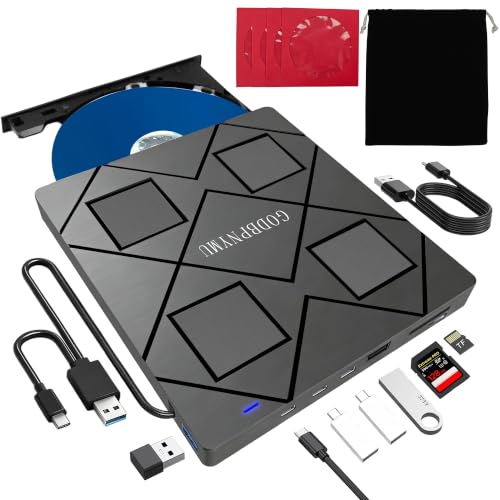
- Blu-ray, DVD, and CD read/write support
- USB-C, USB-A, SD, and TF connectivity
- Slim travel-friendly design with case and sleeves
Best For: Mac users who want a portable Blu-ray drive with built-in hub-style extras.
Best for Mac Blu-ray Playback

- 6X BD write speeds with DVD and CD support
- USB 3.0 + USB-C dual connector for Mac and PC
- Slim body with built-in cable storage
Best For: Mac users who want a compact Blu-ray drive for playback, burning, and archiving.
Best for Mac Setup Flexibility – Slim USB-C Blu-ray Drive with 2 USB Ports
If you want one of the more flexible slim external blu ray drives for mac, this portable burner stands out for its USB-C and USB 3.0 connections plus built-in SD/TF and dual USB ports. It’s a practical choice for MacBook Pro, MacBook Air, and iMac users who need Blu-ray reading and disc burning along with a few extra file-transfer features in one compact unit.
Best For: Mac users who want a slim external Blu-ray drive with extra ports for everyday disc access and light file handling.
Pros:
- USB-C and USB 3.0 support makes it easy to connect to newer Macs and older laptops
- Dual USB ports plus SD/TF slots add extra convenience for file transfers
- Portable, slim design is easy to pack with a laptop
- Plug-and-play setup keeps installation simple
Cons:
- Does not support 4K Ultra HD discs
- Blu-ray playback compatibility on Mac can depend on the software you use
- Not suitable for tablets, phones, TVs, or Chrome OS devices
For buyers comparing slim external blu ray drives for mac, this model is appealing because it balances portability, modern connectivity, and extra storage-card/USB convenience rather than focusing on bare-bones disc reading alone.
Best for UHD Disc Support – Archgon Aluminum USB 3.0 Blu-ray Writer
archgon Premium Aluminum External USB 3.0 UHD 4K Blu-Ray Writer Super Drive for PC and Mac
Check Price On AmazonIf you want one of the more capable slim external blu ray drives for mac, this Archgon unit stands out for its aluminum build and broad disc support. It handles regular Blu-ray, DVD, and CD on Mac, while PC users can take advantage of UHD 4K Blu-ray playback and full read/write functionality with compatible third-party software.
Best For: Mac users who need a slim external Blu-ray drive for everyday discs, with PC owners also benefiting from UHD 4K support.
Pros:
- Aluminum body gives it a sturdy, premium feel
- Reads and writes Blu-ray, DVD, and CD on Mac
- Supports UHD 4K Blu-ray playback on PC with the right software
- Includes M-DISC support for long-term archiving
Cons:
- UHD 4K playback on Mac is limited by software support
- Not the cheapest option in the slim external drive category
For buyers comparing slim external blu ray drives for mac, this Archgon model is a strong pick if you care about build quality and want a drive that can do more than basic DVD and CD work. It is especially appealing if you also use a PC and want UHD-capable hardware in a compact enclosure.
Best for DVD Burning – ASUS LITE Portable USB Slim DVD Burner
If you mainly need an affordable disc-burning solution rather than a modern Blu-ray reader, this ASUS unit is a practical pick for Mac users comparing slim external blu ray drives for mac. It’s a compact USB-powered drive that handles everyday DVD writing and playback with a simple, low-fuss setup.
Best For: Mac users who want a slim, portable external drive for DVD burning, backups, and occasional disc access.
Pros:
- Compact, lightweight design that’s easy to carry with a laptop
- 8X DVD write speed for backups and basic disc creation
- Mac and Windows compatible for flexible use across devices
- Disc Encryption adds password and hidden-file protection
Cons:
- Not a Blu-ray drive, so it won’t play or burn Blu-ray discs
- Uses USB 2.0, which is slower than newer interfaces
- More suited to DVDs than heavier media workflows
For buyers sorting through slim external blu ray drives for mac, this model makes sense only if DVD support is enough. It’s a straightforward, portable burner with useful security extras, but users who need actual Blu-ray playback or authoring should look elsewhere.
Fastest Burner for Archiving – ASUS BW-16D1X-U Blu-ray Drive
If you want a capable pick among slim external blu ray drives for mac, this ASUS model stands out for its 16x BD-R writing speed, USB 3.0 connectivity, and broad Mac/Windows support. It’s a practical choice for anyone who needs to burn large discs quickly, back up files, or keep an archive on BDXL and M-DISC media.
Best For: Mac users who want a fast, full-featured external Blu-ray drive for backups and long-term storage.
Pros:
- 16x Blu-ray writing speed with BDXL support up to 128GB
- Works with Mac OS X 10.6+ and Windows via USB 3.0
- M-DISC support adds a strong archival option for important data
- Includes CyberLink Power2Go 8 with optional encryption
Cons:
- More of a burner-focused drive than a simple plug-and-play reader
- Bulkier than ultra-compact slim external Blu-ray models
For buyers comparing slim external blu ray drives for mac, this ASUS unit makes sense if speed and storage flexibility matter more than the smallest possible footprint. It’s especially appealing for backup workflows, media archiving, and users who want a drive that can handle bigger disc jobs without slowing down.
Best for Dual-Power Stability – External Blu-ray Drive for Mac and PC
If you want one of the more versatile slim external blu ray drives for mac, this model stands out for its USB 3.0 and USB-C support, plus the extra power cable that helps keep disc playback and burning stable. It reads and writes CDs and DVDs and supports Blu-ray use with compatible software, making it a practical pick for mixed Mac and Windows setups.
Best For: Mac users who need a compact external Blu-ray drive with better power stability for reading, burning, and occasional Blu-ray playback.
Pros:
- USB 3.0 and USB-C connections make it easy to use with modern Macs and laptops
- Extra power cable helps reduce read/write interruptions from insufficient power
- Supports BD, DVD, and CD formats, including dual-layer DVDs
- Compact design is easy to carry for travel or office use
Cons:
- Blu-ray playback requires separate software
- Not compatible with TVs, tablets, Chromebooks, PS4, or iPads
For buyers comparing slim external blu ray drives for mac, this one is a solid middle-ground option if you care more about stable performance and broad connectivity than bundle extras. It’s especially appealing if you want a lightweight drive that can handle both everyday disc work and Blu-ray-capable tasks with the right software.
Best for Multi-Device Use – Ultra-Portable 5-in-1 Blu-ray Drive
If you want one of the more versatile slim external blu ray drives for mac, this 5-in-1 model stands out by combining disc playback with a built-in USB hub and SD/TF card readers. It supports Blu-ray/DVD/CD playback on Mac with third-party software, while USB-C and USB-A connections make it easy to move between laptops and desktops.
Best For: Mac users who want a slim external Blu-ray drive that also doubles as a compact hub for transfers and peripherals.
Pros:
- 5-in-1 design adds 2 USB-A ports plus SD/TF card slots
- USB 3.0/USB-C support for flexible laptop and desktop compatibility
- Reads Blu-ray discs and burns CDs/DVDs at fast speeds
- Optional external power input helps with low-voltage USB ports
Cons:
- Blu-ray burning is not supported
- Blu-ray playback on Mac requires third-party software
- Not compatible with TVs, tablets, smartphones, or game consoles
For buyers comparing slim external blu ray drives for mac, this is a smart pick if you value extra connectivity as much as disc support. It is less minimal than a basic drive, but the added hub features make it especially practical for travel or desk setups.
Best for Stable Power – Dainty USB 3.0/Type-C Blu-ray Drive
If you want slim external blu ray drives for mac that are easier to power than the average portable unit, this Dainty model stands out with its dual USB power design and USB 3.0/Type-C connectivity. It handles Blu-ray, DVD, and CD reading and writing, but you’ll need separate playback software on macOS for full Blu-ray use.
Best For: Mac users who want a compact Blu-ray burner with extra power stability for reading and writing discs.
Pros:
- Dual USB power cable helps reduce failed burns and playback interruptions.
- USB 3.0 and Type-C support makes it easy to connect to modern Macs and PCs.
- Reads and writes CDs, DVDs, and Blu-ray discs, including dual-layer media.
- Compact build is convenient for travel and desk setups.
Cons:
- Does not include Blu-ray playback software.
- Not compatible with TVs, tablets, Chromebooks, PS4, iPads, or projectors.
- Mac users may need additional software for Blu-ray playback and burning.
For buyers comparing slim external blu ray drives for mac, this is a practical pick if power stability matters more than extra features. It’s a straightforward portable burner for disc archiving, playback, and everyday optical drive tasks.
Best for Mac CD/DVD Use – External Blu-ray Drive for Mac, USB 3.0 & Type-C
If you want one of the more practical slim external blu ray drives for mac, this portable 2-in-1 unit covers the basics well: Blu-ray disc reading, plus CD and DVD playback and burning over USB-A or USB-C. It’s a sensible pick for Mac users who mainly need an easy-to-carry optical drive for media playback, software installs, or disc archiving.
Best For: Mac owners who need a slim, portable external drive for CD/DVD use and occasional Blu-ray reading.
Pros:
- USB 3.0 and Type-C support makes it easy to connect to modern Mac laptops and desktops
- Compact, lightweight design with an integrated cable for travel-friendly use
- Reads Blu-ray discs up to 6X and handles CD/DVD burning with plug-and-play convenience
- Low-noise operation and simple setup for everyday disc tasks
Cons:
- Cannot burn Blu-ray discs, only read them
- Blu-ray playback requires third-party software on Mac
- Not compatible with Chromebooks, tablets, TVs, iPads, or in-car use
For buyers comparing slim external blu ray drives for mac, this model stands out more for portability and straightforward CD/DVD utility than for advanced Blu-ray authoring. If you mainly want a compact drive that works across Mac, Windows, and Linux, it’s a solid fit.
Best for Mac Hub Use – 8-in-1 Slim Blu-ray Drive for Mac
If you want one of the more versatile slim external blu ray drives for mac, this 8-in-1 model stands out by combining disc burning, 3D Blu-ray playback, and extra hub-style ports in a very portable shell. It works with macOS 10.6 and later, supports USB-C and USB-A connections, and adds SD/TF card reading plus extra USB ports for everyday laptop use.
Best For: MacBook users who want a slim Blu-ray drive that also doubles as a compact USB hub and card reader.
Pros:
- Supports BD, DVD, and CD reading and burning, plus 3D Blu-ray playback with compatible software
- Works with USB-C and USB-A systems, including MacBook Air and MacBook Pro models
- Built-in SD/TF card slots and extra USB ports add useful expandability
- Ultra-slim, lightweight design includes a carrying case and disc sleeves for travel
Cons:
- Needs third-party software for Blu-ray playback
- 4K Blu-ray playback is not supported
- TF and SD cards cannot be read at the same time
For shoppers comparing slim external blu ray drives for mac, this is a strong pick if you care about portability and extra connectivity more than basic disc-only operation. It is especially appealing for Mac users who want one accessory to cover media, backups, and simple hub duties.
Best for Mac Blu-ray Playback – 6X Blu-ray Burner with USB-C
If you want one of the more capable slim external blu ray drives for mac, this GOOBOX unit is a practical pick for playback, disc burning, and portable use. It pairs USB 3.0 and USB-C in one cable, supports Mac OS and Linux, and adds 3D Blu-ray playback support when paired with compatible software and display hardware.
Best For: Mac users who need a slim external drive for Blu-ray playback, CD/DVD burning, and occasional archiving.
Pros:
- Supports BD, DVD, and CD reading/burning with up to 6X Blu-ray write speeds
- USB 3.0 and Type-C dual connector makes it easy to use with modern Macs
- Slim, travel-friendly design with built-in cable storage
- Wide compatibility across Windows, Mac OS, and Linux
Cons:
- Blu-ray playback requires third-party software
- 3D Blu-ray needs a 3D-capable display and compatible app
- Not compatible with Chromebooks, tablets, TVs, or car systems
For buyers comparing slim external blu ray drives for mac, this model stands out for its dual USB-C/USB-A connection, compact storage-friendly design, and broad disc-format support. It is a good fit if you want a portable external drive that can handle both media playback and backup tasks.
How We Picked the Best Slim External Blu Ray Drives for Mac
We prioritized slim external Blu-ray drives for Mac that balance portability, connection flexibility, and real-world usability. That means checking for USB-A and USB-C support, Mac compatibility, power needs, and whether the drive supports both reading and burning for Blu-ray, DVD, and CD media.
We also looked for drives with sturdy builds, reasonable speeds, and features that matter to Mac users, such as bus-powered operation or included adapters. For buyers focused on long-term value, we gave extra weight to models that can handle both everyday media playback and occasional archiving tasks.
Quick Comparison
If you mainly want playback and light disc access, a simpler slim DVD/Blu-ray reader may be enough. If you plan to back up files, author discs, or work with larger media libraries, a Blu-ray writer with USB 3.0 or USB-C is the better fit. Some compact models add card readers or extra ports, which can be useful on modern MacBooks with fewer built-in connections.
Key Buying Factors for Slim External Blu-Ray Drives for Mac
Mac Compatibility
Make sure the drive explicitly supports macOS, and check whether Blu-ray playback software is required. Many drives are physically compatible with Mac but still need separate software for full Blu-ray movie playback or disc authoring.
Connection Type
USB-C is the most convenient choice for newer Macs, while USB 3.0 drives with included adapters still work well. A dual-connector design can be helpful if you switch between MacBook models or use older accessories.
Read Vs. Write Support
Not all slim external Blu-ray drives for Mac can burn Blu-ray discs. If you only need movie playback or file access, a reader is fine. If you want backups, disc creation, or media archiving, choose a writer with BD-RE or BD-R support.
Power and Portability
Slim designs are easier to pack, but some models may need extra power for stable operation. Look for a drive that includes a reliable cable setup and a compact chassis that fits your workspace without adding clutter.
Who Should Buy Which Slim External Blu Ray Drives for Mac?
Buy a basic slim Blu-ray reader if you just need occasional disc access on a MacBook Air or MacBook Pro. Choose a full Blu-ray writer if you archive photos, video projects, or backups and want more flexibility. If you travel often, prioritize the lightest drive with USB-C. If you work at a desk and want maximum versatility, consider a model with extra ports or bundled accessories.
For most buyers, the best choice is the drive that matches your actual disc habits rather than the one with the highest speed rating. A well-matched drive will be easier to use, more portable, and better suited to Mac workflows.
