
A quieter PC setup takes more than one low-noise fan. Case airflow, mounting vibration, and the clicks from your mouse and keyboard can all affect what you hear at your desk.
These 10 picks cover cooling fans, fan-mounting accessories, and wireless input devices. Use the guide below to match each type of upgrade to the noise you actually want to reduce.
Best 10 Silent PC Accessories Picks for 2026
Quiet Single-Fan Upgrade
be quiet! Pure Wings 3 120mm PWM Fan

- Four-pin PWM with low minimum RPM
- Up to 49.9 CFM at 1600 RPM
- One fan per package
Best For: A single adjustable 120mm case fan
Fan Vibration Fix
Noctua NA-SAV2 chromax.Black Mounts

- Twenty mounts fit up to five fans
- Soft silicone rubber dampens vibration
- Requires compatible open-flange frames
Best For: Reducing fan vibration transferred to a case
Quiet Desk Controls
QUASIO Wireless Keyboard and Mouse Combo
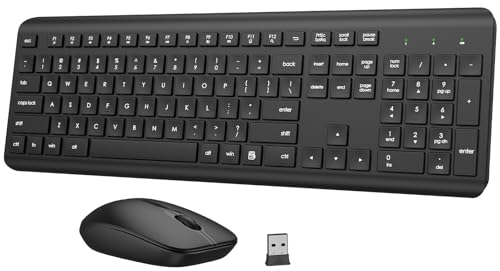
- Quiet membrane keys and mouse clicks
- Full-size layout with numeric keypad
- Shared 2.4GHz USB receiver
Best For: Quieter typing and clicking in shared spaces
Quiet Cooling Pick

- 120mm pressure-optimised fan
- 4-pin PWM; up to 1700 RPM
- Maximum noise rating: 25.1 dB(A)
Best For: Quieter desktop cooling with automatic fan-speed control
Quiet Click Pick
JOYACCESS Silent Wireless Mouse

- Quieter left and right clicks
- Five DPI settings: 800–2400
- 2.4 GHz USB receiver; AA battery required
Best For: Reducing mouse-click noise at a shared desk
Vibration Control Pick
Noctua NA-SAVP1 chromax.Black Pads

- 16 silicone pads for up to two fans
- Minimise transmitted fan vibration
- Check fan-model compatibility
Best For: Damping vibration from compatible Noctua fans
Quiet Travel Mouse
Uiosmuph G12 Rechargeable Wireless Mouse

- Quiet left and right buttons
- Rechargeable, slim design
- USB-A receiver and USB-C adapter included
Best For: Quieter clicking on USB-A or USB-C laptops
Low-Noise Case Cooling
ARCTIC P12 Pro LN 120 mm Fan 5-Pack
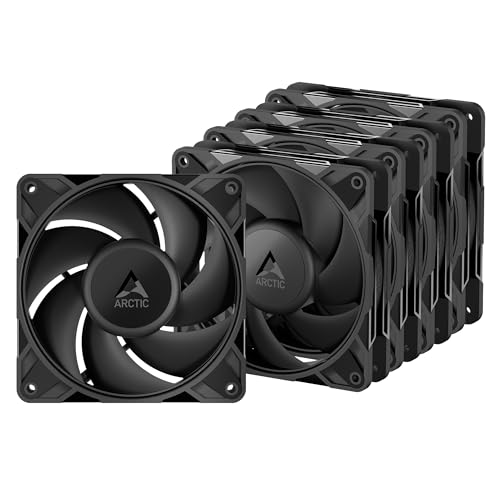
- Five 120 mm PWM fans
- 450–2000 rpm stated range
- Stops below 5% PWM
Best For: Quiet-focused desktop builds needing multiple case fans
Quiet Desk Combo
RECCAZR Wireless Keyboard and Mouse
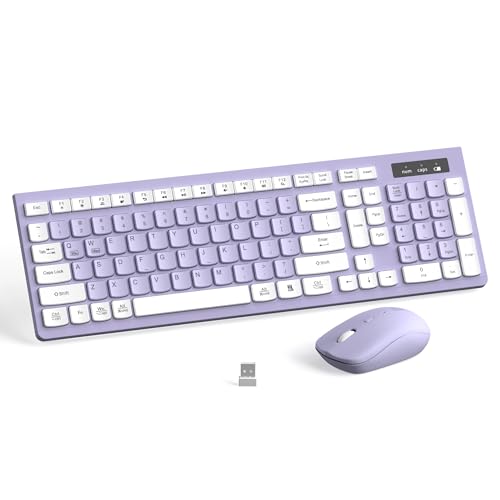
- Quiet membrane keys and mouse clicks
- Full-size keyboard with number pad
- Shared USB receiver; three mouse DPI settings
Best For: Quieter typing and clicking at a home or office desk
Quiet Single-Fan Upgrade – be quiet! Pure Wings 3 120mm PWM Fan
For silent pc accessories that still provide useful cooling, the Pure Wings 3 offers PWM speed control and a low minimum RPM. Its 120mm design works for desktop case cooling, while the frame outlet is designed for radiator performance.
Best For: A single 120mm fan upgrade where adjustable speed and quiet operation matter.
Pros:
- Four-pin PWM connection and low minimum RPM support quieter speed settings.
- Seven airflow-optimized blades; rated at up to 49.9 CFM and 1600 RPM.
- Rifle bearing has a stated operating lifetime of 80,000 hours.
Cons:
- Package contains only one fan.
- Listed noise level is 25.5 dB, so it is not silent at every speed.
The combination of speed flexibility and radiator-oriented frame design makes this a practical individual replacement, provided you need only one fan.
Three-Fan Cooling Pack – Thermalright TL-C12C X3 120mm PWM Fans
If you need several silent pc accessories for a desktop build, this Thermalright pack supplies three 120mm PWM fans. Silicone corner pads help reduce vibration, and motherboard speed control lets airflow respond to temperature.
Best For: Adding multiple case or CPU-cooler fans with PWM control in one purchase.
Pros:
- Three fans are included.
- Silicone corner pads help limit vibration and friction noise.
- Each fan is rated for up to 66.17 CFM at 1550 RPM.
- Four-pin PWM connection supports automatic motherboard speed control.
Cons:
- Listed noise level is 25.6 dBA; maximum-speed operation will not be inaudible.
- Check that your build has room and suitable connections for three 120mm fans.
This set is most useful when you want coordinated cooling across several positions rather than a single replacement fan.
Fan Vibration Fix – Noctua NA-SAV2 chromax.Black Mounts
Among silent pc accessories, fan mounts address a different source of noise: vibration transferred into the case. These extra-soft silicone-rubber mounts replace conventional fan mounting hardware where the fan frame and case holes are compatible.
Best For: Reducing structure-borne fan vibration in a desktop case.
Pros:
- Twenty mounts are enough for up to five fans.
- Tool-free installation in standard case fan mounting holes.
- Black finish suits all-black builds; backed by a six-year manufacturer’s warranty.
Cons:
- Requires compatible open-flange fan frames and standard 4.3mm mounting holes.
- Mounts damp vibration but do not replace the fans themselves.
Choose this kit when fan vibration is the issue; verify frame compatibility before ordering.
Quiet Desk Controls – QUASIO Wireless Keyboard and Mouse Combo
Silent pc accessories are not limited to the case: this QUASIO combo targets typing and clicking noise at your desk. It pairs a full-size membrane keyboard with a mouse designed for quiet clicks, using a shared 2.4GHz USB receiver.
Best For: Shared workspaces where quieter typing and mouse clicks are priorities.
Pros:
- Soft membrane keys and a quiet-click mouse help limit desk noise.
- Full-size keyboard includes a numeric keypad and 12 multimedia shortcuts.
- Shared USB receiver supports a stated wireless range of up to 10m.
Cons:
- Requires one AAA battery for the keyboard and one AA battery for the mouse.
- Wireless connection uses a USB receiver rather than Bluetooth.
This is a practical way to quiet everyday input sounds, especially if you also want a number pad; remember to retrieve the receiver from the mouse’s battery compartment.
Quiet Cooling Pick – Noctua NF-P12 redux-1700 PWM
For silent pc accessories that tackle fan noise without giving up cooling flexibility, this 120mm Noctua fan is a practical choice. Its 4-pin PWM connection lets a compatible motherboard adjust speed automatically, up to 1700 RPM when more airflow is needed.
Best For: Desktop builders who want a quieter PWM fan for a CPU cooler, radiator, or case.
Pros:
- Pressure-optimised design suits coolers, radiators, and chassis ventilation.
- PWM control can keep speeds low at idle and increase them under load.
- Rated at a maximum of 25.1 dB(A) and backed by a six-year manufacturer’s warranty.
Cons:
- Requires a 12V, 4-pin PWM connection to use automatic speed control.
- Anti-vibration mounts and other accessories are optional rather than listed as included.
If your current fan is the main noise source, this is the direct upgrade of the three: it pairs adjustable cooling with a specified noise ceiling.
Quiet Click Pick – JOYACCESS Silent Wireless Mouse
Not all silent pc accessories go inside the case. This JOYACCESS wireless mouse uses quieter left and right button switches to reduce click noise at a shared desk, while its 2.4 GHz USB receiver keeps setup straightforward.
Best For: Office or home users who want quieter clicks without a wired mouse.
Pros:
- Less-noisy left and right clicks help limit distractions nearby.
- Five adjustable sensitivity settings span 800 to 2400 DPI.
- USB receiver stores inside the mouse; the stated wireless range is up to 10 meters.
- Enters sleep mode after eight minutes of inactivity to conserve power.
Cons:
- Requires one AA battery, which is not included.
- The quieter-switch claim applies specifically to the left and right buttons.
Choose it for everyday cursor work where click noise matters most; the adjustable DPI is a useful bonus, but the included notes do not establish that every button is silent.
Vibration Control Pick – Noctua NA-SAVP1 chromax.Black Pads
Among silent pc accessories, these Noctua silicone pads address a specific source of sound: vibration transferred from a fan to its mounting surface. The 16-pad set covers up to two compatible 120mm or 140mm fans.
Best For: Builders with compatible Noctua fans who want to reduce transmitted vibration and keep an all-black look.
Pros:
- Soft silicone pads minimise transmission of minute fan vibrations.
- Set includes 16 pads for up to two compatible fans.
- Works with standard fan screws and most other mounting systems.
- Black finish suits chromax and industrialPPC-themed builds.
Cons:
- Compatibility varies by fan model; check Noctua’s compatibility information before buying.
- Pads target transmitted vibration, not the fan’s own airflow noise.
These are a focused finishing touch rather than a replacement fan: they make the most sense when your existing compatible fans are worth keeping but their mounting vibration is noticeable.
Quiet Travel Mouse – Uiosmuph G12 Rechargeable Wireless Mouse
If your list of silent pc accessories starts with a mouse, the Uiosmuph G12 offers quiet left and right buttons in a slim, rechargeable design. Its included USB receiver and USB-C adapter make it useful across laptops with either port.
Best For: Laptop users who want quieter clicks and a portable wireless mouse.
Pros:
- Soundless left and right buttons help limit click noise.
- Rechargeable battery eliminates disposable battery changes.
- Includes a USB receiver and USB-C adapter; the LED lighting can be switched off.
Cons:
- Requires the included receiver rather than a direct Bluetooth connection.
- Listed maximum sensitivity is 800 DPI, with no adjustable DPI settings specified.
Choose this for a compact, quieter pointing device, especially if you switch between USB-A and USB-C laptops. The color-changing lights are optional rather than a requirement for use.
Low-Noise Case Cooling – ARCTIC P12 Pro LN 120 mm Fan 5-Pack
For desktop builders shopping for silent pc accessories, this five-pack targets cooling noise rather than input-device clicks. The ARCTIC P12 Pro LN fans combine 4-pin PWM control with a stated 450–2000 rpm range and a fluid dynamic bearing.
Best For: Desktop builders outfitting multiple 120 mm fan positions with low-noise PWM cooling.
Pros:
- Five 120 mm fans cover several mounting positions in one pack.
- PWM control allows speed adjustment, with a complete stop below 5% PWM.
- Fluid dynamic bearings and precision balancing are designed to reduce running noise and vibration.
Cons:
- Requires compatible 120 mm mounting positions and 4-pin fan connections or control.
- The supplied notes do not provide a measured noise rating for comparing acoustic output.
This is the practical pick when your quiet-PC project calls for several case fans. Its low-speed range and stop function give a compatible system ways to limit fan noise when full airflow is unnecessary.
Quiet Desk Combo – RECCAZR Wireless Keyboard and Mouse
If you want silent pc accessories for both typing and pointing, this purple RECCAZR combo pairs a quiet membrane keyboard with a mouse designed to avoid clicking noise. Both share one plug-and-play nano USB receiver.
Best For: Home or office desks that need a quieter full-size keyboard and mouse without using two USB ports.
Pros:
- Soft membrane keys and quiet mouse clicks help reduce desk noise.
- Full-size keyboard includes a numeric keypad, 12 multimedia shortcuts and adjustable tilt legs.
- One receiver connects both devices; the mouse offers 800, 1200 and 1600 DPI settings.
Cons:
- Requires two AAA batteries rather than offering a rechargeable setup.
- Receiver-based wireless connection occupies a USB port.
This combo makes sense when you need to replace both noisy peripherals at once. Its full-size layout favors everyday desk work over a compact travel setup.
How We Picked These Silent PC Accessories
We focused on three practical ways to reduce everyday PC noise: quieter airflow, less fan vibration, and less clicking at the desk. The lineup includes individual and multipack 120 mm fans, anti-vibration mounts and pads, and wireless mice and keyboard-and-mouse combos. Because cooling and input devices solve different problems, the most useful comparison is within each category—not a single noise ranking across all 10 products.
Product names and specifications can indicate features such as PWM speed control, low-speed operation, or silent-click buttons, but they do not establish how quiet a complete setup will be. Case design, fan curves, workload, mounting, and room noise all matter.
Quick Comparison: Match the Upgrade to the Noise
- Steady airflow or fan hum: Start with a 120 mm case fan. A multipack makes sense if several existing fans need replacing; a single fan is more economical for one noisy position.
- Rattling or buzzing near a fan: Consider anti-vibration mounts or pads if vibration is transferring into the case. They will not fix a worn bearing or an obstructed fan.
- Audible mouse clicks: A silent-click wireless mouse targets desk noise without changing PC cooling.
- Keyboard and mouse noise together: A wireless combo can simplify the desk, but check its layout and switch feel before choosing it for daily typing.
Key Buying Factors for Silent PC Accessories
Cooling Fit and Control
Confirm your case accepts 120 mm fans at the positions you plan to use. Check the connector and motherboard or hub support, especially if you want PWM speed control. A lower fan speed can reduce noise, but it may also reduce airflow; aim for temperatures you are comfortable with under your normal workload. Compare the number of fans included before judging value.
Vibration and Installation
Mounting accessories must fit the fan holes and case mounting points. Anti-vibration pads sit between contacting surfaces, while flexible mounts replace conventional screws in suitable installations. Check clearance and access before ordering. If a panel is loose, a cable touches the blades, or the fan itself is failing, address that cause first.
Wireless Convenience and Click Feel
For mice and combos, check whether the device uses a USB receiver, whether your computer has an available port, and whether it runs on replaceable batteries or needs recharging. “Silent” usually refers to reduced button-click noise, not completely silent operation. Keyboard key feel, size, and layout are just as important if you type for long stretches.
Who Should Buy Which Silent PC Accessories?
PC builders and upgraders should prioritize compatible fans, then set a sensible fan curve before adding mounts for any remaining vibration. Owners of an otherwise quiet PC with a persistent buzz should inspect the fan and case first; mounts or pads are worthwhile when vibration transfer is the issue. Office users and shared-space workers may notice a bigger day-to-day benefit from a quieter mouse or keyboard-and-mouse combo. If both cooling and desk clicks bother you, treat them as separate upgrades and fix the most distracting source first.
