
In today’s fast-paced work environment, maintaining a quiet workstation is essential for your productivity. You don’t have to settle for noisy cooling solutions that disrupt your focus. There are advanced options designed to provide effective cooling while keeping noise to a minimum. From air coolers to liquid systems, the right choice can elevate your workspace. Let’s explore the top silent cooling solutions that can transform your setup and enhance your comfort.
Thermalright Peerless Assassin 120 SE CPU Cooler

If you’re seeking a powerful yet quiet cooling solution for your workstation, the Thermalright Peerless Assassin 120 SE CPU Cooler stands out with its advanced AGHP technology and dual PWM fans. This cooler features 6 heat pipes and a pure copper base, ensuring exceptional thermal performance. With dimensions of 125x135x155mm, it fits comfortably in most cases while leaving ample space for RAM installation. Its two 120mm PWM fans operate at a maximum of 1550 RPM, delivering an impressive airflow of 66.17 CFM with a noise level of just 25.6 dB(A). Compatibility with Intel and AMD sockets makes it versatile for various builds.
Best For: Enthusiasts and gamers looking for a high-performance, quiet CPU cooler compatible with both Intel and AMD platforms.
Pros:
- Exceptional thermal performance with 6 heat pipes and a pure copper base.
- Dual PWM fans provide high airflow (66.17 CFM) while maintaining low noise levels (25.6 dB(A)).
- Versatile compatibility with multiple Intel and AMD sockets, making it suitable for various builds.
Cons:
- May require careful compatibility checks with case and motherboard sizes.
- Original motherboard’s built-in backplane needed for AMD installation is not included.
- The cooler’s size may not fit in compact cases, limiting options for small form factor builds.
Cooler Master Atmos Stealth AIO CPU Liquid Cooler
For those seeking efficient cooling without the noise, the Cooler Master Atmos Stealth AIO CPU Liquid Cooler stands out with its impressive dual-chamber design and low operational noise of just 25 decibels. Its 360mm radiator, paired with three pre-installed Mobius PWM fans, guarantees ideal airflow while minimizing vibrations. You can easily install it on AM5 and LGA 1851/1700 sockets, making it compatible with high-performance CPUs like AMD R9 and Intel i9. The cooler’s customizable pump top cover adds a personal touch, while its 5-year warranty guarantees reliability. With a 4.7-star rating, it’s a favorite among users seeking silent efficiency.
Best For: Gamers and PC enthusiasts seeking efficient and quiet cooling solutions for high-performance CPUs.
Pros:
- Dual-chamber design enhances water pressure and optimizes flow for targeted cooling.
- Low noise level of 25 decibels ensures a silent operation during intensive tasks.
- Customizable pump cover allows for personalized aesthetics to match your build.
Cons:
- Larger 360mm radiator may not fit in all PC cases, limiting compatibility.
- Weight of 3.71 pounds could be a concern for some users during installation.
- Premium pricing compared to basic air cooling options might deter budget-conscious buyers.
Thermalright Peerless Assassin 120 Vision MAX ARGB CPU Air Cooler

The Thermalright Peerless Assassin 120 Vision MAX ARGB CPU Air Cooler stands out as the ideal choice for gamers and content creators seeking exceptional cooling performance without the distracting noise. With its twin tower design and high-speed fans reaching 2150 RPM, it efficiently cools your CPU while maintaining an operating noise of just 27 dB(A). The included 5-inch IPS LCD screen lets you monitor system parameters in real-time, adding a touch of style with customizable backgrounds. Compatible with both Intel and AMD platforms, it fits seamlessly into your setup, ensuring peak performance and longevity with its durable S-FDB V2 bearings.
Best For: Gamers and content creators seeking high-performance cooling with low noise levels and stylish monitoring options.
Pros:
- Exceptional cooling efficiency with dual-tower design and high-speed fans.
- Real-time system monitoring on a customizable 5-inch IPS LCD screen.
- Compatible with a wide range of Intel and AMD platforms for versatile installation.
Cons:
- Installation on AMD platforms requires the original motherboard backplate, which is not included.
- May take up significant space in smaller cases due to its dimensions.
- The need for a motherboard’s 9-pin USB interface for display functionality could limit compatibility.
Kootek Laptop Cooling Pad with 5 Quiet Fans

Designed for users who demand both performance and tranquility, the Kootek Laptop Cooling Pad with 5 Quiet Fans is an ideal solution for gamers, professionals, and anyone who spends long hours on their laptops. This cooling pad supports laptops from 12″ to 17″, including popular models like the MacBook Pro and Alienware. With its whisper-quiet operation, you won’t be distracted while working or gaming. The adjustable height settings guarantee comfort, while the built-in USB hub allows you to connect peripherals easily. Weighing just 1.16 kg, it’s portable and efficient, making it a reliable companion for your daily tasks.
Best For: Gamers, professionals, and anyone who uses laptops extensively and seeks an efficient cooling solution without noise distractions.
Pros:
- Multiple fan options with whisper-quiet operation for distraction-free use.
- Adjustable height settings for enhanced comfort during extended use.
- Built-in USB hub allows easy connection of additional peripherals.
Cons:
- Requires an adapter for Type C devices, which may not be included.
- Limited color options as it only comes in blue.
- Some users may find it heavy for portable use compared to other cooling pads.
Thermalright Assassin X 120R Digital ARGB CPU Cooler

If you’re seeking a CPU cooler that balances performance with aesthetics, the Thermalright Assassin X 120R Digital ARGB is an excellent choice. Weighing only 100 grams, this compact cooler features a 2000 RPM fan that delivers an impressive airflow of 70.84 CFM while maintaining a whisper-quiet noise level of just 29.8 dB(A). Its digital screen displays real-time CPU and GPU metrics, enhancing your overall experience. With ARGB lighting that syncs with your motherboard, it adds a striking visual element to your workstation. Compatible with Intel and AMD sockets, installation is straightforward, making it a top choice for silent cooling solutions.
Best For: Users who want a high-performance CPU cooler with aesthetic ARGB lighting and quiet operation.
Pros:
- High cooling performance with a 2000 RPM fan providing 70.84 CFM airflow.
- Digital screen display offers real-time metrics for CPU and GPU performance.
- Easy installation across multiple Intel and AMD sockets.
Cons:
- Limited height at 151mm may restrict compatibility with some cases.
- Requires original motherboard backplate for AMD installation, which may not be included.
- Weight of 100 grams might be a concern for users looking for ultra-light options.
Cooler Master V4 Alpha CPU Air Cooler
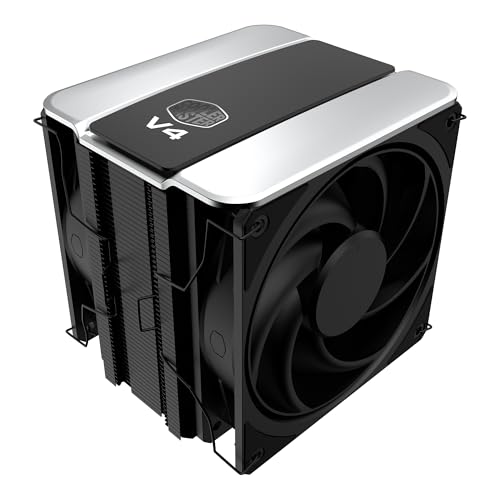
For those seeking a powerful yet quiet cooling solution for high-performance workstations, the Cooler Master V4 Alpha CPU Air Cooler stands out with its innovative 3D Heat Pipe Technology. Its dual 120mm PWM fans deliver exceptional airflow while maintaining a whisper-quiet noise level of just 2.05 decibels. Compatible with AMD AM5/AM4 and Intel LGA 1851/1700 CPUs, it excels at cooling Ryzen 9 and Intel Ultra 9 processors. Installation is simple and includes CryoFuze thermal paste for peak performance. With a 4.7-star rating and a five-year warranty, you can trust the V4 Alpha to keep your system running cool and efficiently.
Best For: High-performance workstation users seeking a powerful and quiet cooling solution for AMD and Intel processors.
Pros:
- Exceptional cooling efficiency due to patented 3D Heat Pipe Technology.
- Whisper-quiet operation with a noise level of just 2.05 decibels.
- Easy installation with included CryoFuze thermal paste and compatibility with latest CPU sockets.
Cons:
- Bulky design may require ample space in PC cases.
- Higher price point compared to some entry-level coolers.
- Limited RGB lighting options for users seeking customizable aesthetics.
be quiet! Silent Loop 3 360mm CPU AIO Liquid Cooler

Silent Loop 3 360mm CPU AIO Liquid Cooler is an exceptional choice for silent operation in your workstation. Weighing 1.77 kg, its powerful 3-chamber pump minimizes turbulence while delivering outstanding cooling performance, even for high-end CPUs like Threadripper. With three Silent Wings 4 fans, it operates at just 38.8 decibels, ensuring a near-silent environment. The adjustable pump and flexible tubes make installation straightforward, while the discreet ARGB lighting adds a sleek touch. Compatible with various Intel and AMD sockets, this cooler comes with a 3-year warranty, promising reliability and superior German engineering.
Best For: Users seeking a high-performance CPU cooler that operates quietly, ideal for workstations or gaming setups where noise reduction is essential.
Pros:
- Exceptional cooling performance with a powerful 3-chamber pump design.
- Near-silent operation at only 38.8 decibels, thanks to the Silent Wings 4 fans.
- Easy installation with flexible tubes and a convenient refill port.
Cons:
- Heavier than some other AIO coolers at 1.77 kg, which may impact compatibility with smaller cases.
- The discreet ARGB lighting may not appeal to users looking for more vibrant or customizable RGB options.
- Limited to specific Intel and AMD socket compatibility, potentially restricting use with certain motherboards.
CORSAIR RS120 120mm PWM Fans (Triple Pack)

Designed for those who demand high-performance cooling without the noise, the CORSAIR RS120 120mm PWM Fans deliver exceptional airflow and static pressure. With speeds reaching up to 2,100 RPM, these fans push an impressive 72.8 CFM while maintaining a static pressure of 4.15mm-H2O. Thanks to CORSAIR AirGuide Technology, you’ll enjoy targeted airflow that efficiently cools your components, especially on radiators or heatsinks. The magnetic dome bearing minimizes noise and reduces friction for longevity. Plus, daisy-chaining multiple fans through a single 4-pin PWM connector streamlines your setup. Sold as a triple pack, they’re sleek, black, and powerful.
Best For: Gamers and PC enthusiasts seeking high-performance cooling solutions with low noise levels.
Pros:
- Exceptional airflow and static pressure: Delivers up to 72.8 CFM and 4.15mm-H2O for effective cooling.
- Quiet operation: Magnetic dome bearing minimizes noise for a more tranquil environment.
- Flexible installation: Daisy-chain multiple fans for a streamlined setup through a single 4-pin PWM connector.
Cons:
- Limited to 120mm size: May not fit larger cases or cooling setups requiring bigger fans.
- Sold only in triple packs: Users who need fewer fans must purchase more than necessary.
- Black color only: Limited aesthetic options for customization in builds.
CORSAIR Nautilus 360 RS ARGB Liquid CPU Cooler

Looking for a powerful yet quiet cooling solution for your workstation? The CORSAIR Nautilus 360 RS ARGB Liquid CPU Cooler is your answer. This 360mm AIO cooler delivers exceptional cooling performance at just 20 dBA, ensuring a serene work environment. With its convex cold plate and pre-applied thermal paste, you’ll enjoy peak thermal transfer. The RS120 ARGB fans provide impressive airflow and static pressure, enhanced by AirGuide technology. Plus, installation’s a breeze with direct motherboard connectivity. Customize your setup’s aesthetic with eight RGB LEDs, and rest easy knowing it comes with a 5-year warranty. Upgrade your workstation today!
Best For: Users seeking a high-performance, quiet cooling solution for their gaming or workstation builds.
Pros:
- Exceptional cooling performance with low noise levels at just 20 dBA.
- Easy installation with direct motherboard connectivity and daisy-chaining capability.
- Customizable RGB lighting with eight LEDs for an aesthetic appeal.
Cons:
- Requires a compatible motherboard for full RGB functionality.
- Slightly heavier at 3.53 pounds compared to some other coolers.
- The optional iCUE controller for advanced features is sold separately.
CORSAIR iCUE Link Titan 360 RX RGB Liquid CPU Cooler

For professionals who demand exceptional cooling performance without the noise, the CORSAIR iCUE Link Titan 360 RX RGB Liquid CPU Cooler is an ideal choice. This 360mm AIO cooler features a high-performance FlowDrive Cooling Engine, ensuring peak thermal contact. With three RX120 RGB fans utilizing AirGuide technology, you’ll enjoy impressive airflow at just 36 decibels. The PWM control allows fan speeds up to 2,100 RPM, and Zero RPM Mode eliminates noise at low temperatures. Plus, the iCUE LINK technology simplifies connectivity and cable management. With a 6-year warranty and a stellar 4.7-star rating, this cooler is a powerful yet quiet solution for your workstation.
Best For: Professionals seeking high-performance cooling solutions that operate quietly.
Pros:
- High-performance FlowDrive Cooling Engine for optimal thermal contact.
- Zero RPM Mode allows for completely silent operation at low temperatures.
- Simplified connectivity and cable management with iCUE LINK technology.
Cons:
- Larger size may be challenging for compact builds.
- Higher price point compared to standard air coolers.
- Requires additional setup for optimal RGB customization through iCUE software.
Factors to Consider When Choosing Silent Cooling Solutions for Workstations
When choosing silent cooling solutions for your workstation, you’ll want to take into account several key factors. Noise level specifications, cooling efficiency, and compatibility with your components are essential for ideal performance. Don’t forget about installation ease and the aesthetic design options that match your setup.
Noise Level Specifications
Choosing the right cooling solution for your workstation hinges on understanding noise level specifications, as quieter operation can enhance your work environment. Noise levels for cooling solutions are measured in decibels (dB), where lower ratings indicate quieter performance. For example, fans typically range from 20 dB to over 38 dB. High-performance systems often use advanced technologies, like magnetic bearings, to minimize noise while ensuring effective cooling. PWM (Pulse Width Modulation) fans adjust their speeds, operating quietly at lower temperatures before ramping up when needed. Additionally, the design, including the number of fans, impacts noise levels; dual-fan setups usually operate more quietly than single-fan models. Look for solutions engineered for silent operation, achieving levels below 25 dB for minimal disturbance.
Cooling Technology Efficiency
Understanding noise levels sets the foundation for selecting a cooling solution, but efficiency is just as important. When choosing a silent cooling system, consider the design of heat pipes and radiators. Advanced technologies like dual-chamber or 3D heat pipes markedly enhance heat transfer. Look for fan speed control options, such as PWM, which allow adjustable speeds up to 2,400 RPM, optimizing airflow while keeping noise to a minimum—some designs operate as quietly as 2.05 dB(A). Additionally, high-performance coolers with specialized fan blades minimize turbulence and boost cooling efficiency. Finally, materials matter; copper and aluminum improve thermal conductivity, while liquid cooling systems offer superior performance for demanding tasks. Prioritize these factors to achieve an effective cooling solution without the noise.
Compatibility With Components
Selecting a silent cooling solution for your workstation requires careful consideration of component compatibility. First, make certain the cooler matches your CPU socket type, like LGA 1700 for Intel or AM5 for AMD. Next, check the cooler’s dimensions to guarantee it fits comfortably within your workstation case, considering height, width, and depth. Verify that the mounting hardware is compatible with your motherboard, especially if you’re using a dual-platform cooler that may need different installation methods. Additionally, assess the cooler’s airflow and noise levels; you want something that maintains your workstation’s acoustics. Finally, consider thermal performance ratings such as CFM and RPM to ascertain the cooler can handle your workstation’s specific cooling demands effectively.
Installation Ease and Support
When you’re looking for silent cooling solutions for your workstation, installation ease and support play an essential role in your decision. Seek out coolers that come with redesigned brackets or mounting kits for various CPU socket types, guaranteeing compatibility with Intel and AMD platforms. Check if the cooler needs additional components, like original motherboard backplates, to avoid any installation headaches. Products with clear installation instructions and support resources can greatly reduce setup time and minimize errors. Opt for modular designs that allow customization and easier cable management, keeping your workspace tidy. Finally, verify the cooling solution’s dimensions fit your workstation case, as larger coolers may complicate installation.
Aesthetic Design Options
After guaranteeing your silent cooling solution is easy to install and compatible with your workstation, you’ll want to contemplate its aesthetic design. Look for customizable RGB lighting to personalize your setup and create a cohesive look with other components. A sleek, modern design with compact dimensions can seamlessly integrate into various builds while enhancing visual appeal. Premium materials like aluminum and copper not only improve cooling performance but also add a refined touch. Some cooling solutions even feature digital screens to display system parameters, providing a high-tech vibe and real-time monitoring. Ultimately, balance functionality and visual appeal to guarantee your cooling solution looks great while effectively managing heat and maintaining quiet operation.
