
If you want a cleaner desktop and more useful ports, the right dock can transform a Mac mini setup. The best options add storage, card readers, extra USB connections, and a better place to park the machine.
Below, we focus on practical choices for different workflows, from simple expansion to high-speed NVMe storage and multi-display support.
Best 10 Satechi Mac Mini Docks Picks for 2026
Best for Expanded Storage
Satechi Mac mini M4 Hub & Stand

- Adds an NVMe SSD enclosure for up to 4TB of extra storage
- Front-facing 10Gbps USB-A ports and UHS-II SD reader
- Aluminum stand with self-cooling airflow design
Best For: Mac mini M4 users who want a compact dock with storage expansion and quick-access ports.
Best for Clutter-Free Desk Setups

- Monitor stand design helps reduce desktop clutter
- 4K@60Hz HDMI plus Ethernet and 5 USB ports
- 100W USB-C charging with plug-and-play setup
Best For: Small desks and users who want a dock with built-in storage and ergonomics.
Best for SSD Expansion
Satechi Mac mini Hub & Stand with SSD

- Adds M.2 SSD storage support up to 10Gbps
- Includes USB-C, USB-A, and SD/microSD ports
- Works as a hub and stand with cooling vents
Best For: Mac mini M1/M2 or Mac Studio users who want extra storage and a cleaner desk setup.
Best for Multi-Display Macs
Satechi 16-in-1 Thunderbolt 4 Dock

- 16-in-1 port selection for demanding setups
- Up to four 4K/60Hz displays on Windows
- 96W charging plus 2.5Gbps Ethernet
Best For: Mac and Windows users who need a feature-packed dock for multiple displays and lots of peripherals.
Best for High-Resolution Displays
Mac mini M4 Dock with 4K144Hz DP

- Built-in M.2 NVMe SSD enclosure
- 4K/144Hz DisplayPort support
- USB-A, USB-C, SD/TF, and audio
Best For: People who want a compact Mac mini dock with fast display output and extra storage.
Best for Desk Organization
SATECHI Type-C Monitor Stand Hub
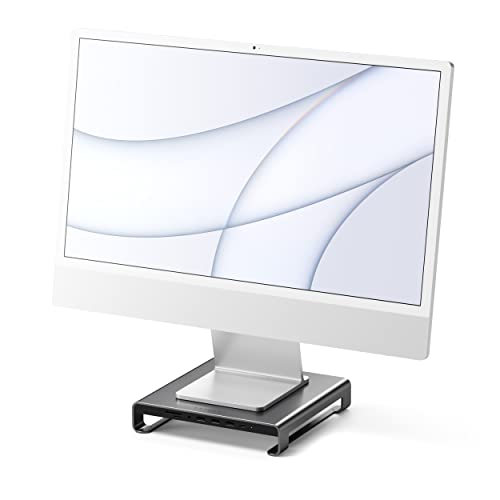
- Adds USB-C, USB 3.0, SD/microSD, and audio ports
- Raises your monitor while freeing up desk space
- Matches Apple-style setups with a sleek aluminum finish
Best For: iMac and Studio Display users who want extra ports and a cleaner desk.
Best for Flexible Connectivity
StarTech 9-in-1 USB-C Mini Dock

- 9-in-1 hub with HDMI/VGA, Ethernet, SD, and USB ports
- 12-inch cable improves placement and reduces port strain
- 100W PD passthrough supports charging while dock is in use
Best For: People who need a compact dock with broad port coverage and extra cable reach.
Best for Storage Expansion
UGREEN Mac mini M4 Dock & Stand with SSD

- Up to 8TB NVMe expansion
- 11-in-1 hub with 10Gbps ports
- SD/TF reader for faster transfers
Best For: Mac mini M4 users who want a storage-focused dock with plenty of fast ports.
Best Hub Stand Combo
Satechi USB-C Hub Stand for Mac mini M2/M1

- Adds USB-C, three USB-A, card readers, and headphone jack access
- Space Gray aluminum design matches the Mac mini well
- Built-in venting helps maintain airflow under the mini
Best For: Mac mini M2/M1 users who want a tidy stand plus front-facing port expansion.
Best for Cooling
Satechi USB C Hub Stand for Mac mini M2/M1
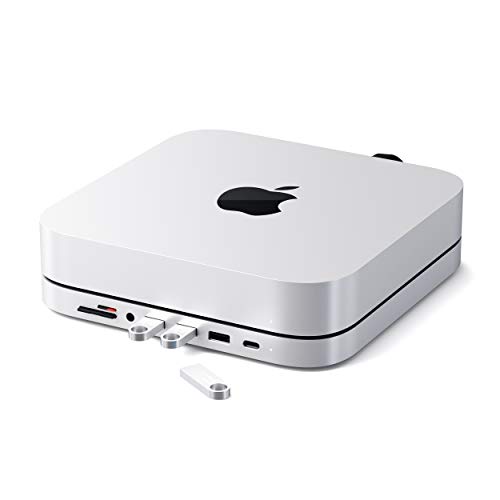
- Ventilated stand design helps airflow
- Adds USB-C, USB-A, SD, microSD, and audio
- Clean aluminum finish complements the Mac mini
Best For: Mac mini owners who want a tidy dock with extra ports and better cooling.
Best for Expanded Storage – Satechi Mac mini M4 Hub & Stand
If you want one of the more capable satechi mac mini docks for a desk setup, this hub-and-stand adds both front-facing ports and an NVMe enclosure in a clean, Mac mini-friendly package. It is especially useful if you want quick-access USB ports, SD card support, and the option to add fast internal-style storage without cluttering your workspace.
Best For: Mac mini M4 owners who want a compact dock with extra storage expansion and easy-access ports.
Pros:
- Built-in NVMe enclosure supports up to 4TB of additional storage.
- Includes two 10Gbps USB-A ports plus a UHS-II SD card reader.
- Self-cooling design helps manage heat while keeping the Mac mini accessible.
- Aluminum stand matches the Mac mini M4 cleanly and includes a power-button cutout.
Cons:
- SSD is not included, so you will need to buy one separately.
- Not compatible with heatsink-equipped or double-sided NVMe drives.
- USB-A ports are not suitable for CD drives, Apple SuperDrive, or iPad charging.
For buyers comparing satechi mac mini docks, this model stands out because it combines storage expansion with practical front ports in a compact, polished design. It is a strong choice if you want a dock that does more than just add connectivity.
Best for Clutter-Free Desk Setups – TobenONE 10-in-1 Dock Stand
If you’re comparing satechi mac mini docks and want something that doubles as a monitor stand, this TobenONE dock is built for tidy, space-saving workstations. It combines charging, display output, and peripheral expansion in one elevated design, making it a practical choice for desktop users who want fewer cables and more usable desk space.
Best For: Small desks, home offices, and users who want a dock-and-stand combo with easy plug-and-play connectivity.
Pros:
- Built-in monitor stand helps clear desk space and improve ergonomics.
- Offers 4K@60Hz HDMI, Ethernet, and 5 USB ports for flexible expansion.
- 100W USB-C power delivery supports fast charging for busy work sessions.
- No-driver setup works across Mac, Windows, and ChromeOS systems.
Cons:
- Bulkier than a simple dock, so it’s less ideal for ultra-minimal setups.
- Designed around laptop/monitor use, not as a compact Mac mini-specific dock.
For shoppers comparing satechi mac mini docks, this TobenONE model stands out more for its integrated stand and workspace organization than for a tiny footprint. It’s a smart pick if you want one unit to handle display, charging, and cable cleanup at the same time.
Best for SSD Expansion – Satechi Mac mini Hub & Stand with SSD
If you want one of the more capable satechi mac mini docks for adding fast storage and everyday ports, this hub-and-stand combo is a strong fit. It adds an M.2 SSD enclosure plus a practical mix of USB-C, USB-A, and card-reader connections while helping keep your Mac mini setup tidy.
Best For: Mac mini M1/M2 or Mac Studio users who want extra internal-style storage and a cleaner desk setup in one accessory.
Pros:
- Supports NVMe PCIe and SATA M.2 SSDs up to 10Gbps
- Includes USB-C, three USB-A ports, microSD/SD readers, and a 3.5mm audio jack
- Built-in vents and aluminum construction help with cooling and desk organization
Cons:
- Not compatible with Mac mini M4
- SSD is not included, so you’ll need to buy storage separately
- USB-A ports have some device and charging limitations
For buyers who need both expansion and storage, this is one of the most practical satechi mac mini docks to consider. It is especially useful if you want a cleaner all-in-one hub with SSD support instead of a basic port extender.
Best for Multi-Display Macs – Satechi 16-in-1 Thunderbolt 4 Dock
If you want one of the more capable satechi mac mini docks for a cluttered desk, this Thunderbolt 4 station is built around display flexibility, fast data, and plenty of legacy USB-A ports. It works best for Mac and Windows users who need a dock that can handle multiple peripherals without constantly reaching for adapters.
Best For: Mac users who want a high-port-count dock with strong external display support and fast wired networking.
Pros:
- 16-in-1 layout with DisplayPort, HDMI, Thunderbolt 4, USB-C, USB-A, SD/microSD, audio, and 2.5GbE
- Supports up to four 4K/60Hz displays on Windows and dual external displays on supported Macs
- 96W power delivery helps keep a laptop charged while the dock handles accessories
- Includes a 135W power supply, TB4 cable, and stand for flexible placement
Cons:
- Overkill if you only need basic ports or a simple single-monitor setup
- Mac display support depends on model, so not every Mac gets the same multi-monitor result
- Pricier than simpler USB-C hubs
For buyers comparing satechi mac mini docks, this model stands out more for workstation-style expansion than minimalist design. It makes the most sense if your setup needs lots of I/O, external storage, fast internet, and flexible monitor support in one box.
Best for High-Resolution Displays – Mac mini M4 Dock with 4K144Hz DP
If you want one of the more capable satechi mac mini docks alternatives for the M4-era Mac mini, this dock-and-stand combo focuses on expandability. It adds a built-in M.2 NVMe SSD enclosure, DisplayPort output for 4K at up to 144Hz, multiple USB-A and USB-C ports, SD/TF card slots, and audio in one compact base.
Best For: Users who want a tidy Mac mini setup with fast display support, extra storage, and easy front-panel access to everyday ports.
Pros:
- Built-in M.2 NVMe SSD enclosure adds flexible local storage
- Supports 4K/144Hz over DisplayPort for sharper, smoother displays
- Includes USB-A, USB-C, SD/TF, and audio for versatile connectivity
- Stand design helps keep the Mac mini setup compact and organized
Cons:
- DisplayPort output may not suit every monitor setup
- NVMe SSD is not included, so storage expansion adds extra cost
- More feature-packed than basic docks, so it may be overkill for simple setups
For buyers comparing satechi mac mini docks, this model stands out if display quality and storage expansion matter as much as port access. It is a strong fit for desktop users who want a clean all-in-one hub without giving up performance-oriented features.
Best for Desk Organization – SATECHI Type-C Monitor Stand Hub
If you want satechi mac mini docks-style convenience in a monitor-stand form factor, this SATECHI hub is a smart way to add ports while freeing up desk space. It raises your display for better ergonomics and keeps everyday connections within easy reach.
Best For: iMac, Studio Display, and other desktop setups that need extra USB, card-reader, and audio ports without clutter.
Pros:
- Built-in USB-C, USB 3.0, microSD/SD, and 3.5mm audio connections
- Helps improve viewing height while creating usable storage underneath
- Clean aluminum design blends well with Apple desks and setups
Cons:
- Not a true Mac mini dock and won’t fit every desktop workflow
- USB-A ports won’t charge devices or support CD readers like Apple SuperDrive
- Best suited to lighter peripherals rather than high-power accessories
For buyers comparing satechi mac mini docks, this model stands out more as a space-saving monitor riser with useful built-in expansion than a full docking station. It’s a practical pick if you value a tidier desk and quick access to common ports.
Best for Flexible Connectivity – StarTech 9-in-1 USB-C Mini Dock
If you want one of the more versatile satechi mac mini docks alternatives for a compact desk setup, this StarTech mini dock covers the basics without getting bulky. It adds HDMI or VGA display output, wired Ethernet, SD card access, and a mix of USB-A and USB-C ports, making it a practical all-in-one hub for everyday work.
Best For: Users who need a compact docking solution with extra cable length, mixed display support, and reliable charging for a streamlined workstation.
Pros:
- 9-in-1 design adds video, data, networking, and card reader support in one compact unit
- 12-inch attached cable helps reduce strain on ports and makes placement easier on crowded desks
- 100W Power Delivery passthrough supports laptop charging while leaving headroom for the dock
- Gigabit Ethernet and SD/microSD slots cover common productivity needs
Cons:
- HDMI is limited to 4K at 30Hz, which is not ideal for high-refresh monitors
- VGA is included, but it is mainly useful for older displays
- Compatibility depends on USB-C/Thunderbolt support and DP Alt Mode for video
Overall, this is a useful pick if you value reach, reliability, and broad port coverage over ultra-fast display output. For shoppers comparing satechi mac mini docks, it stands out as a simple, travel-friendly alternative for mixed-device setups.
Best for Storage Expansion – UGREEN Mac mini M4 Dock & Stand with SSD
If you want one of the more capable satechi mac mini docks alternatives for a Mac mini M4 setup, this UGREEN dock is built around speed, storage, and desk organization. It adds an NVMe enclosure, multiple fast USB ports, and card readers in a compact stand that keeps the mini elevated and your workspace cleaner.
Best For: Mac mini M4 users who want expandable NVMe storage plus a high-port-count hub for creative work or everyday peripherals.
Pros:
- Built-in NVMe enclosure supports up to 8TB of extra storage.
- 11-in-1 layout adds 10Gbps USB-A and USB-C data ports.
- Includes SD/TF card reader for quick photo and video transfers.
- Compact stand design helps keep the desk tidy and organized.
Cons:
- SSD is not included, so you’ll need to buy storage separately.
- Best performance may require an external power adapter with multiple devices.
This is a strong pick if you want more than a basic hub and need both expansion storage and high-speed connectivity. For buyers comparing satechi mac mini docks, the extra NVMe flexibility makes it especially appealing for creators and power users.
Best Hub Stand Combo – Satechi USB-C Hub Stand for Mac mini M2/M1
If you want one of the most practical satechi mac mini docks for an M2 or M1 Mac mini, this stand-and-hub combo adds ports without cluttering your desk. It sits under the mini for a cleaner footprint while giving you front-facing access to USB, card readers, and audio.
Best For: Mac mini owners who want a neat all-in-one dock, stand, and port expansion solution for everyday desktop use.
Pros:
- Adds a USB-C data port, three USB 3.0 ports, microSD/SD card readers, and a headphone jack.
- Matches the Mac mini with a brushed aluminum Space Gray finish.
- Built-in airflow helps support cooling when multiple devices are connected.
Cons:
- Not compatible with the Mac mini M4.
- USB speeds top out at 5Gbps, so it is not ideal for heavy transfer workflows.
This is a strong pick if you want a simple, tidy upgrade that keeps the Mac mini accessible while adding useful front ports. Among satechi mac mini docks, it stands out for combining form, function, and a low-profile desktop setup.
Best for Cooling – Satechi USB C Hub Stand for Mac mini M2/M1
If you want one of the more polished satechi mac mini docks, this aluminum stand-and-hub adds useful ports while helping your Mac mini stay tidy and ventilated. It’s a practical pick for M2 and M1 owners who want front-facing access to storage, peripherals, and audio without cluttering the desk.
Best For: Mac mini users who want a compact all-in-one dock with better airflow and easy access to everyday connections.
Pros:
- Built-in cooling vent helps maintain airflow around the Mac mini
- 6-in-1 layout adds USB-C, USB-A, SD/microSD, and headphone access
- Aluminum design matches the Mac mini nicely on a desk setup
Cons:
- Not compatible with the Mac mini M4
- USB ports top out at 5Gbps, so it’s not a high-speed workstation dock
For M1 and M2 setups, this is a well-executed way to expand ports without sacrificing the clean look of the Mac mini. Among satechi mac mini docks, it stands out most for its stand-style design and cooling-focused layout rather than raw connectivity.
How We Picked These Satechi Mac Mini Docks
We looked for docks and stands that solve the most common Mac mini pain points: limited ports, cable clutter, external storage, and awkward desktop placement. Priority went to models with strong USB performance, reliable card readers, useful front-panel access, and, where relevant, NVMe SSD enclosure support.
We also favored options that match real buyer needs rather than stacking features that are hard to use. That means paying attention to connection type, Mac mini compatibility, display output, and whether the dock is better suited to storage expansion or general hub duties.
Quick Comparison
In broad terms, Satechi Mac Mini Docks fall into three groups: hub-and-stand models with SSD bays, simpler USB-C hub stands, and broader docking stations for mixed-device desks. The SSD models are best for users who want fast local storage. The simpler hub stands are ideal if you mainly need ports and a tidier footprint. Larger docking stations make more sense when you also need monitor output, charging, and more peripheral connections.
Key Buying Factors for Satechi Mac Mini Docks
Storage Support
If you plan to edit media, store project files, or run local backups, choose a dock with an NVMe or SATA M.2 enclosure. Check the supported drive type and whether the enclosure is designed for the speeds you expect. NVMe is typically the better pick for performance-focused users.
Port Mix and Speed
Think about what you actually plug in every day. USB-A ports are still valuable for drives, keyboards, and dongles, while USB-C data ports are useful for newer accessories and faster transfers. Card readers matter for photographers and creators, and 10Gbps USB ports are worth prioritizing if you move large files often.
Display and Power Needs
If you want a single-cable desk, compare display support carefully. Some Satechi Mac Mini Docks are built mainly for expansion and storage, while others are full-featured USB-C or Thunderbolt stations with monitor support and pass-through charging. Make sure the dock matches your monitor resolution and refresh-rate needs.
Mac Mini Generation Compatibility
Compatibility matters. Some stands are built specifically for Mac mini M1/M2 models, while newer versions are tailored to Mac mini M4 and M4 Pro. Always confirm the model fit before buying so the port layout and physical design line up correctly.
Who Should Buy Which Satechi Mac Mini Docks?
Choose an SSD-equipped dock if you want one device to handle expansion and high-capacity storage. Pick a simpler hub stand if your goal is mostly extra ports and a neater setup. Go with a larger Thunderbolt or USB-C docking station if you run multiple accessories, external displays, and charging from the same desk.
For most buyers, the best Satechi Mac Mini Docks are the ones that match your daily workflow first and your spec sheet second. Focus on the ports you will use, the storage you need, and the Mac mini version you own, and you will end up with a setup that feels faster and far less cluttered.
