
Choosing the right dock can make a Mac Studio setup feel faster, cleaner, and far more flexible. The best options add the ports you actually need without crowding your desk.
Below, we focus on Satechi docks for Mac Studio that balance display support, data speed, charging, and everyday convenience for work and creative use.
Best 9 Satechi Docks for Mac Studio Picks for 2026
Best for Storage Expansion
Satechi Mac mini Hub & Stand with SSD

- Adds M.2 SSD expansion for fast local storage
- Includes USB-C, USB-A, SD/microSD, and audio ports
- Matches Mac mini M1/M2 and Mac Studio cleanly
Best For: Mac Studio and Mac mini users who need a compact dock with extra storage.
Best for High-Speed Storage Expansion
Mate Studio Stand-A 80Gbps SSD Dock
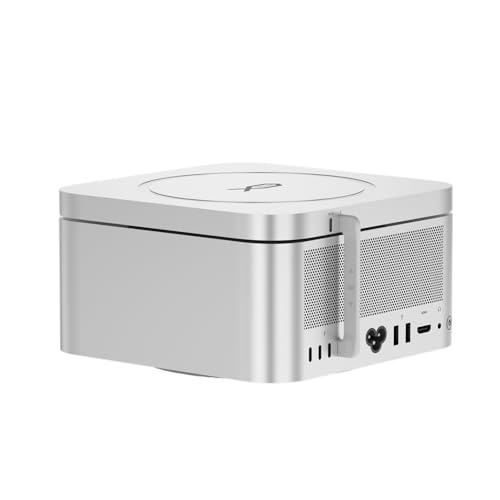
- Dual NVMe slots for up to 16TB total
- 80Gbps USB-C for fast SSD expansion
- Aluminum stand fits Mac Studio-style setups
Best For: Mac Studio users who want a compact stand with serious external SSD capacity.
Best USB 4 Speed
Satechi 7-in-1 USB C Hub Pro Slim

- USB 4 port with up to 40Gbps transfer and 6K/60Hz output
- 4K/60Hz HDMI, SD, and microSD slots for common workflows
- Slim aluminum build keeps the setup portable and tidy
Best For: Mac users who want a slim, fast hub with display output and card readers.
Best for Built-In SSD Expansion
Satechi Mac mini M4 Hub & Stand

- Adds up to 4TB NVMe SSD storage
- Two 10Gbps USB-A ports plus SD card reader
- Compact aluminum design with self-cooling airflow
Best For: Mac mini M4 owners who want storage expansion and handy front-facing ports in one dock.
Best for Multi-Display Thunderbolt 4
Satechi Thunderbolt 4 Dock Slim Pro

- Dual 4K or single 8K/6K display support
- Four Thunderbolt 4 ports plus 10Gbps USB-A
- 96W power delivery with 150W GaN PSU
Best For: Mac Studio users who need a compact Thunderbolt 4 dock with strong monitor support.
Best for High-Speed Expansion
Satechi Thunderbolt 4 Dock 100W Charging

- 40Gbps Thunderbolt 4 for fast connectivity
- 100W charging for a cleaner desk setup
- Dual 4K/60Hz HDMI plus Ethernet and USB-A
Best For: Mac users who want a fast, all-in-one dock for external displays and everyday peripherals.
Best for Mac Studio Expansion
Satechi 16-in-1 Thunderbolt 4 Dock

- 16 ports with dual DisplayPort, dual HDMI, and Thunderbolt 4
- 96W power delivery plus 2.5GbE for a full desktop setup
- UHS-II SD/microSD slots and multiple fast USB ports
Best For: Mac users building a high-connectivity desktop dock with monitors, storage, and Ethernet.
Best for Storage Expansion – Satechi Mac mini Hub & Stand with SSD
If you want a tidy way to add ports and fast local storage, this Satechi hub is one of the more practical satechi docks for mac studio setups. It turns the Mac mini or Mac Studio footprint into a compact dock with USB-C, USB-A, card readers, audio, and an internal M.2 SSD enclosure for extra capacity.
Best For: Mac Studio and Mac mini users who want a space-saving dock with built-in SSD expansion and everyday connectivity.
Pros:
- Built-in M.2 enclosure supports NVMe PCIe and SATA drives for fast storage expansion.
- Useful port mix includes USB-C 10Gbps, USB-A, microSD/SD card readers, and a 3.5mm audio jack.
- Designed to match Mac mini M1/M2 and Mac Studio with a clean aluminum finish.
- Ventilation cutouts help airflow while keeping the setup compact and organized.
Cons:
- Not compatible with Mac mini M4.
- SSD is not included, so you will need to buy storage separately.
- USB-A ports have some device limitations, including Apple SuperDrive support.
For buyers comparing satechi docks for mac studio, this model stands out because it combines dock convenience with real storage expansion instead of just adding ports. That makes it a smart pick if you want to reduce desk clutter while gaining faster access to files and media.
Best for Thunderbolt 4 Expansion – Satechi 11-in-1 Thunderbolt 4 Dock
If you want one dock that adds serious connectivity to a Mac Studio setup, this Satechi option is built for speed, display support, and everyday desk convenience. It’s a strong fit for shoppers comparing satechi docks for mac studio who need Thunderbolt 4 bandwidth, multiple USB ports, and a clean single-cable workstation.
Best For: Mac Studio users who want a high-speed Thunderbolt 4 dock with lots of ports for storage, peripherals, and external displays.
Pros:
- Three Thunderbolt 4 downstream ports help support fast accessories and flexible desk setups.
- Includes 3 USB-A 3.2 ports, Gigabit Ethernet, SD card reader, and audio jack for broad usefulness.
- Delivers up to 96W host charging, which is plenty for many laptop-based workstations.
- Supports dual 4K/60Hz displays on Windows and strong multi-display options on supported Macs.
Cons:
- Mac display support depends on the model, so not every Apple silicon system gets the same result.
- It’s a desk dock, not a compact travel hub, so it takes up more space.
- Premium Thunderbolt features make it more expensive than basic USB-C docks.
For a Mac Studio desk, this is one of the more capable satechi docks for mac studio if you care about Thunderbolt performance and expansion first. It’s especially appealing for users who want a tidy, high-bandwidth hub rather than a simple port multiplier.
Best for High-Speed Storage Expansion – Mate Studio Stand-A 80Gbps SSD Dock
If you’re comparing satechi docks for mac studio and want a dock that adds serious SSD capacity, this Mate Studio Stand-A is built for fast, high-volume storage expansion. It combines a Mac Studio-style aluminum stand with dual NVMe slots and an 80Gbps USB-C connection, making it a practical pick for creators who need more workspace storage without replacing the machine.
Best For: Mac Studio owners who want a compact stand-and-storage dock for video work, large project files, or fast scratch drives.
Pros:
- Dual M.2 NVMe slots support up to 16TB total storage.
- 80Gbps USB-C connection is designed for fast SSD performance.
- Aluminum stand design helps match Mac Studio setups and improve airflow.
- PD 3.0 support adds flexibility for powering demanding drives.
Cons:
- Requires you to buy SSDs separately.
- Top speeds depend on compatible drives and host-device support.
- More specialized than a simple hub if you only need basic ports.
This is a smart choice if you value expandable storage more than extra ports, especially in a Mac Studio desk setup. For shoppers scanning satechi docks for mac studio, it stands out as a storage-first alternative with a clean, workstation-friendly design.
Best USB 4 Speed – Satechi 7-in-1 USB C Hub Pro Slim
If you want one of the more capable satechi docks for mac studio-style setups that need a compact, desk-friendly hub, this model is built around speed and portability. It adds USB 4, 4K HDMI, SD/microSD, and 100W pass-through charging without taking up much space.
Best For: Mac users who want a slim multiport hub with fast data transfer, display output, and card readers for everyday desk or travel use.
Pros:
- USB 4 port supports up to 40Gbps data and 6K/60Hz display output
- 4K/60Hz HDMI plus SD and microSD card slots cover key workflow needs
- Two USB 3.2 Gen 2 ports and a USB-C data port add flexible connectivity
- Slim aluminum design keeps the setup portable and tidy
Cons:
- Not a full desktop docking station with multiple monitor ports
- May not work with some protective cases that block the USB-C opening
For buyers comparing satechi docks for mac studio use, this is a strong choice when you want a compact add-on rather than a bulky dock. It is especially appealing if you value high-speed USB 4 performance and a clean, minimal footprint.
Best for Built-In SSD Expansion – Satechi Mac mini M4 Hub & Stand
If you want one of the more capable satechi docks for mac studio-style desk setups around the Mac mini M4, this hub-and-stand combines front-access ports with an NVMe SSD enclosure for a clean, all-in-one upgrade. It is a practical pick if you want faster media access, extra USB-A connections, and a space-saving form factor that still looks at home on a Mac desk.
Best For: Mac mini M4 users who want docked expansion, built-in SSD storage, and easy front-panel access to everyday ports.
Pros:
- Built-in NVMe enclosure supports up to 4TB of extra storage
- Two 10Gbps USB-A ports plus SD card reader for quick transfers
- Self-cooling design helps maintain airflow and cleaner desk integration
- Includes installation tools, thermal pad, and a 2-year warranty
Cons:
- SSD not included, so total cost is higher once you add storage
- Not compatible with heatsink-equipped or double-sided NVMe drives
- USB-A ports do not support CD drives, SuperDrive, or iPad charging
For buyers comparing satechi docks for mac studio-like workflows, this model stands out because it adds both connectivity and internal storage in one compact accessory. It is less about raw port count and more about keeping a Mac mini setup tidy while improving day-to-day convenience.
Best for Multi-Display Thunderbolt 4 – Satechi Thunderbolt 4 Dock Slim Pro
If you want one of the more capable satechi docks for mac studio setups, this Thunderbolt 4 hub is built for high-speed peripherals, fast charging, and serious external display support. It combines a 96W upstream connection, a 10Gbps USB-A port, and three downstream Thunderbolt 4 ports, making it a strong fit for clean, productivity-focused desks.
Best For: Mac Studio users who want a compact Thunderbolt 4 dock with strong display options and reliable charging.
Pros:
- Supports up to dual 4K or single 8K/6K output for flexible monitor setups.
- Includes four Thunderbolt 4 ports plus a 10Gbps USB-A port for modern connectivity.
- Delivers 96W power delivery and comes with a 150W GaN power supply.
- Broad compatibility with macOS, Windows, USB4, and USB-C devices.
Cons:
- Does not use DisplayLink, so monitor support depends on native Thunderbolt/USB-C compatibility.
- Higher-end feature set may be more dock than casual users need.
For buyers comparing satechi docks for mac studio, this model stands out for its compact form factor and strong Thunderbolt 4 feature set rather than a sprawling port selection. It’s a smart pick if you want a streamlined dock that still handles demanding display and accessory setups.
Best for Portable Mac Studios – Satechi OntheGo 7-in-1 USB-C Hub
If you want one of the more travel-friendly satechi docks for mac studio setups, this compact 7-in-1 hub is built for quick desk expansion without adding clutter. It combines a magnetic mount, coiled cable, and the essentials most Mac users need: 4K/60Hz HDMI, Ethernet, USB-A, and card readers, plus pass-through charging.
Best For: Mac Studio users who want a small, tidy hub for portable workstations, desk-side convenience, or occasional travel.
Pros:
- Compact magnetic design helps keep Mac Studio setups neat and cable-free.
- Includes the key ports most people actually use: HDMI, Ethernet, USB-A, and SD/microSD.
- 100W USB-C input with up to 80W pass-through charging keeps your device powered while connected.
- Works across Mac, Windows, iPad, and Chromebooks for flexible use.
Cons:
- Only one HDMI output, so it is not ideal for multi-display workflows.
- USB-A ports are limited to 5Gbps, which may feel modest for heavy data transfer.
- Best suited to compact setups rather than full desktop docking needs.
This is a smart pick if you want satechi docks for mac studio use that prioritize portability and order over expansion depth. It covers the everyday essentials well, but buyers who need more monitor support or a larger port array may want a fuller dock.
Best for High-Speed Expansion – Satechi Thunderbolt 4 Dock 100W Charging
If you want a dock that adds serious I/O to a desktop setup, this Satechi option is a strong pick among satechi docks for mac studio. It combines 40Gbps Thunderbolt 4 performance, 100W charging, dual 4K/60Hz HDMI support, and wired networking in a single hub, making it practical for a cleaner Mac workstation.
Best For: Mac users who want a fast, all-in-one dock for external displays, charging, and everyday peripherals.
Pros:
- 100W charging helps power a laptop while keeping the desk setup simple
- Dual HDMI 4K/60Hz support is useful for multi-monitor productivity
- 40Gbps Thunderbolt 4 connectivity keeps data transfers quick
- Includes Ethernet plus extra USB-A ports for core accessories
Cons:
- DisplayLink software is required for some display setups
- Not the most compact choice if you want a minimal desktop footprint
For buyers comparing satechi docks for mac studio, this model stands out for its balance of charging, display support, and high-bandwidth connectivity. It is a good fit if you need a flexible dock that can handle both workday peripherals and dual-monitor use.
Best for Mac Studio Expansion – Satechi 16-in-1 Thunderbolt 4 Dock
If you want one of the most capable satechi docks for mac studio-style setups, this 16-in-1 Thunderbolt 4 dock gives you a dense mix of display outputs, fast USB, card readers, and 2.5GbE in a single desktop hub. It’s a strong fit for creators and power users who want to reduce cable clutter while keeping external storage, peripherals, and monitors connected.
Best For: Mac users who want a high-port-count dock for a multi-monitor, high-speed desktop workstation.
Pros:
- Loads in 16 ports, including dual DisplayPort, dual HDMI, Thunderbolt 4, and multiple USB-A/USB-C options
- Supports up to four 4K/60Hz displays on Windows, with strong multi-monitor flexibility for compatible Macs
- Includes 96W power delivery, 2.5GbE, and UHS-II SD/microSD card slots for work-focused setups
- Ships with a 135W power supply, TB4 cable, and a vertical stand for flexible placement
Cons:
- Mac display support is more limited than Windows, especially on base M1/M2 systems
- Large feature set can be overkill if you only need basic USB expansion
For buyers comparing satechi docks for mac studio use, this model stands out more for connectivity breadth than simplicity. It’s a practical pick if you want a single dock to handle monitors, wired networking, memory cards, and accessory charging at once.
How We Picked Satechi Docks for Mac Studio
We prioritized practical features that matter in real setups: Thunderbolt or USB-C bandwidth, reliable display output, enough USB-A and USB-C ports for accessories, and useful extras like card readers or Ethernet. We also considered whether a dock is better for a permanent desk setup or a travel-friendly kit.
Quick Comparison
If you need a stationary workstation, a full-size Thunderbolt dock is usually the best fit. If you want a cleaner footprint or extra storage, a hub with an SSD enclosure can be more useful. Compact multiport hubs are better for portable use, while higher-port-count docks suit users with monitors, storage, audio gear, and peripherals all connected at once.
Key Buying Factors for Satechi Docks for Mac Studio
Display Support
Check whether the dock supports one high-resolution display, dual 4K monitors, or more complex multi-display output. Mac compatibility can vary by connection type and app workflow, so the display claim should match your exact setup.
Port Selection
Look for the mix you actually use. USB-A remains important for older accessories, while USB-C and Thunderbolt matter more for fast external drives, interfaces, and modern peripherals. Ethernet, SD/microSD, and audio jacks can also save desk space.
Power Delivery
Many Satechi Docks for Mac Studio include 100W charging or bus-powered functionality, but the right choice depends on whether you want a dock that powers a laptop too or simply expands a desktop rig. For Mac Studio users, charging is often about powering connected devices rather than the computer itself.
Expansion and Speed
If you work with large media files, prioritize Thunderbolt 4 or high-speed USB-C models. If your storage needs are local, a dock with an integrated SSD enclosure can be a smart two-in-one upgrade.
Who Should Buy Which Satechi Docks for Mac Studio?
Choose a full Thunderbolt dock if you want the most complete desk setup for monitors, drives, and peripherals. Pick a hub with SSD expansion if you want to add fast local storage without another enclosure on the desk. Go with a compact multiport adapter if you travel often or only need the basics. For power users with multiple displays and many accessories, the higher-port-count docks are usually the best long-term fit.
