
If you need a fast, simple way to turn an SSD into portable storage, Sabrent has one of the broadest enclosure lineups available. The right choice depends on your drive type, connection speed, and whether you want maximum portability or desktop-style flexibility.
This roundup highlights the best options for NVMe and SATA users, from slim USB-C cases to higher-speed Thunderbolt-ready enclosures and docking stations.
Best 10 Sabrent External SSD Enclosures Picks for 2026
Best for Speed

- Up to 3,900 MB/s with USB4
- Tool-free support for NVMe drives
- Active fan cooling for sustained performance
Best For: Creators and power users who need a fast portable NVMe enclosure.
Best for Easy Setup
SABRENT Ultra Slim 2.5-Inch SATA Enclosure

- Supports standard 2.5-inch SATA SSDs and HDDs
- Aluminum body aids heat dissipation
- UASP support with plug-and-play setup
Best For: People who want a simple enclosure for quick reuse of a 2.5-inch SATA drive.
Best Budget
Sabrent Tool-Free M.2 NVMe/SATA Enclosure

- Tool-free drive swaps save time
- Works with NVMe and SATA M.2 SSDs
- USB 3.2 Type-C up to 10Gbps
Best For: People who want an easy-to-use, travel-friendly enclosure for frequent SSD swaps.
Best for 2.5" and 3.5" Drives
SABRENT USB 3.0 Lay-Flat Docking Station

- Supports most standard 2.5" and 3.5" SATA drives
- USB 3.0 with UASP for faster transfers
- Includes external power for 3.5" desktop drives
Best For: People who want a simple dock for swapping and backing up SATA SSDs and HDDs.
Best for Everyday Use
SABRENT Tool-Free NVMe Enclosure

- Tool-free flip-open installation
- Aluminum body with improved cooling
- USB-C 10Gbps plug-and-play
Best For: Quick NVMe upgrades, cloning, and portable storage with minimal setup.
Best for Desktop Drives
SABRENT USB 3.0 SATA Docking Station
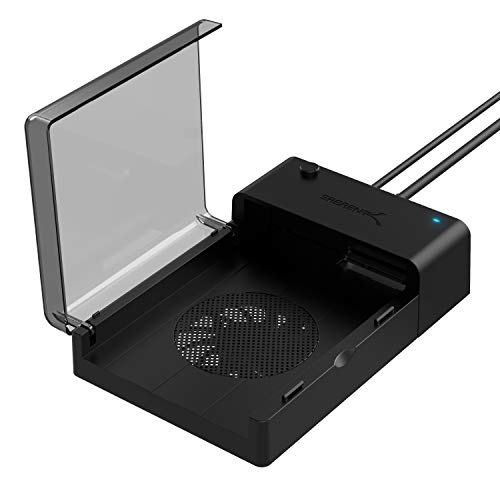
- Supports 2.5-inch and 3.5-inch SATA drives
- Built-in fan helps keep drives cooler
- Hot-swappable with Acronis cloning support
Best For: Desktop users who want a quick-swap dock for backups, cloning, and drive testing.
Best for 20Gbps Speed

- 20Gbps USB 3.2 Gen 2x2 support
- Fits NVMe and SATA M.2 drives
- Tool-free aluminum build with RGB lighting
Best For: Users who want a fast, easy enclosure for NVMe or SATA drives with a more stylish design.
Best with Extra Features
Sabrent 2.5" SATA to USB 3.0 Enclosure

- Tool-free installation
- UASP SATA III support
- USB 3.0 with broad OS compatibility
Best For: People who want a simple plug-and-play enclosure for 2.5-inch SATA SSDs and hard drives.
Best for 2.5/3.5-Inch SATA Drives
SABRENT USB 3.0 Tool-Free Enclosure
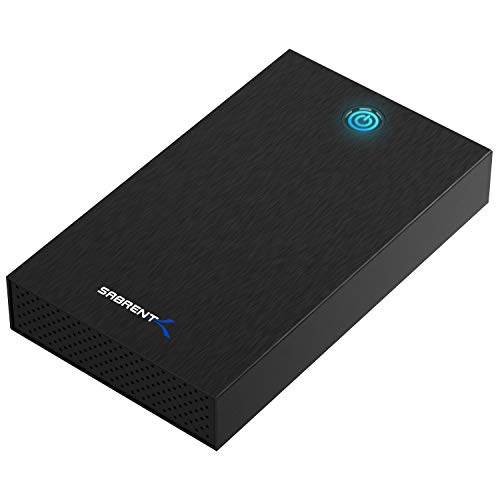
- Tool-free swaps for quick drive changes
- Works with 2.5-inch and 3.5-inch SATA drives
- Includes external power and UASP support
Best For: Users repurposing SATA HDDs or SSDs in a simple desktop enclosure.
Best Simple Pick
SABRENT 2.5" SATA to USB 3.0 Enclosure
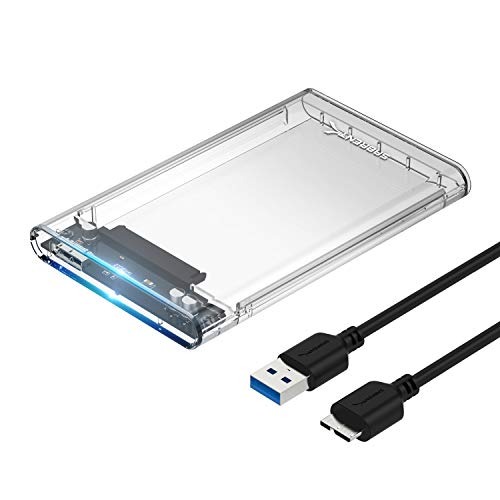
- Tool-free setup for quick drive swaps
- UASP support helps SSD performance
- Includes cloning software download
Best For: Users who want a simple, SSD-friendly enclosure for quick setup and portable storage.
Best for Speed – SABRENT USB4 NVMe Enclosure
If you want one of the fastest sabrent external ssd enclosures for modern laptops and desktops, this USB4 model is built for high-throughput NVMe storage. It supports PCIe Gen4 x4 drives, offers tool-free installation, and stays broadly compatible with Thunderbolt 3/4, USB4, and USB-C systems.
Best For: Creators, editors, and power users who need a fast portable enclosure for large files, project drives, and scratch storage.
Pros:
- Up to 3,900 MB/s over USB4 with strong Thunderbolt compatibility
- Tool-free setup for 2230/2242/2260/2280 PCIe NVMe drives
- Active cooling helps maintain performance during long transfers
- Plug-and-play use on Windows and macOS with no external power needed
Cons:
- Does not support SATA M.2 SSDs
- Best speeds require a USB4 or Thunderbolt-capable host
- Overkill for basic backup or casual file storage
For buyers comparing sabrent external ssd enclosures, this is a performance-first pick that makes the most sense when you already have a fast NVMe drive and a compatible USB4 or Thunderbolt system. It trades simplicity and speed for broad use-case flexibility, which is exactly what many advanced users want.
Best for Easy Setup – SABRENT Ultra Slim 2.5-Inch SATA Enclosure
If you want a simple way to repurpose a laptop drive, this is one of the most straightforward sabrent external ssd enclosures to consider. The aluminum shell helps with heat dissipation, UASP support improves responsiveness on compatible systems, and the tool-free, plug-and-play design makes setup fast for everyday storage or backup use.
Best For: Users who want a no-fuss enclosure for 2.5-inch SATA SSDs or hard drives with quick installation.
Pros:
- Supports standard 2.5-inch SATA drives
- Ultra-slim aluminum case helps with cooling
- UASP support and USB 3.0 for better performance
- Hot-swappable with no drivers required
Cons:
- Limited to 2.5-inch SATA drives only
- No rugged waterproof or shockproof design
Overall, this is a practical pick if you need a dependable enclosure without extra setup steps. Among sabrent external ssd enclosures, it stands out for easy installation, slim construction, and solid everyday compatibility rather than flashy extras.
Best Budget – Sabrent Tool-Free M.2 NVMe/SATA Enclosure
Sabrent USB 3.2 Type-C Tool-Free Enclosure for M.2 PCIe NVMe and SATA SSDs (EC-SNVE)
Check Price On AmazonIf you want one of the more convenient sabrent external ssd enclosures for quick swaps and portable storage, this Sabrent EC-SNVE keeps the process simple. It supports both M.2 SATA and NVMe drives in 2242, 2260, and 2280 sizes, and the tool-free design makes installation fast without opening up a toolkit.
Best For: Users who want a portable, bus-powered enclosure with easy drive changes and broad M.2 compatibility.
Pros:
- 100% tool-free design for fast SSD installs and removals
- Supports both NVMe and SATA M.2 drives in multiple lengths
- USB 3.2 Type-C interface with up to 10Gbps transfer speeds
- Aluminum shell keeps the enclosure slim, sturdy, and travel-friendly
Cons:
- Not a fit for 2.5-inch SATA drives
- Speed depends on your drive type and host port support
- No included external power, so it relies on bus power only
As a practical pick in sabrent external ssd enclosures, this model stands out for simple setup and flexible drive support rather than flashy extras. It is a strong match for people who move drives between systems often and want an enclosure that stays compact and easy to use.
Best for 2.5" and 3.5" Drives – SABRENT USB 3.0 Lay-Flat Docking Station
If you want a simple way to read, clone, or back up SATA drives, this SABRENT dock is a practical fit for many sabrent external ssd enclosures shoppers. It supports both 2.5-inch and 3.5-inch SATA drives, adds USB 3.0 connectivity, and includes UASP support for better transfer performance on compatible systems.
Best For: Users who need an easy-to-use dock for swapping between 2.5-inch SSDs and 3.5-inch HDDs.
Pros:
- Works with most standard 2.5″ and 3.5″ SATA drives
- USB 3.0 with UASP support can improve transfer speeds
- Lay-flat design makes drive changes quick and straightforward
- Includes external power for 3.5″ desktop drives
Cons:
- Not ideal for non-standard or enterprise drives with compatibility issues
- Requires a UASP-capable host system to get the full speed benefit
- Bulkier than a compact enclosure-style adapter
This is a good pick if you value convenience over portability. Among sabrent external ssd enclosures and docks, it stands out as a no-fuss option for fast drive access, backups, and occasional desktop use.
Best for Everyday Use – SABRENT Tool-Free NVMe Enclosure
If you want one of the more user-friendly sabrent external ssd enclosures, this SABRENT EC-PNVO is built for quick swaps and steady 10Gbps portable storage. The flip-open, tool-free design makes it easy to install an NVMe drive without screws, while the aluminum body helps keep temperatures under control during transfers and cloning jobs.
Best For: Anyone who wants a fast, no-fuss NVMe enclosure for backups, drive cloning, handheld gaming, or everyday portable storage.
Pros:
- Tool-free flip-open design makes SSD installs fast and simple
- Aluminum construction and thermal pad improve cooling for long transfers
- Supports M.2 NVMe drives in 2230, 2242, 2260, and 2280 sizes
- USB-C plug-and-play setup with no external power or drivers needed
Cons:
- NVMe-only, so it will not work with M.2 SATA SSDs
- 10Gbps is fast, but not as quick as newer 20Gbps or Thunderbolt enclosures
- Best cooling depends on proper thermal pad contact and enclosure fit
Overall, this is a practical pick if you want one of the easiest sabrent external ssd enclosures to live with day to day. It focuses on simple installation, solid cooling, and reliable 10Gbps performance rather than extra features.
Best for Desktop Drives – SABRENT USB 3.0 SATA Docking Station
If you need one of the more practical sabrent external ssd enclosures for swapping bare drives in and out quickly, this lay-flat docking station is a simple, no-fuss pick. It supports both 2.5-inch and 3.5-inch SATA drives, offers UASP and up to 6Gbps transfer support, and adds a built-in fan to help keep storage cooler during longer backup sessions.
Best For: Users who want an easy desktop dock for quick cloning, backups, and drive testing without opening a PC.
Pros:
- Works with both 2.5-inch and 3.5-inch SATA HDDs and SSDs
- Built-in cooling fan helps manage heat during heavy use
- Hot-swappable design makes drive changes fast and convenient
- Includes Acronis True Image download for cloning support
Cons:
- Bulkier than a portable enclosure meant for travel
- Uses USB 3.0 rather than newer USB-C-only designs
- Open dock format leaves drives exposed to dust and knocks
For a desktop-friendly option, this SABRENT dock stands out because it combines broad drive support, cooling, and easy swapping in one straightforward unit. Among sabrent external ssd enclosures, it makes the most sense for home backup stations and cloning workflows rather than portable use.
Best for 20Gbps Speed – SABRENT Rocket RGB Enclosure
If you want one of the faster sabrent external ssd enclosures for a portable drive build, this SABRENT Rocket RGB case is a strong fit. It supports both NVMe and SATA M.2 drives, works with multiple lengths, and adds tool-free installation plus USB 3.2 Gen 2×2 performance for users who can take advantage of a 20Gbps port.
Best For: Buyers who want a fast, easy-to-use enclosure for NVMe or SATA drives with extra visual flair and broad device support.
Pros:
- Up to 20Gbps over USB 3.2 Gen 2×2 for high-speed transfers
- Supports both M.2 NVMe and M.2 SATA drives in common sizes
- Tool-free aluminum design makes drive swaps quick and simple
- RGB lighting adds clear status indication and a premium look
Cons:
- Full 20Gbps performance depends on a compatible host port
- RGB styling may be unnecessary for buyers who prefer a plain enclosure
- Speed and value may be overkill for older 5Gbps systems
As a practical choice among sabrent external ssd enclosures, this model stands out for combining fast USB-C performance, broad drive compatibility, and tool-free convenience. It makes the most sense if you already have a matching high-speed port and want a portable enclosure that feels a little more polished than the average bare-bones case.
Best with Extra Features – Sabrent 2.5" SATA to USB 3.0 Enclosure
If you want one of the simplest sabrent external ssd enclosures for turning a 2.5-inch SATA SSD into portable storage, this Sabrent EC-UASP is a practical pick. The tool-free shell, UASP support, and broad compatibility make it a straightforward option for quick drive swaps and everyday backups.
Best For: Users who want a no-fuss enclosure for SSDs or 2.5-inch SATA drives with fast USB 3.0 performance.
Pros:
- Tool-free design makes installation quick and easy
- Supports UASP SATA III for better SSD performance
- Works with USB 3.0 and remains backward compatible with USB 2.0/1.1
- Hot-swappable and driver-free for simple plug-and-play use
Cons:
- Designed for 2.5-inch SATA drives, not NVMe SSDs
- Plastic enclosure may feel basic compared with metal models
- Peak speed depends on the host port and drive type
For shoppers comparing sabrent external ssd enclosures, this model stands out more for convenience than extras: it is easy to set up, widely compatible, and fast enough for most portable SSD tasks. If you mainly need a reliable SATA-to-USB enclosure without complexity, it fits the job well.
Best for 2.5/3.5-Inch SATA Drives – SABRENT USB 3.0 Tool-Free Enclosure
If you need one of the more flexible sabrent external ssd enclosures for older SATA drives, this tool-free USB 3.0 model is a practical pick. It supports both 2.5-inch and 3.5-inch SATA HDDs/SSDs, adds UASP for better transfer efficiency, and includes external power for stable desktop use.
Best For: Desktop users who want a simple, tool-free enclosure for repurposing 2.5-inch or 3.5-inch SATA drives.
Pros:
- Tool-free design makes drive swaps fast and easy
- Supports both 2.5-inch and 3.5-inch SATA drives
- UASP and USB 3.0 help maximize performance for SATA storage
- Includes 12V power adapter and LED activity indicator
Cons:
- Not compatible with M.2, NVMe, SAS, or IDE/PATA drives
- Needs wall power, so it is not a bus-powered portable option
- USB-C-only laptops need an adapter because the host port is USB-A
Overall, this is a straightforward choice if your goal is to reuse SATA hard drives or SSDs without fiddling with screws. Among sabrent external ssd enclosures, it stands out more for convenience and compatibility than for cutting-edge speed.
Best Simple Pick – SABRENT 2.5" SATA to USB 3.0 Enclosure
If you want one of the simplest sabrent external ssd enclosures to use, this clear 2.5-inch SATA model is built for quick installs and everyday drive reuse. It supports tool-free, plug-and-play operation, works over USB 3.0, and is optimized for SSD performance with UASP SATA III support.
Best For: Fast, no-fuss conversion of a 2.5-inch SATA SSD or HDD into a portable USB drive.
Pros:
- Tool-free, plug-and-play design makes setup very fast
- UASP SATA III support helps SSDs perform better over USB 3.0
- Fits 7mm and 9.5mm 2.5-inch drives, including many SSDs
- Includes Acronis True Image download for easier cloning
Cons:
- Only supports 2.5-inch SATA drives, not NVMe SSDs
- Clear plastic design is functional rather than premium-looking
For shoppers comparing sabrent external ssd enclosures, this is a strong pick when you care more about simplicity, cloning support, and solid SSD-friendly performance than advanced features. It’s a practical enclosure for turning an old SSD into reliable portable storage.
How We Picked These Sabrent External SSD Enclosures
We focused on enclosure type, supported drive formats, host connection speed, thermal design, installation style, and everyday usability. For Sabrent External SSD Enclosures, the most important filter is compatibility: an NVMe enclosure will not work with a 2.5-inch SATA drive, and a SATA enclosure will not unlock NVMe performance.
We also prioritized models that make real-world use easier, including tool-free installation, clear status indicators, UASP support, and cooling features for sustained transfers.
Quick Comparison: Which Type Fits Your Setup?
Think in terms of the drive you already own and the speed you want from it. NVMe enclosures are the best pick for fast external editing, game libraries, and frequent large file transfers. SATA enclosures are better for repurposing 2.5-inch SSDs or HDDs at a lower cost. Docking stations suit users who swap drives often or need desktop-style convenience.
Best for Speed
Choose a USB 4.0, Thunderbolt-compatible, or USB 3.2 Gen 2×2 NVMe model if your computer supports it.
Best for Value
Pick a 2.5-inch SATA enclosure if you want dependable performance from an older SSD.
Best for Flexibility
Choose a multi-bay or lay-flat dock if you regularly rotate drives or handle both 2.5-inch and 3.5-inch storage.
Key Buying Factors for Sabrent External SSD Enclosures
Drive Format and Size
Match the enclosure to the exact drive class: M.2 NVMe, M.2 SATA, 2.5-inch SATA, or 3.5-inch SATA. Also check supported M.2 lengths such as 2230, 2242, 2260, and 2280.
Interface and Real-World Speed
USB 3.2 Gen 2 is enough for many users, but faster enclosures only pay off if your computer port can keep up. For the highest transfer rates, use a modern USB-C port, USB 4, or Thunderbolt where supported.
Thermals and Sustained Use
Aluminum housings, thermal pads, and active cooling matter if you move large files often. They help maintain performance and protect the drive during long sessions.
Ease of Use
Tool-free designs are ideal for quick swaps, while dock-style units are better if you want easy access on a desk. UASP support can also improve responsiveness on compatible systems.
Who Should Buy Which Sabrent External SSD Enclosures?
If you want the fastest portable option for a modern NVMe drive, go with a high-speed USB-C or USB4 enclosure. If you are reusing an older SSD, a slim 2.5-inch SATA case is usually the best value. If you need a simple workstation solution for frequent drive changes, choose a lay-flat dock or fan-cooled model. Among Sabrent External SSD Enclosures, the best choice is the one that matches your drive, your port speed, and how often you plan to move or swap storage.
