
Running an LLM locally gives you more control over privacy, latency, and ongoing costs—but the model has to fit in your machine’s memory. These 10 compact PCs center on AMD’s Ryzen AI Max+ 395, with configurations that differ in ways that matter for local inference.
Start with the model size you want to run, then compare memory capacity, ports, storage, and software support. A higher-spec listing is only useful if its configuration fits your workflow.
Best 10 Ryzen AI Mini PCs for Local LLMs Picks for 2026
Creator-Friendly Pick
BOSGAME M5 with 128GB RAM and 2TB SSD

- 128GB LPDDR5X shared memory
- 2TB SSD plus second M.2 slot
- Dual USB4 and four-display support
Best For: Local AI alongside editing and demanding multitasking
Large-Model Pick
BOSGAME M5 AI with 128GB Shared Memory
- 128GB LPDDR5X-8000 memory
- Seller cites support for 70B+ LLMs
- 2TB SSD with second M.2 slot
Best For: Experimenting with larger local models
Networked Workstation Pick
GEEKOM A9 Mega with Dual 10GbE

- 128GB unified LPDDR5X memory
- Dual 10GbE for fast NAS access
- Two M.2 slots; up to 8TB stated
Best For: Local AI workflows using networked datasets
32B-Model Pick
GMKtec EVO-X2 Ryzen AI Max+ 395

- Notes describe a DeepSeek 32B use case
- Radeon 8060S and LPDDR5X memory
- Verify RAM and SSD configuration
Best For: Local 32B-model experiments and multi-monitor use
Linux-Ready Pick
NIMO Ryzen AI Max+ 395 with 128GB RAM
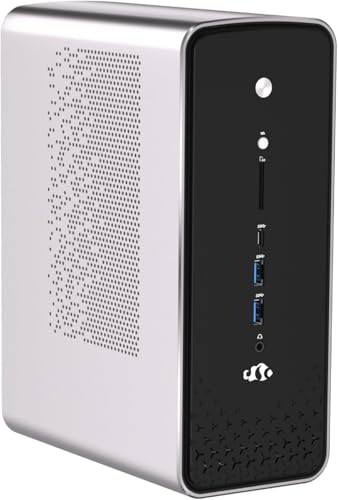
- 128GB LPDDR5X-8000 unified memory
- Linux pre-installed
- Dual 2.5G LAN and dual USB4
Best For: Linux-based local LLM experimentation with ample memory
Desktop-Friendly Pick
GMKtec EVO-X2 Ryzen AI Max+ 395
- Ryzen AI Max+ 395 and Radeon 8060S
- Notes describe a 64GB memory pool
- Four-display support and Wi-Fi 7
Best For: Local-LLM use alongside gaming and everyday desktop tasks
Best for Comfort

- 64GB LPDDR5-8000 and 2TB SSD
- Dual 10G Ethernet
- Extra M.2 slot and internal PCIe slot
Best For: Network-connected local AI with included 2TB storage
Best for a Compact AI Desk
GMKtec EVO-X2 Ryzen AI Max+ 395

- 16-core Ryzen AI Max+ 395 and 40-CU integrated GPU
- Up to 8000 MT/s on-board LPDDR5X
- Dual USB4, 2.5GbE, and Wi-Fi 7
Best For: Compact local-LLM and multi-display setups
Best for Networked AI Workflows

- 128GB LPDDR5X-8000 unified memory
- Dual 10GbE and up to 80Gbps USB4 V2
- PCIe x16, dual M.2, and cluster support
Best For: Expandable local AI workstations and multi-unit setups
Best for External GPU Flexibility
GMKtec EVO-X3 Ryzen AI Max+ 395

- 128GB LPDDR5X and 2TB PCIe 4.0 SSD
- OCuLink PCIe 4.0 x4 external-GPU connection
- 16-core Ryzen AI Max+ 395
Best For: Compact local AI setups with an external-GPU upgrade path
Creator-Friendly Pick – BOSGAME M5 with 128GB RAM and 2TB SSD
Among ryzen ai mini pcs for local llms, this BOSGAME M5 pairs a Ryzen AI Max+ 395 with 128GB of shared LPDDR5X-8000 memory, giving large models and creative applications room to work. The included 2TB SSD leaves space for model files and projects.
Best For: Buyers who want one compact PC for private AI experiments, editing, and other demanding desktop work.
Pros:
- 128GB unified memory is useful for memory-heavy models and multitasking.
- Radeon 8060S graphics, dual USB4, HDMI 2.1, and DisplayPort 1.4 support varied creative and display setups.
- A second M.2 PCIe 4.0 slot offers a path to more model and project storage.
Cons:
- LPDDR5X memory is onboard, so choose the capacity you need upfront.
- Actual LLM speed and model compatibility depend on the software and model used.
Its balance of shared memory, storage expansion, and workstation connectivity makes it a flexible choice when local AI is only part of your workload.
Large-Model Pick – BOSGAME M5 AI with 128GB Shared Memory
If you are comparing ryzen ai mini pcs for local llms, this BOSGAME M5 AI emphasizes model capacity: its 128GB LPDDR5X-8000 memory is shared with the Radeon 8060S, and BOSGAME says it can run 70B+ models locally. Results will depend on model quantization, memory allocation, and inference software.
Best For: Users prioritizing large local models while retaining room for gaming, content creation, and multiple displays.
Pros:
- Ryzen AI Max+ 395 combines 16 CPU cores, Radeon 8060S graphics, and a 50 TOPS NPU.
- Preinstalled 2TB PCIe 4.0 SSD and a second M.2 slot accommodate growing model libraries.
- Dual USB4, 2.5GbE, and Wi-Fi 7 provide flexible peripheral and network connections.
Cons:
- The 128GB onboard memory cannot be expanded like socketed RAM.
- Claims about 70B+ models should not be read as a guarantee of a particular response speed.
This listing is most compelling for its large shared-memory pool; assess the software you plan to use before buying for a specific model size.
Networked Workstation Pick – GEEKOM A9 Mega with Dual 10GbE
The GEEKOM A9 Mega stands out among ryzen ai mini pcs for local llms when your models and datasets live on a fast NAS. It combines 128GB LPDDR5X-8000 shared memory with dual 10GbE ports; GEEKOM says select 4-bit quantized models up to 128B parameters are supported with compatible drivers and inference software.
Best For: Developers and studios that need local inference, large shared memory, and fast wired access to network storage.
Pros:
- Dual 10GbE ports distinguish it from the 2.5GbE systems in this group.
- Dual M.2 slots support up to 8TB total storage, according to GEEKOM.
- Vapor-chamber cooling, dual fans, and a three-year limited warranty suit workstation use.
Cons:
- The up-to-128B claim applies only to select quantized models and compatible setups.
- The supplied notes do not establish practical inference speed for any specific model.
Choose it for the combination of large-model capacity and network infrastructure, not simply the headline parameter count.
32B-Model Pick – GMKtec EVO-X2 Ryzen AI Max+ 395
For shoppers researching ryzen ai mini pcs for local llms, the GMKtec EVO-X2 offers a concrete use case: its notes describe running a DeepSeek 32B model with the Radeon 8060S drawing on a 64GB memory pool. GMKtec also points to LM Studio as an approachable way to run models locally.
Best For: Users who want a compact local-LLM desktop that also supports gaming and a multi-monitor workspace.
Pros:
- Ryzen AI Max+ 395 provides 16 CPU cores, a 50+ peak TOPS NPU, and Radeon 8060S graphics.
- LPDDR5X memory is rated up to 8000 MT/s in the supplied notes.
- Dual USB4, HDMI 2.1, DisplayPort 1.4, 2.5GbE, and Wi-Fi 7 offer broad connectivity.
Cons:
- The supplied notes do not clearly confirm the listed configuration’s total installed RAM or SSD capacity; check the seller’s selected variant.
- A stated 32B-model use case does not establish performance across all 32B models or quantizations.
The EVO-X2 is worth considering for its Strix Halo hardware and stated 32B workflow, but verify memory and storage before comparing its value with the 128GB systems above.
Linux-Ready Pick – NIMO Ryzen AI Max+ 395 with 128GB RAM
For buyers comparing ryzen ai mini pcs for local llms, this NIMO stands out for its 128GB LPDDR5X memory and pre-installed Linux OS. Its Ryzen AI Max+ 395 pairs a 16-core CPU with Radeon 8060S graphics, giving developers a compact platform for local models and other demanding work.
Best For: Linux users who want substantial unified memory for local LLM experiments and a command-line-ready setup.
Pros:
- 128GB LPDDR5X-8000 memory on a 256-bit bus provides room for larger models.
- Pre-installed Linux avoids an initial OS change for Linux-based workflows.
- Dual 2.5G Ethernet, dual USB4, and two PCIe 4.0 M.2 slots support a flexible workstation setup.
Cons:
- The supplied notes do not specify the included SSD capacity.
- Buyers needing Windows out of the box will need a different configuration or their own installation.
The memory capacity is the main reason to choose this model. Check the installed storage and your preferred LLM software stack before buying; the advertised NPU capability alone does not establish how a particular model will run.
Desktop-Friendly Pick – GMKtec EVO-X2 Ryzen AI Max+ 395
The GMKtec EVO-X2 is a practical option among ryzen ai mini pcs for local llms if you want a compact machine for desktop model apps such as LM Studio. Its Ryzen AI Max+ 395 combines 16 CPU cores, Radeon 8060S graphics, and a 50+ peak TOPS NPU; the supplied notes also describe a 64GB memory pool.
Best For: Buyers who want a local-LLM desktop that also handles gaming and multi-monitor work.
Pros:
- Radeon 8060S graphics and LPDDR5X-8000 memory suit GPU-oriented local model workflows.
- HDMI, DisplayPort, and two USB4 ports support a four-display setup.
- 2.5GbE, Wi-Fi 7, and Bluetooth 5.4 offer several connectivity options.
Cons:
- The supplied notes do not establish the included SSD capacity or operating system.
- The described 64GB memory pool is smaller than the 128GB capacity listed for the NIMO model.
This is the more general-purpose desktop choice of the three. Confirm the exact memory, storage, and OS configuration on the listing before purchasing, since those details affect how easily you can get started with local models.
Best for Comfort – MINISFORUM MS-S1 Max 64GB/2TB
In a roundup of ryzen ai mini pcs for local llms, the MINISFORUM MS-S1 Max makes sense when networking and storage matter alongside compute. It lists a Ryzen AI Max+ 395, 64GB LPDDR5-8000 memory, and a 2TB PCIe 4.0 SSD, plus two 10G Ethernet ports for fast wired connections.
Best For: A networked local-AI workstation with substantial included storage and high-speed wired connectivity.
Pros:
- 64GB memory and an included 2TB SSD provide a defined starting configuration.
- Dual 10G Ethernet ports suit fast connections to networked storage or other systems.
- An additional PCIe 4.0 M.2 slot and an internal PCIe slot allow expansion.
- Two USB4 and two USB4 V2 ports add high-speed peripheral and display options.
Cons:
- Its listed 64GB memory capacity is below the 128GB NIMO configuration.
- The supplied notes do not identify the installed operating system.
Choose this model for its unusually strong networking and clearly specified 2TB storage, not just its AI processor. If model size is your priority, weigh the 64GB memory limit against your planned local-LLM workload.
Best for a Compact AI Desk – GMKtec EVO-X2 Ryzen AI Max+ 395
Among ryzen ai mini pcs for local llms, the GMKtec EVO-X2 pairs a 16-core Ryzen AI Max+ 395 with a 40-CU integrated GPU and fast LPDDR5X memory. It is a practical option if you want to run tools such as LM Studio without building a separate desktop.
Best For: A compact local-LLM setup that also supports gaming and multiple displays.
Pros:
- Ryzen AI Max+ 395 offers 16 cores, 32 threads, and an XDNA 2 NPU rated above 50 peak TOPS.
- Eight-channel LPDDR5X runs at up to 8000 MT/s; the integrated GPU can draw from the shared memory pool.
- Dual USB4, HDMI 2.1, DisplayPort 1.4, 2.5GbE, and Wi-Fi 7 provide versatile connectivity.
Cons:
- The LPDDR5X memory is installed on-board rather than in replaceable SO-DIMM slots.
- Quiet Mode’s stated 35 dB noise level may not represent operation under sustained heavy loads.
The EVO-X2 stands out for its integrated GPU and memory bandwidth, but check the exact memory configuration before buying: model size and available shared memory matter more to local LLMs than headline NPU TOPS alone.
Best for Networked AI Workflows – MINISFORUM MS-S1 MAX
If your shortlist of ryzen ai mini pcs for local llms includes larger models or a future multi-machine setup, the MINISFORUM MS-S1 MAX is the workstation-oriented pick. Its Ryzen AI Max+ 395 shares 128GB of LPDDR5X-8000 memory between CPU and GPU, and the listed configuration includes a 2TB SSD.
Best For: Developers who want substantial shared memory, fast networking, and room to expand a local AI workstation.
Pros:
- 128GB of unified memory gives the integrated GPU a large shared pool for model inference.
- Dual 10GbE ports, USB4 V2 rated up to 80Gbps, and a full-length PCIe x16 slot support workstation expansion.
- Dual M.2 slots, a slide-out chassis, and documented rack and cluster configurations suit growing setups.
Cons:
- The listed cluster results require multiple units; they are not single-PC performance claims.
- Its 320W built-in power supply and rack-oriented features may be more than a simple desktop setup needs.
Choose the MS-S1 MAX when memory capacity and infrastructure matter most. Its cluster examples show a path to larger models, but actual inference speed will depend on the model, quantization, software, and number of machines.
Best for External GPU Flexibility – GMKtec EVO-X3 Ryzen AI Max+ 395
The GMKtec EVO-X3 earns its place among ryzen ai mini pcs for local llms by combining a Ryzen AI Max+ 395, 128GB of LPDDR5X, and a 2TB PCIe 4.0 SSD with an OCuLink connection. You can start with its integrated graphics and consider an external GPU dock if your workloads change.
Best For: Local-model users who want a compact system now and an external-GPU upgrade path later.
Pros:
- 128GB of LPDDR5X gives the integrated GPU access to a sizable shared memory pool.
- OCuLink provides a PCIe 4.0 x4 connection for a compatible external GPU dock.
- The 16-core, 32-thread Ryzen AI Max+ 395 and 2TB SSD suit mixed AI and creative workloads.
Cons:
- An external GPU and dock are separate additions, not part of the stated configuration.
- The LPDDR5X memory is installed on-board, limiting conventional RAM upgrades.
The EVO-X3 is the flexible choice if OCuLink is on your checklist. For LLM use, weigh its included 128GB memory against the cost and software compatibility of any external-GPU setup you might add.
How We Picked the Best Ryzen AI Mini PCs for Local LLMs
We focused on the 10 selected Ryzen AI Max+ 395 listings and the specifications most relevant to local LLM use: installed memory, SSD capacity, connectivity, and operating-system details. Several listings have similar names or appear to be different configurations of the same product family. Treat each seller’s exact SKU as the source of truth before ordering; we have not assumed that similarly named units ship with identical memory, ports, or software.
Quick Comparison
The clearest split is memory. The listed BOSGAME, GEEKOM, NIMO, and GMKtec X3 configurations specify 128GB, as does one MINISFORUM MS-S1 MAX listing. Another MS-S1 Max listing specifies 64GB. The remaining GMKtec EVO-X2 and GMKtec AI Mini PC listing titles do not establish their installed memory, so check the configuration page rather than inferring it from the processor. Several listings specify a 2TB SSD, but confirm storage on the exact unit you select. The NIMO listing names Linux; that is worth a closer look if you want to avoid an OS installation.
Key Buying Factors for Ryzen AI Mini PCs for Local LLMs
Memory Capacity and Bandwidth
For local inference, memory is often the first constraint: model weights and working data must fit alongside the operating system and application. A 128GB configuration offers more room for larger quantized models or longer contexts than a 64GB configuration, but usable capacity still depends on how much memory the system allocates to graphics and other tasks. Check the exact memory specification, not just the Ryzen AI Max+ 395 name.
Software and Acceleration
Confirm that your preferred runtime supports the device’s AMD graphics hardware and the operating system you plan to use. GPU acceleration can require particular drivers or backends; do not assume that every local LLM app will use the GPU automatically. The processor’s AI branding or NPU specification alone is not a guarantee of compatibility with your chosen model runner.
Storage, Ports, and Sustained Use
Models, quantized variants, and datasets can quickly consume SSD space. If you expect to keep several models installed, check SSD capacity and whether additional M.2 storage is supported. For an external drive, fast networking, or multiple displays, verify the exact port list; similarly named configurations may differ. Sustained inference also makes cooling and fan noise relevant, so look for independent testing when available rather than relying on peak specifications.
Who Should Buy Which Ryzen AI Mini PCs for Local LLMs?
Choose a verified 128GB configuration if your priority is fitting larger local models and you can justify the cost. Consider the listed 64GB MS-S1 Max if your intended models fit comfortably within that limit and its connectivity suits your desk. The Linux-listed NIMO may reduce setup work for a Linux-first buyer, subject to driver and runtime checks. If a GMKtec listing appeals on price, confirm its installed RAM and storage before comparing it with a specified 128GB unit. Across all 10, buy for a tested software workflow—not the AI label alone.
