
A field laptop has to do more than run your software. It needs to stay usable outdoors, travel between job sites, and connect to the equipment your work depends on.
These 10 options span older budget-oriented systems, renewed Panasonic Toughbooks, and newer Dell rugged models. The right choice depends less on the fastest processor than on your required ports, screen, battery setup, and support needs.
Best 10 Rugged Laptops for Fieldwork Picks for 2026
Best Renewed Dell Touchscreen

- 14-inch Full HD touchscreen
- Core i5, 16GB RAM, 512GB SSD
- Windows 11 Pro; renewed
Best For: Touchscreen field reporting and multitasking
Best for Certified Durability

- Listed MIL-STD-810H and IP53
- Up-to-1,000-nit FHD touchscreen
- Built-in 4G LTE; renewed
Best For: Crews prioritizing stated durability ratings and LTE
Best for Long Unplugged Days
Dell Latitude 5430 Rugged Notebook

- Claims 25-hour battery runtime
- 14-inch FHD anti-glare display
- Core i5, 16GB RAM, 512GB SSD
Best For: Mobile staff prioritizing listed battery life
Best Newer Toughbook Option

- 11th-gen Core i7, 16GB RAM
- 14-inch FHD touchscreen
- Wi-Fi 6 and 4G LTE; renewed
Best For: Connected inspections and mobile diagnostics
Outdoor Touch Pick
Dell Latitude Rugged 5430 Touch
- 1,100-nit FHD touchscreen
- MIL-STD-810H tested; IP53 rated
- Verify conflicting CPU details
Best For: Bright-screen field use with mixed peripherals
Modern Performance Pick

- Core Ultra 7 and DDR5 memory
- 1,100-nit FHD touchscreen
- Confirm conflicting warranty details
Best For: Newer processing and serial-connected field gear
Non-Touch Pick
- 32GB RAM and 1TB SSD
- Non-touch FHD display
- Confirm conflicting screen-size details
Best For: Non-touch workflows with substantial local storage
Best for Field Connectivity
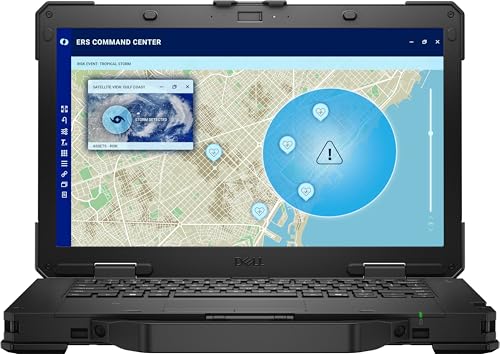
- Core Ultra 7, 16GB RAM, 512GB SSD
- Ethernet, RS-232, and Thunderbolt 4
- Refurbished; 14-inch non-touch FHD display
Best For: Technicians connecting to modern and serial-port equipment
Best for Basic Field Tasks

- Renewed 14-inch Latitude Rugged model
- 16GB RAM and 512GB SSD
- Older Core i5; 1366 × 768 display
Best For: Basic field applications compatible with older hardware
Best for Heavy Multitasking
- Core Ultra 7 with 32GB DDR5 RAM
- Ethernet, RS-232, and two Thunderbolt 4 ports
- Renewed; 90-day limited warranty
Best For: Multitasking field professionals needing serial connectivity
Best Renewed Dell Touchscreen – Dell Latitude Rugged 5430
For shoppers comparing rugged laptops for fieldwork, this renewed Dell Latitude Rugged 5430 pairs a 14-inch Full HD touchscreen with an 11th-generation Core i5, 16GB of RAM, and a 512GB SSD.
Best For: Field teams that want a touchscreen Windows 11 Pro laptop for reports, browser-based tools, and multitasking.
Pros:
- 14-inch 1920 × 1080 touchscreen with a listed anti-glare finish.
- 16GB DDR4 RAM and a 512GB NVMe SSD support everyday multitasking and storage.
- Includes Wi-Fi, Bluetooth, a webcam, and Windows 11 Pro.
Cons:
- Renewed condition makes it worth checking the seller’s condition and warranty details.
- Integrated graphics are a less compelling fit for graphics-heavy workloads.
The touchscreen and practical business specifications make this a sensible field-reporting option; confirm the renewed unit’s condition before buying.
Best for Certified Durability – Panasonic Toughbook FZ-55 MK1
Among rugged laptops for fieldwork, this renewed Toughbook FZ-55 MK1 stands out for its listed MIL-STD-810H certification, IP53 sealing, and built-in 4G LTE. Its 14-inch Full HD touchscreen is listed at up to 1,000 nits.
Best For: Mobile crews that prioritize stated durability ratings, cellular connectivity, and a bright touchscreen.
Pros:
- Listed MIL-STD-810H certification and IP53 sealing.
- 4G LTE, Ethernet, HDMI, USB-A, USB-C, and a docking connector offer connection options.
- Core i7-8665U, 16GB RAM, 512GB SSD, and Windows 11 Pro cover common business workloads.
Cons:
- The eighth-generation processor is older than those in the other listed models.
- Renewed condition warrants a close look at the seller’s warranty and included accessories.
Choose this configuration when documented protection and LTE matter more than having a newer processor; verify the exact renewed unit before ordering.
Best for Long Unplugged Days – Dell Latitude 5430 Rugged Notebook
For rugged laptops for fieldwork, this Dell Latitude 5430 listing is notable for its claimed 25-hour battery runtime alongside an 11th-generation Core i5, 16GB of RAM, and a 512GB SSD.
Best For: Field staff who want a 14-inch Windows 11 Pro notebook and place a high priority on the listed battery runtime.
Pros:
- Claims up to 25 hours of battery runtime; actual runtime depends on use.
- 14-inch Full HD anti-glare display and a listed 4.3-pound weight.
- Wi-Fi 6, Ethernet, HDMI, and USB connectivity support common work setups.
Cons:
- Battery life is a listing claim, not a guarantee for demanding field workloads.
- Several listed specifications conflict or look unusual, so confirm the exact configuration with the seller.
Its portability and connectivity are appealing, but verify the battery and display specifications before making them the deciding factor.
Best Newer Toughbook Option – Panasonic Toughbook FZ-55 MK2
Shoppers looking at rugged laptops for fieldwork should consider this renewed Toughbook FZ-55 MK2 for its 11th-generation Core i7, 14-inch Full HD touchscreen, Wi-Fi 6, and built-in 4G LTE.
Best For: Technicians who need cellular connectivity and responsive multitasking for inspections, diagnostics, and reporting.
Pros:
- Core i7-1185G7, 16GB RAM, and a 512GB SSD suit everyday professional workloads.
- Wi-Fi 6 and 4G LTE help maintain connectivity across work locations.
- Backlit keyboard, webcam with privacy cover, and Windows 11 Pro support mobile work.
Cons:
- At a listed 4.9 pounds, it is heavier than the Dell Latitude 5430 notebook in this roundup.
- The supplied listing does not specify an IP rating or MIL-STD certification for this particular unit.
This is the stronger fit for buyers who want the newer Toughbook processor and LTE; check the renewed unit’s condition and protection specifications before purchase.
Outdoor Touch Pick – Dell Latitude Rugged 5430 Touch
Among rugged laptops for fieldwork, this renewed Latitude 5430 stands out for its 14-inch FHD touch display rated at 1,100 nits. The listing pairs 32GB of RAM and a 1TB SSD with Windows 11 Pro.
Best For: Field staff who need a bright touchscreen and connections for older and newer equipment.
Pros:
- 1,100-nit outdoor-viewable touchscreen and sealed backlit keyboard.
- MIL-STD-810H tested and IP53 rated.
- Includes Thunderbolt 4, Ethernet, HDMI, serial, and microSD connections.
Cons:
- Renewed unit with a listed 90-day limited warranty.
- Processor information conflicts: the title and specifications say Core i7-1185G7, while a bullet says Core i5-1185G7.
The screen and port selection make this a practical on-site option, but confirm the processor and warranty terms before ordering.
For buyers comparing rugged laptops for fieldwork, the Dell Pro Rugged 14 combines a Core Ultra 7 165U, 16GB of DDR5 memory, and a 512GB SSD with a 14-inch, 1,100-nit FHD touchscreen. Its listed ports cover both modern accessories and serial-connected equipment.
Best For: Teams that want a newer processor, a bright touch display, and RS-232 connectivity.
Pros:
- Anti-glare, 1,100-nit touchscreen for bright environments.
- Thunderbolt 4, HDMI 2.1, RJ-45, RS-232, and microSD listed.
- Core Ultra 7 165U with 16GB DDR5 RAM.
Cons:
- 512GB SSD offers less listed storage than the two Latitude models here.
- Warranty information conflicts: the bullets state one year of Dell USA coverage, while the specifications state 90 days.
This is the strongest fit here for buyers prioritizing a newer CPU and versatile ports; verify the warranty coverage with the seller.
If your search for rugged laptops for fieldwork does not require touch input, this renewed Latitude Rugged 5430 lists a non-touch FHD display, a Core i7-1185G7, 32GB of RAM, and a 1TB SSD. It runs Windows 11 Pro and includes a webcam.
Best For: Buyers who prefer a non-touch screen and need ample memory and local storage.
Pros:
- 32GB RAM and 1TB SSD for demanding multitasking and file storage.
- Core i7-1185G7 and Windows 11 Pro listed.
- FHD non-touch display suits conventional keyboard-and-touchpad workflows.
Cons:
- No touchscreen for tap-based field forms.
- Renewed unit with a listed 90-day limited warranty.
- Screen information conflicts: the title and bullets say 14 inches, while the specifications say 15 inches.
Choose this configuration for its memory and storage rather than touch features, and verify the screen size and other unit-specific details before purchasing.
Best for Field Connectivity – Dell Pro Rugged 14 (16GB)
Among rugged laptops for fieldwork, this Dell Pro Rugged 14 stands out for its practical port selection. It pairs a Core Ultra 7 165U, 16GB of DDR5 memory, and a 512GB SSD with a 14-inch Full HD non-touch screen.
Best For: Technicians who connect to equipment over Ethernet or RS-232 while moving between offices, vehicles, and job sites.
Pros:
- RJ-45 Ethernet, RS-232 serial, HDMI 2.1, Thunderbolt 4, and microSD connectivity.
- Integrated carrying handle and backlit keyboard support mobile work.
- Windows 11 Pro, Wi-Fi 6E, and a webcam with privacy shutter.
Cons:
- Non-touch display may not suit touch-based workflows.
- Manufacturer-refurbished rather than new.
Choose this configuration if access to legacy equipment matters as much as current USB-C connectivity. Check that its 16GB memory and included single battery fit your workload and time away from power.
Best for Basic Field Tasks – Dell Latitude Rugged 5414
The renewed Dell Latitude Rugged 5414 is a straightforward option to consider when shopping for rugged laptops for fieldwork. Its listed configuration includes a 6th-generation Core i5-6300U, 16GB of RAM, a 512GB SSD, and a 14-inch 1366 × 768 display.
Best For: Buyers whose field applications run on older hardware and who need a renewed laptop for basic Windows tasks.
Pros:
- 16GB of RAM and a 512GB SSD provide useful capacity for everyday work.
- 14-inch form factor is practical for carrying between locations.
- HDMI output is listed for an external display.
Cons:
- 6th-generation dual-core processor is dated compared with the other models here.
- 1366 × 768 screen offers less workspace than Full HD.
- Listing does not detail field-specific ports or battery specifications.
This is the one to evaluate against your actual software requirements, not just the Rugged name. Confirm the ports, battery condition, and operating-system details with the seller before ordering.
Best for Heavy Multitasking – Dell Pro Rugged 14 (32GB)
For buyers comparing rugged laptops for fieldwork with more demanding multitasking needs, this renewed Dell Pro Rugged 14 offers 32GB of DDR5 RAM alongside a Core Ultra 7 165U and 512GB NVMe SSD. Its 14-inch Full HD non-touch display has an anti-glare coating.
Best For: Field professionals running multiple business applications who also need Ethernet and RS-232 connections.
Pros:
- 32GB of RAM gives this configuration more memory than the other models listed here.
- Includes three USB-A ports, two Thunderbolt 4/USB-C ports, RJ-45 Ethernet, and RS-232.
- Backlit keyboard, spill-resistant design, and anti-glare display suit varied work settings.
Cons:
- Renewed unit comes with a listed 90-day limited warranty.
- Non-touch screen will not serve touch-first applications.
The extra memory is the clearest reason to pick this version over the 16GB Pro Rugged 14. Check the renewed-unit condition and warranty terms if you expect frequent use away from the office.
How We Picked These Rugged Laptops for Fieldwork
We focused on the configurations listed here: processor generation, memory, storage, screen size and resolution, touch support, and whether a machine is sold renewed. The selection includes several configurations of the same Dell model, so treat those as specification choices rather than ten entirely different designs. A listing alone cannot verify real-world durability, battery life, display brightness, or warranty coverage; confirm those details with the seller before ordering.
Quick Comparison
The Dell Pro Rugged 14 listings offer the newest processor platform in this group, with Core Ultra 7 165U chips and either 16GB or 32GB of RAM. Check the exact listing for touch versus non-touch input. The Dell Latitude Rugged 5430 options use 11th-generation Core i5 or i7 processors; the listed i7 configurations increase memory to 32GB and storage to 1TB, with both touch and non-touch versions represented. The renewed Panasonic Toughbook FZ-55 MK1 and MK2 listings pair Core i7 processors with 16GB of RAM and 512GB of storage, but their condition and included components deserve close inspection. The older Latitude Rugged 5414 has a sixth-generation Core i5 and a lower-resolution 1366 × 768 screen, making it a choice to assess against your software requirements.
Key Buying Factors for Rugged Laptops for Fieldwork
Screen and Input
Decide whether you need touch for forms, mapping, or gloved workflows, and verify that the specific screen supports your intended input method. Full HD gives more workspace than the 5414’s HD panel. If you work in direct sunlight, request the panel’s brightness specification rather than assuming every rugged display is equally readable.
Connections and Power
List the ports your instruments, vehicle docks, and network equipment require before comparing laptops. Verify the exact configuration, since available connections can vary. Ask whether batteries are replaceable or hot-swappable, what is included in the box, and whether compatible chargers and docks are readily available.
Condition, Durability, and Support
Check the stated ruggedness and ingress-protection ratings for the exact model and configuration; a rugged product name is not a substitute for specifications. For renewed units, check battery health, cosmetic grade, return terms, and warranty length. For any older system, confirm driver availability and compatibility with your organization’s software and security requirements.
Who Should Buy Which Rugged Laptops for Fieldwork?
Choose a Dell Pro Rugged 14 configuration if a newer platform is the priority; select 32GB of RAM if your workloads justify it. Consider a Latitude Rugged 5430 i7 configuration for 32GB of RAM and 1TB of storage, or an i5 version if 16GB and 512GB meet your needs. The renewed Toughbook FZ-55 models suit buyers comfortable checking refurbishment details and seller support. Consider the 5414 only after confirming its older processor and HD screen fit the job. Whatever you choose, verify the precise listing before purchasing: small configuration differences can matter most in the field.
