
A waterblock can make an RTX 5090 a better fit for a custom loop, but choosing one starts with the exact graphics card—not just the GPU name. Founders Edition and partner cards can use different PCB layouts, mounting points, and cooler designs.
These 10 options cover several RTX 5090 models from ASUS, MSI, Palit, Gigabyte, and NVIDIA. Use the guide below to narrow down compatibility, loop fit, and the features worth paying for.
Best 10 Rtx 5090 Waterblocks Picks for 2026
ROG Astral Pick
Alphacool Core RTX 5090 Astral Waterblock

- Fits listed Astral and Astral LC variants
- Chrome-plated copper block; backplate included
- Four G1/4 ports and 12 aRGB LEDs
Best For: Listed ASUS ROG Astral and Astral LC RTX 5090 builds
ASUS TUF Pick
EK-Quantum Vector3 TUF RTX 5090

- Fits listed ASUS TUF Gaming and OC cards
- Cools GPU, VRAM, and power stages
- Includes backplate, pre-cut pads, and D-RGB
Best For: ASUS TUF Gaming RTX 5090 standard or OC builds
Zotac Pick
Alphacool Core RTX 5090 Solid + AMP Waterblock

- Fits three listed Zotac RTX 5090 variants
- Chrome-plated copper block; backplate included
- Four G1/4 ports and 11 aRGB LEDs
Best For: Listed Zotac Solid, Solid OC, or AMP Extreme Infinity cards
MSI Trio and Vanguard Pick
Copper RTX 5090 GPU Waterblock
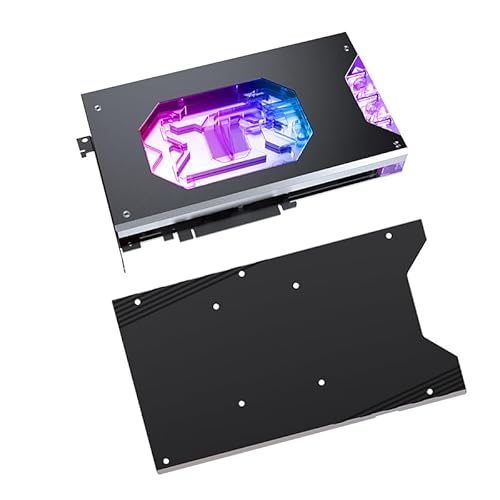
- Names MSI Gaming Trio OC and Vanguard SOC
- Lists up to 44 microchannels
- Confirm included hardware before ordering
Best For: Buyers with a named MSI card who can verify fit and contents
Best for PNY Triple Fan
Alphacool Core RTX 5090 EPIC-X

- Fits listed PNY Triple Fan variants
- Chrome-plated copper block
- Backplate and mounting supplies included
Best For: Compatible PNY RTX 5090 Triple Fan owners
Best for MSI Ventus
Barrow RTX 5090 Copper Waterblock

- Names two MSI Ventus 3X OC variants
- Nickel-plated copper base
- 43 micro-channels in the water passage
Best For: Owners of the named MSI Ventus 3X OC cards
Best for GameRock and Phantom

- Fits listed Palit and Gainward models
- Chrome-plated copper block
- Backplate and mounting supplies included
Best For: Compatible Palit GameRock or Gainward Phantom owners
Founders Edition Fit

- Designed for RTX 5090 Founders Edition
- T2 copper base with 56 microchannels
- Aluminum backplate included
Best For: Founders Edition custom-loop builds
Best Heavy-Duty Pick
Alphacool Core RTX 5090 TUF Waterblock

- Fits listed ASUS TUF and TUF OC cards
- Four G1/4 ports and 5V aRGB LEDs
- Backplate and thermal supplies included
Best For: ASUS TUF Gaming RTX 5090 builds
Gigabyte Gaming OC Fit
Bykski Armored End Port Waterblock

- Fits listed Gigabyte 5090 and 5090D cards
- Direct GPU, RAM, and VRM cooling
- Backplate and installation supplies included
Best For: Listed Gigabyte RTX 5090 custom loops
ROG Astral Pick – Alphacool Core RTX 5090 Astral Waterblock
Among rtx 5090 waterblocks, this Alphacool Core model is the card-specific choice for ASUS ROG Astral and ROG Astral LC owners, including their OC editions. Its chrome-plated copper block sits beneath a transparent acrylic top, and an aluminum backplate is included.
Best For: Builders water-cooling a listed ASUS ROG Astral or Astral LC RTX 5090.
Pros:
- Fits four listed Astral and Astral LC variants, including OC editions.
- Includes an aluminum backplate, thermal pads, thermal grease, and installation tools.
- Provides four G1/4 ports and 12 digital 5V aRGB LEDs.
Cons:
- Compatibility is limited to the listed ASUS card models; verify your card’s model number before ordering.
This is a well-equipped option if its fit list matches your GPU. Check your case clearance against the stated 10.25 × 6.33 × 1.35-inch dimensions as part of your loop planning.
ASUS TUF Pick – EK-Quantum Vector3 TUF RTX 5090
If your search for rtx 5090 waterblocks starts with an ASUS TUF Gaming card, the EK-Quantum Vector3 is designed for the 32GB GDDR7 model and its OC edition. Its open split-flow design targets the GPU core, VRAM, and power stages.
Best For: Owners of a listed ASUS TUF Gaming RTX 5090 who want a full-coverage block with D-RGB lighting.
Pros:
- Nickel-plated copper coldplate and clear, CNC-machined cast acrylic top.
- Includes a black anodized aluminum backplate and pre-cut thermal pads.
- Has 12 addressable LEDs with a 500mm cable for a 3-pin 5V digital LED header.
Cons:
- Designed for ASUS TUF Gaming RTX 5090 cards, not the other RTX 5090 board families in this roundup.
The included pads and backplate make this a focused package for compatible TUF builds. Confirm your card is the standard or OC TUF Gaming model before choosing it.
Zotac Pick – Alphacool Core RTX 5090 Solid + AMP Waterblock
For Zotac owners comparing rtx 5090 waterblocks, this Alphacool Core model fits the Gaming Solid, Solid OC, and AMP Extreme Infinity cards listed in its compatibility information. It pairs a chrome-plated copper block with a transparent acrylic top and an included aluminum backplate.
Best For: Custom-loop builds using a listed Zotac Gaming RTX 5090 Solid or AMP Extreme Infinity.
Pros:
- Supports three specifically listed Zotac RTX 5090 models.
- Includes thermal pads, thermal grease, installation tools, and a backplate.
- Offers four G1/4 ports and 11 digital 5V aRGB LEDs.
Cons:
- Not specified for Zotac RTX 5090 models outside the three listed variants.
Its appeal is straightforward: a matching block and included installation supplies for the named Zotac cards. Compare your card’s model number with the fit list before buying.
MSI Trio and Vanguard Pick – Copper RTX 5090 GPU Waterblock
This entry in the rtx 5090 waterblocks roundup is advertised for the MSI GeForce RTX 5090 D 32G Gaming Trio OC and RTX 5090 32G Vanguard SOC. Its copper-and-acrylic construction uses a microchannel design that the listing describes as having up to 44 channels.
Best For: Buyers with one of the named MSI cards who want a copper waterblock with a fine-channel cooling design.
Pros:
- Names two MSI RTX 5090 variants in its product title.
- Lists 0.33mm jet microchannels and an extended 158.451mm copper plate.
- Uses chemical nickel plating on the copper surface.
Cons:
- The supplied specifications do not clearly identify a backplate or G1/4 port count.
- The included-components listing says “CPU Block,” so confirm package contents before ordering.
The detailed channel specifications distinguish this option, but verify exact card fitment and included hardware with the seller before planning an installation.
Best for PNY Triple Fan – Alphacool Core RTX 5090 EPIC-X
If you have a compatible PNY Triple Fan card, this is one of the rtx 5090 waterblocks worth checking. It supports the listed standard and Overclocked PNY models, including ARGB EPIC-X RGB versions, and pairs a chrome-plated copper block with a transparent acrylic top.
Best For: Owners of the listed PNY RTX 5090 Triple Fan cards building a custom water-cooling loop.
Pros:
- Aluminum backplate, thermal pads, grease, and installation tools are included.
- Four G1/4 ports offer connection options for a custom loop.
- Nine 5V digital aRGB LEDs add lighting beneath the transparent top.
Cons:
- Compatibility is limited to the specified PNY Triple Fan models; verify your exact card before buying.
- Requires a compatible water-cooling loop rather than working as a standalone cooler.
The included mounting supplies make it a practical choice for its supported PNY cards, but the exact GPU model matters more than the shared RTX 5090 name.
Best for MSI Ventus – Barrow RTX 5090 Copper Waterblock
For shoppers comparing rtx 5090 waterblocks for an MSI Ventus card, this Barrow model names the RTX 5090 32G Ventus 3X OC and RTX 5090 D 32G Ventus 3X OC. Its copper base has a mirror nickel-plated finish, while a transparent acrylic top exposes the internal lighting effects described in the listing.
Best For: Owners of the named MSI RTX 5090 Ventus 3X OC variants seeking a liquid-cooling block.
Pros:
- Designed to contact the GPU core and other heat-producing components identified in the listing.
- Water passage incorporates 43 micro-channels.
- Transparent acrylic top makes the interior visible.
Cons:
- The stated fit is for specific MSI Ventus variants, not every RTX 5090.
- The supplied details do not specify included fittings, backplate, or installation supplies.
This is the model to investigate if your card matches one of the two named MSI variants. Confirm the exact fit and what comes in the box before planning the rest of your loop.
Best for GameRock and Phantom – Alphacool Core RTX 5090 Block
Alphacool Core GeForce RTX 5090 Gamerock + Phantom Waterblock with Backplate (10259)
Check Price On AmazonAmong rtx 5090 waterblocks, this Alphacool Core model targets specific Palit GameRock and Gainward Phantom cards rather than a reference design. It uses a chrome-plated copper block under a transparent acrylic top and comes with an aluminum backplate.
Best For: Owners of the listed Palit GameRock or Gainward Phantom RTX 5090 models building a custom loop.
Pros:
- Lists support for GameRock, GameRock OC, Phantom, and Phantom GS models.
- Includes a backplate, thermal pads, grease, and installation tools.
- Four G1/4 ports and nine 5V digital aRGB LEDs support loop routing and lighting.
Cons:
- Fit is restricted to the specified Palit and Gainward models; check the listed model numbers.
- Needs a separate custom water-cooling loop to operate.
The included accessories cover much of the block installation, but they do not replace a complete loop. Match your card’s exact model number before ordering.
Founders Edition Fit – Copper RTX 5090 FE Waterblock
Copper GPU Water Cooling Block GPU Waterblock for NVIDIA GeForce RTX 5090 Founders Edition
Check Price On AmazonAmong RTX 5090 waterblocks, this model is specifically designed for the NVIDIA GeForce RTX 5090 Founders Edition. Its T2 copper base and 56-channel microstructure make it a choice for an FE custom-loop build.
Best For: Founders Edition owners who want a copper block with an included protective backplate.
Pros:
- T2 copper base uses a 0.3 mm jet-type microstructure with 56 water channels.
- Includes an aluminum backplate, installation screws, and a manual.
- Electroless nickel plating is intended to help resist corrosion and erosion.
Cons:
- Specified for the Founders Edition; fit for other RTX 5090 boards is not stated.
- The supplied details do not specify port configuration or lighting.
The appeal is its FE-specific design and detailed copper construction. Confirm your card is the Founders Edition before choosing it.
For buyers comparing RTX 5090 waterblocks for an ASUS TUF Gaming card, the Alphacool Core is listed for both the standard and OC editions. It combines a chrome-plated copper block, transparent acrylic top, and included aluminum backplate.
Best For: ASUS TUF Gaming RTX 5090 owners who want included mounting supplies and aRGB lighting.
Pros:
- Lists compatibility with both TUF Gaming and TUF Gaming OC RTX 5090 models.
- Provides four G1/4 ports and nine 5V digital aRGB LEDs.
- Includes a backplate, thermal pads, thermal grease, and installation hardware.
Cons:
- Not listed as compatible with non-TUF RTX 5090 cards.
- Its 5V aRGB lighting requires a compatible connection to use.
This is a well-specified option for the listed TUF models. Check your card’s model number against the stated compatibility before installation.
The Bykski Armored End Port stands out among RTX 5090 waterblocks for its stated compatibility with the Gigabyte RTX 5090 Gaming OC 32G and several RTX 5090D models. Its nickel-electroplated copper block is designed to cool the GPU, memory, and VRM directly.
Best For: Owners of the listed Gigabyte Gaming OC or 5090D cards building a custom water-cooling loop.
Pros:
- Lists four specific Gigabyte RTX 5090 and RTX 5090D card variants.
- Directly cools the GPU, RAM, and VRM.
- Includes a protective backplate, installation hardware, and thermal paste.
- Supports parallel or serial loop configurations, according to the supplied notes.
Cons:
- Compatibility is limited to the listed card variants; verify your exact model.
- At a listed 6 pounds, it is relatively heavy hardware to handle during installation.
Its appeal is broad component coverage for the named Gigabyte boards, plus an included backplate. Match your card to the compatibility list rather than relying on the RTX 5090 name alone.
How We Picked These Rtx 5090 Waterblocks
We focused on blocks identified for specific RTX 5090 card families, rather than treating every RTX 5090 as interchangeable. The selection spans Founders Edition and several partner-card designs, with different port layouts, backplates, and aesthetic options. A product name is only a starting point: before buying, check the manufacturer’s current compatibility list against your card’s full model number and, where specified, PCB revision.
Quick Comparison: Start with Your Graphics Card
For an ASUS ROG Astral or TUF Gaming card, start with the block named for that family; the ASUS TUF options here also give you a choice between Alphacool and EKWB. MSI Gaming Trio/Vanguard and Ventus cards appear under different listings, so do not swap those blocks based on the MSI name alone. The remaining options target specific Palit GameRock/Phantom, PNY Epic-X, ZOTAC SOLID/AMP, Gigabyte Gaming OC, or NVIDIA Founders Edition cards. Confirm the exact supported variant before considering appearance or price.
Key Buying Factors for Rtx 5090 Waterblocks
PCB Compatibility
The block must align with your card’s GPU, memory, power components, and mounting holes. Check the full card model, regional variants such as RTX 5090 D, and any PCB revision requirements. If a seller’s listing is vague, seek written confirmation from the block maker or retailer; a close-looking card is not proof of fit.
Cooling Coverage and Installation
Review what the block actively cools and what the included backplate does. A backplate may provide structural support and passive heat spreading without being an actively water-cooled component. Confirm that the package includes the required thermal pads, screws, and instructions, and follow the specified pad thicknesses and placement. Removing the factory cooler can affect warranty coverage, which varies by card maker and region.
Loop and Case Fit
Check the assembled block’s length, height, thickness, and port position against your case, adjacent slots, tubing route, and fittings. End-port designs may suit some tight layouts, while conventional side-facing terminals may be easier in others. Verify thread specifications and fitting clearance; do not assume fittings, coolant, or loop hardware are included. Match the block’s wetted materials to your loop components and coolant guidance to avoid material-compatibility problems.
Cost and Features
Compare the total installed cost, not just the block price. Backplates, RGB connections, finishes, fittings, and shipping can change the value proposition. RGB and clear tops affect presentation, not whether a block fits your PCB.
Who Should Buy Which Rtx 5090 Waterblocks?
Buyers who want the simplest path should choose a block explicitly approved for their exact card and prioritize clear documentation over cosmetic extras. If you are planning a compact build, shortlist compatible blocks by terminal position and assembled dimensions. If aesthetics matter, compare top materials, backplate finish, and lighting support only after fit is confirmed. If your card model or revision is missing from a compatibility list, pause the purchase rather than gambling on a near match.
